
鸿蒙PC端 TTS 并发调用问题详解:资源竞争与队列管理
摘要: 本文针对开源鸿蒙PC端TTS(文本转语音)功能在多请求并发场景下出现的资源竞争问题(错误码4001),提出系统化解决方案。通过分析TTSConcurrentError.ets页面的典型问题,如声音重叠、播放中断及引擎崩溃等,深入探讨了单条播放(speakSingle)与并发播放(speakConcurrent)的核心逻辑差异,指出queueMode参数的两种模式(替换/队列)适用场景。重点
欢迎加入开源鸿蒙PC社区:
https://harmonypc.csdn.net/
atomgit仓库地址: https://atomgit.com/2401_83963238/TTSError
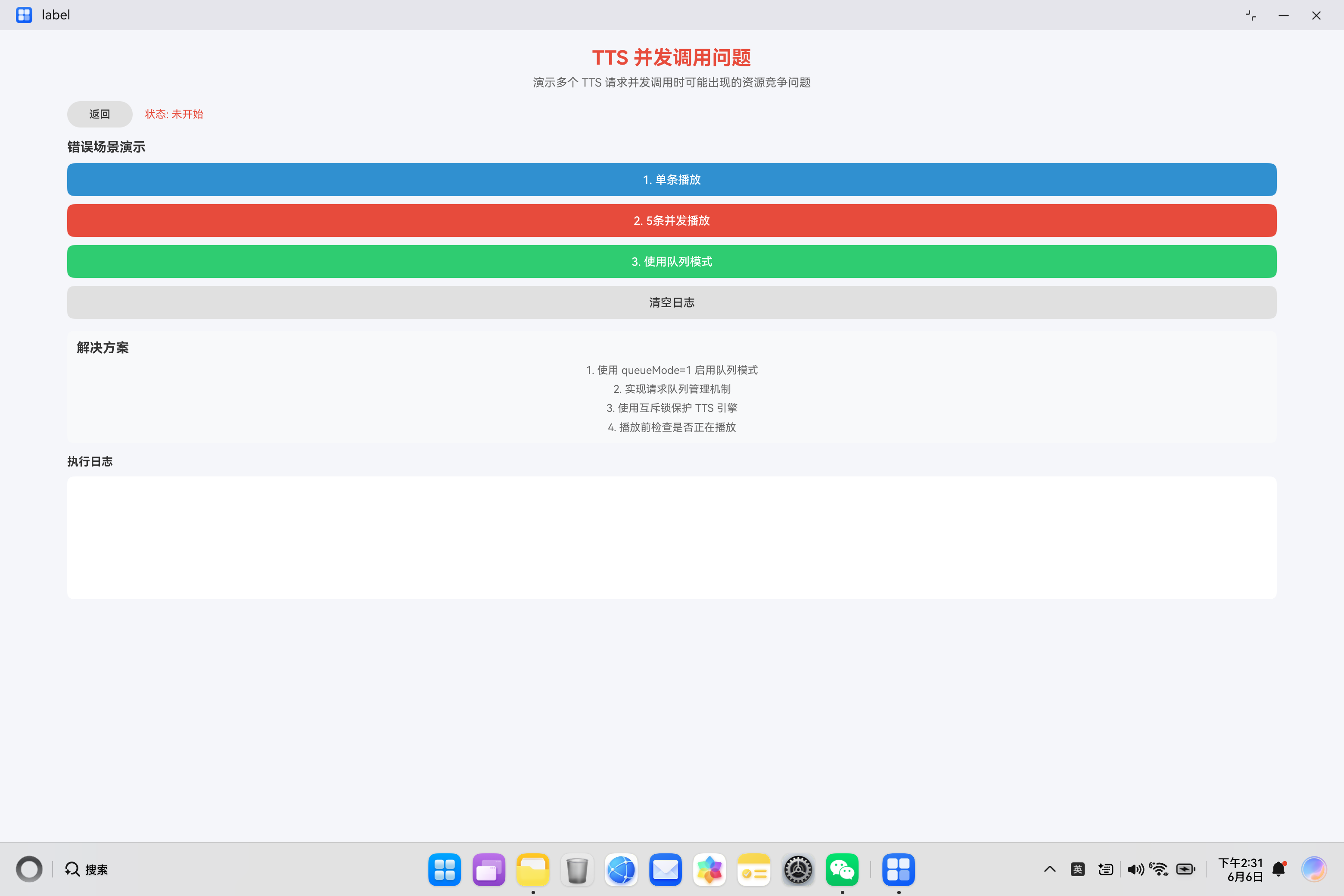
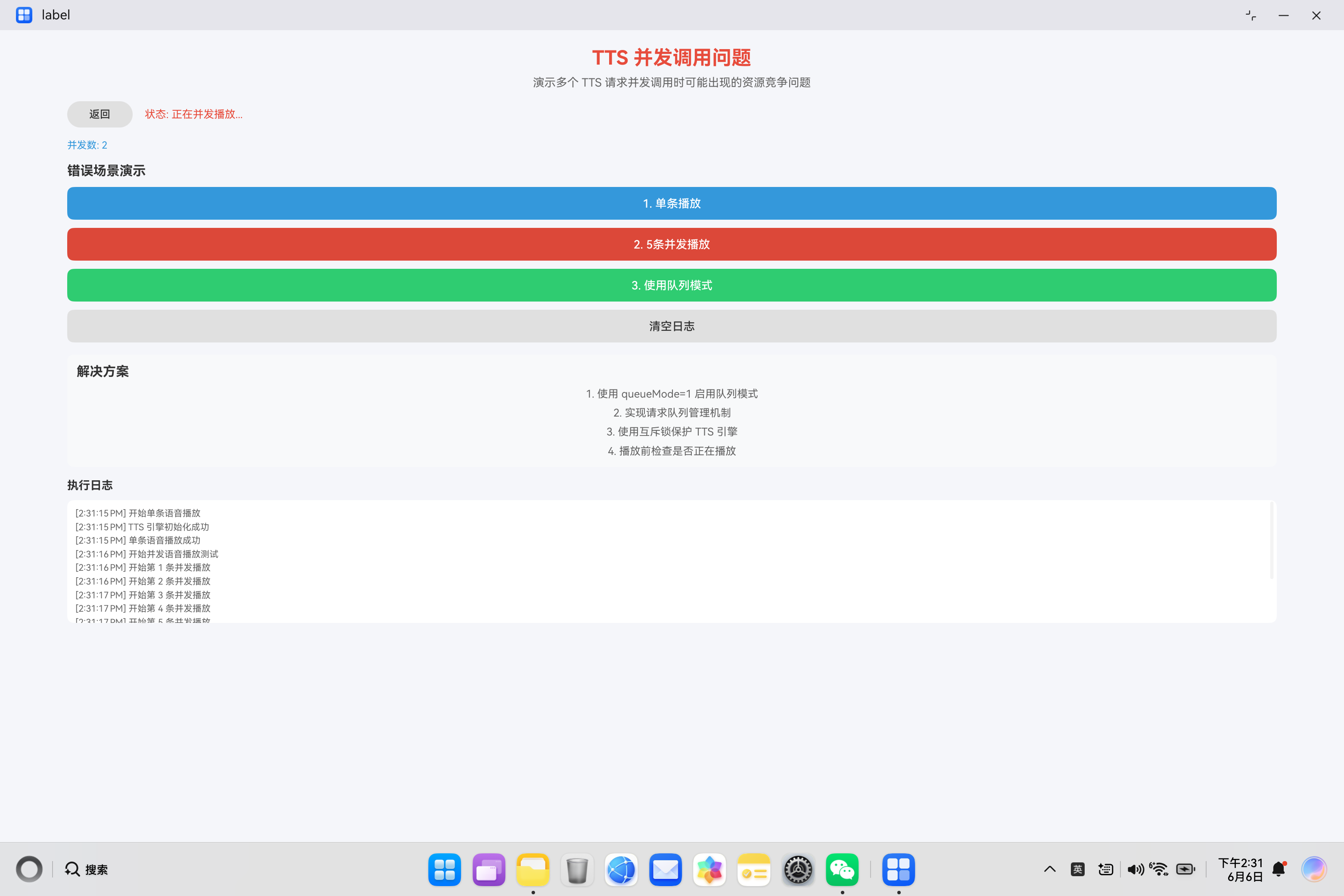
鸿蒙的PC端TTS技术实现效果展示
一、问题背景
在 HarmonyOS 应用开发中,TTS(Text-to-Speech)功能经常需要处理多个语音播放请求。当多个请求同时到达时,如果处理不当,会导致资源竞争、播放混乱、甚至引擎崩溃等问题。错误码 4001 表示并发调用导致的资源竞争异常。
本文基于项目中的 TTSConcurrentError.ets 演示页面,深入分析 TTS 并发调用问题的根本原因,提供完整的解决方案,包括队列模式、互斥锁、请求队列管理等策略。
二、TTS 并发调用问题概述
2.1 什么是并发调用问题
TTS 并发调用问题是指在短时间内发起多个语音播放请求时,由于 TTS 引擎的资源限制和状态管理机制,导致播放失败、声音重叠或引擎异常的情况。
2.2 并发调用的典型场景
| 场景 | 描述 | 风险等级 |
|---|---|---|
| 消息通知 | 多条通知同时到达,需要逐条播报 | 中 |
| 导航指引 | 连续的导航指令需要快速播报 | 高 |
| 语音助手 | 用户连续提问,需要快速响应 | 高 |
| 游戏音效 | 多个游戏事件触发语音播报 | 中 |
2.3 并发调用的后果
| 后果 | 说明 | 严重程度 |
|---|---|---|
| 声音重叠 | 多个语音同时播放,无法听清 | 高 |
| 播放中断 | 新请求打断当前播放 | 中 |
| 引擎崩溃 | 资源耗尽导致引擎异常 | 严重 |
| 错误码 4001 | 并发调用导致的资源竞争 | 严重 |
| 内存泄漏 | 未正确释放资源 | 高 |
2.4 错误码解析
| 错误码 | 含义 | 触发条件 |
|---|---|---|
| 4001 | 并发调用资源竞争 | 同时发起多个播放请求 |
| -1 | 引擎创建失败 | 可能是并发导致的资源不足 |
| 1002 | 播放参数异常 | 并发时参数传递错误 |
三、核心代码深度解析
3.1 单条播放方法:speakSingle
async speakSingle(): Promise<void> {
  // 设置初始状态
  this.statusText = '正在播放...';
  this.errorMessage = '';
  this.addLog('开始单条语音播放');

  // 确保 TTS 引擎已初始化
  if (!await this.initializeTTS()) {
    this.statusText = '初始化失败';
    this.errorMessage = '无法初始化 TTS 引擎';
    return;
  }

  try {
    // 构建播放参数
    const extraParams: TTSSpeakExtraParams = new TTSSpeakExtraParams(
      0, 1.0, 1.0, 1.0, 'zh-CN', 'pcm', 3, 1
    );

    const speakParams: textToSpeech.SpeakParams = {
      requestId: `tts-${Date.now().toString()}`,
      extraParams: extraParams.toRecord()
    };

    // 执行单条播放
    this.ttsEngine!.speak('这是单条语音播放测试。', speakParams);

    // 更新成功状态
    this.statusText = '播放成功';
    this.addLog('单条语音播放成功');
  } catch (error) {
    const err = error as BusinessError;
    this.statusText = '播放失败';
    this.errorMessage = `错误码: ${err.code}, 消息: ${err.message}`;
    this.addLog(`单条播放失败:${this.errorMessage}`);
  }
}
代码解析:
这是最基础的 TTS 播放方法,用于演示单条语音播放的正确流程。关键点是使用 queueMode: 0(替换模式),这意味着新请求会替换当前正在播放的内容。
queueMode 参数的作用:
| queueMode 值 | 行为 | 适用场景 |
|---|---|---|
| 0 | 替换模式,新请求替换当前播放 | 紧急通知、优先级高的消息 |
| 1 | 队列模式,新请求加入播放队列 | 消息列表、导航指引 |
单条播放流程图:
用户点击播放
    │
    ▼
检查引擎初始化状态
    │
    ├──未初始化──▶ 初始化引擎
    │
    └──已初始化
          │
          ▼
    构建 SpeakParams (queueMode: 0)
          │
          ▼
    调用 speak() 方法
          │
          ├──播放成功──▶ 更新状态为"播放成功"
          │
          └──播放失败──▶ 捕获异常,显示错误信息
单条播放的特点:
- 简单直接:没有复杂的逻辑,适合简单的播放需求
- 立即执行:不等待其他播放完成
- 替换模式:新请求会打断当前播放
- 资源占用低:只占用一个播放实例
3.2 并发播放方法:speakConcurrent
async speakConcurrent(): Promise<void> {
  this.statusText = '正在并发播放...';
  this.errorMessage = '';
  this.concurrentCount = 0;
  this.addLog('开始并发语音播放测试');

  if (!await this.initializeTTS()) {
    this.statusText = '初始化失败';
    this.errorMessage = '无法初始化 TTS 引擎';
    return;
  }

  // 定义 5 条待播放的文本
  const texts = [
    '这是第一条并发消息。',
    '这是第二条并发消息。',
    '这是第三条并发消息。',
    '这是第四条并发消息。',
    '这是第五条并发消息。'
  ];

  // 循环发起并发播放请求
  for (let i = 0; i < texts.length; i++) {
    try {
      const extraParams: TTSSpeakExtraParams = new TTSSpeakExtraParams(
        0, 1.0, 1.0, 1.0, 'zh-CN', 'pcm', 3, 1
      );

      const speakParams: textToSpeech.SpeakParams = {
        requestId: `tts-${Date.now().toString()}-${i}`,
        extraParams: extraParams.toRecord()
      };

      this.concurrentCount++;
      this.addLog(`开始第 ${i + 1} 条并发播放`);

      // 调用 speak() 方法,不等待播放完成
      this.ttsEngine!.speak(texts[i], speakParams);

      // 延迟 200ms 后发起下一个请求
      await new Promise<void>((resolve) => {
        setTimeout(() => {
          resolve();
        }, 200);
      });
    } catch (error) {
      const err = error as BusinessError;
      this.addLog(`第 ${i + 1} 条并发播放失败:${err.message}`);
    }
  }

  this.statusText = '并发播放完成';
  this.addLog(`并发播放测试完成,共 ${this.concurrentCount} 条`);
}
代码解析:
这个方法演示了并发调用的场景。关键点是在循环中快速发起多个播放请求,每个请求之间只有 200ms 的延迟。
并发播放的问题分析:
时间轴: 0ms ──────────────────────────────────────────────────────►

请求1: ████████████████████████████████████████████████████████████
请求2:   ██████████████████████████████████████████████████████████
请求3:     ████████████████████████████████████████████████████████
请求4:       ██████████████████████████████████████████████████████
请求5:         ████████████████████████████████████████████████████

问题:
1. 多个请求同时占用音频设备
2. 声音重叠,无法听清
3. 可能触发错误码 4001
4. 引擎资源竞争
并发调用的风险:
- 音频设备竞争:多个请求同时尝试使用音频设备,导致冲突
- 状态管理混乱:引擎无法正确管理多个播放状态
- 资源耗尽:过多的并发请求消耗系统资源
- 用户体验差:声音重叠、播放中断等问题
为什么使用 200ms 延迟?
// 延迟的作用是模拟真实场景中的快速连续请求
// 如果没有延迟,5 个请求几乎同时发起,问题更严重
// 有了 200ms 延迟,模拟了用户快速点击或系统快速触发消息的场景

await new Promise<void>((resolve) => {
  setTimeout(() => {
    resolve();
  }, 200);
});
3.3 队列模式播放方法:speakWithQueueMode
async speakWithQueueMode(): Promise<void> {
  this.statusText = '正在排队播放...';
  this.errorMessage = '';
  this.addLog('开始使用队列模式播放');

  if (!await this.initializeTTS()) {
    this.statusText = '初始化失败';
    this.errorMessage = '无法初始化 TTS 引擎';
    return;
  }

  // 定义 3 条待播放的文本
  const texts = [
    '队列第一条消息。',
    '队列第二条消息。',
    '队列第三条消息。'
  ];

  // 循环将文本加入播放队列
  for (let i = 0; i < texts.length; i++) {
    try {
      const extraParams: TTSSpeakExtraParams = new TTSSpeakExtraParams(
        1, 1.0, 1.0, 1.0, 'zh-CN', 'pcm', 3, 1
      );

      const speakParams: textToSpeech.SpeakParams = {
        requestId: `tts-queue-${Date.now().toString()}-${i}`,
        extraParams: extraParams.toRecord()
      };

      this.addLog(`添加到队列:第 ${i + 1} 条`);

      // 调用 speak() 方法,使用队列模式
      this.ttsEngine!.speak(texts[i], speakParams);
    } catch (error) {
      const err = error as BusinessError;
      this.addLog(`队列播放失败:${err.message}`);
    }
  }

  this.statusText = '队列播放完成';
  this.addLog('队列播放测试完成');
}
代码解析:
这个方法演示了使用队列模式解决并发问题的方案。关键点是使用 queueMode: 1(队列模式)。
队列模式的工作原理:
时间轴: 0ms ──────────────────────────────────────────────────────►

请求1: ████████████████████████████████████████████████████████████
请求2:                                     ████████████████████████
请求3:                                                           ████

队列模式特点:
1. 请求按顺序执行
2. 不会打断当前播放
3. 等待前一个播放完成后才开始下一个
4. 避免资源竞争
队列模式 vs 替换模式:
| 特性 | 队列模式 (queueMode: 1) | 替换模式 (queueMode: 0) |
|---|---|---|
| 执行顺序 | 先进先出 | 立即执行 |
| 当前播放 | 不打断 | 打断 |
| 资源竞争 | 无 | 有 |
| 适用场景 | 消息列表、导航 | 紧急通知 |
| 用户体验 | 平滑连贯 | 可能突兀 |
队列模式的优缺点:
优点:
- 避免资源竞争:同一时间只有一个播放任务
- 播放连贯:消息按顺序播放,不会中断
- 用户体验好:声音清晰,不会重叠
- 资源占用低:不会因为并发导致资源耗尽
缺点:
- 延迟较高:需要等待前面的播放完成
- 队列过长:大量消息会导致播放延迟
- 无法中断:紧急消息无法立即播放
- 状态管理:需要维护队列状态
四、完整的解决方案
4.1 请求队列管理器
interface TTSRequest {
  text: string;
  requestId: string;
  priority: number;
  timestamp: number;
}

class TTSQueueManager {
  private queue: TTSRequest[] = [];
  private isPlaying: boolean = false;
  private engine: textToSpeech.TextToSpeechEngine | null = null;
  private maxQueueSize: number = 10;
  private currentRequest: TTSRequest | null = null;

  constructor(engine: textToSpeech.TextToSpeechEngine) {
    this.engine = engine;
  }

  // 添加请求到队列
  addRequest(text: string, priority: number = 0): boolean {
    if (this.queue.length >= this.maxQueueSize) {
      console.warn('队列已满,无法添加新请求');
      return false;
    }

    const request: TTSRequest = {
      text: text,
      requestId: `tts-${Date.now().toString()}-${Math.random().toString(36).substr(2, 9)}`,
      priority: priority,
      timestamp: Date.now()
    };

    // 根据优先级插入队列
    this.insertByPriority(request);

    console.info(`请求已加入队列: ${text}, 队列长度: ${this.queue.length}`);

    // 如果当前没有播放,开始处理队列
    if (!this.isPlaying) {
      this.processQueue();
    }

    return true;
  }

  // 按优先级插入请求
  private insertByPriority(request: TTSRequest): void {
    // 找到插入位置(优先级高的在前)
    let insertIndex = this.queue.length;
    for (let i = 0; i < this.queue.length; i++) {
      if (request.priority > this.queue[i].priority) {
        insertIndex = i;
        break;
      }
    }

    this.queue.splice(insertIndex, 0, request);
  }

  // 处理队列
  private async processQueue(): Promise<void> {
    if (this.isPlaying || this.queue.length === 0) {
      return;
    }

    this.isPlaying = true;

    while (this.queue.length > 0) {
      const request = this.queue.shift();
      if (request) {
        this.currentRequest = request;
        await this.playRequest(request);
      }
    }

    this.isPlaying = false;
    this.currentRequest = null;
  }

  // 播放单个请求
  private async playRequest(request: TTSRequest): Promise<boolean> {
    try {
      const speakParams: textToSpeech.SpeakParams = {
        requestId: request.requestId,
        extraParams: {
          queueMode: 1,
          speed: 1.0,
          volume: 1.0,
          pitch: 1.0,
          languageContext: 'zh-CN',
          audioType: 'pcm',
          soundChannel: 3,
          playType: 1
        }
      };

      this.engine!.speak(request.text, speakParams);
      console.info(`播放请求: ${request.text}`);

      // 等待播放完成(实际应用中应该使用回调)
      await this.delay(2000);

      return true;
    } catch (error) {
      console.error(`播放请求失败: ${request.text}`, error);
      return false;
    }
  }

  // 清空队列
  clearQueue(): void {
    this.queue = [];
    console.info('队列已清空');
  }

  // 获取队列长度
  getQueueLength(): number {
    return this.queue.length;
  }

  // 获取当前播放的请求
  getCurrentRequest(): TTSRequest | null {
    return this.currentRequest;
  }

  // 延迟工具方法
  private delay(ms: number): Promise<void> {
    return new Promise(resolve => setTimeout(resolve, ms));
  }
}
4.2 互斥锁保护机制
class TTSMutex {
  private locked: boolean = false;
  private waitQueue: Array<(value: void) => void> = [];

  async acquire(): Promise<void> {
    if (!this.locked) {
      this.locked = true;
      return;
    }

    // 如果已锁定,等待解锁
    await new Promise<void>((resolve) => {
      this.waitQueue.push(resolve);
    });
  }

  release(): void {
    if (this.waitQueue.length > 0) {
      // 唤醒等待的请求
      const resolve = this.waitQueue.shift();
      if (resolve) {
        resolve();
      }
    } else {
      this.locked = false;
    }
  }

  isLocked(): boolean {
    return this.locked;
  }
}

class MutexTTSManager {
  private engine: textToSpeech.TextToSpeechEngine | null = null;
  private mutex: TTSMutex = new TTSMutex();

  async speak(text: string): Promise<boolean> {
    // 获取互斥锁
    await this.mutex.acquire();

    try {
      const speakParams: textToSpeech.SpeakParams = {
        requestId: `tts-${Date.now().toString()}`,
        extraParams: {
          queueMode: 0,
          speed: 1.0,
          volume: 1.0,
          pitch: 1.0,
          languageContext: 'zh-CN',
          audioType: 'pcm',
          soundChannel: 3,
          playType: 1
        }
      };

      this.engine!.speak(text, speakParams);

      // 等待播放完成
      await this.delay(2000);

      return true;
    } catch (error) {
      console.error('播放失败:', error);
      return false;
    } finally {
      // 释放互斥锁
      this.mutex.release();
    }
  }

  private delay(ms: number): Promise<void> {
    return new Promise(resolve => setTimeout(resolve, ms));
  }
}
4.3 完整的 TTS 并发管理器
class ConcurrentTTSManager {
  private engine: textToSpeech.TextToSpeechEngine | null = null;
  private queueManager: TTSQueueManager | null = null;
  private mutex: TTSMutex = new TTSMutex();
  private isInitialized: boolean = false;

  async initialize(): Promise<boolean> {
    if (this.isInitialized && this.engine) {
      return true;
    }

    try {
      const extraParams = new TTSInitExtraParams(
        'interaction-broadcast',
        'CN',
        'EngineName'
      );

      const initParams: textToSpeech.CreateEngineParams = {
        language: 'zh-CN',
        person: 0,
        online: 1,
        extraParams: extraParams.toRecord()
      };

      this.engine = await textToSpeech.createEngine(initParams);

      if (this.engine) {
        this.queueManager = new TTSQueueManager(this.engine);
        this.isInitialized = true;
        return true;
      }

      return false;
    } catch (error) {
      console.error('引擎初始化失败:', error);
      return false;
    }
  }

  // 添加播放请求(自动选择策略)
  async speak(text: string, priority: number = 0): Promise<boolean> {
    if (!await this.initialize()) {
      return false;
    }

    // 使用队列管理器处理请求
    if (this.queueManager) {
      return this.queueManager.addRequest(text, priority);
    }

    return false;
  }

  // 紧急播放(打断当前播放)
  async speakUrgent(text: string): Promise<boolean> {
    if (!await this.initialize()) {
      return false;
    }

    // 使用互斥锁确保独占访问
    await this.mutex.acquire();

    try {
      // 清空队列
      if (this.queueManager) {
        this.queueManager.clearQueue();
      }

      const speakParams: textToSpeech.SpeakParams = {
        requestId: `tts-urgent-${Date.now().toString()}`,
        extraParams: {
          queueMode: 0,  // 替换模式
          speed: 1.0,
          volume: 1.0,
          pitch: 1.0,
          languageContext: 'zh-CN',
          audioType: 'pcm',
          soundChannel: 3,
          playType: 1
        }
      };

      this.engine!.speak(text, speakParams);
      return true;
    } catch (error) {
      console.error('紧急播放失败:', error);
      return false;
    } finally {
      this.mutex.release();
    }
  }

  // 批量播放
  async speakBatch(texts: string[]): Promise<number> {
    let successCount = 0;

    for (const text of texts) {
      const success = await this.speak(text);
      if (success) {
        successCount++;
      }
    }

    return successCount;
  }

  // 停止所有播放
  stopAll(): void {
    if (this.queueManager) {
      this.queueManager.clearQueue();
    }

    if (this.engine) {
      try {
        this.engine.stop('all');
      } catch (error) {
        console.error('停止播放失败:', error);
      }
    }
  }

  // 获取队列状态
  getQueueStatus(): { length: number; current: TTSRequest | null } {
    if (!this.queueManager) {
      return { length: 0, current: null };
    }

    return {
      length: this.queueManager.getQueueLength(),
      current: this.queueManager.getCurrentRequest()
    };
  }
}
4.4 播放状态监听器
class TTSPlayStateListener implements textToSpeech.SpeakListener {
  private onPlayStart: ((requestId: string) => void) | null = null;
  private onPlayComplete: ((requestId: string) => void) | null = null;
  private onPlayStop: ((requestId: string) => void) | null = null;
  private onPlayError: ((requestId: string, error: BusinessError) => void) | null = null;

  setOnPlayStart(callback: (requestId: string) => void): void {
    this.onPlayStart = callback;
  }

  setOnPlayComplete(callback: (requestId: string) => void): void {
    this.onPlayComplete = callback;
  }

  setOnPlayStop(callback: (requestId: string) => void): void {
    this.onPlayStop = callback;
  }

  setOnPlayError(callback: (requestId: string, error: BusinessError) => void): void {
    this.onPlayError = callback;
  }

  onStart(requestId: string): void {
    console.info(`播放开始: ${requestId}`);
    if (this.onPlayStart) {
      this.onPlayStart(requestId);
    }
  }

  onComplete(requestId: string): void {
    console.info(`播放完成: ${requestId}`);
    if (this.onPlayComplete) {
      this.onPlayComplete(requestId);
    }
  }

  onStop(requestId: string): void {
    console.info(`播放停止: ${requestId}`);
    if (this.onPlayStop) {
      this.onPlayStop(requestId);
    }
  }

  onError(requestId: string, error: BusinessError): void {
    console.error(`播放错误: ${requestId}, 错误码=${error.code}, 消息=${error.message}`);
    if (this.onPlayError) {
      this.onPlayError(requestId, error);
    }
  }
}
4.5 增强的队列管理器(带回调)
class EnhancedTTSQueueManager {
  private queue: TTSRequest[] = [];
  private isPlaying: boolean = false;
  private engine: textToSpeech.TextToSpeechEngine | null = null;
  private listener: TTSPlayStateListener | null = null;

  constructor(engine: textToSpeech.TextToSpeechEngine) {
    this.engine = engine;
    this.listener = new TTSPlayStateListener();
    this.setupCallbacks();
  }

  private setupCallbacks(): void {
    if (!this.listener) {
      return;
    }

    this.listener.setOnPlayStart((requestId: string) => {
      console.info(`队列播放开始: ${requestId}`);
    });

    this.listener.setOnPlayComplete((requestId: string) => {
      console.info(`队列播放完成: ${requestId}`);
      // 播放完成后,处理下一个请求
      this.processNext();
    });

    this.listener.setOnPlayError((requestId: string, error: BusinessError) => {
      console.error(`队列播放错误: ${requestId}`, error);
      // 出错后,继续处理下一个请求
      this.processNext();
    });

    this.engine!.setListener(this.listener);
  }

  addRequest(text: string, priority: number = 0): boolean {
    const request: TTSRequest = {
      text: text,
      requestId: `tts-${Date.now().toString()}-${Math.random().toString(36).substr(2, 9)}`,
      priority: priority,
      timestamp: Date.now()
    };

    this.insertByPriority(request);

    if (!this.isPlaying) {
      this.processNext();
    }

    return true;
  }

  private insertByPriority(request: TTSRequest): void {
    let insertIndex = this.queue.length;
    for (let i = 0; i < this.queue.length; i++) {
      if (request.priority > this.queue[i].priority) {
        insertIndex = i;
        break;
      }
    }

    this.queue.splice(insertIndex, 0, request);
  }

  private processNext(): void {
    if (this.queue.length === 0) {
      this.isPlaying = false;
      return;
    }

    this.isPlaying = true;
    const request = this.queue.shift();

    if (request) {
      this.playRequest(request);
    }
  }

  private playRequest(request: TTSRequest): void {
    const speakParams: textToSpeech.SpeakParams = {
      requestId: request.requestId,
      extraParams: {
        queueMode: 1,
        speed: 1.0,
        volume: 1.0,
        pitch: 1.0,
        languageContext: 'zh-CN',
        audioType: 'pcm',
        soundChannel: 3,
        playType: 1
      }
    };

    this.engine!.speak(request.text, speakParams);
  }

  clearQueue(): void {
    this.queue = [];
  }

  getQueueLength(): number {
    return this.queue.length;
  }
}
五、使用示例
5.1 基本使用
// 创建 TTS 管理器
const ttsManager = new ConcurrentTTSManager();

// 初始化引擎
await ttsManager.initialize();

// 添加普通播放请求
await ttsManager.speak('这是第一条消息');
await ttsManager.speak('这是第二条消息');
await ttsManager.speak('这是第三条消息');

// 添加高优先级请求
await ttsManager.speak('这是一条紧急消息', 10);

// 紧急播放(打断当前播放)
await ttsManager.speakUrgent('系统警告:电量不足');

// 批量播放
const texts = ['消息1', '消息2', '消息3'];
const successCount = await ttsManager.speakBatch(texts);
console.info(`成功播放 ${successCount} 条消息`);

// 获取队列状态
const status = ttsManager.getQueueStatus();
console.info(`队列长度: ${status.length}, 当前播放: ${status.current?.text ?? '无'}`);

// 停止所有播放
ttsManager.stopAll();
5.2 在组件中使用
@Entry
@Component
struct MyComponent {
  @State statusText: string = '未开始';
  private ttsManager: ConcurrentTTSManager = new ConcurrentTTSManager();

  async aboutToAppear(): Promise<void> {
    await this.ttsManager.initialize();
  }

  async playMessages(): Promise<void> {
    const messages = [
      '欢迎使用我们的应用',
      '这是一条重要通知',
      '请及时查看您的消息'
    ];

    for (const message of messages) {
      await this.ttsManager.speak(message);
    }
  }

  build() {
    Column() {
      Button('播放消息')
        .onClick(() => {
          this.playMessages();
        });

      Text(this.statusText)
        .margin({ top: 20 });
    }
  }
}
六、总结
TTS 并发调用问题是 HarmonyOS 开发中的常见问题,但通过合理的队列管理和互斥锁机制,可以完全避免资源竞争问题。
核心代码模块解析:
- speakSingle - 单条播放方法,使用替换模式
- speakConcurrent - 并发播放方法,演示资源竞争问题
- speakWithQueueMode - 队列模式播放方法,解决并发问题
关键解决方案:
| 问题 | 解决方案 |
|---|---|
| 资源竞争 | 使用 TTSMutex 互斥锁保护引擎 |
| 播放混乱 | 使用 TTSQueueManager 管理请求队列 |
| 无法中断 | 提供 speakUrgent() 紧急播放方法 |
| 状态管理 | 使用 TTSPlayStateListener 监听播放状态 |
完整工具类:
TTSQueueManager- 请求队列管理器TTSMutex- 互斥锁保护机制ConcurrentTTSManager- 完整的 TTS 并发管理器TTSPlayStateListener- 播放状态监听器EnhancedTTSQueueManager- 增强的队列管理器(带回调)
最佳实践:
- 使用队列模式:对于普通消息,使用
queueMode: 1 - 实现优先级:为不同类型的消息设置不同的优先级
- 互斥锁保护:使用互斥锁确保引擎的独占访问
- 状态监听:使用回调监听播放状态变化
- 紧急处理:为紧急消息提供专门的播放方法
通过这些策略,开发者可以构建出稳定、可靠的 TTS 功能,完美处理各种并发场景。

作为“人工智能6S店”的官方数字引擎,为AI开发者与企业提供一个覆盖软硬件全栈、一站式门户。
更多推荐


 1
1 0
0- 0


 已为社区贡献5条内容

所有评论(0)