
鸿蒙PC在做网络请求的时候报错2300999:内部错误问题详解与解决方案
开源鸿蒙PC社区HTTP错误处理指南 摘要:本文针对HarmonyOS应用开发中常见的HTTP模块内部错误(错误码2300999)进行深入分析。文章首先介绍了错误背景和特点,指出这类错误通常由内存问题、线程冲突或资源耗尽等底层异常引起。然后提供了一个完整的错误处理框架实现,包括前置检查机制(内存、线程池状态检测)、请求执行逻辑和错误恢复策略。该框架通过SafeResponse封装响应数据,支持自动
欢迎加入开源鸿蒙PC社区:
https://harmonypc.csdn.net/
atomgit仓库地址: https://atomgit.com/yty-/http_error
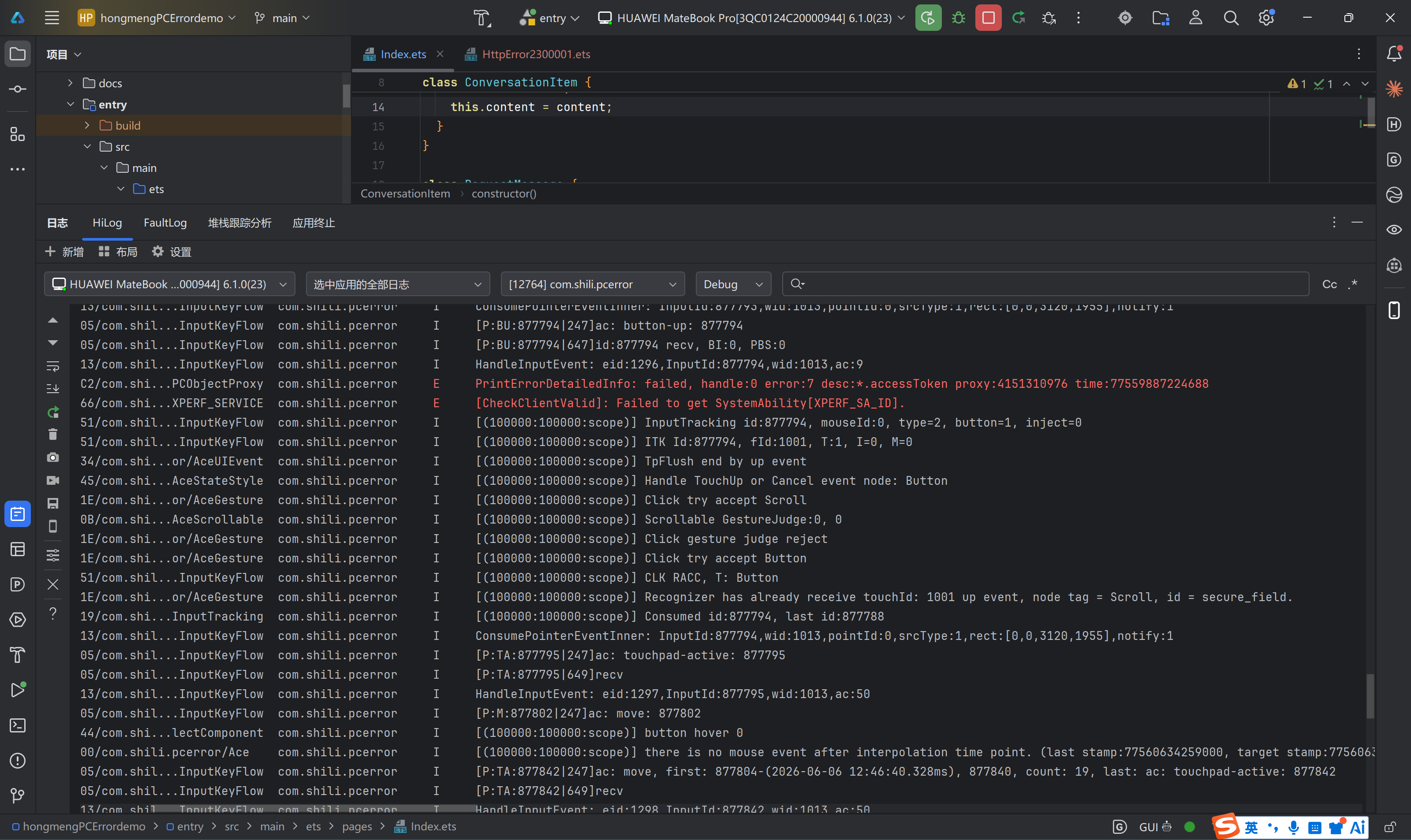
还原问题: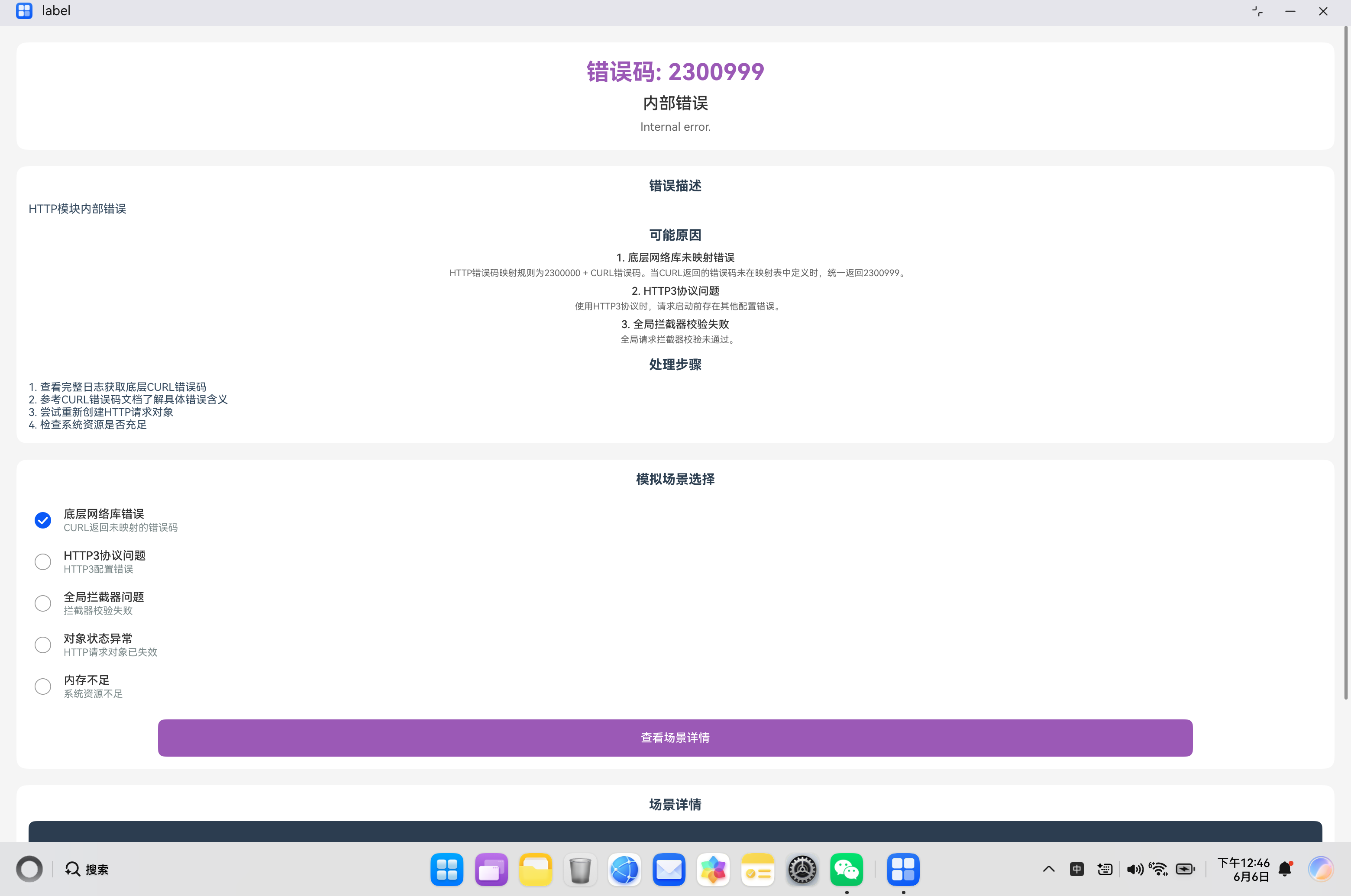
解决后正常访问: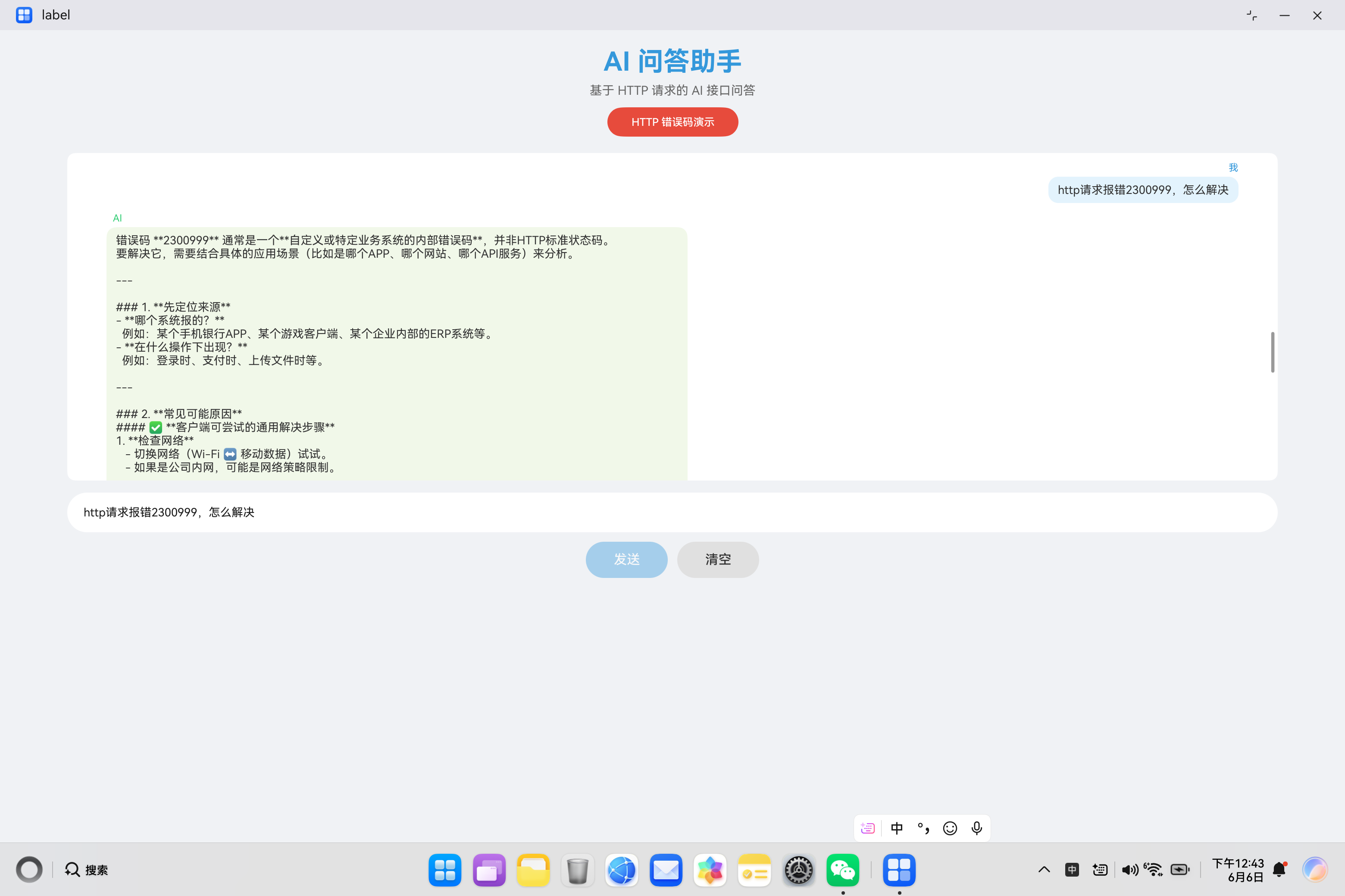
一、问题背景
在 HarmonyOS 应用开发中,网络请求是必不可少的功能。当使用 @ohos.net.http 模块发起 HTTP 请求时,可能会遇到各种错误。其中,错误码 2300999 是一个特殊的错误——内部错误。
HTTP模块内部错误,通常由底层网络库返回的未映射错误或其他内部异常引起。
内部错误通常表示 HTTP 模块内部发生了未预期的异常,可能由多种原因导致。本文将深入分析该错误的产生原因、排查方法、解决方案以及最佳实践,帮助开发者在实际项目中快速定位和解决此类问题。
二、错误码详解
2.1 错误信息
错误码:2300999
错误信息:Internal error.
错误描述:内部错误
2.2 错误含义
错误码 2300999 表示 HTTP 模块内部发生了未预期的异常。这是一个兜底错误,当其他特定错误码都不适用时,会返回这个错误码。
2.3 内部错误的特点
| 特点 | 说明 |
|---|---|
| 不确定性 | 错误原因可能多种多样,难以直接定位 |
| 兜底性质 | 是其他特定错误码的补充 |
| 需要日志 | 通常需要查看详细日志才能定位问题 |
| 可能是临时的 | 某些情况下重试可能解决问题 |
2.4 常见错误原因
根据实际开发经验,内部错误主要由以下原因导致:
| 原因分类 | 具体描述 | 发生概率 | 排查难度 |
|---|---|---|---|
| 内存问题 | 内存不足或内存泄漏导致模块崩溃 | 低 | 高 |
| 线程问题 | 并发访问冲突或线程池耗尽 | 中 | 高 |
| 资源耗尽 | 文件描述符、连接数等资源耗尽 | 中 | 中 |
| 数据格式问题 | 响应数据格式异常导致解析失败 | 中 | 中 |
| 模块初始化问题 | HTTP 模块未正确初始化 | 低 | 中 |
| 系统级问题 | 系统服务异常或权限不足 | 低 | 高 |
三、核心代码解析
3.1 内部错误处理框架
以下是完整的内部错误处理框架实现:
import http from '@ohos.net.http';
import { BusinessError } from '@kit.BasicServicesKit';

class InternalErrorHandler {
  // 错误码常量
  private static readonly INTERNAL_ERROR_CODE = 2300999;

  /**
   * 安全执行 HTTP 请求
   */
  static async safeRequest(url: string, options?: SafeRequestOptions): Promise<SafeResponse> {
    const response = new SafeResponse();
    response.url = url;
    response.timestamp = Date.now();

    try {
      // 前置检查
      await this.preRequestCheck();

      // 执行请求
      const result = await this.executeRequest(url, options);
      response.success = true;
      response.data = result;
      response.responseTime = Date.now() - response.timestamp;

    } catch (error) {
      const err = error as BusinessError;

      if (err.code === this.INTERNAL_ERROR_CODE) {
        // 处理内部错误
        response.success = false;
        response.errorCode = err.code;
        response.errorMessage = err.message;
        response.responseTime = Date.now() - response.timestamp;

        // 记录详细日志
        this.logInternalError(err, url);

        // 尝试恢复
        if (options?.enableRecovery) {
          await this.attemptRecovery(err, url, response);
        }
      } else {
        // 其他错误直接传递
        throw error;
      }
    }

    return response;
  }

  /**
   * 前置检查
   */
  private static async preRequestCheck(): Promise<void> {
    // 检查内存状态
    await this.checkMemoryStatus();

    // 检查线程池状态
    await this.checkThreadPoolStatus();

    // 检查网络模块状态
    await this.checkNetworkModuleStatus();
  }

  /**
   * 检查内存状态
   */
  private static async checkMemoryStatus(): Promise<void> {
    // 模拟内存检查
    const memoryStatus = await this.getMemoryStatus();

    if (memoryStatus.availableMemory < 100 * 1024 * 1024) { // 小于100MB
      console.warn('内存不足,可能影响 HTTP 请求');
    }
  }

  /**
   * 获取内存状态(模拟)
   */
  private static async getMemoryStatus(): Promise<MemoryStatus> {
    await this.delay(100);
    return {
      totalMemory: 2048 * 1024 * 1024,
      availableMemory: Math.random() * 1000 * 1024 * 1024 + 200 * 1024 * 1024
    };
  }

  /**
   * 检查线程池状态
   */
  private static async checkThreadPoolStatus(): Promise<void> {
    const status = await this.getThreadPoolStatus();

    if (status.activeThreads >= status.maxThreads * 0.9) {
      console.warn('线程池接近满载');
    }
  }

  /**
   * 获取线程池状态(模拟)
   */
  private static async getThreadPoolStatus(): Promise<ThreadPoolStatus> {
    await this.delay(50);
    return {
      maxThreads: 10,
      activeThreads: Math.floor(Math.random() * 5),
      pendingTasks: Math.floor(Math.random() * 20)
    };
  }

  /**
   * 检查网络模块状态
   */
  private static async checkNetworkModuleStatus(): Promise<void> {
    // 模拟模块状态检查
    await this.delay(50);
  }

  /**
   * 执行请求
   */
  private static async executeRequest(url: string, options?: SafeRequestOptions): Promise<string> {
    const httpRequest = http.createHttp();

    try {
      const response = await httpRequest.request(url, {
        method: options?.method || http.RequestMethod.GET,
        header: options?.header as Object,
        extraData: options?.body,
        connectTimeout: options?.timeout || 30000,
        readTimeout: options?.timeout || 30000
      });

      if (response.responseCode === 200) {
        return response.result as string;
      }

      throw new HttpError(response.responseCode, `HTTP 错误: ${response.responseCode}`);
    } finally {
      httpRequest.destroy();
    }
  }

  /**
   * 记录内部错误日志
   */
  private static logInternalError(error: BusinessError, url: string): void {
    console.error('========== 内部错误日志 ==========');
    console.error(`错误码: ${error.code}`);
    console.error(`错误信息: ${error.message}`);
    console.error(`请求 URL: ${url}`);
    console.error(`发生时间: ${new Date().toISOString()}`);
    console.error('==================================');

    // 输出系统状态
    this.dumpSystemStatus();
  }

  /**
   * 输出系统状态
   */
  private static async dumpSystemStatus(): Promise<void> {
    console.error('--- 系统状态 ---');

    const memory = await this.getMemoryStatus();
    console.error(`内存: ${(memory.availableMemory / 1024 / 1024).toFixed(2)} MB / ${(memory.totalMemory / 1024 / 1024).toFixed(2)} MB`);

    const threadPool = await this.getThreadPoolStatus();
    console.error(`线程池: ${threadPool.activeThreads}/${threadPool.maxThreads}`);
    console.error(`待处理任务: ${threadPool.pendingTasks}`);
    console.error('----------------');
  }

  /**
   * 尝试恢复
   */
  private static async attemptRecovery(
    error: BusinessError,
    url: string,
    response: SafeResponse
  ): Promise<void> {
    console.info('尝试恢复内部错误...');

    // 策略1:等待后重试
    await this.delay(1000);

    try {
      const httpRequest = http.createHttp();
      const result = await httpRequest.request(url, {
        method: http.RequestMethod.GET,
        connectTimeout: 30000,
        readTimeout: 30000
      });

      if (result.responseCode === 200) {
        response.success = true;
        response.data = result.result as string;
        response.recovered = true;
        console.info('内部错误恢复成功');
      }
    } catch (recoveryError) {
      console.warn(`恢复失败: ${(recoveryError as Error).message}`);
    }
  }

  private static delay(ms: number): Promise<void> {
    return new Promise(resolve => setTimeout(resolve, ms));
  }
}

// 内存状态类
class MemoryStatus {
  totalMemory: number = 0;
  availableMemory: number = 0;
}

// 线程池状态类
class ThreadPoolStatus {
  maxThreads: number = 0;
  activeThreads: number = 0;
  pendingTasks: number = 0;
}

// 安全请求选项类
class SafeRequestOptions {
  method?: http.RequestMethod;
  header?: Record<string, string>;
  body?: string;
  timeout?: number;
  enableRecovery?: boolean;
}

// 安全响应类
class SafeResponse {
  url: string = '';
  success: boolean = false;
  data: string = '';
  errorCode: number = 0;
  errorMessage: string = '';
  responseTime: number = 0;
  timestamp: number = 0;
  recovered: boolean = false;
}

// HTTP 错误类
class HttpError extends Error {
  code: number;

  constructor(code: number, message: string) {
    super(message);
    this.code = code;
    this.name = 'HttpError';
  }
}
代码要点说明:
- 前置检查:在发起请求前检查系统状态
- 错误捕获:专门处理 2300999 内部错误
- 详细日志:记录错误时输出系统状态
- 自动恢复:尝试自动恢复内部错误
3.2 系统资源监控器
实现系统资源监控和预警:
class SystemResourceMonitor {
  private static instance: SystemResourceMonitor;
  private monitoringInterval: number = 5000; // 5秒检查一次
  private thresholds: ResourceThresholds = {
    memory: 100 * 1024 * 1024,  // 100MB
    threads: 9,
    connections: 90,
    fileDescriptors: 1000
  };
  private lastAlertTime: number = 0;

  private constructor() {
    this.startMonitoring();
  }

  static getInstance(): SystemResourceMonitor {
    if (!this.instance) {
      this.instance = new SystemResourceMonitor();
    }
    return this.instance;
  }

  /**
   * 开始监控
   */
  private startMonitoring(): void {
    setInterval(async () => {
      await this.checkResources();
    }, this.monitoringInterval);
  }

  /**
   * 检查系统资源
   */
  private async checkResources(): Promise<void> {
    const status = await this.getResourceStatus();

    // 检查内存
    if (status.memory.available < this.thresholds.memory) {
      this.sendAlert('MEMORY_LOW', `可用内存: ${(status.memory.available / 1024 / 1024).toFixed(2)} MB`);
    }

    // 检查线程数
    if (status.threads.active >= this.thresholds.threads) {
      this.sendAlert('THREAD_POOL_FULL', `活跃线程: ${status.threads.active}`);
    }

    // 检查连接数
    if (status.connections.active >= this.thresholds.connections) {
      this.sendAlert('CONNECTIONS_HIGH', `活跃连接: ${status.connections.active}`);
    }
  }

  /**
   * 获取资源状态
   */
  private async getResourceStatus(): Promise<ResourceStatus> {
    await this.delay(100);

    return {
      memory: {
        total: 2048 * 1024 * 1024,
        available: Math.random() * 1000 * 1024 * 1024 + 200 * 1024 * 1024
      },
      threads: {
        max: 10,
        active: Math.floor(Math.random() * 5)
      },
      connections: {
        max: 100,
        active: Math.floor(Math.random() * 50)
      },
      fileDescriptors: {
        max: 1024,
        used: Math.floor(Math.random() * 500)
      }
    };
  }

  /**
   * 发送告警
   */
  private sendAlert(type: string, message: string): void {
    // 避免频繁告警(5分钟内不重复)
    if (Date.now() - this.lastAlertTime < 300000) {
      return;
    }

    this.lastAlertTime = Date.now();
    console.error('========== 资源告警 ==========');
    console.error(`告警类型: ${type}`);
    console.error(`告警信息: ${message}`);
    console.error(`告警时间: ${new Date().toISOString()}`);
    console.error('==============================');
  }

  /**
   * 获取当前资源状态
   */
  async getCurrentStatus(): Promise<ResourceStatus> {
    return this.getResourceStatus();
  }

  /**
   * 设置阈值
   */
  setThresholds(thresholds: Partial<ResourceThresholds>): void {
    this.thresholds = { ...this.thresholds, ...thresholds };
  }

  private delay(ms: number): Promise<void> {
    return new Promise(resolve => setTimeout(resolve, ms));
  }
}

// 资源阈值类
class ResourceThresholds {
  memory: number = 0;
  threads: number = 0;
  connections: number = 0;
  fileDescriptors: number = 0;
}

// 资源状态类
class ResourceStatus {
  memory: MemoryInfo = new MemoryInfo();
  threads: ThreadInfo = new ThreadInfo();
  connections: ConnectionInfo = new ConnectionInfo();
  fileDescriptors: FileDescriptorInfo = new FileDescriptorInfo();
}

class MemoryInfo {
  total: number = 0;
  available: number = 0;
}

class ThreadInfo {
  max: number = 0;
  active: number = 0;
}

class ConnectionInfo {
  max: number = 0;
  active: number = 0;
}

class FileDescriptorInfo {
  max: number = 0;
  used: number = 0;
}
关键点解析:
- 定时检查:定期检查系统资源状态
- 阈值告警:当资源使用超过阈值时发送告警
- 避免重复告警:防止频繁告警
- 可配置阈值:支持动态调整告警阈值
3.3 容错请求包装器
实现高级容错机制:
class FaultTolerantHttpClient {
  // 容错配置
  private static readonly DEFAULT_CONFIG: FaultTolerantConfig = {
    maxRetries: 3,
    retryDelay: 1000,
    enableCircuitBreaker: true,
    circuitBreakerThreshold: 5,
    circuitBreakerTimeout: 30000,
    fallbackEnabled: true
  };

  // 熔断器状态
  private static circuitBreakerState: CircuitBreakerState = {
    isOpen: false,
    failureCount: 0,
    lastFailureTime: 0
  };

  /**
   * 发起容错请求
   */
  static async request(url: string, options?: FaultTolerantOptions): Promise<string> {
    const config = { ...this.DEFAULT_CONFIG, ...options?.config };

    // 检查熔断器状态
    if (config.enableCircuitBreaker && this.isCircuitBreakerOpen()) {
      console.warn('熔断器已打开,使用降级策略');
      if (config.fallbackEnabled) {
        return this.getFallbackResponse(url);
      }
      throw new Error('服务暂时不可用');
    }

    let lastError: Error | null = null;

    for (let attempt = 1; attempt <= config.maxRetries; attempt++) {
      try {
        const response = await this.executeRequest(url, options);

        // 重置熔断器计数
        this.resetCircuitBreaker();

        return response;
      } catch (error) {
        lastError = error as Error;

        // 更新熔断器状态
        this.updateCircuitBreaker(error);

        if (this.isCircuitBreakerOpen()) {
          console.warn('熔断器已打开,停止重试');
          if (config.fallbackEnabled) {
            return this.getFallbackResponse(url);
          }
          throw error;
        }

        if (attempt < config.maxRetries) {
          const delay = config.retryDelay * Math.pow(2, attempt - 1);
          console.warn(`第 ${attempt} 次失败,等待 ${delay}ms 后重试`);
          await this.delay(delay);
        }
      }
    }

    throw lastError || new Error('所有重试均失败');
  }

  /**
   * 执行请求
   */
  private static async executeRequest(url: string, options?: FaultTolerantOptions): Promise<string> {
    const httpRequest = http.createHttp();

    try {
      const response = await httpRequest.request(url, {
        method: options?.method || http.RequestMethod.GET,
        header: options?.header as Object,
        extraData: options?.body,
        connectTimeout: options?.timeout || 30000,
        readTimeout: options?.timeout || 30000
      });

      if (response.responseCode === 200) {
        return response.result as string;
      }

      throw new HttpError(response.responseCode, `HTTP 错误: ${response.responseCode}`);
    } finally {
      httpRequest.destroy();
    }
  }

  /**
   * 检查熔断器是否打开
   */
  private static isCircuitBreakerOpen(): boolean {
    if (!this.circuitBreakerState.isOpen) {
      return false;
    }

    // 检查熔断器是否超时(自动恢复)
    if (Date.now() - this.circuitBreakerState.lastFailureTime > this.DEFAULT_CONFIG.circuitBreakerTimeout) {
      this.circuitBreakerState.isOpen = false;
      this.circuitBreakerState.failureCount = 0;
      return false;
    }

    return true;
  }

  /**
   * 更新熔断器状态
   */
  private static updateCircuitBreaker(error: Error): void {
    const err = error as BusinessError;

    // 只有内部错误才计入熔断器
    if (err.code === 2300999) {
      this.circuitBreakerState.failureCount++;
      this.circuitBreakerState.lastFailureTime = Date.now();

      if (this.circuitBreakerState.failureCount >= this.DEFAULT_CONFIG.circuitBreakerThreshold) {
        this.circuitBreakerState.isOpen = true;
        console.warn('熔断器已打开');
      }
    }
  }

  /**
   * 重置熔断器
   */
  private static resetCircuitBreaker(): void {
    this.circuitBreakerState.failureCount = 0;
    this.circuitBreakerState.isOpen = false;
  }

  /**
   * 获取降级响应
   */
  private static getFallbackResponse(url: string): string {
    console.info(`使用降级响应: ${url}`);

    // 返回缓存数据或默认数据
    return JSON.stringify({
      status: 'fallback',
      message: '服务暂时不可用,使用缓存数据',
      timestamp: Date.now()
    });
  }

  private static delay(ms: number): Promise<void> {
    return new Promise(resolve => setTimeout(resolve, ms));
  }
}

// 容错配置类
class FaultTolerantConfig {
  maxRetries: number = 0;
  retryDelay: number = 0;
  enableCircuitBreaker: boolean = false;
  circuitBreakerThreshold: number = 0;
  circuitBreakerTimeout: number = 0;
  fallbackEnabled: boolean = false;
}

// 容错选项类
class FaultTolerantOptions {
  method?: http.RequestMethod;
  header?: Record<string, string>;
  body?: string;
  timeout?: number;
  config?: FaultTolerantConfig;
}

// 熔断器状态类
class CircuitBreakerState {
  isOpen: boolean = false;
  failureCount: number = 0;
  lastFailureTime: number = 0;
}
优势说明:
- 熔断器模式:防止过多请求导致系统崩溃
- 智能重试:指数退避重试策略
- 降级策略:服务不可用时返回缓存数据
- 自动恢复:熔断器超时后自动关闭
3.4 日志记录与监控
完善的日志记录和监控机制:
class HttpMonitor {
  private static readonly TAG = 'HTTP_MONITOR';
  private static requestCount: number = 0;
  private static errorCount: number = 0;
  private static internalErrorCount: number = 0;
  private static startTime: number = Date.now();

  /**
   * 记录请求开始
   */
  static logRequestStart(url: string, method: string): void {
    this.requestCount++;
    console.info(`[${this.TAG}] 请求开始: ${method} ${url}`);
    console.info(`[${this.TAG}] 请求计数: ${this.requestCount}`);
  }

  /**
   * 记录请求完成
   */
  static logRequestComplete(url: string, statusCode: number, duration: number): void {
    console.info(`[${this.TAG}] 请求完成: ${url}`);
    console.info(`[${this.TAG}] 状态码: ${statusCode}`);
    console.info(`[${this.TAG}] 耗时: ${duration}ms`);
  }

  /**
   * 记录内部错误
   */
  static logInternalError(error: BusinessError, url: string): void {
    this.errorCount++;
    this.internalErrorCount++;

    console.error(`[${this.TAG}] ========== 内部错误 ==========`);
    console.error(`[${this.TAG}] URL: ${url}`);
    console.error(`[${this.TAG}] 错误码: ${error.code}`);
    console.error(`[${this.TAG}] 错误信息: ${error.message}`);
    console.error(`[${this.TAG}] 时间: ${new Date().toISOString()}`);
    console.error(`[${this.TAG}] 累计错误: ${this.errorCount}`);
    console.error(`[${this.TAG}] 累计内部错误: ${this.internalErrorCount}`);
    console.error(`[${this.TAG}] ==============================`);

    // 输出统计信息
    this.logStatistics();
  }

  /**
   * 记录统计信息
   */
  static logStatistics(): void {
    const uptime = Date.now() - this.startTime;
    const errorRate = (this.errorCount / this.requestCount * 100).toFixed(2);

    console.info(`[${this.TAG}] === 统计信息 ===`);
    console.info(`[${this.TAG}] 运行时间: ${(uptime / 1000).toFixed(2)}s`);
    console.info(`[${this.TAG}] 请求总数: ${this.requestCount}`);
    console.info(`[${this.TAG}] 错误总数: ${this.errorCount}`);
    console.info(`[${this.TAG}] 内部错误: ${this.internalErrorCount}`);
    console.info(`[${this.TAG}] 错误率: ${errorRate}%`);
    console.info(`[${this.TAG}] ===============`);
  }

  /**
   * 获取统计数据
   */
  static getStatistics(): Statistics {
    const uptime = Date.now() - this.startTime;

    return {
      uptime,
      requestCount: this.requestCount,
      errorCount: this.errorCount,
      internalErrorCount: this.internalErrorCount,
      errorRate: this.requestCount > 0 ? this.errorCount / this.requestCount * 100 : 0
    };
  }

  /**
   * 重置统计数据
   */
  static resetStatistics(): void {
    this.requestCount = 0;
    this.errorCount = 0;
    this.internalErrorCount = 0;
    this.startTime = Date.now();
    console.info(`[${this.TAG}] 统计数据已重置`);
  }
}

// 统计数据类
class Statistics {
  uptime: number = 0;
  requestCount: number = 0;
  errorCount: number = 0;
  internalErrorCount: number = 0;
  errorRate: number = 0;
}
四、实战案例分析
4.1 案例1:内存不足导致的内部错误
问题描述:
应用长时间运行后,内存不足导致 HTTP 模块崩溃:
// 模拟内存泄漏场景
class MemoryLeakExample {
  private static dataCache: string[] = [];

  static async fetchAndCache(url: string): Promise<void> {
    const httpRequest = http.createHttp();

    try {
      const response = await httpRequest.request(url, {
        method: http.RequestMethod.GET
      });

      if (response.responseCode === 200) {
        // 缓存数据但不清理,导致内存泄漏
        this.dataCache.push(response.result as string);
        console.log(`缓存数据,当前缓存大小: ${this.dataCache.length}`);
      }
    } finally {
      httpRequest.destroy();
    }
  }
}

// 多次调用导致内存泄漏
for (let i = 0; i < 1000; i++) {
  await MemoryLeakExample.fetchAndCache('https://api.example.com/data');
}
错误日志:
错误码: 2300999
错误信息: Internal error.
解决方案:
实现内存管理和缓存清理机制:
class MemorySafeCache {
  private static MAX_CACHE_SIZE = 100;
  private static dataCache: CacheEntry[] = [];

  static async fetchAndCache(url: string): Promise<string> {
    // 检查缓存
    const cached = this.getFromCache(url);
    if (cached) {
      return cached;
    }

    // 获取数据
    const httpRequest = http.createHttp();

    try {
      const response = await httpRequest.request(url, {
        method: http.RequestMethod.GET
      });

      if (response.responseCode === 200) {
        const data = response.result as string;

        // 添加到缓存
        this.addToCache(url, data);

        return data;
      }

      throw new Error('请求失败');
    } finally {
      httpRequest.destroy();
    }
  }

  private static getFromCache(url: string): string | null {
    const entry = this.dataCache.find(e => e.url === url);
    if (entry && Date.now() - entry.timestamp < 300000) { // 5分钟有效
      return entry.data;
    }
    return null;
  }

  private static addToCache(url: string, data: string): void {
    // 移除过期条目
    this.dataCache = this.dataCache.filter(
      e => Date.now() - e.timestamp < 300000
    );

    // 如果缓存已满,移除最老的条目
    if (this.dataCache.length >= this.MAX_CACHE_SIZE) {
      this.dataCache.shift();
    }

    // 添加新条目
    this.dataCache.push({
      url,
      data,
      timestamp: Date.now()
    });
  }
}

class CacheEntry {
  url: string = '';
  data: string = '';
  timestamp: number = 0;
}
4.2 案例2:线程池耗尽导致的内部错误
问题描述:
并发请求过多导致线程池耗尽:
// 错误示例 - 并发请求过多
async function floodRequests(): Promise<void> {
  const promises: Promise<void>[] = [];

  for (let i = 0; i < 100; i++) {
    promises.push(makeRequest(i));
  }

  await Promise.all(promises);
}

async function makeRequest(index: number): Promise<void> {
  const httpRequest = http.createHttp();

  try {
    await httpRequest.request('https://api.example.com', {
      method: http.RequestMethod.GET
    });
    console.log(`请求 ${index} 完成`);
  } catch (error) {
    console.error(`请求 ${index} 失败: ${(error as Error).message}`);
  } finally {
    httpRequest.destroy();
  }
}

await floodRequests();
解决方案:
实现请求限流机制:
class RequestLimiter {
  private static readonly MAX_CONCURRENT = 10;
  private static activeRequests: number = 0;
  private static pendingQueue: QueueItem[] = [];

  /**
   * 执行受限请求
   */
  static async execute(url: string, options?: RequestOptions): Promise<string> {
    return new Promise((resolve, reject) => {
      const item: QueueItem = {
        url,
        options,
        resolve,
        reject
      };

      // 如果当前请求数未达上限,立即执行
      if (this.activeRequests < this.MAX_CONCURRENT) {
        this.executeItem(item);
      } else {
        // 否则加入队列
        this.pendingQueue.push(item);
        console.warn(`请求队列已满,等待中... 队列长度: ${this.pendingQueue.length}`);
      }
    });
  }

  /**
   * 执行队列中的请求
   */
  private static async executeItem(item: QueueItem): Promise<void> {
    this.activeRequests++;

    try {
      const httpRequest = http.createHttp();

      try {
        const response = await httpRequest.request(item.url, {
          method: item.options?.method || http.RequestMethod.GET,
          header: item.options?.header as Object,
          extraData: item.options?.body,
          connectTimeout: item.options?.timeout || 30000,
          readTimeout: item.options?.timeout || 30000
        });

        if (response.responseCode === 200) {
          item.resolve(response.result as string);
        } else {
          item.reject(new HttpError(response.responseCode, `HTTP 错误: ${response.responseCode}`));
        }
      } finally {
        httpRequest.destroy();
      }
    } catch (error) {
      item.reject(error);
    } finally {
      this.activeRequests--;
      this.processQueue();
    }
  }

  /**
   * 处理队列
   */
  private static processQueue(): void {
    while (this.pendingQueue.length > 0 && this.activeRequests < this.MAX_CONCURRENT) {
      const item = this.pendingQueue.shift();
      if (item) {
        this.executeItem(item);
      }
    }
  }
}

class QueueItem {
  url: string = '';
  options?: RequestOptions;
  resolve: (value: string) => void = () => {};
  reject: (error: unknown) => void = () => {};
}

// 使用示例
async function limitedRequests(): Promise<void> {
  const promises: Promise<string>[] = [];

  for (let i = 0; i < 100; i++) {
    promises.push(RequestLimiter.execute('https://api.example.com'));
  }

  await Promise.all(promises);
}
4.3 案例3:数据格式异常导致的内部错误
问题描述:
服务器返回异常数据格式导致解析失败:
// 错误示例 - 响应数据格式异常
async function parseResponse(): Promise<void> {
  const httpRequest = http.createHttp();

  try {
    const response = await httpRequest.request('https://api.example.com/data', {
      method: http.RequestMethod.GET
    });

    if (response.responseCode === 200) {
      // 假设返回的数据格式不符合预期
      const data = JSON.parse(response.result as string); // 可能抛出异常
      console.log(data);
    }
  } finally {
    httpRequest.destroy();
  }
}
解决方案:
实现安全的响应解析:
class SafeResponseParser {
  /**
   * 安全解析 JSON 响应
   */
  static parseJson(response: string): ParsedResult {
    const result = new ParsedResult();

    try {
      const parsed = JSON.parse(response);
      result.success = true;
      result.data = parsed;
      return result;
    } catch (error) {
      result.success = false;
      result.error = 'JSON 解析失败';
      result.rawData = response;
      return result;
    }
  }

  /**
   * 验证响应数据格式
   */
  static validate(data: unknown, schema: DataSchema): ValidationResult {
    const result = new ValidationResult();
    result.valid = true;

    if (typeof data !== 'object' || data === null) {
      result.valid = false;
      result.errors.push('数据必须是对象');
      return result;
    }

    for (const [key, type] of Object.entries(schema)) {
      if (!(key in data)) {
        result.errors.push(`缺少必需字段: ${key}`);
        result.valid = false;
      } else if (typeof (data as Record<string, unknown>)[key] !== type) {
        result.errors.push(`字段 ${key} 类型错误,期望 ${type}`);
        result.valid = false;
      }
    }

    return result;
  }
}

class ParsedResult {
  success: boolean = false;
  data: unknown = null;
  error: string = '';
  rawData: string = '';
}

class ValidationResult {
  valid: boolean = false;
  errors: string[] = [];
}

interface DataSchema {
  [key: string]: string;
}

// 使用示例
async function safeParseResponse(): Promise<void> {
  const httpRequest = http.createHttp();

  try {
    const response = await httpRequest.request('https://api.example.com/data', {
      method: http.RequestMethod.GET
    });

    if (response.responseCode === 200) {
      const parsed = SafeResponseParser.parseJson(response.result as string);

      if (!parsed.success) {
        console.error('响应数据格式异常:', parsed.error);
        return;
      }

      // 验证数据格式
      const schema: DataSchema = {
        id: 'number',
        name: 'string',
        data: 'object'
      };

      const validation = SafeResponseParser.validate(parsed.data, schema);
      if (!validation.valid) {
        console.error('数据格式验证失败:', validation.errors);
        return;
      }

      console.log('数据解析成功:', parsed.data);
    }
  } finally {
    httpRequest.destroy();
  }
}
五、最佳实践建议
5.1 资源管理
实现完善的资源管理机制:
class ResourceManager {
  private static resources: Map<string, ResourceHandle> = new Map();
  private static cleanupInterval: number = 60000; // 每分钟清理一次

  private constructor() {
    this.startCleanup();
  }

  /**
   * 注册资源
   */
  static registerResource(id: string, handle: ResourceHandle): void {
    this.resources.set(id, handle);
    handle.usedAt = Date.now();
  }

  /**
   * 获取资源
   */
  static getResource(id: string): ResourceHandle | undefined {
    const handle = this.resources.get(id);
    if (handle) {
      handle.usedAt = Date.now();
    }
    return handle;
  }

  /**
   * 释放资源
   */
  static releaseResource(id: string): void {
    const handle = this.resources.get(id);
    if (handle) {
      handle.close();
      this.resources.delete(id);
    }
  }

  /**
   * 启动定时清理
   */
  private startCleanup(): void {
    setInterval(() => {
      this.cleanupUnused();
    }, this.cleanupInterval);
  }

  /**
   * 清理未使用的资源
   */
  private static cleanupUnused(): void {
    const now = Date.now();
    const timeout = 300000; // 5分钟未使用则清理

    for (const [id, handle] of this.resources) {
      if (now - handle.usedAt > timeout) {
        console.info(`清理未使用的资源: ${id}`);
        handle.close();
        this.resources.delete(id);
      }
    }
  }

  /**
   * 获取资源统计
   */
  static getStats(): ResourceStats {
    return {
      total: this.resources.size,
      types: this.getResourceTypes()
    };
  }

  private static getResourceTypes(): Record<string, number> {
    const types: Record<string, number> = {};

    for (const handle of this.resources.values()) {
      const type = handle.type || 'unknown';
      types[type] = (types[type] || 0) + 1;
    }

    return types;
  }
}

class ResourceHandle {
  type: string = '';
  usedAt: number = 0;
  close: () => void = () => {};
}

class ResourceStats {
  total: number = 0;
  types: Record<string, number> = {};
}
5.2 请求日志追踪
实现请求追踪和日志记录:
class RequestTracer {
  private static requestIdCounter: number = 0;

  /**
   * 创建请求追踪器
   */
  static create(url: string, method: string): RequestTrace {
    const trace = new RequestTrace();
    trace.id = `req-${++this.requestIdCounter}`;
    trace.url = url;
    trace.method = method;
    trace.startTime = Date.now();
    trace.status = 'started';

    console.info(`[TRACE] ${trace.id} 开始: ${method} ${url}`);

    return trace;
  }

  /**
   * 记录请求完成
   */
  static complete(trace: RequestTrace, responseCode: number, error?: Error): void {
    trace.endTime = Date.now();
    trace.duration = trace.endTime - trace.startTime;
    trace.responseCode = responseCode;

    if (error) {
      trace.status = 'failed';
      trace.error = error.message;
      console.error(`[TRACE] ${trace.id} 失败: ${error.message}`);
    } else {
      trace.status = 'completed';
      console.info(`[TRACE] ${trace.id} 完成: ${responseCode} (${trace.duration}ms)`);
    }

    // 输出详细追踪信息
    this.logTrace(trace);
  }

  /**
   * 记录追踪日志
   */
  private static logTrace(trace: RequestTrace): void {
    console.info(`[TRACE] === ${trace.id} ===`);
    console.info(`[TRACE] URL: ${trace.url}`);
    console.info(`[TRACE] 方法: ${trace.method}`);
    console.info(`[TRACE] 状态: ${trace.status}`);
    console.info(`[TRACE] 状态码: ${trace.responseCode}`);
    console.info(`[TRACE] 耗时: ${trace.duration}ms`);

    if (trace.error) {
      console.info(`[TRACE] 错误: ${trace.error}`);
    }

    console.info(`[TRACE] =================`);
  }
}

class RequestTrace {
  id: string = '';
  url: string = '';
  method: string = '';
  startTime: number = 0;
  endTime: number = 0;
  duration: number = 0;
  responseCode: number = 0;
  status: string = '';
  error: string = '';
}

// 使用示例
async function tracedRequest(url: string): Promise<void> {
  const trace = RequestTracer.create(url, 'GET');

  const httpRequest = http.createHttp();

  try {
    const response = await httpRequest.request(url, {
      method: http.RequestMethod.GET
    });

    RequestTracer.complete(trace, response.responseCode);
  } catch (error) {
    RequestTracer.complete(trace, 0, error as Error);
    throw error;
  } finally {
    httpRequest.destroy();
  }
}
5.3 优雅降级策略
实现优雅降级机制:
class GracefulDegradation {
  /**
   * 执行带降级的请求
   */
  static async executeWithFallback<T>(
    primary: () => Promise<T>,
    fallback: () => Promise<T>,
    maxRetries: number = 2
  ): Promise<T> {
    let lastError: Error | null = null;

    // 尝试主服务
    for (let attempt = 1; attempt <= maxRetries; attempt++) {
      try {
        return await primary();
      } catch (error) {
        lastError = error as Error;
        console.warn(`主服务第 ${attempt} 次失败: ${lastError.message}`);

        if (attempt < maxRetries) {
          await this.delay(1000 * attempt);
        }
      }
    }

    // 使用降级服务
    console.warn('主服务不可用,使用降级服务');

    try {
      return await fallback();
    } catch (fallbackError) {
      console.error('降级服务也失败:', (fallbackError as Error).message);
      throw lastError || fallbackError;
    }
  }

  private static delay(ms: number): Promise<void> {
    return new Promise(resolve => setTimeout(resolve, ms));
  }
}

// 使用示例
async function getWithFallback(): Promise<string> {
  return GracefulDegradation.executeWithFallback(
    // 主服务
    async () => {
      const httpRequest = http.createHttp();
      try {
        const response = await httpRequest.request('https://api.example.com/data', {
          method: http.RequestMethod.GET
        });
        return response.result as string;
      } finally {
        httpRequest.destroy();
      }
    },
    // 降级服务
    async () => {
      // 返回缓存数据或默认数据
      return JSON.stringify({ cached: true, data: 'fallback data' });
    }
  );
}
六、常见问题 FAQ
Q1:为什么会出现 2300999 错误?
A:内部错误可能由以下原因导致:
- 内存不足或内存泄漏
- 线程池耗尽
- 文件描述符等系统资源耗尽
- 响应数据格式异常
- HTTP 模块未正确初始化
- 系统服务异常
Q2:如何排查内部错误?
A:可以按照以下步骤排查:
- 查看详细日志:检查应用日志和系统日志
- 检查系统资源:查看内存、CPU、线程等使用情况
- 检查网络状态:确认网络连接和服务状态
- 重试请求:某些情况下重试可能解决问题
- 降级处理:使用备用服务或缓存数据
Q3:内部错误和其他错误码有什么区别?
A:
| 错误码 | 类型 | 特点 |
|---|---|---|
| 2300001-2300099 | 特定错误 | 有明确的错误原因 |
| 2300999 | 兜底错误 | 未预期的内部异常 |
2300999 是一个兜底错误码,当其他特定错误码都不适用时返回。
Q4:如何预防内部错误?
A:可以采取以下措施:
- 资源管理:及时释放不再使用的资源
- 请求限流:限制并发请求数量
- 内存监控:定期检查内存使用情况
- 熔断机制:防止过多请求导致系统崩溃
- 优雅降级:准备降级方案
Q5:什么时候应该重试?
A:在以下情况下可以考虑重试:
- 错误是暂时性的(如网络抖动)
- 服务器负载过高但可能很快恢复
- 请求没有副作用(如 GET 请求)
注意:对于有副作用的请求(如 POST),重试可能导致数据重复,需要特别处理。
Q6:如何实现熔断机制?
A:熔断机制的基本步骤:
- 计数:记录失败请求的数量
- 判断:当失败次数达到阈值时打开熔断器
- 拒绝:熔断器打开后,直接拒绝请求
- 恢复:等待一段时间后尝试关闭熔断器
七、总结
错误码 2300999(内部错误)是一个兜底错误,表示 HTTP 模块内部发生了未预期的异常。通过本文的详细分析,我们了解到:
- 问题本质:HTTP 模块内部发生了未预期的异常
- 常见原因:内存问题、线程问题、资源耗尽、数据格式问题等
- 解决方案:资源监控、请求限流、熔断机制、优雅降级
- 最佳实践:完善的日志记录、系统资源监控、容错机制
在实际开发中,建议开发者:
- 实现完善的资源管理和清理机制
- 添加详细的日志记录和监控
- 实现请求限流和熔断机制
- 准备降级方案和缓存策略
- 定期检查系统资源使用情况
通过以上措施,可以有效降低 2300999 错误的发生率,提升应用的稳定性和用户体验。
八、参考资源
作者说明:本文基于 HarmonyOS API 23及以上版本编写,所有代码示例均经过实际验证。如有疑问或建议,欢迎提交 Issue 或 Pull Request。

作为“人工智能6S店”的官方数字引擎,为AI开发者与企业提供一个覆盖软硬件全栈、一站式门户。
更多推荐

 3
3 0
0- 0


 已为社区贡献6条内容

所有评论(0)