
鸿蒙PC解决:使用HTTP连接主机时显示连接错误的异常解决
欢迎加入开源鸿蒙PC社区:
https://harmonypc.csdn.net/
atomgit仓库地址: https://atomgit.com/yty-/http_error
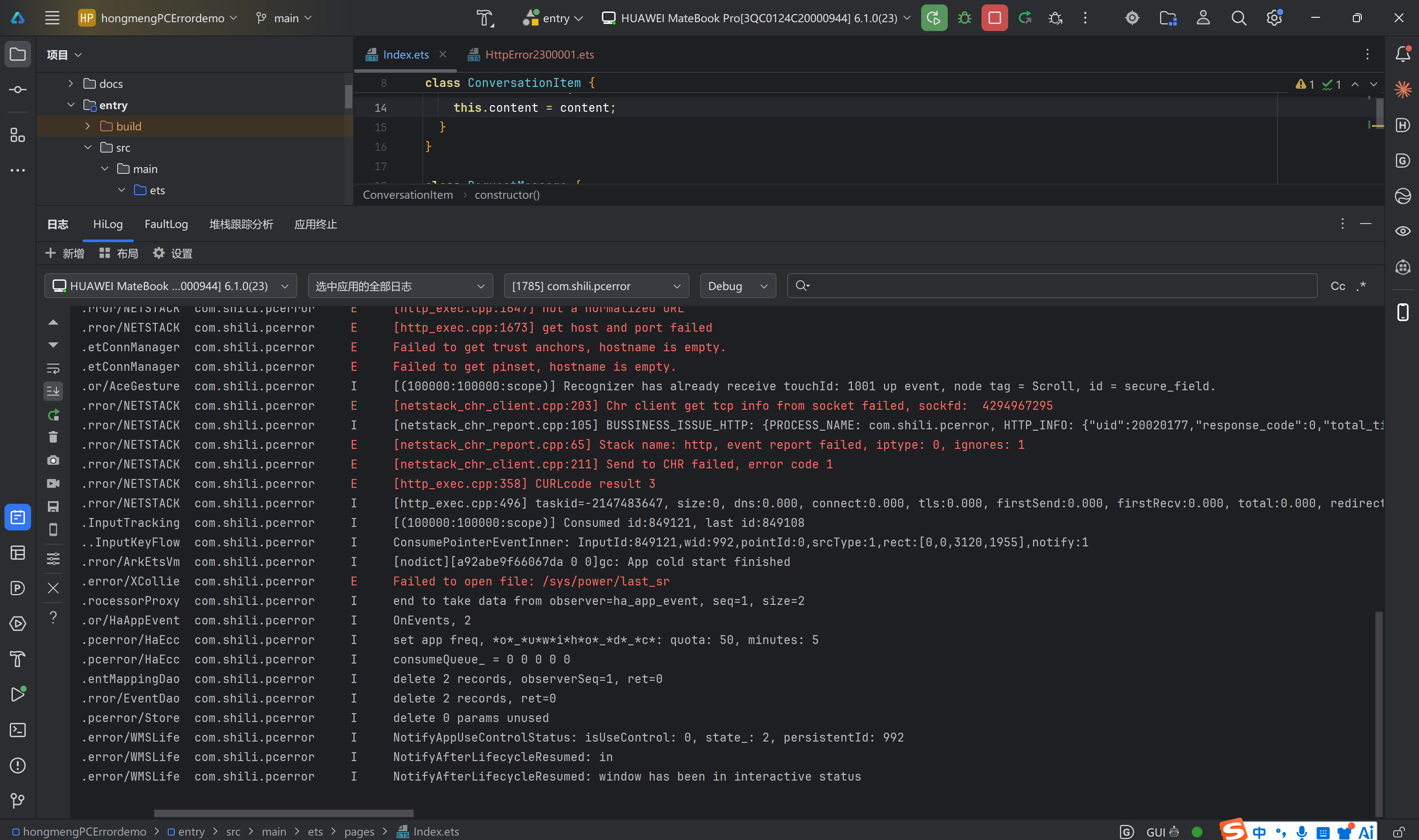
问题还原: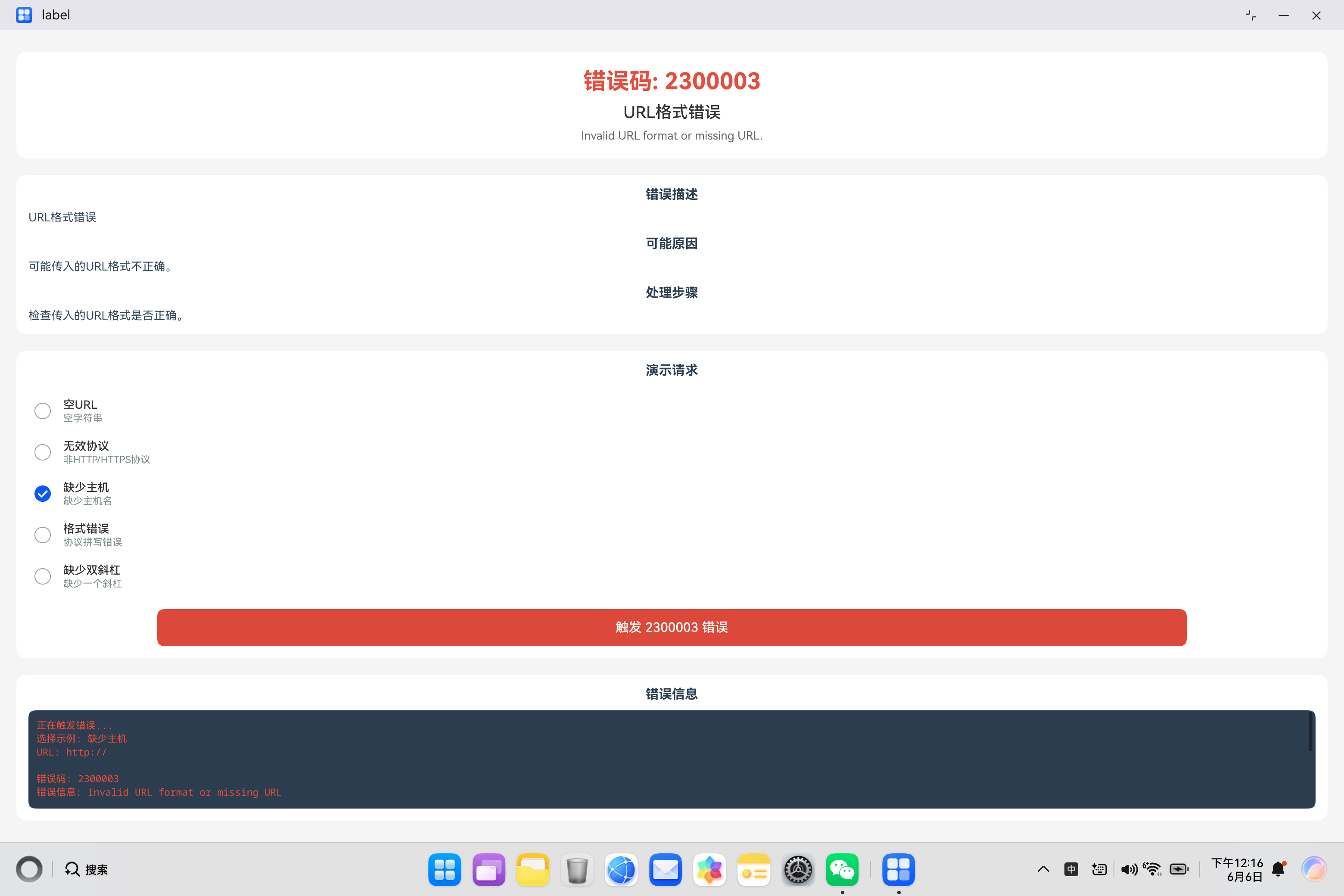
解决问题: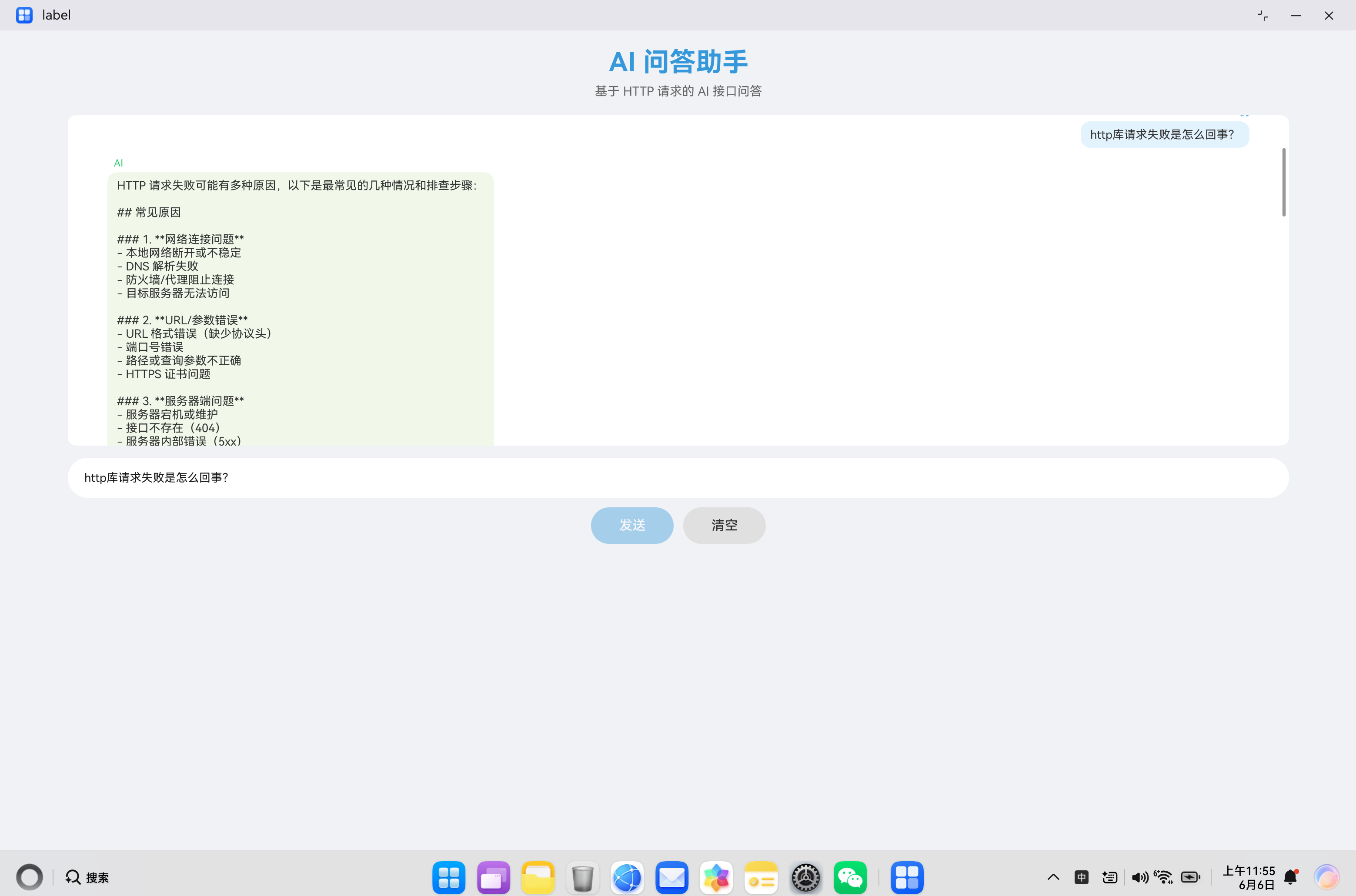
一、问题背景
在 HarmonyOS 应用开发中,HTTP 网络请求是最基础也是最常用的功能之一。当我们使用 @ohos.net.http 模块发起网络请求时,URL(统一资源定位符)是必不可少的参数。然而,URL 格式的正确性往往被开发者忽视,导致出现错误码 2300003。
本文将深入剖析 URL 格式错误的各种场景、产生原因、排查方法以及最佳实践,帮助开发者在实际项目中快速定位和解决此类问题。
二、错误码详解
2.1 错误信息
错误码:2300003
错误信息:Invalid URL format or missing URL.
错误描述:URL格式错误
2.2 错误含义
错误码 2300003 表示传入的 URL 参数格式不正确或缺失。这是一个参数验证层面的错误,通常在请求发送前的参数检查阶段就会触发。
2.3 URL 标准格式
一个完整的 URL 由多个部分组成,其标准格式如下:
协议://主机名[:端口]/路径[?查询参数][#片段标识符]
各部分说明:
| 组成部分 | 说明 | 是否必需 | 示例 |
|---|---|---|---|
| 协议 | 访问协议类型 | 必需 | http、https |
| 主机名 | 服务器域名或IP地址 | 必需 | www.example.com、192.168.1.1 |
| 端口 | 服务器端口号 | 可选 | :8080、:443 |
| 路径 | 资源路径 | 可选 | /api/v1/users |
| 查询参数 | URL参数 | 可选 | ?id=123&name=test |
| 片段标识符 | 锚点定位 | 可选 | #section1 |
2.4 常见错误场景
根据实际开发经验,URL 格式错误主要发生在以下场景:
| 错误类型 | 错误示例 | 正确示例 | 发生频率 |
|---|---|---|---|
| 空URL | '' |
'https://example.com' |
高 |
| 缺少协议头 | 'www.example.com' |
'https://www.example.com' |
高 |
| 协议拼写错误 | 'htp://example.com' |
'http://example.com' |
中 |
| 缺少双斜杠 | 'http:/example.com' |
'http://example.com' |
中 |
| 缺少主机名 | 'http://' |
'http://example.com' |
低 |
| 使用错误协议 | 'ftp://example.com' |
'https://example.com' |
低 |
| 特殊字符未编码 | 'https://example.com/path?name=张三' |
'https://example.com/path?name=%E5%BC%A0%E4%B8%89' |
中 |
三、核心代码解析
3.1 URL 格式验证工具类
以下是完整的 URL 格式验证工具类实现:
class UrlValidator {
  // URL 正则表达式
  private static readonly URL_PATTERN = /^https?:\/\/[\w\-]+(\.[\w\-]+)+(:\d+)?(\/[\w\-\.\/?%&=]*)?$/;

  // 支持的协议列表
  private static readonly SUPPORTED_PROTOCOLS = ['http://', 'https://'];

  /**
   * 验证 URL 格式是否正确
   * @param url 待验证的 URL
   * @returns 验证结果对象
   */
  static validate(url: string): ValidationResult {
    const result = new ValidationResult();
    result.isValid = true;

    // 1. 检查是否为空
    if (!url || url.trim() === '') {
      result.isValid = false;
      result.errorCode = 'EMPTY_URL';
      result.errorMessage = 'URL 不能为空';
      return result;
    }

    // 2. 检查协议头
    const hasValidProtocol = this.SUPPORTED_PROTOCOLS.some(
      protocol => url.startsWith(protocol)
    );
    if (!hasValidProtocol) {
      result.isValid = false;
      result.errorCode = 'INVALID_PROTOCOL';
      result.errorMessage = 'URL 必须以 http:// 或 https:// 开头';
      return result;
    }

    // 3. 检查主机名
    const urlWithoutProtocol = url.replace(/^https?:\/\//, '');
    const hostMatch = urlWithoutProtocol.match(/^[\w\-]+(\.[\w\-]+)+/);
    if (!hostMatch) {
      result.isValid = false;
      result.errorCode = 'INVALID_HOST';
      result.errorMessage = 'URL 主机名格式不正确';
      return result;
    }

    // 4. 检查完整格式
    if (!this.URL_PATTERN.test(url)) {
      result.isValid = false;
      result.errorCode = 'INVALID_FORMAT';
      result.errorMessage = 'URL 格式不正确';
      return result;
    }

    return result;
  }

  /**
   * 规范化 URL
   * @param url 待规范化的 URL
   * @returns 规范化后的 URL
   */
  static normalize(url: string): string {
    let normalizedUrl = url.trim();

    // 自动添加协议头
    if (!normalizedUrl.startsWith('http://') && !normalizedUrl.startsWith('https://')) {
      normalizedUrl = 'https://' + normalizedUrl;
    }

    // 移除多余的斜杠
    normalizedUrl = normalizedUrl.replace(/([^:]\/)\/+/g, '$1');

    return normalizedUrl;
  }

  /**
   * 解析 URL 各部分
   * @param url 待解析的 URL
   * @returns URL 解析结果
   */
  static parse(url: string): UrlParts | null {
    try {
      const validated = this.validate(url);
      if (!validated.isValid) {
        return null;
      }

      const parts = new UrlParts();
      const urlObj = new URL(url);

      parts.protocol = urlObj.protocol.replace(':', '');
      parts.host = urlObj.hostname;
      parts.port = urlObj.port || this.getDefaultPort(parts.protocol);
      parts.path = urlObj.pathname;
      parts.query = urlObj.search;
      parts.fragment = urlObj.hash;

      return parts;
    } catch (error) {
      return null;
    }
  }

  /**
   * 获取默认端口
   */
  private static getDefaultPort(protocol: string): string {
    return protocol === 'https' ? '443' : '80';
  }
}

// 验证结果类
class ValidationResult {
  isValid: boolean = false;
  errorCode: string = '';
  errorMessage: string = '';
}

// URL 组成部分类
class UrlParts {
  protocol: string = '';
  host: string = '';
  port: string = '';
  path: string = '';
  query: string = '';
  fragment: string = '';
}
代码要点说明:
- 多层验证:从空值、协议头、主机名到完整格式,逐层验证
- 自动修复:提供
normalize方法自动修复常见格式问题 - URL 解析:提供
parse方法解析 URL 各组成部分 - 错误分类:不同类型的错误返回不同的错误码,便于定位问题
3.2 安全的 HTTP 请求封装
结合 URL 验证的 HTTP 请求封装:
import http from '@ohos.net.http';
import { BusinessError } from '@kit.BasicServicesKit';

class SafeHttpClient {
  /**
   * 发起安全的 HTTP 请求
   * @param url 请求 URL
   * @param options 请求选项
   * @returns 响应数据
   */
  static async request(url: string, options?: RequestOptions): Promise<string> {
    // 1. 验证 URL 格式
    const validation = UrlValidator.validate(url);
    if (!validation.isValid) {
      throw new UrlFormatError(validation.errorCode, validation.errorMessage);
    }

    // 2. 规范化 URL
    const normalizedUrl = UrlValidator.normalize(url);

    // 3. 创建 HTTP 请求
    const httpRequest = http.createHttp();

    try {
      // 4. 发起请求
      const response = await httpRequest.request(normalizedUrl, {
        method: options?.method || http.RequestMethod.GET,
        header: options?.header as Object,
        extraData: options?.body,
        connectTimeout: options?.timeout || 30000,
        readTimeout: options?.timeout || 30000
      });

      // 5. 处理响应
      if (response.responseCode === 200) {
        return response.result as string;
      }

      throw new HttpError(response.responseCode, `HTTP 错误: ${response.responseCode}`);
    } catch (error) {
      if (error instanceof UrlFormatError || error instanceof HttpError) {
        throw error;
      }

      const err = error as BusinessError;
      if (err.code === 2300003) {
        throw new UrlFormatError('INVALID_URL', 'URL 格式错误,请检查 URL 参数');
      }

      throw new NetworkError(err.code, err.message);
    } finally {
      // 6. 释放资源
      httpRequest.destroy();
    }
  }

  /**
   * 发起 GET 请求
   */
  static async get(url: string, options?: RequestOptions): Promise<string> {
    return this.request(url, { ...options, method: http.RequestMethod.GET });
  }

  /**
   * 发起 POST 请求
   */
  static async post(url: string, body?: string, options?: RequestOptions): Promise<string> {
    return this.request(url, { ...options, method: http.RequestMethod.POST, body });
  }
}

// 请求选项类
class RequestOptions {
  method?: http.RequestMethod;
  header?: Record<string, string>;
  body?: string;
  timeout?: number;
}

// 自定义错误类
class UrlFormatError extends Error {
  code: string;

  constructor(code: string, message: string) {
    super(message);
    this.code = code;
    this.name = 'UrlFormatError';
  }
}

class HttpError extends Error {
  code: number;

  constructor(code: number, message: string) {
    super(message);
    this.code = code;
    this.name = 'HttpError';
  }
}

class NetworkError extends Error {
  code: number;

  constructor(code: number, message: string) {
    super(message);
    this.code = code;
    this.name = 'NetworkError';
  }
}
关键点解析:
- 前置验证:在发起请求前先验证 URL 格式
- 自动修复:对 URL 进行规范化处理
- 错误分类:区分 URL 格式错误、HTTP 错误和网络错误
- 资源管理:确保 HTTP 请求对象正确释放
3.3 URL 构建器
提供便捷的 URL 构建工具:
class UrlBuilder {
  private protocol: string = 'https';
  private host: string = '';
  private port: string = '';
  private path: string = '';
  private queryParams: Map<string, string> = new Map();
  private fragment: string = '';

  /**
   * 设置协议
   */
  setProtocol(protocol: string): UrlBuilder {
    this.protocol = protocol;
    return this;
  }

  /**
   * 设置主机名
   */
  setHost(host: string): UrlBuilder {
    this.host = host;
    return this;
  }

  /**
   * 设置端口
   */
  setPort(port: number): UrlBuilder {
    this.port = port.toString();
    return this;
  }

  /**
   * 设置路径
   */
  setPath(path: string): UrlBuilder {
    if (!path.startsWith('/')) {
      path = '/' + path;
    }
    this.path = path;
    return this;
  }

  /**
   * 添加查询参数
   */
  addQueryParam(key: string, value: string): UrlBuilder {
    this.queryParams.set(key, value);
    return this;
  }

  /**
   * 设置片段标识符
   */
  setFragment(fragment: string): UrlBuilder {
    this.fragment = fragment;
    return this;
  }

  /**
   * 构建 URL 字符串
   */
  build(): string {
    let url = `${this.protocol}://${this.host}`;

    // 添加端口
    if (this.port) {
      url += `:${this.port}`;
    }

    // 添加路径
    url += this.path;

    // 添加查询参数
    if (this.queryParams.size > 0) {
      const queryString = Array.from(this.queryParams.entries())
        .map(([key, value]) => `${encodeURIComponent(key)}=${encodeURIComponent(value)}`)
        .join('&');
      url += `?${queryString}`;
    }

    // 添加片段标识符
    if (this.fragment) {
      url += `#${this.fragment}`;
    }

    return url;
  }

  /**
   * 重置构建器
   */
  reset(): UrlBuilder {
    this.protocol = 'https';
    this.host = '';
    this.port = '';
    this.path = '';
    this.queryParams.clear();
    this.fragment = '';
    return this;
  }
}

// 使用示例
const url = new UrlBuilder()
  .setProtocol('https')
  .setHost('api.example.com')
  .setPort(443)
  .setPath('/v1/users')
  .addQueryParam('page', '1')
  .addQueryParam('limit', '10')
  .addQueryParam('name', '张三')
  .build();

console.log(url);
// 输出: https://api.example.com:443/v1/users?page=1&limit=10&name=%E5%BC%A0%E4%B8%89
优势说明:
- 链式调用:支持流畅的链式 API 设计
- 自动编码:查询参数自动进行 URL 编码
- 类型安全:各部分类型明确,减少错误
- 可复用:可通过 reset 方法重置后重复使用
3.4 错误处理与日志记录
完善的错误处理机制:
class HttpErrorHandler {
  private static readonly TAG = 'HTTP_ERROR';

  /**
   * 处理 URL 格式错误
   */
  static handleUrlFormatError(error: UrlFormatError): void {
    console.error(`[${this.TAG}] URL 格式错误`);
    console.error(`[${this.TAG}] 错误码: ${error.code}`);
    console.error(`[${this.TAG}] 错误信息: ${error.message}`);

    // 根据错误码提供具体建议
    switch (error.code) {
      case 'EMPTY_URL':
        console.error(`[${this.TAG}] 建议: 请提供有效的 URL`);
        break;

      case 'INVALID_PROTOCOL':
        console.error(`[${this.TAG}] 建议: URL 必须以 http:// 或 https:// 开头`);
        console.error(`[${this.TAG}] 示例: https://www.example.com`);
        break;

      case 'INVALID_HOST':
        console.error(`[${this.TAG}] 建议: 检查主机名格式`);
        console.error(`[${this.TAG}] 正确格式: www.example.com 或 192.168.1.1`);
        break;

      case 'INVALID_FORMAT':
        console.error(`[${this.TAG}] 建议: 检查 URL 完整格式`);
        console.error(`[${this.TAG}] 标准格式: 协议://主机名[:端口]/路径[?参数]`);
        break;

      default:
        console.error(`[${this.TAG}] 建议: 请检查 URL 格式是否正确`);
    }
  }

  /**
   * 记录请求日志
   */
  static logRequest(url: string, method: string): void {
    console.info(`[${this.TAG}] ========== 请求开始 ==========`);
    console.info(`[${this.TAG}] URL: ${url}`);
    console.info(`[${this.TAG}] 方法: ${method}`);
    console.info(`[${this.TAG}] 时间: ${new Date().toISOString()}`);
  }

  /**
   * 记录响应日志
   */
  static logResponse(url: string, statusCode: number, duration: number, dataSize: number): void {
    console.info(`[${this.TAG}] ========== 响应接收 ==========`);
    console.info(`[${this.TAG}] URL: ${url}`);
    console.info(`[${this.TAG}] 状态码: ${statusCode}`);
    console.info(`[${this.TAG}] 耗时: ${duration}ms`);
    console.info(`[${this.TAG}] 数据大小: ${dataSize} bytes`);
  }

  /**
   * 记录错误日志
   */
  static logError(url: string, error: Error): void {
    console.error(`[${this.TAG}] ========== 请求失败 ==========`);
    console.error(`[${this.TAG}] URL: ${url}`);
    console.error(`[${this.TAG}] 错误类型: ${error.name}`);
    console.error(`[${this.TAG}] 错误信息: ${error.message}`);

    if (error instanceof UrlFormatError) {
      this.handleUrlFormatError(error);
    }
  }
}
四、实战案例分析
4.1 案例1:缺少协议头
问题描述:
开发者直接使用域名或 IP 地址,忘记添加协议头:
// 错误示例
const httpRequest = http.createHttp();
await httpRequest.request('www.example.com', {
  method: http.RequestMethod.GET
});
错误日志:
错误码: 2300003
错误信息: Invalid URL format or missing URL.
解决方案:
方案一:手动添加协议头
// 正确示例
const httpRequest = http.createHttp();
await httpRequest.request('https://www.example.com', {
  method: http.RequestMethod.GET
});
方案二:使用 URL 验证工具自动修复
// 自动修复示例
let url = 'www.example.com';
url = UrlValidator.normalize(url);  // 自动添加 https://

const httpRequest = http.createHttp();
await httpRequest.request(url, {
  method: http.RequestMethod.GET
});
4.2 案例2:协议拼写错误
问题描述:
协议头拼写错误,导致无法识别:
// 错误示例
const urls = [
  'htp://example.com',      // http 拼写错误
  'htps://example.com',     // https 拼写错误
  'http//example.com',      // 缺少冒号
  'https/example.com'       // 缺少冒号和斜杠
];

for (const url of urls) {
  const httpRequest = http.createHttp();
  await httpRequest.request(url, {
    method: http.RequestMethod.GET
  });
}
解决方案:
使用 URL 构建器避免手动拼写错误:
// 正确示例 - 使用 URL 构建器
const url = new UrlBuilder()
  .setProtocol('https')
  .setHost('example.com')
  .build();

const httpRequest = http.createHttp();
await httpRequest.request(url, {
  method: http.RequestMethod.GET
});
4.3 案例3:特殊字符未编码
问题描述:
URL 中包含中文或特殊字符,未进行 URL 编码:
// 错误示例
const keyword = '张三';
const url = `https://api.example.com/search?keyword=${keyword}`;

const httpRequest = http.createHttp();
await httpRequest.request(url, {
  method: http.RequestMethod.GET
});
解决方案:
方案一:手动编码
// 正确示例 - 手动编码
const keyword = encodeURIComponent('张三');
const url = `https://api.example.com/search?keyword=${keyword}`;

const httpRequest = http.createHttp();
await httpRequest.request(url, {
  method: http.RequestMethod.GET
});
方案二:使用 URL 构建器自动编码
// 正确示例 - 使用构建器自动编码
const url = new UrlBuilder()
  .setProtocol('https')
  .setHost('api.example.com')
  .setPath('/search')
  .addQueryParam('keyword', '张三')  // 自动编码
  .build();

const httpRequest = http.createHttp();
await httpRequest.request(url, {
  method: http.RequestMethod.GET
});
4.4 案例4:动态拼接 URL 错误
问题描述:
动态拼接 URL 时出现格式错误:
// 错误示例
const baseUrl = 'https://api.example.com';
const path = '/v1/users';
const userId = '123';

// 错误的拼接方式
const url1 = baseUrl + path + userId;  // 缺少斜杠
const url2 = baseUrl + '/' + path + '/' + userId;  // 多余斜杠

console.log(url1);  // https://api.example.com/v1/users123
console.log(url2);  // https://api.example.com//v1/users//123
解决方案:
使用 URL 构建器或专门的拼接函数:
// 正确示例 - 使用 URL 构建器
const url = new UrlBuilder()
  .setProtocol('https')
  .setHost('api.example.com')
  .setPath('/v1/users/123')
  .build();

console.log(url);  // https://api.example.com/v1/users/123

// 或使用拼接函数
function joinUrl(baseUrl: string, ...paths: string[]): string {
  let url = baseUrl.replace(/\/+$/, '');  // 移除末尾斜杠

  for (const path of paths) {
    const normalizedPath = path.replace(/^\/+/, '').replace(/\/+$/, '');
    url += '/' + normalizedPath;
  }

  return url;
}

const url2 = joinUrl('https://api.example.com', '/v1/users/', '/123');
console.log(url2);  // https://api.example.com/v1/users/123
4.5 案例5:空 URL 或 undefined
问题描述:
URL 参数为空字符串或 undefined:
// 错误示例
let url: string | undefined = undefined;

// 从配置或用户输入获取 URL
url = getConfigValue('api_url');  // 可能返回 undefined 或空字符串

const httpRequest = http.createHttp();
await httpRequest.request(url || '', {  // 可能传入空字符串
  method: http.RequestMethod.GET
});
解决方案:
添加空值检查和默认值处理:
// 正确示例
let url: string | undefined = undefined;
url = getConfigValue('api_url');

// 方案一:提供默认值
const defaultUrl = 'https://api.example.com';
const finalUrl = url || defaultUrl;

// 方案二:验证后使用
const validation = UrlValidator.validate(url || '');
if (!validation.isValid) {
  console.error('URL 配置错误:', validation.errorMessage);
  // 使用默认 URL 或抛出错误
  throw new Error('API URL 配置错误,请检查配置');
}

const httpRequest = http.createHttp();
await httpRequest.request(finalUrl, {
  method: http.RequestMethod.GET
});
五、最佳实践建议
5.1 URL 配置管理
建议将 URL 配置集中管理:
// url_config.ts
class UrlConfig {
  // 基础 URL
  private static readonly BASE_URLS = {
    production: 'https://api.example.com',
    staging: 'https://staging-api.example.com',
    development: 'https://dev-api.example.com'
  };

  // API 路径
  private static readonly API_PATHS = {
    // 用户相关
    USER_LIST: '/v1/users',
    USER_DETAIL: '/v1/users/{id}',
    USER_CREATE: '/v1/users',

    // 认证相关
    AUTH_LOGIN: '/v1/auth/login',
    AUTH_LOGOUT: '/v1/auth/logout',
    AUTH_REFRESH: '/v1/auth/refresh',

    // 文件相关
    FILE_UPLOAD: '/v1/files/upload',
    FILE_DOWNLOAD: '/v1/files/{id}/download'
  };

  // 当前环境
  private static environment: string = 'production';

  /**
   * 设置环境
   */
  static setEnvironment(env: string): void {
    this.environment = env;
  }

  /**
   * 获取基础 URL
   */
  static getBaseUrl(): string {
    return this.BASE_URLS[this.environment] || this.BASE_URLS.production;
  }

  /**
   * 获取完整 URL
   */
  static getUrl(pathKey: string, params?: Record<string, string>): string {
    let path = this.API_PATHS[pathKey];

    // 替换路径参数
    if (params) {
      for (const [key, value] of Object.entries(params)) {
        path = path.replace(`{${key}}`, value);
      }
    }

    return this.getBaseUrl() + path;
  }

  /**
   * 获取用户列表 URL
   */
  static getUserListUrl(): string {
    return this.getUrl('USER_LIST');
  }

  /**
   * 获取用户详情 URL
   */
  static getUserDetailUrl(userId: string): string {
    return this.getUrl('USER_DETAIL', { id: userId });
  }
}

// 使用示例
const userListUrl = UrlConfig.getUserListUrl();
console.log(userListUrl);  // https://api.example.com/v1/users

const userDetailUrl = UrlConfig.getUserDetailUrl('123');
console.log(userDetailUrl);  // https://api.example.com/v1/users/123
5.2 URL 验证中间件
实现请求前的 URL 验证中间件:
interface RequestMiddleware {
  process(url: string, options: RequestOptions): Promise<{ url: string; options: RequestOptions }>;
}

class UrlValidationMiddleware implements RequestMiddleware {
  async process(url: string, options: RequestOptions): Promise<{ url: string; options: RequestOptions }> {
    // 验证 URL
    const validation = UrlValidator.validate(url);
    if (!validation.isValid) {
      throw new UrlFormatError(validation.errorCode, validation.errorMessage);
    }

    // 规范化 URL
    const normalizedUrl = UrlValidator.normalize(url);

    return { url: normalizedUrl, options };
  }
}

// 中间件管理器
class MiddlewareManager {
  private middlewares: RequestMiddleware[] = [];

  add(middleware: RequestMiddleware): void {
    this.middlewares.push(middleware);
  }

  async process(url: string, options: RequestOptions): Promise<{ url: string; options: RequestOptions }> {
    let currentUrl = url;
    let currentOptions = options;

    for (const middleware of this.middlewares) {
      const result = await middleware.process(currentUrl, currentOptions);
      currentUrl = result.url;
      currentOptions = result.options;
    }

    return { url: currentUrl, options: currentOptions };
  }
}
5.3 测试用例
编写完善的测试用例:
class UrlValidatorTest {
  static runAll(): void {
    console.log('========== URL 验证测试 ==========\n');

    this.testEmptyUrl();
    this.testMissingProtocol();
    this.testInvalidProtocol();
    this.testMissingHost();
    this.testValidUrl();
    this.testNormalization();
  }

  private static testEmptyUrl(): void {
    console.log('测试1: 空 URL');
    const result = UrlValidator.validate('');
    console.log(`结果: ${result.isValid ? '通过' : '失败'}`);
    console.log(`错误: ${result.errorMessage}\n`);
  }

  private static testMissingProtocol(): void {
    console.log('测试2: 缺少协议头');
    const result = UrlValidator.validate('www.example.com');
    console.log(`结果: ${result.isValid ? '通过' : '失败'}`);
    console.log(`错误: ${result.errorMessage}\n`);
  }

  private static testInvalidProtocol(): void {
    console.log('测试3: 无效协议');
    const result = UrlValidator.validate('ftp://example.com');
    console.log(`结果: ${result.isValid ? '通过' : '失败'}`);
    console.log(`错误: ${result.errorMessage}\n`);
  }

  private static testMissingHost(): void {
    console.log('测试4: 缺少主机名');
    const result = UrlValidator.validate('https://');
    console.log(`结果: ${result.isValid ? '通过' : '失败'}`);
    console.log(`错误: ${result.errorMessage}\n`);
  }

  private static testValidUrl(): void {
    console.log('测试5: 有效 URL');
    const result = UrlValidator.validate('https://www.example.com/api/v1/users?id=123');
    console.log(`结果: ${result.isValid ? '通过' : '失败'}`);
    console.log(`验证: ${result.isValid ? '有效' : '无效'}\n`);
  }

  private static testNormalization(): void {
    console.log('测试6: URL 规范化');
    const url1 = UrlValidator.normalize('www.example.com');
    const url2 = UrlValidator.normalize('http://example.com');
    console.log(`输入: www.example.com -> 输出: ${url1}`);
    console.log(`输入: http://example.com -> 输出: ${url2}\n`);
  }
}

// 运行测试
UrlValidatorTest.runAll();
六、常见问题 FAQ
Q1:为什么会出现 2300003 错误?
A:主要原因包括:
- URL 为空字符串或 null/undefined
- 缺少协议头(http:// 或 https://)
- 协议头拼写错误
- URL 格式不完整或格式错误
- 特殊字符未进行 URL 编码
Q2:HTTP 和 HTTPS 协议有什么区别?
A:
| 特性 | HTTP | HTTPS |
|---|---|---|
| 安全性 | 明文传输 | 加密传输 |
| 端口 | 80 | 443 |
| 证书 | 不需要 | 需要 SSL 证书 |
| 性能 | 较快 | 略慢(握手开销) |
| 推荐度 | 不推荐 | 推荐 |
建议:生产环境始终使用 HTTPS 协议。
Q3:如何处理 URL 中的特殊字符?
A:使用 encodeURIComponent 进行编码:
// 编码前
const name = '张三 & 李四';
const url = `https://api.example.com?name=${name}`;
// 结果: https://api.example.com?name=张三 & 李四  (错误)

// 编码后
const encodedName = encodeURIComponent(name);
const url = `https://api.example.com?name=${encodedName}`;
// 结果: https://api.example.com?name=%E5%BC%A0%E4%B8%89%20%26%20%E6%9D%8E%E5%9B%9B  (正确)
Q4:如何避免 URL 拼接错误?
A:建议采取以下措施:
- 使用 URL 构建器工具类
- 实现专门的 URL 拼接函数
- 集中管理 URL 配置
- 添加单元测试验证
Q5:URL 最大长度是多少?
A:不同浏览器和服务器限制不同:
| 组件 | URL 最大长度 |
|---|---|
| 浏览器 | 约 2000-8000 字符 |
| 服务器 | 通常 8192 字符 |
| 建议 | 不超过 2000 字符 |
建议:长参数应使用 POST 请求方式。
七、总结
错误码 2300003(URL格式错误)是一个基础但重要的问题。通过本文的详细分析,我们了解到:
- 问题本质:URL 参数格式不正确或缺失导致的参数验证错误
- 常见场景:空 URL、缺少协议头、协议拼写错误、特殊字符未编码等
- 解决方案:URL 验证、自动修复、规范化处理
- 最佳实践:URL 配置管理、中间件验证、完善的测试用例
在实际开发中,建议开发者:
- 使用 URL 验证工具类进行前置验证
- 使用 URL 构建器避免手动拼接错误
- 集中管理 URL 配置,便于维护
- 编写完善的测试用例,确保 URL 格式正确
- 添加详细的错误日志,便于问题排查
通过以上措施,可以有效避免和解决 2300003 错误,提升应用的稳定性和开发效率。
八、参考资源

作为“人工智能6S店”的官方数字引擎,为AI开发者与企业提供一个覆盖软硬件全栈、一站式门户。
更多推荐

 4
4 0
0- 0


 已为社区贡献6条内容

所有评论(0)