
蛋鸡养护周期管理系统 - 鸿蒙PC Electron框架完整实现指南
摘要: 蛋鸡养护周期管理系统是一款专为养殖户设计的现代化管理工具,基于开源鸿蒙PC社区开发。系统包含鸡群管理、生长周期追踪、日常记录和产蛋统计四大核心模块,采用LocalStorage实现数据持久化存储。通过科学的周龄计算算法和生长阶段判断逻辑,系统可自动识别蛋鸡当前发育阶段(孵化期、育雏期、生长期、产蛋期、换羽期),并提供喂食、饮水、产蛋等日常数据记录功能。项目采用分层架构设计,数据模型包含鸡群
·
欢迎加入开源鸿蒙PC社区:
https://harmonypc.csdn.net/
atomgit仓库地址: https://atomgit.com/xiaomei11/danjiyanghu
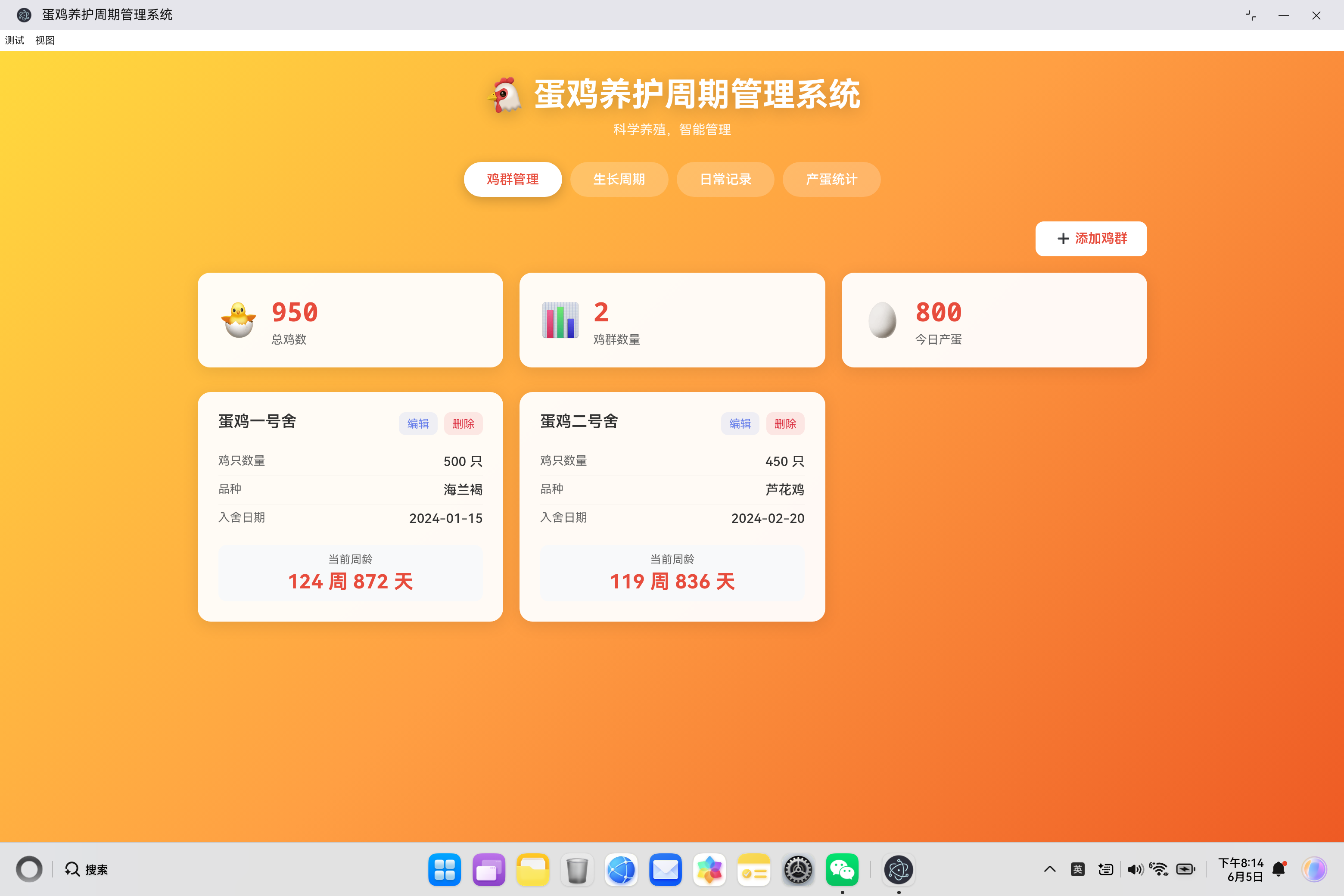
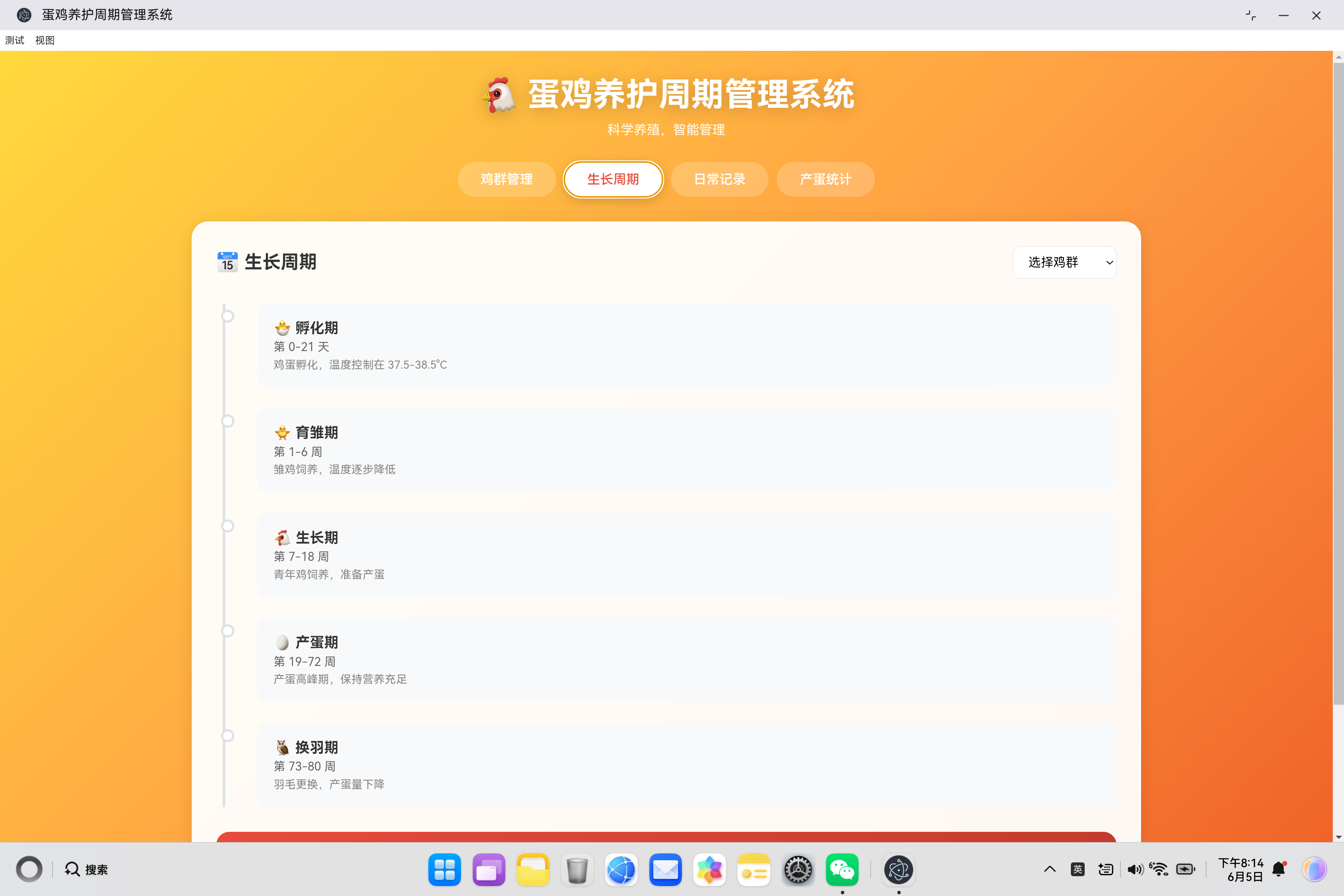
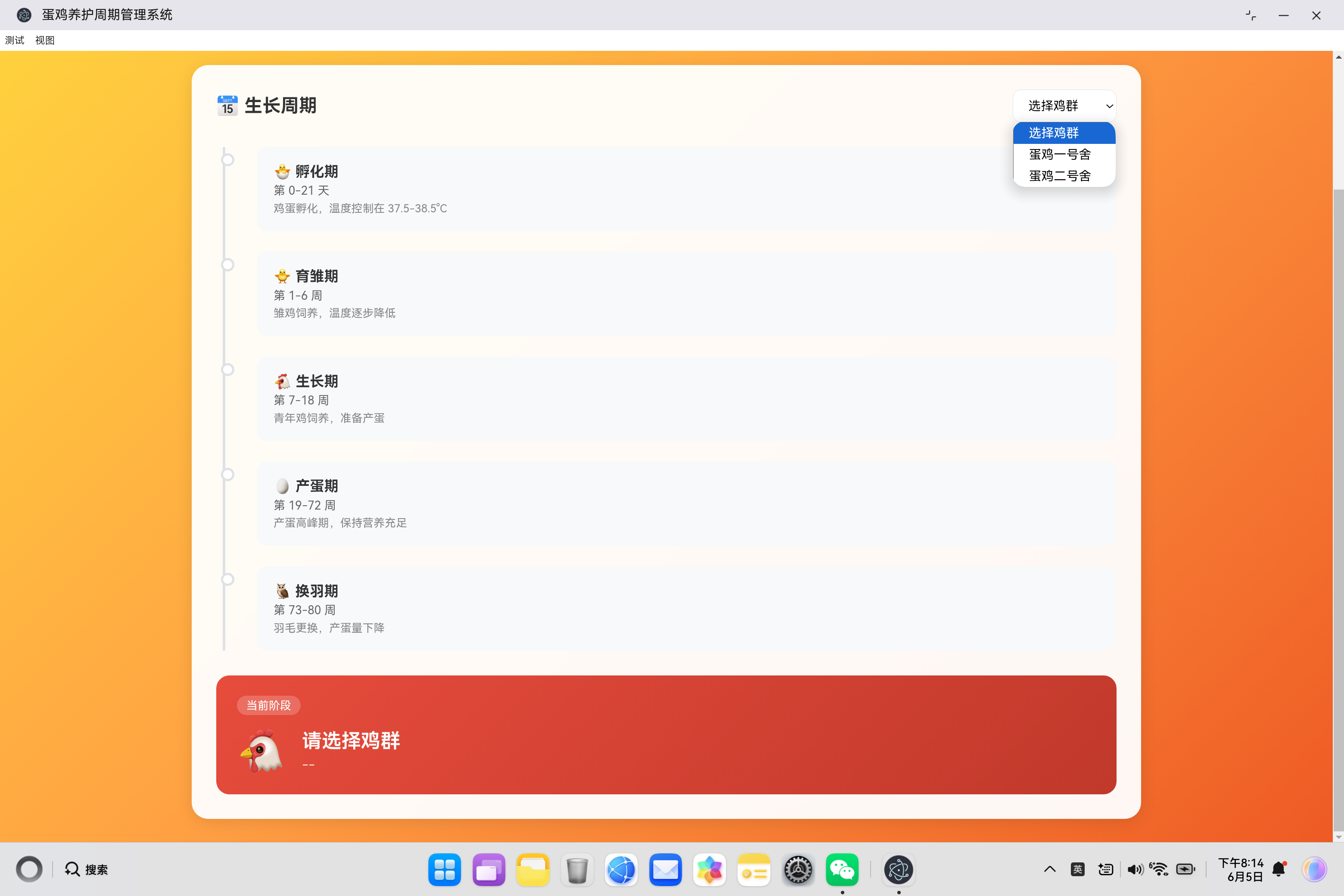
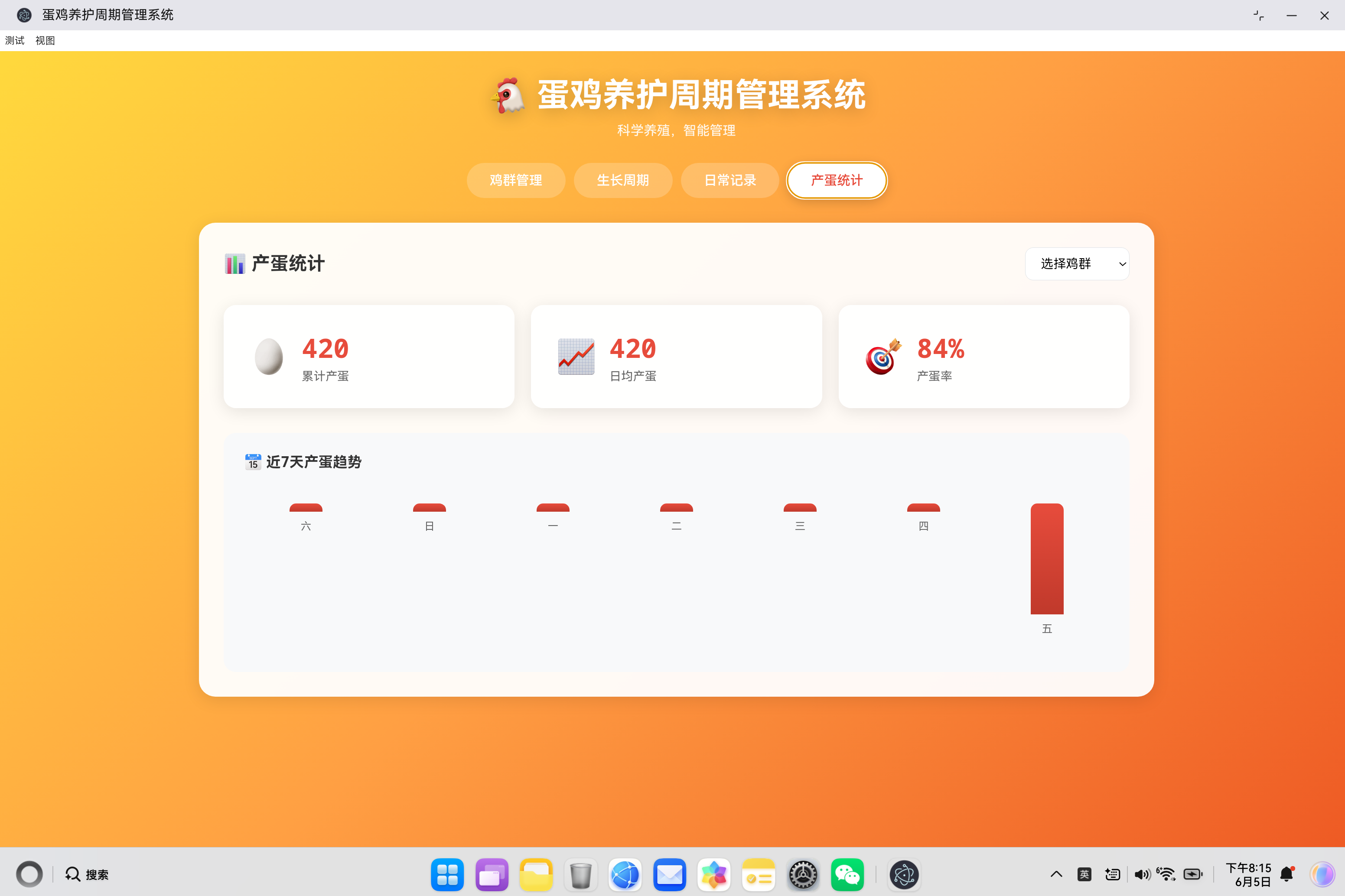
🐔 蛋鸡养护周期管理系统
一、项目概述
蛋鸡养殖是现代农业的重要组成部分,科学的养殖管理直接影响产蛋效率和经济效益。本系统旨在为养殖户提供一个便捷、高效的蛋鸡养护周期管理工具,涵盖鸡群管理、生长周期追踪、日常记录和产蛋统计四大核心模块。
1.1 系统架构设计
┌─────────────────────────────────────────────────────────────┐
│                     蛋鸡养护周期管理系统                      │
├─────────────────────────────────────────────────────────────┤
│                     UI层 (index.html)                       │
│  ┌──────────┬──────────┬──────────┬──────────┐             │
│  │ 鸡群管理 │ 生长周期 │ 日常记录 │ 产蛋统计 │             │
│  └──────────┴──────────┴──────────┴──────────┘             │
├─────────────────────────────────────────────────────────────┤
│                    业务逻辑层 (app.js)                       │
│  ┌──────────────┐ ┌──────────────┐ ┌──────────────┐        │
│  │ 数据管理模块 │ │ 周期计算模块 │ │ 统计分析模块 │        │
│  └──────────────┘ └──────────────┘ └──────────────┘        │
├─────────────────────────────────────────────────────────────┤
│                    数据持久层 (LocalStorage)                 │
│  ┌──────────────┐ ┌──────────────┐                         │
│  │   flocks     │ │   records    │                         │
│  │  鸡群数据    │ │  日常记录    │                         │
│  └──────────────┘ └──────────────┘                         │
└─────────────────────────────────────────────────────────────┘
1.2 核心功能模块
| 模块 | 功能描述 | 技术要点 |
|---|---|---|
| 鸡群管理 | 添加、编辑、删除鸡群信息 | 表单验证、CRUD操作 |
| 生长周期 | 自动计算周龄、判断生长阶段 | 日期计算、阶段匹配算法 |
| 日常记录 | 喂食、饮水、产蛋、温度记录 | 实时数据录入、数据校验 |
| 产蛋统计 | 数据可视化、趋势分析 | 图表生成、统计计算 |
二、数据模型设计
2.1 鸡群数据结构
{
    id: 1,                    // 唯一标识
    name: '蛋鸡一号舍',        // 鸡群名称
    count: 500,               // 鸡只数量
    breed: 'hyline',          // 品种:hyline海兰褐、luhua芦花鸡、rhode罗德岛红
    entryDate: '2024-01-15',  // 入舍日期
    status: 'active'          // 状态:active/retired
}
设计要点:
- 使用数字ID作为主键,便于快速查找
- 品种字段采用枚举值,保证数据一致性
- 状态字段支持未来扩展(如淘汰鸡群)
2.2 日常记录数据结构
{
    '1': {  // 鸡群ID作为key
        '2024-01-15': {  // 日期作为key
            feed: 25,           // 喂食量(kg)
            water: 80,          // 饮水量(L)
            eggs: 420,          // 产蛋数(个)
            temperature: 24.5,  // 温度(°C)
            health: ''          // 健康记录
        }
    }
}
设计要点:
- 采用双层对象结构,外层key为鸡群ID,内层key为日期
- 日期格式统一使用ISO标准格式
YYYY-MM-DD - 健康记录支持多行文本,方便记录详细信息
2.3 生长阶段定义
| 阶段ID | 阶段名称 | 周龄范围 | 图标 | 关键管理要点 |
|---|---|---|---|---|
| incubation | 孵化期 | 0-0.3周 | 🐣 | 温度控制37.5-38.5°C |
| brooding | 育雏期 | 1-6周 | 🐥 | 逐步降低温度 |
| growing | 生长期 | 7-18周 | 🐔 | 准备产蛋 |
| laying | 产蛋期 | 19-72周 | 🥚 | 保持营养充足 |
| molting | 换羽期 | 73-80周 | 🦉 | 羽毛更换,产蛋量下降 |
三、核心代码实现详解
3.1 周龄计算算法
calculateAge(entryDate) {
    const entry = new Date(entryDate);
    const today = new Date();
    const diff = today - entry;
    const days = Math.floor(diff / (1000 * 60 * 60 * 24));
    const weeks = Math.floor(days / 7);
    const remainingDays = days % 7;

    return { days, weeks, remainingDays };
}
技术要点:
- 日期差值计算:通过时间戳差值计算天数,避免手动处理月份差异
- 整数除法:使用
Math.floor()确保结果为整数周龄 - 返回结构:同时返回总天数、周数和剩余天数,满足不同场景需求
应用场景:
- 鸡群卡片显示当前周龄
- 生长阶段判断依据
- 产蛋率计算参考
3.2 生长阶段判断算法
getPhase(weeks) {
    if (weeks < 1) return { phase: 'incubation', name: '孵化期', icon: '🐣' };
    if (weeks <= 6) return { phase: 'brooding', name: '育雏期', icon: '🐥' };
    if (weeks <= 18) return { phase: 'growing', name: '生长期', icon: '🐔' };
    if (weeks <= 72) return { phase: 'laying', name: '产蛋期', icon: '🥚' };
    return { phase: 'molting', name: '换羽期', icon: '🦉' };
}
算法设计思路:
周龄输入 ──┬── weeks < 1 ──→ 孵化期
           ├── 1 ≤ weeks ≤ 6 ──→ 育雏期
           ├── 7 ≤ weeks ≤ 18 ──→ 生长期
           ├── 19 ≤ weeks ≤ 72 ──→ 产蛋期
           └── weeks > 72 ──→ 换羽期
设计优势:
- 边界条件清晰,避免重叠判断
- 返回完整阶段信息(ID、名称、图标),便于UI展示
- 支持扩展新的生长阶段
3.3 数据持久化机制
loadData() {
    const saved = localStorage.getItem('eggAppData');
    if (saved) {
        try {
            this.data = JSON.parse(saved);
        } catch (e) {
            this.data = this.getDefaultData();
        }
    } else {
        this.data = this.getDefaultData();
        this.saveData();
    }
}

saveData() {
    localStorage.setItem('eggAppData', JSON.stringify(this.data));
}
关键技术点:
| 技术点 | 实现方式 | 设计考虑 |
|---|---|---|
| 数据序列化 | JSON.stringify() |
统一格式,便于存储 |
| 异常处理 | try-catch包裹 |
防止损坏数据导致系统崩溃 |
| 默认数据 | getDefaultData() |
首次使用时提供示例数据 |
| 存储时机 | 每次数据变更后调用 | 确保数据不丢失 |
数据完整性保障:
getDefaultData() {
    const today = new Date().toISOString().split('T')[0];
    return {
        flocks: [
            { id: 1, name: '蛋鸡一号舍', count: 500, breed: 'hyline', entryDate: '2024-01-15', status: 'active' },
            { id: 2, name: '蛋鸡二号舍', count: 450, breed: 'luhua', entryDate: '2024-02-20', status: 'active' }
        ],
        records: {
            '1': { [today]: { feed: 25, water: 80, eggs: 420, temperature: 24.5, health: '' } },
            '2': { [today]: { feed: 22, water: 70, eggs: 380, temperature: 25, health: '' } }
        }
    };
}
3.4 产蛋统计与图表生成
updateStats() {
    const flockId = this.selectedFlockId;
    const flocksToUse = flockId ? [parseInt(flockId)] : this.data.flocks.map(f => f.id);

    let totalEggs = 0;
    let totalDays = 0;
    const dailyEggs = [];

    const today = new Date();
    for (let i = 6; i >= 0; i--) {
        const date = new Date(today);
        date.setDate(date.getDate() - i);
        const dateKey = date.toISOString().split('T')[0];

        let dayEggs = 0;
        flocksToUse.forEach(id => {
            if (this.data.records[id] && this.data.records[id][dateKey] && this.data.records[id][dateKey].eggs) {
                dayEggs += this.data.records[id][dateKey].eggs;
            }
        });
        dailyEggs.push({ date: dateKey, eggs: dayEggs });

        if (dayEggs > 0) {
            totalEggs += dayEggs;
            totalDays++;
        }
    }

    const avgEggs = totalDays > 0 ? Math.round(totalEggs / totalDays) : 0;
    const layRate = totalChickens > 0 && dailyEggs[dailyEggs.length - 1].eggs > 0
        ? Math.round((dailyEggs[dailyEggs.length - 1].eggs / totalChickens) * 100)
        : 0;

    this.totalEggsEl.textContent = totalEggs;
    this.avgEggsEl.textContent = avgEggs;
    this.layRateEl.textContent = `${layRate}%`;

    this.updateEggChart(dailyEggs);
}
统计逻辑流程:
┌──────────────────────────────────────────────────────────────────┐
│                      统计计算流程                               │
├──────────────────────────────────────────────────────────────────┤
│  1. 确定统计范围(单鸡群/全部鸡群)                               │
│           ↓                                                     │
│  2. 遍历近7天日期                                               │
│           ↓                                                     │
│  3. 累加每日产蛋数                                               │
│           ↓                                                     │
│  4. 计算累计产蛋、日均产蛋、产蛋率                                │
│           ↓                                                     │
│  5. 更新统计卡片和柱状图                                         │
└──────────────────────────────────────────────────────────────────┘
图表绑定实现:
updateEggChart(data) {
    const maxEggs = Math.max(...data.map(d => d.eggs), 1);
    const labels = ['日', '一', '二', '三', '四', '五', '六'];

    const bars = this.eggChart.querySelectorAll('.chart-bar');
    const labelsEl = this.eggChart.querySelectorAll('.chart-label');

    data.forEach((item, index) => {
        const height = maxEggs > 0 ? (item.eggs / maxEggs) * 100 : 0;
        bars[index].style.height = `${Math.max(height, 5)}%`;
        labelsEl[index].textContent = labels[(new Date(item.date)).getDay()];
    });
}
图表设计要点:
- 使用百分比高度,实现自适应缩放
- 设置最小高度5%,避免零数据时图表消失
- 动态计算星期标签,提升可读性
四、UI交互设计
4.1 标签页切换机制
switchTab(tab) {
    // 移除所有活跃状态
    this.tabFlock.classList.remove('active');
    this.tabCycle.classList.remove('active');
    this.tabRecords.classList.remove('active');
    this.tabStats.classList.remove('active');

    this.flockTab.classList.remove('active');
    this.cycleTab.classList.remove('active');
    this.recordsTab.classList.remove('active');
    this.statsTab.classList.remove('active');

    // 激活目标标签
    document.getElementById(`tab${tab.charAt(0).toUpperCase() + tab.slice(1)}`).classList.add('active');
    document.getElementById(`${tab}Tab`).classList.add('active');

    // 延迟加载统计数据
    if (tab === 'cycle') {
        this.updateCycleView();
    } else if (tab === 'stats') {
        this.updateStats();
    }
}
交互设计原则:
- 先移除所有活跃状态,再激活目标标签
- 使用字符串操作动态构建元素ID
- 按需加载数据,提升页面性能
4.2 表单验证机制
handleFlockSubmit(e) {
    e.preventDefault();
    const id = document.getElementById('flockId').value;
    const data = {
        name: document.getElementById('flockName').value.trim(),
        count: parseInt(document.getElementById('flockCount').value),
        breed: document.getElementById('flockBreed').value,
        entryDate: document.getElementById('flockDate').value,
        status: 'active'
    };

    if (!data.name || isNaN(data.count) || !data.entryDate) {
        this.showToast('请填写完整信息', 'warning');
        return;
    }

    // 保存逻辑...
}
验证规则:
| 字段 | 验证规则 | 错误提示 |
|---|---|---|
| name | 非空且去除首尾空格 | 请填写完整信息 |
| count | 必须是有效数字 | 请填写完整信息 |
| entryDate | 非空 | 请填写完整信息 |
4.3 Toast消息提示
showToast(message, type = 'success') {
    this.toastMessage.textContent = message;
    this.toast.className = 'toast';
    if (type) this.toast.classList.add(type);
    this.toast.classList.add('show');

    setTimeout(() => {
        this.toast.classList.remove('show');
    }, 3000);
}
样式定义:
.toast {
    position: fixed;
    bottom: 30px;
    left: 50%;
    transform: translateX(-50%) translateY(100px);
    background: #333;
    color: #fff;
    padding: 12px 24px;
    border-radius: 10px;
    opacity: 0;
    transition: all 0.3s ease;
}

.toast.show {
    transform: translateX(-50%) translateY(0);
    opacity: 1;
}

.toast.success { background: #28a745; }
.toast.warning { background: #ffc107; color: #333; }
设计特点:
- 底部居中显示,不遮挡主要内容
- 滑入/滑出动画提升用户体验
- 支持成功和警告两种状态样式
五、响应式布局设计
5.1 布局适配策略
/* 桌面端布局 */
.stats-row {
    display: grid;
    grid-template-columns: repeat(auto-fit, minmax(200px, 1fr));
    gap: 20px;
}

.flock-list {
    display: grid;
    grid-template-columns: repeat(auto-fill, minmax(280px, 1fr));
    gap: 20px;
}

/* 平板端适配 */
@media (max-width: 768px) {
    .header h1 { font-size: 1.8rem; }

    .tab-btn {
        padding: 10px 20px;
        font-size: 0.9rem;
    }

    .stats-row { grid-template-columns: 1fr; }
    .flock-list { grid-template-columns: 1fr; }

    .record-grid { grid-template-columns: repeat(2, 1fr); }
}

/* 移动端适配 */
@media (max-width: 480px) {
    .record-grid { grid-template-columns: 1fr; }

    .cycle-header,
    .section-header,
    .stats-header {
        flex-direction: column;
        gap: 15px;
        align-items: flex-start;
    }
}
响应式设计要点:
| 断点 | 屏幕宽度 | 布局策略 |
|---|---|---|
| 桌面端 | >768px | 多列网格布局 |
| 平板端 | 480-768px | 单列卡片布局 |
| 移动端 | <480px | 单列布局,垂直排列 |
5.2 视觉主题设计
系统采用温暖的橙色系主题,与蛋鸡养殖的农业属性相契合:
body {
    background: linear-gradient(135deg, #ffd93d 0%, #ff9f43 50%, #ee5a24 100%);
    min-height: 100vh;
}

.tab-btn.active {
    background: #fff;
    color: #e74c3c;
}

.stat-value {
    color: #e74c3c;
}

.chart-bar {
    background: linear-gradient(180deg, #e74c3c 0%, #c0392b 100%);
}
颜色方案:
| 颜色 | 用途 | 设计含义 |
|---|---|---|
| #ffd93d → #ee5a24 | 背景渐变 | 温暖、活力的农业氛围 |
| #e74c3c | 主色调 | 强调重要数据 |
| #fff | 卡片背景 | 清晰可读的内容区域 |
| #666 | 辅助文字 | 次要信息展示 |
六、性能优化策略
6.1 事件委托优化
bindEventListeners() {
    // 标签切换
    this.tabFlock.addEventListener('click', () => this.switchTab('flock'));
    this.tabCycle.addEventListener('click', () => this.switchTab('cycle'));
    this.tabRecords.addEventListener('click', () => this.switchTab('records'));
    this.tabStats.addEventListener('click', () => this.switchTab('stats'));

    // 模态框点击外部关闭
    this.flockModal.addEventListener('click', (e) => {
        if (e.target === this.flockModal) this.closeFlockModal();
    });
}
优化策略:
- 直接绑定到固定元素,避免动态元素重复绑定
- 使用事件委托模式处理动态内容
6.2 DOM引用缓存
initDOMReferences() {
    this.totalChickensEl = document.getElementById('totalChickens');
    this.totalFlocksEl = document.getElementById('totalFlocks');
    this.todayEggsEl = document.getElementById('todayEggs');
    this.flockListEl = document.getElementById('flockList');
    // ... 更多引用
}
优化效果:
- 避免重复调用
getElementById() - 提升DOM操作性能
6.3 数据按需加载
switchTab(tab) {
    // ... 标签切换逻辑

    if (tab === 'cycle') {
        this.updateCycleView();
    } else if (tab === 'stats') {
        this.updateStats();
    }
}
优化策略:
- 仅在切换到对应标签时加载数据
- 减少页面初始化时的计算量
七、扩展性设计
7.1 品种扩展机制
const breedNames = {
    hyline: '海兰褐',
    luhua: '芦花鸡',
    rhode: '罗德岛红',
    other: '其他'
};
扩展方法:
- 在HTML的select中添加新选项
- 在JavaScript的breedNames对象中添加对应映射
- 无需修改核心逻辑
7.2 生长阶段扩展
getPhase(weeks) {
    if (weeks < 1) return { phase: 'incubation', name: '孵化期', icon: '🐣' };
    // ... 添加新阶段
    return { phase: 'molting', name: '换羽期', icon: '🦉' };
}
扩展步骤:
- 在getPhase函数中添加新的条件分支
- 在HTML的timeline中添加对应阶段节点
- 更新CSS样式(如需)
7.3 记录类型扩展
系统当前支持四种记录类型:feed、water、eggs、temperature。如需扩展新类型:
addRecord(type) {
    const inputs = {
        feed: document.getElementById('feedAmount'),
        water: document.getElementById('waterAmount'),
        egg: document.getElementById('eggAmount'),
        temperature: document.getElementById('tempAmount'),
        // 添加新类型
    };
}
八、测试与验证
8.1 单元测试建议
// 周龄计算测试
describe('calculateAge', () => {
    it('should calculate correct weeks and days', () => {
        const app = new EggApp();
        const result = app.calculateAge('2024-01-01');
        expect(result.weeks).toBeGreaterThanOrEqual(0);
        expect(result.days).toBeGreaterThanOrEqual(0);
    });
});

// 阶段判断测试
describe('getPhase', () => {
    it('should return correct phase for different ages', () => {
        const app = new EggApp();
        expect(app.getPhase(0).phase).toBe('incubation');
        expect(app.getPhase(3).phase).toBe('brooding');
        expect(app.getPhase(10).phase).toBe('growing');
        expect(app.getPhase(30).phase).toBe('laying');
        expect(app.getPhase(80).phase).toBe('molting');
    });
});
8.2 边界条件测试
| 测试场景 | 预期行为 |
|---|---|
| 空鸡群列表 | 显示空状态提示 |
| 无选择鸡群 | 提示"请选择鸡群" |
| 输入负数 | 提示"请输入有效数值" |
| 数据损坏 | 使用默认数据恢复 |
| 极端日期 | 正确计算周龄 |
九、总结
蛋鸡养护周期管理系统通过模块化设计、响应式布局和智能数据管理,为养殖户提供了一个便捷的管理工具。系统的核心优势包括:
- 科学的生长周期管理:自动计算周龄和判断生长阶段
- 完整的数据记录:覆盖喂食、饮水、产蛋、温度和健康记录
- 直观的数据可视化:柱状图展示产蛋趋势
- 数据持久化:LocalStorage确保数据不丢失
- 响应式设计:支持多种设备访问
未来可以扩展的功能包括:
- 多用户支持
- 数据导出功能
- 告警提醒(如温度异常、产蛋率下降)
- 移动端App版本
- 数据分析和预测功能
附录:蛋鸡养殖参考数据
A.1 各阶段温度要求
| 阶段 | 温度范围 | 备注 |
|---|---|---|
| 孵化期 | 37.5-38.5°C | 孵化器温度 |
| 育雏期第1周 | 35-37°C | 每周下降2-3°C |
| 育雏期第2周 | 33-35°C | |
| 育雏期第3周 | 31-33°C | |
| 育雏期第4周 | 29-31°C | |
| 生长期 | 20-25°C | |
| 产蛋期 | 18-24°C | 最佳温度20-22°C |
A.2 产蛋率参考标准
| 周龄 | 产蛋率 | 备注 |
|---|---|---|
| 19周 | 5-10% | 开产初期 |
| 25周 | >90% | 达到高峰 |
| 30-50周 | 90-95% | 产蛋高峰期 |
| 50-72周 | 逐渐下降 | 每周下降0.5-1% |
A.3 饲料消耗参考
| 周龄 | 每只鸡日耗料(g) |
|---|---|
| 1-2周 | 10-20 |
| 3-4周 | 25-35 |
| 5-6周 | 40-50 |
| 7-8周 | 55-65 |
| 9-12周 | 70-80 |
| 13-18周 | 85-100 |
| 19-72周 | 110-120 |

作为“人工智能6S店”的官方数字引擎,为AI开发者与企业提供一个覆盖软硬件全栈、一站式门户。
更多推荐
 0
0 0
0- 0


 已为社区贡献5条内容

所有评论(0)