
商品猜价格游戏 - 鸿蒙PC Electron框架完整技术实现指南
商品猜价格游戏技术指南摘要 项目简介 商品猜价格是一款互动网页游戏,用户需在5轮挑战中猜测随机商品价格,每轮最多10次机会。系统根据猜测次数计算得分,鼓励用户用最少次数猜中价格。 核心架构 UI层:包含商品展示区、输入区、提示区和历史记录区 逻辑层:处理游戏管理、商品管理、分数计算和状态管理 数据层:使用LocalStorage存储最高分记录 关键技术 商品随机抽取算法(带去重机制) 智能提示系统
·
欢迎加入开源鸿蒙PC社区:
https://harmonypc.csdn.net/
atomgit仓库地址: https://atomgit.com/xiaomei11/shangpinjiage
🎁 商品猜价格游戏 - 完整技术实现指南
一、项目概述
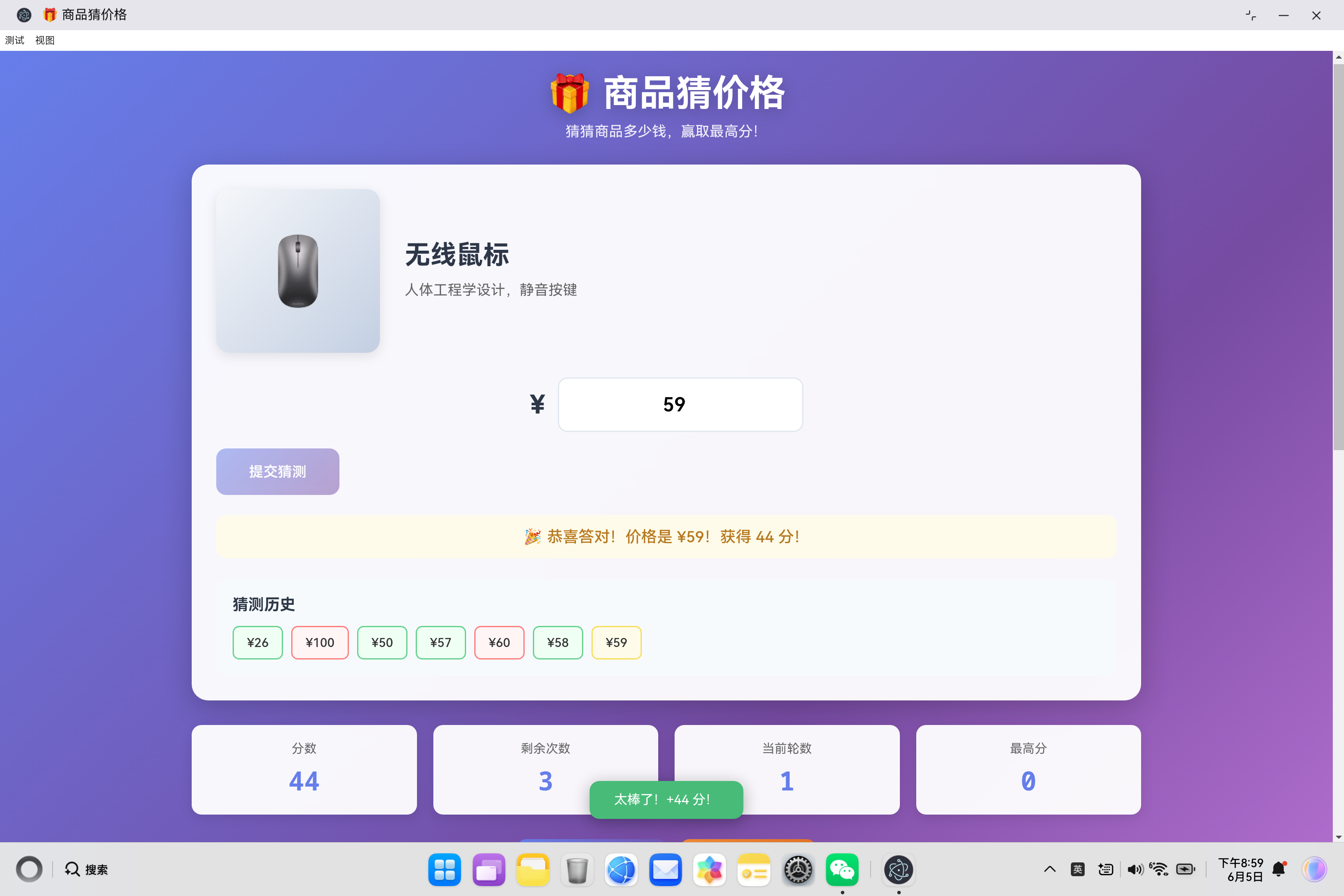
商品猜价格是一个互动式网页游戏,用户通过猜测商品价格获取分数。游戏包含5轮挑战,每轮最多10次猜测机会,根据猜测次数计算得分,鼓励用户用最少的次数猜中价格。
1.1 系统架构设计
┌─────────────────────────────────────────────────────────────┐
│                    商品猜价格游戏系统                        │
├─────────────────────────────────────────────────────────────┤
│                    UI层 (index.html)                        │
│  ┌─────────────┬─────────────┬─────────────┬─────────────┐  │
│  │  商品展示区  │  猜测输入区 │  提示反馈区 │  历史记录区 │  │
│  └─────────────┴─────────────┴─────────────┴─────────────┘  │
├─────────────────────────────────────────────────────────────┤
│                  业务逻辑层 (app.js)                         │
│  ┌────────────┬────────────┬────────────┬────────────┐    │
│  │  游戏管理   │  商品管理   │  分数计算   │  状态管理   │    │
│  └────────────┴────────────┴────────────┴────────────┘    │
├─────────────────────────────────────────────────────────────┤
│                  数据持久层 (LocalStorage)                   │
│  ┌──────────────────────────────────────────────────────┐ │
│  │         guessPriceHighScore (最高分)                 │ │
│  └──────────────────────────────────────────────────────┘ │
└─────────────────────────────────────────────────────────────┘
1.2 核心功能模块
| 模块 | 功能描述 | 技术要点 |
|---|---|---|
| 游戏控制 | 游戏开始、结束、重新开始、下一轮 | 状态管理、流程控制 |
| 商品管理 | 商品数据、随机抽取、去重机制 | 数据结构、随机算法 |
| 猜测验证 | 价格比较、智能提示 | 数值计算、条件判断 |
| 分数系统 | 基础分、惩罚分、奖励分 | 算法设计、策略优化 |
| 历史记录 | 猜测历史、颜色标记 | DOM操作、动态渲染 |
| 数据持久化 | 最高分保存 | LocalStorage操作 |
二、数据模型设计
2.1 商品数据结构
{
    id: 1,                          // 唯一标识
    name: '无线蓝牙耳机',            // 商品名称
    desc: '高品质音质,降噪功能,续航20小时',  // 商品描述
    price: 299,                     // 商品价格
    icon: '🎧'                      // 商品图标
}
设计要点:
id:使用自增数字ID,便于随机抽取和去重name:清晰的商品名称desc:详细的商品描述,帮助用户了解商品价值price:整数价格,便于比较icon:使用Emoji图标,视觉友好
2.2 商品库示例
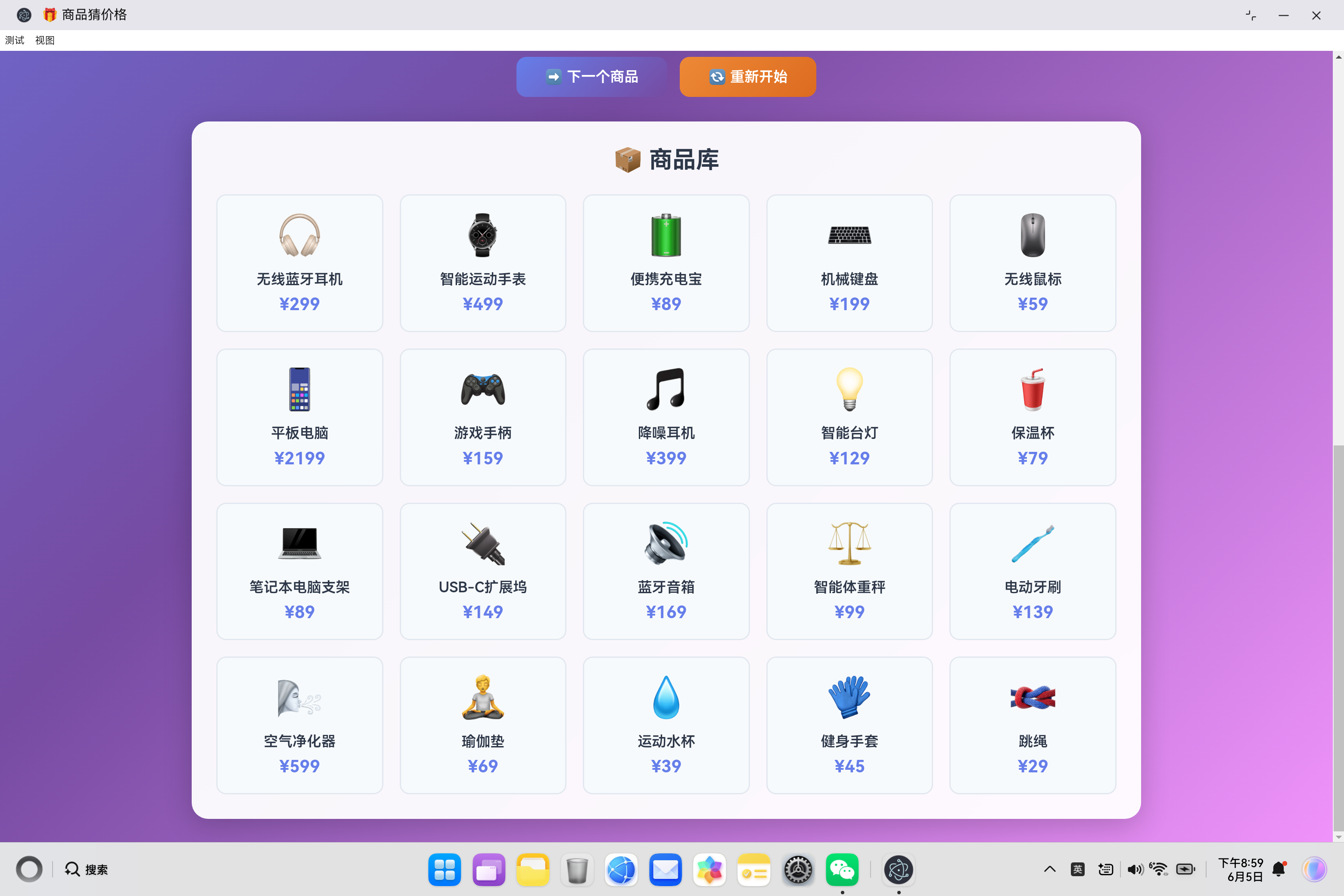
系统内置20种精心挑选的商品,价格范围从29元到2199元,涵盖数码产品和生活用品:
| ID | 商品名称 | 价格 | 图标 |
|---|---|---|---|
| 1 | 无线蓝牙耳机 | ¥299 | 🎧 |
| 2 | 智能运动手表 | ¥499 | ⌚ |
| 3 | 便携充电宝 | ¥89 | 🔋 |
| 4 | 机械键盘 | ¥199 | ⌨️ |
| 5 | 无线鼠标 | ¥59 | 🖱️ |
| 6 | 平板电脑 | ¥2199 | 📱 |
| 7 | 游戏手柄 | ¥159 | 🎮 |
| 8 | 降噪耳机 | ¥399 | 🎵 |
| 9 | 智能台灯 | ¥129 | 💡 |
| 10 | 保温杯 | ¥79 | 🥤 |
| 11 | 笔记本电脑支架 | ¥89 | 💻 |
| 12 | USB-C扩展坞 | ¥149 | 🔌 |
| 13 | 蓝牙音箱 | ¥169 | 🔊 |
| 14 | 智能体重秤 | ¥99 | ⚖️ |
| 15 | 电动牙刷 | ¥139 | 🪥 |
| 16 | 空气净化器 | ¥599 | 🌬️ |
| 17 | 瑜伽垫 | ¥69 | 🧘 |
| 18 | 运动水杯 | ¥39 | 💧 |
| 19 | 健身手套 | ¥45 | 🧤 |
| 20 | 跳绳 | ¥29 | 🪢 |
2.3 游戏状态结构
{
    products: [...],               // 商品库
    currentProduct: null,          // 当前商品
    guessHistory: [],              // 猜测历史
    score: 0,                      // 当前得分
    attempts: 10,                  // 剩余尝试次数
    round: 1,                      // 当前轮数
    maxRounds: 5,                  // 最大轮数
    highScore: 0,                  // 最高分
    isGameActive: false,           // 游戏是否进行中
    isRoundComplete: false,        // 当前轮是否完成
    usedProducts: []               // 已使用的商品ID
}
三、核心代码实现详解
3.1 游戏类的设计与初始化
class GuessPriceGame {
    constructor() {
        this.products = this.getProductData();
        this.currentProduct = null;
        this.guessHistory = [];
        this.score = 0;
        this.attempts = 10;
        this.round = 1;
        this.maxRounds = 5;
        this.highScore = 0;
        this.isGameActive = false;
        this.isRoundComplete = false;
        this.usedProducts = [];
        this.init();
    }

    init() {
        this.loadHighScore();
        this.initDOMReferences();
        this.bindEventListeners();
        this.renderProductGrid();
        this.updateStatusDisplay();
    }
}
核心设计要点:
- 构造函数:初始化所有游戏状态
- init方法:按顺序执行初始化流程
- 职责分离:每个方法负责单一功能
3.2 商品随机抽取算法
getRandomProduct() {
    const availableProducts = this.products.filter(p =>
        !this.usedProducts.includes(p.id)
    );

    if (availableProducts.length === 0) {
        this.usedProducts = [];
        return this.products[Math.floor(Math.random() * this.products.length)];
    }

    const product = availableProducts[
        Math.floor(Math.random() * availableProducts.length)
    ];
    this.usedProducts.push(product.id);
    return product;
}
算法分析:
- 过滤已使用商品:确保不重复使用相同商品
- 边界处理:商品库用尽时重置usedProducts
- 随机选择:使用
Math.random()和数组索引实现 - 状态更新:将选中的商品ID加入已使用列表
时间复杂度: O(n),n为商品库大小
3.3 分数计算算法
calculateScore(attemptsUsed) {
    const baseScore = 100;               // 基础分
    const penalty = attemptsUsed * 8;    // 惩罚分
    const bonus = attemptsUsed <= 3 ? 50 : (attemptsUsed <= 6 ? 25 : 0);  // 奖励分
    return Math.max(baseScore - penalty + bonus, 10);  // 保底10分
}
分数计算策略:
| 尝试次数 | 基础分 | 惩罚分 | 奖励分 | 最终得分 |
|---|---|---|---|---|
| 1 | 100 | -8 | +50 | 142 |
| 2 | 100 | -16 | +50 | 134 |
| 3 | 100 | -24 | +50 | 126 |
| 4 | 100 | -32 | +25 | 93 |
| 5 | 100 | -40 | +25 | 85 |
| 6 | 100 | -48 | +25 | 77 |
| 7 | 100 | -56 | 0 | 44 |
| 8 | 100 | -64 | 0 | 36 |
| 9 | 100 | -72 | 0 | 28 |
| 10 | 100 | -80 | 0 | 20 |
| >10 | 100 | -80 | 0 | 10 |
设计优势:
- 鼓励快速猜中,早期奖励丰厚
- 后期惩罚递增,但保证有得分
- 设置最低分,避免负分
3.4 智能提示系统
handleWrongGuess(guess, actualPrice) {
    const diff = Math.abs(guess - actualPrice);
    let hint;

    if (diff > actualPrice * 0.5) {
        hint = guess > actualPrice ?
            '太高了!猜低一点' : '太低了!猜高一点';
    } else if (diff > actualPrice * 0.2) {
        hint = guess > actualPrice ?
            '有点高,再低一些' : '有点低,再高一些';
    } else {
        hint = guess > actualPrice ?
            '接近了!再低一点点' : '接近了!再高一点点';
    }

    this.hintMessage.textContent = hint;
    this.hintMessage.className =
        `hint-message ${guess > actualPrice ? 'high' : 'low'}`;
    this.guessInput.value = '';
    this.guessInput.focus();
}
提示级别设计:
| 误差范围 | 提示内容 | 视觉反馈 |
|---|---|---|
| >50% | 太高了!猜低一点 / 太低了!猜高一点 | 红色/绿色 |
| 20%-50% | 有点高,再低一些 / 有点低,再高一些 | 红色/绿色 |
| <20% | 接近了!再低一点点 / 接近了!再高一点点 | 红色/绿色 |
动态UI反馈:
- 根据猜测方向应用不同的CSS类
- 自动清空输入框
- 自动聚焦输入框,提升体验
3.5 游戏流程控制
startGame() {
    this.score = 0;
    this.attempts = 10;
    this.round = 1;
    this.usedProducts = [];
    this.isGameActive = true;
    this.startNewRound();

    this.startBtn.style.display = 'none';
    this.restartBtn.style.display = 'inline-block';
    this.guessBtn.disabled = false;
    this.showToast('游戏开始!加油!', 'success');
}

startNewRound() {
    this.currentProduct = this.getRandomProduct();
    this.guessHistory = [];
    this.attempts = 10;
    this.isRoundComplete = false;

    this.productImageEl.innerHTML =
        `<span class="placeholder">${this.currentProduct.icon}</span>`;
    this.productNameEl.textContent = this.currentProduct.name;
    this.productDescEl.textContent = this.currentProduct.desc;
    this.guessInput.value = '';
    this.hintMessage.textContent = '猜猜这个商品的价格?';
    this.hintMessage.className = 'hint-message';
    this.historyList.innerHTML = '';
    this.guessBtn.disabled = false;
    this.nextBtn.style.display = 'none';
    this.updateStatusDisplay();
    this.guessInput.focus();
}

nextProduct() {
    this.round++;

    if (this.round > this.maxRounds) {
        this.endGame();
        return;
    }

    this.startNewRound();
    this.showToast(`第 ${this.round} 轮开始!`, 'success');
}
状态转换流程:
初始化 → 开始游戏 → 第1轮 → 猜测 → 猜对/次数用完 →
       ↓
    第2轮 → 猜测 → ... → 第5轮 → 游戏结束 → 显示结果
3.6 猜测验证处理
makeGuess() {
    if (!this.isGameActive || this.isRoundComplete) return;

    const guess = parseFloat(this.guessInput.value);
    if (isNaN(guess) || guess < 0) {
        this.showToast('请输入有效的价格', 'warning');
        return;
    }

    const actualPrice = this.currentProduct.price;
    this.guessHistory.push(guess);
    this.attempts--;
    this.updateStatusDisplay();
    this.addHistoryItem(guess, actualPrice);

    if (guess === actualPrice) {
        this.handleCorrectGuess();
    } else if (this.attempts === 0) {
        this.handleNoMoreAttempts();
    } else {
        this.handleWrongGuess(guess, actualPrice);
    }
}
验证流程:
- 检查游戏状态
- 验证输入合法性
- 更新猜测历史
- 减少尝试次数
- 根据猜测结果分发处理
3.7 游戏结束处理
endGame() {
    this.isGameActive = false;
    this.guessBtn.disabled = true;
    this.nextBtn.style.display = 'none';
    this.startBtn.style.display = 'inline-block';

    const isNewRecord = this.score > this.highScore;
    if (isNewRecord) {
        this.highScore = this.score;
        this.saveHighScore();
        this.updateStatusDisplay();
    }

    this.showGameOverModal(isNewRecord);
}

showGameOverModal(isNewRecord) {
    this.finalScore.textContent = this.score;

    if (isNewRecord) {
        this.finalMessage.textContent = '🎊 新纪录!太棒了!';
    } else if (this.score >= 400) {
        this.finalMessage.textContent = '🏆 非常优秀!';
    } else if (this.score >= 250) {
        this.finalMessage.textContent = '👍 表现不错!';
    } else if (this.score >= 100) {
        this.finalMessage.textContent = '💪 继续加油!';
    } else {
        this.finalMessage.textContent = '🌱 多多练习!';
    }

    this.gameOverModal.classList.add('active');
}
评价体系:
| 得分范围 | 评价 | 表情 |
|---|---|---|
| 新纪录 | 新纪录!太棒了! | 🎊 |
| ≥400 | 非常优秀! | 🏆 |
| 250-399 | 表现不错! | 👍 |
| 100-249 | 继续加油! | 💪 |
| <100 | 多多练习! | 🌱 |
3.8 LocalStorage数据持久化
loadHighScore() {
    const saved = localStorage.getItem('guessPriceHighScore');
    if (saved) {
        this.highScore = parseInt(saved) || 0;
    }
}

saveHighScore() {
    localStorage.setItem('guessPriceHighScore', this.highScore.toString());
}
数据持久化要点:
- 使用
localStorage.setItem()保存数据 - 使用
localStorage.getItem()读取数据 - 数据类型转换:数字存储为字符串,读取时解析
- 容错处理:
parseInt()失败时返回0
四、UI交互设计
4.1 响应式布局设计
.game-board {
    background: rgba(255, 255, 255, 0.95);
    border-radius: 20px;
    padding: 30px;
    box-shadow: 0 8px 35px rgba(0, 0, 0, 0.2);
    margin-bottom: 30px;
}

.product-display {
    display: flex;
    gap: 30px;
    margin-bottom: 30px;
    align-items: center;
}

@media (max-width: 768px) {
    .header h1 {
        font-size: 2rem;
    }

    .product-display {
        flex-direction: column;
        text-align: center;
    }

    .product-image {
        width: 150px;
        height: 150px;
    }

    .status-bar {
        grid-template-columns: repeat(2, 1fr);
    }
}

@media (max-width: 480px) {
    .status-bar {
        grid-template-columns: 1fr;
    }
}
响应式断点:
| 设备类型 | 断点 | 布局策略 |
|---|---|---|
| 桌面端 | >768px | 横向布局,4列状态 |
| 平板端 | 480-768px | 纵向布局,2列状态 |
| 移动端 | <480px | 单列布局,1列状态 |
4.2 视觉主题设计
body {
    background: linear-gradient(135deg,
        #667eea 0%,
        #764ba2 50%,
        #f093fb 100%);
}

.hint-message.high {
    background: #fff5f5;
    color: #c53030;
}

.hint-message.low {
    background: #f0fff4;
    color: #276749;
}

.hint-message.correct {
    background: #fffbea;
    color: #b7791f;
}
配色方案:
| 用途 | 颜色 | 含义 |
|---|---|---|
| 背景渐变 | #667eea → #f093fb | 活力、游戏感 |
| 猜高提示 | #fff5f5 / #c53030 | 红色警告 |
| 猜低提示 | #f0fff4 / #276749 | 绿色通过 |
| 猜对提示 | #fffbea / #b7791f | 黄色警告 |
4.3 按钮状态管理
.guess-btn {
    padding: 18px 40px;
    background: linear-gradient(135deg, #667eea 0%, #764ba2 100%);
    color: #fff;
    border: none;
    border-radius: 12px;
    font-size: 1.1rem;
    font-weight: 600;
    cursor: pointer;
    transition: all 0.3s ease;
}

.guess-btn:hover:not(:disabled) {
    transform: translateY(-2px);
    box-shadow: 0 6px 20px rgba(102, 126, 234, 0.4);
}

.guess-btn:disabled {
    opacity: 0.5;
    cursor: not-allowed;
}
状态设计:
- 默认状态:渐变背景,正常样式
- 悬停状态:向上移动2px,添加阴影
- 禁用状态:透明度0.5,不可点击
4.4 Toast消息提示
showToast(message, type = 'success') {
    this.toastMessage.textContent = message;
    this.toast.className = 'toast';
    if (type) this.toast.classList.add(type);
    this.toast.classList.add('show');

    setTimeout(() => {
        this.toast.classList.remove('show');
    }, 2500);
}
.toast {
    position: fixed;
    bottom: 30px;
    left: 50%;
    transform: translateX(-50%) translateY(100px);
    background: #333;
    color: #fff;
    padding: 14px 30px;
    border-radius: 12px;
    box-shadow: 0 4px 20px rgba(0, 0, 0, 0.3);
    z-index: 2000;
    opacity: 0;
    transition: all 0.3s ease;
}

.toast.show {
    transform: translateX(-50%) translateY(0);
    opacity: 1;
}
动画效果:
- 从底部滑入,2500ms后滑出
- 支持三种类型:success、warning、error
- 居中显示,固定定位
五、性能优化策略
5.1 DOM引用缓存
initDOMReferences() {
    this.productImageEl = document.getElementById('productImage');
    this.productNameEl = document.getElementById('productName');
    this.productDescEl = document.getElementById('productDesc');
    this.guessInput = document.getElementById('guessInput');
    this.guessBtn = document.getElementById('guessBtn');
    this.hintMessage = document.getElementById('hintMessage');
    this.historyList = document.getElementById('historyList');
    this.scoreValue = document.getElementById('scoreValue');
    this.attemptsValue = document.getElementById('attemptsValue');
    this.roundValue = document.getElementById('roundValue');
    this.highScoreValue = document.getElementById('highScoreValue');
    // ... 更多引用
}
优化效果:
- 避免重复调用
getElementById() - 减少DOM查询开销
- 提升渲染性能
5.2 事件绑定优化
bindEventListeners() {
    this.startBtn.addEventListener('click', () => this.startGame());
    this.nextBtn.addEventListener('click', () => this.nextProduct());
    this.restartBtn.addEventListener('click', () => this.restartGame());
    this.guessBtn.addEventListener('click', () => this.makeGuess());

    this.guessInput.addEventListener('keypress', (e) => {
        if (e.key === 'Enter' && this.isGameActive && !this.isRoundComplete) {
            this.makeGuess();
        }
    });
}
优化要点:
- 使用箭头函数确保
this上下文正确 - 条件判断避免不必要的函数调用
- 支持键盘操作(Enter键)
5.3 渲染优化
renderProductGrid() {
    this.productGrid.innerHTML = this.products.map(product => `
        <div class="product-card">
            <div class="product-card-icon">${product.icon}</div>
            <div class="product-card-name">${product.name}</div>
            <div class="product-card-price">¥${product.price}</div>
        </div>
    `).join('');
}
优化策略:
- 使用
innerHTML一次性渲染,而不是多次DOM操作 - 使用模板字符串和
map()构建HTML - 避免在循环中进行DOM操作
六、扩展性设计
6.1 商品数据扩展
只需修改getProductData()方法即可添加新商品:
getProductData() {
    return [
        { id: 1, name: '无线蓝牙耳机', desc: '...', price: 299, icon: '🎧' },
        { id: 2, name: '智能运动手表', desc: '...', price: 499, icon: '⌚' },
        // 添加新商品...
    ];
}
6.2 游戏规则扩展
可以轻松调整游戏参数:
constructor() {
    this.attempts = 10;        // 可改为8、15等
    this.maxRounds = 5;        // 可改为3、10等
    // ... 其他参数
}

calculateScore(attemptsUsed) {
    const baseScore = 100;     // 可调整
    const penalty = attemptsUsed * 8;  // 可调整惩罚系数
    const bonus = attemptsUsed <= 3 ? 50 : (attemptsUsed <= 6 ? 25 : 0);
    return Math.max(baseScore - penalty + bonus, 10);
}
6.3 UI主题扩展
支持自定义主题色,只需修改CSS变量或渐变:
body {
    background: linear-gradient(135deg,
        #your-color-1 0%,
        #your-color-2 50%,
        #your-color-3 100%);
}
七、测试与验证
7.1 功能测试用例
| 测试场景 | 输入 | 预期结果 |
|---|---|---|
| 开始游戏 | 点击"开始游戏" | 显示第一个商品,分数0,轮数1,次数10 |
| 正确猜测 | 输入正确价格 | 显示"恭喜答对",加分,显示下一轮按钮 |
| 错误猜测 | 输入错误价格 | 显示提示,次数减1,添加历史记录 |
| 次数用尽 | 10次都猜错 | 显示正确答案,显示下一轮按钮 |
| 游戏结束 | 完成5轮 | 显示最终得分,保存最高分 |
| 新纪录 | 得分超过历史最高 | 显示"新纪录",更新最高分 |
| 重新开始 | 点击"重新开始" | 重置所有状态 |
7.2 边界条件测试
| 测试场景 | 测试内容 | 预期结果 |
|---|---|---|
| 空输入 | 不输入直接提交 | 提示"请输入有效的价格" |
| 负数输入 | 输入负数 | 提示"请输入有效的价格" |
| 输入非数字 | 输入文字 | 提示"请输入有效的价格" |
| 最高分存储 | 刷新页面 | 最高分保持不变 |
| 商品去重 | 连续游戏 | 不重复出现相同商品 |
7.3 响应式测试
| 设备尺寸 | 测试内容 |
|---|---|
| 1920x1080 | 完整显示所有内容 |
| 1024x768 | 正常显示,无错位 |
| 768x1024 | 响应式布局,2列状态 |
| 375x667 | 单列布局,正常交互 |
八、总结
商品猜价格游戏通过精心设计的游戏机制和完整的实现,提供了一个有趣且易用的互动体验。
核心优势
- 完整的游戏流程:从开始到结束,流畅完整
- 智能提示系统:根据误差程度给出不同提示
- 合理的分数计算:鼓励快速猜中,奖励策略合理
- 数据持久化:自动保存最高分
- 响应式设计:支持各种设备
- 可扩展性强:易于添加新商品和调整规则
技术亮点
- 面向对象设计:使用Class组织代码,结构清晰
- DOM引用缓存:优化性能
- LocalStorage持久化:数据保存
- 智能随机算法:商品去重抽取
- 状态管理:完整的游戏状态控制
- 响应式布局:CSS Grid + Flexbox
未来扩展方向
- 更多商品:增加商品库到50种
- 难度选择:简单/普通/困难模式
- 排行榜:与朋友分享分数
- 音效:添加背景音乐和音效
- 动画:更丰富的交互动画
- 后台管理:商品库编辑功能
- 联机对战:多人实时对战模式
附录:游戏策略指南
A.1 猜价格技巧
- 观察商品描述:仔细阅读商品描述,了解商品价值
- 从中间价位开始:先猜一个中间价格,快速缩小范围
- 使用二分法:每次猜区间中间值,快速定位
- 参考商品库:查看下方商品库,了解价格区间
- 保留猜测历史:查看历史记录,分析趋势
A.2 满分攻略
要获得高分(每轮都在前3次猜中):
- 熟悉常见商品价格
- 每次猜测后仔细分析提示
- 使用二分法策略
- 保持冷静,不要急躁
- 多练习,提高价格敏感度
A.3 预期得分参考
| 每轮平均尝试次数 | 预期总得分 | 评价 |
|---|---|---|
| 1-2次 | 600-700分 | 天才级别! |
| 3次 | 500-600分 | 非常优秀! |
| 4-5次 | 350-500分 | 表现不错! |
| 6-8次 | 200-350分 | 继续加油! |
| >8次 | <200分 | 多多练习! |

作为“人工智能6S店”的官方数字引擎,为AI开发者与企业提供一个覆盖软硬件全栈、一站式门户。
更多推荐

 0
0 0
0- 0


 已为社区贡献5条内容

所有评论(0)