
鸿蒙PC Electron框架天天饮水应用深度解析:健康饮水管理系统
天天饮水应用摘要: 一款基于Web的健康饮水管理应用,帮助用户养成规律饮水习惯。采用MVC架构设计,核心功能包括: 饮水记录:支持快捷添加(150/250/500ml)和自定义输入 进度追踪:实时显示日饮水量/目标值(2000ml可调) 智能提醒:可设置间隔提醒(默认60分钟) 数据统计:提供今日记录、连续达标天数、周视图图表 本地存储:使用localStorage持久化用户数据 技术特点: 日期
·
欢迎加入开源鸿蒙PC社区:
https://harmonypc.csdn.net/
atomgit仓库地址: https://atomgit.com/ai_lingshi/tiantianyinshui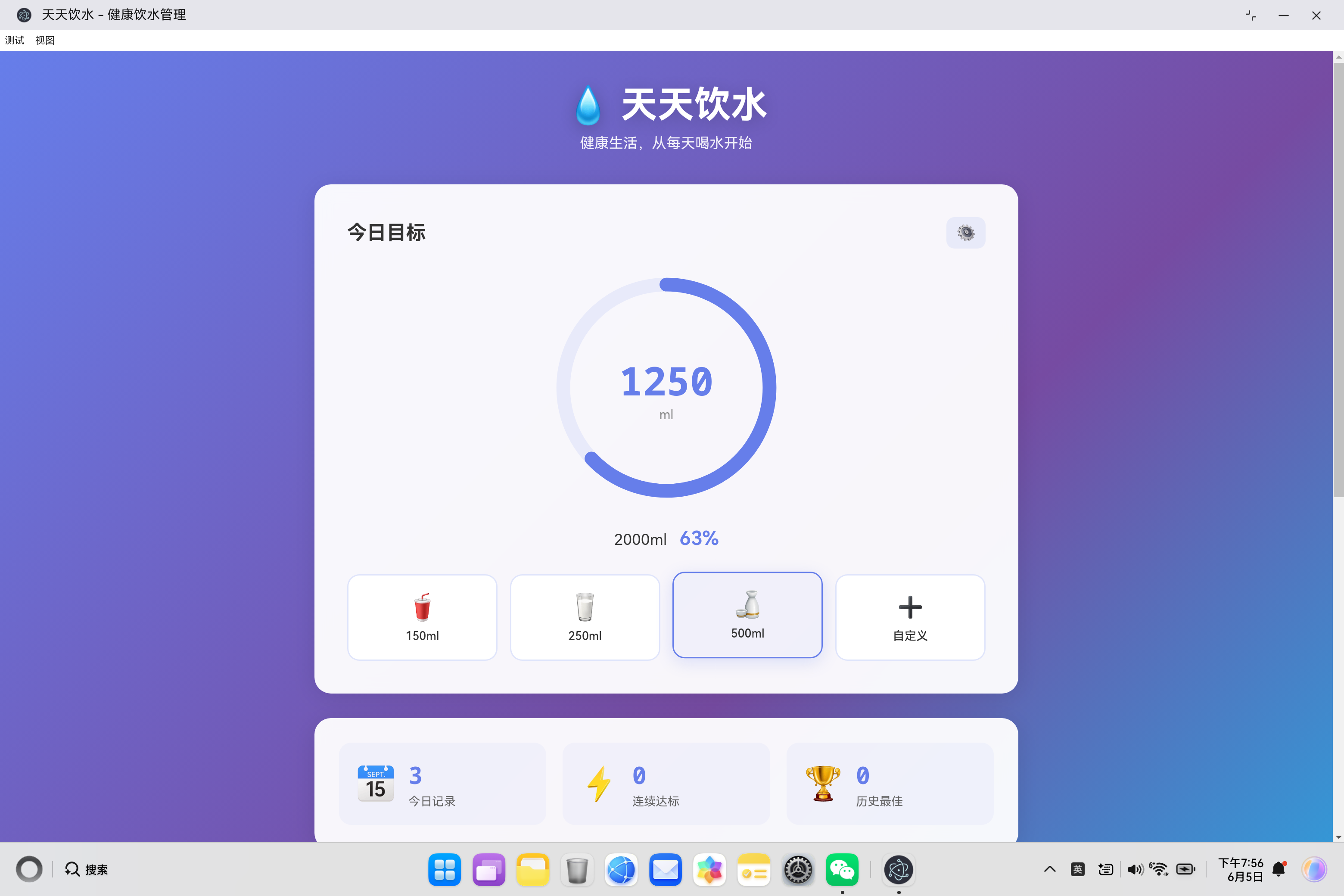
一、项目概述
1.1 项目背景
水是生命之源,保持充足的饮水量对人体健康至关重要。医学研究表明,成年人每天需要饮用约 2000-2500ml 的水才能满足身体需求。然而,在快节奏的现代生活中,很多人经常忘记喝水,导致身体缺水,影响健康。
为什么需要饮水管理应用?
- 健康意识提升:人们越来越关注健康管理
- 生活节奏加快:需要工具帮助养成良好习惯
- 数据可视化:直观了解自己的饮水情况
- 习惯养成:通过提醒和记录帮助坚持
1.2 功能定位
天天饮水是一款专注于帮助用户养成健康饮水习惯的应用。核心功能包括:
| 功能模块 | 功能说明 |
|---|---|
| 饮水记录 | 快捷添加、自定义输入、记录管理 |
| 进度展示 | 圆形进度环、百分比、数值显示 |
| 目标设置 | 自定义每日目标、目标达成提醒 |
| 提醒功能 | 定时提醒、通知推送、弹窗提示 |
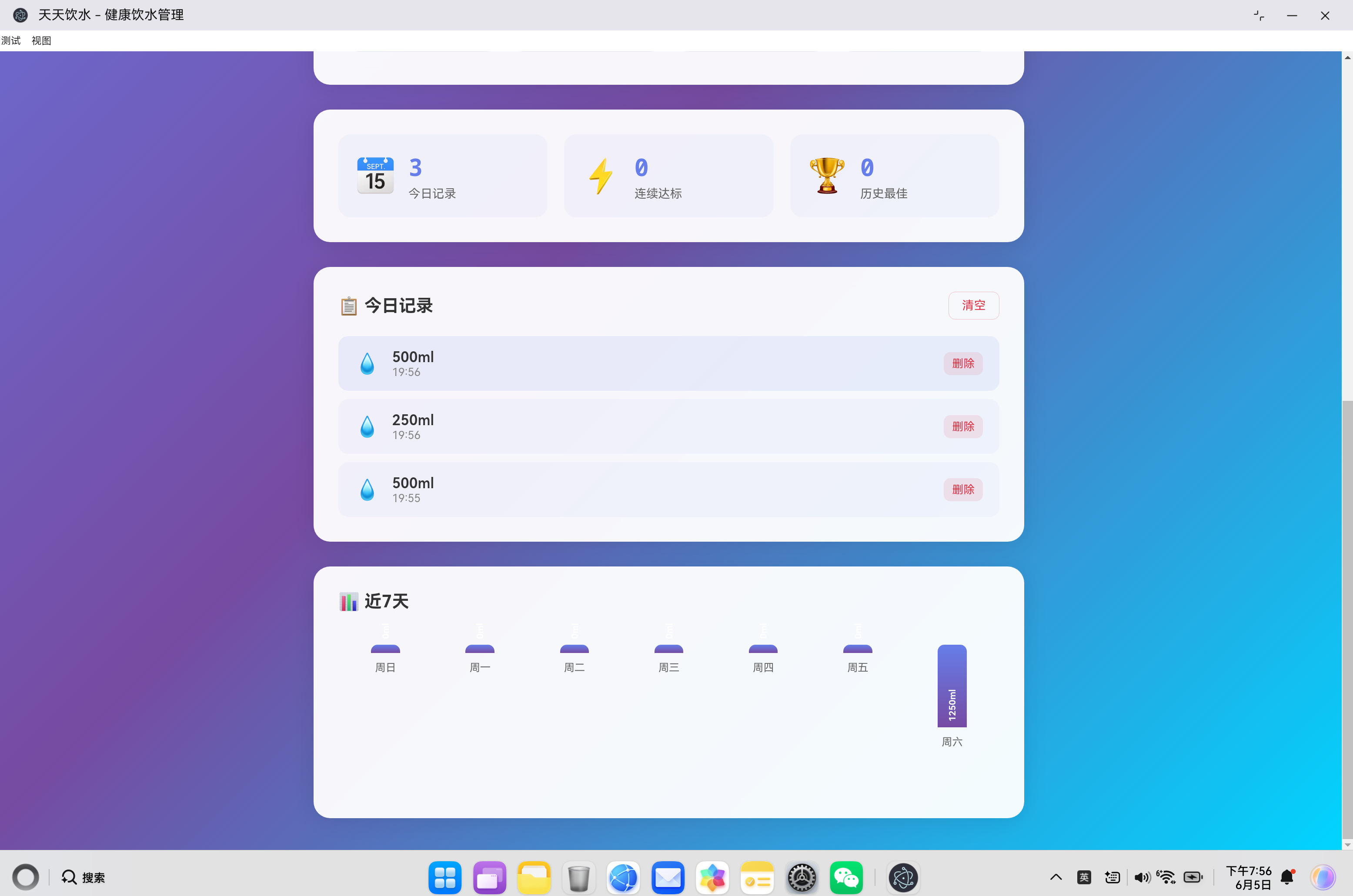
| 数据统计 | 今日记录、连续达标、历史最佳、周图表 |
| 数据持久化 | 本地存储、数据不丢失、跨天记录 |
1.3 技术架构
┌─────────────────────────────────────────────────────────────┐
│                    用户界面层 (View)                         │
│  ┌──────────────────┐  ┌──────────────────┐                │
│  │   主页面布局    │  │   组件与卡片     │                │
│  └──────────────────┘  └──────────────────┘                │
├─────────────────────────────────────────────────────────────┤
│                  应用控制器 (Controller)                    │
│  ┌───────────────────────────────────────────────────────┐ │
│  │              WaterApp 主控制器                         │ │
│  │  - 事件监听与分发                                     │ │
│  │  - UI 更新协调                                        │ │
│  │  - 业务逻辑调度                                       │ │
│  └───────────────────────────────────────────────────────┘ │
├─────────────────────────────────────────────────────────────┤
│                  数据模型层 (Model)                         │
│  ┌──────────────────┐  ┌──────────────────┐                │
│  │  数据管理与存储  │  │  业务逻辑计算    │                │
│  └──────────────────┘  └──────────────────┘                │
├─────────────────────────────────────────────────────────────┤
│                  存储层 (Storage)                           │
│  ┌───────────────────────────────────────────────────────┐ │
│  │              localStorage 本地存储                      │ │
│  └───────────────────────────────────────────────────────┘ │
└─────────────────────────────────────────────────────────────┘
二、数据模型设计
2.1 核心数据结构
应用的数据结构设计围绕以下几个核心概念:
{
    records: [],                  // 历史数据(保留兼容性)
    settings: {
        dailyGoal: 2000,           // 每日饮水目标(毫升)
        reminderEnabled: true,    // 提醒开关
        reminderInterval: 60       // 提醒间隔(分钟)
    },
    history: {                     // 每日记录,按日期索引
        '2024-01-01': [
            {
                id: 1,
                amount: 200,
                time: '08:30'
            },
            {
                id: 2,
                amount: 250,
                time: '10:15'
            }
        ],
        '2024-01-02': [
            // ... 其他日期记录
        ]
    },
    bestStreak: 0                  // 历史最佳连续达标天数
}
2.2 设计原则
1. 按日期组织数据
history: {
    'YYYY-MM-DD': [record1, record2, ...]
}
- 便于查询任意一天的数据
- 天然分离每日数据
- 支持历史数据回溯
2. 记录包含完整信息
{
    id: 1672531200000,          // 时间戳作为唯一ID
    amount: 200,               // 饮水量(毫升)
    time: '08:30'              // 格式化的时间字符串
}
- id:使用时间戳保证唯一性
- amount:饮水量数值
- time:便于显示的时间
3. 设置独立存储
settings: {
    dailyGoal: 2000,
    reminderEnabled: true,
    reminderInterval: 60
}
- 与记录数据分离
- 便于修改和恢复
- 支持个性化配置
2.3 日期处理工具
// 获取今日日期键
getTodayKey() {
    return new Date().toISOString().split('T')[0];
}

// 获取今日记录
getTodayRecords() {
    const today = this.getTodayKey();
    if (!this.data.history[today]) {
        this.data.history[today] = [];
    }
    return this.data.history[today];
}

// 计算今日总饮水量
getTodayTotal() {
    const records = this.getTodayRecords();
    return records.reduce((sum, record) => sum + record.amount, 0);
}
三、核心功能实现
3.1 饮水记录功能
添加记录流程:
addWater(amount) {
    // 1. 创建记录对象
    const record = {
        id: Date.now(),  // 使用时间戳作为唯一ID
        amount: amount,
        time: new Date().toLocaleTimeString('zh-CN', {
            hour: '2-digit',
            minute: '2-digit'
        })
    };

    // 2. 添加到今日记录
    this.getTodayRecords().push(record);

    // 3. 保存到本地存储
    this.saveData();

    // 4. 更新UI
    this.updateUI();

    // 5. 显示成功提示
    this.showToast(`已添加 ${amount}ml 水`, 'success');

    // 6. 检查是否达成目标
    this.checkGoalReached();
}
快捷添加按钮设计:
<div class="quick-add">
    <button class="quick-btn" onclick="waterApp.addWater(150)">
        <div class="btn-icon">🥤</div>
        <div class="btn-text">150ml</div>
    </button>
    <button class="quick-btn" onclick="waterApp.addWater(250)">
        <div class="btn-icon">🥛</div>
        <div class="btn-text">250ml</div>
    </button>
    <button class="quick-btn" onclick="waterApp.addWater(500)">
        <div class="btn-icon">🍶</div>
        <div class="btn-text">500ml</div>
    </button>
    <button class="quick-btn custom" onclick="waterApp.openCustomModal()">
        <div class="btn-icon">➕</div>
        <div class="btn-text">自定义</div>
    </button>
</div>
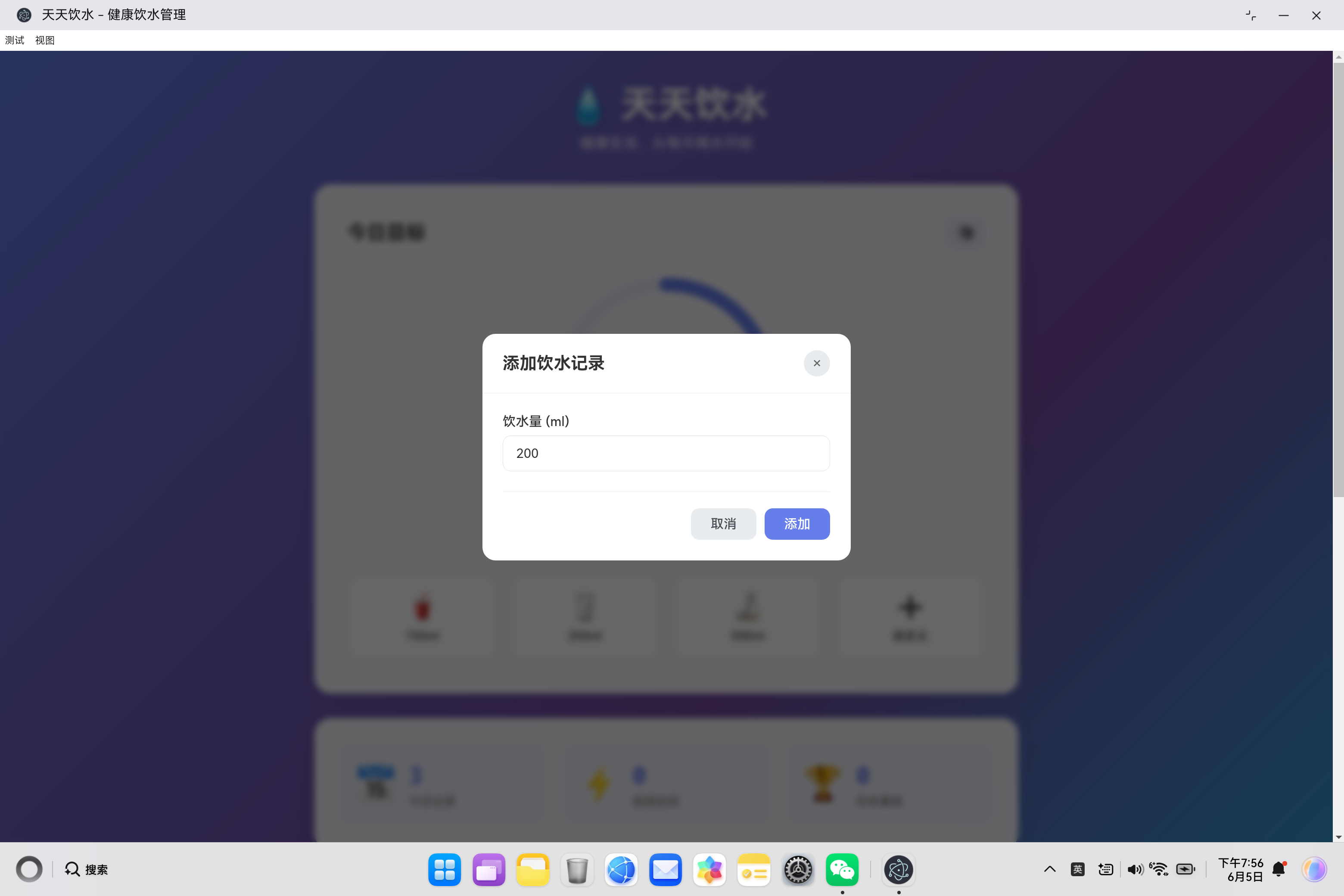
自定义输入弹窗:
openCustomModal() {
    document.getElementById('customAmount').value = '200';
    this.customModal.classList.add('active');
}

closeCustomModal() {
    this.customModal.classList.remove('active');
}

handleCustomSubmit(e) {
    e.preventDefault();
    const amount = parseInt(document.getElementById('customAmount').value);
    if (amount > 0) {
        this.addWater(amount);
        this.closeCustomModal();
    }
}
3.2 进度可视化功能
圆形进度环实现:
.progress-circle {
    width: 280px;
    height: 280px;
    transform: rotate(-90deg); /* 从顶部开始 */
}

.progress-bg {
    fill: none;
    stroke: rgba(102, 126, 234, 0.1);
    stroke-width: 12;
}

.progress-bar {
    fill: none;
    stroke: #667eea;
    stroke-width: 12;
    stroke-linecap: round;
    stroke-dasharray: 565;  /* 2 * PI * 90 ≈ 565 */
    stroke-dashoffset: 565;
    transition: stroke-dashoffset 0.5s ease;
}
进度计算与更新:
updateProgress() {
    const total = this.getTodayTotal();
    const goal = this.data.settings.dailyGoal;
    const percent = Math.min(Math.round((total / goal) * 100), 100);

    // 更新数值显示
    this.currentWaterEl.textContent = total;
    this.goalTextEl.textContent = `${goal}ml`;
    this.goalPercentEl.textContent = `${percent}%`;

    // 计算进度环偏移量
    const circumference = 2 * Math.PI * 90;  // 2πr
    const offset = circumference * (1 - percent / 100);
    this.progressBarEl.style.strokeDashoffset = offset;
}
SVG 圆形进度原理:
- 使用
stroke-dasharray定义虚线模式 - 使用
stroke-dashoffset控制显示长度 - 通过计算偏移量实现进度动画
3.3 目标达成检测
checkGoalReached() {
    const todayTotal = this.getTodayTotal();
    const goal = this.data.settings.dailyGoal;

    if (todayTotal >= goal) {
        // 计算上一次添加前的总量
        const previousTotal = todayTotal -
            this.getTodayRecords()[this.getTodayRecords().length - 1].amount;

        // 只有第一次达成目标时才显示提醒
        if (previousTotal < goal) {
            this.showToast('🎉 恭喜!今天的饮水目标达成!', 'success');

            // 发送浏览器通知
            if ('Notification' in window && Notification.permission === 'granted') {
                new Notification('🎉 目标达成!', {
                    body: '恭喜完成今天的饮水目标!',
                    icon: '🎉'
                });
            }
        }
    }
}
3.4 提醒功能实现
定时器管理:
startReminderTimer() {
    this.stopReminderTimer();

    if (this.data.settings.reminderEnabled) {
        const interval = this.data.settings.reminderInterval * 60 * 1000;
        this.reminderTimer = setInterval(() => {
            this.showReminder();
        }, interval);
    }
}

stopReminderTimer() {
    if (this.reminderTimer) {
        clearInterval(this.reminderTimer);
        this.reminderTimer = null;
    }
}

restartReminderTimer() {
    this.startReminderTimer();
}
显示提醒:
showReminder() {
    // 浏览器通知
    if ('Notification' in window && Notification.permission === 'granted') {
        new Notification('💧 该喝水啦!', {
            body: '记得按时喝水,保持健康!',
            icon: '💧'
        });
    }

    // Toast 提示
    this.showToast('💧 该喝水啦!', 'warning');
}
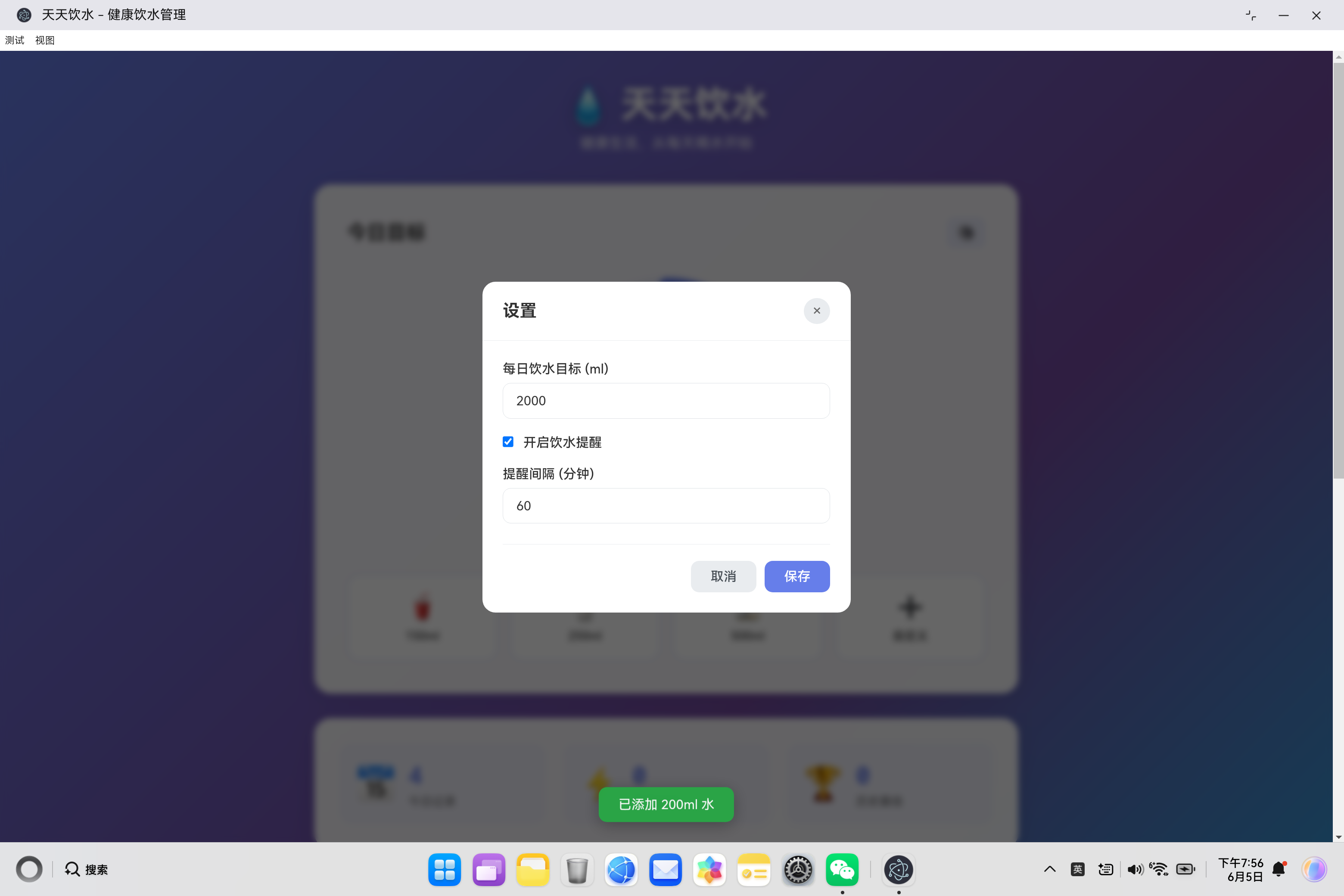
设置页面控制:
handleSettingsSubmit(e) {
    e.preventDefault();
    const dailyGoal = parseInt(document.getElementById('dailyGoal').value);
    const reminderEnabled = document.getElementById('reminderEnabled').checked;
    const reminderInterval = parseInt(document.getElementById('reminderInterval').value);

    this.data.settings.dailyGoal = dailyGoal;
    this.data.settings.reminderEnabled = reminderEnabled;
    this.data.settings.reminderInterval = reminderInterval;

    this.saveData();
    this.updateUI();
    this.closeSettingsModal();
    this.showToast('设置已保存', 'success');

    // 重启定时器
    this.restartReminderTimer();
}
四、统计功能实现
4.1 连续达标天数计算
calculateStreak() {
    let streak = 0;
    const today = new Date();

    // 从今天往前倒推 365 天
    for (let i = 0; i < 365; i++) {
        const date = new Date(today);
        date.setDate(date.getDate() - i);
        const dateKey = date.toISOString().split('T')[0];

        // 获取当天的记录
        const records = this.data.history[dateKey];
        if (records && records.length > 0) {
            const total = records.reduce((sum, r) => sum + r.amount, 0);
            // 检查是否达成目标
            if (total >= this.data.settings.dailyGoal) {
                streak++;
            } else {
                // 一旦发现未达标,停止计算
                break;
            }
        } else {
            // 没有记录,停止计算
            break;
        }
    }

    return streak;
}
4.2 近7天数据统计
getWeeklyData() {
    const days = ['一', '二', '三', '四', '五', '六', '日'];
    const weeklyData = [];
    const today = new Date();

    // 获取过去7天的数据(包括今天)
    for (let i = 6; i >= 0; i--) {
        const date = new Date(today);
        date.setDate(date.getDate() - i);
        const dateKey = date.toISOString().split('T')[0];
        const dayName = `周${days[date.getDay()]}`;

        // 获取当天总饮水量
        const records = this.data.history[dateKey];
        const total = records ? records.reduce((sum, r) => sum + r.amount, 0) : 0;

        weeklyData.push({
            date: dateKey,
            day: dayName,
            amount: total
        });
    }

    return weeklyData;
}
4.3 周图表渲染
updateWeeklyChart() {
    const weeklyData = this.getWeeklyData();
    const barContainers = this.weeklyChartEl.querySelectorAll('.chart-bar-container');

    // 计算最大值,用于缩放图表
    const maxAmount = Math.max(...weeklyData.map(d => d.amount), this.data.settings.dailyGoal);

    barContainers.forEach((container, index) => {
        if (weeklyData[index]) {
            const data = weeklyData[index];
            const heightPercent = maxAmount > 0 ? (data.amount / maxAmount) * 100 : 0;

            const bar = container.querySelector('.chart-bar');
            const barValue = container.querySelector('.bar-value');
            const barLabel = container.querySelector('.bar-label');

            // 更新柱状图高度
            bar.style.height = `${Math.max(heightPercent, 5)}%`;
            bar.setAttribute('data-date', data.date);
            barValue.textContent = `${data.amount}ml`;
            barLabel.textContent = data.day;
        }
    });
}
4.4 统计数据更新
updateStats() {
    const records = this.getTodayRecords();
    const streak = this.calculateStreak();

    // 更新历史最佳
    if (streak > this.data.bestStreak) {
        this.data.bestStreak = streak;
        this.saveData();
    }

    this.todayCountEl.textContent = records.length;
    this.streakDaysEl.textContent = streak;
    this.bestStreakEl.textContent = this.data.bestStreak;
}
五、用户界面设计
5.1 主界面布局
.main-content {
    display: grid;
    gap: 30px;
}

.goal-section,
.stats-section,
.history-section,
.weekly-section {
    background: rgba(255, 255, 255, 0.95);
    border-radius: 20px;
    padding: 40px 30px;
    box-shadow: 0 4px 30px rgba(0, 0, 0, 0.1);
    backdrop-filter: blur(10px);
}
5.2 响应式设计
/* 桌面端 */
@media (min-width: 1024px) {
    .main-content {
        grid-template-columns: 1fr 1fr;
    }

    .goal-section {
        grid-column: 1 / 2;
    }

    .stats-section {
        grid-column: 2 / 3;
    }

    .history-section {
        grid-column: 1 / 2;
    }

    .weekly-section {
        grid-column: 2 / 3;
    }
}

/* 平板和手机端 */
@media (max-width: 1024px) {
    .main-content {
        grid-template-columns: 1fr;
    }

    .stats-grid {
        grid-template-columns: 1fr;
    }
}

@media (max-width: 768px) {
    .header h1 {
        font-size: 2rem;
    }

    .progress-circle {
        width: 220px;
        height: 220px;
    }

    .quick-add {
        grid-template-columns: repeat(2, 1fr);
    }
}
5.3 视觉效果
渐变背景:
body {
    background: linear-gradient(135deg, #667eea 0%, #764ba2 50%, #00d4ff 100%);
}
玻璃态效果:
.goal-section {
    background: rgba(255, 255, 255, 0.95);
    backdrop-filter: blur(10px);
}
按钮动画:
.quick-btn:hover {
    transform: translateY(-3px);
    box-shadow: 0 5px 20px rgba(102, 126, 234, 0.2);
}

.quick-btn:active {
    transform: translateY(0);
}
5.4 Toast 提示组件
showToast(message, type = 'success') {
    this.toastMessage.textContent = message;
    this.toast.className = 'toast';

    if (type) {
        this.toast.classList.add(type);
    }

    this.toast.classList.add('show');

    // 3秒后自动隐藏
    setTimeout(() => {
        this.toast.classList.remove('show');
    }, 3000);
}
.toast {
    position: fixed;
    bottom: 30px;
    left: 50%;
    transform: translateX(-50%) translateY(100px);
    background: #333;
    color: #fff;
    padding: 12px 24px;
    border-radius: 10px;
    box-shadow: 0 4px 20px rgba(0, 0, 0, 0.3);
    z-index: 2000;
    opacity: 0;
    transition: all 0.3s ease;
}

.toast.show {
    transform: translateX(-50%) translateY(0);
    opacity: 1;
}

.toast.success {
    background: #28a745;
}

.toast.warning {
    background: #ffc107;
    color: #333;
}
六、数据持久化
6.1 本地存储实现
loadData() {
    const saved = localStorage.getItem('waterAppData');
    if (saved) {
        try {
            this.data = JSON.parse(saved);
        } catch (e) {
            console.error('数据解析失败:', e);
            // 解析失败时使用默认数据
            this.data = this.getDefaultData();
        }
    } else {
        // 首次使用时初始化默认数据
        this.data = this.getDefaultData();
    }
}

saveData() {
    localStorage.setItem('waterAppData', JSON.stringify(this.data));
}

getDefaultData() {
    return {
        records: [],
        settings: {
            dailyGoal: 2000,
            reminderEnabled: true,
            reminderInterval: 60
        },
        history: {},
        bestStreak: 0
    };
}
6.2 数据安全考虑
1. JSON 解析异常处理
try {
    this.data = JSON.parse(saved);
} catch (e) {
    console.error('数据解析失败:', e);
    this.data = this.getDefaultData();
}
2. 数据类型验证
handleSettingsSubmit(e) {
    e.preventDefault();
    const dailyGoal = parseInt(document.getElementById('dailyGoal').value);
    const reminderEnabled = document.getElementById('reminderEnabled').checked;
    const reminderInterval = parseInt(document.getElementById('reminderInterval').value);

    // 确保数值类型正确
    this.data.settings.dailyGoal = dailyGoal;
    this.data.settings.reminderEnabled = reminderEnabled;
    this.data.settings.reminderInterval = reminderInterval;

    this.saveData();
}
七、应用初始化与事件绑定
7.1 初始化流程
class WaterApp {
    constructor() {
        this.data = {
            records: [],
            settings: {
                dailyGoal: 2000,
                reminderEnabled: true,
                reminderInterval: 60
            },
            history: {},
            bestStreak: 0
        };

        this.reminderTimer = null;
        this.init();
    }

    init() {
        // 1. 加载数据
        this.loadData();

        // 2. 初始化 DOM 引用
        this.initDOMReferences();

        // 3. 绑定事件监听器
        this.bindEventListeners();

        // 4. 更新界面
        this.updateUI();

        // 5. 启动提醒定时器
        this.startReminderTimer();
    }
}
7.2 DOM 引用管理
initDOMReferences() {
    // 进度显示
    this.currentWaterEl = document.getElementById('currentWater');
    this.goalTextEl = document.getElementById('goalText');
    this.goalPercentEl = document.getElementById('goalPercent');
    this.progressBarEl = document.querySelector('.progress-bar');

    // 统计显示
    this.todayCountEl = document.getElementById('todayCount');
    this.streakDaysEl = document.getElementById('streakDays');
    this.bestStreakEl = document.getElementById('bestStreak');

    // 列表和图表
    this.historyListEl = document.getElementById('historyList');
    this.weeklyChartEl = document.getElementById('weeklyChart');

    // 弹窗
    this.customModal = document.getElementById('customModal');
    this.settingsModal = document.getElementById('settingsModal');

    // Toast
    this.toast = document.getElementById('toast');
    this.toastMessage = document.getElementById('toastMessage');
}
7.3 事件绑定
bindEventListeners() {
    // 设置按钮
    document.getElementById('settingsBtn').addEventListener('click', () => this.openSettingsModal());
    document.getElementById('clearBtn').addEventListener('click', () => this.clearTodayRecords());

    // 自定义弹窗
    document.getElementById('closeCustomModal').addEventListener('click', () => this.closeCustomModal());
    document.getElementById('cancelCustomBtn').addEventListener('click', () => this.closeCustomModal());

    // 设置弹窗
    document.getElementById('closeSettingsModal').addEventListener('click', () => this.closeSettingsModal());
    document.getElementById('cancelSettingsBtn').addEventListener('click', () => this.closeSettingsModal());

    // 表单提交
    document.getElementById('customForm').addEventListener('submit', (e) => this.handleCustomSubmit(e));
    document.getElementById('settingsForm').addEventListener('submit', (e) => this.handleSettingsSubmit(e));

    // 提醒开关
    document.getElementById('reminderEnabled').addEventListener('change', (e) => {
        const intervalGroup = document.getElementById('reminderIntervalGroup');
        intervalGroup.style.display = e.target.checked ? 'block' : 'none';
    });

    // 点击弹窗外部关闭
    this.customModal.addEventListener('click', (e) => {
        if (e.target === this.customModal) this.closeCustomModal();
    });

    this.settingsModal.addEventListener('click', (e) => {
        if (e.target === this.settingsModal) this.closeSettingsModal();
    });
}
八、功能扩展建议
8.1 可添加的功能
| 功能 | 优先级 | 说明 |
|---|---|---|
| 数据导出 | 高 | 导出 CSV/JSON 格式数据 |
| 数据导入 | 中 | 导入历史数据备份 |
| 饮水提醒定制 | 中 | 设置多个提醒时间点 |
| 成就系统 | 低 | 解锁成就徽章 |
| 健康建议 | 低 | 根据饮水量给出建议 |
| 好友对比 | 低 | 和好友 PK 饮水量 |
| 云端同步 | 低 | 数据云端备份和同步 |
8.2 数据导出示例
exportData() {
    const dataStr = JSON.stringify(this.data, null, 2);
    const blob = new Blob([dataStr], { type: 'application/json' });
    const url = URL.createObjectURL(blob);
    const a = document.createElement('a');
    a.href = url;
    a.download = `water-app-data-${new Date().toISOString().split('T')[0]}.json`;
    a.click();
    URL.revokeObjectURL(url);
}
九、用户体验优化
9.1 通知权限处理
// 在应用初始化时请求通知权限
document.addEventListener('DOMContentLoaded', () => {
    waterApp = new WaterApp();

    if ('Notification' in window && Notification.permission === 'default') {
        Notification.requestPermission();
    }
});
9.2 空状态提示
updateHistory() {
    const records = this.getTodayRecords();

    if (records.length === 0) {
        this.historyListEl.innerHTML = `
            <div class="empty-state">
                <div class="empty-icon">💧</div>
                <div class="empty-text">暂无饮水记录</div>
                <div class="empty-hint">点击上方按钮开始记录吧</div>
            </div>
        `;
        return;
    }

    // 渲染记录列表
}
9.3 确认操作
clearTodayRecords() {
    if (confirm('确定要清空今天的所有记录吗?')) {
        const today = this.getTodayKey();
        this.data.history[today] = [];
        this.saveData();
        this.updateUI();
        this.showToast('已清空今天的记录', 'success');
    }
}
十、总结
10.1 核心技术要点
- 数据模型设计:按日期组织数据,便于查询和统计
- 圆形进度可视化:SVG + CSS 实现平滑的进度动画
- 定时器管理:安全的定时器启动、停止、重启机制
- 浏览器通知:Web Notification API 实现桌面提醒
- 数据持久化:localStorage 保存用户数据
- 响应式布局:适配各种屏幕尺寸
- 统计计算:连续达标、周数据图表等
- 用户反馈:Toast 提示、确认对话框等
10.2 实现亮点
| 特性 | 说明 |
|---|---|
| 简洁架构 | MVC 模式,职责清晰 |
| 视觉友好 | 渐变背景、玻璃态效果、动画过渡 |
| 功能完整 | 记录、进度、提醒、统计一应俱全 |
| 数据安全 | 异常处理、类型验证 |
| 用户体验 | 快捷操作、反馈及时、引导友好 |
10.3 学习价值
这个项目是学习前端开发的绝佳案例,涵盖:
- JavaScript 面向对象编程
- 事件驱动编程
- 数据结构设计
- SVG 图形处理
- 本地存储技术
- 通知 API 使用
- 响应式 CSS 布局
- 用户交互设计
天天饮水应用通过简洁美观的设计和完整的功能,帮助用户养成健康的饮水习惯,是一个既有实用价值又有学习意义的项目。

作为“人工智能6S店”的官方数字引擎,为AI开发者与企业提供一个覆盖软硬件全栈、一站式门户。
更多推荐



 1
1 0
0- 0


 已为社区贡献5条内容

所有评论(0)