
番茄钟鸿蒙PC Electron框架完成:状态机、定时器管理与专注力工具设计
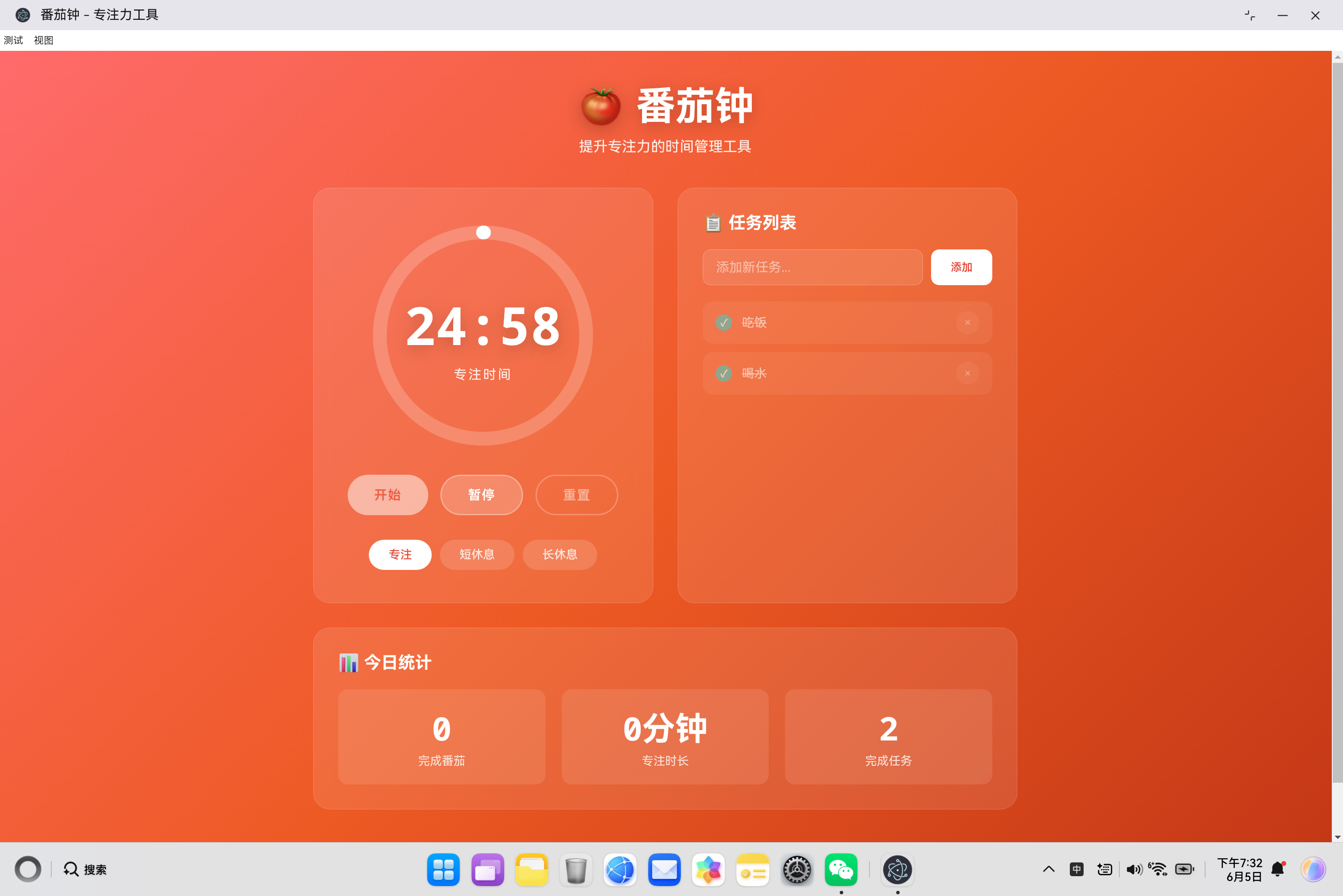
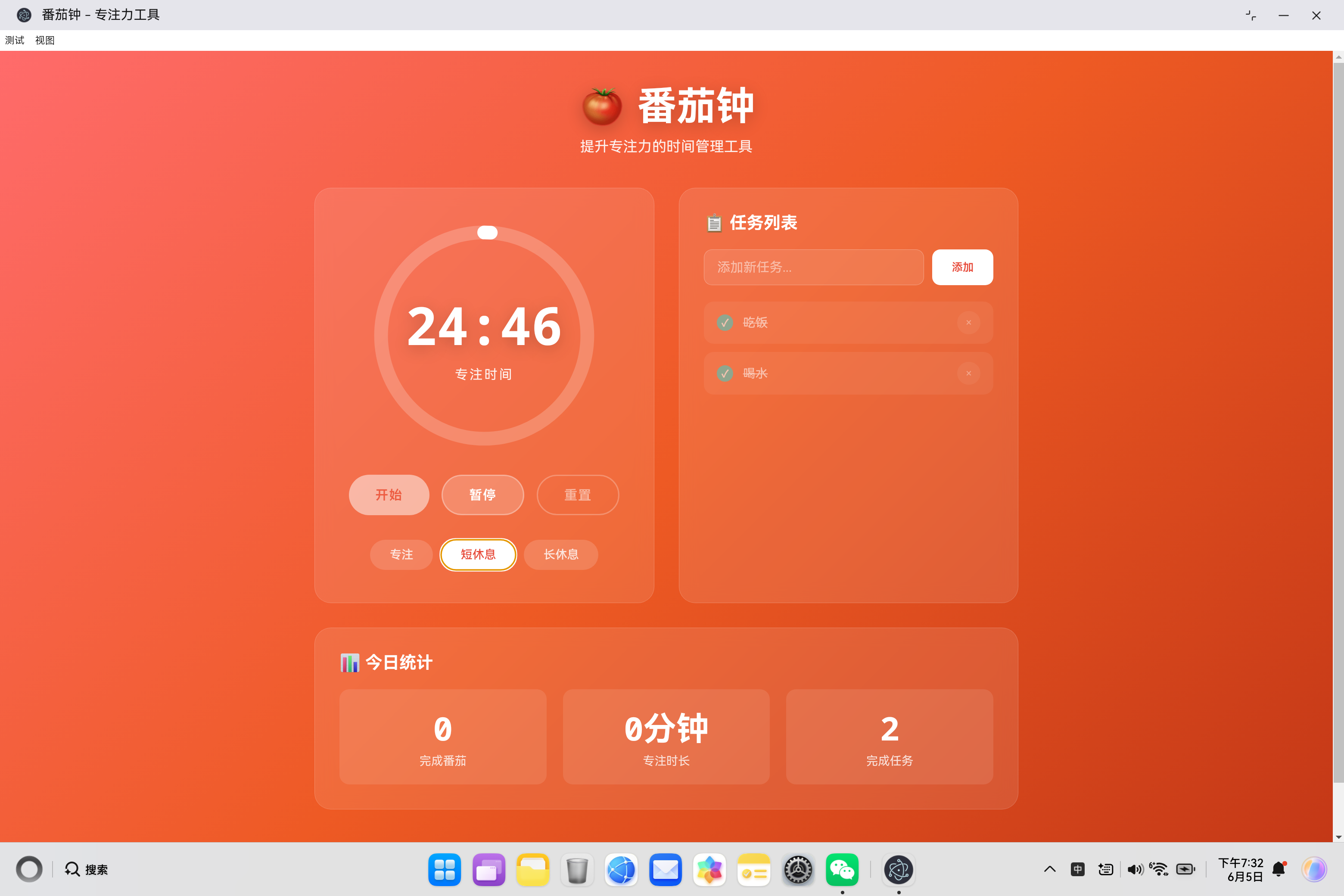
番茄时间管理工具 - 开源鸿蒙PC社区项目 本项目是基于番茄工作法原理开发的时间管理工具,采用模块化架构设计,包含状态机、任务管理和统计功能等核心模块。状态机设计实现了空闲、运行、暂停和完成四种状态,支持专注、短休息和长休息三种模式的自动切换。项目使用本地存储实现任务持久化,并提供任务管理、数据统计和通知提醒等功能。技术实现上采用有限状态机、Web Notification API等前端技术,代码
·
欢迎加入开源鸿蒙PC社区:
https://harmonypc.csdn.net/
atomgit仓库地址: https://atomgit.com/ai_lingshi/fanqietime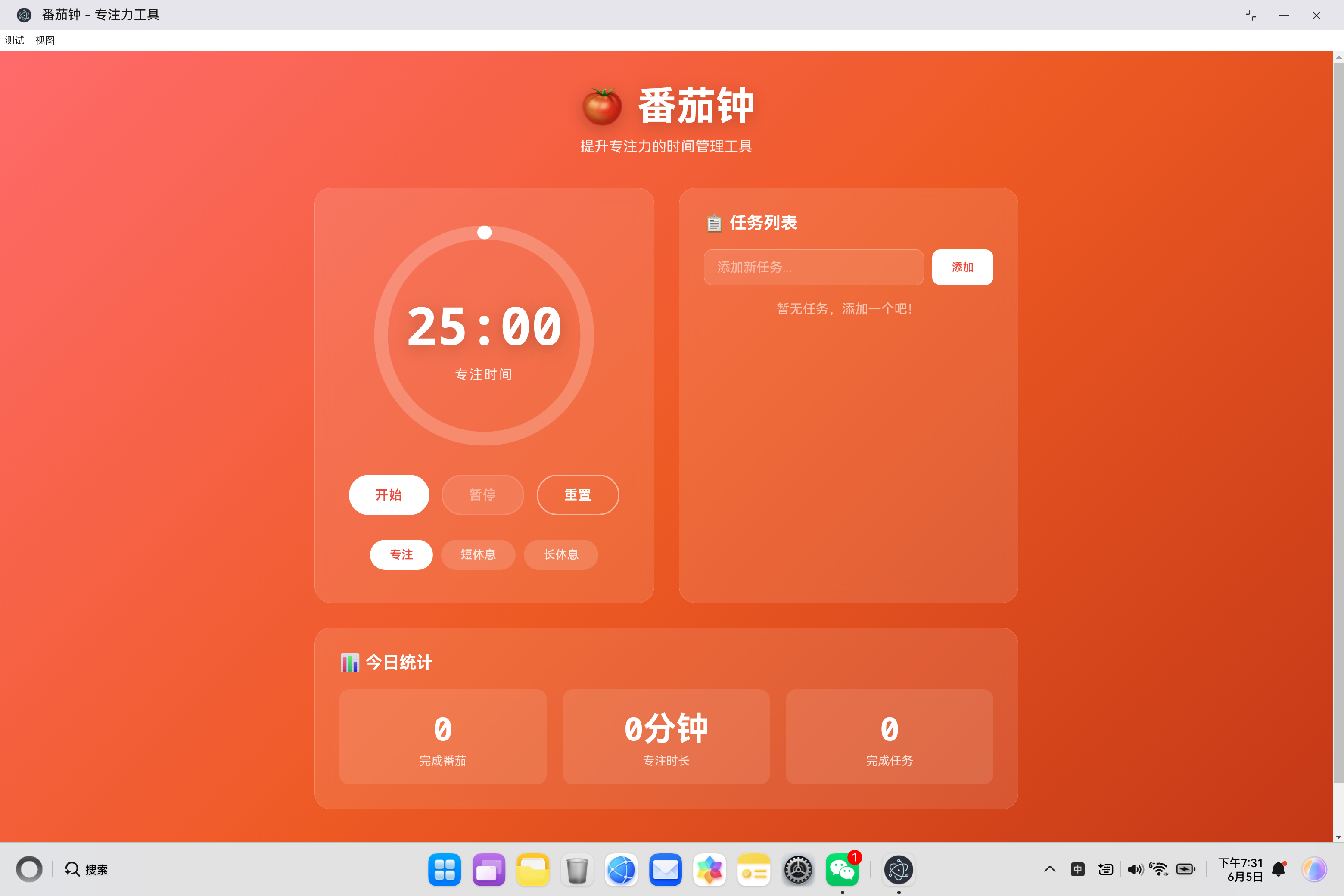
一、项目概述
1.1 番茄工作法原理
番茄工作法(Pomodoro Technique)是一种时间管理方法,由 Francesco Cirillo 在1992年创立。其核心思想是将工作时间划分为25分钟的专注周期(称为"番茄"),每完成一个番茄后休息5分钟,每完成4个番茄后进行一次长休息(15-30分钟)。
工作原理:
| 阶段 | 时长 | 目的 |
|---|---|---|
| 专注时间 | 25分钟 | 深度专注,避免干扰 |
| 短休息 | 5分钟 | 恢复精力,放松大脑 |
| 长休息 | 15分钟 | 深度休息,整理思路 |
1.2 应用架构设计
本项目采用模块化架构设计,将应用分解为多个独立的功能模块:
┌─────────────────────────────────────────────────────────────┐
│                     应用层 (PomodoroApp)                    │
│         (协调各模块、UI交互、事件处理)                       │
├─────────────────────────────────────────────────────────────┤
│              业务逻辑层                                     │
│    ┌─────────────────┐  ┌─────────────────┐                │
│    │ 状态机模块      │  │ 任务管理模块    │                │
│    │ (状态转换控制)   │  │ (任务CRUD)      │                │
│    └────────┬────────┘  └────────┬────────┘                │
│             │                    │                         │
│    ┌────────┴────────┐  ┌────────┴────────┐                │
│    │ 定时器模块      │  │ 统计管理模块    │                │
│    │ (计时逻辑)      │  │ (数据统计)      │                │
│    └─────────────────┘  └─────────────────┘                │
├─────────────────────────────────────────────────────────────┤
│                     存储层 (localStorage)                   │
│         (任务持久化、统计数据存储)                            │
└─────────────────────────────────────────────────────────────┘
1.3 核心功能特性
| 功能 | 说明 | 技术实现 |
|---|---|---|
| 状态管理 | 控制定时器的启动、暂停、重置 | 有限状态机 |
| 模式切换 | 专注/短休息/长休息模式 | 状态模式 |
| 任务管理 | 添加、删除、完成任务 | 本地存储 |
| 统计功能 | 今日数据统计 | 本地存储 + 日期判断 |
| 自动切换 | 完成后自动切换模式 | 定时器 + 状态转换 |
| 通知提醒 | 番茄完成通知 | Web Notification API |
二、状态机设计与实现
2.1 状态机概念
状态机是一种行为模型,它定义了对象在其生命周期中可能处于的状态、状态之间的转换规则以及触发转换的事件。
状态机的核心要素:
- 状态(State):对象的当前状况
- 事件(Event):触发状态转换的外部刺激
- 转换(Transition):从一个状态到另一个状态的过程
- 动作(Action):状态转换时执行的操作
2.2 番茄钟状态机设计
状态定义:
STATES = {
    IDLE: 'idle',        // 空闲状态,等待开始
    RUNNING: 'running',   // 运行中,计时器倒计时
    PAUSED: 'paused',     // 暂停状态,保留当前时间
    COMPLETED: 'completed' // 完成状态,等待切换
};
状态转换规则:
| 当前状态 | 事件 | 目标状态 | 动作 |
|---|---|---|---|
| IDLE | start | RUNNING | 启动计时器 |
| RUNNING | pause | PAUSED | 停止计时器 |
| PAUSED | start | RUNNING | 重启计时器 |
| RUNNING | complete | COMPLETED | 停止计时器 |
| COMPLETED | reset | IDLE | 重置时间 |
| * | reset | IDLE | 重置时间 |
2.3 状态机核心实现
class PomodoroStateMachine {
    constructor() {
        this.STATES = {
            IDLE: 'idle',
            RUNNING: 'running',
            PAUSED: 'paused',
            COMPLETED: 'completed'
        };

        this.MODES = {
            WORK: 'work',
            SHORT_BREAK: 'shortBreak',
            LONG_BREAK: 'longBreak'
        };

        this.config = {
            workMinutes: 25,
            shortBreakMinutes: 5,
            longBreakMinutes: 15,
            pomodorosBeforeLongBreak: 4
        };

        this.currentState = this.STATES.IDLE;
        this.currentMode = this.MODES.WORK;
        this.timeRemaining = this.config.workMinutes * 60;
        this.totalPomodoros = 0;
        this.timerInterval = null;

        // 事件系统
        this.callbacks = {};
    }

    // 事件订阅
    on(event, callback) {
        if (!this.callbacks[event]) {
            this.callbacks[event] = [];
        }
        this.callbacks[event].push(callback);
    }

    // 事件发布
    emit(event, data) {
        if (this.callbacks[event]) {
            this.callbacks[event].forEach(callback => callback(data));
        }
    }

    // 状态转换
    transitionTo(newState) {
        const oldState = this.currentState;
        this.currentState = newState;
        this.emit('stateChange', { oldState, newState });
    }
}
2.4 状态转换方法
start() {
    if (this.currentState === this.STATES.RUNNING) return;

    if (this.currentState === this.STATES.COMPLETED) {
        this.reset();
    }

    this.transitionTo(this.STATES.RUNNING);
    this.startTimer();
    this.emit('start');
}

pause() {
    if (this.currentState !== this.STATES.RUNNING) return;

    this.transitionTo(this.STATES.PAUSED);
    this.stopTimer();
    this.emit('pause');
}

reset() {
    this.stopTimer();

    // 根据模式重置时间
    switch (this.currentMode) {
        case this.MODES.WORK:
            this.timeRemaining = this.config.workMinutes * 60;
            break;
        case this.MODES.SHORT_BREAK:
            this.timeRemaining = this.config.shortBreakMinutes * 60;
            break;
        case this.MODES.LONG_BREAK:
            this.timeRemaining = this.config.longBreakMinutes * 60;
            break;
    }

    this.transitionTo(this.STATES.IDLE);
    this.emit('reset', this.timeRemaining);
}

complete() {
    this.stopTimer();
    this.transitionTo(this.STATES.COMPLETED);
    this.emit('complete', { mode: this.currentMode });
}
2.5 状态转换流程图
         ┌──────────────┐
         │    IDLE      │
         └──────┬───────┘
                │ start()
                ▼
         ┌──────────────┐     pause()     ┌──────────────┐
         │   RUNNING    │◄────────────────│   PAUSED     │
         └──────┬───────┘                 └──────┬───────┘
                │ complete()                      │ start()
                ▼                                │
         ┌──────────────┐                        │
         │ COMPLETED    │────────────────────────┘
         └──────┬───────┘
                │ reset()
                ▼
         ┌──────────────┐
         │    IDLE      │
         └──────────────┘
三、定时器管理机制
3.1 定时器设计考量
定时器管理是番茄钟的核心功能,需要考虑以下因素:
| 考量点 | 说明 | 实现策略 |
|---|---|---|
| 精度 | 每秒更新一次 | setInterval(1000ms) |
| 准确性 | 避免累积误差 | 使用 Date 对象校准 |
| 资源管理 | 防止内存泄漏 | 及时清除定时器 |
| 状态同步 | UI与状态保持一致 | 事件驱动更新 |
3.2 定时器核心实现
startTimer() {
    // 确保清除之前的定时器
    if (this.timerInterval) {
        clearInterval(this.timerInterval);
    }

    this.timerInterval = setInterval(() => {
        if (this.timeRemaining > 0) {
            this.timeRemaining--;
            this.emit('tick', this.timeRemaining);
        } else {
            this.handleTimerComplete();
        }
    }, 1000);
}

stopTimer() {
    if (this.timerInterval) {
        clearInterval(this.timerInterval);
        this.timerInterval = null;
    }
}

handleTimerComplete() {
    this.stopTimer();

    // 如果是工作模式,增加番茄计数
    if (this.currentMode === this.MODES.WORK) {
        this.totalPomodoros++;
        this.emit('pomodoroComplete', this.totalPomodoros);
    }

    this.complete();
    this.scheduleNextMode();
}
3.3 自动模式切换
scheduleNextMode() {
    if (this.currentMode === this.MODES.WORK) {
        // 每4个番茄后进行长休息
        if (this.totalPomodoros % this.config.pomodorosBeforeLongBreak === 0) {
            setTimeout(() => this.autoSwitchToLongBreak(), 1000);
        } else {
            setTimeout(() => this.autoSwitchToShortBreak(), 1000);
        }
    } else {
        // 休息结束后切换回工作模式
        setTimeout(() => this.autoSwitchToWork(), 1000);
    }
}

autoSwitchToShortBreak() {
    this.setMode(this.MODES.SHORT_BREAK);
}

autoSwitchToLongBreak() {
    this.setMode(this.MODES.LONG_BREAK);
}

autoSwitchToWork() {
    this.setMode(this.MODES.WORK);
}
3.4 进度计算
getProgress() {
    let totalSeconds;
    switch (this.currentMode) {
        case this.MODES.WORK:
            totalSeconds = this.config.workMinutes * 60;
            break;
        case this.MODES.SHORT_BREAK:
            totalSeconds = this.config.shortBreakMinutes * 60;
            break;
        case this.MODES.LONG_BREAK:
            totalSeconds = this.config.longBreakMinutes * 60;
            break;
    }
    return (totalSeconds - this.timeRemaining) / totalSeconds;
}
四、任务管理系统
4.1 任务数据模型
// 任务数据结构
{
    id: Number,           // 唯一标识符
    text: String,         // 任务内容
    completed: Boolean,   // 完成状态
    createdAt: String     // 创建时间 (ISO格式)
}
4.2 任务管理器实现
class TaskManager {
    constructor() {
        this.tasks = [];
        this.callbacks = {};
        this.loadTasks(); // 从本地存储加载任务
    }

    // 事件系统
    on(event, callback) {
        if (!this.callbacks[event]) {
            this.callbacks[event] = [];
        }
        this.callbacks[event].push(callback);
    }

    emit(event, data) {
        if (this.callbacks[event]) {
            this.callbacks[event].forEach(callback => callback(data));
        }
    }

    // 添加任务
    addTask(text) {
        const task = {
            id: Date.now(),
            text,
            completed: false,
            createdAt: new Date().toISOString()
        };
        this.tasks.push(task);
        this.saveTasks();
        this.emit('taskAdded', task);
        return task;
    }

    // 切换任务完成状态
    toggleTask(id) {
        const task = this.tasks.find(t => t.id === id);
        if (task) {
            task.completed = !task.completed;
            this.saveTasks();
            this.emit('taskToggled', task);
        }
    }

    // 删除任务
    deleteTask(id) {
        const index = this.tasks.findIndex(t => t.id === id);
        if (index !== -1) {
            const deleted = this.tasks.splice(index, 1)[0];
            this.saveTasks();
            this.emit('taskDeleted', deleted);
        }
    }

    // 获取任务列表
    getTasks() {
        return [...this.tasks]; // 返回副本,防止外部修改
    }
}
4.3 持久化存储
// 保存任务到本地存储
saveTasks() {
    localStorage.setItem('pomodoroTasks', JSON.stringify(this.tasks));
}

// 从本地存储加载任务
loadTasks() {
    const saved = localStorage.getItem('pomodoroTasks');
    if (saved) {
        try {
            this.tasks = JSON.parse(saved);
        } catch (e) {
            this.tasks = [];
        }
    }
}
五、统计管理系统
5.1 统计数据模型
{
    completedPomodoros: Number,  // 今日完成番茄数
    totalFocusTime: Number,      // 今日专注时长(分钟)
    completedTasks: Number,      // 今日完成任务数
    today: String               // 日期标识
}
5.2 统计管理器实现
class StatsManager {
    constructor() {
        this.stats = {
            completedPomodoros: 0,
            totalFocusTime: 0,
            completedTasks: 0,
            today: new Date().toDateString()
        };
        this.loadStats();
    }

    // 增加番茄计数
    incrementPomodoros() {
        this.stats.completedPomodoros++;
        this.stats.totalFocusTime += 25; // 每个番茄25分钟
        this.checkDateReset();
        this.saveStats();
    }

    // 增加任务完成计数
    incrementCompletedTasks() {
        this.stats.completedTasks++;
        this.checkDateReset();
        this.saveStats();
    }

    // 减少任务完成计数(取消完成)
    decrementCompletedTasks() {
        if (this.stats.completedTasks > 0) {
            this.stats.completedTasks--;
            this.saveStats();
        }
    }

    // 日期检查与重置
    checkDateReset() {
        const today = new Date().toDateString();
        if (this.stats.today !== today) {
            this.stats = {
                completedPomodoros: 0,
                totalFocusTime: 0,
                completedTasks: 0,
                today: today
            };
        }
    }

    // 获取统计数据
    getStats() {
        this.checkDateReset();
        return { ...this.stats };
    }

    // 持久化存储
    saveStats() {
        localStorage.setItem('pomodoroStats', JSON.stringify(this.stats));
    }

    loadStats() {
        const saved = localStorage.getItem('pomodoroStats');
        if (saved) {
            try {
                this.stats = JSON.parse(saved);
            } catch (e) {
                this.stats = {
                    completedPomodoros: 0,
                    totalFocusTime: 0,
                    completedTasks: 0,
                    today: new Date().toDateString()
                };
            }
        }
        this.checkDateReset();
    }
}
六、应用控制器设计
6.1 控制器职责
应用控制器负责协调各个模块,处理 UI 交互和事件响应。
核心职责:
- 初始化 DOM 引用
- 绑定事件监听器
- 响应状态机事件
- 更新 UI 显示
- 处理用户输入
6.2 控制器核心实现
class PomodoroApp {
    constructor() {
        // 初始化模块
        this.stateMachine = new PomodoroStateMachine();
        this.taskManager = new TaskManager();
        this.statsManager = new StatsManager();

        // 初始化 DOM 引用
        this.initDOMReferences();

        // 绑定事件监听器
        this.bindEventListeners();

        // 更新 UI
        this.updateUI();
    }

    // 初始化 DOM 引用
    initDOMReferences() {
        this.timeDisplay = document.getElementById('timeDisplay');
        this.timeLabel = document.getElementById('timeLabel');
        this.progressBar = document.querySelector('.progress-bar');
        this.startBtn = document.getElementById('startBtn');
        this.pauseBtn = document.getElementById('pauseBtn');
        this.resetBtn = document.getElementById('resetBtn');
        this.workModeBtn = document.getElementById('workMode');
        this.shortBreakModeBtn = document.getElementById('shortBreakMode');
        this.longBreakModeBtn = document.getElementById('longBreakMode');
        this.taskInput = document.getElementById('taskInput');
        this.addTaskBtn = document.getElementById('addTaskBtn');
        this.taskList = document.getElementById('taskList');
        this.completedPomodoros = document.getElementById('completedPomodoros');
        this.totalFocusTime = document.getElementById('totalFocusTime');
        this.completedTasks = document.getElementById('completedTasks');
    }
}
6.3 事件绑定
bindEventListeners() {
    // 状态机事件
    this.stateMachine.on('stateChange', this.handleStateChange.bind(this));
    this.stateMachine.on('modeChange', this.handleModeChange.bind(this));
    this.stateMachine.on('tick', this.handleTick.bind(this));
    this.stateMachine.on('pomodoroComplete', this.handlePomodoroComplete.bind(this));
    this.stateMachine.on('start', () => this.updateControls());
    this.stateMachine.on('pause', () => this.updateControls());
    this.stateMachine.on('reset', () => this.updateUI());

    // 任务管理器事件
    this.taskManager.on('taskAdded', this.renderTasks.bind(this));
    this.taskManager.on('taskToggled', this.handleTaskToggled.bind(this));
    this.taskManager.on('taskDeleted', this.renderTasks.bind(this));

    // 按钮点击事件
    this.startBtn.addEventListener('click', () => this.stateMachine.start());
    this.pauseBtn.addEventListener('click', () => this.stateMachine.pause());
    this.resetBtn.addEventListener('click', () => this.stateMachine.reset());

    // 模式切换事件
    this.workModeBtn.addEventListener('click', () => this.switchMode('work'));
    this.shortBreakModeBtn.addEventListener('click', () => this.switchMode('shortBreak'));
    this.longBreakModeBtn.addEventListener('click', () => this.switchMode('longBreak'));

    // 任务输入事件
    this.addTaskBtn.addEventListener('click', () => this.addTask());
    this.taskInput.addEventListener('keypress', (e) => {
        if (e.key === 'Enter') this.addTask();
    });

    // 键盘快捷键
    document.addEventListener('keydown', (e) => {
        if (e.code === 'Space') {
            e.preventDefault();
            if (this.stateMachine.getCurrentState() === 'running') {
                this.stateMachine.pause();
            } else {
                this.stateMachine.start();
            }
        }
        if (e.code === 'KeyR') {
            this.stateMachine.reset();
        }
    });
}
6.4 事件处理方法
// 处理状态变化
handleStateChange({ newState }) {
    this.updateControls();
    this.updateProgressBar();
}

// 处理模式变化
handleModeChange(mode) {
    this.updateTimeLabel();
    this.updateProgressBarColor();
    this.updateUI();
}

// 处理计时器滴答
handleTick(timeRemaining) {
    this.updateTimeDisplay(timeRemaining);
    this.updateProgressBar();
}

// 处理番茄完成
handlePomodoroComplete(pomodoros) {
    this.statsManager.incrementPomodoros();
    this.updateStats();
    this.showNotification();
}

// 处理任务切换
handleTaskToggled(task) {
    this.renderTasks();
    if (task.completed) {
        this.statsManager.incrementCompletedTasks();
    } else {
        this.statsManager.decrementCompletedTasks();
    }
    this.updateStats();
}
6.5 UI 更新方法
// 更新时间显示
updateTimeDisplay(seconds) {
    const mins = Math.floor(seconds / 60);
    const secs = seconds % 60;
    this.timeDisplay.textContent = `${mins.toString().padStart(2, '0')}:${secs.toString().padStart(2, '0')}`;
}

// 更新时间标签
updateTimeLabel() {
    const labels = {
        work: '专注时间',
        shortBreak: '短休息',
        longBreak: '长休息'
    };
    this.timeLabel.textContent = labels[this.stateMachine.getCurrentMode()] || '专注时间';
}

// 更新进度条
updateProgressBar() {
    const progress = this.stateMachine.getProgress();
    const circumference = 2 * Math.PI * 45;
    const offset = circumference * (1 - progress);
    this.progressBar.style.strokeDashoffset = offset;
}

// 更新进度条颜色
updateProgressBarColor() {
    this.progressBar.classList.remove('break', 'long-break');

    switch (this.stateMachine.getCurrentMode()) {
        case this.stateMachine.MODES.SHORT_BREAK:
            this.progressBar.classList.add('break');
            break;
        case this.stateMachine.MODES.LONG_BREAK:
            this.progressBar.classList.add('long-break');
            break;
    }
}

// 更新控制按钮状态
updateControls() {
    const state = this.stateMachine.getCurrentState();

    this.startBtn.disabled = state === 'running';
    this.pauseBtn.disabled = state !== 'running';
    this.resetBtn.disabled = state === 'running';
}
七、视觉设计与样式实现
7.1 主题配色方案
/* 番茄主题配色 */
body {
    background: linear-gradient(135deg, #ff6b6b 0%, #ee5a24 50%, #c23616 100%);
}

/* 进度条颜色 */
.progress-bar {
    stroke: #fff; /* 专注模式 - 白色 */
}

.progress-bar.break {
    stroke: #4ecdc4; /* 短休息 - 青绿色 */
}

.progress-bar.long-break {
    stroke: #a29bfe; /* 长休息 - 紫色 */
}
7.2 玻璃态卡片效果
.timer-section,
.task-section,
.stats-section {
    background: rgba(255, 255, 255, 0.1);
    backdrop-filter: blur(10px);
    border-radius: 20px;
    border: 1px solid rgba(255, 255, 255, 0.2);
}
7.3 SVG 环形进度条
.progress-ring {
    width: 100%;
    height: 100%;
    transform: rotate(-90deg); /* 从顶部开始 */
}

.progress-bg {
    fill: none;
    stroke: rgba(255, 255, 255, 0.2);
    stroke-width: 6;
}

.progress-bar {
    fill: none;
    stroke: #fff;
    stroke-width: 6;
    stroke-linecap: round;
    stroke-dasharray: 283; /* 2 * π * 45 ≈ 283 */
    stroke-dashoffset: 283;
    transition: stroke-dashoffset 0.5s ease;
}
7.4 响应式布局
@media (min-width: 768px) {
    .main-content {
        grid-template-columns: 1fr 1fr;
    }

    .timer-section {
        grid-column: 1 / 2;
    }

    .task-section {
        grid-column: 2 / 3;
    }

    .stats-section {
        grid-column: 1 / 3;
    }
}
八、通知系统
8.1 Web Notification API 集成
showNotification() {
    if ('Notification' in window && Notification.permission === 'granted') {
        new Notification('番茄钟完成', {
            body: '恭喜完成一个番茄!休息一下吧。',
            icon: '🍅'
        });
    }
}

// 请求通知权限
if ('Notification' in window) {
    Notification.requestPermission();
}
九、扩展性设计
9.1 可配置化设计
config = {
    workMinutes: 25,              // 专注时长
    shortBreakMinutes: 5,         // 短休息时长
    longBreakMinutes: 15,         // 长休息时长
    pomodorosBeforeLongBreak: 4   // 长休息前的番茄数
};
9.2 可能的扩展功能
| 功能 | 说明 | 实现复杂度 |
|---|---|---|
| 音效提醒 | 番茄完成时播放提示音 | 低 |
| 数据导出 | 导出历史统计数据 | 中 |
| 主题切换 | 支持多种主题配色 | 中 |
| 目标设定 | 设置每日目标 | 低 |
| 历史记录 | 查看历史统计 | 中 |
| 多任务优先级 | 任务优先级管理 | 中 |
十、总结
10.1 核心设计要点
| 设计原则 | 实现方式 |
|---|---|
| 单一职责 | 状态机、任务管理、统计管理分离 |
| 事件驱动 | 发布-订阅模式解耦模块 |
| 状态管理 | 有限状态机控制状态转换 |
| 持久化 | localStorage 存储数据 |
| 响应式 | 键盘快捷键、触摸支持 |
10.2 技术亮点
- 状态机模式:清晰的状态转换逻辑,易于维护和扩展
- 模块化设计:各模块职责明确,便于单元测试
- 事件驱动架构:模块间松耦合,提高代码可维护性
- 响应式设计:适配多种设备尺寸
- 本地存储:数据持久化,刷新页面不丢失
10.3 最佳实践
- 状态转换校验:每个状态转换前进行有效性检查
- 资源清理:定时器及时清除,避免内存泄漏
- 数据备份:定期保存到本地存储
- 错误处理:JSON 解析添加异常捕获
- 代码复用:事件系统统一管理
番茄钟应用展示了如何使用状态机模式管理复杂的状态转换,如何设计模块化的应用架构,以及如何实现用户友好的交互体验。通过合理的设计,可以创建出功能完整、易于维护的时间管理工具。

作为“人工智能6S店”的官方数字引擎,为AI开发者与企业提供一个覆盖软硬件全栈、一站式门户。
更多推荐


 0
0 0
0- 0


 已为社区贡献5条内容

所有评论(0)