
基于 Electron 运行时的鸿蒙PC桌面应用-安全可靠的随机密码生成工具
摘要: 开源鸿蒙PC社区推出了一款基于Electron框架开发的随机密码生成器,支持自定义密码长度(4-64位)和字符类型(大小写字母、数字、特殊符号)。该工具采用Web Crypto API生成加密安全随机数,提供实时四档强度检测、一键复制功能,并本地存储最近10条生成记录。项目使用HTML5+CSS3实现响应式界面,适配不同设备,代码已开源至AtomGit仓库。核心功能包括密码生成算法、强度评
欢迎加入开源鸿蒙PC社区:
https://harmonypc.csdn.net/
atomgit仓库地址: https://atomgit.com/m0_66062719/shuzimima
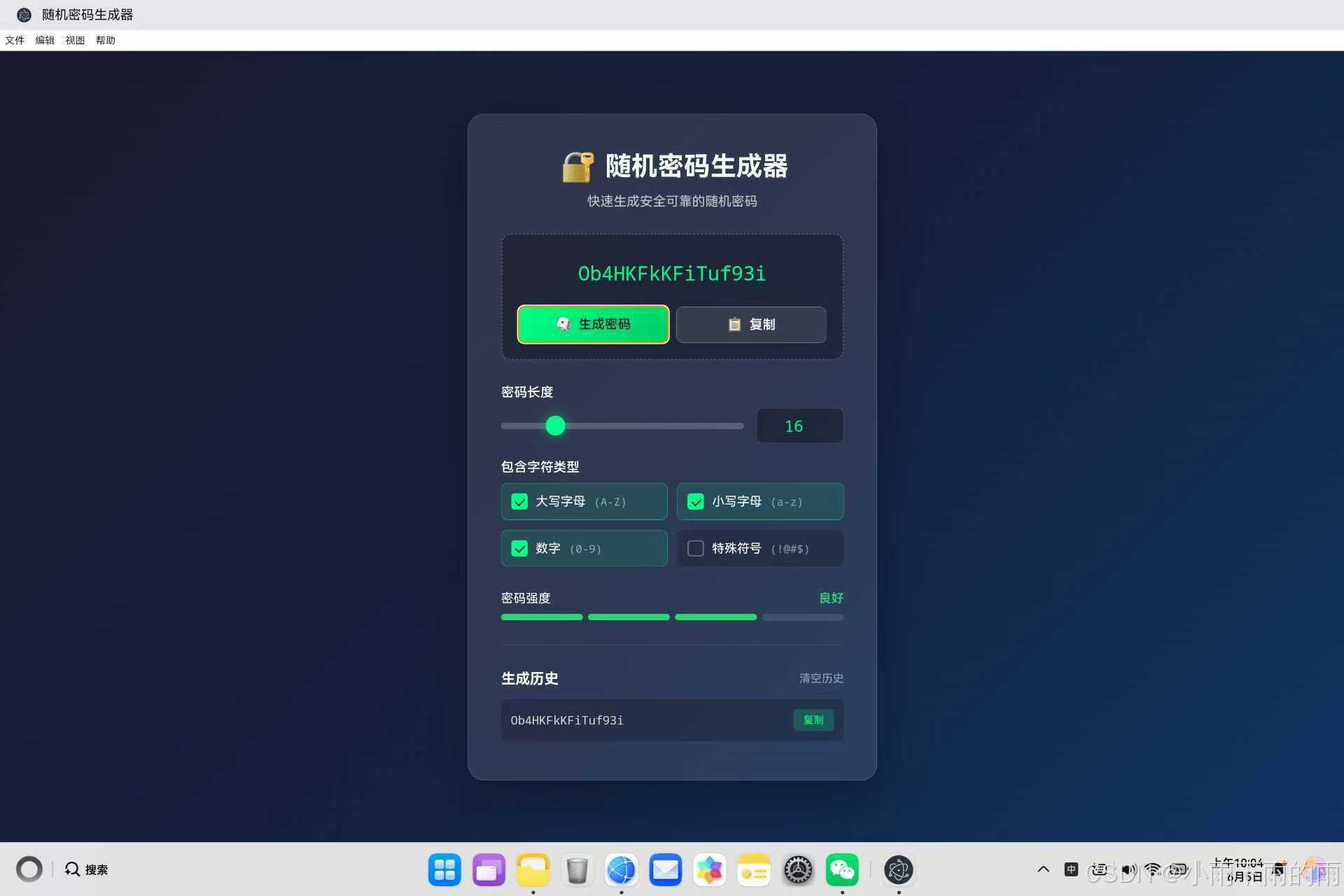
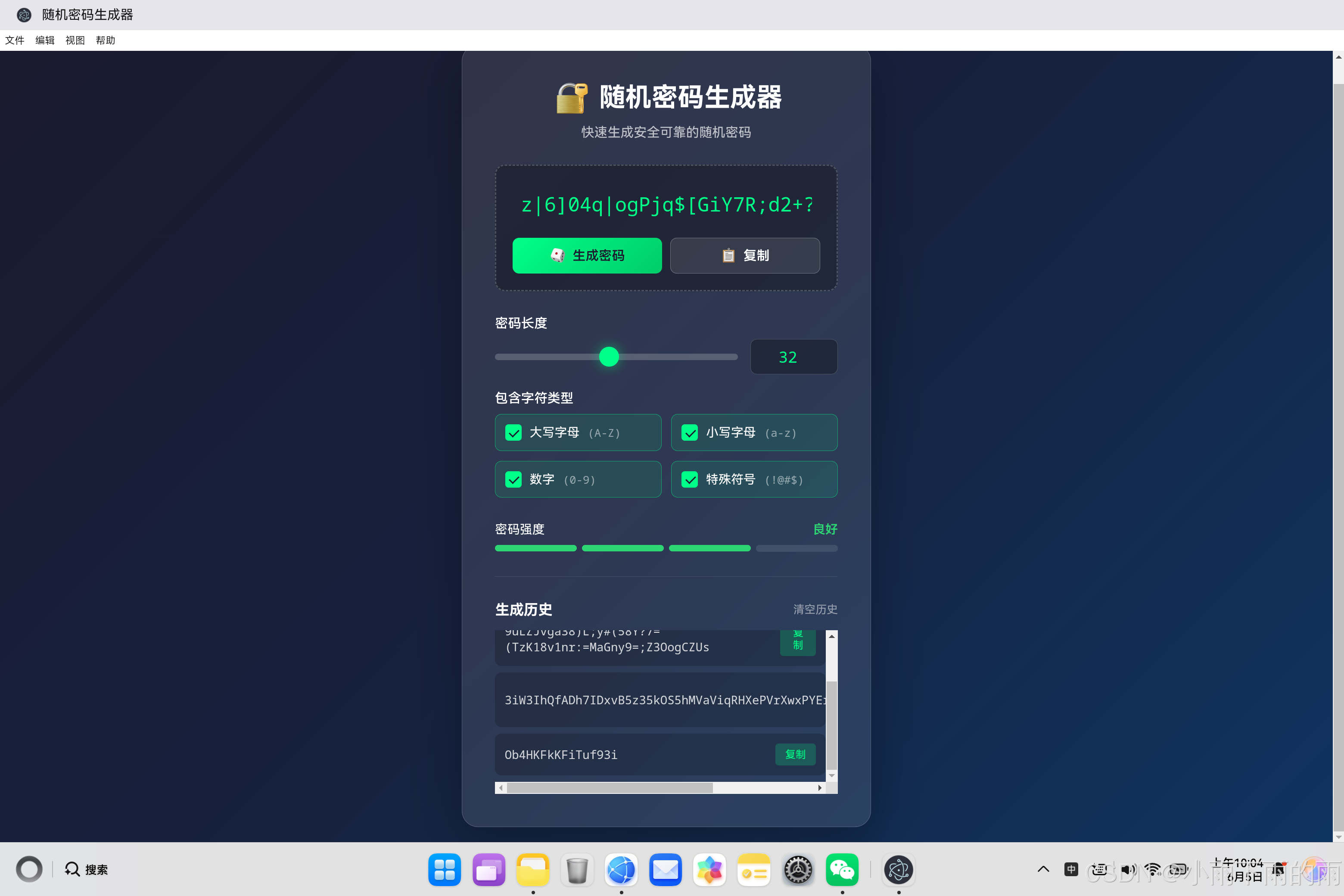
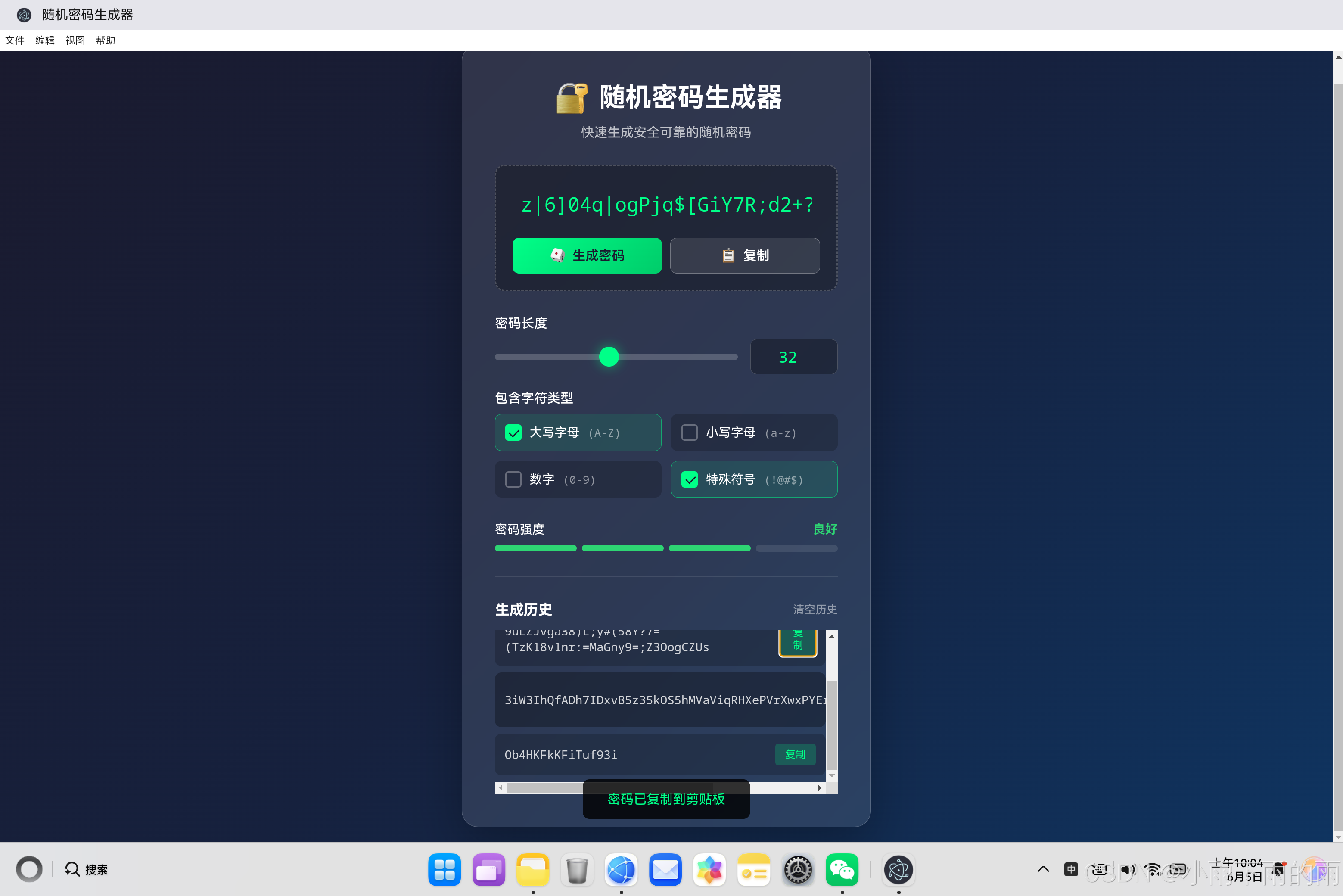
1. 项目概述
1.1 背景介绍
在数字化时代,密码安全至关重要。一个安全的密码应该具备足够的长度和复杂度,包含多种字符类型。本文详细介绍如何在鸿蒙PC平台上,基于Electron框架实现一个专业的随机密码生成器,支持自定义密码长度、字符类型选择、实时强度检测和历史记录功能。
1.2 技术选型
| 维度 | 技术 | 版本 | 选型理由 |
|---|---|---|---|
| 框架 | Electron | 18.x | 跨平台桌面应用框架,支持Web技术栈 |
| 渲染引擎 | Chromium | 95+ | 高性能Web Crypto API支持 |
| 语言 | JavaScript | ES6+ | 异步编程友好,适合安全相关开发 |
| UI技术 | HTML5 + CSS3 | - | 现代化界面设计和动画效果 |
| 安全 | Web Crypto API | - | 加密安全随机数生成 |
| 存储 | localStorage | - | 轻量级本地数据持久化 |
1.3 功能特性
本项目实现了一个功能丰富的随机密码生成器,主要特性包括:
- 自定义密码长度:支持4-64位密码长度调节
- 字符类型选择:大写字母、小写字母、数字、特殊符号
- 加密安全随机数:使用Web Crypto API生成安全随机数
- 实时强度检测:四档强度显示,可视化进度条
- 一键复制:快速复制到剪贴板
- 生成历史:保存最近10条记录,本地持久化
- 响应式设计:适配不同屏幕尺寸
2. 架构设计
2.1 整体架构
┌─────────────────────────────────────────────────────┐
│                      Electron主进程                   │
├─────────────────────────────────────────────────────┤
│  main.js                                            │
│  ├── 创建BrowserWindow                              │
│  ├── 加载HTML页面                                   │
│  └── 菜单与快捷键管理                                │
└─────────────────────────────────────────────────────┘
                            │
                            ▼
┌─────────────────────────────────────────────────────┐
│                      渲染进程                        │
├─────────────────────────────────────────────────────┤
│  password_generator.html                           │
│  ├── 密码显示层(密码输出和复制按钮)                │
│  ├── 控制面板层(长度滑块、字符类型选择)             │
│  ├── 强度指示层(进度条和文字描述)                  │
│  └── 历史记录层(生成历史和复制功能)                │
├─────────────────────────────────────────────────────┤
│  password_generator.js                             │
│  ├── PasswordGenerator类(核心逻辑)                │
│  ├── 随机数生成模块                                │
│  ├── 密码强度评估模块                              │
│  └── 历史记录管理模块                              │
└─────────────────────────────────────────────────────┘
2.2 核心组件职责
| 组件 | 职责 | 关键方法 |
|---|---|---|
| PasswordGenerator | 主控制器,协调整体逻辑 | constructor, generatePassword, updateStrength |
| 随机数生成 | 使用Web Crypto API生成安全随机数 | 基于crypto.getRandomValues() |
| 密码强度评估 | 根据长度和字符类型评估密码强度 | updateStrength() |
| 历史记录管理 | 管理生成历史的存储和展示 | saveHistory, loadHistory, updateHistoryDisplay |
2.3 数据流
用户操作 → DOM事件 → PasswordGenerator方法 → 密码生成 → 强度评估 → 更新UI → 保存历史
    ↓
参数变化 → 状态更新 → 重新生成密码
3. 核心代码实现
3.1 主入口HTML结构
HTML页面采用分层结构设计:密码显示层、控制面板层、强度指示层和历史记录层。
<!DOCTYPE html>
<html lang="zh-CN">
<head>
    <meta charset="UTF-8">
    <meta name="viewport" content="width=device-width, initial-scale=1.0">
    <title>随机密码生成器</title>
    <style>
        body {
            font-family: 'Segoe UI', Tahoma, Geneva, Verdana, sans-serif;
            background: linear-gradient(135deg, #1a1a2e 0%, #16213e 50%, #0f3460 100%);
            min-height: 100vh;
            display: flex;
            align-items: center;
            justify-content: center;
            padding: 20px;
        }

        .container {
            background: rgba(255, 255, 255, 0.1);
            backdrop-filter: blur(10px);
            border-radius: 20px;
            padding: 40px;
            width: 100%;
            max-width: 500px;
            box-shadow: 0 20px 60px rgba(0, 0, 0, 0.3);
            border: 1px solid rgba(255, 255, 255, 0.2);
        }

        .password-display {
            background: rgba(0, 0, 0, 0.3);
            border-radius: 12px;
            padding: 20px;
            margin-bottom: 30px;
            border: 2px dashed rgba(255, 255, 255, 0.2);
        }

        #password {
            width: 100%;
            background: transparent;
            border: none;
            color: #00ff88;
            font-size: 1.5rem;
            font-family: 'Courier New', monospace;
            text-align: center;
            padding: 10px;
            word-break: break-all;
            outline: none;
        }

        .btn-primary {
            background: linear-gradient(135deg, #00ff88, #00cc6a);
            color: #1a1a2e;
            padding: 12px 20px;
            border: none;
            border-radius: 8px;
            font-weight: 600;
            cursor: pointer;
            transition: all 0.3s ease;
        }

        .btn-primary:hover {
            transform: translateY(-2px);
            box-shadow: 0 10px 30px rgba(0, 255, 136, 0.4);
        }

        .strength-bars {
            display: flex;
            gap: 6px;
            height: 8px;
        }

        .strength-bar {
            flex: 1;
            border-radius: 4px;
            background: rgba(255, 255, 255, 0.1);
            transition: all 0.3s ease;
        }

        .strength-bar.strong {
            background: #00ff88;
        }

        .strength-bar.good {
            background: #2ed573;
        }

        .strength-bar.fair {
            background: #ffa502;
        }

        .strength-bar.weak {
            background: #ff4757;
        }
    </style>
</head>
<body>
    <div class="container">
        <div class="password-display">
            <input type="text" id="password" readonly>
            <button class="btn-primary" id="generate-btn">生成密码</button>
        </div>
        <!-- 控制面板、强度指示器、历史记录 -->
    </div>
</body>
</html>
设计要点:
- 深色主题设计:使用深蓝色渐变背景,营造专业安全的氛围
- 毛玻璃效果:通过
backdrop-filter: blur(10px)实现现代感的半透明效果 - 密码显示:使用等宽字体(Courier New)显示密码,绿色高亮显示
- 强度进度条:四档颜色区分密码强度(红色/橙色/绿色/深绿色)
3.2 PasswordGenerator核心类实现
这是整个应用的核心,负责密码生成、强度评估和历史记录管理。
class PasswordGenerator {
    constructor() {
        this.charSets = {
            uppercase: 'ABCDEFGHIJKLMNOPQRSTUVWXYZ',
            lowercase: 'abcdefghijklmnopqrstuvwxyz',
            numbers: '0123456789',
            symbols: '!@#$%^&*()_+-=[]{}|;:,.<>?'
        };

        this.passwordDisplay = document.getElementById('password');
        this.lengthSlider = document.getElementById('length-slider');
        this.lengthValue = document.getElementById('length-value');
        this.generateBtn = document.getElementById('generate-btn');
        this.copyBtn = document.getElementById('copy-btn');

        this.checkboxes = {
            uppercase: document.getElementById('uppercase'),
            lowercase: document.getElementById('lowercase'),
            numbers: document.getElementById('numbers'),
            symbols: document.getElementById('symbols')
        };

        this.strengthBars = {
            bar1: document.getElementById('bar1'),
            bar2: document.getElementById('bar2'),
            bar3: document.getElementById('bar3'),
            bar4: document.getElementById('bar4')
        };

        this.history = this.loadHistory();
        this.setupEventListeners();
    }
}
核心属性说明:
| 属性 | 类型 | 说明 |
|---|---|---|
| charSets | Object | 字符集映射表,包含四种字符类型 |
| passwordDisplay | HTMLInputElement | 密码显示输入框 |
| lengthSlider | HTMLInputElement | 长度调节滑块 |
| lengthValue | HTMLInputElement | 长度数值输入框 |
| checkboxes | Object | 字符类型选择复选框 |
| strengthBars | Object | 强度进度条DOM元素 |
| history | Array | 生成历史记录数组 |
3.3 加密安全随机数生成
密码的安全性首先取决于随机数生成的质量。本项目使用Web Crypto API生成加密安全的随机数,而非不安全的Math.random()。
generatePassword() {
    const length = parseInt(this.lengthValue.value);
    const charSets = this.getSelectedCharSets();

    if (charSets.length === 0) {
        this.showToast('请至少选择一种字符类型');
        return;
    }

    const allChars = charSets.join('');
    let password = '';

    for (let i = 0; i < length; i++) {
        const randomIndex = crypto.getRandomValues(new Uint32Array(1))[0] % allChars.length;
        password += allChars[randomIndex];
    }

    password = this.shuffleString(password);
    password = this.ensureAllTypesIncluded(password, charSets);

    this.passwordDisplay.value = password;
    this.updateStrength(password);
    this.addToHistory(password);
}
安全特性:
- Web Crypto API:使用
crypto.getRandomValues()生成加密安全的随机数 - Uint32Array:生成32位无符号整数,确保足够的随机性
- 模运算:通过取模运算将随机数映射到字符集索引范围
为什么不使用Math.random()?
Math.random()生成的是伪随机数,可预测性较高- 密码生成需要加密安全级别的随机性
- Web Crypto API提供的随机数符合密码学安全标准
3.4 Fisher-Yates洗牌算法
为了进一步增加密码的随机性,使用Fisher-Yates算法打乱密码字符顺序。
shuffleString(str) {
    const array = str.split('');
    for (let i = array.length - 1; i > 0; i--) {
        const j = crypto.getRandomValues(new Uint32Array(1))[0] % (i + 1);
        [array[i], array[j]] = [array[j], array[i]];
    }
    return array.join('');
}
算法原理:
Fisher-Yates洗牌算法(也称为Knuth洗牌算法)通过遍历数组,将每个元素与随机位置的元素交换,时间复杂度为O(n),空间复杂度为O(1)(原地操作)。
┌──────────────────────────────────────────────────────────┐
│ Fisher-Yates洗牌算法流程                                 │
├──────────────────────────────────────────────────────────┤
│ 输入: [A, B, C, D, E]                                   │
│                                                         │
│ i=4 (最后一个元素):                                      │
│   j = random(0-4) = 2                                   │
│   交换: [A, B, E, D, C]                                 │
│                                                         │
│ i=3:                                                    │
│   j = random(0-3) = 0                                   │
│   交换: [D, B, E, A, C]                                 │
│                                                         │
│ i=2:                                                    │
│   j = random(0-2) = 1                                   │
│   交换: [D, E, B, A, C]                                 │
│                                                         │
│ i=1:                                                    │
│   j = random(0-1) = 1                                   │
│   交换: [D, E, B, A, C] (不变)                          │
│                                                         │
│ 输出: [D, E, B, A, C]                                   │
└──────────────────────────────────────────────────────────┘
3.5 确保字符类型覆盖
确保选中的每种字符类型至少在密码中出现一次。
ensureAllTypesIncluded(password, charSets) {
    const passwordArray = password.split('');
    let modified = false;

    charSets.forEach((charSet, index) => {
        const hasChar = passwordArray.some(c => charSet.includes(c));
        if (!hasChar && index < passwordArray.length) {
            const randomIndex = crypto.getRandomValues(new Uint32Array(1))[0] % charSet.length;
            passwordArray[index] = charSet[randomIndex];
            modified = true;
        }
    });

    return modified ? this.shuffleString(passwordArray.join('')) : password;
}
实现逻辑:
- 遍历每个选中的字符集
- 检查密码中是否已包含该字符集的字符
- 如果未包含,在密码中替换一个位置为该字符集的随机字符
- 如果进行了替换,重新打乱密码以保持随机性
3.6 密码强度评估算法
基于密码长度和字符类型综合评估密码强度。
updateStrength(password) {
    let score = 0;
    const length = password.length;

    if (length >= 8) score++;
    if (length >= 12) score++;
    if (length >= 16) score++;

    if (this.checkboxes.uppercase.checked && /[A-Z]/.test(password)) score++;
    if (this.checkboxes.lowercase.checked && /[a-z]/.test(password)) score++;
    if (this.checkboxes.numbers.checked && /[0-9]/.test(password)) score++;
    if (this.checkboxes.symbols.checked && /[!@#$%^&*()_+\-=\[\]{}|;:,.<>?]/.test(password)) score++;

    const normalizedScore = Math.min(Math.floor(score / 2), 4);

    Object.values(this.strengthBars).forEach((bar, index) => {
        bar.className = 'strength-bar';
        if (index < normalizedScore) {
            if (normalizedScore === 1) bar.classList.add('weak');
            else if (normalizedScore === 2) bar.classList.add('fair');
            else if (normalizedScore === 3) bar.classList.add('good');
            else bar.classList.add('strong');
        }
    });

    const strengthLabels = ['弱', '较弱', '中等', '良好', '强'];
    const colors = ['#ff4757', '#ff6b81', '#ffa502', '#2ed573', '#00ff88'];
    this.strengthText.textContent = strengthLabels[Math.min(normalizedScore, 4)];
    this.strengthText.style.color = colors[Math.min(normalizedScore, 4)];
}
评分标准:
| 评分项 | 分数 |
|---|---|
| 长度 ≥ 8 | +1 |
| 长度 ≥ 12 | +1 |
| 长度 ≥ 16 | +1 |
| 包含大写字母 | +1 |
| 包含小写字母 | +1 |
| 包含数字 | +1 |
| 包含特殊符号 | +1 |
强度等级:
| 综合评分 | 强度等级 | 颜色 |
|---|---|---|
| 0-1 | 弱 | 红色 (#ff4757) |
| 2 | 较弱 | 浅红色 (#ff6b81) |
| 3-4 | 中等 | 橙色 (#ffa502) |
| 5-6 | 良好 | 绿色 (#2ed573) |
| 7+ | 强 | 深绿色 (#00ff88) |
3.7 历史记录管理
使用localStorage实现生成历史的本地持久化。
addToHistory(password) {
    this.history.unshift(password);
    if (this.history.length > 10) {
        this.history.pop();
    }
    this.saveHistory();
    this.updateHistoryDisplay();
}

saveHistory() {
    localStorage.setItem('passwordHistory', JSON.stringify(this.history));
}

loadHistory() {
    const saved = localStorage.getItem('passwordHistory');
    return saved ? JSON.parse(saved) : [];
}

updateHistoryDisplay() {
    if (this.history.length === 0) {
        this.historyList.innerHTML = '<p style="text-align: center; color: rgba(255,255,255,0.5); padding: 20px;">暂无历史记录</p>';
        return;
    }

    this.historyList.innerHTML = this.history.map((pwd, index) => `
        <div class="history-item">
            <span>${pwd}</span>
            <button class="copy-btn" data-index="${index}">复制</button>
        </div>
    `).join('');
}
设计考虑:
- 最大记录数:限制为10条,避免占用过多存储空间
- 最新优先:使用
unshift()将新记录添加到数组开头 - JSON序列化:将数组序列化为JSON字符串存储
- 防注入:使用
textContent而非innerHTML展示密码
3.8 一键复制功能
支持现代浏览器的Clipboard API和传统方法的降级处理。
async copyPassword() {
    const password = this.passwordDisplay.value;
    if (!password || password === '点击生成按钮创建密码') {
        this.showToast('请先生成密码');
        return;
    }

    try {
        await navigator.clipboard.writeText(password);
        this.showToast('密码已复制到剪贴板');
    } catch (err) {
        const textArea = document.createElement('textarea');
        textArea.value = password;
        document.body.appendChild(textArea);
        textArea.select();
        document.execCommand('copy');
        document.body.removeChild(textArea);
        this.showToast('密码已复制到剪贴板');
    }
}
兼容性处理:
- 现代浏览器:使用
navigator.clipboard.writeText()异步API - 降级方案:创建临时textarea元素,使用
document.execCommand('copy') - 错误处理:捕获异常并优雅降级
4. 安全性考虑
4.1 随机数安全性
| 方法 | 安全性 | 适用场景 |
|---|---|---|
| crypto.getRandomValues() | 高(加密安全) | 密码生成、令牌生成 |
| Math.random() | 低(伪随机) | 非安全场景,如动画 |
4.2 数据隐私
- ✅ 纯客户端生成,密码不上传服务器
- ✅ 历史记录仅保存在用户本地设备
- ✅ 使用HTTPS传输(生产环境)
- ✅ 敏感操作无日志记录
4.3 输入验证
hasAnyCheckboxChecked() {
    return Object.values(this.checkboxes).some(cb => cb.checked);
}
确保至少选择一种字符类型,防止生成空密码或无效密码。
5. 鸿蒙PC平台适配
5.1 Electron配置要点
const { app, BrowserWindow } = require('electron');

function createWindow() {
    mainWindow = new BrowserWindow({
        width: 600,
        height: 800,
        minWidth: 400,
        minHeight: 600,
        title: '随机密码生成器',
        webPreferences: {
            nodeIntegration: true,
            contextIsolation: false,
        },
    });

    mainWindow.loadFile('password_generator.html');
}

app.on('ready', createWindow);
5.2 平台特殊考虑
- 窗口尺寸:针对鸿蒙PC设备优化默认窗口大小
- 字体渲染:确保等宽字体在鸿蒙平台正确显示
- 剪贴板访问:验证Clipboard API在鸿蒙环境中的兼容性
6. 应用扩展
6.1 功能扩展建议
| 扩展功能 | 实现思路 |
|---|---|
| 密码模板 | 预设常用密码模板(如WiFi密码、邮箱密码等) |
| 密码验证 | 检查密码是否在常见密码字典中 |
| 多密码生成 | 一次生成多个密码 |
| 导出功能 | 导出密码列表到文件 |
| 密码强度建议 | 根据强度给出改进建议 |
6.2 代码优化方向
// 优化建议:使用Web Worker进行密码生成
// 避免长时间阻塞主线程

class PasswordGeneratorWorker {
    constructor() {
        this.worker = new Worker('password_worker.js');
    }

    generatePassword(options) {
        return new Promise((resolve) => {
            this.worker.postMessage(options);
            this.worker.onmessage = (e) => {
                resolve(e.data);
            };
        });
    }
}
7. 总结
本文详细介绍了基于Electron框架在鸿蒙PC平台上实现随机密码生成器的完整方案。核心技术点包括:
- 加密安全随机数:使用Web Crypto API生成密码学安全的随机数
- Fisher-Yates洗牌:打乱密码字符顺序,增加随机性
- 字符类型保障:确保每种选中类型至少出现一次
- 智能强度评估:基于长度和字符类型综合评分
- 本地持久化:使用localStorage保存生成历史
- 一键复制:支持现代浏览器和降级方案
该实现不仅提供了安全可靠的密码生成功能,还具备良好的用户体验和现代化的UI设计,适合作为学习安全编程和Electron开发的参考项目。
附录:完整文件清单
| 文件路径 | 说明 |
|---|---|
password_generator.html |
主HTML页面 |
password_generator.js |
核心JavaScript逻辑 |
home.html |
应用中心入口(包含导航链接) |
main.js |
Electron主进程配置 |

作为“人工智能6S店”的官方数字引擎,为AI开发者与企业提供一个覆盖软硬件全栈、一站式门户。
更多推荐
 0
0 0
0- 0


 已为社区贡献19条内容

所有评论(0)