
鸿蒙6.0应用开发——实况窗开发
鸿蒙6.0应用开发——实况窗开发
概述
在实际应用开发中,实时信息的高效呈现始终是提升用户体验的关键。实况窗作为高效的交互组件,有助于用户聚焦并迅速查看、处理任务,具备时段性、时效性、变化性的特征。锁屏沉浸实况窗能够详细展示应用的实时活动状态,将重要信息呈现在锁屏界面上,使用户一目了然,无需解锁屏幕进入应用即可获取最新的活动状态,尤其适合于实时性要求高,需要用户及时了解状态的场景,如动态显示网约车位置的出行打车场景、实时更新外卖进度的即时配送场景、以及在锁屏界面呈现电子登机牌的航班场景等。通过Live View Kit(实况窗服务)协助开发者快速集成实况窗功能,能轻松实现锁屏沉浸式的展示效果。
图1 用户获取实时信息界面
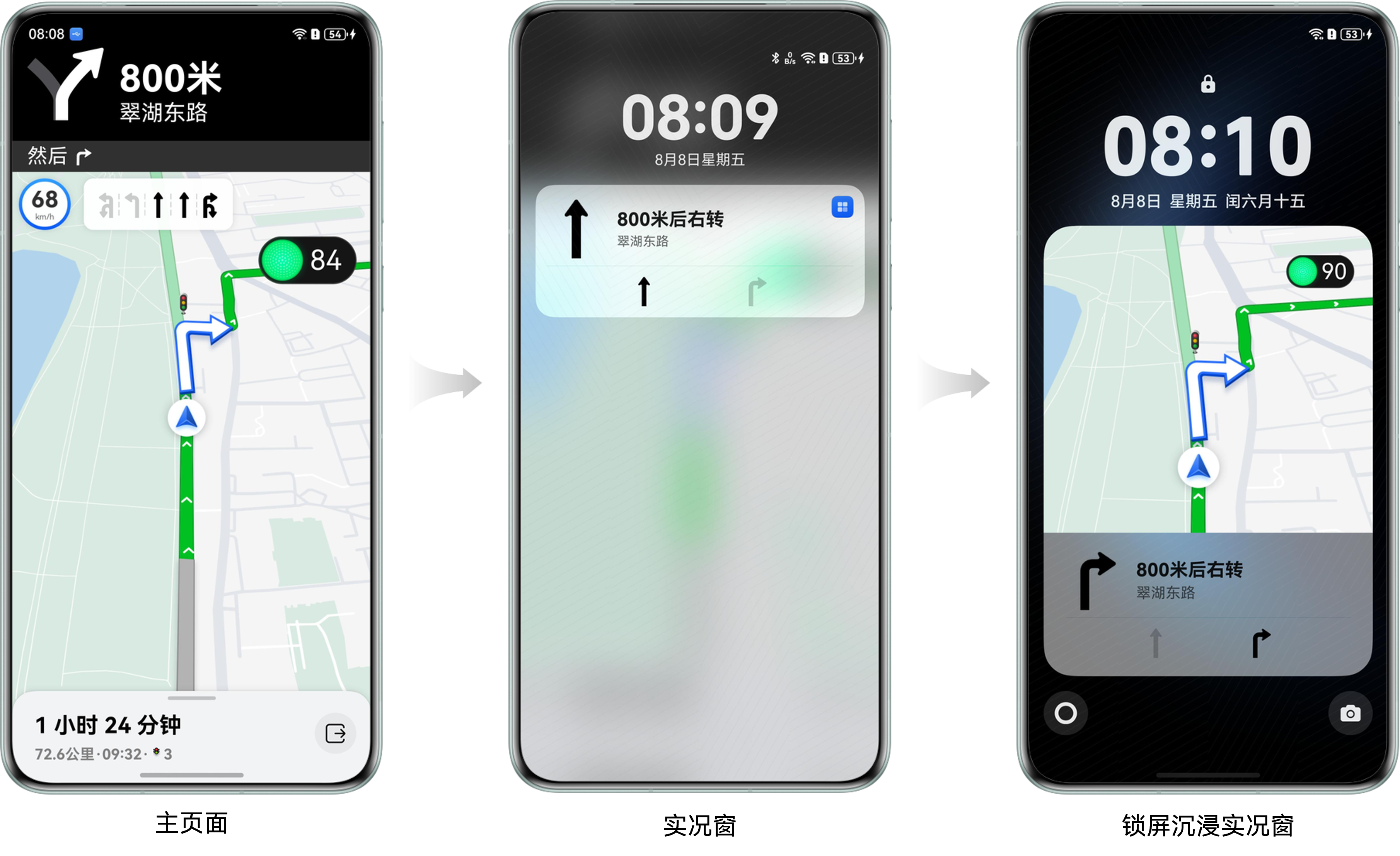
当用户退出主界面操作后,可通过下拉通知栏或点击胶囊态实况窗快速获取导航概要;当设备进入锁屏状态时,将进一步展示沉浸式锁屏实况窗界面。这种设计可实现实时获取当前信息,既保证了核心业务流的持续可视化,又实现了用户注意力资源的智能分配。
本文将以车道级导航锁屏沉浸实况窗开发实践为例,介绍锁屏沉浸实况窗的实现原理、开发流程,以及开发过程中常见的问题。
锁屏沉浸实况窗创建
场景描述
通过LiveView对象与LiveViewLockScreenExtensionAbility关联,并通过回调创建锁屏沉浸实况窗,以实现锁屏沉浸实况窗的展示。
开发步骤
在创建实况窗时,需在LiveView对象中指定LiveViewLockScreenExtensionAbility的名称,以便系统能够正确关联并渲染锁屏沉浸式实况窗。
-
将LiveViewLockScreenExtensionAbility的名称写入创建实况窗时创建的liveView对象中。
import { liveViewManager } from '@kit.LiveViewKit'; // ... // Construct live window request body. let liveView: liveViewManager.LiveView = { id: 0, sequence: this.sequence, // Application scenarios of the live window. NAVIGATION: Navigation. event: 'NAVIGATION', liveViewData: { // Live view capsule related parameters capsule: { type: liveViewManager.CapsuleType.CAPSULE_TYPE_TEXT, status: 1, icon: 'turn_right_light_square.png', backgroundColor: this.getStringSync($r('app.string.live_view_background').id), title: this.getStringSync($r('app.string.live_view_title').id), }, // Live view card related parameters primary: { title: this.getStringSync($r('app.string.live_view_title').id), content: [{ text: this.getStringSync($r('app.string.live_view_content').id) }], // Add LiveViewLockScreenExtensionAbility name to build lock screen live view liveViewLockScreenAbilityName: 'LiveViewExtAbility', liveViewLockScreenAbilityParameters: { liveViewParameters: '' }, keepTime: 0, clickAction: await LiveViewUtil.buildWantAgent() } } }; -
在应用module.json5中配置LiveViewLockScreenExtensionAbility的名称。
"extensionAbilities": [ { // Keep it consistent with LiveViewLockScreenExtensionAbility name in live view instance "name": "LiveViewExtAbility", "type": "liveViewLockScreen", // LiveViewLockScreenExtensionAbility location "srcEntry": "./ets/liveview/LiveViewExtAbility.ets", "exported": false } ], -
在LiveViewLockScreenExtensionAbility的onSessionCreate()方法中完成锁屏沉浸实况窗页面的创建。
// Core logic when creating UI session.
onSessionCreate(_want: Want, session: UIExtensionContentSession): void {
  // ...
  try {
    session.loadContent('liveview/LockScreenPage');
  } catch (error) {
    const err: BusinessError = error as BusinessError;
    hilog.error(0x0000, TAG, `Session load content failed. code: ${err.code}, message: ${err.message}`);
  }
}
锁屏沉浸实况窗实时更新
场景描述
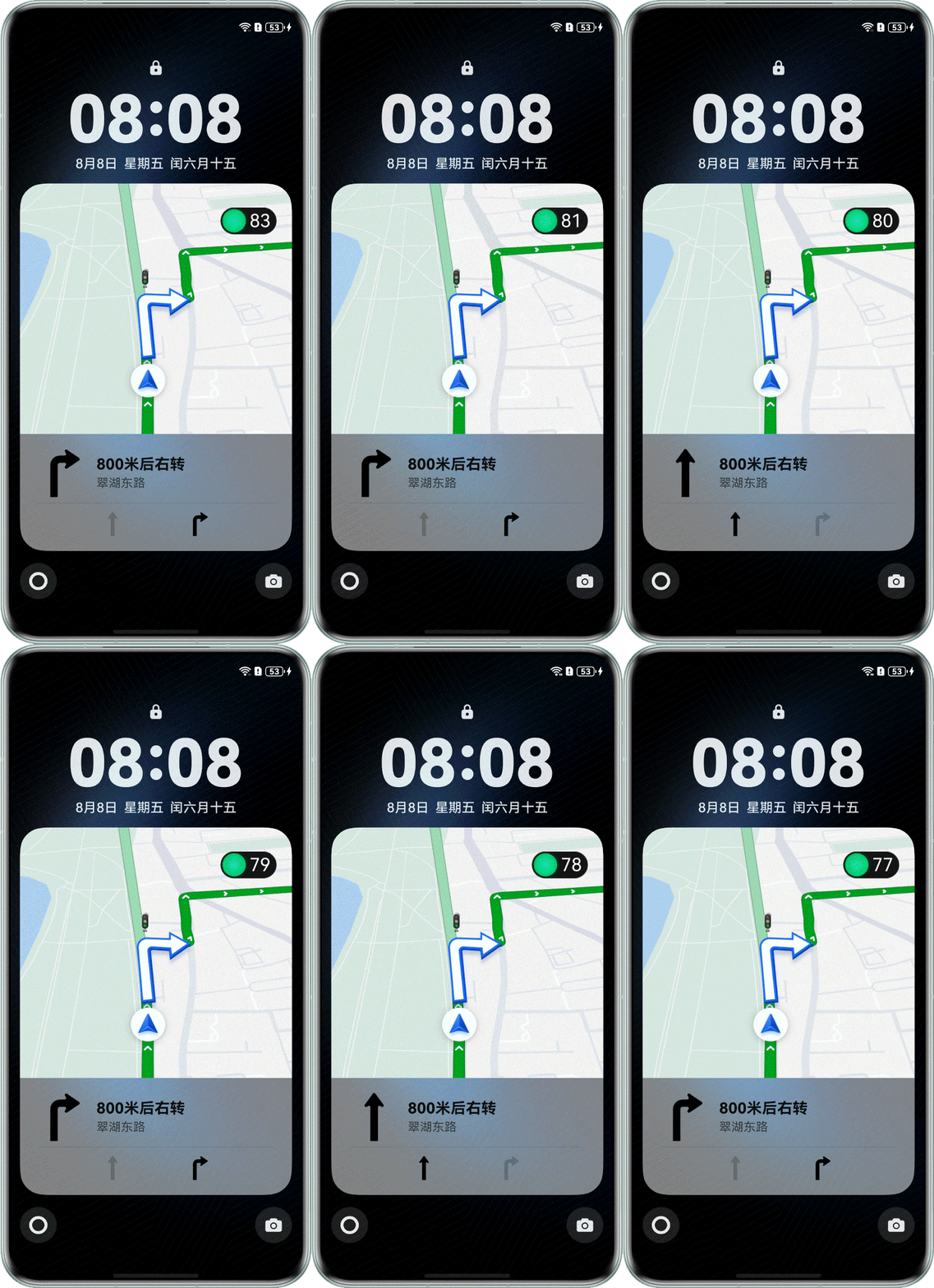
在通过LiveViewLockScreenExtensionAbility生命周期回调创建锁屏沉浸实况窗后,为了满足用户及时获取信息更新的需求,该实况窗需要实时更新。本章节将介绍如何实现锁屏沉浸实况窗的数据实时更新。
图5 锁屏沉浸实况窗实时更新
开发步骤
沉浸式实况窗进程与应用主进程之间的数据通信需根据不同场景兼顾实时性和初始化需求。以下是不同场景下的推荐方案:
- 公共事件方案(适用于多数场景):通过注册公共事件和监听公共事件的方式,实现锁屏沉浸实况窗进程与应用主进程间的数据通信。
- 优点:实现简单,支持跨进程广播通信。
- 缺点:无法获取初始数据。
- liveViewLockScreenAbilityParameters参数方案(适用于有初始化需求的场景):将数据携带在liveview对象的liveViewLockScreenAbilityParameters中,锁屏沉浸实况窗启动时可通过want直接获取。
- 优点:启动时可立即获取初始数据。
- 缺点:数据不可更新,更新需重启锁屏沉浸实况窗,可能导致闪屏。
- 文件共享方案(适用于大数据传输场景,谨慎使用):应用主进程将数据保存至沙箱文件中,在沉浸实况进程中监听文件内容变动以获取数据。
- 优点:适合大数据量传输,可持久化存储。
- 缺点:读写文件效率较低,锁屏沉浸实况窗进程无法直接获取沙箱路径,需由应用主进程通过其他方式传入沙箱路径。
综合考虑实现复杂度、性能表现和业务需求,在对初始数据无特殊要求的场景下,推荐开发者采用公共事件方案。该方案在实现难度和功能完整性之间取得了平衡,能够满足大多数场景下的通信需求。
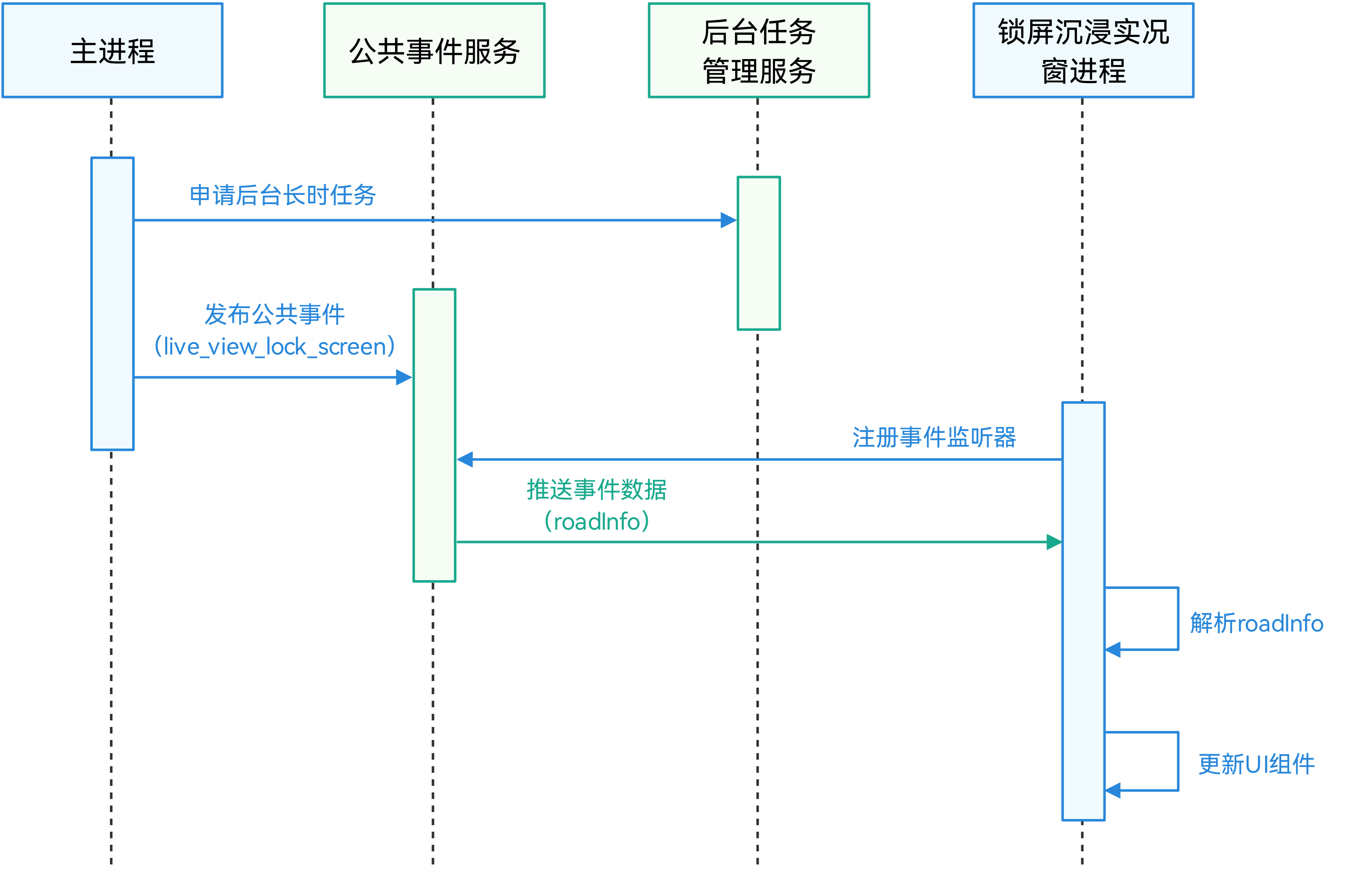
如果开发者对锁屏沉浸实况窗的初始数据有特殊要求,可以结合使用liveViewLockScreenAbilityParameters参数方案和公共事件方案:使用liveViewLockScreenAbilityParameters参数传入初始数据,通过注册和监听公共事件的方式进行后续数据更新。下文将以公共事件方案为例,介绍如何实现锁屏沉浸式实况窗的实时更新。
图6 锁屏沉浸实况窗实时更新时序图
-
申请后台长时任务,确保在后台能够发布公共事件以传递更新数据。
-
在申请后台长时任务之前,需确认应用已在module.json5中声明后台运行权限。
"requestPermissions": [ { "name": "ohos.permission.KEEP_BACKGROUND_RUNNING", "reason": "$string:reason_background", "usedScene": { "abilities": [ "EntryAbility" ], "when": "always" } }, ], -
应用创建长时任务,并声明长时任务类型。
import { backgroundTaskManager } from '@kit.BackgroundTasksKit';
// ...
  // Internal method to manage background tasks
  private startContinuousRunningTask() {
    // Configure WantAgent for background operation
    let wantAgentInfo: wantAgent.WantAgentInfo = {
      wants: [
        {
          bundleName: 'com.example.mapliveviewsample',
          abilityName: 'EntryAbility'
        }
      ],
      actionType: wantAgent.OperationType.START_ABILITY,
      requestCode: 0,
      actionFlags: [wantAgent.WantAgentFlags.UPDATE_PRESENT_FLAG]
    };

    try {
      // Acquire WantAgent for background operations
      wantAgent.getWantAgent(wantAgentInfo).then((wantAgentObj: WantAgent) => {
        try {
          hilog.info(0x0000, TAG, '%{public}s', 'Operation startBackgroundRunning begin.');
          // Required background resource types
          const list: string[] = ['location'];
          // Request background running permission
          if (canIUse('SystemCapability.ResourceSchedule.BackgroundTaskManager.ContinuousTask')) {
            backgroundTaskManager.startBackgroundRunning(this.context, list, wantAgentObj).then(() => {
              hilog.info(0x0000, TAG, '%{public}s', 'Operation startBackgroundRunning succeeded.');
            }).catch((error: BusinessError) => {
              hilog.error(0x0000, TAG, '%{public}s',
                `Failed to Operation startBackgroundRunning. code is ${error.code} message is ${error.message}`);
            });
          }
        } catch (error) {
          hilog.error(0x0000, TAG, '%{public}s',
            `Failed to Operation startBackgroundRunning. code is ${(error as BusinessError).code} message is ${(error as BusinessError).message}`);
        }
      });
    } catch (error) {
      hilog.error(0x0000, TAG, '%{public}s',
        `Failed to Operation getWantAgent. code is ${(error as BusinessError).code} message is ${(error as BusinessError).message}`);
    }
  }
代码逻辑走读:
- 导入模块:代码首先从
@kit.BackgroundTasksKit模块中导入backgroundTaskManager,用于管理后台任务。 - 内部方法定义:定义了一个名为
startContinuousRunningTask的私有方法,用于启动持续运行的后台任务。 - 配置WantAgent:创建一个
wantAgentInfo对象,用于配置WantAgent,以便在后台执行特定操作。 - 获取WantAgent对象:使用
wantAgent.getWantAgent方法获取WantAgent对象,该方法是异步的,返回一个Promise。 - 日志记录:在尝试开始后台运行任务之前,使用
hilog.info记录日志信息,表示开始操作。 - 请求后台运行权限:检查系统是否支持
SystemCapability.ResourceSchedule.BackgroundTaskManager.ContinuousTask,如果支持,则调用backgroundTaskManager.startBackgroundRunning方法启动后台运行任务。 - 处理成功和错误情况:在启动后台运行任务的Promise中,使用
.then处理成功情况,使用.catch处理错误情况,并通过hilog.error记录错误信息。 - 错误处理:在获取WantAgent对象的Promise中,也使用
.catch处理错误情况,并通过hilog.error记录错误信息。
- 导入模块:代码首先从
-
-
发布公共事件传递更新数据到锁屏沉浸实况窗。
应用在主页面中通过commonEventManager.publish()接口发布公共事件’live_view_lock_screen’,并在CommonEventPublishData的parameters属性中附带锁屏沉浸实况窗的创建和更新数据。
import { BusinessError, commonEventManager } from '@kit.BasicServicesKit'; // ... // Prepare common event data let options: commonEventManager.CommonEventPublishData = { data: 'data', bundleName: 'com.example.mapliveviewsample', parameters: { 'laneData': routeData.laneData } }; // Publish system event for lock screen updates commonEventManager.publish('live_view_lock_screen', options, (error: BusinessError) => { if (error) { hilog.error(0x0000, TAG, '%{public}s', `Failed to publish commonEvent. code is ${error.code} message is ${error.message}`); } else { hilog.info(0x0000, TAG, '%{public}s', 'Succeeded in publishing commonEvent.') } }); -
订阅公共事件更新锁屏沉浸实况窗。
锁屏沉浸实况窗进程在LiveViewLockScreenExtensionAbility中,使用commonEventManager.createSubscriber()接口创建主页面创建的公共事件’live_view_lock_screen’的订阅者,通过AppStorage(应用全局的UI状态存储)将主页面传递的数据传入LockScreenPage.ets,以实现锁屏沉浸实况窗的创建和更新。
import { BusinessError, commonEventManager } from '@kit.BasicServicesKit';
// ...

    // Initialize event subscription.
    let subscribeInfo: commonEventManager.CommonEventSubscribeInfo = {
      events: ['live_view_lock_screen'],
      publisherBundleName: 'com.example.mapliveviewsample',
      priority: 0
    };
    commonEventManager.createSubscriber(subscribeInfo,
      (error: BusinessError, data: commonEventManager.CommonEventSubscriber) => {
        if (error) {
          hilog.error(0x0000, TAG, '%{public}s',
            `Failed to create subscriber. code is ${error.code} message is ${error.message}.`);
          return;
        }
        this.subscriber = data;
        hilog.info(0x0000, TAG, '%{public}s', 'Succeeded in creating subscriber.');
        // Event handling logic.
        commonEventManager.subscribe(this.subscriber,
          async (error: BusinessError, data: commonEventManager.CommonEventData) => {
            if (error) {
              hilog.error(0x0000, TAG, '%{public}s',
                `Failed to subscribe commonEvent. code is ${error.code} message is ${error.message}.`);
              return;
            }
            hilog.info(0x0000, TAG, '%{public}s', 'Succeeded in subscribe commonEvent success.');
            if (data.parameters) {
              let laneData = data.parameters['laneData'] as LaneData;
              AppStorage.setOrCreate('laneData', laneData);
              hilog.info(0x0000, TAG, '%{public}s', 'Succeeded in receive commonEvent.');
            }
          });
      })
代码逻辑走读:
- 导入模块:
- 从’@kit.BasicServicesKit’导入
BusinessError和commonEventManager。
- 从’@kit.BasicServicesKit’导入
- 初始化事件订阅信息:
- 创建一个
subscribeInfo对象,指定要订阅的事件名称为’live_view_lock_screen’,并设置发布者包名和优先级。
- 创建一个
- 创建事件订阅者:
- 调用
commonEventManager.createSubscriber方法,传入subscribeInfo和回调函数。 - 如果创建订阅者失败,记录错误日志并返回。
- 如果成功,将返回的订阅者对象赋值给
this.subscriber,并记录成功日志。
- 调用
- 订阅事件:
- 调用
commonEventManager.subscribe方法,传入订阅者对象和回调函数。 - 如果订阅失败,记录错误日志并返回。
- 如果订阅成功,记录成功日志。
- 调用
- 处理事件数据:
- 检查事件数据中是否包含参数
laneData。 - 如果存在,将其转换为
LaneData类型,并存储到AppStorage中。 - 记录接收事件的日志。
- 检查事件数据中是否包含参数
- 导入模块:
锁屏沉浸实况窗结束
场景描述
当用户实时获取信息的需求结束时,应用应及时关闭实况窗及锁屏沉浸实况窗,以优化设备性能和电池续航,避免不必要功耗问题。
开发步骤
为确保结束锁屏沉浸实况窗时可以完整释放系统资源,结束流程需按以下顺序执行:
-
停止数据源接收:关闭数据输入通道,停止数据采集。本开发实践为结束定时器任务,停止更新车道数据。
// Clear periodic updates if (this.updateInterval !== undefined) { clearInterval(this.updateInterval); this.updateInterval = undefined; hilog.info(0x0000, TAG, 'Timer has been cleared'); } -
结束界面更新:停止实况窗和沉浸实况窗的内容更新与展示。
// Close live view. public async closeLiveView() { // Ensure that the sequence is greater than the current live window page. this.sequence++; this.defaultLiveView = await this.createPrimaryLiveView(); await liveViewManager.stopLiveView(this.defaultLiveView).then(() => { this.sequence = 0; this.defaultLiveView = undefined; hilog.info(0x0000, TAG, '%{public}s', 'Succeeded in stopping liveView, result: %{public}'); }).catch((error: BusinessError) => { hilog.error(0x0000, TAG, '%{public}s', `Failed to stop liveView. Cause code: ${error.code}, message: ${error.message}`); }); return; } -
清理后台任务:结束关联的后台长时运行任务。
// Stop background tasks
try {
  if (canIUse('SystemCapability.ResourceSchedule.BackgroundTaskManager.ContinuousTask')) {
    backgroundTaskManager.stopBackgroundRunning(this.context).then(() => {
      hilog.info(0x0000, TAG, '%{public}s', 'Operation stopBackgroundRunning succeeded');
    }).catch((error: BusinessError) => {
      hilog.error(0x0000, TAG, '%{public}s',
        `Operation stopBackgroundRunning failed. code is ${error.code} message is ${error.message}`);
    });
  }
} catch (error) {
  hilog.error(0x0000, TAG, '%{public}s',
    `Operation stopBackgroundRunning failed. code is ${(error as BusinessError).code} message is ${(error as BusinessError).message}`);
}

作为“人工智能6S店”的官方数字引擎,为AI开发者与企业提供一个覆盖软硬件全栈、一站式门户。
更多推荐

 59
59 0
0- 0


 已为社区贡献68条内容

所有评论(0)