
【鸿蒙原生开发实战】第二篇:数据层与核心架构——Clean Architecture 在 ArkTS 中的实践
本文介绍了如何在鸿蒙(HarmonyOS)应用开发中实践Clean Architecture架构,以笔记应用"知墨"为例。文章首先解释了Clean Architecture的核心思想——依赖反转原则,通过领域层、数据层和UI层的分离实现代码的高可维护性。 在领域模型层,作者设计了Note和Category两个核心数据模型,使用TypeScript接口定义数据结构,并提供了配套的工厂函数和预定义分类
【鸿蒙原生开发实战】第二篇:数据层与核心架构——Clean Architecture 在 ArkTS 中的实践
前言
上一篇我们搭好了环境、跑通了构建。但一个真正的应用不能只有 Hello World,它需要清晰的架构来支撑功能的持续迭代。
在本篇中,我会用 Clean Architecture(整洁架构) 的思想来组织「知墨」的数据层代码,包括:
- 领域模型(Note、Category)的定义
- Repository 仓库模式封装 Preferences 持久化
- UseCase 用例层处理业务逻辑
- Services 服务层管理主题和偏好设置
这是一套即使在项目膨胀到 50+ 页面后依然能保持可维护性的架构方案。
一、为什么选择 Clean Architecture?
在 HarmonyOS 开发中,很多初学者会直接把所有逻辑写在 Page 的 @State 和 build() 里,导致一个文件上千行。当需求变更时,牵一发动全身。
Clean Architecture 的核心原则是 依赖反转:高层模块不依赖低层模块,两者都依赖抽象。
我们项目的目录结构体现了这一点:
ets/
├── domain/           # 领域层(纯逻辑,无框架依赖)
│   ├── models/       # 实体模型
│   └── usecases/     # 业务用例
├── data/             # 数据层(实现持久化)
│   ├── repositories/ # 仓库实现
│   └── services/     # 基础设施服务
├── ui/               # UI 组件层
│   └── core/         # 可复用组件
└── pages/            # 页面层(仅编排)
依赖方向:pages → domain ← data,领域层在最中心,谁都不依赖。
二、领域模型层(Domain Models)
2.1 Note 模型
domain/models/Note.ts 定义了笔记的核心数据结构:
export interface Note {
  id: string;
  title: string;
  content: string;
  categoryId: string;
  isFavorite: boolean;
  createdAt: number;
  updatedAt: number;
  tags: string[];
}
为什么用 interface 而不是 class? 在 ArkTS 中,interface 更轻量,没有构造开销,适合纯数据对象。同时 JSON.parse 可以直接反序列化为 interface 类型。
配套的工厂函数:
export function createNote(
  title: string,
  content: string,
  categoryId: string = 'uncategorized',
  tags: string[] = [],
): Note {
  const now = Date.now();
  return {
    id: `note_${now}_${Math.random().toString(36).substring(2, 8)}`,
    title,
    content,
    categoryId,
    isFavorite: false,
    createdAt: now,
    updatedAt: now,
    tags,
  };
}
注意 ID 生成策略:时间戳 + 随机字符串,保证唯一性又不需要数据库自增。Date.now() 使用毫秒级时间戳,这在 HarmonyOS 中完全支持。
2.2 Category 模型
分类在笔记应用中是一个相对固定的枚举,所以我们用常量数组 + 查找函数来实现:
export interface Category {
  id: string;
  name: string;
  icon: string;
  color: string;
}

export const PREDEFINED_CATEGORIES: Category[] = [
  { id: 'tech',     name: '技术', icon: '💻', color: '#6c5ce7' },
  { id: 'life',     name: '生活', icon: '🌿', color: '#00b894' },
  { id: 'work',     name: '工作', icon: '💼', color: '#0984e3' },
  { id: 'study',    name: '学习', icon: '📚', color: '#fdcb6e' },
  { id: 'idea',     name: '灵感', icon: '💡', color: '#e17055' },
  { id: 'uncategorized', name: '未分类', icon: '📄', color: '#636e72' },
];

export function getCategoryById(id: string): Category {
  return PREDEFINED_CATEGORIES.find(c => c.id === id) || PREDEFINED_CATEGORIES[5];
}
每个分类有专属的 Emoji 图标和颜色值,这些在 UI 层会被直接使用来实现视觉区分。
三、数据持久化层(Data Layer)
3.1 Preferences API 封装
HarmonyOS 提供了 @kit.ArkData 中的 Preferences API,类似于 Android 的 SharedPreferences 或 Web 的 localStorage。它是一个键值对存储系统,适合存储结构化 JSON 数据。
我们封装了一个 PreferencesService,统一管理所有偏好存储操作:
class PreferencesService {
  private pref: preferences.Preferences | null = null;

  async init(context: Context): Promise<void> {
    if (this.pref) return;
    this.pref = await preferences.getPreferences(context, 'knowink_preferences');
  }

  async getString(key: string, defaultValue: string): Promise<string> {
    if (!this.pref) return defaultValue;
    return (await this.pref.get(key, defaultValue)) as string;
  }

  async set(key: string, value: string | boolean | number): Promise<void> {
    if (!this.pref) return;
    await this.pref.put(key, value);
  }

  async flush(): Promise<void> {
    if (!this.pref) return;
    await this.pref.flush();
  }
}

export const preferencesService = new PreferencesService();
为什么封装一层? 直接调用 preferences.getPreferences() 太底层,而且需要在每个页面都传 Context。封装成单例 Service 后,所有模块通过 preferencesService.init(ctx) 一次性初始化,后续使用只需调用 getString / set 即可。
注意:
flush()方法必须显式调用才能确保数据落盘。如果只调put不调flush,应用被系统杀死时可能丢失数据。
3.2 NoteRepository 仓库
仓库模式在领域驱动设计中扮演着"集合"的角色——对上层暴露的操作就像操作内存集合一样简单,内部隐藏了具体的持久化机制。
const STORAGE_KEY_NOTES = 'knowink_notes';

class NoteRepository {
  private notes: Note[] | null = null; // 内存缓存

  async loadAll(): Promise<Note[]> {
    if (this.notes !== null) return this.notes; // 优先返回缓存
    const raw = await preferencesService.getString(STORAGE_KEY_NOTES, '[]');
    try {
      this.notes = JSON.parse(raw) as Note[];
    } catch {
      this.notes = [];
    }
    return this.notes!;
  }

  private async save(): Promise<void> {
    await preferencesService.set(STORAGE_KEY_NOTES, JSON.stringify(this.notes));
    await preferencesService.flush();
  }
  // ... 其他 CRUD 方法
}
仓库提供了以下操作接口:
| 方法 | 功能 | 复杂度 |
|---|---|---|
loadAll() |
加载全部笔记(含缓存) | O(n) |
getById(id) |
按 ID 查询 | O(n) |
add(title, content, categoryId, tags) |
新增笔记 | O(n) |
update(note) |
更新笔记 | O(n) |
delete(id) |
删除笔记 | O(n) |
toggleFavorite(id) |
切换收藏 | O(n) |
search(query) |
全文搜索(标题+内容) | O(n) |
getByCategory(categoryId) |
按分类筛选 | O(n) |
getFavorites() |
获取收藏笔记 | O(n) |
getStats() |
获取统计数据 | O(n) |
reload() |
清除缓存重新加载 | O(1) |
内存缓存的妙用:this.notes 作为内存缓存,首次 loadAll() 从 Preferences 读取后,后续所有操作都在内存中进行,只有 save() 时才序列化回磁盘。这避免了频繁 I/O,也使得页面切换时数据不会丢失。
数据统计的实现:
async getStats(): Promise<NoteStats> {
  const notes = await this.loadAll();
  const total = notes.length;
  const favorites = notes.filter(n => n.isFavorite).length;
  const categoryDist: Record<string, number> = {};
  for (const n of notes) {
    categoryDist[n.categoryId] = (categoryDist[n.categoryId] || 0) + 1;
  }
  const recentNotes = [...notes].sort((a, b) => b.updatedAt - a.updatedAt).slice(0, 5);
  return { total, favorites, categoryDist, recentNotes };
}
这里用 Record<string, number> 做了一个简易的分类计数字典,展示在主页的统计卡片上。
四、业务用例层(UseCases)
UseCase 层是应用的核心业务逻辑所在。它不直接操作数据,而是通过调用 Repository 完成工作:
class NoteUseCases {
  async getAllNotes(): Promise<Note[]> {
    return await noteRepository.loadAll();
  }

  async addNote(title: string, content: string, categoryId: string, tags: string[]): Promise<Note> {
    if (!title.trim()) throw new Error('Title cannot be empty');
    return await noteRepository.add(title.trim(), content.trim(), categoryId, tags);
  }

  async updateNote(note: Note): Promise<void> {
    if (!note.title.trim()) throw new Error('Title cannot be empty');
    await noteRepository.update(note);
  }

  async searchNotes(query: string): Promise<Note[]> {
    if (!query.trim()) return [];
    return await noteRepository.search(query.trim());
  }
  // ...
}

export const noteUseCases = new NoteUseCases();
为什么还要加一层 UseCase,而不是直接调 Repository?
- 业务规则集中管理:比如标题不能为空、搜索前做 trim 等,都在 UseCase 层统一校验
- 跨聚合操作:如果将来需要"删除分类时同时删除该分类下的所有笔记",逻辑写在 UseCase 中
- 可测试性:单元测试时只需 Mock UseCase 的依赖,不需要启动模拟器
五、Service 层:主题管理
主题切换服务是一个典型的基础设施服务:
class ThemeService {
  private isDark: boolean = false;

  async init(context: Context): Promise<void> {
    await preferencesService.init(context);
    this.isDark = await preferencesService.getBoolean(STORAGE_KEY_THEME, false);
  }

  async toggle(): Promise<boolean> {
    await this.setDarkMode(!this.isDark);
    return this.isDark;
  }

  private applyTheme(): void {
    AppStorage.setOrCreate('isDarkTheme', this.isDark);
    try {
      const ctx = AppStorage.get<Context>('appContext');
      if (ctx) {
        ctx.getApplicationContext().setColorMode(
          this.isDark
            ? ConfigurationConstant.ColorMode.COLOR_MODE_DARK
            : ConfigurationConstant.ColorMode.COLOR_MODE_LIGHT,
        );
      }
    } catch (e) { /* ignore */ }
  }
}
技术要点:
- 使用
AppStorage全局存储主题状态,各页面通过@StorageProp监听变化 - 调用
setColorMode()让系统级 UI 组件(状态栏、对话框等)也跟随主题变化 AppStorage.get<Context>('appContext')通过之前Index.ets中AppStorage.setOrCreate('appContext', getContext(this))保存的全局上下文
六、架构总览与调用链
以"创建新笔记"为例,完整的调用链如下:
用户点击保存按钮
    ↓
NoteEditPage.onSave()                    # 页面层:获取表单数据
    ↓
noteUseCases.addNote(title, content, ...) # 用例层:校验业务规则
    ↓
noteRepository.add(title, content, ...)   # 仓库层:创建 Note 对象并持久化
    ↓
createNote(title, content, ...)           # 模型层:生成实体
    ↓
preferencesService.set(key, JSON...)      # 服务层:写入磁盘
    ↓
preferences.put(key, value)               # HarmonyOS API
这种分层让每一层的职责单一清晰:
| 层 | 职责 | 可被替换吗? |
|---|---|---|
| Page | UI 编排、用户交互 | 可被不同 UI 框架替换 |
| UseCase | 业务规则、校验 | 业务不变则不需变 |
| Repository | 数据聚合、缓存 | 可切换为网络 API |
| Service | 基础设施操作 | 可替换为其他存储方案 |
七、本阶段小结
本篇我们完成了:
- ✅ 用 Clean Architecture 思想组织项目结构
- ✅ 定义 Note 和 Category 领域模型
- ✅ 封装 PreferencesService 提供持久化基座
- ✅ 实现 NoteRepository 仓库模式(含内存缓存)
- ✅ 实现 NoteUseCases 业务用例层
- ✅ 实现 ThemeService 主题管理服务
- ✅ 对所有代码做了分层注释和文档
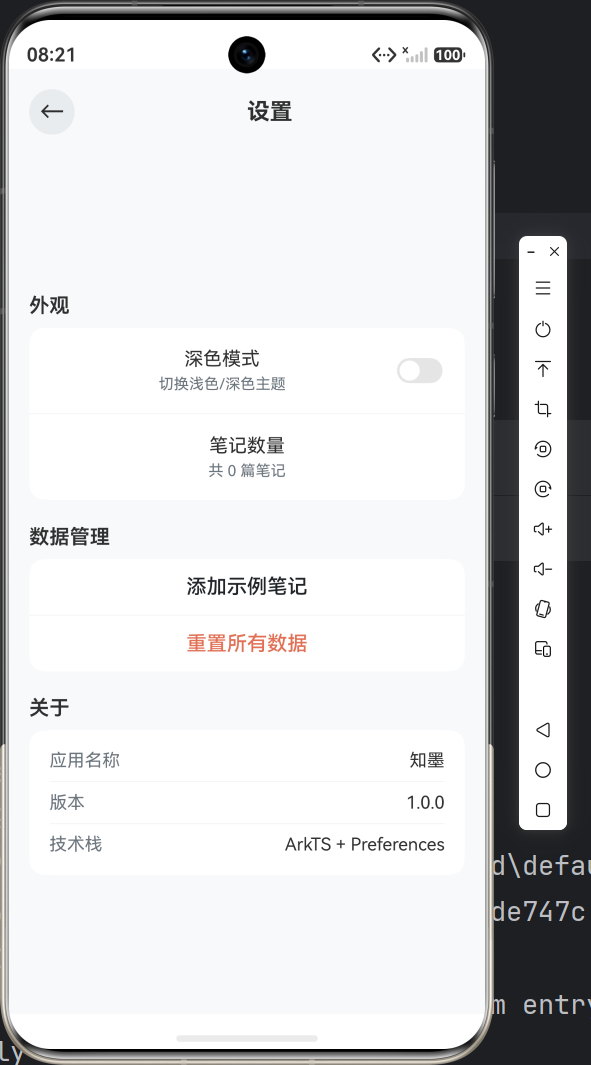
下一篇预告:进入 UI 开发阶段!我们将创建 ArkUI 自定义组件(NoteCard、StatsCard、CategoryBadge、EmptyState),并搭建主页面(Index)的完整布局——包括统计栏、分类筛选器、笔记列表和 FAB 按钮。

作为“人工智能6S店”的官方数字引擎,为AI开发者与企业提供一个覆盖软硬件全栈、一站式门户。
更多推荐
 6
6 0
0- 0


 已为社区贡献9条内容

所有评论(0)