
鸿蒙Flutter实战:MethodChannel桥接获取OHOS文件目录
Flutter 的标准包 `path_provider` 目前不支持 OHOS。但 Flutter 提供了一套与原生平台通信的通用机制——`MethodChannel`。通过它,我们可以在 Dart 层向 OHOS 原生层发送请求,获取应用沙盒目录路径。
前言
当 Flutter 应用跑在鸿蒙 OHOS 上时,第一个需要解决的问题是:文件存哪里? Android 有 getApplicationDocumentsDirectory(),iOS 有 NSDocumentDirectory,鸿蒙 OHOS 有 context.filesDir。
Flutter 的标准包 path_provider 目前不支持 OHOS。但 Flutter 提供了一套与原生平台通信的通用机制——MethodChannel。通过它,我们可以在 Dart 层向 OHOS 原生层发送请求,获取应用沙盒目录路径。
本文是鸿蒙 Flutter 适配的核心文章——拆解 MethodChannel 在 Flutter ↔ OHOS 之间的完整通信链路。
项目仓库:todo_flutter_harmony
整体架构
Flutter (Dart)                    HarmonyOS (ArkTS)
─────────────────                 ─────────────────
StoragePath.getAppDir()           EntryAbility.ets
        │                              │
        │  MethodChannel                │
        │  'com.memo.app/storage'      │
        │                              │
        ├──── invokeMethod ───────────→│
        │     'getFilesDir'            │
        │                              ├── this.context.filesDir
        │←── return filesDir ──────────┤
        │                              │
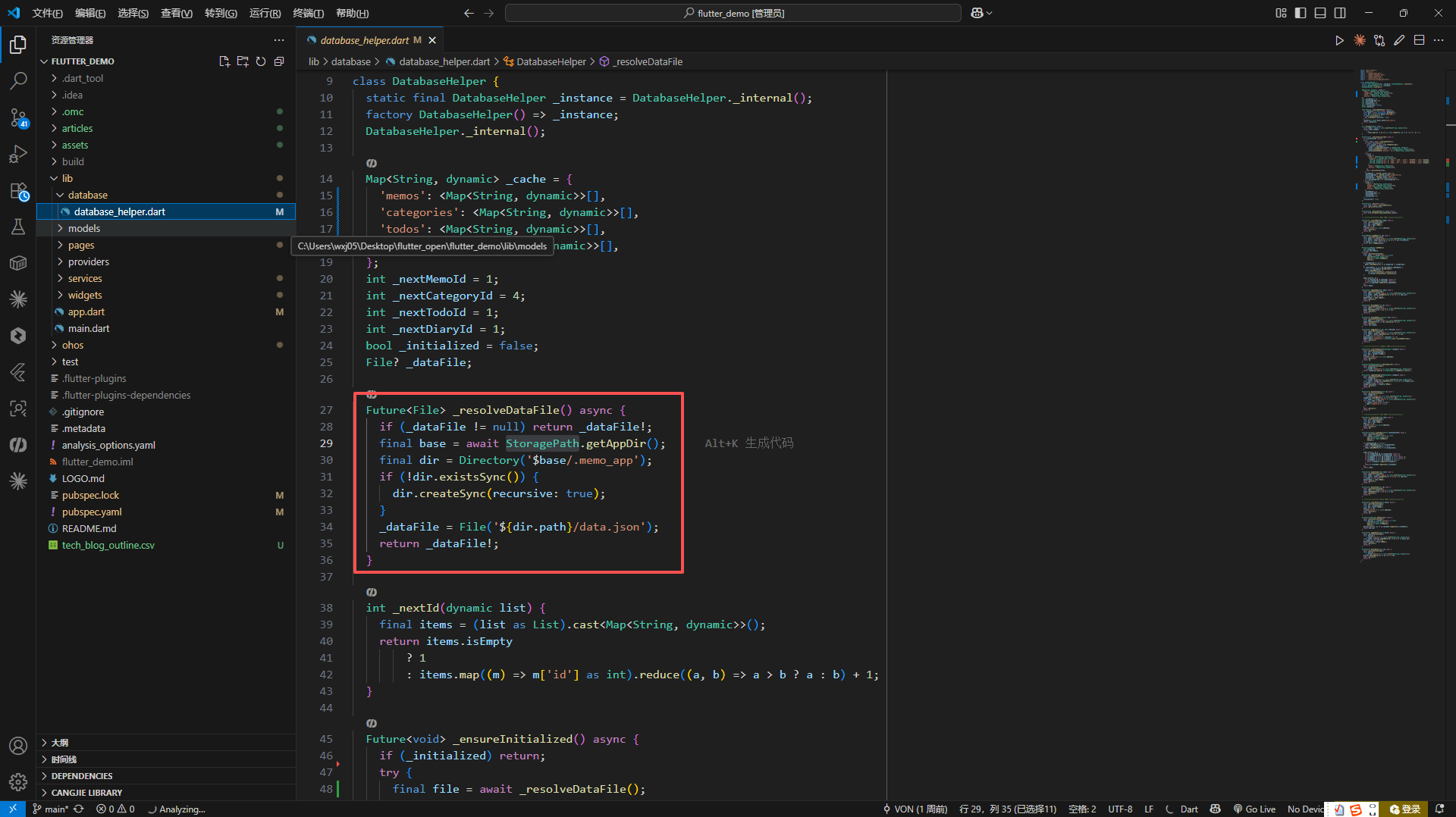
Flutter 端:StoragePath
import 'package:flutter/services.dart';

class StoragePath {
  static const _channel = MethodChannel('com.memo.app/storage');

  static Future<String> getAppDir() async {
    try {
      // 优先尝试 MethodChannel(鸿蒙 OHOS)
      final dir = await _channel.invokeMethod<String>('getFilesDir');
      if (dir != null && dir.isNotEmpty) {
        return dir;
      }
    } catch (e) {
      // MethodChannel 不可用时静默降级
      // 可能原因:
      // 1. 当前平台是 Android/iOS/Desktop(没有注册这个 method handler)
      // 2. OHOS 引擎尚未完全初始化
    }

    // 降级方案 1:尝试 path_provider
    try {
      final appDir = await getApplicationDocumentsDirectory();
      return appDir.path;
    } catch (e) {
      // 降级方案 2:当前目录
      return Directory.current.path;
    }
  }
}
关键设计:
MethodChannel('com.memo.app/storage'):通道名称需要与 OHOS 端完全一致invokeMethod<String>('getFilesDir'):方法名 ‘getFilesDir’ 需要与 OHOS 端的 handler 匹配- 三层降级策略:MethodChannel → path_provider → Directory.current
为什么写三层降级?
- Android/iOS 上没有 MethodChannel:
_channel.invokeMethod会抛出MissingPluginException——因为 Android/iOS 原生端没有注册这个 channel handler。降级方案 1 让应用在标准平台上正常工作 - Desktop/测试环境:
path_provider在这些环境下行为可能不一致。Directory.current.path是最后的兜底 - 开发效率:在 PC 上调试 Flutter 时不需要启动 OHOS 模拟器
OHOS 端:EntryAbility.ets
import { FlutterAbility } from '@ohos/flutter_ohos';
import { MethodChannel, MethodCallHandler, MethodCall, MethodResult } from '@ohos/flutter_ohos';

export default class EntryAbility extends FlutterAbility {
  configureFlutterEngine(flutterEngine: FlutterEngine): void {
    super.configureFlutterEngine(flutterEngine);

    // 注册 MethodChannel
    const channel = new MethodChannel(
      flutterEngine.getBinaryMessenger(),
      'com.memo.app/storage'  // 与 Flutter 端通道名一致
    );

    // 注册方法处理器
    const handler = new StorageMethodHandler(this.context);
    channel.setMethodCallHandler(handler);

    // 注册 Flutter 插件(当前为空——应用没有使用任何 OHOS 原生插件)
    GeneratedPluginRegistrant.registerWith(flutterEngine);
  }
}
逐行解析:
FlutterAbility:@ohos/flutter_ohos提供的基类,相当于 Android 的FlutterActivityconfigureFlutterEngine:在 Flutter 引擎初始化完成后被调用,此时引擎的BinaryMessenger已就绪MethodChannel(flutterEngine.getBinaryMessenger(), 'com.memo.app/storage'):创建通道,getBinaryMessenger()返回 Dart 层和 OHOS 层之间的二进制消息传递器channel.setMethodCallHandler(handler):设置方法处理器,Dart 层的invokeMethod调用会路由到此处
OHOS 端:StorageMethodHandler
class StorageMethodHandler implements MethodCallHandler {
  private context: Context;

  constructor(context: Context) {
    this.context = context;
  }

  onMethodCall(call: MethodCall, result: MethodResult): void {
    if (call.method === 'getFilesDir') {
      // 返回应用的沙盒文件目录
      const filesDir = this.context.filesDir;
      result.success(filesDir);
    } else {
      result.notImplemented();
    }
  }
}
核心逻辑非常简洁:
onMethodCall(call, result):Dart 层的方法调用到达时触发call.method:区分不同的方法调用。当前只有'getFilesDir'this.context.filesDir:OHOS 的context.filesDir与 Android 的context.getFilesDir()语义一致——返回应用私有的内部存储目录result.success(value):将结果返回给 Dart 层result.notImplemented():方法名不匹配时的标准响应,Dart 端会收到MissingPluginException
目录结构实例
在 OHOS 真机上,filesDir 返回的路径类似:
/data/storage/el2/base/haps/entry/files/
Flutter 会在其下创建 .memo_app/data.json:
/data/storage/el2/base/haps/entry/files/.memo_app/
└── data.json
这个目录对用户和其他应用不可见(沙盒隔离),应用卸载时会被自动删除。
GeneratedPluginRegistrant 为什么是空的?
// 文件:ohos/entry/src/main/ets/plugins/GeneratedPluginRegistrant.ts
export class GeneratedPluginRegistrant {
  static registerWith(engine: FlutterEngine): void {
    // 空实现——当前项目没有使用任何需要 OHOS 原生注册的 Flutter 插件
  }
}
这是刻意为之的设计:整个应用只依赖一个 MethodChannel 获取文件目录,不依赖任何其他原生插件(没有 sqflite、没有 path_provider 的原生部分、没有相机、没有定位)。保持零第三方 OHOS 原生依赖,最大化降低兼容性风险。
调试方法
当 MethodChannel 通信失败时,从两端分别排查:
Dart 端:打印异常信息
try {
  final dir = await _channel.invokeMethod<String>('getFilesDir');
  print('MethodChannel success: $dir');
} catch (e) {
  print('MethodChannel failed: $e');
  print('Falling back to path_provider...');
}
OHOS 端:在 onMethodCall 中打印日志
onMethodCall(call: MethodCall, result: MethodResult): void {
  console.info(`MethodChannel called: ${call.method}`);
  if (call.method === 'getFilesDir') {
    const filesDir = this.context.filesDir;
    console.info(`Returning filesDir: ${filesDir}`);
    result.success(filesDir);
  } else {
    console.warn(`Unknown method: ${call.method}`);
    result.notImplemented();
  }
}
扩展:如果需要更多平台能力
随着应用发展,可能需要更多 OHOS 原生能力(如通知、分享、生物识别)。扩展模式一致:
onMethodCall(call: MethodCall, result: MethodResult): void {
  switch (call.method) {
    case 'getFilesDir':
      result.success(this.context.filesDir);
      break;
    case 'getDeviceInfo':
      result.success({
        'model': deviceInfo.model,
        'osVersion': deviceInfo.osVersion,
      });
      break;
    case 'shareText':
      this.shareText(call.arguments as string, result);
      break;
    default:
      result.notImplemented();
  }
}
Dart 端对应:
static Future<String> getDeviceInfo() async {
  return await _channel.invokeMethod<String>('getDeviceInfo');
}

static Future<void> shareText(String text) async {
  await _channel.invokeMethod('shareText', text);
}
鸿蒙兼容性
MethodChannel 是 Flutter 框架的核心组件,@ohos/flutter_ohos 引擎已经完整实现了 BinaryMessenger 和 MethodChannel 协议。在鸿蒙 OHOS 上运行的可靠性与 Android 平台一致。
总结
Flutter 与鸿蒙 OHOS 的 MethodChannel 通信可以总结为"三个一":
- 一个通道名:
'com.memo.app/storage'(两端保持一致) - 一个方法名:
'getFilesDir'(通过call.method路由) - 一行关键代码:
this.context.filesDir(获取鸿蒙沙盒目录)
30 行 Dart + 20 行 ArkTS,就为整个应用的文件存储提供了跨平台基础。三层降级策略保证了开发效率和平台兼容性。
完整项目代码见:todo_flutter_harmony

作为“人工智能6S店”的官方数字引擎,为AI开发者与企业提供一个覆盖软硬件全栈、一站式门户。
更多推荐


 1
1 0
0- 0


 已为社区贡献50条内容

所有评论(0)