
鸿蒙Flutter三级联动选择器技术详解:省市区级联选择实现方案
本文介绍了Flutter中省市区三级联动选择器的实现方案。主要内容包括:数据模型采用不可变类设计,建立层级关联结构;状态管理通过索引和对象缓存实现联动更新;UI部分使用ListWheelScrollView实现滚轮选择器效果,并配置透视和物理效果。该方案适用于地址选择、分类筛选等场景,具有数据标准化、交互流畅的特点。
·
示例效果
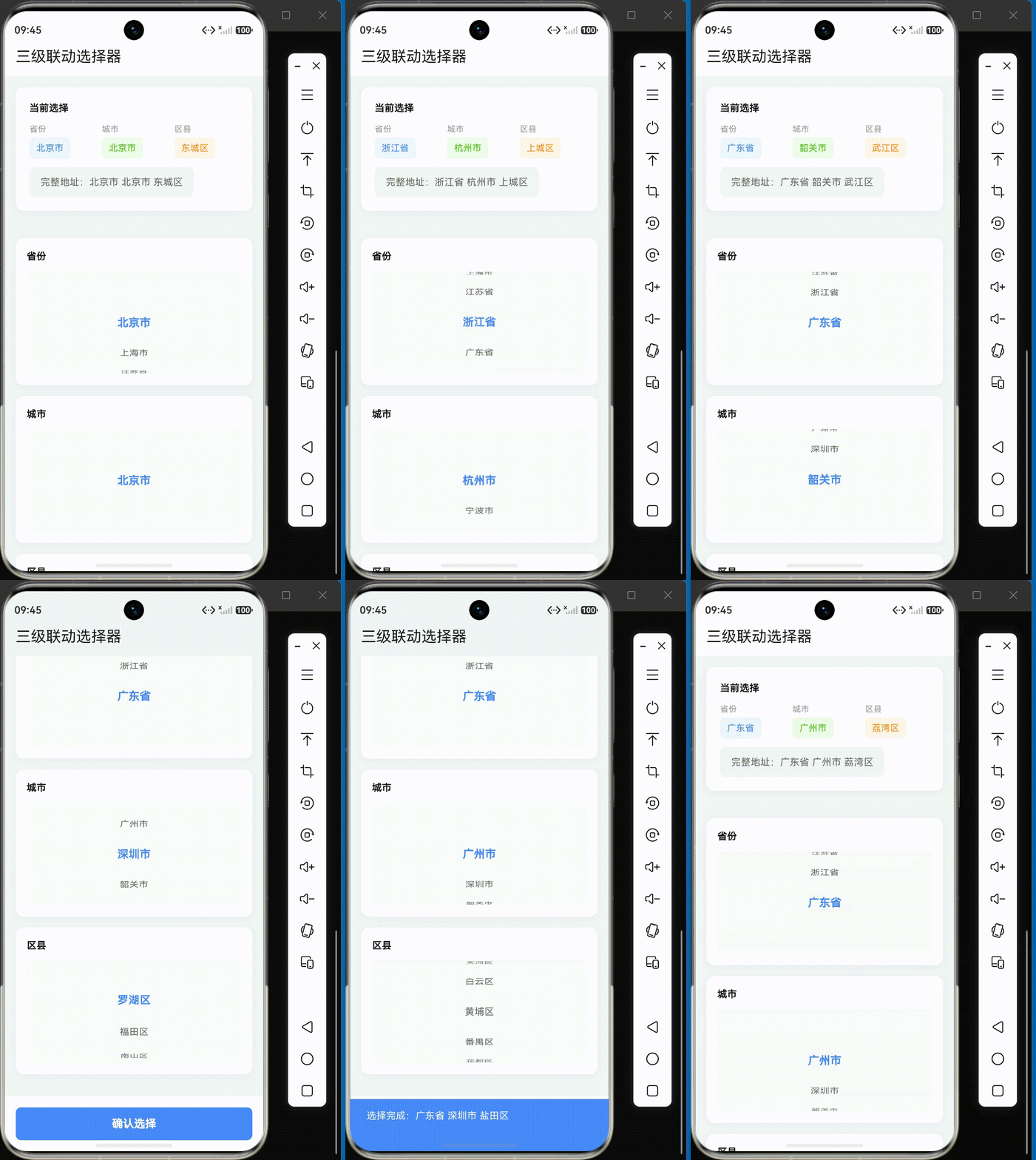
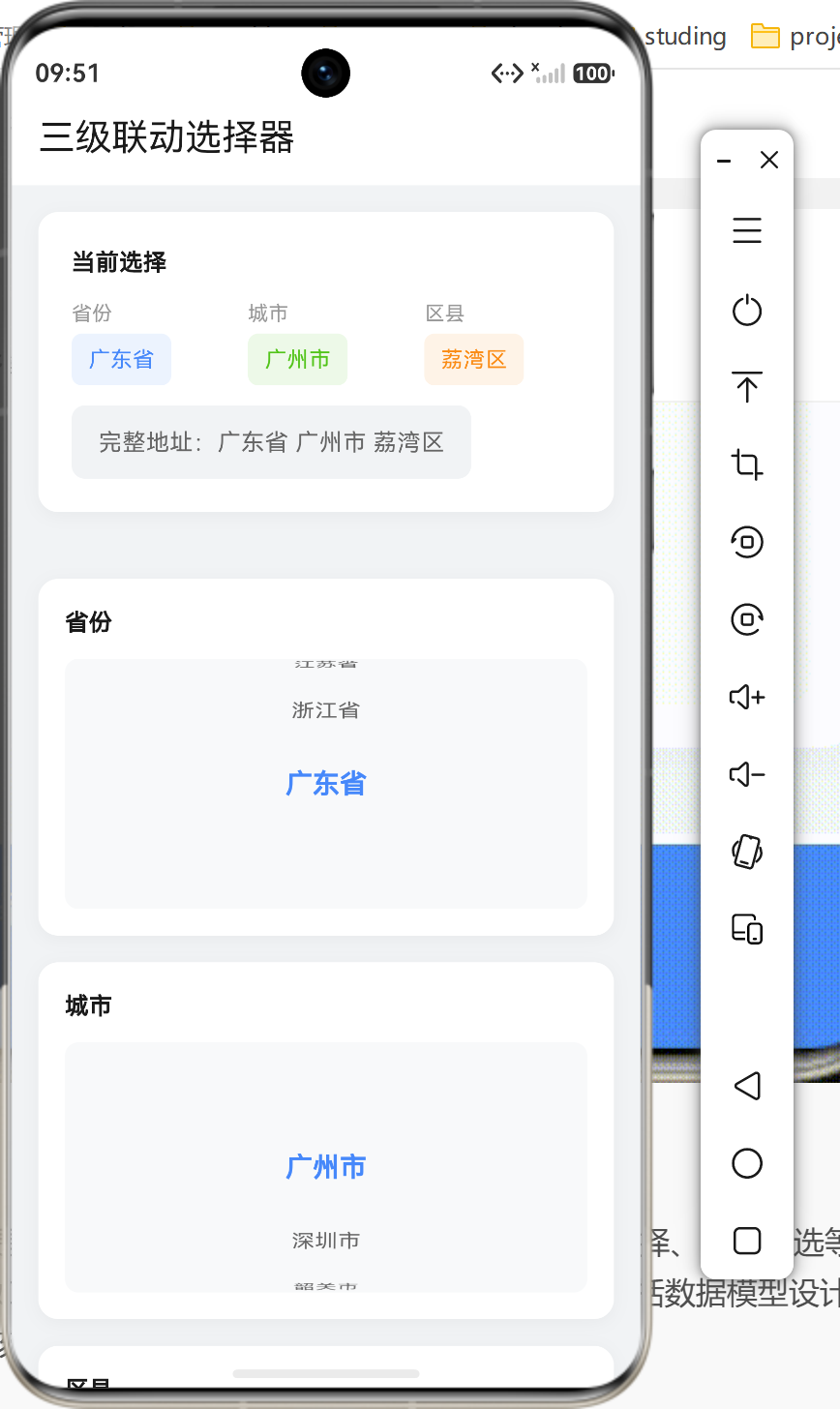
概述
三级联动是移动端应用中常见的交互模式,尤其在地址选择、分类筛选等场景中广泛应用。本文将深入探讨如何在Flutter中实现省市区三级联动选择器,包括数据模型设计、状态管理、交互逻辑和UI实现等核心技术要点。
应用场景
三级联动选择器适用于以下场景:
| 场景 | 说明 | 典型示例 |
|---|---|---|
| 地址选择 | 用户填写收货地址 | 省份 → 城市 → 区县 |
| 分类筛选 | 商品多级分类筛选 | 一级分类 → 二级分类 → 三级分类 |
| 地区统计 | 按地区维度统计数据 | 国家 → 省份 → 城市 |
| 部门选择 | 企业组织架构选择 | 公司 → 部门 → 小组 |
技术架构
数据模型设计
三级联动的核心是建立层级数据结构,我们定义三个不可变数据类:
class Province {
final String code; // 行政区划代码
final String name; // 省份名称
final List<City> cities; // 下属城市列表
const Province({
required this.code,
required this.name,
required this.cities,
});
}
class City {
final String code; // 城市代码
final String name; // 城市名称
final List<District> districts; // 下属区县列表
const City({
required this.code,
required this.name,
required this.districts,
});
}
class District {
final String code; // 区县代码
final String name; // 区县名称
const District({
required this.code,
required this.name,
});
}
数据模型特点:
- 不可变性:使用
@immutable注解,确保数据在创建后不可修改 - 层级关联:Province 包含 City 列表,City 包含 District 列表
- 标准化编码:使用国家标准行政区划代码,便于数据对接
状态管理策略
class _ThreeLevelPickerPageState extends State<ThreeLevelPickerPage> {
  // 当前选中的索引
  int _selectedProvinceIndex = 0;
  int _selectedCityIndex = 0;
  int _selectedDistrictIndex = 0;

  // 当前选中的对象
  Province? _selectedProvince;
  City? _selectedCity;
  District? _selectedDistrict;

  // 数据源
  final List<Province> _provinces = _generateProvinceData();
}
状态设计要点:
| 状态变量 | 作用 | 更新时机 |
|---|---|---|
_selectedProvinceIndex |
省份选中索引 | 省份选择变化时 |
_selectedCityIndex |
城市选中索引 | 城市选择变化时 |
_selectedDistrictIndex |
区县选中索引 | 区县选择变化时 |
_selectedProvince/City/District |
选中对象缓存 | 索引变化后更新 |
联动更新机制
当上级选择发生变化时,需要重置下级选择并更新显示:
void _onProvinceChanged(int index) {
  setState(() {
    _selectedProvinceIndex = index;
    _selectedCityIndex = 0;           // 重置城市选择
    _selectedDistrictIndex = 0;       // 重置区县选择
    _updateSelections();              // 更新选中对象
  });
}

void _onCityChanged(int index) {
  setState(() {
    _selectedCityIndex = index;
    _selectedDistrictIndex = 0;       // 重置区县选择
    _updateSelections();
  });
}

void _updateSelections() {
  _selectedProvince = _provinces[_selectedProvinceIndex];
  _selectedCity = _selectedProvince?.cities[_selectedCityIndex];
  _selectedDistrict = _selectedCity?.districts[_selectedDistrictIndex];
}
联动流程图:
省份选择变化
    │
    ▼
更新省份索引 → 重置城市索引为0 → 重置区县索引为0 → 更新选中对象
    │
    ▼
城市选择变化
    │
    ▼
更新城市索引 → 重置区县索引为0 → 更新选中对象
    │
    ▼
区县选择变化
    │
    ▼
更新区县索引 → 更新选中对象
UI实现
滚轮选择器实现
使用 ListWheelScrollView 实现滚轮效果:
Widget _buildWheelPicker({
  required List<String> items,
  required int selectedIndex,
  required void Function(int) onChanged,
}) {
  if (items.isEmpty) {
    return const Center(
      child: Text('暂无数据', style: TextStyle(color: Color(0xFF999999))),
    );
  }

  return Container(
    height: 150,
    decoration: BoxDecoration(
      color: const Color(0xFFF8F9FA),
      borderRadius: BorderRadius.circular(8),
    ),
    child: ListWheelScrollView.useDelegate(
      itemExtent: 40,              // 每个选项高度
      diameterRatio: 1.2,          // 滚轮直径比例
      perspective: 0.002,          // 透视效果
      physics: const FixedExtentScrollPhysics(),  // 固定滚动
      controller: FixedExtentScrollController(initialItem: selectedIndex),
      onSelectedItemChanged: onChanged,
      childDelegate: ListWheelChildBuilderDelegate(
        builder: (context, index) {
          final isSelected = index == selectedIndex;
          return Center(
            child: Text(
              items[index],
              style: TextStyle(
                fontSize: isSelected ? 16 : 14,
                fontWeight: isSelected ? FontWeight.w600 : FontWeight.normal,
                color: isSelected ? const Color(0xFF4688FA) : const Color(0xFF666666),
              ),
            ),
          );
        },
        childCount: items.length,
      ),
    ),
  );
}
滚轮配置参数说明:
| 参数 | 说明 | 取值建议 |
|---|---|---|
itemExtent |
每个选项高度 | 40-50px |
diameterRatio |
滚轮直径与高度比例 | 1.0-1.5 |
perspective |
透视系数 | 0.001-0.005 |
physics |
滚动物理效果 | FixedExtentScrollPhysics() |
选择摘要展示
顶部展示当前选择结果:
Widget _buildSelectionSummary() {
  return Container(
    margin: const EdgeInsets.all(16),
    padding: const EdgeInsets.all(20),
    decoration: BoxDecoration(
      color: Colors.white,
      borderRadius: BorderRadius.circular(12),
      boxShadow: [
        BoxShadow(
          color: Colors.black.withOpacity(0.04),
          blurRadius: 8,
          offset: const Offset(0, 2),
        ),
      ],
    ),
    child: Column(
      crossAxisAlignment: CrossAxisAlignment.start,
      children: [
        const Text('当前选择', style: TextStyle(fontSize: 14, fontWeight: FontWeight.w600)),
        const SizedBox(height: 12),
        Row(
          children: [
            Expanded(child: _buildSummaryChip('省份', _selectedProvince?.name ?? '请选择', const Color(0xFF4688FA))),
            const SizedBox(width: 12),
            Expanded(child: _buildSummaryChip('城市', _selectedCity?.name ?? '请选择', const Color(0xFF52C41A))),
            const SizedBox(width: 12),
            Expanded(child: _buildSummaryChip('区县', _selectedDistrict?.name ?? '请选择', const Color(0xFFFA8C16))),
          ],
        ),
        const SizedBox(height: 12),
        Container(
          padding: const EdgeInsets.symmetric(horizontal: 16, vertical: 12),
          decoration: BoxDecoration(
            color: const Color(0xFFF1F3F5),
            borderRadius: BorderRadius.circular(8),
          ),
          child: Text(
            '完整地址:${_selectedProvince?.name ?? ''} ${_selectedCity?.name ?? ''} ${_selectedDistrict?.name ?? ''}',
            style: const TextStyle(fontSize: 14, color: Color(0xFF666666)),
          ),
        ),
      ],
    ),
  );
}
整体布局结构
Widget build(BuildContext context) {
final cities = _selectedProvince?.cities ?? [];
final districts = _selectedCity?.districts ?? [];
return Scaffold(
backgroundColor: const Color(0xFFF1F3F5),
appBar: AppBar(title: const Text('三级联动选择器')),
body: Column(
children: [
_buildSelectionSummary(), // 选择摘要
_buildPickerSection('省份', _buildProvincePicker()), // 省份选择器
_buildPickerSection('城市', _buildCityPicker(cities)), // 城市选择器
_buildPickerSection('区县', _buildDistrictPicker(districts)), // 区县选择器
const Expanded(child: SizedBox()),
_buildConfirmButton(), // 确认按钮
],
),
);
}
数据模拟
模拟数据生成
static List<Province> _generateProvinceData() {
  return [
    Province(
      code: '110000',
      name: '北京市',
      cities: [
        City(
          code: '110100',
          name: '北京市',
          districts: [
            const District(code: '110101', name: '东城区'),
            const District(code: '110102', name: '西城区'),
            const District(code: '110105', name: '朝阳区'),
            // ... 更多区县
          ],
        ),
      ],
    ),
    Province(
      code: '320000',
      name: '江苏省',
      cities: [
        City(code: '320100', name: '南京市', districts: [...]),
        City(code: '320500', name: '苏州市', districts: [...]),
        City(code: '320200', name: '无锡市', districts: [...]),
      ],
    ),
    // ... 更多省份
  ];
}
数据结构示意:
省份列表
├── 北京市 (110000)
│   └── 北京市 (110100)
│       ├── 东城区 (110101)
│       ├── 西城区 (110102)
│       └── ...
├── 江苏省 (320000)
│   ├── 南京市 (320100)
│   │   ├── 玄武区 (320102)
│   │   └── ...
│   ├── 苏州市 (320500)
│   │   └── ...
│   └── 无锡市 (320200)
│       └── ...
└── ...
进阶优化方案
1. 异步数据加载
在实际应用中,数据通常来自网络接口:
Future<List<Province>> _fetchProvinces() async {
final response = await http.get(Uri.parse('https://api.example.com/provinces'));
if (response.statusCode == 200) {
final data = json.decode(response.body);
return data.map<Province>((item) => Province.fromJson(item)).toList();
}
throw Exception('Failed to load provinces');
}
void initState() {
super.initState();
_fetchData();
}
Future<void> _fetchData() async {
try {
_provinces = await _fetchProvinces();
setState(() {});
} catch (e) {
// 处理错误
}
}
2. 缓存优化
避免重复请求,使用缓存机制:
class AddressCache {
  static final Map<String, List<Province>> _cache = {};

  static Future<List<Province>> getProvinces() async {
    if (_cache.containsKey('provinces')) {
      return _cache['provinces']!;
    }
    final provinces = await _fetchFromApi();
    _cache['provinces'] = provinces;
    return provinces;
  }
}
3. 搜索过滤功能
为长列表添加搜索功能:
Widget _buildSearchablePicker(List<String> items, String hint) {
  final TextEditingController controller = TextEditingController();

  return Column(
    children: [
      TextField(
        controller: controller,
        decoration: InputDecoration(
          hintText: hint,
          prefixIcon: const Icon(Icons.search),
          border: OutlineInputBorder(borderRadius: BorderRadius.circular(8)),
        ),
        onChanged: (value) {
          // 过滤逻辑
        },
      ),
      const SizedBox(height: 8),
      _buildWheelPicker(items: items, ...),
    ],
  );
}
4. 自定义选择器样式
支持自定义主题颜色:
class ThreeLevelPickerTheme {
  final Color primaryColor;
  final Color selectedTextColor;
  final Color unselectedTextColor;

  const ThreeLevelPickerTheme({
    this.primaryColor = const Color(0xFF4688FA),
    this.selectedTextColor = const Color(0xFF4688FA),
    this.unselectedTextColor = const Color(0xFF666666),
  });
}
鸿蒙系统适配
颜色系统统一
const Color harmonyBlue = Color(0xFF4688FA);      // 鸿蒙蓝
const Color harmonyGreen = Color(0xFF52C41A);     // 成功绿
const Color harmonyOrange = Color(0xFFFA8C16);    // 警告橙
const Color harmonyBackground = Color(0xFFF1F3F5); // 背景灰
布局适配
// 根据屏幕宽度调整布局
int crossAxisCount = MediaQuery.of(context).size.width > 600 ? 3 : 1;
性能优化
1. 避免不必要的重建
使用 const 构造器和 const 变量:
const District(code: '110101', name: '东城区');
2. 数据预加载
在 initState 中提前初始化数据:
void initState() {
super.initState();
_updateSelections(); // 提前计算选中对象
}
3. 延迟加载
对于大数据量,使用 ListView.builder 延迟渲染:
childDelegate: ListWheelChildBuilderDelegate(
  builder: (context, index) {
    // 只渲染可见项
    return Center(child: Text(items[index]));
  },
  childCount: items.length,
),
完整示例
输入输出示例
输入:
// 用户选择流程
// 1. 选择省份:江苏省
// 2. 选择城市:苏州市
// 3. 选择区县:吴中区
输出:
// 选中结果
_selectedProvince = Province(code: '320000', name: '江苏省', ...)
_selectedCity = City(code: '320500', name: '苏州市', ...)
_selectedDistrict = District(code: '320506', name: '吴中区')

// 完整地址字符串
'江苏省 苏州市 吴中区'
总结
三级联动选择器的核心实现要点:
- 数据模型:设计三层嵌套的不可变数据类
- 状态管理:维护三个层级的选中索引和对象引用
- 联动机制:上级变化时重置下级索引并更新显示
- UI实现:使用
ListWheelScrollView实现滚轮选择器 - 性能优化:预加载数据、使用const构造器、延迟渲染
该实现方案具有以下特点:
- 灵活性:支持自定义数据源和样式
- 可扩展性:易于添加搜索、筛选等功能
- 稳定性:完整的错误处理和空值检查
- 适配性:支持鸿蒙系统和多端部署
项目源码地址:本项目代码位于 lib/main.dart,包含完整的三级联动选择器实现。

作为“人工智能6S店”的官方数字引擎,为AI开发者与企业提供一个覆盖软硬件全栈、一站式门户。
更多推荐



 1
1 0
0- 0


 已为社区贡献72条内容

所有评论(0)