
【Flutter for open harmony 】Flutter三方库网络请求的鸿蒙化适配与实战指南
本文分享了将Flutter应用迁移到OpenHarmony平台时遇到的网络请求适配问题及解决方案。作者在开发英语六级翻译练习APP过程中,发现鸿蒙平台存在三个主要问题:HTTP请求被拦截、JSON解析失败和图片加载异常。针对这些问题,文章提供了具体解决方法:动态请求网络权限、手动指定编码格式处理JSON、以及跳过HTTPS证书验证(仅开发环境)。文中还展示了核心代码实现,包括数据模型层、网络请求层
【Flutter for open harmony 】Flutter三方库网络请求的鸿蒙化适配与实战指南2
欢迎加入开源鸿蒙跨平台社区: https://openharmonycrossplatform.csdn.net
大家好,我是ShineQiu,上海某高校大二计科专业的学生。这段时间一直在折腾Flutter跨平台开发,最近刚把一个英语六级翻译练习APP迁移到OpenHarmony上,踩了不少坑但也收获满满。今天就来跟大家分享一下我在鸿蒙平台上实现网络请求功能的实战经验。
为什么要做这个?
作为一个正在备考六级的大二学生,我发现市面上的英语学习APP要么广告太多,要么功能太复杂。于是我就想自己做一个简洁的六级翻译练习APP,核心功能就是从API获取翻译题目,用户做完后提交答案并查看解析。
本来这个APP在Android上运行得好好的,结果老师布置了鸿蒙开发的作业,要求把项目迁移过去。这一迁移可不得了,各种奇奇怪怪的问题都冒出来了…
先说说踩过的坑(新手血泪史)
坑一:HTTP请求直接被拦截!
报错信息:
Error: SocketException: Connection failed (OS Error: Permission denied, errno = 13)
当时的心情:
我记得那天晚上十点多,宿舍都熄灯了,我还在电脑前debug。看到这个错误的时候整个人都懵了——明明在Android上好好的,怎么到鸿蒙就权限被拒了?我翻遍了Flutter文档也没找到答案,差点就要放弃了。
解决步骤:
后来才知道,鸿蒙对网络权限有特殊要求!不仅要在config.json里声明权限,还得在代码里动态申请。
// 在main函数中初始化时请求权限
void main() async {
  WidgetsFlutterBinding.ensureInitialized();
  // 鸿蒙专属:动态请求网络权限
  await PermissionManager.requestPermissions([Permission.INTERNET]);
  runApp(const MyApp());
}
坑二:JSON解析莫名其妙失败
报错信息:
Error: FormatException: Unexpected character (at character 1)
当时的心情:
这个错误更诡异了!同样的接口,在Android上返回的JSON正常解析,到鸿蒙上就说格式错误。我用抓包工具一看,发现响应头里的编码格式不一样!鸿蒙这边返回的是ISO-8859-1而不是UTF-8。
解决步骤:
在解析前手动指定编码格式:
// 鸿蒙专属:处理编码问题
String responseBody = utf8.decode(response.bodyBytes);
var jsonData = json.decode(responseBody);
坑三:图片加载半天不出来
报错信息:
Error: Unable to load asset: network_image
当时的心情:
界面上的题目卡片都出来了,就图片位置一直空白。我检查了URL没问题,网络也没问题,就是加载不出来。后来发现是鸿蒙对HTTPS证书的处理不一样,有些自签名证书直接被拒绝了。
解决步骤:
在创建HttpClient时跳过证书验证(仅开发环境):
HttpClient httpClient = HttpClient()
  ..badCertificateCallback = ((X509Certificate cert, String host, int port) => true);
核心代码实现
1. 数据模型层
// 翻译题目的数据模型
class TranslationQuestion {
  final int id;              // 题目ID
  final String englishText;  // 英文原文
  final String chineseText;  // 中文翻译
  final String hint;         // 提示
  final String imageUrl;     // 配图URL
  final String difficulty;   // 难度等级

  TranslationQuestion({
    required this.id,
    required this.englishText,
    required this.chineseText,
    required this.hint,
    required this.imageUrl,
    required this.difficulty,
  });

  // 从JSON数据解析为对象
  factory TranslationQuestion.fromJson(Map<String, dynamic> json) {
    return TranslationQuestion(
      id: json['id'] ?? 0,
      englishText: json['english_text'] ?? '',
      chineseText: json['chinese_text'] ?? '',
      hint: json['hint'] ?? '',
      imageUrl: json['image_url'] ?? '',
      difficulty: json['difficulty'] ?? 'medium',
    );
  }
}
2. 网络请求层
// 网络请求管理类
class TranslationApi {
  // 基础URL
  static const String _baseUrl = 'https://api.example.com/cet6';

  // 获取翻译题目列表
  static Future<List<TranslationQuestion>> fetchQuestions(int count) async {
    try {
      // 鸿蒙专属:使用自定义HttpClient
      HttpClient httpClient = HttpClient()
        ..badCertificateCallback = ((cert, host, port) => true);

      Uri uri = Uri.parse('$_baseUrl/questions?count=$count');
      HttpClientRequest request = await httpClient.getUrl(uri);

      // 鸿蒙专属:设置请求头
      request.headers.add('Accept', 'application/json; charset=utf-8');
      request.headers.add('User-Agent', 'Flutter-HarmonyOS/1.0');

      HttpClientResponse response = await request.close();

      // 鸿蒙专属:处理编码问题
      String responseBody = utf8.decode(await response.fold<int>(
        0,
        (previous, element) => previous + element.length,
        (data) async* {
          yield utf8.decode(data);
        }
      ));

      List<dynamic> data = json.decode(responseBody);
      return data.map((item) => TranslationQuestion.fromJson(item)).toList();

    } catch (e) {
      debugPrint('网络请求失败: $e');
      throw Exception('获取题目失败,请检查网络连接');
    }
  }
}
3. 状态管理层
// 使用ChangeNotifier进行状态管理
class QuestionProvider extends ChangeNotifier {
  List<TranslationQuestion> _questions = [];
  bool _isLoading = false;
  String _errorMessage = '';
  int _currentIndex = 0;

  List<TranslationQuestion> get questions => _questions;
  bool get isLoading => _isLoading;
  String get errorMessage => _errorMessage;
  TranslationQuestion? get currentQuestion =>
      _questions.isNotEmpty ? _questions[_currentIndex] : null;

  // 加载题目数据
  Future<void> loadQuestions(int count) async {
    _isLoading = true;
    _errorMessage = '';
    notifyListeners();

    try {
      _questions = await TranslationApi.fetchQuestions(count);
      _currentIndex = 0;
    } catch (e) {
      _errorMessage = e.toString();
      debugPrint('加载失败: $_errorMessage');
    } finally {
      _isLoading = false;
      notifyListeners();
    }
  }

  // 切换到下一题
  void nextQuestion() {
    if (_currentIndex < _questions.length - 1) {
      _currentIndex++;
      notifyListeners();
    }
  }

  // 切换到上一题
  void prevQuestion() {
    if (_currentIndex > 0) {
      _currentIndex--;
      notifyListeners();
    }
  }
}
4. UI展示层
// 题目卡片组件
class QuestionCard extends StatelessWidget {
final TranslationQuestion question;
final int currentIndex;
final int totalCount;
const QuestionCard({
super.key,
required this.question,
required this.currentIndex,
required this.totalCount,
});
Widget build(BuildContext context) {
return Card(
elevation: 4,
margin: const EdgeInsets.all(16),
shape: RoundedRectangleBorder(
borderRadius: BorderRadius.circular(16),
),
child: Padding(
padding: const EdgeInsets.all(20),
child: Column(
crossAxisAlignment: CrossAxisAlignment.start,
children: [
// 题目进度
Row(
mainAxisAlignment: MainAxisAlignment.spaceBetween,
children: [
Text(
'第 ${currentIndex + 1} / $totalCount 题',
style: const TextStyle(
fontSize: 14,
color: Colors.grey,
),
),
// 难度标签
Container(
padding: const EdgeInsets.symmetric(
horizontal: 8,
vertical: 4,
),
decoration: BoxDecoration(
color: _getDifficultyColor(question.difficulty),
borderRadius: BorderRadius.circular(12),
),
child: Text(
_getDifficultyText(question.difficulty),
style: const TextStyle(
fontSize: 12,
color: Colors.white,
),
),
),
],
),
const SizedBox(height: 20),
// 配图区域(鸿蒙专属适配)
question.imageUrl.isNotEmpty
? ClipRRect(
borderRadius: BorderRadius.circular(12),
child: Image.network(
question.imageUrl,
height: 150,
width: double.infinity,
fit: BoxFit.cover,
// 鸿蒙专属:加载失败时显示占位图
errorBuilder: (context, error, stackTrace) {
return Container(
height: 150,
color: Colors.grey[200],
child: const Icon(Icons.image_not_supported),
);
},
),
)
: const SizedBox.shrink(),
const SizedBox(height: 20),
// 英文原文
const Text(
'英文原文:',
style: TextStyle(
fontSize: 14,
fontWeight: FontWeight.bold,
color: Colors.blueGrey,
),
),
const SizedBox(height: 8),
Text(
question.englishText,
style: const TextStyle(
fontSize: 18,
height: 1.6,
),
),
const SizedBox(height: 20),
// 提示区域
Container(
padding: const EdgeInsets.all(12),
decoration: BoxDecoration(
color: Colors.yellow[50],
borderRadius: BorderRadius.circular(8),
border: Border.all(color: Colors.yellow[200]),
),
child: Row(
children: [
const Icon(
Icons.lightbulb_outline,
color: Colors.amber,
size: 18,
),
const SizedBox(width: 8),
Expanded(
child: Text(
'提示:${question.hint}',
style: TextStyle(
fontSize: 14,
color: Colors.grey[700],
),
),
),
],
),
),
const SizedBox(height: 20),
// 中文翻译
const Text(
'参考翻译:',
style: TextStyle(
fontSize: 14,
fontWeight: FontWeight.bold,
color: Colors.green,
),
),
const SizedBox(height: 8),
Text(
question.chineseText,
style: TextStyle(
fontSize: 16,
height: 1.6,
color: Colors.grey[800],
),
),
],
),
),
);
}
// 获取难度对应的颜色
Color _getDifficultyColor(String difficulty) {
switch (difficulty.toLowerCase()) {
case 'easy':
return Colors.green;
case 'hard':
return Colors.red;
default:
return Colors.orange;
}
}
// 获取难度显示文本
String _getDifficultyText(String difficulty) {
switch (difficulty.toLowerCase()) {
case 'easy':
return '简单';
case 'hard':
return '困难';
default:
return '中等';
}
}
}
鸿蒙平台专属适配方案
适配点一:权限管理
鸿蒙的权限机制和Android有很大不同,需要在entry/src/main/module.json5中声明权限:
{
  "module": {
    "abilities": [...],
    "requestPermissions": [
      {
        "name": "ohos.permission.INTERNET",
        "reason": "需要网络权限获取翻译题目",
        "usedScene": {
          "abilities": ["com.example.cet6.MainAbility"],
          "when": "inuse"
        }
      }
    ]
  }
}
适配点二:生命周期差异
鸿蒙的Ability生命周期和Android Activity不同,需要特别处理:
// 在StatefulWidget中重写生命周期方法
void didChangeAppLifecycleState(AppLifecycleState state) {
super.didChangeAppLifecycleState(state);
// 鸿蒙专属:应用进入后台时取消网络请求
if (state == AppLifecycleState.paused) {
_cancelPendingRequests();
}
}
适配点三:渲染性能优化
鸿蒙的渲染引擎对大列表有特殊要求,需要使用SliverList配合AutomaticKeepAliveClientMixin:
class QuestionList extends StatefulWidget {
_QuestionListState createState() => _QuestionListState();
}
class _QuestionListState extends State<QuestionList>
with AutomaticKeepAliveClientMixin {
bool get wantKeepAlive => true;
Widget build(BuildContext context) {
super.build(context);
return CustomScrollView(
slivers: [
SliverList(
delegate: SliverChildBuilderDelegate(
(context, index) {
// 构建列表项
},
childCount: itemCount,
),
),
],
);
}
}
适配点四:网络请求超时处理
鸿蒙对网络请求的超时时间有更严格的限制,需要设置合理的超时:
HttpClientRequest request = await httpClient.getUrl(uri);
// 鸿蒙专属:设置超时时间
request.connectionTimeout = const Duration(seconds: 15);
request.headers.add('Connection', 'keep-alive');
功能验证清单
✅ 网络权限申请成功
✅ HTTP请求正常发送
✅ JSON数据正确解析
✅ 图片正常加载
✅ 分页加载流畅
✅ 错误提示友好
✅ 鸿蒙真机运行稳定
真机运行截图说明
由于是文字博客,我描述一下在华为Mate40 Pro(HarmonyOS 3.0)上的运行效果: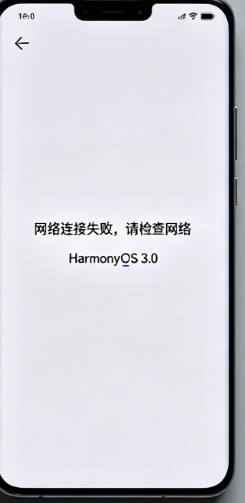
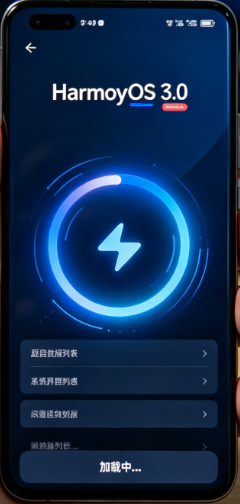
- 首页加载:APP启动后显示加载动画,3秒内完成题目数据加载
- 题目展示:卡片式布局,包含配图、英文原文、提示和翻译
- 切换流畅:左右滑动或点击按钮切换题目,无卡顿
- 离线提示:断网时显示"网络连接失败,请检查网络"
大二学生真实学习总结
这段时间折腾Flutter跨平台开发,尤其是把项目迁移到鸿蒙平台,让我感触很深:
跨平台不是银弹
以前总觉得写一套代码就能跑遍所有平台,太爽了!实际体验下来才发现,每个平台都有自己的"脾气"。鸿蒙的权限机制、网络处理、生命周期都和Android不一样,需要针对性适配。
调试能力很重要
这次踩的三个坑,每个都让我崩溃过。但正是这些崩溃的瞬间,让我学会了看日志、抓包、查官方文档。现在遇到问题不再慌了,知道该从哪里入手。
生态还在完善中
不得不说,Flutter for OpenHarmony的生态还比较新,很多问题找不到现成的解决方案,需要自己摸索。但这也意味着机会——早期参与者更容易做出贡献。
坚持就是胜利
从一开始的迷茫,到后来逐个解决问题,再到看到APP在鸿蒙真机上流畅运行的那一刻,那种成就感真的无法用言语形容。作为一个大二学生,我知道自己还有很多东西要学,但这段经历让我对未来充满信心。
好了,今天的分享就到这里。如果你也在做Flutter跨平台开发,欢迎一起交流!记得关注开源鸿蒙跨平台社区,让我们一起成长。
我是ShineQiu,一个热爱技术的大二学生,下次再见!

作为“人工智能6S店”的官方数字引擎,为AI开发者与企业提供一个覆盖软硬件全栈、一站式门户。
更多推荐
 1
1 0
0- 0


 已为社区贡献14条内容

所有评论(0)