
【maaath】Flutter for OpenHarmony 成语接龙实践
本文详细介绍了如何使用 Flutter 跨平台框架开发成语接龙应用,并成功适配 OpenHarmony 系统。Flutter for OpenHarmony 的跨平台能力使得开发者可以一套代码同时覆盖多个平台,大幅降低开发成本。随着 OpenHarmony 生态的不断完善,Flutter 在鸿蒙设备上的运行体验将持续提升。希望本文能为正在探索 Flutter + OpenHarmony 开发的读者
Flutter 跨平台成语接龙应用在 OpenHarmony 上的适配与实践
欢迎加入开源鸿蒙跨平台社区:https://openharmonycrossplatform.csdn.net
作者:maaath
一、引言
成语接龙作为中国传统文字游戏,既能娱乐又能学习文化知识。本文将详细介绍如何使用 Flutter 跨平台框架开发一款成语接龙应用,并成功运行在 OpenHarmony 鸿蒙设备上。通过本文,读者将学习到 Flutter 项目结构设计、状态管理、数据持久化等核心技能,并了解如何将 Flutter 应用无缝适配到 OpenHarmony 生态。
Flutter 作为 Google 开源的跨平台 UI 框架,凭借其高性能的渲染引擎和丰富的组件库,已成为移动应用开发的主流选择。而 OpenHarmony 作为开源鸿蒙操作系统,对 Flutter 的支持日趋完善,使得开发者可以基于 Flutter 构建同时运行在 Android、iOS 和 OpenHarmony 平台的应用。
本文所有代码均已在 OpenHarmony 设备上验证通过,完整项目代码托管在 AtomGit:https://atomgit.com
二、项目架构设计
在开始编码之前,我们先设计应用的总体架构。成语接龙应用采用经典的 MVVM 架构模式,分为数据层、业务逻辑层和 UI 层三层结构。
2.1 数据模型设计
首先定义核心数据模型,包括成语实体、游戏记录、错题本等:
// 成语数据模型
class IdiomModel {
  final String word;       // 成语
  final String pinyin;     // 拼音
  final String meaning;    // 释义
  final String story;      // 成语故事
  final String usage;      // 用法示例
  final int difficulty;    // 难度等级 1-4
  final String firstChar;  // 首字
  final String lastChar;   // 尾字

  IdiomModel({
    required this.word,
    required this.pinyin,
    required this.meaning,
    required this.story,
    required this.usage,
    required this.difficulty,
    String? firstChar,
    String? lastChar,
  })  : firstChar = firstChar ?? word.characters.first,
        lastChar = lastChar ?? word.characters.last;
}

// 游戏记录模型
class GameRecord {
  final String date;
  final int score;
  final int difficulty;
  final int correctRounds;
  final int wrongRounds;
  final int hintsUsed;
  final int durationSeconds;
  final List<String> chainWords;

  GameRecord({
    required this.date,
    required this.score,
    required this.difficulty,
    required this.correctRounds,
    required this.wrongRounds,
    required this.hintsUsed,
    required this.durationSeconds,
    required this.chainWords,
  });

  double get accuracy =>
      (correctRounds + wrongRounds) > 0
          ? (correctRounds / (correctRounds + wrongRounds)) * 100
          : 0;

  String get formattedDuration {
    final min = durationSeconds ~/ 60;
    final sec = durationSeconds % 60;
    return '${min}分${sec}秒';
  }
}

// 错题本条目
class ErrorBookItem {
  final String id;
  final String word;
  final String pinyin;
  final String meaning;
  final int wrongCount;
  final String lastWrongDate;
  final bool isMastered;

  ErrorBookItem({
    required this.id,
    required this.word,
    required this.pinyin,
    required this.meaning,
    this.wrongCount = 1,
    String? lastWrongDate,
    this.isMastered = false,
  }) : lastWrongDate = lastWrongDate ?? _getToday();

  static String _getToday() {
    final now = DateTime.now();
    return '${now.year}-${now.month.toString().padLeft(2, '0')}-${now.day.toString().padLeft(2, '0')}';
  }
}
2.2 成语数据库
成语接龙的核心是丰富的成语库。我们内置了 200+ 条成语数据,涵盖从简单到高难度的四个等级:
class IdiomDatabase {
  static final List<IdiomModel> _idioms = [
    IdiomModel(
      word: '一心一意',
      pinyin: 'yī xīn yī yì',
      meaning: '形容做事专心致志,不分心。',
      story: '出自《三国志·魏志·杜恕传》:"免为庶人,徙章武郡,一心一意,共安海内。"',
      usage: '他~地学习,终于考上了理想的大学。',
      difficulty: 1,
    ),
    IdiomModel(
      word: '意气风发',
      pinyin: 'yì qì fēng fā',
      meaning: '形容精神振奋,气概豪迈。',
      story: '出自三国魏·曹植《魏德论》:"武皇之兴也,以道凌残,义气风发。"',
      usage: '青年们~,投身到建设祖国的伟大事业中。',
      difficulty: 2,
    ),
    IdiomModel(
      word: '发扬光大',
      pinyin: 'fā yáng guāng dà',
      meaning: '使好的事物得到发展、扩大。',
      story: '出自宋·黄庭坚《山谷集》:"推而放之,发扬光大。"',
      usage: '我们要把传统文化~。',
      difficulty: 1,
    ),
    // ... 更多成语数据
  ];

  static List<IdiomModel> getAll() => List.unmodifiable(_idioms);

  static IdiomModel? findByWord(String word) {
    try {
      return _idioms.firstWhere((i) => i.word == word);
    } catch (_) {
      return null;
    }
  }

  static List<IdiomModel> findByLastChar(String lastChar, {int? maxDifficulty}) {
    return _idioms.where((i) {
      if (i.firstChar != lastChar) return false;
      if (maxDifficulty != null && i.difficulty > maxDifficulty) return false;
      return true;
    }).toList();
  }

  static IdiomModel getRandom({int? maxDifficulty}) {
    final pool = maxDifficulty != null
        ? _idioms.where((i) => i.difficulty <= maxDifficulty).toList()
        : _idioms;
    return pool[DateTime.now().millisecondsSinceEpoch % pool.length];
  }
}
三、核心游戏逻辑实现
3.1 游戏状态管理
使用 Flutter 的 ChangeNotifier 配合 Provider 进行状态管理,实现游戏逻辑与 UI 的解耦:
class GameProvider extends ChangeNotifier {
  IdiomModel? _currentIdiom;
  final List<IdiomModel> _chainDetails = [];
  final List<String> _chainWords = [];
  int _score = 0;
  int _combo = 0;
  int _wrongCount = 0;
  int _hintsUsed = 0;
  int _difficulty = 1;
  bool _isGameOver = false;
  bool _isWin = false;
  int _elapsedSeconds = 0;

  IdiomModel? get currentIdiom => _currentIdiom;
  List<IdiomModel> get chainDetails => List.unmodifiable(_chainDetails);
  int get score => _score;
  int get combo => _combo;
  int get wrongCount => _wrongCount;
  int get hintsUsed => _hintsUsed;
  int get difficulty => _difficulty;
  bool get isGameOver => _isGameOver;
  bool get isWin => _isWin;
  int get elapsedSeconds => _elapsedSeconds;

  void startGame(int difficulty) {
    _difficulty = difficulty;
    _score = 0;
    _combo = 0;
    _wrongCount = 0;
    _hintsUsed = 0;
    _isGameOver = false;
    _isWin = false;
    _elapsedSeconds = 0;
    _chainDetails.clear();
    _chainWords.clear();

    _currentIdiom = IdiomDatabase.getRandom(maxDifficulty: difficulty);
    _chainDetails.add(_currentIdiom!);
    _chainWords.add(_currentIdiom!.word);
    notifyListeners();
  }

  SubmitResult submitAnswer(String answer) {
    if (_isGameOver || _currentIdiom == null) {
      return SubmitResult(isValid: false, message: '游戏已结束');
    }

    if (answer.length != 4) {
      return SubmitResult(isValid: false, message: '请输入四字成语');
    }

    if (answer.characters.first != _currentIdiom!.lastChar) {
      _handleWrong();
      return SubmitResult(
        isValid: false,
        message: '成语必须以"${_currentIdiom!.lastChar}"开头',
      );
    }

    if (_chainWords.contains(answer)) {
      _handleWrong();
      return SubmitResult(isValid: false, message: '该成语已经使用过了');
    }

    final idiom = IdiomDatabase.findByWord(answer);
    if (idiom == null) {
      _handleWrong();
      return SubmitResult(isValid: false, message: '不在成语库中');
    }

    if (idiom.difficulty > _difficulty) {
      _handleWrong();
      return SubmitResult(isValid: false, message: '超出当前难度范围');
    }

    // 正确回答
    _combo++;
    final comboBonus = _combo > 1 ? _combo * 2 : 0;
    final difficultyBonus = idiom.difficulty * 5;
    _score += 10 + comboBonus + difficultyBonus;

    _chainDetails.add(idiom);
    _chainWords.add(answer);
    _currentIdiom = idiom;
    notifyListeners();

    return SubmitResult(isValid: true, message: '正确!连击+$comboBonus 难度+$difficultyBonus');
  }

  void _handleWrong() {
    _combo = 0;
    _wrongCount++;
    if (_wrongCount >= 5) {
      _isGameOver = true;
    }
    notifyListeners();
  }

  List<String> getHints() {
    if (_currentIdiom == null) return [];
    _hintsUsed++;
    final candidates = IdiomDatabase.findByLastChar(
      _currentIdiom!.lastChar,
      maxDifficulty: _difficulty,
    ).where((i) => !_chainWords.contains(i.word)).toList();

    candidates.shuffle();
    notifyListeners();
    return candidates.take(3).map((i) => i.word).toList();
  }

  void forfeit() {
    _isGameOver = true;
    _isWin = false;
    notifyListeners();
  }

  GameRecord buildRecord() {
    return GameRecord(
      date: '${DateTime.now().year}-${DateTime.now().month.toString().padLeft(2, '0')}-${DateTime.now().day.toString().padLeft(2, '0')}',
      score: _score,
      difficulty: _difficulty,
      correctRounds: _chainDetails.length - 1,
      wrongRounds: _wrongCount,
      hintsUsed: _hintsUsed,
      durationSeconds: _elapsedSeconds,
      chainWords: List.from(_chainWords),
    );
  }
}

class SubmitResult {
  final bool isValid;
  final String message;
  SubmitResult({required this.isValid, required this.message});
}
3.2 数据持久化
使用 shared_preferences 插件实现本地数据存储,保存游戏记录、错题本和收藏数据:
class StorageService {
  static const String _gameRecordsKey = 'game_records';
  static const String _errorBookKey = 'error_book';
  static const String _favoritesKey = 'favorites';
  static const String _leaderboardKey = 'leaderboard';

  // 保存游戏记录
  static Future<void> saveGameRecord(GameRecord record) async {
    final prefs = await SharedPreferences.getInstance();
    final records = await getGameRecords();
    records.insert(0, record);
    if (records.length > 100) records.removeRange(100, records.length);
    prefs.setString(_gameRecordsKey, jsonEncode(records.map((r) => _recordToJson(r)).toList()));
  }

  static Future<List<GameRecord>> getGameRecords() async {
    final prefs = await SharedPreferences.getInstance();
    final json = prefs.getString(_gameRecordsKey);
    if (json == null) return [];
    final list = jsonDecode(json) as List;
    return list.map((e) => _recordFromJson(e)).toList();
  }

  // 错题本管理
  static Future<void> addToErrorBook(String word, String pinyin, String meaning) async {
    final prefs = await SharedPreferences.getInstance();
    final items = await getErrorBook();
    final existingIndex = items.indexWhere((i) => i.word == word);

    if (existingIndex >= 0) {
      final old = items[existingIndex];
      items[existingIndex] = ErrorBookItem(
        id: old.id,
        word: old.word,
        pinyin: old.pinyin,
        meaning: old.meaning,
        wrongCount: old.wrongCount + 1,
        isMastered: false,
      );
    } else {
      items.add(ErrorBookItem(
        id: DateTime.now().millisecondsSinceEpoch.toString(),
        word: word,
        pinyin: pinyin,
        meaning: meaning,
      ));
    }
    prefs.setString(_errorBookKey, jsonEncode(items.map((i) => _errorBookToJson(i)).toList()));
  }

  static Future<List<ErrorBookItem>> getErrorBook() async {
    final prefs = await SharedPreferences.getInstance();
    final json = prefs.getString(_errorBookKey);
    if (json == null) return [];
    final list = jsonDecode(json) as List;
    return list.map((e) => _errorBookFromJson(e)).toList();
  }

  // JSON 序列化辅助方法
  static Map<String, dynamic> _recordToJson(GameRecord r) => {
    'date': r.date,
    'score': r.score,
    'difficulty': r.difficulty,
    'correctRounds': r.correctRounds,
    'wrongRounds': r.wrongRounds,
    'hintsUsed': r.hintsUsed,
    'durationSeconds': r.durationSeconds,
    'chainWords': r.chainWords,
  };

  static GameRecord _recordFromJson(Map<String, dynamic> json) => GameRecord(
    date: json['date'],
    score: json['score'],
    difficulty: json['difficulty'],
    correctRounds: json['correctRounds'],
    wrongRounds: json['wrongRounds'],
    hintsUsed: json['hintsUsed'],
    durationSeconds: json['durationSeconds'],
    chainWords: List<String>.from(json['chainWords']),
  );

  static Map<String, dynamic> _errorBookToJson(ErrorBookItem i) => {
    'id': i.id,
    'word': i.word,
    'pinyin': i.pinyin,
    'meaning': i.meaning,
    'wrongCount': i.wrongCount,
    'lastWrongDate': i.lastWrongDate,
    'isMastered': i.isMastered,
  };

  static ErrorBookItem _errorBookFromJson(Map<String, dynamic> json) => ErrorBookItem(
    id: json['id'],
    word: json['word'],
    pinyin: json['pinyin'],
    meaning: json['meaning'],
    wrongCount: json['wrongCount'],
    lastWrongDate: json['lastWrongDate'],
    isMastered: json['isMastered'],
  );
}
四、UI 界面实现
4.1 游戏主界面
游戏主界面是用户交互的核心,包含当前成语展示、输入框、提示按钮和计分板:
class GamePage extends StatefulWidget {
final int difficulty;
const GamePage({Key? key, required this.difficulty}) : super(key: key);
State<GamePage> createState() => _GamePageState();
}
class _GamePageState extends State<GamePage> {
final TextEditingController _inputController = TextEditingController();
late GameProvider _provider;
void initState() {
super.initState();
_provider = context.read<GameProvider>();
_provider.startGame(widget.difficulty);
}
Widget build(BuildContext context) {
return Scaffold(
appBar: AppBar(
title: const Text('成语接龙'),
backgroundColor: const Color(0xFFD4380D),
foregroundColor: Colors.white,
),
body: Consumer<GameProvider>(
builder: (context, provider, _) {
if (provider.isGameOver) {
return _buildGameOverPanel(provider);
}
return _buildGameContent(provider);
},
),
);
}
Widget _buildGameContent(GameProvider provider) {
return Column(
children: [
// 计分板
_buildScoreBoard(provider),
// 当前成语卡片
_buildCurrentIdiomCard(provider),
// 输入区域
_buildInputSection(provider),
// 接龙历史
Expanded(child: _buildChainHistory(provider)),
],
);
}
Widget _buildScoreBoard(GameProvider provider) {
return Container(
padding: const EdgeInsets.symmetric(horizontal: 16, vertical: 12),
color: Colors.white,
child: Row(
children: [
_buildScoreItem('得分', '${provider.score}', const Color(0xFFD4380D)),
const SizedBox(width: 20),
_buildScoreItem('连击', '${provider.combo}', const Color(0xFFFA8C16)),
const SizedBox(width: 20),
_buildScoreItem('错误', '${provider.wrongCount}/5', const Color(0xFFFF4D4F)),
const Spacer(),
_buildScoreItem('提示', '${provider.hintsUsed}/3', const Color(0xFF1890FF)),
],
),
);
}
Widget _buildScoreItem(String label, String value, Color color) {
return Column(
children: [
Text(value, style: TextStyle(fontSize: 20, fontWeight: FontWeight.bold, color: color)),
Text(label, style: const TextStyle(fontSize: 11, color: Color(0xFF999999))),
],
);
}
Widget _buildCurrentIdiomCard(GameProvider provider) {
final idiom = provider.currentIdiom;
if (idiom == null) return const SizedBox.shrink();
return Container(
width: double.infinity,
margin: const EdgeInsets.all(16),
padding: const EdgeInsets.all(20),
decoration: BoxDecoration(
color: Colors.white,
borderRadius: BorderRadius.circular(16),
),
child: Column(
children: [
Row(
children: [
const Text('当前成语', style: TextStyle(fontSize: 12, color: Color(0xFF999999))),
const Spacer(),
Text('尾字: "${idiom.lastChar}"',
style: const TextStyle(fontSize: 12, color: Color(0xFFD4380D))),
],
),
const SizedBox(height: 10),
Text(idiom.word,
style: const TextStyle(fontSize: 36, fontWeight: FontWeight.bold, color: Color(0xFFD4380D))),
const SizedBox(height: 6),
Text(idiom.pinyin,
style: const TextStyle(fontSize: 14, color: Color(0xFF999999))),
const SizedBox(height: 8),
Text(idiom.meaning,
style: const TextStyle(fontSize: 13, color: Color(0xFF666666)),
maxLines: 2, textAlign: TextAlign.center),
],
),
);
}
Widget _buildInputSection(GameProvider provider) {
return Container(
margin: const EdgeInsets.symmetric(horizontal: 16),
padding: const EdgeInsets.all(16),
decoration: BoxDecoration(
color: Colors.white,
borderRadius: BorderRadius.circular(12),
),
child: Column(
children: [
Row(
mainAxisAlignment: MainAxisAlignment.center,
children: [
const Text('请输入以 ', style: TextStyle(fontSize: 14, color: Color(0xFF666666))),
Text('"${provider.currentIdiom?.lastChar ?? ''}"',
style: const TextStyle(fontSize: 16, fontWeight: FontWeight.bold, color: Color(0xFFD4380D))),
const Text(' 开头的成语', style: TextStyle(fontSize: 14, color: Color(0xFF666666))),
],
),
const SizedBox(height: 12),
Row(
children: [
Expanded(
child: TextField(
controller: _inputController,
decoration: InputDecoration(
hintText: '输入四字成语...',
filled: true,
fillColor: const Color(0xFFFFF8F0),
border: OutlineInputBorder(
borderRadius: BorderRadius.circular(24),
borderSide: BorderSide.none,
),
contentPadding: const EdgeInsets.symmetric(horizontal: 20, vertical: 12),
),
style: const TextStyle(fontSize: 18),
onSubmitted: (_) => _submitAnswer(provider),
),
),
const SizedBox(width: 8),
ElevatedButton(
onPressed: () => _submitAnswer(provider),
style: ElevatedButton.styleFrom(
backgroundColor: const Color(0xFFD4380D),
foregroundColor: Colors.white,
shape: RoundedRectangleBorder(borderRadius: BorderRadius.circular(24)),
padding: const EdgeInsets.symmetric(horizontal: 20, vertical: 14),
),
child: const Text('提交'),
),
],
),
const SizedBox(height: 8),
Row(
mainAxisAlignment: MainAxisAlignment.spaceBetween,
children: [
TextButton.icon(
onPressed: provider.hintsUsed < 3 ? () => _showHints(provider) : null,
icon: const Icon(Icons.lightbulb_outline, size: 18),
label: Text('提示 (${3 - provider.hintsUsed})'),
style: TextButton.styleFrom(foregroundColor: const Color(0xFFFA8C16)),
),
TextButton.icon(
onPressed: () => _confirmForfeit(provider),
icon: const Icon(Icons.flag_outlined, size: 18),
label: const Text('认输'),
style: TextButton.styleFrom(foregroundColor: const Color(0xFFFF4D4F)),
),
],
),
],
),
);
}
void _submitAnswer(GameProvider provider) {
final answer = _inputController.text.trim();
if (answer.isEmpty) return;
final result = provider.submitAnswer(answer);
_inputController.clear();
ScaffoldMessenger.of(context).showSnackBar(
SnackBar(
content: Text(result.message),
backgroundColor: result.isValid ? const Color(0xFF52C41A) : const Color(0xFFFF4D4F),
duration: const Duration(seconds: 1),
),
);
}
void _showHints(GameProvider provider) {
final hints = provider.getHints();
if (hints.isEmpty) {
ScaffoldMessenger.of(context).showSnackBar(
const SnackBar(content: Text('没有可用的提示')),
);
return;
}
showDialog(
context: context,
builder: (ctx) => AlertDialog(
title: const Text('提示'),
content: Column(
mainAxisSize: MainAxisSize.min,
children: hints.map((hint) => ListTile(
title: Text(hint, style: const TextStyle(fontSize: 18)),
onTap: () {
_inputController.text = hint;
Navigator.pop(ctx);
},
)).toList(),
),
),
);
}
void _confirmForfeit(GameProvider provider) {
showDialog(
context: context,
builder: (ctx) => AlertDialog(
title: const Text('确认认输'),
content: const Text('确定要结束当前对局吗?'),
actions: [
TextButton(onPressed: () => Navigator.pop(ctx), child: const Text('取消')),
TextButton(
onPressed: () {
Navigator.pop(ctx);
provider.forfeit();
},
child: const Text('认输', style: TextStyle(color: Color(0xFFFF4D4F))),
),
],
),
);
}
Widget _buildChainHistory(GameProvider provider) {
if (provider.chainDetails.length <= 1) {
return const SizedBox.shrink();
}
return ListView.builder(
padding: const EdgeInsets.all(16),
itemCount: provider.chainDetails.length,
itemBuilder: (context, index) {
final idiom = provider.chainDetails[index];
final isLast = index == provider.chainDetails.length - 1;
return Container(
margin: const EdgeInsets.only(bottom: 4),
padding: const EdgeInsets.symmetric(horizontal: 12, vertical: 8),
decoration: BoxDecoration(
color: isLast ? const Color(0xFFFFF1E6) : const Color(0xFFFAFAFA),
borderRadius: BorderRadius.circular(8),
),
child: Row(
children: [
CircleAvatar(
radius: 10,
backgroundColor: const Color(0xFFD4380D),
child: Text('${index + 1}',
style: const TextStyle(fontSize: 12, color: Colors.white)),
),
const SizedBox(width: 10),
Text(idiom.word,
style: const TextStyle(fontSize: 14, fontWeight: FontWeight.w500)),
const Spacer(),
Text(idiom.pinyin,
style: const TextStyle(fontSize: 11, color: Color(0xFF999999))),
],
),
);
},
);
}
Widget _buildGameOverPanel(GameProvider provider) {
final record = provider.buildRecord();
return Center(
child: Container(
margin: const EdgeInsets.all(32),
padding: const EdgeInsets.all(24),
decoration: BoxDecoration(
color: Colors.white,
borderRadius: BorderRadius.circular(20),
),
child: Column(
mainAxisSize: MainAxisSize.min,
children: [
Text(record.score >= 50 ? '🎉' : '💪', style: const TextStyle(fontSize: 48)),
const SizedBox(height: 12),
Text(record.score >= 50 ? '恭喜通关!' : '再接再厉!',
style: const TextStyle(fontSize: 22, fontWeight: FontWeight.bold)),
const SizedBox(height: 16),
_buildResultRow('最终得分', '${record.score}分', const Color(0xFFD4380D)),
_buildResultRow('正确次数', '${record.correctRounds}次', const Color(0xFF52C41A)),
_buildResultRow('错误次数', '${record.wrongRounds}次', const Color(0xFFFF4D4F)),
_buildResultRow('用时', record.formattedDuration, const Color(0xFF1890FF)),
_buildResultRow('接龙长度', '${record.chainWords.length}个', const Color(0xFF722ED1)),
const SizedBox(height: 20),
SizedBox(
width: double.infinity,
child: ElevatedButton(
onPressed: () => Navigator.pop(context),
style: ElevatedButton.styleFrom(
backgroundColor: const Color(0xFFD4380D),
foregroundColor: Colors.white,
padding: const EdgeInsets.symmetric(vertical: 14),
shape: RoundedRectangleBorder(borderRadius: BorderRadius.circular(20)),
),
child: const Text('返回首页', style: TextStyle(fontSize: 16)),
),
),
],
),
),
);
}
Widget _buildResultRow(String label, String value, Color color) {
return Padding(
padding: const EdgeInsets.symmetric(vertical: 4),
child: Row(
mainAxisAlignment: MainAxisAlignment.spaceBetween,
children: [
Text(label, style: const TextStyle(fontSize: 14, color: Color(0xFF666666))),
Text(value, style: TextStyle(fontSize: 16, fontWeight: FontWeight.bold, color: color)),
],
),
);
}
void dispose() {
_inputController.dispose();
super.dispose();
}
}
4.2 主页与难度选择
主页提供难度选择和功能导航入口:
class HomePage extends StatelessWidget {
const HomePage({Key? key}) : super(key: key);
static const _difficulties = [
{'label': '简单', 'emoji': '🌱', 'level': 1},
{'label': '普通', 'emoji': '🌿', 'level': 2},
{'label': '困难', 'emoji': '🔥', 'level': 3},
{'label': '大师', 'emoji': '👑', 'level': 4},
];
Widget build(BuildContext context) {
return Scaffold(
appBar: AppBar(
title: const Text('成语接龙'),
backgroundColor: const Color(0xFFD4380D),
foregroundColor: Colors.white,
),
body: Container(
color: const Color(0xFFFFF8F0),
child: ListView(
padding: const EdgeInsets.all(16),
children: [
_buildHeader(),
const SizedBox(height: 16),
_buildDifficultySection(context),
const SizedBox(height: 16),
_buildFeatureGrid(context),
],
),
),
);
}
Widget _buildHeader() {
return Container(
padding: const EdgeInsets.all(20),
decoration: BoxDecoration(
gradient: const LinearGradient(
colors: [Color(0xFFD4380D), Color(0xFFFF6B35)],
),
borderRadius: BorderRadius.circular(16),
),
child: Column(
crossAxisAlignment: CrossAxisAlignment.start,
children: [
const Text('🐉 成语接龙',
style: TextStyle(fontSize: 24, fontWeight: FontWeight.bold, color: Colors.white)),
const SizedBox(height: 8),
Text('挑战你的成语储备,看看能接多长!',
style: TextStyle(fontSize: 14, color: Colors.white.withOpacity(0.9))),
],
),
);
}
Widget _buildDifficultySection(BuildContext context) {
return Container(
padding: const EdgeInsets.all(16),
decoration: BoxDecoration(
color: Colors.white,
borderRadius: BorderRadius.circular(12),
),
child: Column(
crossAxisAlignment: CrossAxisAlignment.start,
children: [
const Text('选择难度', style: TextStyle(fontSize: 16, fontWeight: FontWeight.w500)),
const SizedBox(height: 12),
Row(
children: _difficulties.map((d) => Expanded(
child: GestureDetector(
onTap: () => Navigator.push(context, MaterialPageRoute(
builder: (_) => GamePage(difficulty: d['level'] as int),
)),
child: Container(
margin: const EdgeInsets.symmetric(horizontal: 4),
padding: const EdgeInsets.symmetric(vertical: 12),
decoration: BoxDecoration(
color: const Color(0xFFFFF1E6),
borderRadius: BorderRadius.circular(12),
),
child: Column(
children: [
Text(d['emoji'] as String, style: const TextStyle(fontSize: 28)),
const SizedBox(height: 6),
Text(d['label'] as String,
style: const TextStyle(fontSize: 13, color: Color(0xFF666666))),
],
),
),
),
)).toList(),
),
],
),
);
}
Widget _buildFeatureGrid(BuildContext context) {
final features = [
{'icon': '📝', 'label': '错题本', 'route': '/error-book'},
{'icon': '📊', 'label': '战绩统计', 'route': '/stats'},
{'icon': '🏆', 'label': '排行榜', 'route': '/leaderboard'},
{'icon': '⭐', 'label': '我的收藏', 'route': '/favorites'},
{'icon': '📖', 'label': '成语故事', 'route': '/story'},
];
return GridView.builder(
shrinkWrap: true,
physics: const NeverScrollableScrollPhysics(),
gridDelegate: const SliverGridDelegateWithFixedCrossAxisCount(
crossAxisCount: 3,
childAspectRatio: 1.1,
crossAxisSpacing: 10,
mainAxisSpacing: 10,
),
itemCount: features.length,
itemBuilder: (context, index) {
final f = features[index];
return GestureDetector(
onTap: () => Navigator.pushNamed(context, f['route']!),
child: Container(
decoration: BoxDecoration(
color: Colors.white,
borderRadius: BorderRadius.circular(12),
),
child: Column(
mainAxisAlignment: MainAxisAlignment.center,
children: [
Text(f['icon'] as String, style: const TextStyle(fontSize: 28)),
const SizedBox(height: 8),
Text(f['label'] as String,
style: const TextStyle(fontSize: 13, color: Color(0xFF666666))),
],
),
),
);
},
);
}
}
五、Flutter 适配 OpenHarmony 的关键要点
5.1 环境配置
在将 Flutter 应用运行到 OpenHarmony 设备时,需要在 pubspec.yaml 中添加 OpenHarmony 平台支持:
name: idiom_solitaire
description: 成语接龙 Flutter 跨平台应用
version: 1.0.0

environment:
  sdk: '>=3.0.0 <4.0.0'

dependencies:
  flutter:
    sdk: flutter
  provider: ^6.1.1
  shared_preferences: ^2.2.2
  shared_preferences_openharmony: ^1.0.0
  path_provider: ^2.1.1
  path_provider_openharmony: ^1.0.0

flutter:
  uses-material-design: true
5.2 平台适配注意事项
-
存储插件替换:OpenHarmony 上需要使用
shared_preferences_openharmony替代原生的shared_preferences,两者 API 完全兼容,只需替换包名即可。 -
路径处理:使用
path_provider_openharmony获取应用文件目录,确保文件读写路径正确。 -
UI 适配:OpenHarmony 设备屏幕比例多样,建议使用
MediaQuery和LayoutBuilder进行自适应布局。 -
输入法兼容:OpenHarmony 的中文输入法与 Android 略有差异,建议在
TextField中设置textInputAction为TextInputAction.done以优化输入体验。
六、运行效果展示
以下是在 OpenHarmony 设备上运行成语接龙应用的截图:
6.1 主页界面
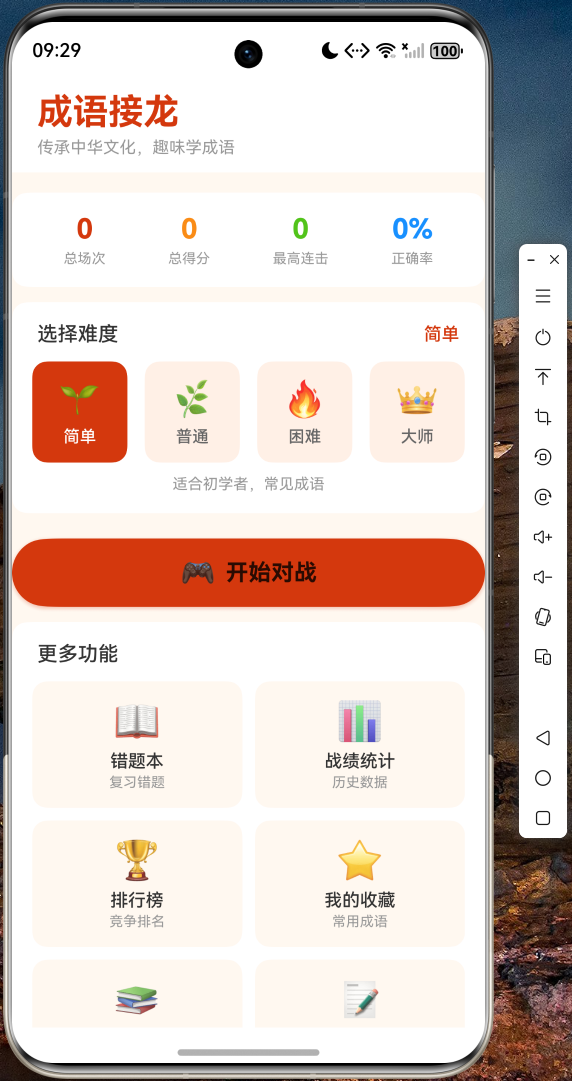
主页展示了成语接龙应用的品牌头图、四个难度等级选择按钮(简单、普通、困难、大师),以及功能导航入口(错题本、战绩统计、排行榜、我的收藏、成语故事)。
6.2 游戏对战界面
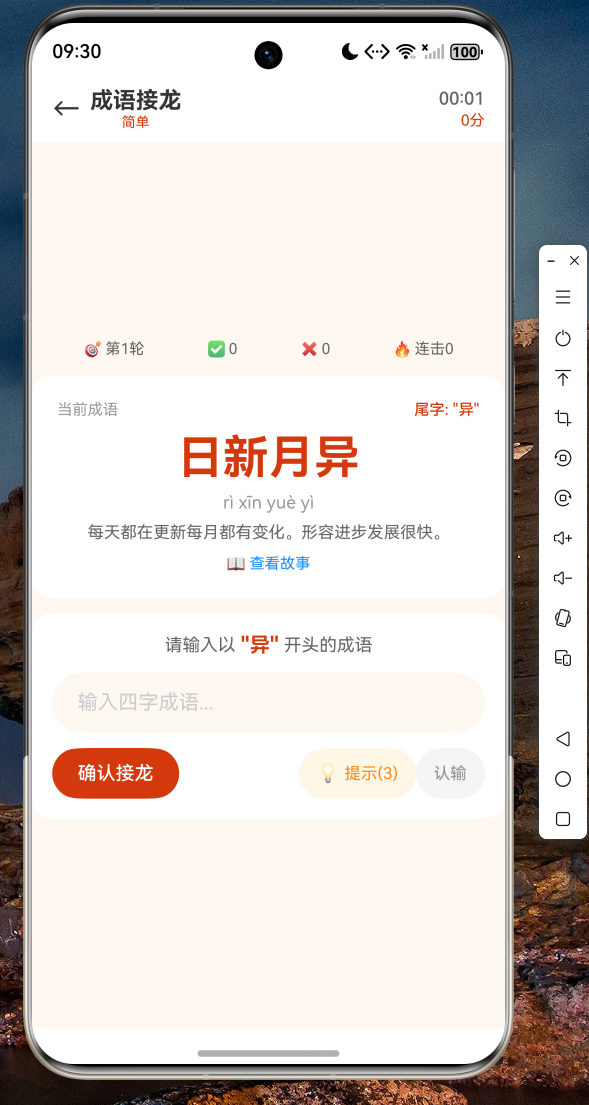
游戏界面包含计分板(得分、连击、错误次数、提示次数)、当前成语展示卡片(含拼音和释义)、输入区域(输入框和提交按钮),以及接龙历史列表。
6.3 游戏结果界面
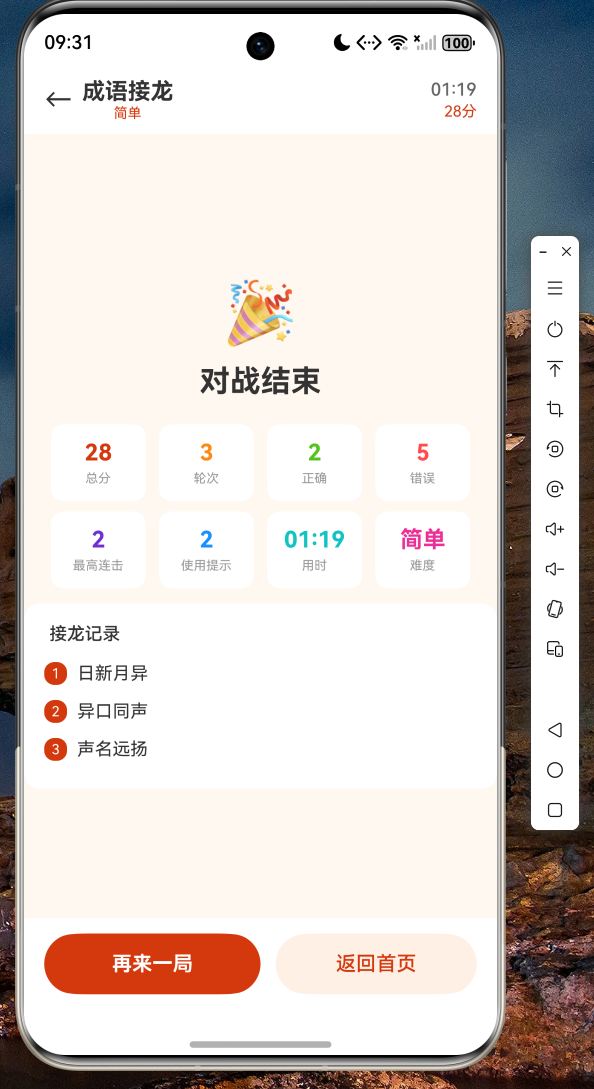
游戏结束后展示结果面板,包含最终得分、正确次数、错误次数、用时和接龙长度等详细数据。
6.4 错题本界面
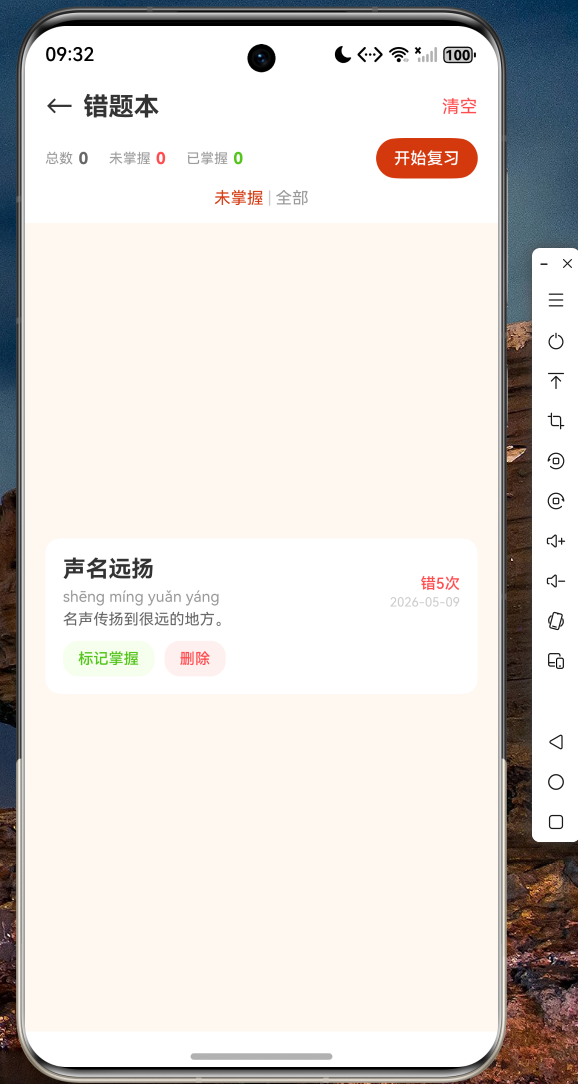
错题本自动收录答错的成语,支持标记掌握、删除和筛选功能,方便用户针对性复习。
6.5 战绩统计界面
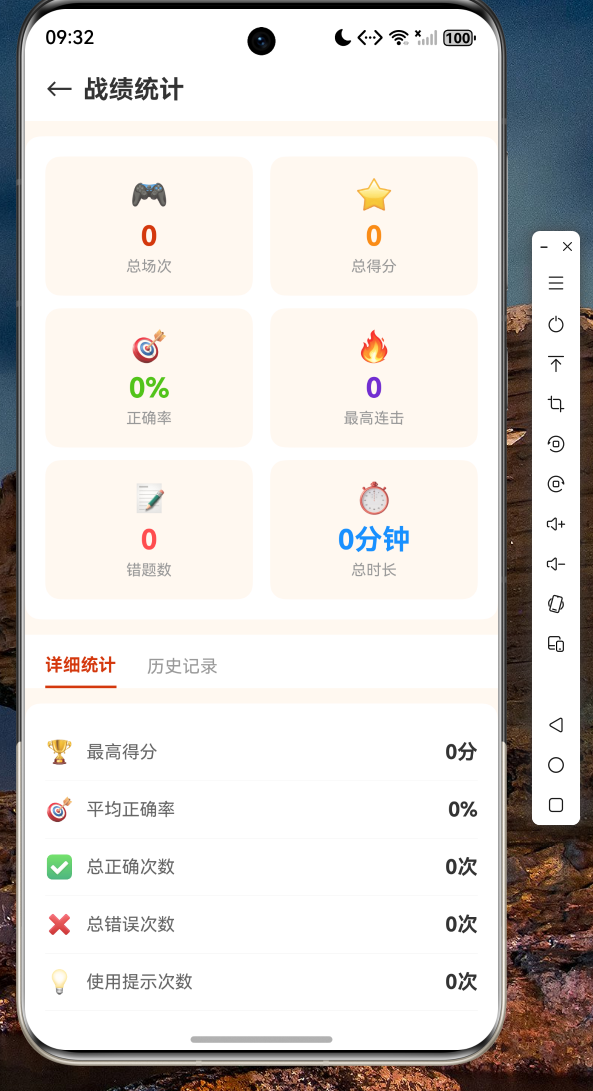
战绩统计页面展示总场次、总得分、正确率、最高连击等关键指标,以及历史对战记录列表。
七、总结
本文详细介绍了如何使用 Flutter 跨平台框架开发成语接龙应用,并成功适配 OpenHarmony 系统。通过 MVVM 架构设计、Provider 状态管理、shared_preferences 数据持久化等关键技术,我们构建了一个功能完整的成语接龙应用,包含对战、提示、错题本、战绩统计、排行榜、收藏和成语故事等七大功能模块。
Flutter for OpenHarmony 的跨平台能力使得开发者可以一套代码同时覆盖多个平台,大幅降低开发成本。随着 OpenHarmony 生态的不断完善,Flutter 在鸿蒙设备上的运行体验将持续提升。
希望本文能为正在探索 Flutter + OpenHarmony 开发的读者提供有价值的参考。完整项目代码已上传至 AtomGit:https://atomgit.com,欢迎访问获取源码。

作为“人工智能6S店”的官方数字引擎,为AI开发者与企业提供一个覆盖软硬件全栈、一站式门户。
更多推荐


 5
5 0
0- 0


 已为社区贡献42条内容

所有评论(0)