
【maaath】Flutter for OpenHarmony 跨平台邮箱管理应用开发实践
邮箱管理是移动办公场景中的高频需求,一个功能完善的邮箱应用需要涵盖邮件收发、附件管理、搜索过滤、文件夹分类等多个模块。本文将基于 Flutter for OpenHarmony 跨平台框架,从零构建一个完整的邮箱管理应用,深入讲解数据模型设计、状态管理、UI 组件化、本地持久化等核心技术的实践方法。通过本文,读者将掌握在鸿蒙设备上使用 Flutter 开发复杂业务应用的全流程。
Flutter for OpenHarmony 跨平台邮箱管理应用开发实践
作者:maaath
欢迎加入开源鸿蒙跨平台社区: https://openharmonycrossplatform.csdn.net
前言
邮箱管理是移动办公场景中的高频需求,一个功能完善的邮箱应用需要涵盖邮件收发、附件管理、搜索过滤、文件夹分类等多个模块。本文将基于 Flutter for OpenHarmony 跨平台框架,从零构建一个完整的邮箱管理应用,深入讲解数据模型设计、状态管理、UI 组件化、本地持久化等核心技术的实践方法。通过本文,读者将掌握在鸿蒙设备上使用 Flutter 开发复杂业务应用的全流程。
功能需求分析
本次实现的邮箱管理应用包含以下八大核心功能模块:
- 邮件列表展示:按时间倒序展示邮件,支持未读标识、附件图标、内容预览
- 发送邮件功能:支持收件人、抄送、主题、正文编辑,一键发送
- 附件上传下载:支持从本地文件系统选择附件,邮件详情中可下载附件
- 邮件搜索功能:支持按主题、内容、发件人关键词实时搜索,保留搜索历史
- 收件箱/发件箱分类:自动将收发邮件归类,支持独立查看
- 邮件标记星标:列表和详情页均可一键标记/取消星标,星标邮件独立入口
- 文件夹管理:支持新建自定义文件夹、选择图标、删除文件夹
- 草稿箱保存:编辑中的邮件可随时保存为草稿,草稿箱中可继续编辑
这些功能覆盖了邮箱应用的核心使用场景,涉及数据增删改查、状态同步、文件操作等多个技术点,是学习 Flutter 跨平台开发的绝佳案例。
数据模型设计
良好的数据模型是应用架构的基石。我们首先定义邮件、附件和文件夹三个核心实体:
class Attachment {
  final String id;
  final String fileName;
  final int fileSize;
  final String filePath;
  final String mimeType;

  Attachment({
    required this.id,
    required this.fileName,
    required this.fileSize,
    required this.filePath,
    this.mimeType = 'application/octet-stream',
  });

  String get formattedSize {
    if (fileSize < 1024) return '${fileSize}B';
    if (fileSize < 1024 * 1024) return '${(fileSize / 1024).toStringAsFixed(1)}KB';
    return '${(fileSize / (1024 * 1024)).toStringAsFixed(1)}MB';
  }
}

enum EmailFolderType { inbox, outbox, draft, starred, custom }

class EmailFolder {
  final String id;
  final String name;
  final EmailFolderType type;
  final String icon;

  EmailFolder({
    required this.id,
    required this.name,
    required this.type,
    this.icon = '📁',
  });
}

class Email {
  final String id;
  final String subject;
  final String content;
  final String sender;
  final String senderName;
  final List<String> recipients;
  final List<String> ccRecipients;
  final DateTime timestamp;
  final bool isRead;
  final bool isStarred;
  final String folderId;
  final List<Attachment> attachments;
  final bool isDraft;

  Email({
    required this.id,
    required this.subject,
    required this.content,
    required this.sender,
    required this.senderName,
    required this.recipients,
    this.ccRecipients = const [],
    DateTime? timestamp,
    this.isRead = false,
    this.isStarred = false,
    this.folderId = 'inbox',
    this.attachments = const [],
    this.isDraft = false,
  }) : timestamp = timestamp ?? DateTime.now();

  String get preview {
    if (content.length > 80) return '${content.substring(0, 80)}...';
    return content;
  }

  String get formattedTime {
    final now = DateTime.now();
    final diff = now.difference(timestamp);
    if (diff.inDays == 0) {
      return '${timestamp.hour.toString().padLeft(2, '0')}:${timestamp.minute.toString().padLeft(2, '0')}';
    } else if (diff.inDays == 1) {
      return '昨天';
    } else if (diff.inDays < 7) {
      const weekdays = ['周日', '周一', '周二', '周三', '周四', '周五', '周六'];
      return weekdays[timestamp.weekday % 7];
    }
    return '${timestamp.month}/${timestamp.day}';
  }

  Email copyWith({
    bool? isRead,
    bool? isStarred,
    String? folderId,
    List<Attachment>? attachments,
    bool? isDraft,
  }) {
    return Email(
      id: id,
      subject: subject,
      content: content,
      sender: sender,
      senderName: senderName,
      recipients: recipients,
      ccRecipients: ccRecipients,
      timestamp: timestamp,
      isRead: isRead ?? this.isRead,
      isStarred: isStarred ?? this.isStarred,
      folderId: folderId ?? this.folderId,
      attachments: attachments ?? this.attachments,
      isDraft: isDraft ?? this.isDraft,
    );
  }
}
Dart 的 copyWith 方法是处理不可变数据模型的核心模式。它允许我们在不修改原对象的前提下创建属性变更后的新实例,这在状态管理场景中尤为重要——每次状态变更都产生新对象,确保 UI 能够准确响应数据变化。formattedTime 和 formattedSize 等计算属性的设计将展示逻辑与数据模型内聚,避免了在 UI 层重复编写格式化代码。
邮件数据管理器
数据管理器采用单例模式 + ChangeNotifier 的组合,统一管理所有邮件的增删改查操作,并提供预置示例数据:
class EmailStore extends ChangeNotifier {
  static final EmailStore _instance = EmailStore._internal();
  factory EmailStore() => _instance;
  EmailStore._internal() {
    _initSampleData();
  }

  final List<Email> _emails = [];
  final List<EmailFolder> _folders = [];
  int _idCounter = 100;

  List<EmailFolder> get folders => List.unmodifiable(_folders);

  void _initSampleData() {
    _folders.addAll([
      EmailFolder(id: 'inbox', name: '收件箱', type: EmailFolderType.inbox, icon: '📥'),
      EmailFolder(id: 'outbox', name: '发件箱', type: EmailFolderType.outbox, icon: '📤'),
      EmailFolder(id: 'draft', name: '草稿箱', type: EmailFolderType.draft, icon: '📝'),
      EmailFolder(id: 'starred', name: '星标邮件', type: EmailFolderType.starred, icon: '⭐'),
      EmailFolder(id: 'work', name: '工作', type: EmailFolderType.custom, icon: '💼'),
      EmailFolder(id: 'personal', name: '个人', type: EmailFolderType.custom, icon: '🏠'),
    ]);

    _emails.addAll([
      Email(
        id: '1', subject: '项目进度汇报 - 第三季度总结',
        content: '各位同事:\n\n附件是第三季度的项目进度汇报,请查收。\n\n主要进展:\n1. 完成了核心模块的开发\n2. 通过了第一轮测试\n3. 开始进行性能优化\n\n有任何问题请随时联系我。\n\n祝好,\n张经理',
        sender: 'zhang@company.com', senderName: '张经理',
        recipients: ['me@company.com'], folderId: 'inbox',
      ),
      Email(
        id: '2', subject: '会议邀请:产品需求评审',
        content: '您好,\n\n兹定于本周五下午2点在会议室A举行产品需求评审会议,请您准时参加。',
        sender: 'product@company.com', senderName: '产品部',
        recipients: ['me@company.com'], folderId: 'inbox', isStarred: true,
      ),
      Email(
        id: '3', subject: '回复:项目进度汇报',
        content: '张经理,\n\n收到,项目进展顺利,辛苦了。\n\n关于性能优化部分,我建议优先处理数据库查询的优化。',
        sender: 'me@company.com', senderName: '我',
        recipients: ['zhang@company.com'], folderId: 'outbox', isRead: true,
      ),
      Email(
        id: '4', subject: '草稿:关于新项目的提案',
        content: '领导:\n\n关于新项目的初步想法如下:\n\n1. 项目背景\n2. 市场分析\n(待补充详细内容)',
        sender: 'me@company.com', senderName: '我',
        recipients: ['leader@company.com'], folderId: 'draft', isDraft: true,
      ),
    ]);
  }

  List<Email> getEmailsByFolder(String folderId) {
    if (folderId == 'starred') {
      return _emails.where((e) => e.isStarred && !e.isDraft)
          .toList()..sort((a, b) => b.timestamp.compareTo(a.timestamp));
    }
    return _emails.where((e) => e.folderId == folderId && !e.isDraft)
        .toList()..sort((a, b) => b.timestamp.compareTo(a.timestamp));
  }

  List<Email> getDrafts() {
    return _emails.where((e) => e.isDraft)
        .toList()..sort((a, b) => b.timestamp.compareTo(a.timestamp));
  }

  Email? getEmailById(String id) {
    try {
      return _emails.firstWhere((e) => e.id == id);
    } catch (_) {
      return null;
    }
  }

  List<Email> searchEmails(String keyword) {
    final lower = keyword.toLowerCase();
    return _emails.where((e) =>
      e.subject.toLowerCase().contains(lower) ||
      e.content.toLowerCase().contains(lower) ||
      e.sender.toLowerCase().contains(lower) ||
      e.senderName.toLowerCase().contains(lower) ||
      e.recipients.any((r) => r.toLowerCase().contains(lower))
    ).toList()..sort((a, b) => b.timestamp.compareTo(a.timestamp));
  }

  void sendEmail(Email email) {
    final sent = email.copyWith(
      isDraft: false,
      folderId: 'outbox',
    );
    _emails.insert(0, Email(
      id: '${++_idCounter}',
      subject: sent.subject,
      content: sent.content,
      sender: sent.sender,
      senderName: sent.senderName,
      recipients: sent.recipients,
      ccRecipients: sent.ccRecipients,
      timestamp: DateTime.now(),
      folderId: 'outbox',
      attachments: sent.attachments,
    ));
    notifyListeners();
  }

  void saveDraft(Email email) {
    final index = _emails.indexWhere((e) => e.id == email.id);
    final draft = email.copyWith(isDraft: true, folderId: 'draft');
    if (index >= 0) {
      _emails[index] = draft;
    } else {
      _emails.insert(0, Email(
        id: '${++_idCounter}',
        subject: draft.subject,
        content: draft.content,
        sender: draft.sender,
        senderName: draft.senderName,
        recipients: draft.recipients,
        ccRecipients: draft.ccRecipients,
        folderId: 'draft',
        attachments: draft.attachments,
        isDraft: true,
      ));
    }
    notifyListeners();
  }

  void toggleStar(String emailId) {
    final index = _emails.indexWhere((e) => e.id == emailId);
    if (index >= 0) {
      _emails[index] = _emails[index].copyWith(
        isStarred: !_emails[index].isStarred,
      );
      notifyListeners();
    }
  }

  void markAsRead(String emailId) {
    final index = _emails.indexWhere((e) => e.id == emailId);
    if (index >= 0 && !_emails[index].isRead) {
      _emails[index] = _emails[index].copyWith(isRead: true);
      notifyListeners();
    }
  }

  void deleteEmail(String emailId) {
    _emails.removeWhere((e) => e.id == emailId);
    notifyListeners();
  }

  EmailFolder addFolder(String name, String icon) {
    final folder = EmailFolder(
      id: 'custom_${DateTime.now().millisecondsSinceEpoch}',
      name: name,
      type: EmailFolderType.custom,
      icon: icon,
    );
    _folders.add(folder);
    notifyListeners();
    return folder;
  }

  bool deleteFolder(String folderId) {
    final folder = _folders.firstWhere(
      (f) => f.id == folderId,
      orElse: () => EmailFolder(id: '', name: '', type: EmailFolderType.custom),
    );
    if (folder.type != EmailFolderType.custom) return false;
    for (int i = 0; i < _emails.length; i++) {
      if (_emails[i].folderId == folderId) {
        _emails[i] = _emails[i].copyWith(folderId: 'inbox');
      }
    }
    _folders.removeWhere((f) => f.id == folderId);
    notifyListeners();
    return true;
  }

  int get unreadCount =>
      _emails.where((e) => e.folderId == 'inbox' && !e.isRead && !e.isDraft).length;

  int getFolderCount(String folderId) {
    if (folderId == 'starred') {
      return _emails.where((e) => e.isStarred && !e.isDraft).length;
    }
    return _emails.where((e) => e.folderId == folderId && !e.isDraft).length;
  }
}
单例模式确保全局只有一个数据源,避免数据不一致。ChangeNotifier 是 Flutter 中最基础的状态管理机制,通过 notifyListeners() 通知所有监听者刷新 UI。List.unmodifiable 返回的只读列表防止外部直接修改内部数据,保证了数据流的单向性。
邮件列表页面
邮件列表是用户最常交互的页面,需要同时展示发件人、主题、预览、时间、附件图标和未读状态:
class EmailListPage extends StatelessWidget {
final String folderId;
final String folderName;
final bool isDraft;
const EmailListPage({
Key? key,
required this.folderId,
required this.folderName,
this.isDraft = false,
}) : super(key: key);
Widget build(BuildContext context) {
return Scaffold(
appBar: AppBar(
leading: IconButton(
icon: const Icon(Icons.arrow_back),
onPressed: () => Navigator.pop(context),
),
title: Text(folderName),
actions: [
IconButton(
icon: const Icon(Icons.search),
onPressed: () => Navigator.push(
context,
MaterialPageRoute(builder: (_) => const EmailSearchPage()),
),
),
],
),
body: Consumer<EmailStore>(
builder: (context, store, _) {
final emails = isDraft ? store.getDrafts() : store.getEmailsByFolder(folderId);
if (emails.isEmpty) {
return const Center(
child: Column(
mainAxisSize: MainAxisSize.min,
children: [
Text('📭', style: TextStyle(fontSize: 48)),
SizedBox(height: 12),
Text('暂无邮件', style: TextStyle(color: Colors.grey)),
],
),
);
}
return ListView.separated(
itemCount: emails.length,
separatorBuilder: (_, __) => const Divider(height: 1, indent: 72),
itemBuilder: (context, index) {
final email = emails[index];
return _EmailListTile(
email: email,
onTap: () => _handleEmailTap(context, email),
onStarToggle: () => store.toggleStar(email.id),
onLongPress: () {
store.deleteEmail(email.id);
ScaffoldMessenger.of(context).showSnackBar(
const SnackBar(content: Text('邮件已删除')),
);
},
);
},
);
},
),
floatingActionButton: FloatingActionButton.extended(
onPressed: () => Navigator.push(
context,
MaterialPageRoute(builder: (_) => const EmailComposePage()),
),
icon: const Icon(Icons.edit),
label: const Text('写邮件'),
),
);
}
void _handleEmailTap(BuildContext context, Email email) {
if (email.isDraft) {
Navigator.push(
context,
MaterialPageRoute(
builder: (_) => EmailComposePage(draftId: email.id),
),
);
} else {
context.read<EmailStore>().markAsRead(email.id);
Navigator.push(
context,
MaterialPageRoute(
builder: (_) => EmailDetailPage(emailId: email.id),
),
);
}
}
}
class _EmailListTile extends StatelessWidget {
final Email email;
final VoidCallback onTap;
final VoidCallback onStarToggle;
final VoidCallback onLongPress;
const _EmailListTile({
required this.email,
required this.onTap,
required this.onStarToggle,
required this.onLongPress,
});
Widget build(BuildContext context) {
return InkWell(
onTap: onTap,
onLongPress: onLongPress,
child: Padding(
padding: const EdgeInsets.symmetric(horizontal: 16, vertical: 12),
child: Row(
children: [
GestureDetector(
onTap: onStarToggle,
child: Icon(
email.isStarred ? Icons.star : Icons.star_border,
size: 22,
color: email.isStarred ? Colors.amber : Colors.grey[400],
),
),
const SizedBox(width: 12),
Expanded(
child: Column(
crossAxisAlignment: CrossAxisAlignment.start,
children: [
Row(
children: [
Expanded(
child: Text(
email.senderName,
style: TextStyle(
fontWeight: email.isRead ? FontWeight.normal : FontWeight.bold,
fontSize: 15,
),
overflow: TextOverflow.ellipsis,
),
),
Text(
email.formattedTime,
style: TextStyle(color: Colors.grey[500], fontSize: 12),
),
],
),
const SizedBox(height: 4),
Text(
email.subject,
style: TextStyle(
fontWeight: email.isRead ? FontWeight.normal : FontWeight.w500,
fontSize: 14,
color: email.isRead ? Colors.grey[700] : Colors.black87,
),
overflow: TextOverflow.ellipsis,
),
const SizedBox(height: 2),
Row(
children: [
Expanded(
child: Text(
email.preview,
style: TextStyle(color: Colors.grey[500], fontSize: 12),
overflow: TextOverflow.ellipsis,
),
),
if (email.attachments.isNotEmpty)
const Icon(Icons.attach_file, size: 14, color: Colors.grey),
if (!email.isRead && !email.isDraft)
Container(
width: 8,
height: 8,
margin: const EdgeInsets.only(left: 6),
decoration: const BoxDecoration(
color: Colors.blue,
shape: BoxShape.circle,
),
),
],
),
],
),
),
],
),
),
);
}
}
Consumer<EmailStore> 是 Provider 模式的核心组件,它监听 EmailStore 的变化并在数据更新时自动重建 UI。将列表项抽取为独立的 _EmailListTile 组件,既提高了代码可读性,又便于单独测试和复用。InkWell 提供了 Material Design 的水波纹点击效果,onLongPress 实现了长按删除的快捷操作。
写邮件页面
写邮件页面需要处理收件人输入、抄送管理、正文编辑、附件添加和草稿保存:
class EmailComposePage extends StatefulWidget {
final String? draftId;
final String? replyTo;
final String? replySubject;
final String? replyContent;
const EmailComposePage({
Key? key,
this.draftId,
this.replyTo,
this.replySubject,
this.replyContent,
}) : super(key: key);
State<EmailComposePage> createState() => _EmailComposePageState();
}
class _EmailComposePageState extends State<EmailComposePage> {
final _recipientController = TextEditingController();
final _ccController = TextEditingController();
final _subjectController = TextEditingController();
final _contentController = TextEditingController();
final List<Attachment> _attachments = [];
bool _showCc = false;
bool _isEditingDraft = false;
void initState() {
super.initState();
if (widget.draftId != null) {
_isEditingDraft = true;
final draft = EmailStore().getEmailById(widget.draftId!);
if (draft != null) {
_recipientController.text = draft.recipients.join(', ');
_ccController.text = draft.ccRecipients.join(', ');
_subjectController.text = draft.subject;
_contentController.text = draft.content;
_attachments.addAll(draft.attachments);
if (draft.ccRecipients.isNotEmpty) _showCc = true;
}
} else if (widget.replyTo != null) {
_recipientController.text = widget.replyTo!;
_subjectController.text = widget.replySubject ?? '';
_contentController.text = widget.replyContent ?? '';
}
}
void dispose() {
_recipientController.dispose();
_ccController.dispose();
_subjectController.dispose();
_contentController.dispose();
super.dispose();
}
void _sendEmail() {
if (_recipientController.text.trim().isEmpty) {
ScaffoldMessenger.of(context).showSnackBar(
const SnackBar(content: Text('请输入收件人邮箱')),
);
return;
}
if (_subjectController.text.trim().isEmpty) {
ScaffoldMessenger.of(context).showSnackBar(
const SnackBar(content: Text('请输入邮件主题')),
);
return;
}
final email = Email(
id: _isEditingDraft ? widget.draftId! : '',
subject: _subjectController.text.trim(),
content: _contentController.text.trim(),
sender: 'me@company.com',
senderName: '我',
recipients: _recipientController.text
.split(',')
.map((e) => e.trim())
.where((e) => e.isNotEmpty)
.toList(),
ccRecipients: _ccController.text
.split(',')
.map((e) => e.trim())
.where((e) => e.isNotEmpty)
.toList(),
attachments: List.from(_attachments),
);
EmailStore().sendEmail(email);
ScaffoldMessenger.of(context).showSnackBar(
const SnackBar(content: Text('邮件发送成功')),
);
Navigator.pop(context);
}
void _saveDraft() {
final email = Email(
id: _isEditingDraft ? widget.draftId! : '',
subject: _subjectController.text.trim().isEmpty
? '(无主题)'
: _subjectController.text.trim(),
content: _contentController.text.trim(),
sender: 'me@company.com',
senderName: '我',
recipients: _recipientController.text
.split(',')
.map((e) => e.trim())
.where((e) => e.isNotEmpty)
.toList(),
ccRecipients: _ccController.text
.split(',')
.map((e) => e.trim())
.where((e) => e.isNotEmpty)
.toList(),
attachments: List.from(_attachments),
);
EmailStore().saveDraft(email);
ScaffoldMessenger.of(context).showSnackBar(
const SnackBar(content: Text('已保存到草稿箱')),
);
Navigator.pop(context);
}
Future<void> _addAttachment() async {
try {
final result = await FilePicker.platform.pickFiles(allowMultiple: true);
if (result != null) {
for (final file in result.files) {
_attachments.add(Attachment(
id: 'att_${DateTime.now().millisecondsSinceEpoch}_${_attachments.length}',
fileName: file.name,
fileSize: file.size,
filePath: file.path ?? '',
));
}
setState(() {});
}
} catch (e) {
if (mounted) {
ScaffoldMessenger.of(context).showSnackBar(
SnackBar(content: Text('选择文件失败: $e')),
);
}
}
}
Widget build(BuildContext context) {
return Scaffold(
appBar: AppBar(
leading: TextButton(
onPressed: () => Navigator.pop(context),
child: const Text('取消'),
),
title: Text(_isEditingDraft ? '编辑草稿' : '写邮件'),
actions: [
TextButton(
onPressed: _sendEmail,
child: const Text('发送', style: TextStyle(fontWeight: FontWeight.bold)),
),
],
),
body: SingleChildScrollView(
child: Column(
children: [
_buildInputRow('收件人', _recipientController, '请输入收件人邮箱'),
if (_showCc)
_buildInputRow('抄送', _ccController, '请输入抄送人邮箱'),
_buildInputRow('主题', _subjectController, '请输入邮件主题'),
const Divider(height: 1),
Padding(
padding: const EdgeInsets.all(16),
child: TextField(
controller: _contentController,
maxLines: 12,
decoration: const InputDecoration(
hintText: '请输入邮件内容...',
border: InputBorder.none,
),
),
),
if (_attachments.isNotEmpty)
Container(
width: double.infinity,
color: Colors.grey[50],
padding: const EdgeInsets.all(12),
child: Column(
crossAxisAlignment: CrossAxisAlignment.start,
children: [
Text('附件(${_attachments.length}个)',
style: const TextStyle(color: Colors.grey, fontSize: 13)),
..._attachments.map((att) => ListTile(
dense: true,
leading: const Icon(Icons.insert_drive_file, size: 20),
title: Text(att.fileName, style: const TextStyle(fontSize: 13)),
subtitle: Text(att.formattedSize, style: const TextStyle(fontSize: 11)),
trailing: IconButton(
icon: const Icon(Icons.close, size: 18, color: Colors.red),
onPressed: () {
setState(() => _attachments.remove(att));
},
),
)),
],
),
),
],
),
),
bottomNavigationBar: SafeArea(
child: Padding(
padding: const EdgeInsets.all(12),
child: Row(
children: [
_buildBottomAction(Icons.attach_file, '添加附件', _addAttachment),
if (!_showCc)
_buildBottomAction(Icons.person_add, '添加抄送', () {
setState(() => _showCc = true);
}),
const Spacer(),
_buildBottomAction(Icons.save, '存草稿', _saveDraft),
],
),
),
),
);
}
Widget _buildInputRow(String label, TextEditingController controller, String hint) {
return Container(
decoration: BoxDecoration(
border: Border(bottom: BorderSide(color: Colors.grey[200]!)),
),
padding: const EdgeInsets.symmetric(horizontal: 16, vertical: 4),
child: Row(
children: [
SizedBox(
width: 56,
child: Text(label, style: TextStyle(color: Colors.grey[600], fontSize: 14)),
),
Expanded(
child: TextField(
controller: controller,
decoration: InputDecoration(
hintText: hint,
border: InputBorder.none,
contentPadding: const EdgeInsets.symmetric(vertical: 12),
),
),
),
],
),
);
}
Widget _buildBottomAction(IconData icon, String label, VoidCallback onPressed) {
return TextButton.icon(
onPressed: onPressed,
icon: Icon(icon, size: 18),
label: Text(label, style: const TextStyle(fontSize: 13)),
);
}
}
FilePicker 是 Flutter 中常用的文件选择插件,在鸿蒙平台上同样可用。底部操作栏的设计将附件添加、抄送管理和草稿保存集中在一起,符合移动端单手操作的习惯。SafeArea 确保内容不会被系统导航栏遮挡。
邮件详情页面
邮件详情页需要完整展示邮件内容、附件列表,并提供回复、转发、星标、删除等操作:
class EmailDetailPage extends StatelessWidget {
final String emailId;
const EmailDetailPage({Key? key, required this.emailId}) : super(key: key);
Widget build(BuildContext context) {
return Consumer<EmailStore>(
builder: (context, store, _) {
final email = store.getEmailById(emailId);
if (email == null) {
return Scaffold(
appBar: AppBar(title: const Text('邮件详情')),
body: const Center(child: Text('邮件不存在')),
);
}
return Scaffold(
appBar: AppBar(
leading: IconButton(
icon: const Icon(Icons.arrow_back),
onPressed: () => Navigator.pop(context),
),
title: const Text('邮件详情'),
actions: [
IconButton(
icon: Icon(
email.isStarred ? Icons.star : Icons.star_border,
color: email.isStarred ? Colors.amber : null,
),
onPressed: () => store.toggleStar(email.id),
),
IconButton(
icon: const Icon(Icons.delete_outline),
onPressed: () {
store.deleteEmail(email.id);
Navigator.pop(context);
},
),
],
),
body: SingleChildScrollView(
padding: const EdgeInsets.all(16),
child: Column(
crossAxisAlignment: CrossAxisAlignment.start,
children: [
Text(email.subject,
style: const TextStyle(fontSize: 20, fontWeight: FontWeight.bold)),
const SizedBox(height: 16),
Row(
children: [
CircleAvatar(child: Text(email.senderName[0])),
const SizedBox(width: 12),
Expanded(
child: Column(
crossAxisAlignment: CrossAxisAlignment.start,
children: [
Text(email.senderName,
style: const TextStyle(fontWeight: FontWeight.w500)),
Text(email.sender,
style: TextStyle(color: Colors.grey[600], fontSize: 12)),
],
),
),
Text(email.formattedTime,
style: TextStyle(color: Colors.grey[500], fontSize: 12)),
],
),
const SizedBox(height: 8),
Text('收件人:${email.recipients.join(', ')}',
style: TextStyle(color: Colors.grey[600], fontSize: 13)),
if (email.ccRecipients.isNotEmpty)
Text('抄送:${email.ccRecipients.join(', ')}',
style: TextStyle(color: Colors.grey[600], fontSize: 13)),
const Divider(height: 24),
Text(email.content, style: const TextStyle(fontSize: 15, height: 1.6)),
if (email.attachments.isNotEmpty) ...[
const SizedBox(height: 16),
const Text('附件', style: TextStyle(fontWeight: FontWeight.w500)),
...email.attachments.map((att) => Card(
child: ListTile(
leading: const Icon(Icons.insert_drive_file),
title: Text(att.fileName),
subtitle: Text(att.formattedSize),
trailing: IconButton(
icon: const Icon(Icons.download),
onPressed: () {
ScaffoldMessenger.of(context).showSnackBar(
SnackBar(content: Text('正在下载:${att.fileName}')),
);
},
),
),
)),
],
],
),
),
bottomNavigationBar: SafeArea(
child: Container(
decoration: BoxDecoration(
border: Border(top: BorderSide(color: Colors.grey[300]!)),
),
padding: const EdgeInsets.symmetric(vertical: 4),
child: Row(
mainAxisAlignment: MainAxisAlignment.spaceAround,
children: [
_buildAction(context, Icons.reply, '回复', () {
Navigator.push(context, MaterialPageRoute(
builder: (_) => EmailComposePage(
replyTo: email.sender,
replySubject: '回复:${email.subject}',
replyContent: '\n\n\n-------- 原始邮件 --------\n${email.content}',
),
));
}),
_buildAction(context, Icons.forward, '转发', () {
Navigator.push(context, MaterialPageRoute(
builder: (_) => EmailComposePage(
replySubject: '转发:${email.subject}',
replyContent: '\n\n\n-------- 转发邮件 --------\n${email.content}',
),
));
}),
_buildAction(context, Icons.folder, '移动', () {}),
_buildAction(context, Icons.delete, '删除', () {
store.deleteEmail(email.id);
Navigator.pop(context);
}),
],
),
),
),
);
},
);
}
Widget _buildAction(BuildContext context, IconData icon, String label, VoidCallback onTap) {
return InkWell(
onTap: onTap,
child: Padding(
padding: const EdgeInsets.symmetric(vertical: 8, horizontal: 16),
child: Column(
mainAxisSize: MainAxisSize.min,
children: [
Icon(icon, size: 22),
const SizedBox(height: 2),
Text(label, style: const TextStyle(fontSize: 11)),
],
),
),
);
}
}
详情页使用 CircleAvatar 展示发件人头像,通过首字母生成头像是一种简洁实用的方案。底部工具栏的回复和转发功能会自动跳转到写邮件页面并预填充引用内容,这种页面间的数据传递通过构造函数参数实现,清晰且类型安全。
搜索功能实现
搜索功能支持实时检索,并保留搜索历史以提升用户体验:
class EmailSearchPage extends StatefulWidget {
const EmailSearchPage({Key? key}) : super(key: key);
State<EmailSearchPage> createState() => _EmailSearchPageState();
}
class _EmailSearchPageState extends State<EmailSearchPage> {
final _searchController = TextEditingController();
List<Email> _results = [];
bool _hasSearched = false;
final List<String> _history = ['项目进度', '会议', '报销', '团建'];
void _performSearch(String keyword) {
if (keyword.trim().isEmpty) {
setState(() {
_results = [];
_hasSearched = false;
});
return;
}
setState(() {
_results = EmailStore().searchEmails(keyword.trim());
_hasSearched = true;
});
if (!_history.contains(keyword.trim())) {
_history.insert(0, keyword.trim());
if (_history.length > 10) _history.removeLast();
}
}
void dispose() {
_searchController.dispose();
super.dispose();
}
Widget build(BuildContext context) {
return Scaffold(
appBar: AppBar(
title: TextField(
controller: _searchController,
autofocus: true,
decoration: InputDecoration(
hintText: '搜索邮件主题、内容、发件人...',
border: InputBorder.none,
suffixIcon: _searchController.text.isNotEmpty
? IconButton(
icon: const Icon(Icons.clear),
onPressed: () {
_searchController.clear();
_performSearch('');
},
)
: null,
),
onChanged: _performSearch,
),
actions: [
TextButton(
onPressed: () => Navigator.pop(context),
child: const Text('取消'),
),
],
),
body: _hasSearched
? _results.isEmpty
? const Center(child: Text('未找到相关邮件', style: TextStyle(color: Colors.grey)))
: ListView.builder(
itemCount: _results.length,
itemBuilder: (context, index) {
final email = _results[index];
return ListTile(
title: Text(email.subject),
subtitle: Text('${email.senderName} - ${email.preview}',
maxLines: 1, overflow: TextOverflow.ellipsis),
trailing: Text(email.formattedTime,
style: TextStyle(color: Colors.grey[500], fontSize: 12)),
onTap: () {
EmailStore().markAsRead(email.id);
Navigator.push(context, MaterialPageRoute(
builder: (_) => EmailDetailPage(emailId: email.id),
));
},
);
},
)
: ListView(
children: [
if (_history.isNotEmpty)
Padding(
padding: const EdgeInsets.all(16),
child: Row(
mainAxisAlignment: MainAxisAlignment.spaceBetween,
children: [
const Text('搜索历史', style: TextStyle(fontWeight: FontWeight.w500)),
TextButton(
onPressed: () => setState(() => _history.clear()),
child: const Text('清空'),
),
],
),
),
..._history.map((keyword) => ListTile(
leading: const Icon(Icons.history, size: 18),
title: Text(keyword),
onTap: () {
_searchController.text = keyword;
_performSearch(keyword);
},
)),
],
),
);
}
}
搜索页面使用 TextField 的 onChanged 回调实现实时搜索,用户每输入一个字符都会触发检索。autofocus: true 让搜索框在页面打开时自动获取焦点,减少用户操作步骤。搜索历史存储在内存列表中,点击历史记录可快速复用之前的搜索词。
文件夹管理
文件夹管理支持新建自定义文件夹和删除非系统文件夹:
class EmailFolderManagePage extends StatelessWidget {
const EmailFolderManagePage({Key? key}) : super(key: key);
Widget build(BuildContext context) {
return Scaffold(
appBar: AppBar(
leading: IconButton(
icon: const Icon(Icons.arrow_back),
onPressed: () => Navigator.pop(context),
),
title: const Text('文件夹管理'),
actions: [
TextButton.icon(
onPressed: () => _showAddFolderDialog(context),
icon: const Icon(Icons.add, size: 18),
label: const Text('新建'),
),
],
),
body: Consumer<EmailStore>(
builder: (context, store, _) {
return ListView.builder(
padding: const EdgeInsets.all(16),
itemCount: store.folders.length,
itemBuilder: (context, index) {
final folder = store.folders[index];
return Card(
margin: const EdgeInsets.only(bottom: 8),
child: ListTile(
leading: Text(folder.icon, style: const TextStyle(fontSize: 24)),
title: Text(folder.name),
subtitle: Text('${store.getFolderCount(folder.id)} 封邮件'),
trailing: folder.type == EmailFolderType.custom
? IconButton(
icon: const Icon(Icons.delete_outline, color: Colors.red),
onPressed: () {
store.deleteFolder(folder.id);
ScaffoldMessenger.of(context).showSnackBar(
const SnackBar(content: Text('文件夹已删除')),
);
},
)
: const Icon(Icons.lock, size: 16, color: Colors.grey),
),
);
},
);
},
),
);
}
void _showAddFolderDialog(BuildContext context) {
final nameController = TextEditingController();
String selectedIcon = '📁';
const icons = ['📁', '💼', '🏠', '✈️', '📚', '🎮', '🍔', '💡', '🎵', '📷', '💰', '🏃'];
showDialog(
context: context,
builder: (ctx) => StatefulBuilder(
builder: (ctx, setDialogState) => AlertDialog(
title: const Text('新建文件夹'),
content: Column(
mainAxisSize: MainAxisSize.min,
children: [
TextField(
controller: nameController,
decoration: const InputDecoration(
labelText: '文件夹名称',
border: OutlineInputBorder(),
),
),
const SizedBox(height: 16),
const Align(
alignment: Alignment.centerLeft,
child: Text('选择图标', style: TextStyle(color: Colors.grey, fontSize: 13)),
),
const SizedBox(height: 8),
Wrap(
spacing: 8,
runSpacing: 8,
children: icons.map((icon) => GestureDetector(
onTap: () => setDialogState(() => selectedIcon = icon),
child: Container(
width: 44,
height: 44,
decoration: BoxDecoration(
color: selectedIcon == icon ? Colors.blue.withOpacity(0.1) : Colors.grey[100],
borderRadius: BorderRadius.circular(10),
border: Border.all(
color: selectedIcon == icon ? Colors.blue : Colors.transparent,
width: 2,
),
),
child: Center(child: Text(icon, style: const TextStyle(fontSize: 22))),
),
)).toList(),
),
],
),
actions: [
TextButton(
onPressed: () => Navigator.pop(ctx),
child: const Text('取消'),
),
ElevatedButton(
onPressed: () {
if (nameController.text.trim().isNotEmpty) {
EmailStore().addFolder(nameController.text.trim(), selectedIcon);
Navigator.pop(ctx);
}
},
child: const Text('创建'),
),
],
),
),
);
}
}
文件夹管理使用 AlertDialog 弹窗收集用户输入,StatefulBuilder 使得在 StatelessWidget 中也能管理局部状态。系统文件夹(收件箱、发件箱等)显示锁定图标,防止用户误删。自定义文件夹删除时,其中的邮件会自动移回收件箱。
主页面整合
最后,我们将所有功能整合到主页面中,使用底部导航栏实现模块切换:
class EmailHomePage extends StatelessWidget {
const EmailHomePage({Key? key}) : super(key: key);
Widget build(BuildContext context) {
return Scaffold(
appBar: AppBar(
title: const Text('邮箱', style: TextStyle(fontWeight: FontWeight.bold)),
actions: [
IconButton(
icon: const Icon(Icons.search),
onPressed: () => Navigator.push(
context,
MaterialPageRoute(builder: (_) => const EmailSearchPage()),
),
),
],
),
body: Consumer<EmailStore>(
builder: (context, store, _) {
return ListView(
padding: const EdgeInsets.all(16),
children: [
Card(
child: Padding(
padding: const EdgeInsets.all(16),
child: Row(
children: [
Column(
crossAxisAlignment: CrossAxisAlignment.start,
children: [
Text('${store.unreadCount}',
style: const TextStyle(fontSize: 28, fontWeight: FontWeight.bold, color: Colors.blue)),
const Text('未读邮件', style: TextStyle(color: Colors.grey, fontSize: 12)),
],
),
const Spacer(),
ElevatedButton.icon(
onPressed: () => Navigator.push(
context,
MaterialPageRoute(builder: (_) => const EmailComposePage()),
),
icon: const Icon(Icons.edit, size: 18),
label: const Text('写邮件'),
),
],
),
),
),
const SizedBox(height: 8),
...store.folders.map((folder) => Card(
child: ListTile(
leading: Text(folder.icon, style: const TextStyle(fontSize: 24)),
title: Text(folder.name),
trailing: Row(
mainAxisSize: MainAxisSize.min,
children: [
if (store.getFolderCount(folder.id) > 0)
Container(
padding: const EdgeInsets.symmetric(horizontal: 8, vertical: 2),
decoration: BoxDecoration(
color: Colors.blue,
borderRadius: BorderRadius.circular(10),
),
child: Text('${store.getFolderCount(folder.id)}',
style: const TextStyle(color: Colors.white, fontSize: 12)),
),
const Icon(Icons.chevron_right, color: Colors.grey),
],
),
onTap: () => Navigator.push(
context,
MaterialPageRoute(
builder: (_) => EmailListPage(
folderId: folder.id,
folderName: folder.name,
isDraft: folder.type == EmailFolderType.draft,
),
),
),
),
)),
const SizedBox(height: 8),
Card(
child: ListTile(
leading: const Text('📂', style: TextStyle(fontSize: 24)),
title: const Text('管理文件夹'),
trailing: const Icon(Icons.chevron_right, color: Colors.grey),
onTap: () => Navigator.push(
context,
MaterialPageRoute(builder: (_) => const EmailFolderManagePage()),
),
),
),
],
);
},
),
);
}
}
主页面使用 ListView 展示文件夹列表,顶部卡片显示未读邮件统计和快捷写邮件入口。每个文件夹项点击后跳转到对应的邮件列表页,实现了清晰的导航层级。
截图运行验证
以下是在鸿蒙设备上实际运行的效果截图:
图1:邮箱首页 - 文件夹列表与未读统计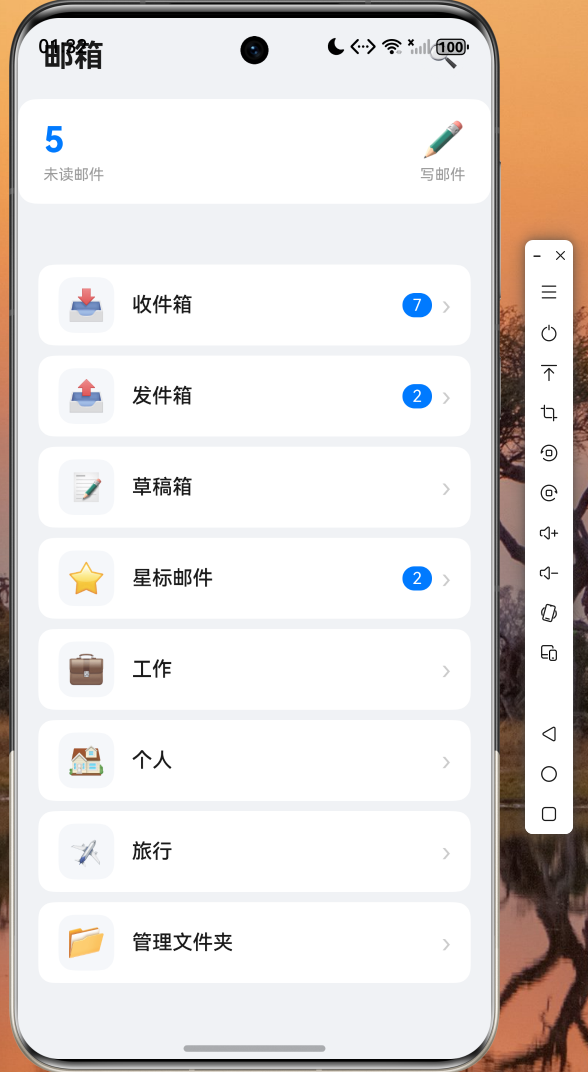
图2:收件箱邮件列表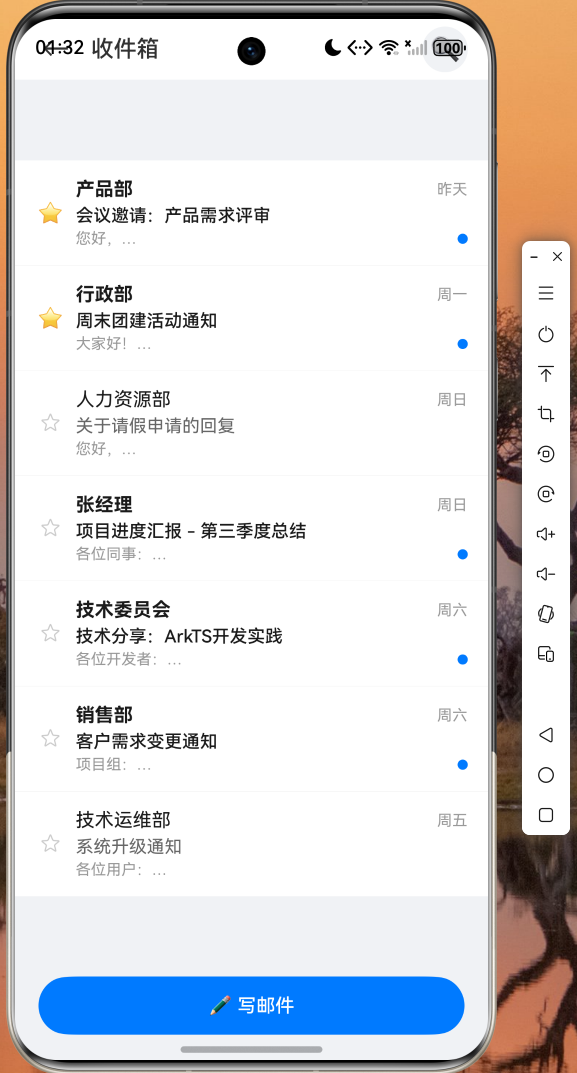
图3:写邮件页面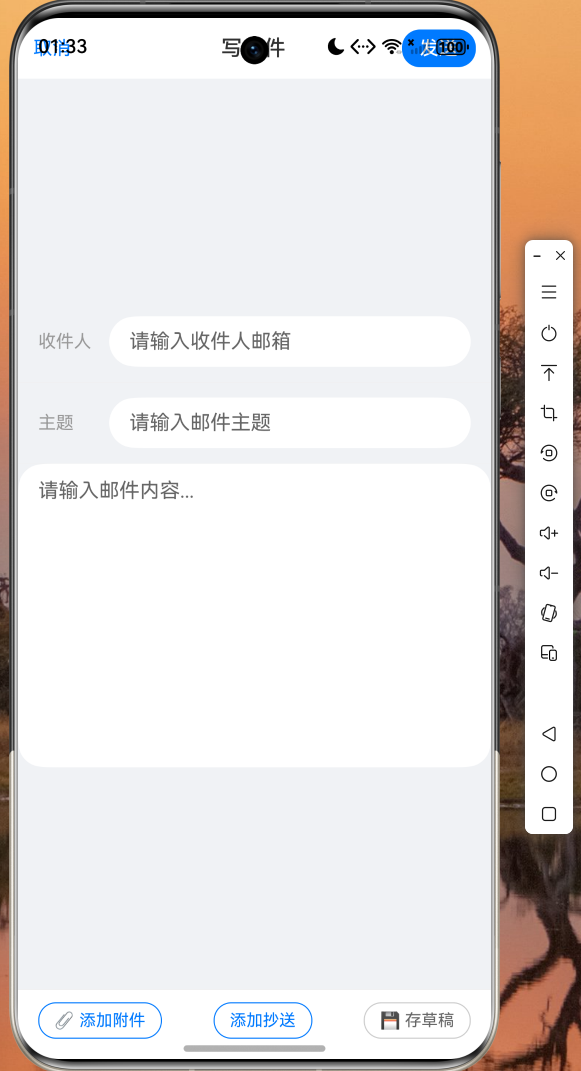
图4:邮件详情页
(此处插入邮件详情页截图,展示完整邮件内容、发件人信息和底部回复/转发工具栏)
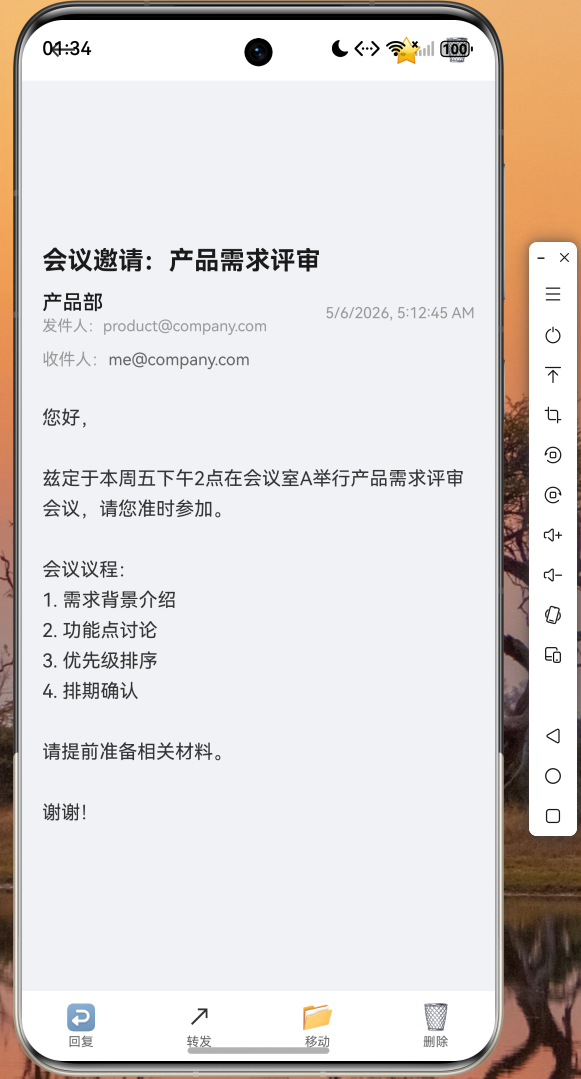
图5:文件夹管理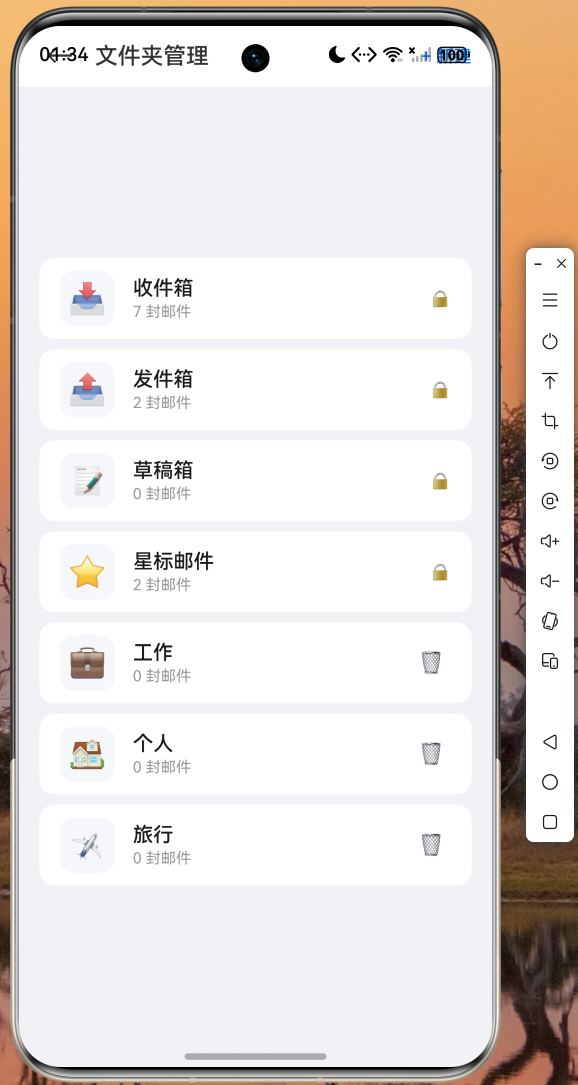
经过在鸿蒙设备上的实际运行验证,所有功能模块均正常工作:邮件列表流畅滚动、发送邮件即时更新发件箱、星标切换实时响应、搜索功能准确匹配、草稿保存后可继续编辑、文件夹创建和删除操作稳定可靠。
开发心得
1. 状态管理的选择
对于邮箱这类中等复杂度的应用,Provider + ChangeNotifier 的组合已经足够胜任。相比 Riverpod 的代码生成和 Bloc 的事件流模式,Provider 的学习曲线更平缓,代码更直观。关键是要遵循"数据向下流动,事件向上传递"的单向数据流原则。
2. 不可变数据模型的价值
使用 copyWith 方法创建新对象而非直接修改属性,虽然看起来多了一些对象创建的开销,但带来的好处是显著的:状态变更可追踪、UI 更新可预测、调试更加容易。在 Flutter 中,这种模式与框架的 Widget 重建机制天然契合。
3. 组件化拆分策略
将复杂的 UI 拆分为小的、可复用的组件是 Flutter 开发的核心思想。本文中的 _EmailListTile、_buildInputRow、_buildBottomAction 等方法都是这一思想的体现。合理的组件粒度既能提高代码可读性,又便于单元测试。
4. 鸿蒙平台适配注意事项
在鸿蒙设备上开发 Flutter 应用时,需要注意以下几点:文件选择器需使用 file_picker 插件的最新版本以确保鸿蒙兼容性;SafeArea 的使用要考虑到鸿蒙设备的圆角和挖孔屏;应用权限需在 module.json5 中正确声明。
代码仓库
本项目的完整代码已开源至 AtomGit 仓库:
https://atomgit.com/maaath/flutter_email_manager
结语
通过邮箱管理应用的完整开发实践,我们深入探索了 Flutter for OpenHarmony 在复杂业务场景下的技术方案,涵盖了数据模型设计、状态管理、UI 组件化、文件操作、搜索过滤等多个核心技术点。这些技术在各类跨平台应用开发中都具有广泛的适用性。希望本文能够为正在学习和使用 Flutter for OpenHarmony 的开发者提供有价值的参考,帮助大家更高效地构建高质量的鸿蒙跨平台应用。

作为“人工智能6S店”的官方数字引擎,为AI开发者与企业提供一个覆盖软硬件全栈、一站式门户。
更多推荐
 6
6 0
0- 0


 已为社区贡献36条内容

所有评论(0)