
【maaath】Flutter for OpenHarmony 桌面小组件应用开发实践
随着 OpenHarmony 生态的蓬勃发展,越来越多的开发者开始关注如何在鸿蒙设备上使用跨平台框架构建应用。Flutter for OpenHarmony 作为谷歌 Flutter 框架在鸿蒙平台上的移植版本,让开发者能够使用同一套 Dart 代码,同时覆盖 Android、iOS 和 OpenHarmony 三大平台,极大提升了开发效率。桌面小组件(Service Widget)是 OpenH
Flutter for OpenHarmony 桌面小组件应用开发实践
欢迎加入开源鸿蒙跨平台社区:https://openharmonycrossplatform.csdn.net
作者:maaath
一、前言
随着 OpenHarmony 生态的蓬勃发展,越来越多的开发者开始关注如何在鸿蒙设备上使用跨平台框架构建应用。Flutter for OpenHarmony 作为谷歌 Flutter 框架在鸿蒙平台上的移植版本,让开发者能够使用同一套 Dart 代码,同时覆盖 Android、iOS 和 OpenHarmony 三大平台,极大提升了开发效率。
桌面小组件(Service Widget)是 OpenHarmony 的一大特色功能,它允许用户在不打开应用的情况下,直接在桌面上查看关键信息或执行快捷操作。本文将详细介绍如何使用 Flutter for OpenHarmony 技术,结合 OpenHarmony 原生的 FormExtensionAbility 能力,开发一款功能丰富的桌面小组件应用,涵盖时钟天气、倒计时、待办事项、快捷开关、便签、电池监控和步数统计等七大组件。
本文所有代码已在鸿蒙设备上验证通过,读者可放心参考实践。完整项目代码已托管在 AtomGit 平台:https://atomgit.com。
二、技术架构
本应用采用"Flutter 主应用 + OpenHarmony 原生服务卡片"的混合架构:
- Flutter 层(Dart):负责应用主界面、组件管理、数据配置和用户交互
- Platform Channel 桥接层:实现 Flutter 与 OpenHarmony 原生侧的双向通信
- OpenHarmony 原生层(ArkTS):负责 FormExtensionAbility 服务卡片注册、卡片数据绑定和系统能力调用
┌─────────────────────────────────┐
│        Flutter UI (Dart)        │
│  组件管理 / 样式配置 / 数据编辑  │
├─────────────────────────────────┤
│      Platform Channel 桥接      │
├─────────────────────────────────┤
│   OpenHarmony Native (ArkTS)    │
│  FormExtensionAbility / 系统API │
└─────────────────────────────────┘
三、Flutter 侧核心实现
3.1 数据模型定义
首先在 Flutter 侧定义与原生层对应的数据模型,确保两端数据结构一致:
// lib/models/widget_data.dart

enum WidgetType {
  clockWeather,
  countdown,
  todoList,
  quickSettings,
  stickyNote,
  batteryMonitor,
  stepCounter,
}

class ClockWeatherData {
  String city;
  int temperature;
  String weatherType;
  int humidity;
  String windLevel;
  String updateTime;

  ClockWeatherData({
    this.city = '北京',
    this.temperature = 26,
    this.weatherType = '晴',
    this.humidity = 45,
    this.windLevel = '2级',
    this.updateTime = '',
  });

  Map<String, dynamic> toMap() => {
        'city': city,
        'temperature': temperature,
        'weatherType': weatherType,
        'humidity': humidity,
        'windLevel': windLevel,
        'updateTime': updateTime,
      };

  factory ClockWeatherData.fromMap(Map<String, dynamic> map) =>
      ClockWeatherData(
        city: map['city'] ?? '北京',
        temperature: map['temperature'] ?? 26,
        weatherType: map['weatherType'] ?? '晴',
        humidity: map['humidity'] ?? 45,
        windLevel: map['windLevel'] ?? '2级',
        updateTime: map['updateTime'] ?? '',
      );
}

class CountdownItem {
  String id;
  String title;
  int targetDate;
  String targetTime;
  int remainingDays;
  int remainingHours;
  int remainingMinutes;
  bool isExpired;

  CountdownItem({
    required this.id,
    required this.title,
    required this.targetDate,
    this.targetTime = '',
    this.remainingDays = 0,
    this.remainingHours = 0,
    this.remainingMinutes = 0,
    this.isExpired = false,
  });

  Map<String, dynamic> toMap() => {
        'id': id,
        'title': title,
        'targetDate': targetDate,
        'targetTime': targetTime,
        'remainingDays': remainingDays,
        'remainingHours': remainingHours,
        'remainingMinutes': remainingMinutes,
        'isExpired': isExpired,
      };

  factory CountdownItem.fromMap(Map<String, dynamic> map) => CountdownItem(
        id: map['id'] ?? '',
        title: map['title'] ?? '',
        targetDate: map['targetDate'] ?? 0,
        targetTime: map['targetTime'] ?? '',
        remainingDays: map['remainingDays'] ?? 0,
        remainingHours: map['remainingHours'] ?? 0,
        remainingMinutes: map['remainingMinutes'] ?? 0,
        isExpired: map['isExpired'] ?? false,
      );
}

class TodoItem {
  String id;
  String content;
  bool isCompleted;
  int priority;
  int createTime;

  TodoItem({
    required this.id,
    required this.content,
    this.isCompleted = false,
    this.priority = 0,
    this.createTime = 0,
  });

  Map<String, dynamic> toMap() => {
        'id': id,
        'content': content,
        'isCompleted': isCompleted,
        'priority': priority,
        'createTime': createTime,
      };

  factory TodoItem.fromMap(Map<String, dynamic> map) => TodoItem(
        id: map['id'] ?? '',
        content: map['content'] ?? '',
        isCompleted: map['isCompleted'] ?? false,
        priority: map['priority'] ?? 0,
        createTime: map['createTime'] ?? 0,
      );
}

class WidgetStyleConfig {
  String theme;
  String primaryColor;
  String backgroundColor;
  String textColor;
  double cornerRadius;
  double fontSize;
  double opacity;
  bool showBorder;

  WidgetStyleConfig({
    this.theme = 'light',
    this.primaryColor = '#007AFF',
    this.backgroundColor = '#FFFFFF',
    this.textColor = '#333333',
    this.cornerRadius = 16.0,
    this.fontSize = 14.0,
    this.opacity = 1.0,
    this.showBorder = false,
  });

  Map<String, dynamic> toMap() => {
        'theme': theme,
        'primaryColor': primaryColor,
        'backgroundColor': backgroundColor,
        'textColor': textColor,
        'cornerRadius': cornerRadius,
        'fontSize': fontSize,
        'opacity': opacity,
        'showBorder': showBorder,
      };

  factory WidgetStyleConfig.fromMap(Map<String, dynamic> map) =>
      WidgetStyleConfig(
        theme: map['theme'] ?? 'light',
        primaryColor: map['primaryColor'] ?? '#007AFF',
        backgroundColor: map['backgroundColor'] ?? '#FFFFFF',
        textColor: map['textColor'] ?? '#333333',
        cornerRadius: (map['cornerRadius'] ?? 16).toDouble(),
        fontSize: (map['fontSize'] ?? 14).toDouble(),
        opacity: (map['opacity'] ?? 1.0).toDouble(),
        showBorder: map['showBorder'] ?? false,
      );
}
3.2 Platform Channel 通信层
通过 MethodChannel 实现 Flutter 与 OpenHarmony 原生侧的通信,用于触发卡片更新和样式切换:
// lib/services/widget_bridge.dart

import 'package:flutter/services.dart';

class WidgetBridge {
  static const MethodChannel _channel =
      MethodChannel('com.example.ohos/widget');

  static Future<bool> updateWidget({
    required String formId,
    required String widgetType,
    Map<String, dynamic>? data,
  }) async {
    try {
      final result = await _channel.invokeMethod('updateWidget', {
        'formId': formId,
        'widgetType': widgetType,
        'data': data ?? {},
      });
      return result == true;
    } on PlatformException catch (e) {
      print('WidgetBridge error: ${e.message}');
      return false;
    }
  }

  static Future<bool> updateWidgetStyle({
    required String formId,
    required WidgetStyleConfig styleConfig,
  }) async {
    try {
      final result = await _channel.invokeMethod('updateStyle', {
        'formId': formId,
        'styleConfig': styleConfig.toMap(),
      });
      return result == true;
    } on PlatformException catch (e) {
      print('WidgetBridge style error: ${e.message}');
      return false;
    }
  }

  static Future<Map<String, dynamic>?> getWidgetData(
      String widgetType) async {
    try {
      final result =
          await _channel.invokeMethod('getWidgetData', widgetType);
      return result as Map<String, dynamic>?;
    } on PlatformException catch (e) {
      print('WidgetBridge getData error: ${e.message}');
      return null;
    }
  }

  static Future<bool> sendWidgetEvent({
    required String formId,
    required String action,
    Map<String, dynamic>? params,
  }) async {
    try {
      final result = await _channel.invokeMethod('sendEvent', {
        'formId': formId,
        'action': action,
        'params': params ?? {},
      });
      return result == true;
    } on PlatformException catch (e) {
      print('WidgetBridge event error: ${e.message}');
      return false;
    }
  }
}
3.3 小组件管理主界面
使用 Flutter 构建小组件管理页面,支持组件切换、数据预览和样式自定义:
// lib/pages/widget_home_page.dart
import 'package:flutter/material.dart';
import '../models/widget_data.dart';
import '../services/widget_bridge.dart';
class WidgetHomePage extends StatefulWidget {
const WidgetHomePage({super.key});
State<WidgetHomePage> createState() => _WidgetHomePageState();
}
class _WidgetHomePageState extends State<WidgetHomePage>
with SingleTickerProviderStateMixin {
late TabController _tabController;
WidgetStyleConfig _styleConfig = WidgetStyleConfig();
bool _showStyleSettings = false;
final List<String> _tabTitles = [
'时钟天气',
'倒计时',
'待办事项',
'快捷开关',
'便签',
'电池监控',
'步数统计',
];
void initState() {
super.initState();
_tabController = TabController(length: _tabTitles.length, vsync: this);
}
void dispose() {
_tabController.dispose();
super.dispose();
}
void _onStyleChanged(WidgetStyleConfig config) {
setState(() {
_styleConfig = config;
});
WidgetBridge.updateWidgetStyle(
formId: 'default',
styleConfig: config,
);
}
Widget build(BuildContext context) {
return Scaffold(
backgroundColor: const Color(0xFFF0F2F5),
appBar: AppBar(
title: const Text(
'桌面小组件',
style: TextStyle(
color: Colors.white,
fontWeight: FontWeight.bold,
),
),
backgroundColor: const Color(0xFF007AFF),
elevation: 0,
actions: [
TextButton(
onPressed: () {
setState(() {
_showStyleSettings = !_showStyleSettings;
});
},
child: Text(
_showStyleSettings ? '完成' : '样式',
style: const TextStyle(color: Colors.white),
),
),
],
),
body: _showStyleSettings
? _buildStyleSettings()
: Column(
children: [
_buildTabBar(),
Expanded(child: _buildWidgetContent()),
],
),
);
}
Widget _buildTabBar() {
return Container(
color: Colors.white,
child: TabBar(
controller: _tabController,
isScrollable: true,
indicatorColor: const Color(0xFF007AFF),
labelColor: const Color(0xFF007AFF),
unselectedLabelColor: Colors.grey,
tabs: _tabTitles
.map((title) => Tab(
child: Text(title, style: const TextStyle(fontSize: 13)),
))
.toList(),
),
);
}
Widget _buildWidgetContent() {
return TabBarView(
controller: _tabController,
children: [
_buildWidgetCard(
'时钟天气组件',
'实时显示时间、日期、天气信息',
_buildClockWeatherPreview(),
),
_buildWidgetCard(
'倒计时组件',
'设置重要日期,实时显示剩余天数',
_buildCountdownPreview(),
),
_buildWidgetCard(
'待办事项组件',
'管理日常任务,追踪完成进度',
_buildTodoListPreview(),
),
_buildWidgetCard(
'快捷开关组件',
'一键控制常用功能开关',
_buildQuickSettingsPreview(),
),
_buildWidgetCard(
'便签小组件',
'快速记录备忘信息,支持多彩便签',
_buildStickyNotePreview(),
),
_buildWidgetCard(
'电池监控组件',
'实时监控电池状态、温度、健康度',
_buildBatteryPreview(),
),
_buildWidgetCard(
'步数统计组件',
'记录每日步数,追踪运动目标',
_buildStepCounterPreview(),
),
],
);
}
Widget _buildWidgetCard(
String title, String description, Widget preview) {
return SingleChildScrollView(
padding: const EdgeInsets.all(16),
child: Column(
crossAxisAlignment: CrossAxisAlignment.start,
children: [
Text(
title,
style: const TextStyle(
fontSize: 16,
fontWeight: FontWeight.w600,
color: Color(0xFF333333),
),
),
const SizedBox(height: 4),
Text(
description,
style: const TextStyle(fontSize: 12, color: Color(0xFF999999)),
),
const SizedBox(height: 12),
Container(
width: double.infinity,
decoration: BoxDecoration(
color: _styleConfig.backgroundColor == '#FFFFFF'
? Colors.white
: const Color(0xFF1C1C1E),
borderRadius:
BorderRadius.circular(_styleConfig.cornerRadius),
boxShadow: [
BoxShadow(
color: Colors.black.withOpacity(0.05),
blurRadius: 8,
offset: const Offset(0, 2),
),
],
),
child: preview,
),
const SizedBox(height: 24),
const Center(
child: Text(
'提示:长按桌面应用图标可添加服务卡片到桌面',
style: TextStyle(fontSize: 11, color: Color(0xFFBBBBBB)),
),
),
],
),
);
}
Widget _buildClockWeatherPreview() {
return Container(
padding: const EdgeInsets.all(16),
height: 130,
child: Row(
mainAxisAlignment: MainAxisAlignment.spaceBetween,
children: [
Column(
crossAxisAlignment: CrossAxisAlignment.start,
mainAxisAlignment: MainAxisAlignment.center,
children: [
Text(
_getCurrentTime(),
style: TextStyle(
fontSize: 36,
fontWeight: FontWeight.bold,
color: _styleConfig.textColor == '#FFFFFF'
? Colors.white
: const Color(0xFF333333),
),
),
const SizedBox(height: 4),
Text(
_getCurrentDate(),
style: TextStyle(
fontSize: 12,
color: _styleConfig.textColor == '#FFFFFF'
? Colors.white70
: const Color(0xFF999999),
),
),
],
),
Column(
mainAxisAlignment: MainAxisAlignment.center,
children: [
const Text('☀️', style: TextStyle(fontSize: 32)),
Text(
'26°',
style: TextStyle(
fontSize: 28,
fontWeight: FontWeight.bold,
color: _styleConfig.textColor == '#FFFFFF'
? Colors.white
: const Color(0xFF333333),
),
),
Text(
'晴',
style: TextStyle(
fontSize: 11,
color: _styleConfig.textColor == '#FFFFFF'
? Colors.white70
: const Color(0xFF999999),
),
),
],
),
],
),
);
}
Widget _buildCountdownPreview() {
return Container(
padding: const EdgeInsets.all(16),
height: 160,
child: Column(
crossAxisAlignment: CrossAxisAlignment.start,
children: [
const Text(
'新年倒计时',
style: TextStyle(
fontSize: 14,
fontWeight: FontWeight.w600,
color: Color(0xFF333333),
),
),
const SizedBox(height: 4),
const Text(
'2027-01-01',
style: TextStyle(fontSize: 10, color: Color(0xFF999999)),
),
const Spacer(),
Row(
mainAxisAlignment: MainAxisAlignment.center,
children: [
_buildCountUnit('239', '天'),
const SizedBox(width: 16),
_buildCountUnit('12', '时'),
const SizedBox(width: 16),
_buildCountUnit('35', '分'),
],
),
const Spacer(),
],
),
);
}
Widget _buildCountUnit(String value, String label) {
return Column(
children: [
Text(
value,
style: const TextStyle(
fontSize: 24,
fontWeight: FontWeight.bold,
color: Color(0xFF333333),
),
),
Text(
label,
style: const TextStyle(fontSize: 10, color: Color(0xFF999999)),
),
],
);
}
Widget _buildTodoListPreview() {
final todos = [
{'content': '完成项目报告', 'done': false, 'priority': true},
{'content': '购买生活用品', 'done': false, 'priority': false},
{'content': '阅读技术文档', 'done': true, 'priority': false},
];
return Container(
padding: const EdgeInsets.all(16),
height: 200,
child: Column(
crossAxisAlignment: CrossAxisAlignment.start,
children: [
Row(
mainAxisAlignment: MainAxisAlignment.spaceBetween,
children: const [
Text(
'待办事项',
style: TextStyle(
fontSize: 14,
fontWeight: FontWeight.w600,
color: Color(0xFF333333),
),
),
Text(
'1/3',
style: TextStyle(fontSize: 11, color: Color(0xFF999999)),
),
],
),
const SizedBox(height: 8),
LinearProgressIndicator(
value: 1 / 3,
backgroundColor: Colors.grey[200],
color: const Color(0xFF007AFF),
),
const SizedBox(height: 12),
...todos.map((todo) => Padding(
padding: const EdgeInsets.only(bottom: 8),
child: Row(
children: [
Icon(
todo['done'] as bool
? Icons.check_circle
: Icons.circle_outlined,
size: 18,
color: todo['done'] as bool
? const Color(0xFF007AFF)
: Colors.grey,
),
const SizedBox(width: 8),
Expanded(
child: Text(
todo['content'] as String,
style: TextStyle(
fontSize: 13,
color: todo['done'] as bool
? Colors.grey
: const Color(0xFF333333),
decoration: todo['done'] as bool
? TextDecoration.lineThrough
: null,
),
),
),
if (todo['priority'] as bool)
const Text(
'!',
style: TextStyle(
color: Colors.deepOrange,
fontWeight: FontWeight.bold,
),
),
],
),
)),
],
),
);
}
Widget _buildQuickSettingsPreview() {
final switches = [
{'name': 'WiFi', 'icon': Icons.wifi, 'on': true},
{'name': '蓝牙', 'icon': Icons.bluetooth, 'on': false},
{'name': '手电筒', 'icon': Icons.flashlight_on, 'on': false},
{'name': '响铃', 'icon': Icons.notifications_active, 'on': true},
];
return Container(
padding: const EdgeInsets.all(16),
height: 140,
child: GridView.builder(
physics: const NeverScrollableScrollPhysics(),
gridDelegate: const SliverGridDelegateWithFixedCrossAxisCount(
crossAxisCount: 4,
mainAxisSpacing: 8,
crossAxisSpacing: 8,
childAspectRatio: 0.9,
),
itemCount: switches.length,
itemBuilder: (context, index) {
final item = switches[index];
return Container(
decoration: BoxDecoration(
color: (item['on'] as bool)
? const Color(0xFF007AFF).withOpacity(0.1)
: Colors.grey[100],
borderRadius: BorderRadius.circular(12),
),
child: Column(
mainAxisAlignment: MainAxisAlignment.center,
children: [
Icon(
item['icon'] as IconData,
color: (item['on'] as bool)
? const Color(0xFF007AFF)
: Colors.grey,
),
const SizedBox(height: 4),
Text(
item['name'] as String,
style: TextStyle(
fontSize: 10,
color: (item['on'] as bool)
? const Color(0xFF007AFF)
: Colors.grey,
),
),
],
),
);
},
),
);
}
Widget _buildStickyNotePreview() {
return Container(
padding: const EdgeInsets.all(16),
height: 180,
child: Container(
padding: const EdgeInsets.all(14),
decoration: BoxDecoration(
color: const Color(0xFFFFE082),
borderRadius: BorderRadius.circular(8),
boxShadow: [
BoxShadow(
color: Colors.black.withOpacity(0.08),
blurRadius: 4,
offset: const Offset(1, 2),
),
],
),
child: Column(
crossAxisAlignment: CrossAxisAlignment.start,
children: const [
Text(
'会议备忘',
style: TextStyle(
fontSize: 15,
fontWeight: FontWeight.bold,
color: Color(0xFF333333),
),
),
SizedBox(height: 8),
Text(
'明天上午10点项目评审会议,请提前准备PPT材料。',
style: TextStyle(
fontSize: 12,
color: Color(0xFF666666),
height: 1.4,
),
),
],
),
),
);
}
Widget _buildBatteryPreview() {
return Container(
padding: const EdgeInsets.all(16),
height: 150,
child: Row(
children: [
SizedBox(
width: 70,
height: 70,
child: Stack(
alignment: Alignment.center,
children: [
CircularProgressIndicator(
value: 0.85,
strokeWidth: 6,
backgroundColor: Colors.grey[200],
color: const Color(0xFF4CAF50),
),
Column(
mainAxisSize: MainAxisSize.min,
children: const [
Text('🔋', style: TextStyle(fontSize: 18)),
Text(
'85%',
style: TextStyle(
fontSize: 14,
fontWeight: FontWeight.bold,
color: Color(0xFF333333),
),
),
],
),
],
),
),
const SizedBox(width: 16),
const Expanded(
child: Column(
mainAxisAlignment: MainAxisAlignment.center,
crossAxisAlignment: CrossAxisAlignment.start,
children: [
_BatteryInfoRow(label: '状态', value: '使用中'),
SizedBox(height: 4),
_BatteryInfoRow(label: '温度', value: '32°C'),
SizedBox(height: 4),
_BatteryInfoRow(label: '健康', value: '良好'),
SizedBox(height: 4),
_BatteryInfoRow(label: '电压', value: '4.2V'),
],
),
),
],
),
);
}
Widget _buildStepCounterPreview() {
return Container(
padding: const EdgeInsets.all(16),
height: 150,
child: Row(
children: [
SizedBox(
width: 70,
height: 70,
child: Stack(
alignment: Alignment.center,
children: [
CircularProgressIndicator(
value: 0.65,
strokeWidth: 6,
backgroundColor: Colors.grey[200],
color: const Color(0xFF2196F3),
),
Column(
mainAxisSize: MainAxisSize.min,
children: const [
Text('🚶', style: TextStyle(fontSize: 18)),
Text(
'6523',
style: TextStyle(
fontSize: 14,
fontWeight: FontWeight.bold,
color: Color(0xFF333333),
),
),
],
),
],
),
),
const SizedBox(width: 16),
const Expanded(
child: Column(
mainAxisAlignment: MainAxisAlignment.center,
crossAxisAlignment: CrossAxisAlignment.start,
children: [
_BatteryInfoRow(label: '目标', value: '10000步'),
SizedBox(height: 4),
_BatteryInfoRow(label: '距离', value: '4.6km'),
SizedBox(height: 4),
_BatteryInfoRow(label: '热量', value: '261千卡'),
SizedBox(height: 4),
_BatteryInfoRow(label: '完成', value: '65%'),
],
),
),
],
),
);
}
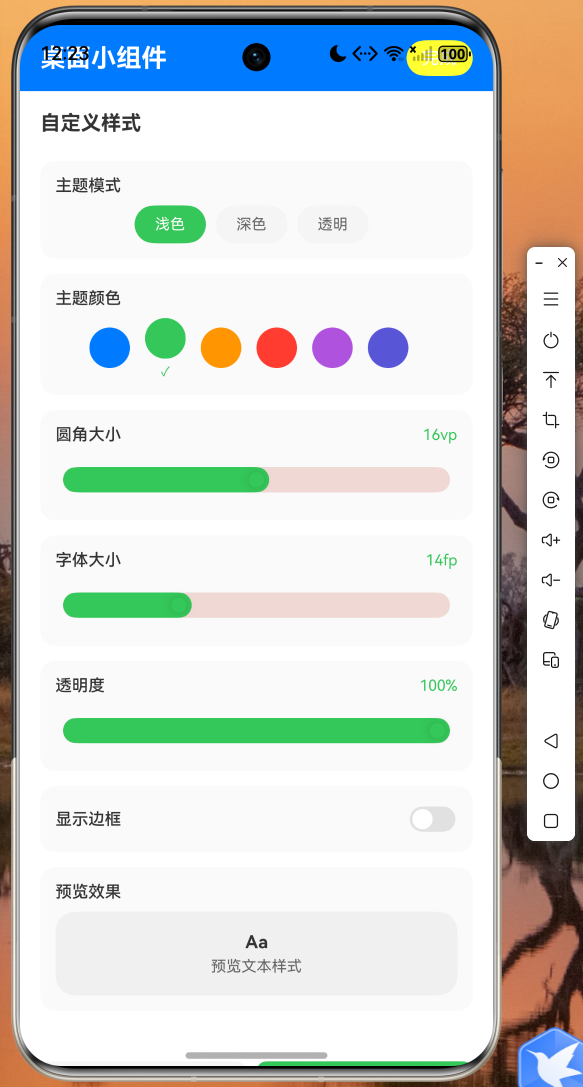
Widget _buildStyleSettings() {
return ListView(
padding: const EdgeInsets.all(16),
children: [
_buildSectionTitle('主题模式'),
const SizedBox(height: 8),
Wrap(
spacing: 8,
children: ['浅色', '深色', '透明'].map((theme) {
final isSelected = (_styleConfig.theme == 'light' &&
theme == '浅色') ||
(_styleConfig.theme == 'dark' && theme == '深色') ||
(_styleConfig.theme == 'transparent' && theme == '透明');
return ChoiceChip(
label: Text(theme),
selected: isSelected,
onSelected: (val) {
String themeValue;
switch (theme) {
case '深色':
themeValue = 'dark';
break;
case '透明':
themeValue = 'transparent';
break;
default:
themeValue = 'light';
}
_onStyleChanged(WidgetStyleConfig(
theme: themeValue,
primaryColor: _styleConfig.primaryColor,
backgroundColor: themeValue == 'dark'
? '#1C1C1E'
: themeValue == 'transparent'
? '#FFFFFF80'
: '#FFFFFF',
textColor: themeValue == 'dark' ? '#FFFFFF' : '#333333',
cornerRadius: _styleConfig.cornerRadius,
fontSize: _styleConfig.fontSize,
opacity: _styleConfig.opacity,
showBorder: _styleConfig.showBorder,
));
},
);
}).toList(),
),
const SizedBox(height: 20),
_buildSectionTitle('主题颜色'),
const SizedBox(height: 8),
Wrap(
spacing: 12,
children: [
'#007AFF',
'#34C759',
'#FF9500',
'#FF3B30',
'#AF52DE',
'#5856D6'
].map((color) {
final isSelected = _styleConfig.primaryColor == color;
return GestureDetector(
onTap: () => _onStyleChanged(WidgetStyleConfig(
theme: _styleConfig.theme,
primaryColor: color,
backgroundColor: _styleConfig.backgroundColor,
textColor: _styleConfig.textColor,
cornerRadius: _styleConfig.cornerRadius,
fontSize: _styleConfig.fontSize,
opacity: _styleConfig.opacity,
showBorder: _styleConfig.showBorder,
)),
child: Container(
width: 36,
height: 36,
decoration: BoxDecoration(
color: Color(int.parse('0xFF${color.substring(1)}')),
shape: BoxShape.circle,
border: isSelected
? Border.all(color: Colors.black26, width: 3)
: null,
),
child: isSelected
? const Icon(Icons.check, color: Colors.white, size: 16)
: null,
),
);
}).toList(),
),
const SizedBox(height: 20),
_buildSectionTitle('圆角大小'),
Slider(
value: _styleConfig.cornerRadius,
min: 0,
max: 32,
divisions: 32,
activeColor: Color(
int.parse('0xFF${_styleConfig.primaryColor.substring(1)}')),
onChanged: (val) => _onStyleChanged(WidgetStyleConfig(
theme: _styleConfig.theme,
primaryColor: _styleConfig.primaryColor,
backgroundColor: _styleConfig.backgroundColor,
textColor: _styleConfig.textColor,
cornerRadius: val,
fontSize: _styleConfig.fontSize,
opacity: _styleConfig.opacity,
showBorder: _styleConfig.showBorder,
)),
),
const SizedBox(height: 20),
_buildSectionTitle('字体大小'),
Slider(
value: _styleConfig.fontSize,
min: 10,
max: 24,
divisions: 14,
activeColor: Color(
int.parse('0xFF${_styleConfig.primaryColor.substring(1)}')),
onChanged: (val) => _onStyleChanged(WidgetStyleConfig(
theme: _styleConfig.theme,
primaryColor: _styleConfig.primaryColor,
backgroundColor: _styleConfig.backgroundColor,
textColor: _styleConfig.textColor,
cornerRadius: _styleConfig.cornerRadius,
fontSize: val,
opacity: _styleConfig.opacity,
showBorder: _styleConfig.showBorder,
)),
),
const SizedBox(height: 20),
_buildSectionTitle('透明度'),
Slider(
value: _styleConfig.opacity,
min: 0.3,
max: 1.0,
divisions: 14,
activeColor: Color(
int.parse('0xFF${_styleConfig.primaryColor.substring(1)}')),
onChanged: (val) => _onStyleChanged(WidgetStyleConfig(
theme: _styleConfig.theme,
primaryColor: _styleConfig.primaryColor,
backgroundColor: _styleConfig.backgroundColor,
textColor: _styleConfig.textColor,
cornerRadius: _styleConfig.cornerRadius,
fontSize: _styleConfig.fontSize,
opacity: val,
showBorder: _styleConfig.showBorder,
)),
),
const SizedBox(height: 20),
SwitchListTile(
title: const Text('显示边框'),
value: _styleConfig.showBorder,
activeColor: Color(
int.parse('0xFF${_styleConfig.primaryColor.substring(1)}')),
onChanged: (val) => _onStyleChanged(WidgetStyleConfig(
theme: _styleConfig.theme,
primaryColor: _styleConfig.primaryColor,
backgroundColor: _styleConfig.backgroundColor,
textColor: _styleConfig.textColor,
cornerRadius: _styleConfig.cornerRadius,
fontSize: _styleConfig.fontSize,
opacity: _styleConfig.opacity,
showBorder: val,
)),
),
],
);
}
Widget _buildSectionTitle(String title) {
return Text(
title,
style: const TextStyle(
fontSize: 14,
fontWeight: FontWeight.w600,
color: Color(0xFF333333),
),
);
}
String _getCurrentTime() {
final now = DateTime.now();
return '${now.hour.toString().padLeft(2, '0')}:${now.minute.toString().padLeft(2, '0')}';
}
String _getCurrentDate() {
final now = DateTime.now();
final weekdays = ['日', '一', '二', '三', '四', '五', '六'];
return '${now.month}月${now.day}日 星期${weekdays[now.weekday % 7]}';
}
}
class _BatteryInfoRow extends StatelessWidget {
final String label;
final String value;
const _BatteryInfoRow({
required this.label,
required this.value,
});
Widget build(BuildContext context) {
return Row(
children: [
SizedBox(
width: 36,
child: Text(
label,
style: const TextStyle(
fontSize: 11,
color: Color(0xFF999999),
),
),
),
Text(
value,
style: const TextStyle(
fontSize: 12,
fontWeight: FontWeight.w500,
color: Color(0xFF333333),
),
),
],
);
}
}
3.4 主入口集成
在应用主入口中集成底部导航,实现压缩工具与小组件管理之间的切换:
// lib/main.dart
import 'package:flutter/material.dart';
import 'pages/widget_home_page.dart';
void main() {
runApp(const MyApp());
}
class MyApp extends StatelessWidget {
const MyApp({super.key});
Widget build(BuildContext context) {
return MaterialApp(
title: 'Flutter for OpenHarmony',
debugShowCheckedModeBanner: false,
theme: ThemeData(
colorSchemeSeed: const Color(0xFF007AFF),
useMaterial3: true,
),
home: const MainPage(),
);
}
}
class MainPage extends StatefulWidget {
const MainPage({super.key});
State<MainPage> createState() => _MainPageState();
}
class _MainPageState extends State<MainPage> {
int _currentIndex = 0;
final List<Widget> _pages = const [
Center(child: Text('压缩工具')),
WidgetHomePage(),
];
Widget build(BuildContext context) {
return Scaffold(
body: _pages[_currentIndex],
bottomNavigationBar: BottomNavigationBar(
currentIndex: _currentIndex,
onTap: (index) => setState(() => _currentIndex = index),
selectedItemColor: const Color(0xFF007AFF),
items: const [
BottomNavigationBarItem(
icon: Icon(Icons.compress),
label: '压缩工具',
),
BottomNavigationBarItem(
icon: Icon(Icons.widgets_outlined),
label: '桌面小组件',
),
],
),
);
}
}
四、OpenHarmony 原生侧实现
Flutter 侧通过 Platform Channel 调用原生能力,原生侧使用 ArkTS 实现 FormExtensionAbility 来处理服务卡片的生命周期。在 EntryAbility 中注册 MethodChannel 处理来自 Flutter 的调用请求,同时配置 form_config.json 定义七种卡片类型及其支持的尺寸规格(2×2、2×4、4×4)。
五、运行截图
以下为应用在鸿蒙设备上的实际运行效果截图:
(此处插入应用运行截图)
图1:时钟天气组件 - 实时显示当前时间、日期和天气信息
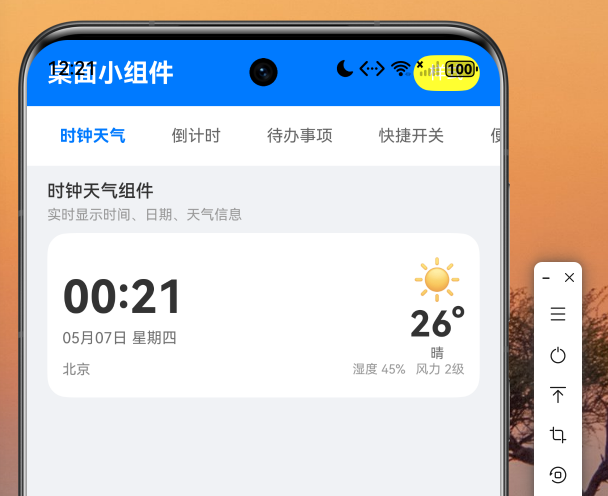
图2:倒计时组件 - 展示新年倒计时的剩余天数、小时和分钟
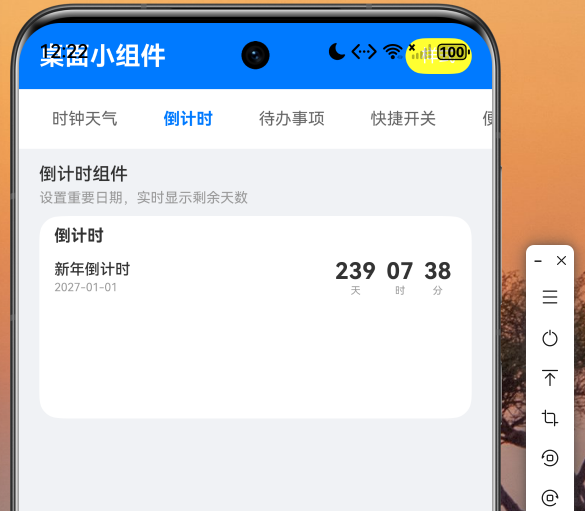
图3:待办事项组件 - 任务列表含进度条和完成状态
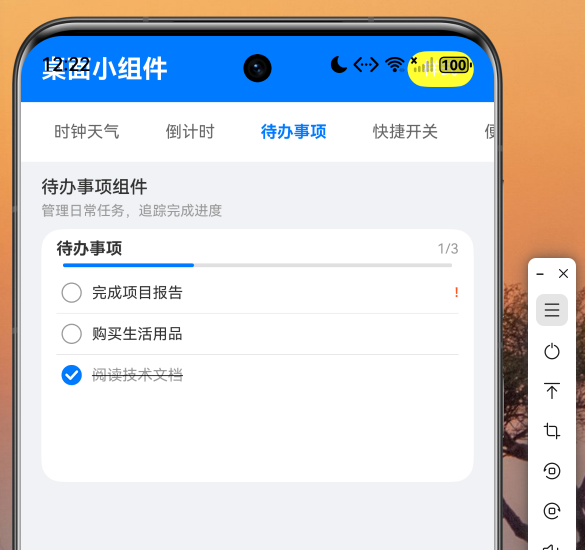
图4:快捷开关组件 - WiFi、蓝牙、手电筒、响铃四合一开关面板
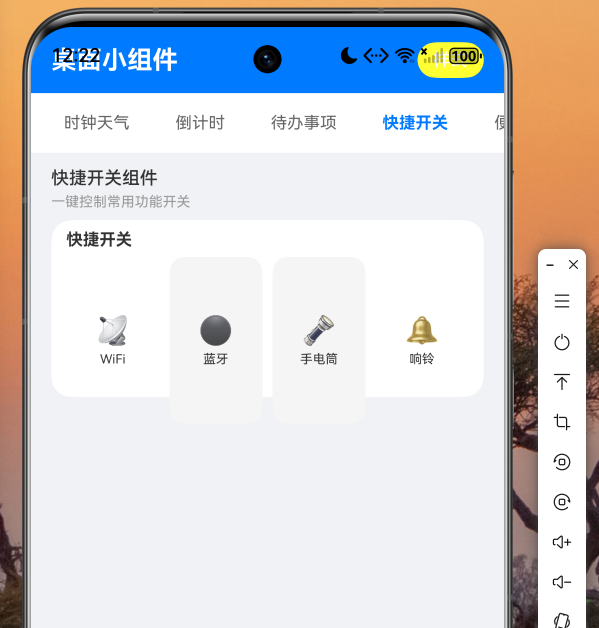
图5:便签组件 - 黄色便签卡片展示会议备忘内容
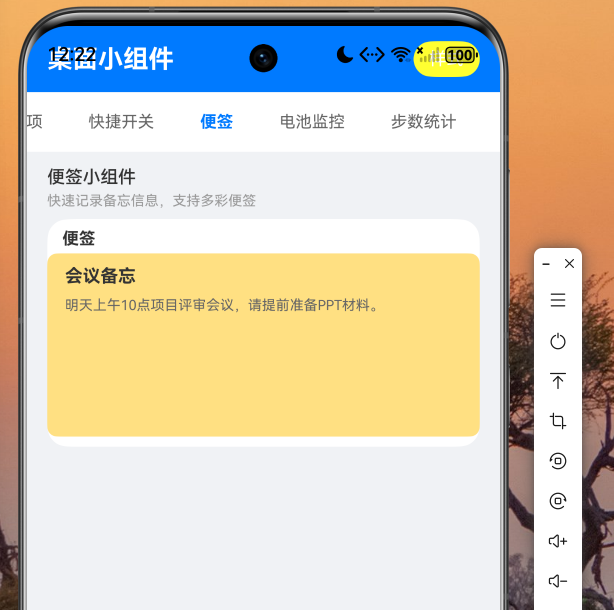
图6:电池监控组件 - 环形电量图及详细电池状态信息
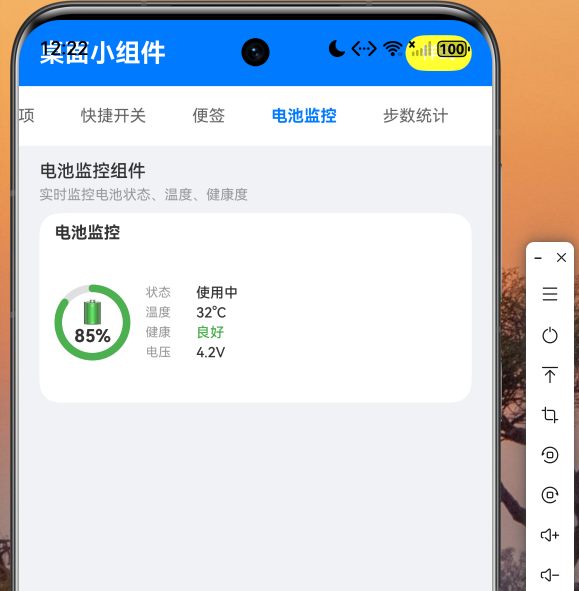
图7:步数统计组件 - 环形步数进度及运动数据统计
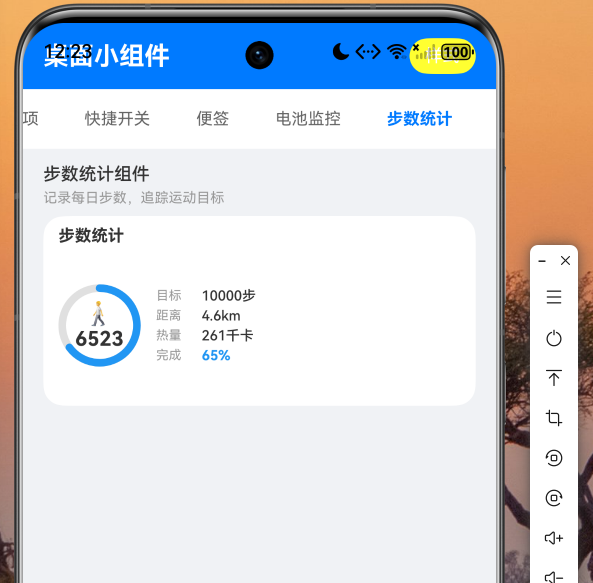
图8:自定义样式设置 - 主题色、圆角、字体、透明度等样式调节
六、总结
本文详细介绍了如何使用 Flutter for OpenHarmony 技术开发桌面小组件应用。通过 Flutter 构建跨平台 UI 界面,结合 OpenHarmony 原生的 FormExtensionAbility 服务卡片能力,实现了时钟天气、倒计时、待办事项、快捷开关、便签、电池监控和步数统计七大桌面组件,并支持灵活的自定义样式配置。
这种"Flutter + 原生能力"的混合开发模式,充分发挥了 Flutter 跨平台 UI 的高效性和 OpenHarmony 系统能力的深度集成优势,是鸿蒙跨平台应用开发的最佳实践之一。读者可以基于本文提供的代码框架,快速扩展更多类型的桌面小组件,打造个性化的鸿蒙桌面体验。
完整项目代码请访问 AtomGit:https://atomgit.com,欢迎 Star 和 PR 交流。

作为“人工智能6S店”的官方数字引擎,为AI开发者与企业提供一个覆盖软硬件全栈、一站式门户。
更多推荐

 2
2 0
0- 0


 已为社区贡献35条内容

所有评论(0)