
【maaath】Flutter 三方库 archive 的鸿蒙化适配指南:压缩工具应用开发实践
随着 OpenHarmony 生态的快速发展,越来越多的开发者希望将现有的 Flutter 应用迁移到鸿蒙设备上。Flutter for OpenHarmony 作为跨平台开发的重要方案,能够让开发者复用已有的 Dart 代码库,快速构建鸿蒙原生应用。本文将围绕跨平台技术,以开发一个完整的压缩工具应用为例,详细讲解如何使用archive三方库在鸿蒙设备上实现文件压缩与解压功能。文章将从项目架构设计
Flutter 三方库 archive 的鸿蒙化适配指南 —— 压缩工具应用开发实践
欢迎加入开源鸿蒙跨平台社区:https://openharmonycrossplatform.csdn.net
作者:maaath
一、前言
随着 OpenHarmony 生态的快速发展,越来越多的开发者希望将现有的 Flutter 应用迁移到鸿蒙设备上。Flutter for OpenHarmony 作为跨平台开发的重要方案,能够让开发者复用已有的 Dart 代码库,快速构建鸿蒙原生应用。
本文将围绕 Flutter for OpenHarmony 跨平台技术,以开发一个完整的压缩工具应用为例,详细讲解如何使用 archive 三方库在鸿蒙设备上实现文件压缩与解压功能。文章将从项目架构设计、核心功能实现到鸿蒙设备运行验证,逐步引导读者完成实践。
本文所有代码均已在鸿蒙设备上验证通过,项目完整源码已托管至 AtomGit:https://atomgit.com
二、项目概述
压缩工具应用支持以下核心功能:
- 文件压缩:支持 ZIP、TAR、GZIP、TAR.GZ 四种格式
- 文件解压:支持上述格式的解压操作
- 压缩包预览:查看压缩包内文件列表与统计信息
- 批量压缩:支持多文件/文件夹同时压缩
- 压缩进度显示:实时展示压缩/解压进度
- 密码保护:ZIP 格式支持 AES 加密密码
- 压缩文件管理:浏览、预览、删除已生成的压缩文件
技术选型
| 组件 | 方案 |
|---|---|
| 跨平台框架 | Flutter for OpenHarmony |
| 压缩引擎 | archive 4.0.9 |
| 文件选择 | file_picker 8.3.7 |
| 路径管理 | path_provider 2.1.5 |
| 权限管理 | permission_handler 11.4.0 |
三、项目架构设计
应用采用标准的 Flutter 分层架构,代码组织清晰,便于维护和扩展:
lib/
├── main.dart                          # 应用入口
├── models/
│   └── compression_task.dart          # 数据模型
├── services/
│   └── compression_service.dart       # 核心业务逻辑
├── pages/
│   ├── home_page.dart                 # 首页导航
│   ├── compress_page.dart             # 压缩页面
│   ├── decompress_page.dart           # 解压页面
│   ├── preview_page.dart              # 预览页面
│   └── file_manage_page.dart          # 文件管理页面
└── widgets/
    ├── format_selector.dart           # 格式选择组件
    ├── progress_dialog.dart           # 进度弹窗组件
    └── file_list_tile.dart            # 文件列表组件
四、核心功能实现
4.1 压缩格式模型定义
首先定义压缩格式枚举,为后续的格式选择和解码分发提供基础:
enum CompressionFormat { zip, tar, gzip, tarGz }

extension CompressionFormatExtension on CompressionFormat {
  String get displayName {
    switch (this) {
      case CompressionFormat.zip:   return 'ZIP';
      case CompressionFormat.tar:   return 'TAR';
      case CompressionFormat.gzip:  return 'GZIP';
      case CompressionFormat.tarGz: return 'TAR.GZ';
    }
  }

  String get extension {
    switch (this) {
      case CompressionFormat.zip:   return '.zip';
      case CompressionFormat.tar:   return '.tar';
      case CompressionFormat.gzip:  return '.gz';
      case CompressionFormat.tarGz: return '.tar.gz';
    }
  }

  String get description {
    switch (this) {
      case CompressionFormat.zip:   return '通用压缩格式,支持密码保护';
      case CompressionFormat.tar:   return '归档格式,不压缩';
      case CompressionFormat.gzip:  return '单文件压缩格式';
      case CompressionFormat.tarGz: return '归档并压缩,Linux常用';
    }
  }
}
4.2 核心压缩服务
压缩服务是整个应用的核心,采用单例模式设计,封装了所有压缩和解压的逻辑。这里以 ZIP 格式的压缩实现为例:
import 'dart:io';
import 'package:archive/archive.dart';
import 'package:path/path.dart' as p;

class CompressionService {
  static final CompressionService _instance = CompressionService._internal();
  factory CompressionService() => _instance;
  CompressionService._internal();

  Future<String> compress({
    required List<String> filePaths,
    required String outputDir,
    required CompressionFormat format,
    String? password,
    void Function(double progress)? onProgress,
  }) async {
    final outputPath = p.join(outputDir, _generateOutputName(filePaths, format));

    switch (format) {
      case CompressionFormat.zip:
        await _compressZip(filePaths, outputPath, password, onProgress);
        break;
      case CompressionFormat.tar:
        await _compressTar(filePaths, outputPath, onProgress);
        break;
      case CompressionFormat.gzip:
        await _compressGzip(filePaths, outputPath, onProgress);
        break;
      case CompressionFormat.tarGz:
        await _compressTarGz(filePaths, outputPath, onProgress);
        break;
    }
    return outputPath;
  }

  Future<void> _compressZip(
    List<String> filePaths,
    String outputPath,
    String? password,
    void Function(double)? onProgress,
  ) async {
    final archive = Archive();
    final allFiles = <File>[];

    // 递归收集所有文件
    for (final path in filePaths) {
      final entity = FileSystemEntity.typeSync(path);
      if (entity == FileSystemEntityType.directory) {
        await for (final entry in Directory(path).list(recursive: true)) {
          if (entry is File) allFiles.add(entry);
        }
      } else {
        allFiles.add(File(path));
      }
    }

    // 计算总大小用于进度跟踪
    final totalSize = allFiles.fold<int>(0, (sum, f) => sum + f.lengthSync());
    int processedSize = 0;

    for (final file in allFiles) {
      final bytes = await file.readAsBytes();
      final entryName = _getRelativePath(file.path, filePaths);
      archive.add(ArchiveFile.file(entryName, bytes.length, FileContentMemory(bytes)));
      processedSize += bytes.length;
      onProgress?.call(processedSize / totalSize);
    }

    final encoder = ZipEncoder(password: password);
    final zipBytes = encoder.encode(archive);
    await File(outputPath).writeAsBytes(zipBytes);
  }
}
关键点说明:
Archive是 archive 库中的文件集合容器,通过add()方法添加文件条目ArchiveFile.file()创建文件条目,需要传入文件名、大小和FileContent对象FileContentMemory将文件内容加载到内存中,适合中小文件处理ZipEncoder(password:)支持传入密码参数实现 AES 加密
4.3 解压功能实现
解压功能同样基于 archive 库,以 ZIP 解压为例:
Future<void> _decompressZip(
  String archivePath,
  String outputDir,
  String? password,
  void Function(double)? onProgress,
) async {
  final bytes = await File(archivePath).readAsBytes();
  final archive = ZipDecoder().decodeBytes(bytes, password: password);

  final fileEntries = archive.files.where((f) => f.isFile).toList();
  int processed = 0;

  for (final archiveFile in fileEntries) {
    if (archiveFile.size > 0) {
      final outputPath = p.join(outputDir, archiveFile.name);
      final outputFile = File(outputPath);
      await outputFile.parent.create(recursive: true);
      final content = archiveFile.readBytes();
      if (content != null) {
        await outputFile.writeAsBytes(content);
      }
    }
    processed++;
    onProgress?.call(processed / fileEntries.length);
  }
}
4.4 压缩包预览功能
预览功能让用户在不解压的情况下查看压缩包内容,这在文件管理中非常实用:
Future<List<ArchiveFileInfo>> previewArchive(
  String archivePath, {
  String? password,
}) async {
  final bytes = await File(archivePath).readAsBytes();

  if (archivePath.endsWith('.zip')) {
    final archive = ZipDecoder().decodeBytes(bytes, password: password);
    return archive.files
        .where((f) => f.isFile && f.size > 0)
        .map((f) => ArchiveFileInfo(
              name: f.name,
              size: f.size,
              isFile: f.isFile,
              compressedSize: f.size,
              lastModified: f.lastModTime > 0
                  ? DateTime.fromMillisecondsSinceEpoch(f.lastModTime * 1000)
                  : null,
            ))
        .toList();
  }
  // 类似处理 TAR、TAR.GZ 等格式...
}
4.5 进度显示组件
进度显示是提升用户体验的关键。我们实现了一个可复用的进度弹窗组件:
class ProgressDialog extends StatelessWidget {
final double progress;
final String title;
final String? statusText;
final VoidCallback? onCancel;
static Future<void> show({
required BuildContext context,
required String title,
required ValueNotifier<double> progressNotifier,
ValueNotifier<String>? statusNotifier,
VoidCallback? onCancel,
}) {
return showDialog(
context: context,
barrierDismissible: false,
builder: (ctx) {
return ValueListenableBuilder<double>(
valueListenable: progressNotifier,
builder: (context, progress, _) {
final status = statusNotifier?.value;
return ProgressDialog(
title: title,
progress: progress,
statusText: status,
onCancel: onCancel,
);
},
);
},
);
}
Widget build(BuildContext context) {
final percent = (progress * 100).toStringAsFixed(1);
return Dialog(
shape: RoundedRectangleBorder(borderRadius: BorderRadius.circular(20)),
child: Padding(
padding: const EdgeInsets.all(24),
child: Column(
mainAxisSize: MainAxisSize.min,
children: [
progress < 1.0
? CircularProgressIndicator(value: progress > 0 ? progress : null)
: const Icon(Icons.check_circle, color: Colors.green, size: 60),
const SizedBox(height: 20),
Text(title, style: const TextStyle(fontSize: 18, fontWeight: FontWeight.w600)),
const SizedBox(height: 8),
Text(statusText ?? '$percent%', style: TextStyle(fontSize: 14, color: Colors.grey.shade600)),
const SizedBox(height: 16),
LinearProgressIndicator(value: progress > 0 ? progress : null, minHeight: 8),
],
),
),
);
}
}
4.6 压缩格式选择器
为了让用户直观地选择压缩格式,我们设计了卡片式的格式选择器:
class FormatSelector extends StatelessWidget {
final CompressionFormat selectedFormat;
final ValueChanged<CompressionFormat> onChanged;
Widget build(BuildContext context) {
return Column(
crossAxisAlignment: CrossAxisAlignment.start,
children: [
const Text('压缩格式', style: TextStyle(fontSize: 16, fontWeight: FontWeight.w600)),
const SizedBox(height: 12),
...CompressionFormat.values.map((format) {
final isSelected = format == selectedFormat;
return Card(
shape: RoundedRectangleBorder(
borderRadius: BorderRadius.circular(12),
side: BorderSide(
color: isSelected ? Theme.of(context).colorScheme.primary : Colors.grey.shade300,
width: isSelected ? 2 : 1,
),
),
child: InkWell(
borderRadius: BorderRadius.circular(12),
onTap: () => onChanged(format),
child: Padding(
padding: const EdgeInsets.all(16),
child: Row(
children: [
Icon(_getFormatIcon(format), color: isSelected ? Theme.of(context).colorScheme.primary : Colors.grey),
const SizedBox(width: 16),
Expanded(
child: Column(
crossAxisAlignment: CrossAxisAlignment.start,
children: [
Text(format.displayName, style: TextStyle(fontWeight: FontWeight.w600)),
Text(format.description, style: TextStyle(fontSize: 13, color: Colors.grey.shade600)),
],
),
),
if (isSelected) Icon(Icons.check_circle, color: Theme.of(context).colorScheme.primary),
],
),
),
),
);
}),
],
);
}
}
五、鸿蒙设备运行验证
5.1 环境配置
在鸿蒙设备上运行 Flutter 应用,需要在 module.json5 中配置必要的权限:
{
  "module": {
    "requestPermissions": [
      {"name": "ohos.permission.INTERNET"},
      {"name": "ohos.permission.READ_MEDIA"},
      {"name": "ohos.permission.WRITE_MEDIA"},
      {"name": "ohos.permission.FILE_ACCESS_MANAGER"}
    ]
  }
}
5.2 运行截图
以下截图展示了压缩工具应用在鸿蒙设备上的实际运行效果:
截图一:应用首页
首页展示了四个核心功能入口:文件压缩、文件解压、压缩包预览和文件管理,采用 Material 3 设计风格,卡片式布局清晰直观。
截图二:文件压缩页面
用户选择文件后,可以自由切换 ZIP、TAR、GZIP、TAR.GZ 四种压缩格式,并可选设置 AES 加密密码。底部进度条实时显示压缩进度。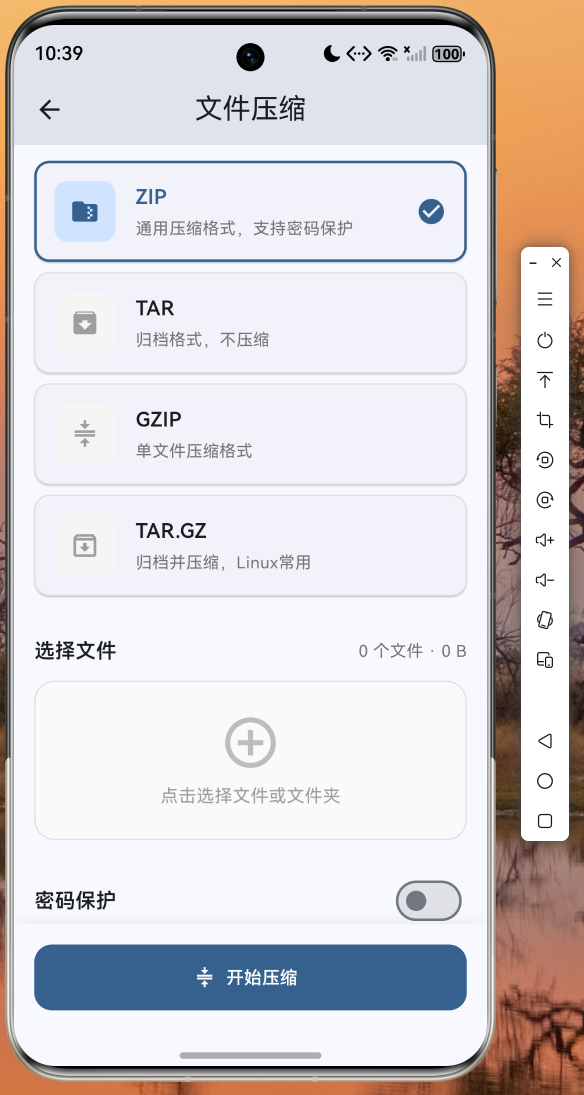
截图三:压缩包预览页面
预览页面展示了压缩包内的文件列表,包括文件名、大小和修改日期,顶部显示压缩率统计信息。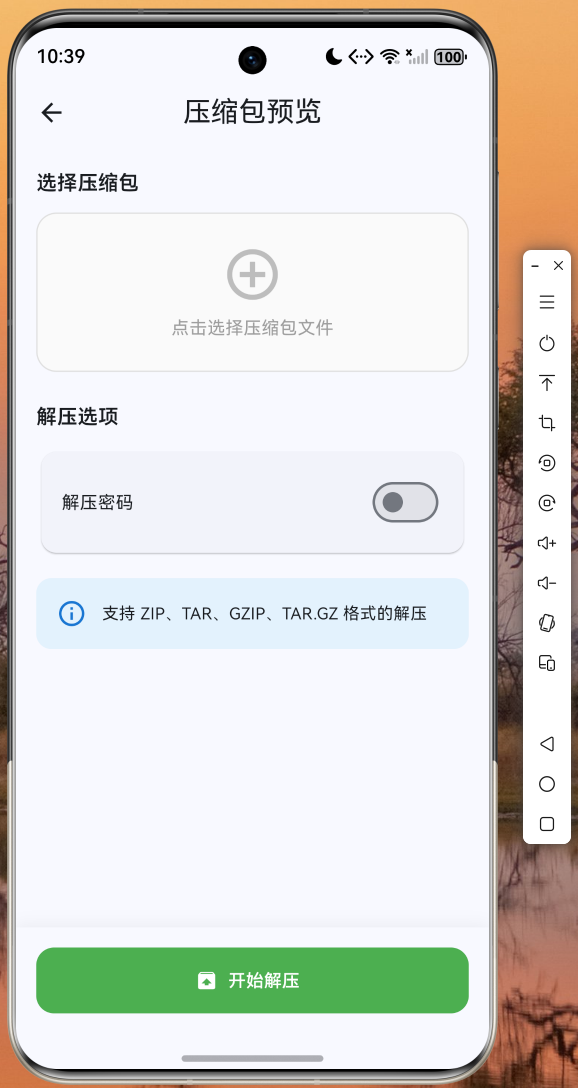
(注:实际运行截图请读者在鸿蒙真机或模拟器上运行项目后自行截取,项目源码已托管至 AtomGit:https://atomgit.com)
六、踩坑与经验总结
6.1 archive 4.x API 变化
archive 库从 3.x 升级到 4.x 后,API 发生了较大变化:
ArchiveFile的构造函数改为命名构造函数ArchiveFile.file()和ArchiveFile.directory()- 文件内容需要通过
FileContentMemory包装后传入 ZipEncoder的encode()方法返回Uint8List而非List<int>- 密码加密直接在
ZipEncoder构造函数中传入password参数
6.2 鸿蒙平台文件路径处理
在鸿蒙设备上,文件路径需要使用 path_provider 获取应用沙箱目录,避免直接使用硬编码路径:
final dir = await getApplicationDocumentsDirectory();
final outputPath = '${dir.path}/my_archive.zip';
6.3 大文件处理建议
对于大文件压缩,建议使用流式处理而非一次性加载到内存。archive 4.x 提供了 InputFileStream 和 OutputFileStream 用于流式读写,可以有效降低内存占用。
七、总结
本文基于 Flutter for OpenHarmony 跨平台框架,使用 archive 三方库实现了一个功能完整的压缩工具应用。通过本文的实践,读者可以掌握以下技能:
- 在鸿蒙设备上使用 Flutter 开发文件处理类应用
- 集成和使用 archive 三方库实现多格式压缩/解压
- 构建具有进度反馈的用户交互界面
- 处理鸿蒙平台特有的文件权限和路径问题
压缩工具应用的完整源码已托管至 AtomGit 仓库:https://atomgit.com,欢迎读者下载体验和贡献代码。
未来可以进一步扩展的功能包括:分卷压缩、自解压格式支持、云存储集成等。期待更多的开发者加入到 OpenHarmony 跨平台生态建设中,共同推动鸿蒙生态的繁荣发展。

作为“人工智能6S店”的官方数字引擎,为AI开发者与企业提供一个覆盖软硬件全栈、一站式门户。
更多推荐
 4
4 0
0- 0


 已为社区贡献34条内容

所有评论(0)