
AtomGit API深度集成实战 - Flutter鸿蒙应用开发
AtomGit是中国本土化代码托管平台,提供类似GitHub的代码仓库管理和协作开发功能。其API体系包含REST API(api.gitcode.com)和AI API(api-ai.gitcode.com)两大核心服务,采用Bearer Token认证方式。平台提供完整的仓库管理接口,包括获取用户仓库列表等操作,示例展示了Dart语言实现的Repository数据模型及分页查询方法。同时集成A
·
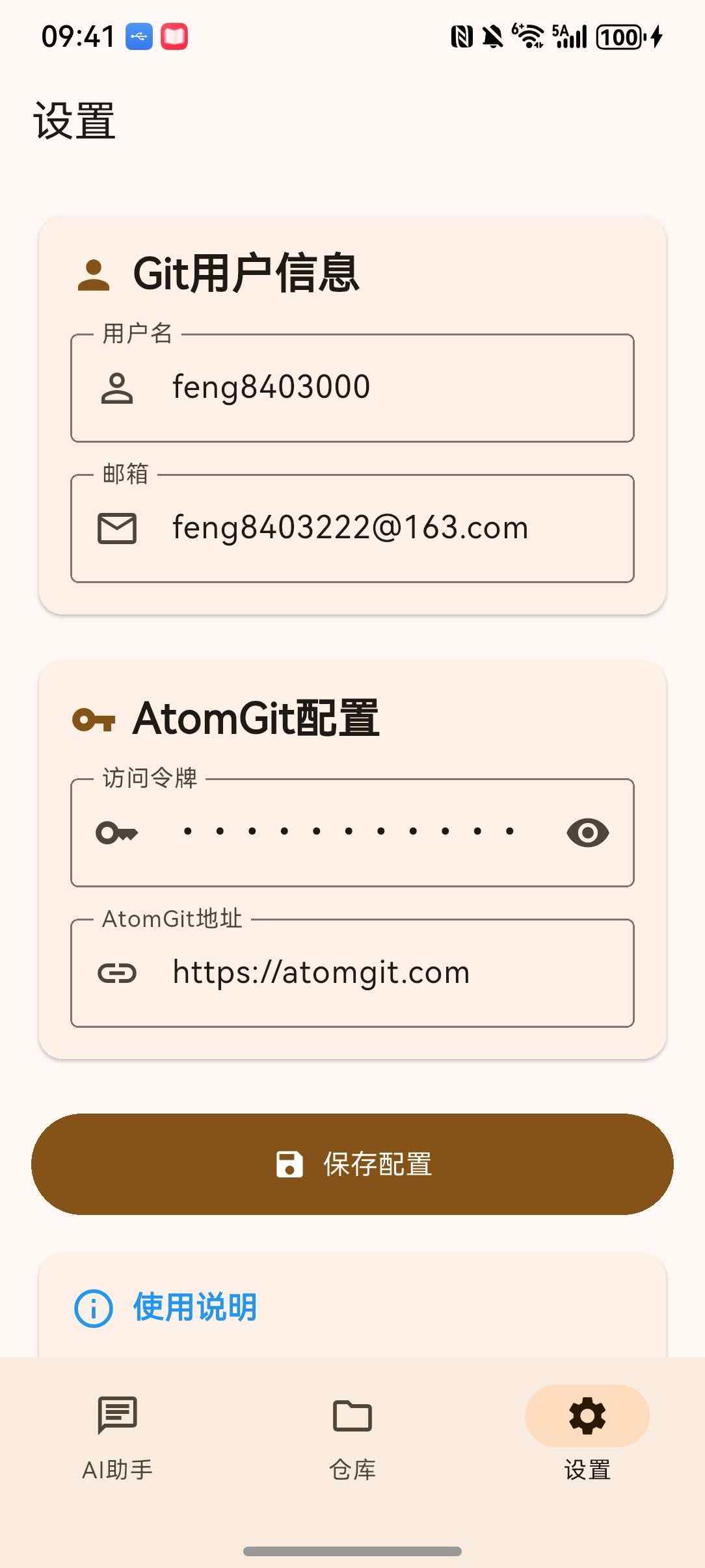
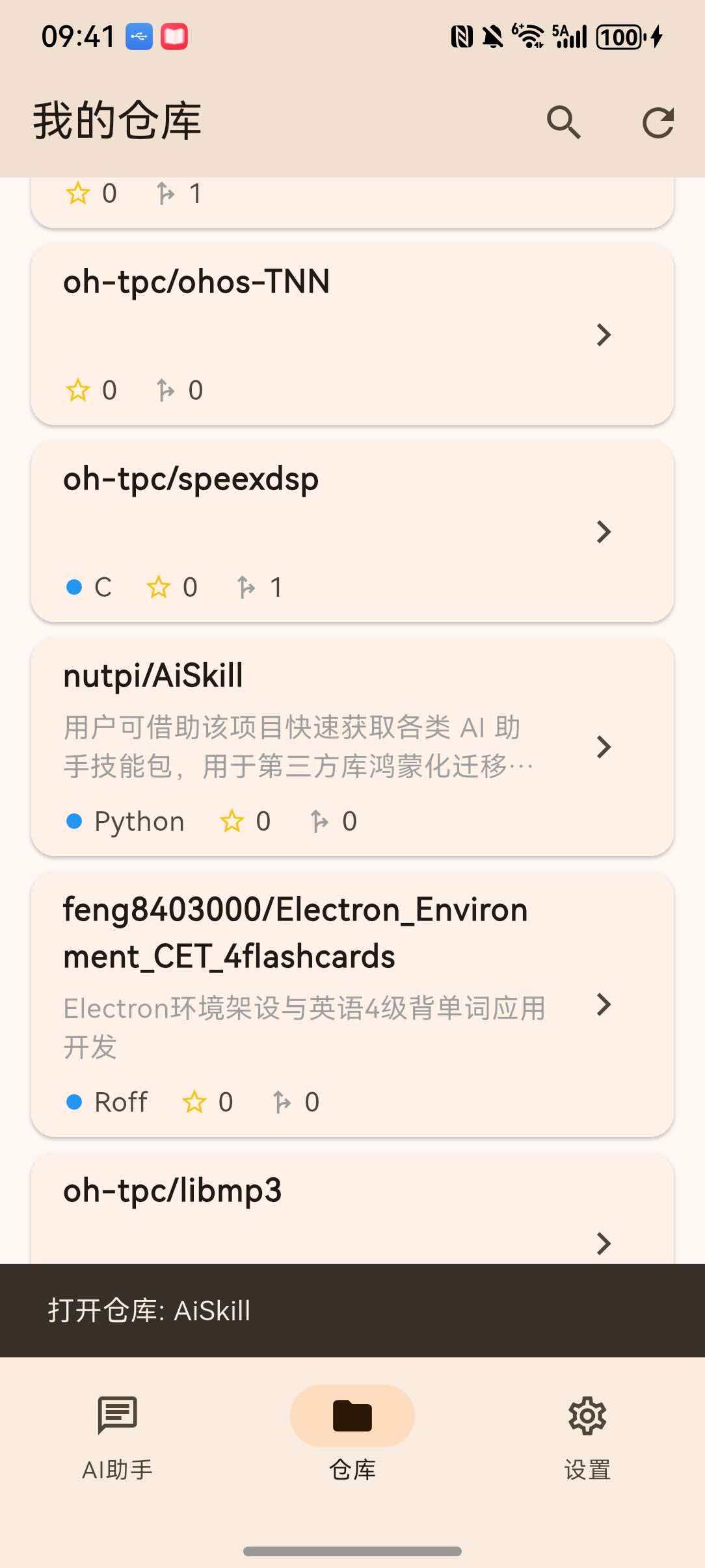
AtomGit(https://atomgit.com)是中国版的GitHub代码托管平台,为开发者提供代码仓库管理、协作开发、CI/CD等功能。AtomGit提供了丰富的API接口,支持第三方应用开发和自动化集成。
1.1 核心API端点
| API类型 | 端点地址 | 用途 |
|---|---|---|
| REST API | https://api.gitcode.com/api/v5 |
仓库管理、用户信息、项目协作 |
| AI API | https://api-ai.gitcode.com/v1/chat/completions |
AI智能问答服务 |
1.2 API认证方式
AtomGit API使用Bearer Token进行身份认证:
headers: {
    'Authorization': 'Bearer $accessToken',
    'Accept': 'application/json',
}
二、仓库管理API实战
2.1 获取用户仓库列表
获取当前用户的所有仓库列表:
class AtomGitApi {
    static const String _apiBaseUrl = "https://api.gitcode.com/api/v5";

    static Future<List<Repository>> getRepositories({
        required String accessToken,
        int page = 1,
        int perPage = 20,
    }) async {
        final response = await http.get(
        Uri.parse('$_apiBaseUrl/user/repos?page=$page&per_page=$perPage'),
        headers: {
            'Authorization': 'Bearer $accessToken',
            'Accept': 'application/json',
        },
        );

        if (response.statusCode == 200) {
            final List<dynamic> data = jsonDecode(response.body);
            return data.map((json) => Repository.fromJson(json)).toList();
        } else {
            throw Exception('获取仓库列表失败: ${response.statusCode}');
        }
    }
}
2.2 仓库数据模型
class Repository {
    final int id;
    final String name;
    final String fullName;
    final String? description;
    final String htmlUrl;
    final String defaultBranch;
    final int stargazersCount;
    final int forksCount;
    final int openIssuesCount;
    final String visibility;
    final DateTime? createdAt;
    final DateTime? updatedAt;

    Repository({
        required this.id,
        required this.name,
        required this.fullName,
        this.description,
        required this.htmlUrl,
        required this.defaultBranch,
        this.stargazersCount = 0,
        this.forksCount = 0,
        this.openIssuesCount = 0,
        this.visibility = 'public',
        this.createdAt,
        this.updatedAt,
    });

    factory Repository.fromJson(Map<String, dynamic> map) {
        return Repository(
        id: map['id'] as int? ?? 0,
        name: map['name'] as String? ?? '',
        fullName: map['full_name'] as String? ?? '',
        description: map['description'] as String?,
        htmlUrl: map['html_url'] as String? ?? '',
        defaultBranch: map['default_branch'] as String? ?? 'master',
        stargazersCount: map['stargazers_count'] as int? ?? 0,
        forksCount: map['forks_count'] as int? ?? 0,
        openIssuesCount: map['open_issues_count'] as int? ?? 0,
        visibility: map['visibility'] as String? ?? 'public',
        createdAt: map['created_at'] != null
            ? DateTime.tryParse(map['created_at'] as String)
            : null,
        updatedAt: map['updated_at'] != null
            ? DateTime.tryParse(map['updated_at'] as String)
            : null,
        );
    }

    Map<String, dynamic> toJson() {
        return {
        'id': id,
        'name': name,
        'full_name': fullName,
        'description': description,
        'html_url': htmlUrl,
        'default_branch': defaultBranch,
        'stargazers_count': stargazersCount,
        'forks_count': forksCount,
        'open_issues_count': openIssuesCount,
        'visibility': visibility,
        'created_at': createdAt?.toIso8601String(),
        'updated_at': updatedAt?.toIso8601String(),
        };
    }
}
API响应示例:
{
    "id": 123456,
    "name": "flutter_harmonyos_study",
    "full_name": "feng8403000/flutter_harmonyos_study",
    "description": "Flutter鸿蒙应用开发学习项目",
    "html_url": "https://atomgit.com/feng8403000/flutter_harmonyos_study",
    "default_branch": "master",
    "stargazers_count": 10,
    "forks_count": 5,
    "open_issues_count": 2,
    "visibility": "public",
    "created_at": "2024-01-15T08:30:00Z",
    "updated_at": "2024-06-01T12:00:00Z"
}
三、AI问答API集成
3.1 API调用实现
AtomGit平台提供了AI智能问答功能,通过 api-ai.gitcode.com 端点访问:
static Future<String> sendChatMessage({
    required String message,
    required String accessToken,
}) async {
    try {
        final response = await http.post(
        Uri.parse('https://api-ai.gitcode.com/v1/chat/completions'),
        headers: {
            'Content-Type': 'application/json; charset=utf-8',
            'Accept': 'application/json; charset=utf-8',
            'Authorization': 'Bearer $accessToken',
        },
        body: jsonEncode({
            'model': 'deepseek-ai/DeepSeek-V3',
            'messages': [
            {
                'role': 'user',
                'content': message
            }
            ],
            'stream': true,
            'max_tokens': '2048',
            'temperature': '0.6',
            'top_p': '0.95',
            'top_k': '50',
            'frequency_penalty': '0',
            'thinking_budget': '2048',
        }),
        );

        if (response.statusCode == 200) {
            final String responseBody = utf8.decode(response.bodyBytes);
            final List<String> lines = responseBody.split('\n');

            String content = '';
            for (String line in lines) {
                line = line.trim();
                if (!line.startsWith('data:')) {
                continue;
                }

                if (line == 'data:[DONE]') {
                break;
                }

                final String jsonStr = line.substring(5).trim();
                if (jsonStr.isEmpty) {
                continue;
                }

                try {
                final data = jsonDecode(jsonStr);
                if (data != null &&
                    data.containsKey('choices') &&
                    data['choices'] != null &&
                    data['choices'].isNotEmpty &&
                    data['choices'][0] != null &&
                    data['choices'][0].containsKey('delta') &&
                    data['choices'][0]['delta'] != null &&
                    data['choices'][0]['delta'].containsKey('content')) {

                    final String? deltaContent = data['choices'][0]['delta']['content']?.toString();
                    if (deltaContent != null && deltaContent.isNotEmpty) {
                    content += deltaContent;
                    }
                }
                } catch (e) {
                continue;
                }
            }

            return content.isNotEmpty ? content : 'API返回内容为空';
        } else {
            final String responseBody = utf8.decode(response.bodyBytes);
            return 'API请求失败: ${response.statusCode}\n${responseBody}';
        }
    } catch (e) {
        return '抱歉,处理您的问题时出错了: $e';
    }
}
3.2 流式响应处理
AI API采用Server-Sent Events(SSE)技术实现流式响应:
data: {"id":"chatcmpl-xxx","object":"chat.completion.chunk","created":1234567890,"model":"deepseek-ai/DeepSeek-V3","choices":[{"index":0,"delta":{"content":"你好"},"finish_reason":null}]}

data: {"id":"chatcmpl-xxx","object":"chat.completion.chunk","created":1234567890,"model":"deepseek-ai/DeepSeek-V3","choices":[{"index":0,"delta":{"content":","},"finish_reason":null}]}

data: [DONE]
解析流程:
┌──────────────────────────────────────────────────────────────┐
│                     流式响应解析流程                          │
├──────────────────────────────────────────────────────────────┤
│  1. HTTP响应体(String)                                     │
│     ↓ utf8.decode(response.bodyBytes)                       │
│  2. 按行分割(split('\n'))                                  │
│     ↓                                                       │
│  3. 过滤data:前缀(line.startsWith('data:'))               │
│     ↓                                                       │
│  4. 解析JSON(jsonDecode)                                  │
│     ↓                                                       │
│  5. 提取delta.content(choices[0].delta.content)           │
│     ↓                                                       │
│  6. 拼接内容字符串                                           │
└──────────────────────────────────────────────────────────────┘
3.3 请求参数说明
| 参数名 | 类型 | 默认值 | 说明 |
|---|---|---|---|
model |
String | deepseek-ai/DeepSeek-V3 | 模型名称 |
messages |
Array | - | 对话消息列表 |
stream |
Boolean | true | 是否启用流式响应 |
max_tokens |
Integer | 2048 | 最大生成token数 |
temperature |
Float | 0.6 | 采样温度,控制随机性 |
top_p |
Float | 0.95 | 核采样概率 |
top_k |
Integer | 50 | Top-K采样参数 |
frequency_penalty |
Float | 0 | 频率惩罚系数 |
thinking_budget |
Integer | 2048 | 思考预算token数 |
四、Git配置管理
4.1 配置数据模型
class GitConfig {
    final int id;
    final String userName;
    final String userEmail;
    final String accessToken;
    final String atomgitUrl;
    final bool isActive;

    GitConfig({
        required this.id,
        required this.userName,
        required this.userEmail,
        required this.accessToken,
        this.atomgitUrl = 'https://atomgit.com',
        this.isActive = false,
    });

    factory GitConfig.fromJson(Map<String, dynamic> map) {
        return GitConfig(
        id: map['id'] as int? ?? 0,
        userName: map['userName'] as String? ?? '',
        userEmail: map['userEmail'] as String? ?? '',
        accessToken: map['accessToken'] as String? ?? '',
        atomgitUrl: map['atomgitUrl'] as String? ?? 'https://atomgit.com',
        isActive: map['isActive'] as bool? ?? false,
        );
    }

    Map<String, dynamic> toJson() {
        return {
        'id': id,
        'userName': userName,
        'userEmail': userEmail,
        'accessToken': accessToken,
        'atomgitUrl': atomgitUrl,
        'isActive': isActive,
        };
    }
}
4.2 配置管理器实现
class GitConfigManager {
    static SharedPreferences? _prefs;
    static const String _currentConfigKey = 'atomgit_current_config';
    static const String _accountsKey = 'atomgit_accounts';

    static Future<void> init() async {
        _prefs = await SharedPreferences.getInstance();
        await _initializeDefaultConfig();
    }

    static Future<void> _initializeDefaultConfig() async {
        if (_prefs == null) return;

        final currentConfig = _prefs!.getString(_currentConfigKey);
        if (currentConfig == null || currentConfig.isEmpty) {
        final defaultConfig = GitConfig(
            id: 1,
            userName: 'feng8403000',
            userEmail: 'feng8403222@163.com',
            accessToken: 'whayqJpN8tuywPDEuxDCH_bs',
            atomgitUrl: 'https://atomgit.com',
            isActive: true,
        );
        await saveConfig(defaultConfig);
        }
    }

    static Future<GitConfig> getConfig() async {
        if (_prefs == null) await init();

        final jsonString = _prefs!.getString(_currentConfigKey);
        if (jsonString != null) {
        return GitConfig.fromJson(jsonDecode(jsonString));
        }

        return GitConfig(
        id: 1,
        userName: '',
        userEmail: '',
        accessToken: '',
        atomgitUrl: 'https://atomgit.com',
        isActive: true,
        );
    }

    static Future<void> saveConfig(GitConfig config) async {
        if (_prefs == null) await init();
        await _prefs!.setString(_currentConfigKey, jsonEncode(config.toJson()));

        final accounts = await getAllAccounts();
        final existingIndex = accounts.indexWhere((acc) => acc.id == config.id);

        if (existingIndex >= 0) {
        accounts[existingIndex] = config;
        } else {
        accounts.add(config);
        }

        await _prefs!.setString(_accountsKey, jsonEncode(accounts.map((a) => a.toJson()).toList()));
    }

    static Future<List<GitConfig>> getAllAccounts() async {
        if (_prefs == null) await init();

        final jsonString = _prefs!.getString(_accountsKey);
        if (jsonString != null) {
        final List<dynamic> list = jsonDecode(jsonString);
        return list.map((json) => GitConfig.fromJson(json)).toList();
        }

        return [];
    }

    static Future<void> switchAccount(int accountId) async {
        final accounts = await getAllAccounts();
        final account = accounts.firstWhere((acc) => acc.id == accountId);
        await saveConfig(account);
    }
}
五、应用架构设计
5.1 整体架构图
┌─────────────────────────────────────────────────────────────────┐
│                    AtomGit AI助手应用架构                        │
├─────────────────────────────────────────────────────────────────┤
│                                                                  │
│  ┌─────────────────────────────────────────────────────────┐   │
│  │                      表现层                              │   │
│  │  ┌─────────────┐  ┌─────────────┐  ┌─────────────┐    │   │
│  │  │  AI助手页面  │  │  仓库列表页  │  │   设置页面   │    │   │
│  │  │ChatHomePage │  │RepoListPage │  │SettingsPage │    │   │
│  │  └─────────────┘  └─────────────┘  └─────────────┘    │   │
│  └─────────────────────────────────────────────────────────┘   │
│                              │                                 │
│  ┌─────────────────────────────────────────────────────────┐   │
│  │                      业务逻辑层                           │   │
│  │  ┌────────────────┐  ┌────────────────────────────┐     │   │
│  │  │  AtomGitApi    │  │     GitConfigManager       │     │   │
│  │  │  仓库、AI API   │  │     配置管理、多账号切换     │     │   │
│  │  └────────────────┘  └────────────────────────────┘     │   │
│  └─────────────────────────────────────────────────────────┘   │
│                              │                                 │
│  ┌─────────────────────────────────────────────────────────┐   │
│  │                      数据层                               │   │
│  │  ┌─────────────────────────────────────────────────┐     │   │
│  │  │              SharedPreferences                   │     │   │
│  │  │           (鸿蒙适配版-持久化存储)                  │     │   │
│  │  └─────────────────────────────────────────────────┘     │   │
│  └─────────────────────────────────────────────────────────┘   │
│                                                                  │
└─────────────────────────────────────────────────────────────────┘
5.2 API调用时序图
┌──────────┐    ┌──────────┐    ┌──────────┐    ┌──────────┐
│   UI层   │    │  Api层   │    │ Storage层 │    │ AtomGit  │
└────┬─────┘    └────┬─────┘    └────┬─────┘    └────┬─────┘
     │               │               │               │
     │ 1.用户提问     │               │               │
     │───────────────>│               │               │
     │               │ 2.获取配置     │               │
     │───────────────>│───────────────>│               │
     │               │ 3.返回配置     │               │
     │<──────────────│<───────────────│               │
     │               │ 4.发送请求     │               │
     │               │───────────────────────────────>│
     │               │ 5.流式响应     │               │
     │               │<───────────────────────────────│
     │               │ 6.解析响应     │               │
     │ 7.显示结果     │               │               │
     │<──────────────│               │               │
     │               │               │               │
六、错误处理与调试
6.1 常见错误码
| HTTP状态码 | 错误类型 | 处理方式 |
|---|---|---|
| 200 | 成功 | 正常解析响应 |
| 400 | 参数错误 | 检查请求参数格式 |
| 401 | 未授权 | 检查accessToken是否有效 |
| 403 | 禁止访问 | 检查令牌权限 |
| 404 | 资源不存在 | 检查仓库名称 |
| 429 | 请求过于频繁 | 添加延迟重试 |
| 500 | 服务器错误 | 稍后重试 |
6.2 调试技巧
Future<String> sendChatMessageDebug({
    required String message,
    required String accessToken,
}) async {
    try {
        print('=== API请求开始 ===');
        print('URL: https://api-ai.gitcode.com/v1/chat/completions');
        print('Token: ${accessToken.substring(0, 10)}...');
        print('Message: $message');

        final response = await http.post(...);

        print('=== 响应状态 ===');
        print('StatusCode: ${response.statusCode}');
        print('Headers: ${response.headers}');
        print('Body Length: ${response.bodyBytes.length}');

        // 打印前200字节
        final preview = utf8.decode(response.bodyBytes.take(200).toList());
        print('Body Preview: $preview');

        // ... 后续处理

    } catch (e) {
        print('=== 异常捕获 ===');
        print('Error: $e');
        print('StackTrace: ${StackTrace.current}');
        rethrow;
    }
}
七、完整项目结构
lib/
├── main.dart                 # 应用入口
├── models/
│   ├── repository.dart       # 仓库数据模型
│   └── git_config.dart       # Git配置模型
├── services/
│   ├── atomgit_api.dart      # API服务
│   └── config_manager.dart   # 配置管理
└── pages/
    ├── chat_home_page.dart   # AI助手页面
    ├── repo_list_page.dart   # 仓库列表页面
    └── settings_page.dart    # 设置页面
八、总结与展望
8.1 技术亮点
- 双API集成:同时支持AtomGit REST API和AI API
- 流式响应:实现实时AI问答体验
- 多账号管理:支持配置切换不同Git账号
- 鸿蒙适配:使用SharedPreferences替代SQLite
8.2 未来扩展方向
| 功能 | 说明 | 优先级 |
|---|---|---|
| 仓库详情页 | 查看文件列表、提交历史 | 高 |
| Issue管理 | 创建、查看、管理Issue | 中 |
| PR协作 | 发起和审核Pull Request | 中 |
| 代码搜索 | 搜索仓库代码内容 | 低 |

作为“人工智能6S店”的官方数字引擎,为AI开发者与企业提供一个覆盖软硬件全栈、一站式门户。
更多推荐
 3
3 0
0- 0


 已为社区贡献48条内容

所有评论(0)