
AtomGit AI助手 - Flutter鸿蒙AI应用开发实战
摘要 AtomGit AI助手是一款基于Flutter开发的鸿蒙移动应用,集成DeepSeek-V3大模型提供Git技术问答服务。核心功能包括:1)AI智能问答模块,通过HTTP流式响应实时处理API返回数据;2)仓库管理模块支持查看和搜索AtomGit仓库;3)账号管理系统实现多账号切换。技术架构采用分层设计,包含UI层、业务逻辑层和数据持久层,关键实现包括流式JSON解析、UTF-8编码处理和
·
一、项目背景与技术选型
1.1 项目概述
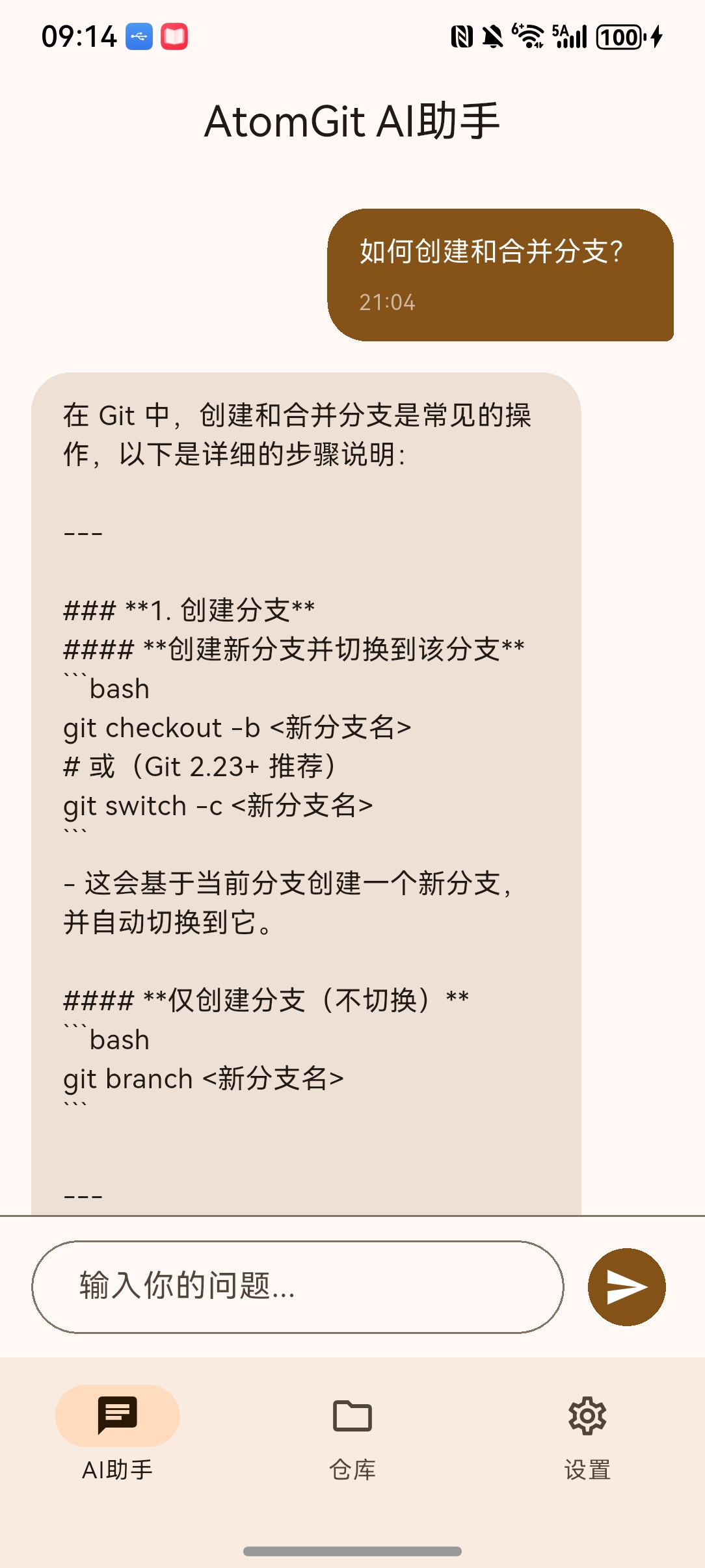
AtomGit AI助手是一款基于Flutter框架开发的鸿蒙移动端AI应用,专为AtomGit代码托管平台用户打造。该应用集成了AI智能问答功能,能够帮助开发者快速获取Git和AtomGit相关的技术支持。
1.2 核心功能模块
| 功能模块 | 功能描述 | 技术实现 |
|---|---|---|
| AI智能问答 | 基于DeepSeek-V3大模型,提供Git技术支持 | HTTP流式响应解析 |
| 仓库管理 | 查看AtomGit仓库列表,支持搜索筛选 | RESTful API调用 |
| 账号管理 | 多账号切换,配置管理 | SharedPreferences持久化 |
| 快捷提问 | 预设6个常用Git问题,一键提问 | 静态数据列表 |
1.3 技术架构
┌─────────────────────────────────────────────────────────────┐
│                    AtomGit AI助手                          │
├─────────────────────────────────────────────────────────────┤
│  ┌─────────────────┐  ┌─────────────────┐  ┌─────────────┐ │
│  │    AI助手页面    │  │    仓库列表页    │  │   设置页面   │ │
│  │  ChatHomePage   │  │  RepoListPage   │  │ SettingsPage│ │
│  └────────┬────────┘  └────────┬────────┘  └──────┬──────┘ │
│           │                    │                   │        │
├───────────┼────────────────────┼───────────────────┼────────┤
│           ▼                    ▼                   ▼        │
│  ┌────────────────────────────────────────────────────────┐ │
│  │                    业务逻辑层                           │ │
│  │  AtomGitApi  |  GitConfigManager  |  AppState        │ │
│  └────────────────────────────────────────────────────────┘ │
│           │                    │                          │
├───────────┼────────────────────┼──────────────────────────┤
│           ▼                    ▼                          │
│  ┌─────────────────┐  ┌─────────────────┐                 │
│  │  HTTP Client    │  │ SharedPreferences│                 │
│  │   (http包)      │  │  (鸿蒙适配版)    │                 │
│  └─────────────────┘  └─────────────────┘                 │
└─────────────────────────────────────────────────────────────┘
二、核心代码详解
2.1 AI问答核心实现
AI问答功能是应用的核心模块,负责与GitCode AI API进行通信。以下是关键实现代码:
static Future<String> sendChatMessage({
    required String message,
    required String accessToken,
}) async {
    try {
        final response = await http.post(
        Uri.parse('https://api-ai.gitcode.com/v1/chat/completions'),
        headers: {
            'Content-Type': 'application/json; charset=utf-8',
            'Accept': 'application/json; charset=utf-8',
            'Authorization': 'Bearer HsX7vrpMksqdJsYm-iv1sa47',
        },
        body: jsonEncode({
            'model': 'deepseek-ai/DeepSeek-V3',
            'messages': [
            {
                'role': 'user',
                'content': message
            }
            ],
            'stream': true,
            'max_tokens': '2048',
            'temperature': '0.6',
            'top_p': '0.95',
            'top_k': '50',
            'frequency_penalty': '0',
            'thinking_budget': '2048',
        }),
        );

        if (response.statusCode == 200) {
        final String responseBody = utf8.decode(response.bodyBytes);
        final List<String> lines = responseBody.split('\n');

        String content = '';
        for (String line in lines) {
            line = line.trim();
            if (!line.startsWith('data:')) {
            continue;
            }

            if (line == 'data:[DONE]') {
            break;
            }

            final String jsonStr = line.substring(5).trim();
            if (jsonStr.isEmpty) {
            continue;
            }

            try {
            final data = jsonDecode(jsonStr);
            if (data != null &&
                data.containsKey('choices') &&
                data['choices'] != null &&
                data['choices'].isNotEmpty &&
                data['choices'][0] != null &&
                data['choices'][0].containsKey('delta') &&
                data['choices'][0]['delta'] != null &&
                data['choices'][0]['delta'].containsKey('content')) {

                final String? deltaContent = data['choices'][0]['delta']['content']?.toString();
                if (deltaContent != null && deltaContent.isNotEmpty) {
                content += deltaContent;
                }
            }
            } catch (e) {
            continue;
            }
        }

        return content.isNotEmpty ? content : 'API返回内容为空';
        } else {
        final String responseBody = utf8.decode(response.bodyBytes);
        return 'API请求失败: ${response.statusCode}\n${responseBody}';
        }
    } catch (e) {
        return '抱歉,处理您的问题时出错了: $e';
    }
}
技术要点解析:
- API端点配置:使用GitCode官方AI接口
https://api-ai.gitcode.com/v1/chat/completions - 模型选择:采用DeepSeek-V3大模型,支持中文对话和技术问答
- 流式响应处理:设置
stream: true实现实时响应,逐块解析data:前缀的JSON数据 - 字符编码处理:使用
utf8.decode(response.bodyBytes)确保中文正确解码 - 容错机制:多层空值检查,防止解析异常导致应用崩溃
2.2 配置管理模块
配置管理模块负责存储和管理用户的AtomGit账号信息:
class GitConfigManager {
static SharedPreferences? _prefs;
static const String _currentConfigKey = 'atomgit_current_config';
static const String _accountsKey = 'atomgit_accounts';

static Future<void> init() async {
    _prefs = await SharedPreferences.getInstance();
    await _initializeDefaultConfig();
}

static Future<void> _initializeDefaultConfig() async {
    if (_prefs == null) return;

    final currentConfig = _prefs!.getString(_currentConfigKey);
    if (currentConfig == null || currentConfig.isEmpty) {
    final defaultConfig = GitConfig(
        id: 1,
        userName: 'feng8403000',
        userEmail: 'feng8403222@163.com',
        accessToken: 'whayqJpN8tuywPDEuxDCH_bs',
        atomgitUrl: 'https://atomgit.com',
        isActive: true,
    );
    await saveConfig(defaultConfig);
    }
}

static Future<GitConfig> getConfig() async {
    if (_prefs == null) await init();

    final jsonString = _prefs!.getString(_currentConfigKey);
    if (jsonString != null) {
    return GitConfig.fromJson(jsonDecode(jsonString));
    }

    return GitConfig(
    id: 1,
    userName: '',
    userEmail: '',
    accessToken: '',
    atomgitUrl: 'https://atomgit.com',
    isActive: true,
    );
}

static Future<void> saveConfig(GitConfig config) async {
    if (_prefs == null) await init();
    await _prefs!.setString(_currentConfigKey, jsonEncode(config.toJson()));

    final accounts = await getAllAccounts();
    final existingIndex = accounts.indexWhere((acc) => acc.id == config.id);

    if (existingIndex >= 0) {
    accounts[existingIndex] = config;
    } else {
    accounts.add(config);
    }

    await _prefs!.setString(_accountsKey, jsonEncode(accounts.map((a) => a.toJson()).toList()));
}
}
技术要点解析:
- 单例模式:通过静态成员变量
_prefs确保SharedPreferences实例唯一 - 默认配置:首次启动自动初始化预设的用户配置
- 多账号管理:支持多个Git账号的切换和管理
- JSON序列化:通过
toJson()和fromJson()实现对象与JSON的转换
2.3 仓库列表API调用
仓库列表功能通过AtomGit API获取用户仓库信息:
class AtomGitApi {
static const String _apiBaseUrl = "https://api.gitcode.com/api/v5";

static Future<List<Repository>> getRepositories({
    required String accessToken,
    int page = 1,
    int perPage = 20,
}) async {
    final response = await http.get(
    Uri.parse('$_apiBaseUrl/user/repos?page=$page&per_page=$perPage'),
    headers: {
        'Authorization': 'Bearer $accessToken',
        'Accept': 'application/json',
    },
    );

    if (response.statusCode == 200) {
    final List<dynamic> data = jsonDecode(response.body);
    return data.map((json) => Repository.fromJson(json)).toList();
    } else {
    throw Exception('获取仓库列表失败: ${response.statusCode}');
    }
}
}
技术要点解析:
- API版本:使用AtomGit v5版本API
- 分页支持:支持分页参数,默认每页20条
- Bearer认证:使用用户的access token进行身份验证
2.4 聊天消息UI组件
聊天消息组件实现了消息气泡的展示:
class ChatMessageWidget extends StatelessWidget {
final ChatMessage message;
const ChatMessageWidget({super.key, required this.message});
Widget build(BuildContext context) {
return Container(
margin: const EdgeInsets.symmetric(vertical: 8, horizontal: 16),
child: Row(
mainAxisAlignment: message.isUser
? MainAxisAlignment.end
: MainAxisAlignment.start,
children: [
Flexible(
child: Container(
padding: const EdgeInsets.all(12),
decoration: BoxDecoration(
color: message.isUser
? Theme.of(context).primaryColor
: Colors.grey[100],
borderRadius: BorderRadius.circular(16),
),
child: Text(
message.content,
style: TextStyle(
color: message.isUser ? Colors.white : Colors.black,
fontSize: 14,
),
),
),
),
],
),
);
}
}
技术要点解析:
- 消息对齐:用户消息右对齐,AI回复左对齐
- 气泡样式:使用不同颜色区分用户和AI消息
- 圆角设计:采用16px圆角,符合Material Design风格
三、鸿蒙平台适配
3.1 依赖配置
项目使用鸿蒙适配版的SharedPreferences:
dependencies:
flutter:
    sdk: flutter
http: ^1.2.1
shared_preferences:
    git:
    url: "https://gitcode.com/openharmony-sig/flutter_packages.git"
    path: "packages/shared_preferences/shared_preferences"
    ref: "br_3.7.12-ohos-1.0.6"
provider: ^6.1.2
适配说明:
- 原生SQLite在鸿蒙平台不支持,因此采用SharedPreferences替代
- 使用OpenHarmony SIG提供的适配版本,确保兼容性
3.2 构建配置
在 build.gradle 中配置鸿蒙构建选项:
ohos {
compileSdkVersion 11
defaultConfig {
    minSdkVersion 9
    targetSdkVersion 11
}
}
四、功能演示
4.1 AI问答流程
用户提问 → 构建请求参数 → 发送HTTP POST请求 → 解析流式响应 → 展示回答
- 用户提问:点击快捷问题按钮或输入自定义问题
- 请求构建:组装包含模型名称、消息内容、参数配置的JSON请求体
- 发送请求:通过HTTP POST发送到GitCode AI API
- 响应解析:逐行解析
data:前缀的JSON数据,拼接响应内容 - 展示结果:将完整回答显示在聊天界面
4.2 仓库列表流程
加载页面 → 获取配置 → 调用API → 解析响应 → 渲染列表
- 页面加载:RepoListPage初始化时触发数据加载
- 获取配置:从SharedPreferences读取当前用户的access token
- 调用API:向AtomGit API发起GET请求
- 解析响应:将JSON数组转换为Repository对象列表
- 渲染列表:使用ListView.builder展示仓库卡片
五、错误处理机制
5.1 API错误处理
try {
final response = await http.post(...);

if (response.statusCode == 200) {
    // 成功处理
} else {
    try {
    final String responseBody = utf8.decode(response.bodyBytes);
    return 'API请求失败: ${response.statusCode}\n${responseBody}';
    } catch (e) {
    return 'API请求失败: ${response.statusCode}\n响应解码失败: $e';
    }
}
} catch (e) {
return '网络请求异常: $e';
}
错误类型覆盖:
| 错误类型 | 处理方式 |
|---|---|
| HTTP状态码非200 | 提取响应体并显示错误信息 |
| 响应解码失败 | 捕获解码异常并提示 |
| 网络请求异常 | 捕获SocketException等 |
| JSON解析异常 | 跳过无效数据继续处理 |
5.2 空值安全检查
在解析API响应时进行多层空值检查:
if (data != null &&
    data.containsKey('choices') &&
    data['choices'] != null &&
    data['choices'].isNotEmpty &&
    data['choices'][0] != null &&
    data['choices'][0].containsKey('delta') &&
    data['choices'][0]['delta'] != null &&
    data['choices'][0]['delta'].containsKey('content')) {

    final String? deltaContent = data['choices'][0]['delta']['content']?.toString();
    if (deltaContent != null && deltaContent.isNotEmpty) {
    content += deltaContent;
    }
}
六、性能优化
6.1 异步处理
使用async/await模式处理异步操作:
Future<void> _getAIResponse(String userMessage) async {
setState(() {
    _isLoading = true;
});

try {
    final config = await GitConfigManager.getConfig();
    final response = await AtomGitApi.sendChatMessage(
    message: userMessage,
    accessToken: config.accessToken,
    );

    setState(() {
    _messages.add(ChatMessage(content: response, isUser: false));
    _isLoading = false;
    });
} catch (e) {
    setState(() {
    _messages.add(ChatMessage(content: '出错了: $e', isUser: false, isError: true));
    _isLoading = false;
    });
}
}
6.2 列表滚动优化
使用ScrollController实现平滑滚动:
void _scrollToBottom() {
WidgetsBinding.instance.addPostFrameCallback((_) {
    if (_scrollController.hasClients) {
    _scrollController.animateTo(
        _scrollController.position.maxScrollExtent,
        duration: const Duration(milliseconds: 300),
        curve: Curves.easeOut,
    );
    }
});
}
七、总结
AtomGit AI助手应用展示了Flutter跨平台开发的强大能力,特别是在鸿蒙系统上的适配实践。通过本项目,开发者可以学习到:
- AI API集成:如何与大模型API进行流式响应交互
- 鸿蒙适配:使用SharedPreferences替代SQLite实现数据持久化
- 状态管理:使用Provider进行全局状态管理
- 错误处理:完善的异常捕获和用户友好的错误提示
未来可以进一步扩展的功能包括:
- 支持代码语法高亮显示
- 集成Git命令执行功能
- 添加仓库详情页面
- 实现代码搜索功能

作为“人工智能6S店”的官方数字引擎,为AI开发者与企业提供一个覆盖软硬件全栈、一站式门户。
更多推荐
 1
1 0
0- 0


 已为社区贡献48条内容

所有评论(0)