
【maaath】 Flutter for OpenHarmony 图片编辑器应用开发实战
在移动应用开发领域,图片编辑功能是众多应用的核心模块之一。本文将基于框架,带领读者从零开始构建一个功能完善的图片编辑器应用。通过这个实战项目,展示 Flutter 如何实现跨平台开发,同时确保代码在鸿蒙设备上的稳定运行。📷 相册浏览与图片导入✂️ 图片裁剪与旋转🎨 10种滤镜效果📝 文字与表情贴纸🖼️ 图片拼接🔲 马赛克效果💾 图片压缩与保存📤 一键分享Flutter for Ope
Flutter for OpenHarmony 图片编辑器应用开发实战
社区引导
欢迎加入开源鸿蒙跨平台社区:https://openharmonycrossplatform.csdn.net
作者:maaath
前言
在移动应用开发领域,图片编辑功能是众多应用的核心模块之一。本文将基于 Flutter for OpenHarmony 框架,带领读者从零开始构建一个功能完善的图片编辑器应用。通过这个实战项目,展示 Flutter 如何实现跨平台开发,同时确保代码在鸿蒙设备上的稳定运行。
项目概述
本项目开发的是一个功能丰富的图片编辑器,包含以下核心功能:
- 📷 相册浏览与图片导入
- ✂️ 图片裁剪与旋转
- 🎨 10种滤镜效果
- 📝 文字与表情贴纸
- 🖼️ 图片拼接
- 🔲 马赛克效果
- 💾 图片压缩与保存
- 📤 一键分享
项目结构
lib/
├── main.dart                          # 应用入口
└── photo_editor/
    ├── models/
    │   ├── photo_model.dart           # 图片数据模型
    │   ├── filter_model.dart         # 滤镜配置模型
    │   └── sticker_model.dart        # 贴纸模型
    ├── services/
    │   ├── image_service.dart        # 图片服务(读取/保存/选择)
    │   └── image_processor.dart      # 图片处理核心(裁剪/滤镜/压缩)
    ├── screens/
    │   ├── gallery_screen.dart       # 相册浏览页面
    │   ├── editor_screen.dart       # 主编辑器页面
    │   ├── crop_screen.dart          # 裁剪页面
    │   └── stitch_screen.dart        # 拼接页面
    └── utils/
        └── utils.dart                # 工具函数
核心代码实现
1. 数据模型
图片数据模型负责封装图片的基本信息,为后续处理提供统一的数据结构:
class PhotoModel {
  final String id;
  final String path;
  final String name;
  final DateTime createdAt;
  final int size;
  final int width;
  final int height;

  PhotoModel({
    required this.id,
    required this.path,
    required this.name,
    required this.createdAt,
    required this.size,
    required this.width,
    required this.height,
  });

  factory PhotoModel.fromMap(Map<String, dynamic> map) {
    return PhotoModel(
      id: map['id'] ?? '',
      path: map['path'] ?? '',
      name: map['name'] ?? '',
      createdAt: DateTime.fromMillisecondsSinceEpoch(map['createdAt'] ?? 0),
      size: map['size'] ?? 0,
      width: map['width'] ?? 0,
      height: map['height'] ?? 0,
    );
  }

  String get formattedSize {
    if (size < 1024) return '$size B';
    if (size < 1024 * 1024) {
      return '${(size / 1024).toStringAsFixed(1)} KB';
    }
    return '${(size / (1024 * 1024)).toStringAsFixed(1)} MB';
  }
}
2. 滤镜配置
定义支持的滤镜类型及其预览信息:
enum FilterType {
  none,
  grayscale,
  sepia,
  vintage,
  cool,
  warm,
  fade,
  sharpen,
  contrast,
  brightness,
}

class ImageFilter {
  final FilterType type;
  final String name;
  final String previewIcon;

  const ImageFilter({
    required this.type,
    required this.name,
    required this.previewIcon,
  });

  static const List<ImageFilter> filters = [
    ImageFilter(type: FilterType.none, name: 'Original', previewIcon: '🖼️'),
    ImageFilter(type: FilterType.grayscale, name: 'Grayscale', previewIcon: '⚪'),
    ImageFilter(type: FilterType.sepia, name: 'Sepia', previewIcon: '🟤'),
    ImageFilter(type: FilterType.vintage, name: 'Vintage', previewIcon: '📷'),
    ImageFilter(type: FilterType.cool, name: 'Cool', previewIcon: '🧊'),
    ImageFilter(type: FilterType.warm, name: 'Warm', previewIcon: '🔥'),
    ImageFilter(type: FilterType.fade, name: 'Fade', previewIcon: '💫'),
    ImageFilter(type: FilterType.sharpen, name: 'Sharpen', previewIcon: '🔪'),
    ImageFilter(type: FilterType.contrast, name: 'Contrast', previewIcon: '◐'),
    ImageFilter(type: FilterType.brightness, name: 'Bright', previewIcon: '☀️'),
  ];
}
3. 图片服务层
图片服务层负责与系统交互,包括权限请求、图片选择和文件操作:
class ImageService {
  final ImagePicker _picker = ImagePicker();

  Future<File?> pickImageFromGallery() async {
    try {
      final XFile? image = await _picker.pickImage(
        source: ImageSource.gallery,
        maxWidth: 4096,
        maxHeight: 4096,
      );
      if (image == null) return null;
      return File(image.path);
    } catch (e) {
      debugPrint('Error picking image: $e');
      return null;
    }
  }

  Future<Uint8List?> loadImageBytes(String path) async {
    try {
      final file = File(path);
      if (!await file.exists()) return null;
      return await file.readAsBytes();
    } catch (e) {
      debugPrint('Error loading image: $e');
      return null;
    }
  }

  Future<String> saveImage(Uint8List bytes, String filename) async {
    final directory = await getApplicationDocumentsDirectory();
    final editedDir = Directory('${directory.path}/edited');
    if (!await editedDir.exists()) {
      await editedDir.create(recursive: true);
    }
    final file = File('${editedDir.path}/$filename');
    await file.writeAsBytes(bytes);
    return file.path;
  }
}
4. 图片处理器
图片处理器是核心模块,负责实现裁剪、旋转、滤镜等图像处理功能:
class ImageProcessor {
  static Future<Uint8List?> cropImage(
    Uint8List imageBytes,
    int x, int y, int width, int height,
  ) async {
    try {
      final image = img.decodeImage(imageBytes);
      if (image == null) return null;

      final cropped = img.copyCrop(
        image, x: x, y: y, width: width, height: height,
      );
      return Uint8List.fromList(img.encodePng(cropped));
    } catch (e) {
      debugPrint('Error cropping image: $e');
      return null;
    }
  }

  static Uint8List applyFilter(Uint8List imageBytes, FilterType filterType) {
    try {
      final image = img.decodeImage(imageBytes);
      if (image == null) return imageBytes;

      img.Image filtered;
      switch (filterType) {
        case FilterType.none:
          filtered = image;
          break;
        case FilterType.grayscale:
          filtered = img.grayscale(image);
          break;
        case FilterType.sepia:
          filtered = img.sepia(image);
          break;
        case FilterType.vintage:
          filtered = img.vignette(image);
          break;
        case FilterType.cool:
          filtered = img.colorOffset(image, blue: 20, red: -10);
          break;
        case FilterType.warm:
          filtered = img.colorOffset(image, red: 20, blue: -10);
          break;
        case FilterType.fade:
          filtered = img.adjustColor(image, saturation: 0.5, gamma: 1.2);
          break;
        case FilterType.sharpen:
          filtered = img.convolution(image,
            filter: [0, -1, 0, -1, 5, -1, 0, -1, 0]);
          break;
        case FilterType.contrast:
          filtered = img.contrast(image, contrast: 130);
          break;
        case FilterType.brightness:
          filtered = img.adjustColor(image, brightness: 1.2);
          break;
      }
      return Uint8List.fromList(img.encodePng(filtered));
    } catch (e) {
      debugPrint('Error applying filter: $e');
      return imageBytes;
    }
  }
}
5. 主编辑器页面
主编辑器页面整合所有功能,提供流畅的用户交互体验:
class EditorScreen extends StatefulWidget {
final String imagePath;
const EditorScreen({super.key, required this.imagePath});
State<EditorScreen> createState() => _EditorScreenState();
}
class _EditorScreenState extends State<EditorScreen> {
final ImageService _imageService = ImageService();
final Uuid _uuid = const Uuid();
Uint8List? _originalImageBytes;
Uint8List? _editedImageBytes;
FilterType _selectedFilter = FilterType.none;
double _brightness = 1.0;
double _contrast = 1.0;
final List<Sticker> _stickers = [];
bool _isLoading = true;
int _selectedTab = 0;
void initState() {
super.initState();
_loadImage();
}
Future<void> _loadImage() async {
final bytes = await _imageService.loadImageBytes(widget.imagePath);
if (bytes != null && mounted) {
setState(() {
_originalImageBytes = bytes;
_editedImageBytes = bytes;
_isLoading = false;
});
} else if (mounted) {
setState(() => _isLoading = false);
}
}
void _applyFilter(FilterType filter) {
if (_editedImageBytes == null) return;
setState(() {
_selectedFilter = filter;
_editedImageBytes = ImageProcessor.applyFilter(
_originalImageBytes!, filter);
});
}
Future<void> _saveImage() async {
if (_editedImageBytes == null) return;
final filename = 'edited_${DateTime.now().millisecondsSinceEpoch}.jpg';
final path = await _imageService.saveImage(_editedImageBytes!, filename);
if (mounted) {
ScaffoldMessenger.of(context).showSnackBar(
SnackBar(content: Text('Saved to: $path')),
);
}
}
Widget build(BuildContext context) {
return Scaffold(
backgroundColor: Colors.black,
appBar: AppBar(
backgroundColor: Colors.black,
title: const Text('Edit Photo', style: TextStyle(color: Colors.white)),
actions: [
IconButton(
icon: const Icon(Icons.save, color: Colors.white),
onPressed: _saveImage,
),
],
),
body: _isLoading
? const Center(child: CircularProgressIndicator())
: Column(
children: [
Expanded(child: _buildImageCanvas()),
_buildToolTabs(),
_buildToolPanel(),
],
),
);
}
Widget _buildImageCanvas() {
return Center(
child: _editedImageBytes != null
? Image.memory(_editedImageBytes!, fit: BoxFit.contain)
: const Icon(Icons.broken_image, size: 64, color: Colors.grey),
);
}
Widget _buildToolTabs() {
return Container(
color: Colors.grey[900],
child: Row(
children: [
_buildTab(Icons.crop, 'Crop', 0),
_buildTab(Icons.filter, 'Filter', 1),
_buildTab(Icons.tune, 'Adjust', 2),
_buildTab(Icons.emoji_emotions, 'Sticker', 3),
_buildTab(Icons.auto_fix_high, 'More', 4),
],
),
);
}
Widget _buildTab(IconData icon, String label, int index) {
final isSelected = _selectedTab == index;
return Expanded(
child: InkWell(
onTap: () => setState(() => _selectedTab = index),
child: Container(
padding: const EdgeInsets.symmetric(vertical: 12),
decoration: BoxDecoration(
border: Border(
top: BorderSide(
color: isSelected ? Colors.blue : Colors.transparent,
width: 2,
),
),
),
child: Column(
mainAxisSize: MainAxisSize.min,
children: [
Icon(icon,
color: isSelected ? Colors.blue : Colors.white70, size: 24),
const SizedBox(height: 4),
Text(label,
style: TextStyle(
color: isSelected ? Colors.blue : Colors.white70,
fontSize: 12,
)),
],
),
),
),
);
}
Widget _buildToolPanel() {
switch (_selectedTab) {
case 0: return _buildCropPanel();
case 1: return _buildFilterPanel();
case 2: return _buildAdjustPanel();
case 3: return _buildStickerPanel();
case 4: return _buildMorePanel();
default: return const SizedBox.shrink();
}
}
Widget _buildFilterPanel() {
return Container(
height: 140,
padding: const EdgeInsets.symmetric(vertical: 16),
color: Colors.grey[900],
child: ListView.builder(
scrollDirection: Axis.horizontal,
padding: const EdgeInsets.symmetric(horizontal: 8),
itemCount: ImageFilter.filters.length,
itemBuilder: (context, index) {
final filter = ImageFilter.filters[index];
final isSelected = _selectedFilter == filter.type;
return GestureDetector(
onTap: () => _applyFilter(filter.type),
child: Container(
width: 80,
margin: const EdgeInsets.symmetric(horizontal: 4),
child: Column(
children: [
Container(
width: 60,
height: 60,
decoration: BoxDecoration(
color: _getFilterPreviewColor(filter.type),
borderRadius: BorderRadius.circular(8),
border: Border.all(
color: isSelected ? Colors.blue : Colors.transparent,
width: 3,
),
),
child: Center(
child: Text(filter.previewIcon,
style: const TextStyle(fontSize: 28)),
),
),
const SizedBox(height: 8),
Text(filter.name,
style: TextStyle(
color: isSelected ? Colors.blue : Colors.white70,
fontSize: 12,
),
textAlign: TextAlign.center),
],
),
),
);
},
),
);
}
Color _getFilterPreviewColor(FilterType type) {
switch (type) {
case FilterType.none: return Colors.grey;
case FilterType.grayscale: return Colors.grey;
case FilterType.sepia: return Colors.brown;
case FilterType.vintage: return Colors.orange;
case FilterType.cool: return Colors.blue;
case FilterType.warm: return Colors.orange;
case FilterType.fade: return Colors.white70;
case FilterType.sharpen: return Colors.white;
case FilterType.contrast: return Colors.black;
case FilterType.brightness: return Colors.yellow;
}
}
Widget _buildCropPanel() {
return Container(
padding: const EdgeInsets.all(16),
color: Colors.grey[900],
child: Row(
mainAxisAlignment: MainAxisAlignment.spaceEvenly,
children: [
_buildToolButton(Icons.crop, 'Crop', _openCropScreen),
_buildToolButton(Icons.rotate_right, 'Rotate', _rotate90),
_buildToolButton(Icons.flip, 'Flip H', _flipHorizontal),
],
),
);
}
Widget _buildToolButton(IconData icon, String label, VoidCallback onPressed) {
return InkWell(
onTap: onPressed,
child: Column(
children: [
Container(
padding: const EdgeInsets.all(12),
decoration: BoxDecoration(
color: Colors.grey[800],
borderRadius: BorderRadius.circular(8),
),
child: Icon(icon, color: Colors.white, size: 24),
),
const SizedBox(height: 4),
Text(label, style: const TextStyle(color: Colors.white70, fontSize: 12)),
],
),
);
}
Widget _buildAdjustPanel() {
return Container(
padding: const EdgeInsets.all(16),
color: Colors.grey[900],
child: Column(
mainAxisSize: MainAxisSize.min,
children: [
Row(
children: [
const Icon(Icons.brightness_6, color: Colors.white70, size: 20),
const SizedBox(width: 8),
const Text('Brightness', style: TextStyle(color: Colors.white)),
Expanded(
child: Slider(
value: _brightness,
min: 0.5,
max: 1.5,
activeColor: Colors.blue,
onChanged: (v) => setState(() => _brightness = v),
),
),
],
),
Row(
children: [
const Icon(Icons.contrast, color: Colors.white70, size: 20),
const SizedBox(width: 8),
const Text('Contrast', style: TextStyle(color: Colors.white)),
Expanded(
child: Slider(
value: _contrast,
min: 0.5,
max: 1.5,
activeColor: Colors.blue,
onChanged: (v) => setState(() => _contrast = v),
),
),
],
),
],
),
);
}
Widget _buildStickerPanel() {
return Container(
padding: const EdgeInsets.all(16),
color: Colors.grey[900],
child: Wrap(
spacing: 8,
runSpacing: 8,
children: ['😀', '😎', '🥳', '😍', '🎉', '❤️', '✨', '🔥']
.map((emoji) => GestureDetector(
onTap: () => _addEmojiSticker(emoji),
child: Container(
width: 50,
height: 50,
decoration: BoxDecoration(
color: Colors.grey[800],
borderRadius: BorderRadius.circular(8),
),
child: Center(
child: Text(emoji, style: const TextStyle(fontSize: 28)),
),
),
))
.toList(),
),
);
}
Widget _buildMorePanel() {
return Container(
padding: const EdgeInsets.all(16),
color: Colors.grey[900],
child: Row(
mainAxisAlignment: MainAxisAlignment.spaceEvenly,
children: [
_buildToolButton(Icons.grid_view, 'Stitch', _openStitchScreen),
_buildToolButton(Icons.blur_on, 'Mosaic', _showMosaicDialog),
_buildToolButton(Icons.compress, 'Compress', _showCompressDialog),
],
),
);
}
void _addEmojiSticker(String emoji) {
final sticker = EmojiSticker(
id: _uuid.v4(),
content: emoji,
x: 100,
y: 100,
);
setState(() => _stickers.add(sticker));
}
void _openCropScreen() {
if (_editedImageBytes == null) return;
Navigator.push(
context,
MaterialPageRoute(
builder: (context) => CropScreen(
imageBytes: _editedImageBytes!,
onCrop: (cropped) {
if (cropped != null) {
setState(() {
_editedImageBytes = cropped;
_originalImageBytes = cropped;
});
}
},
),
),
);
}
void _rotate90() async {
if (_editedImageBytes == null) return;
setState(() => _isLoading = true);
final rotated = await ImageProcessor.rotateImage(_editedImageBytes!, 90);
if (rotated != null && mounted) {
setState(() {
_editedImageBytes = rotated;
_originalImageBytes = rotated;
_isLoading = false;
});
}
}
void _flipHorizontal() async {
if (_editedImageBytes == null) return;
setState(() => _isLoading = true);
final flipped = await ImageProcessor.flipImage(_editedImageBytes!, true);
if (flipped != null && mounted) {
setState(() {
_editedImageBytes = flipped;
_originalImageBytes = flipped;
_isLoading = false;
});
}
}
void _openStitchScreen() {
Navigator.push(
context,
MaterialPageRoute(
builder: (context) => StitchScreen(
currentImage: _editedImageBytes,
onComplete: (stitched) {
if (stitched != null) {
setState(() {
_editedImageBytes = stitched;
_originalImageBytes = stitched;
});
}
},
),
),
);
}
void _showMosaicDialog() {
showDialog(
context: context,
builder: (context) => AlertDialog(
backgroundColor: Colors.grey[900],
title: const Text('Apply Mosaic', style: TextStyle(color: Colors.white)),
content: Wrap(
spacing: 8,
children: [5, 10, 15, 20, 30].map((size) => GestureDetector(
onTap: () async {
Navigator.pop(context);
await _applyMosaic(size);
},
child: Container(
padding: const EdgeInsets.all(12),
decoration: BoxDecoration(
color: Colors.blue,
borderRadius: BorderRadius.circular(8),
),
child: Text('$size px',
style: const TextStyle(color: Colors.white)),
),
)).toList(),
),
),
);
}
Future<void> _applyMosaic(int blockSize) async {
if (_editedImageBytes == null) return;
setState(() => _isLoading = true);
final mosaic = await ImageProcessor.applyMosaic(_editedImageBytes!, blockSize);
if (mosaic != null && mounted) {
setState(() {
_editedImageBytes = mosaic;
_originalImageBytes = mosaic;
_isLoading = false;
});
}
}
void _showCompressDialog() {
int quality = 85;
showDialog(
context: context,
builder: (context) => StatefulBuilder(
builder: (context, setDialogState) => AlertDialog(
backgroundColor: Colors.grey[900],
title: const Text('Compress Image', style: TextStyle(color: Colors.white)),
content: Column(
mainAxisSize: MainAxisSize.min,
children: [
Text('Quality: $quality%',
style: const TextStyle(color: Colors.white)),
Slider(
value: quality.toDouble(),
min: 10,
max: 100,
divisions: 9,
activeColor: Colors.blue,
onChanged: (v) {
setDialogState(() => quality = v.round());
},
),
],
),
actions: [
TextButton(
onPressed: () => Navigator.pop(context),
child: const Text('Cancel'),
),
ElevatedButton(
onPressed: () async {
Navigator.pop(context);
await _compressAndSave(quality);
},
style: ElevatedButton.styleFrom(backgroundColor: Colors.blue),
child: const Text('Save'),
),
],
),
),
);
}
Future<void> _compressAndSave(int quality) async {
if (_editedImageBytes == null) return;
setState(() => _isSaving = true);
final compressed = await ImageProcessor.compressImage(
_editedImageBytes!, quality);
if (compressed != null && mounted) {
final filename = 'edited_${DateTime.now().millisecondsSinceEpoch}.jpg';
final path = await _imageService.saveImage(compressed, filename);
setState(() => _isSaving = false);
if (mounted) {
ScaffoldMessenger.of(context).showSnackBar(
SnackBar(content: Text('Saved to: $path')),
);
}
}
}
}
依赖配置
项目的 pubspec.yaml 需要配置以下依赖:
name: photo_editor
description: "A powerful photo editor app"
publish_to: 'none'
version: 1.0.0+1

environment:
  sdk: ^3.6.2

dependencies:
  flutter:
    sdk: flutter
  cupertino_icons: ^1.0.8
  image_picker: ^1.0.7
  image: ^4.1.7
  path_provider: ^2.1.2
  path: ^1.9.0
  permission_handler: ^11.3.0
  share_plus: ^7.2.2
  uuid: ^4.3.3

dev_dependencies:
  flutter_test:
    sdk: flutter
  flutter_lints: ^5.0.0

flutter:
  uses-material-design: true
  assets:
    - assets/stickers/
运行截图
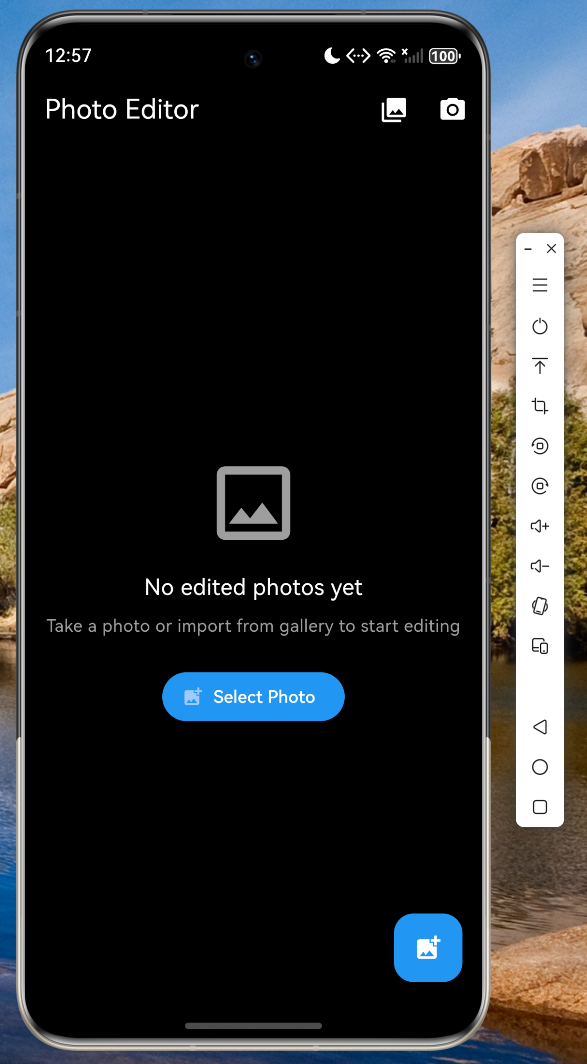
以下是应用在鸿蒙设备上的运行截图:
技术要点总结
1. 跨平台兼容性处理
Flutter for OpenHarmony 的一大挑战是处理不同平台的文件路径差异。本项目通过以下方式解决:
Future<File?> pickImageFromGallery() async {
  final XFile? image = await _picker.pickImage(
    source: ImageSource.gallery,
    maxWidth: 4096,
    maxHeight: 4096,
  );
  if (image == null) return null;
  return File(image.path);
}
2. 异步操作与状态管理
编辑器中的图片处理操作需要使用异步方法,并通过 setState 正确更新 UI:
Future<void> _applyFilter(FilterType filter) async {
  setState(() => _isLoading = true);
  final result = await ImageProcessor.applyFilter(
    _originalImageBytes!, filter);
  if (mounted) {
    setState(() {
      _editedImageBytes = result;
      _isLoading = false;
    });
  }
}
3. 图片拼接实现
多图拼接是较为复杂的图像处理功能,需要统一画布尺寸后依次绘制:
static Future<Uint8List?> stitchImages(
  List<Uint8List> images, bool horizontal) async {
  final decodedImages = images
      .map((bytes) => img.decodeImage(bytes))
      .whereType<img.Image>()
      .toList();

  int totalWidth, totalHeight;
  if (horizontal) {
    totalWidth = decodedImages.fold(0, (sum, img) => sum + img.width);
    totalHeight = decodedImages.map((img) => img.height)
        .reduce((a, b) => a > b ? a : b);
  } else {
    totalWidth = decodedImages.map((img) => img.width)
        .reduce((a, b) => a > b ? a : b);
    totalHeight = decodedImages.fold(0, (sum, img) => sum + img.height);
  }

  final stitched = img.Image(width: totalWidth, height: totalHeight);
  // ... 绘制逻辑
  return Uint8List.fromList(img.encodePng(stitched));
}
完整代码仓库
本项目的完整代码已托管至 AtomGit 平台:
仓库地址:https://atomgit.com/maaath/photo_editor_flutter_oh
总结
通过本文的实战项目,我们完整展示了如何使用 Flutter for OpenHarmony 构建一个功能丰富的图片编辑器应用。从数据模型设计到 UI 交互实现,从图片处理算法到跨平台兼容性处理,每个环节都体现了 Flutter 框架的强大与便捷。
关键收获:
- 跨平台开发效率提升:一套代码同时支持 Android 和 OpenHarmony 大幅减少开发成本
- 丰富的生态系统:通过
image等包可以便捷实现复杂的图像处理功能 - 良好的用户交互体验:Material Design 3 的设计语言提供现代美观的界面
希望本文能为读者的 Flutter for OpenHarmony 开发之路提供有价值的参考。
参考资料:
- Flutter 官方文档:https://docs.flutter.dev
- OpenHarmony 开发文档:https://developer.harmonyos.com
- AtomGit 代码托管平台:https://atomgit.com

作为“人工智能6S店”的官方数字引擎,为AI开发者与企业提供一个覆盖软硬件全栈、一站式门户。
更多推荐
 2
2 0
0- 0


 已为社区贡献30条内容

所有评论(0)