
Day4_开源鸿蒙_Flutter_for_OpenHarmony_离线笔记_私密笔记加密存储
这篇文章介绍了如何在开源鸿蒙Flutter应用中实现"私密笔记"功能,通过加密技术保护敏感内容不被明文存储在数据库中。主要内容包括: 使用纯Dart的cryptography库实现加密功能,支持PBKDF2密钥派生和AES-GCM加密算法 数据库升级方案:为notes表添加加密相关字段,并新增app_kv表存储盐值 模型层改造:扩展Note类以支持私密笔记的加密字段 核心加密逻
开源鸿蒙 Flutter for OpenHarmony:离线笔记做“私密笔记”(cryptography 加密落库)
欢迎加入开源鸿蒙跨平台社区:https://openharmonycrossplatform.csdn.net
离线笔记一旦开始写“真实内容”,很快就会遇到一个需求:有些内容不想明文落到 SQLite 里,比如账号信息、备忘密码、身份证号、隐私记录等。
这篇把 Day1~Day3 的离线笔记继续往前推进:在不引入平台侧适配成本的前提下,用第三方库 cryptography 把正文加密后再写入本地数据库,做出最小可用的“私密笔记”闭环:
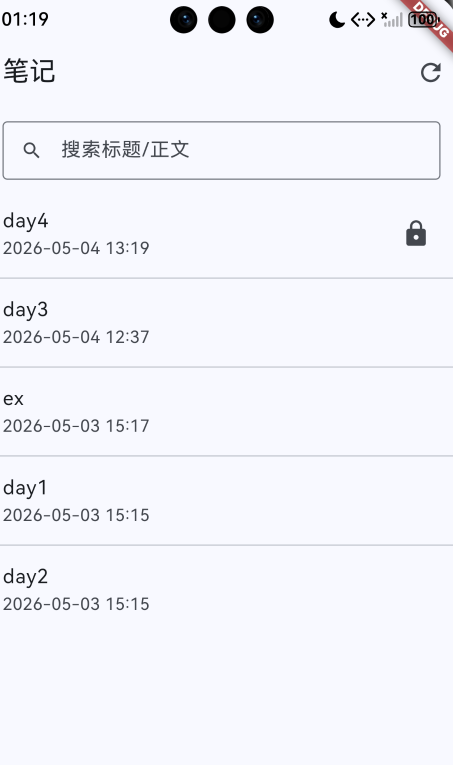
- 列表里能看见“🔒 私密”标识
- 点进私密笔记先输入 PIN 解锁
- 编辑/自动保存时把正文加密后再更新数据库
1. 这次用到的第三方库:cryptography(纯 Dart,OpenHarmony 可直接跑)
📌 目标不是“把数据藏起来”,而是做到:即使别人拿到数据库文件,也读不出正文。
这次选 cryptography 的原因很简单:
- 纯 Dart:不走平台通道,不依赖 native 插件适配,跨平台更稳
- 能力够用:PBKDF2(从 PIN 派生密钥)+ AES-GCM(加密+完整性校验)
- 落库好做:把
cipherText / nonce / mac用 Base64 编码存到 SQLite 的 TEXT 字段
2. 添加依赖:pubspec.yaml
📌 执行一次:
flutter pub add cryptography
执行后会在 pubspec.yaml 里新增(版本以实际为准):
dependencies:
  cryptography: ^2.9.0
3. 数据库升级:notes 表新增“私密字段” + app_kv 存盐
📌 文件:lib/features/note/data/app_database.dart
3.1 notes 表新增字段
我们给 notes 表加 4 个字段:
is_private:是否私密(0/1)content_cipher:密文(Base64)content_nonce:随机 nonce(Base64)content_mac:校验值 mac(Base64)
对应建表(新安装直接走 onCreate):
return openDatabase(
  path,
  version: 3,
  onCreate: (db, version) async {
    await db.execute('''
CREATE TABLE notes(
  id INTEGER PRIMARY KEY AUTOINCREMENT,
  title TEXT NOT NULL DEFAULT '',
  content TEXT NOT NULL DEFAULT '',
  pinned INTEGER NOT NULL DEFAULT 0,
  is_private INTEGER NOT NULL DEFAULT 0,
  content_cipher TEXT,
  content_nonce TEXT,
  content_mac TEXT,
  is_deleted INTEGER NOT NULL DEFAULT 0,
  created_at INTEGER NOT NULL,
  updated_at INTEGER NOT NULL
)
''');
  },
);
这里有个小细节:私密笔记的 content 我们固定写空字符串,避免把明文正文写进数据库;真正的正文只落在 content_cipher/... 这三列里。
3.2 app_kv 表:存一份“盐”(salt)
PIN 不能直接当加密密钥用(太短、可穷举)。我们用 PBKDF2 把 PIN 派生为 256-bit 密钥,PBKDF2 需要 salt。
salt 不是秘密,但要固定保存下来,否则同一个 PIN 每次派生出来的密钥会变。
所以建一个很轻量的 key-value 表:
await db.execute('''
CREATE TABLE app_kv(
  k TEXT PRIMARY KEY,
  v TEXT NOT NULL
)
''');
4. 模型与 DAO:让 Note 能带上“私密字段”
📌 文件:lib/features/note/data/note.dart
新增字段:
final bool isPrivate;
final String? contentCipher;
final String? contentNonce;
final String? contentMac;
📌 文件:lib/features/note/data/note_dao.dart
插入/更新时把字段写进 row:
Map<String, Object?> _toUpdateRow(Note note) {
  return {
    'title': note.title.trim(),
    'content': note.content,
    'pinned': note.pinned ? 1 : 0,
    'is_private': note.isPrivate ? 1 : 0,
    'content_cipher': note.contentCipher,
    'content_nonce': note.contentNonce,
    'content_mac': note.contentMac,
    'is_deleted': note.isDeleted ? 1 : 0,
    'created_at': note.createdAt.millisecondsSinceEpoch,
    'updated_at': note.updatedAt.millisecondsSinceEpoch,
  };
}
读取 row 时也要补齐:
Note _fromRow(Map<String, Object?> row) {
  return Note(
    id: row['id'] as int?,
    title: (row['title'] as String?) ?? '',
    content: (row['content'] as String?) ?? '',
    pinned: (row['pinned'] as int? ?? 0) != 0,
    isPrivate: (row['is_private'] as int? ?? 0) != 0,
    contentCipher: row['content_cipher'] as String?,
    contentNonce: row['content_nonce'] as String?,
    contentMac: row['content_mac'] as String?,
    isDeleted: (row['is_deleted'] as int? ?? 0) != 0,
    createdAt: DateTime.fromMillisecondsSinceEpoch(row['created_at'] as int),
    updatedAt: DateTime.fromMillisecondsSinceEpoch(row['updated_at'] as int),
  );
}
5. 核心:NoteCrypto(PBKDF2 派生密钥 + AES-GCM 加解密)
📌 文件:lib/features/note/data/note_crypto.dart
这个类做 3 件事:
- 第一次使用时生成 salt,并写入
app_kv - 用 PBKDF2 把 PIN 派生出 256-bit 密钥
- 用 AES-GCM 加密/解密正文,并把结果转成 Base64 便于落库
class NoteCrypto {
  static const String _saltKey = 'private_pin_salt_b64';

  final AppDatabase _db;
  final Cipher _cipher = AesGcm.with256bits();
  final Pbkdf2 _kdf = Pbkdf2(
    macAlgorithm: Hmac.sha256(),
    iterations: 120000,
    bits: 256,
  );

  String? _cachedPin;
  SecretKey? _cachedKey;

  NoteCrypto(this._db);
}
加密返回三件套(cipher/nonce/mac),都 Base64:
Future<EncryptedNoteContent> encrypt(String plainText, String pin) async {
  final key = await _deriveKey(pin);
  final nonce = _cipher.newNonce();
  final secretBox = await _cipher.encrypt(
    utf8.encode(plainText),
    secretKey: key,
    nonce: nonce,
  );

  return EncryptedNoteContent(
    cipherB64: base64Encode(secretBox.cipherText),
    nonceB64: base64Encode(secretBox.nonce),
    macB64: base64Encode(secretBox.mac.bytes),
  );
}
解密时把它们拼回 SecretBox:
Future<String> decrypt(EncryptedNoteContent encrypted, String pin) async {
  final key = await _deriveKey(pin);
  final clearBytes = await _cipher.decrypt(
    SecretBox(
      base64Decode(encrypted.cipherB64),
      nonce: base64Decode(encrypted.nonceB64),
      mac: Mac(base64Decode(encrypted.macB64)),
    ),
    secretKey: key,
  );
  return utf8.decode(clearBytes);
}
6. Repository:保存时“明文/密文”分流,解锁时统一解密
📌 文件:lib/features/note/data/note_repository.dart
这一层最适合做“业务决策”:
- 普通笔记:
content明文落库,content_cipher/...置空 - 私密笔记:
content写空字符串,content_cipher/...写密文
保存方法统一成一个 save(...):
Future<Note> save({
  required Note? existing,
  required String title,
  required String content,
  required bool isPrivate,
  required String? pin,
}) async {
  final now = DateTime.now();

  final enc = isPrivate ? await _encryptOrThrow(content, pin) : null;
  final note = Note(
    id: existing?.id,
    title: title.trim(),
    content: isPrivate ? '' : content,
    pinned: existing?.pinned ?? false,
    isPrivate: isPrivate,
    contentCipher: enc?.cipherB64,
    contentNonce: enc?.nonceB64,
    contentMac: enc?.macB64,
    isDeleted: existing?.isDeleted ?? false,
    createdAt: existing?.createdAt ?? now,
    updatedAt: now,
  );

  if (existing == null) {
    final id = await _dao.insert(note);
    return note.copyWith(id: id);
  }
  await _dao.update(note);
  return note;
}
解锁时统一用 decryptContent(...):
Future<String> decryptContent(Note note, {required String pin}) async {
  if (!note.isPrivate) return note.content;
  return _crypto.decrypt(
    EncryptedNoteContent(
      cipherB64: note.contentCipher!,
      nonceB64: note.contentNonce!,
      macB64: note.contentMac!,
    ),
    pin,
  );
}
7. 编辑页:开关“私密” + PIN 弹窗 + 解锁后编辑
📌 文件:lib/features/note/ui/note_editor_page.dart
7.1 私密开关
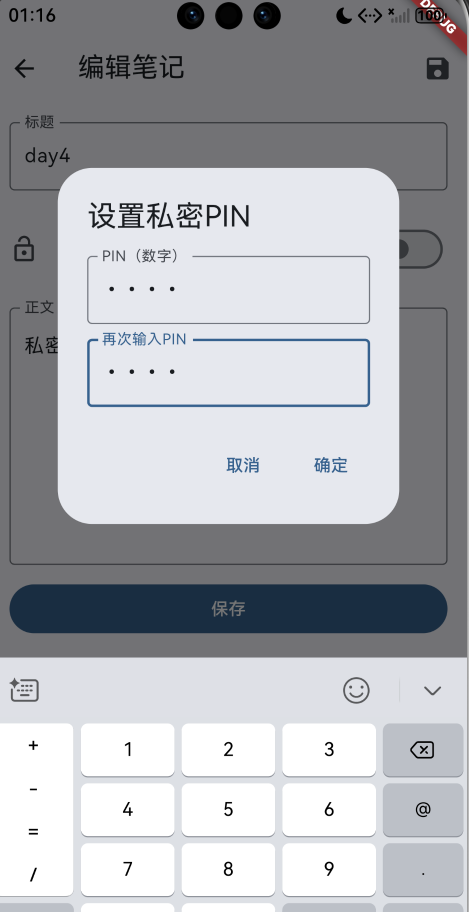
用 SwitchListTile 做开关,开启时弹 PIN 设置框:
SwitchListTile(
  value: _isPrivate,
  onChanged: _saving ? null : _setPrivate,
  title: const Text('私密笔记'),
  subtitle: const Text('正文加密后保存到本地数据库'),
  secondary: Icon(_isPrivate ? Icons.lock : Icons.lock_open),
  contentPadding: EdgeInsets.zero,
),
7.2 解锁流程
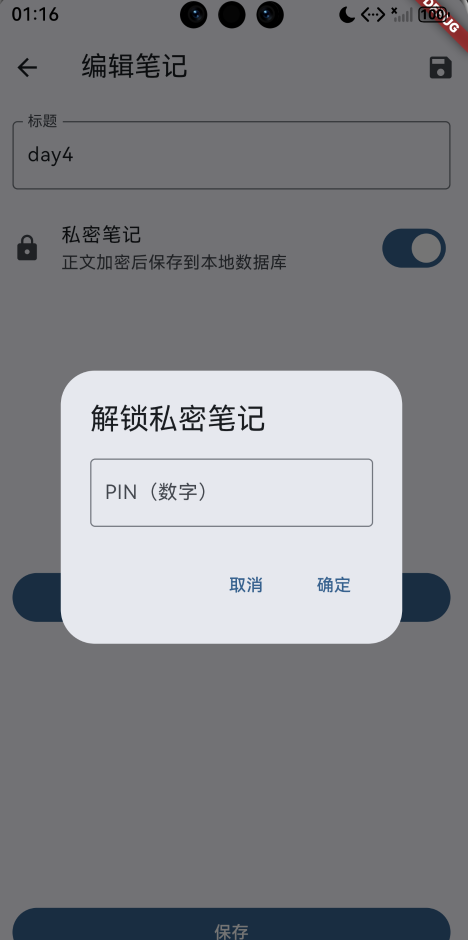
如果打开的是“已有私密笔记”,先别把正文塞进 TextField,而是给个“解锁”按钮:
child: _isPrivate && !_unlocked
    ? FilledButton.icon(
        onPressed: _unlockIfNeeded,
        icon: const Icon(Icons.lock),
        label: const Text('解锁查看/编辑'),
      )
    : TextField(
        controller: _contentController,
        maxLines: null,
        expands: true,
      ),
解锁成功后,把解密出来的正文放进编辑框;保存时则走 repo.save(...) 自动分流为密文/明文。
📷
8. 自测清单(Day4)
🧪 加密落库:
- 新建笔记 → 打开“私密笔记” → 输入正文 → 返回列表 → 看到 🔒 标识
- 退出应用重新进入 → 点开私密笔记 → 不解锁看不到正文 → 输入 PIN 后可看到正文
🧪 明文/密文切换:
- 私密笔记取消“私密” → 再次进入不需要 PIN,正文能直接展示
- 普通笔记打开“私密” → 重新进入必须 PIN 才能看到正文
🧪 自动保存:
- 私密笔记编辑时停 1 秒左右 → 返回列表更新时间变化(自动保存生效)
9. 下一步(Day5 方向)
Day5 很适合接“权限相关”的第三方库,比如做笔记导出/附件读取时的权限申请(permission_handler),把“私密笔记 + 附件”组合起来更像真实产品。

作为“人工智能6S店”的官方数字引擎,为AI开发者与企业提供一个覆盖软硬件全栈、一站式门户。
更多推荐
 2
2 0
0- 0


 已为社区贡献4条内容

所有评论(0)