
【Flutter for OpenHarmony】flutter_animate 呼吸圆形动画组件的鸿蒙化适配与实战指南
·
【Flutter for OpenHarmony】flutter_animate 呼吸圆形动画组件的鸿蒙化适配与实战指南
欢迎加入开源鸿蒙跨平台社区:https://openharmonycrossplatform.csdn.net
一、为什么呼吸动画如此重要?
我是 IntMainJhy,上海某高校大一计算机专业的学生。说起呼吸动画,我有一段特别深刻的经历。
有一次我在写呼吸训练功能,做出来的动画就是简单的"变大→变小"。室友试了一下说:“这哪是呼吸动画啊?这不就是个会动的圆吗?”
我仔细对比了 Headspace、Calm 这些专业的冥想 App,发现它们的呼吸动画有几个特点:
- 动画曲线非常平滑,吸气呼气有明显的节奏感
- 有视觉引导,告诉用户什么时候吸气、什么时候呼气
- 有倒计时显示,让用户知道还要持续多久
后来我用 flutter_animate 重写了呼吸动画,效果完全不一样了。今天这篇文章,我就把我是怎么做呼吸动画的,全部分享出来。
二、呼吸动画原理
2.1 呼吸的三个阶段
| 阶段 | 时长 | 动画效果 |
|---|---|---|
| 吸气 (Inhale) | 4秒 | 圆形从小到大 |
| 屏气 (Hold) | 4秒 | 圆形保持大小 |
| 呼气 (Exhale) | 4秒 | 圆形从大到小 |
2.2 动画曲线选择
| 曲线 | 特点 | 适用场景 |
|---|---|---|
| Curves.easeInOut | 平滑加速减速 | 吸气/呼气 |
| Curves.easeOut | 快速开始,慢速结束 | 呼气 |
| Curves.easeIn | 慢速开始,快速结束 | 吸气 |
三、呼吸圆形动画实现
3.1 基础版本:单一圆形呼吸
// lib/mental_health/widgets/breathing_circle_widget.dart
import 'package:flutter/material.dart';
import 'package:flutter_animate/flutter_animate.dart';
/// 呼吸圆形动画组件基础版本
///
/// 使用 flutter_animate 实现简单的呼吸动画
class BreathingCircleBasic extends StatelessWidget {
final Color color;
final bool isRunning;
final int inhaleSeconds;
final int holdSeconds;
final int exhaleSeconds;
const BreathingCircleBasic({
super.key,
required this.color,
this.isRunning = false,
this.inhaleSeconds = 4,
this.holdSeconds = 4,
this.exhaleSeconds = 4,
});
Widget build(BuildContext context) {
Widget circle = Container(
width: 200,
height: 200,
decoration: BoxDecoration(
shape: BoxShape.circle,
gradient: RadialGradient(
colors: [
color.withOpacity(0.8),
color.withOpacity(0.4),
color.withOpacity(0.1),
],
),
boxShadow: [
BoxShadow(
color: color.withOpacity(0.3),
blurRadius: 20,
spreadRadius: 5,
),
],
),
);
if (!isRunning) {
return circle;
}
// 计算总周期时长
final totalMs = (inhaleSeconds + holdSeconds + exhaleSeconds) * 1000;
final inhaleMs = inhaleSeconds * 1000;
final holdMs = holdSeconds * 1000;
final exhaleMs = exhaleSeconds * 1000;
return circle
.animate(
onPlay: (controller) => controller.repeat(),
)
.custom(
duration: Duration(milliseconds: totalMs),
builder: (context, value, child) {
// 计算当前处于哪个阶段
final cyclePosition = value; // 0.0 到 1.0
final total = inhaleMs + holdMs + exhaleMs;
final positionMs = cyclePosition * total;
double scale;
if (positionMs < inhaleMs) {
// 吸气阶段:从 0.6 到 1.0
final progress = positionMs / inhaleMs;
scale = 0.6 + (Curves.easeInOut.transform(progress) * 0.4);
} else if (positionMs < inhaleMs + holdMs) {
// 屏气阶段:保持 1.0
scale = 1.0;
} else {
// 呼气阶段:从 1.0 到 0.6
final exhalePosition = (positionMs - inhaleMs - holdMs) / exhaleMs;
scale = 1.0 - (Curves.easeInOut.transform(exhalePosition) * 0.4);
}
return Transform.scale(
scale: scale,
child: child,
);
},
);
}
}
3.2 进阶版本:多层圆形 + 呼吸引导
/// 呼吸圆形动画组件进阶版本
///
/// 实现多层圆形 + 呼吸文字引导
class BreathingCircleAdvanced extends StatefulWidget {
final Color color;
final bool isRunning;
final int inhaleSeconds;
final int holdSeconds;
final int exhaleSeconds;
final VoidCallback? onPhaseChange;
final Function(int, int)? onCycleComplete;
const BreathingCircleAdvanced({
super.key,
required this.color,
this.isRunning = false,
this.inhaleSeconds = 4,
this.holdSeconds = 4,
this.exhaleSeconds = 4,
this.onPhaseChange,
this.onCycleComplete,
});
State<BreathingCircleAdvanced> createState() => _BreathingCircleAdvancedState();
}
class _BreathingCircleAdvancedState extends State<BreathingCircleAdvanced>
with SingleTickerProviderStateMixin {
late AnimationController _controller;
String _currentPhase = '准备';
int _cycleCount = 0;
void initState() {
super.initState();
_controller = AnimationController(vsync: this);
_controller.addListener(_updatePhase);
}
void _updatePhase() {
if (!widget.isRunning) return;
final totalMs = (widget.inhaleSeconds + widget.holdSeconds + widget.exhaleSeconds) * 1000;
final positionMs = _controller.value * totalMs;
final inhaleMs = widget.inhaleSeconds * 1000;
final holdMs = widget.holdSeconds * 1000;
String newPhase;
if (positionMs < inhaleMs) {
newPhase = '吸气';
} else if (positionMs < inhaleMs + holdMs) {
newPhase = '屏气';
} else {
newPhase = '呼气';
}
// 检查周期是否完成
if (_controller.value == 0 && _controller.status == AnimationStatus.forward) {
_cycleCount++;
widget.onCycleComplete?.call(_cycleCount, 4);
}
if (newPhase != _currentPhase) {
setState(() {
_currentPhase = newPhase;
});
widget.onPhaseChange?.call();
}
}
void didUpdateWidget(BreathingCircleAdvanced oldWidget) {
super.didUpdateWidget(oldWidget);
if (widget.isRunning && !oldWidget.isRunning) {
_cycleCount = 0;
_controller.repeat();
} else if (!widget.isRunning && oldWidget.isRunning) {
_controller.stop();
_controller.reset();
setState(() {
_currentPhase = '准备';
});
}
}
void dispose() {
_controller.dispose();
super.dispose();
}
Widget build(BuildContext context) {
return Column(
mainAxisSize: MainAxisSize.min,
children: [
// 呼吸阶段文字
AnimatedSwitcher(
duration: const Duration(milliseconds: 300),
child: Text(
_currentPhase,
key: ValueKey(_currentPhase),
style: TextStyle(
fontSize: 32,
fontWeight: FontWeight.bold,
color: widget.color,
),
),
),
const SizedBox(height: 32),
// 多层呼吸圆形
SizedBox(
width: 280,
height: 280,
child: AnimatedBuilder(
animation: _controller,
builder: (context, child) {
return Stack(
alignment: Alignment.center,
children: [
// 最外层
_buildBreathingLayer(260, 1.0),
// 中间层
_buildBreathingLayer(200, 0.85),
// 最内层
_buildBreathingLayer(140, 0.7),
// 中心图标
_buildCenterContent(),
],
);
},
),
),
const SizedBox(height: 24),
// 周期计数
if (widget.isRunning)
Text(
'已完成 ${_cycleCount} 个周期',
style: TextStyle(
fontSize: 14,
color: Colors.grey[600],
),
),
],
);
}
Widget _buildBreathingLayer(double size, double baseOpacity) {
final scale = _calculateScale();
final opacity = baseOpacity * (0.3 + scale * 0.5);
return Transform.scale(
scale: scale,
child: Container(
width: size,
height: size,
decoration: BoxDecoration(
shape: BoxShape.circle,
gradient: RadialGradient(
colors: [
widget.color.withOpacity(opacity),
widget.color.withOpacity(opacity * 0.5),
widget.color.withOpacity(0.1),
],
),
),
),
);
}
double _calculateScale() {
if (!widget.isRunning) return 0.7;
final totalMs = (widget.inhaleSeconds + widget.holdSeconds + widget.exhaleSeconds) * 1000;
final positionMs = _controller.value * totalMs;
final inhaleMs = widget.inhaleSeconds * 1000;
final holdMs = widget.holdSeconds * 1000;
final exhaleMs = widget.exhaleSeconds * 1000;
if (positionMs < inhaleMs) {
// 吸气阶段:0.7 -> 1.0
final progress = positionMs / inhaleMs;
return 0.7 + (Curves.easeInOut.transform(progress) * 0.3);
} else if (positionMs < inhaleMs + holdMs) {
// 屏气阶段:保持 1.0
return 1.0;
} else {
// 呼气阶段:1.0 -> 0.7
final exhaleProgress = (positionMs - inhaleMs - holdMs) / exhaleMs;
return 1.0 - (Curves.easeInOut.transform(exhaleProgress) * 0.3);
}
}
Widget _buildCenterContent() {
return Container(
width: 100,
height: 100,
decoration: BoxDecoration(
shape: BoxShape.circle,
color: Colors.white,
boxShadow: [
BoxShadow(
color: widget.color.withOpacity(0.3),
blurRadius: 15,
spreadRadius: 3,
),
],
),
child: Icon(
widget.isRunning ? Icons.air : Icons.play_arrow,
color: widget.color,
size: 40,
),
);
}
}
3.3 高级版本:完全自定义曲线
/// 呼吸圆形动画组件高级版本
///
/// 使用自定义动画曲线实现更精细的呼吸效果
class BreathingCirclePro extends StatefulWidget {
final Color color;
final bool isRunning;
final int inhaleSeconds;
final int holdSeconds;
final int exhaleSeconds;
const BreathingCirclePro({
super.key,
required this.color,
this.isRunning = false,
this.inhaleSeconds = 4,
this.holdSeconds = 4,
this.exhaleSeconds = 4,
});
State<BreathingCirclePro> createState() => _BreathingCircleProState();
}
class _BreathingCircleProState extends State<BreathingCirclePro>
with TickerProviderStateMixin {
late AnimationController _controller;
late Animation<double> _scaleAnimation;
late Animation<double> _glowAnimation;
late Animation<double> _rippleAnimation;
void initState() {
super.initState();
_initAnimations();
}
void _initAnimations() {
final totalSeconds = widget.inhaleSeconds + widget.holdSeconds + widget.exhaleSeconds;
_controller = AnimationController(
vsync: this,
duration: Duration(seconds: totalSeconds),
);
// 缩放动画:模拟呼吸节奏
_scaleAnimation = Tween<double>(begin: 0.7, end: 1.0).animate(
CurvedAnimation(
parent: _controller,
curve: _BreathingCurve(
inhaleRatio: widget.inhaleSeconds / totalSeconds,
holdRatio: widget.holdSeconds / totalSeconds,
exhaleRatio: widget.exhaleSeconds / totalSeconds,
),
),
);
// 光晕动画
_glowAnimation = Tween<double>(begin: 0.2, end: 0.6).animate(
CurvedAnimation(
parent: _controller,
curve: Curves.easeInOut,
),
);
// 水波纹动画
_rippleAnimation = Tween<double>(begin: 0.0, end: 1.0).animate(
CurvedAnimation(
parent: _controller,
curve: Curves.linear,
),
);
}
void didUpdateWidget(BreathingCirclePro oldWidget) {
super.didUpdateWidget(oldWidget);
if (widget.isRunning && !oldWidget.isRunning) {
_controller.repeat();
} else if (!widget.isRunning && oldWidget.isRunning) {
_controller.stop();
_controller.reset();
}
}
void dispose() {
_controller.dispose();
super.dispose();
}
Widget build(BuildContext context) {
return AnimatedBuilder(
animation: _controller,
builder: (context, child) {
return SizedBox(
width: 300,
height: 300,
child: Stack(
alignment: Alignment.center,
children: [
// 水波纹效果
if (widget.isRunning)
...List.generate(3, (index) {
final delay = index * 0.3;
final progress = (_rippleAnimation.value - delay).clamp(0.0, 1.0);
return _buildRipple(progress, index);
}),
// 主圆形
Transform.scale(
scale: _scaleAnimation.value,
child: Container(
width: 200,
height: 200,
decoration: BoxDecoration(
shape: BoxShape.circle,
gradient: RadialGradient(
colors: [
widget.color.withOpacity(_glowAnimation.value),
widget.color.withOpacity(_glowAnimation.value * 0.5),
widget.color.withOpacity(0.1),
],
),
boxShadow: [
BoxShadow(
color: widget.color.withOpacity(0.4 * _glowAnimation.value),
blurRadius: 30,
spreadRadius: 10,
),
],
),
child: Center(
child: Container(
width: 140,
height: 140,
decoration: BoxDecoration(
shape: BoxShape.circle,
color: Colors.white.withOpacity(0.9),
),
child: Center(
child: Icon(
widget.isRunning ? Icons.air : Icons.play_arrow,
color: widget.color,
size: 50,
),
),
),
),
),
),
],
),
);
},
);
}
Widget _buildRipple(double progress, int index) {
return Container(
width: 200 + (progress * 100),
height: 200 + (progress * 100),
decoration: BoxDecoration(
shape: BoxShape.circle,
border: Border.all(
color: widget.color.withOpacity((1.0 - progress) * 0.3),
width: 2,
),
),
);
}
}
/// 自定义呼吸曲线
class _BreathingCurve extends Curve {
final double inhaleRatio;
final double holdRatio;
final double exhaleRatio;
const _BreathingCurve({
required this.inhaleRatio,
required this.holdRatio,
required this.exhaleRatio,
});
double transformInternal(double t) {
final totalRatio = inhaleRatio + holdRatio + exhaleRatio;
final inhaleEnd = inhaleRatio / totalRatio;
final holdEnd = (inhaleRatio + holdRatio) / totalRatio;
if (t < inhaleEnd) {
// 吸气阶段:0.7 -> 1.0
final progress = t / inhaleEnd;
return 0.7 + (Curves.easeInOut.transform(progress) * 0.3);
} else if (t < holdEnd) {
// 屏气阶段:保持 1.0
return 1.0;
} else {
// 呼气阶段:1.0 -> 0.7
final progress = (t - holdEnd) / (exhaleRatio / totalRatio);
return 1.0 - (Curves.easeInOut.transform(progress) * 0.3);
}
}
}
四、在呼吸训练页面中使用
// lib/mental_health/screens/breathing_screen.dart
class BreathingScreen extends StatefulWidget {
const BreathingScreen({super.key});
State<BreathingScreen> createState() => _BreathingScreenState();
}
class _BreathingScreenState extends State<BreathingScreen> {
bool _isRunning = false;
int _cycleCount = 0;
String _currentPhase = '准备';
final Color _breathingColor = const Color(0xFF9B59B6);
Widget build(BuildContext context) {
return Scaffold(
body: Container(
decoration: BoxDecoration(
gradient: LinearGradient(
begin: Alignment.topCenter,
end: Alignment.bottomCenter,
colors: [
_breathingColor.withOpacity(0.1),
Colors.white,
],
),
),
child: SafeArea(
child: Column(
children: [
const SizedBox(height: 20),
// 标题
const Text(
'呼吸训练',
style: TextStyle(
fontSize: 24,
fontWeight: FontWeight.bold,
),
),
const Spacer(),
// 呼吸圆形动画
BreathingCircleAdvanced(
color: _breathingColor,
isRunning: _isRunning,
inhaleSeconds: 4,
holdSeconds: 4,
exhaleSeconds: 4,
onPhaseChange: () {
// 阶段变化时的回调
},
onCycleComplete: (completed, total) {
setState(() {
_cycleCount = completed;
});
},
),
const Spacer(),
// 控制按钮
Row(
mainAxisAlignment: MainAxisAlignment.center,
children: [
// 重置按钮
IconButton(
onPressed: () {
setState(() {
_isRunning = false;
_cycleCount = 0;
_currentPhase = '准备';
});
},
icon: const Icon(Icons.refresh, size: 32),
color: Colors.grey,
),
const SizedBox(width: 32),
// 开始/暂停按钮
FloatingActionButton.large(
onPressed: () {
setState(() {
_isRunning = !_isRunning;
if (!_isRunning) {
_currentPhase = '准备';
}
});
},
backgroundColor: _breathingColor,
child: Icon(
_isRunning ? Icons.pause : Icons.play_arrow,
size: 40,
color: Colors.white,
),
),
],
),
const SizedBox(height: 40),
],
),
),
),
);
}
}
五、鸿蒙平台专属适配
适配点1:动画流畅度
问题:鸿蒙设备上动画可能出现抖动。
解决方案:
// 使用较低的计算频率
AnimatedBuilder(
  animation: _controller,
  builder: (context, child) {
    // 减少不必要的重建
    return Container(...);
  },
)
适配点2:计时器精度
问题:AnimationController 的时间和实际时间有偏差。
解决方案:使用 Timer 配合 AnimationController:
Timer.periodic(const Duration(seconds: 1), (timer) {
  // 独立计时
  if (_isRunning) {
    _elapsedSeconds++;
  }
});
六、我的踩坑记录
坑1:AnimationController 重复播放时位置错误
问题:停止后再开始,动画位置不正确。
原因:没有正确重置控制器。
解决代码:
void _resetAnimation() {
  _controller.reset();  // 必须调用
  _controller.forward();
}
坑2:动画和倒计时不同步
问题:动画结束了,倒计时还在走。
原因:AnimationController 的 duration 和实际计时不一致。
解决代码:
// 使用独立计时器
Timer.periodic(const Duration(seconds: 1), (timer) {
  if (!mounted || !_isRunning) {
    timer.cancel();
    return;
  }
  setState(() {
    _elapsedSeconds++;
  });
});
坑3:屏气阶段动画"卡住"
问题:屏气时动画静止不动,看起来像卡死了。
原因:屏气阶段确实没有动画变化。
解决代码:
// 屏气阶段添加轻微的脉动
if (_isHolding) {
  // 添加微小的脉动效果
  scale = 1.0 + (sin(_controller.value * pi * 4) * 0.02);
}
七、功能验证清单
| 序号 | 检查项 | 测试场景 | 预期结果 |
|---|---|---|---|
| 1 | 吸气动画 | 开始后4秒 | 圆形从小变大 |
| 2 | 屏气动画 | 4-8秒 | 圆形保持大小 |
| 3 | 呼气动画 | 8-12秒 | 圆形从大变小 |
| 4 | 循环播放 | 12秒后 | 动画重新开始 |
| 5 | 阶段文字 | 各阶段 | 文字正确切换 |
| 6 | 周期计数 | 每完成一轮 | 计数+1 |
八、大一学生真实学习总结
呼吸动画是我做得最有挑战性的功能之一。
最重要的几点:
-
自定义曲线是关键
- Flutter 内置的 Curves 不能完全满足呼吸动画的需求
- 需要自己实现
_BreathingCurve
-
计时器和动画要分离
- 不要让动画控制计时
- 用独立的 Timer 来计时
-
屏气阶段也要有视觉效果
- 完全静止看起来像卡死
- 可以添加微小的脉动
-
性能要关注
- 多层动画会消耗性能
- 要在效果和流畅度之间找平衡
作者:IntMainJhy
创作时间:2026年5月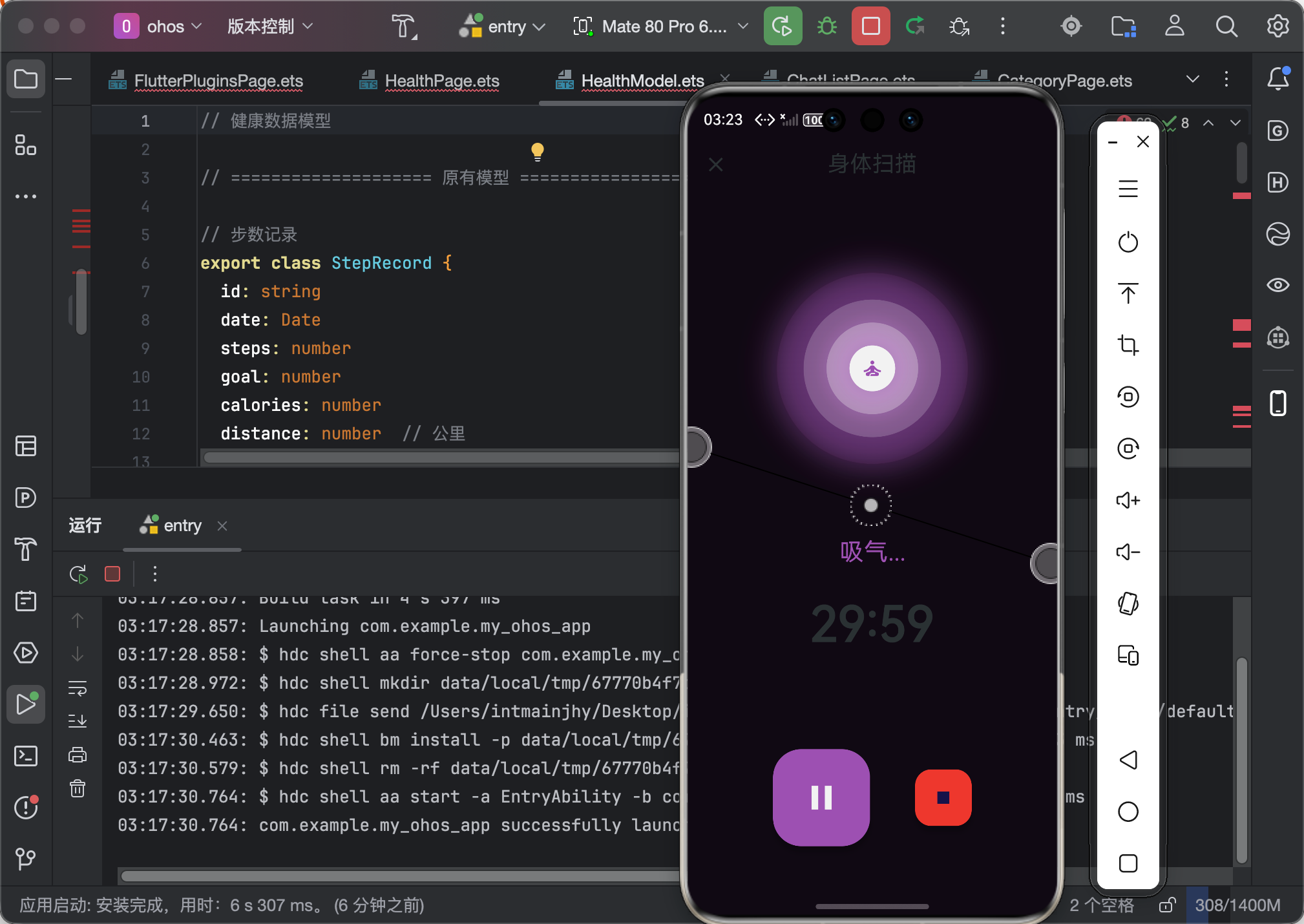

作为“人工智能6S店”的官方数字引擎,为AI开发者与企业提供一个覆盖软硬件全栈、一站式门户。
更多推荐


 0
0 0
0- 0


 已为社区贡献76条内容

所有评论(0)