
【Flutter for OpenHarmony】flutter_animate 冥想圆形动画组件的鸿蒙化适配与实战指南
Flutter_animate冥想圆形动画组件开发指南 摘要:本文介绍了如何使用flutter_animate库为冥想应用开发动态圆形动画组件。文章分为三个部分:1) 设计背景,分析了静态冥想界面的不足;2) flutter_animate库介绍,包括核心概念和链式调用方法;3) 具体实现,提供了基础版(单层圆形+脉冲动画)和进阶版(多层圆形+呼吸动画)两种实现方案。进阶版本通过Stack布局和分
【Flutter for OpenHarmony】flutter_animate 冥想圆形动画组件的鸿蒙化适配与实战指南
欢迎加入开源鸿蒙跨平台社区:https://openharmonycrossplatform.csdn.net
一、为什么我要重新设计冥想动画?
我是 IntMainJhy,上海某高校大一计算机专业的学生。说起冥想圆形动画,我真的是被"静态"折磨了很久。
最开始我的冥想页面就是一个普通的圆形,中间放个播放按钮。用户点一下就开始计时,但这个圆形完全没有"动"的感觉。
室友看了说:“你这冥想 App 一点仪式感都没有,冥想是要让人静下心来的,你这界面就让人心浮气躁。”
后来我研究了好多冥想 App,发现它们都有一个共同点:动画非常柔和、流畅。比如 Headspace 的冥想动画,就是一个慢慢呼吸的圆形,呼气时缩小,吸气时放大。
我就想,能不能用 flutter_animate 做出类似的效果?
二、flutter_animate 介绍
2.1 什么是 flutter_animate?
flutter_animate 是一个声明式动画库,它的核心理念是:“Animate Anything with Zero Boilerplate”。
# pubspec.yaml
dependencies:
  flutter_animate: ^4.5.0
2.2 核心概念
| 概念 | 说明 |
|---|---|
Animate() |
最基础的扩展,给任何 Widget 添加动画 |
.fadeIn() |
淡入动画 |
.scale() |
缩放动画 |
.rotate() |
旋转动画 |
.shimmer() |
闪烁动画 |
.shake() |
抖动动画 |
2.3 链式调用
flutter_animate 支持链式调用,可以组合多个动画:
widget
    .animate()
    .fadeIn(duration: 300.ms)
    .scale(begin: const Offset(0.8, 0.8))
    .slideY(begin: 0.2);
三、冥想圆形动画实现
3.1 基础版本:单层圆形 + 脉冲动画
// lib/mental_health/widgets/meditation_circle_widget.dart
import 'package:flutter/material.dart';
import 'package:flutter_animate/flutter_animate.dart';
/// 冥想圆形动画组件基础版本
///
/// 使用 flutter_animate 实现脉冲动画效果
class MeditationCircleBasic extends StatelessWidget {
final Color color;
final bool isRunning;
final VoidCallback? onTap;
const MeditationCircleBasic({
super.key,
required this.color,
this.isRunning = false,
this.onTap,
});
Widget build(BuildContext context) {
Widget circle = GestureDetector(
onTap: onTap,
child: Container(
width: 250,
height: 250,
decoration: BoxDecoration(
shape: BoxShape.circle,
gradient: RadialGradient(
colors: [
color.withOpacity(0.8),
color.withOpacity(0.4),
color.withOpacity(0.1),
],
stops: const [0.3, 0.6, 1.0],
),
boxShadow: [
BoxShadow(
color: color.withOpacity(0.4),
blurRadius: 30,
spreadRadius: 10,
),
],
),
child: Center(
child: Container(
width: 100,
height: 100,
decoration: BoxDecoration(
shape: BoxShape.circle,
color: Colors.white.withOpacity(0.9),
),
child: Icon(
isRunning ? Icons.self_improvement : Icons.play_arrow,
color: color,
size: 40,
),
),
),
),
);
// 如果正在运行,添加脉冲动画
if (isRunning) {
return circle
.animate(onPlay: (controller) => controller.repeat(reverse: true))
.scale(
begin: const Offset(1.0, 1.0),
end: const Offset(1.08, 1.08),
duration: 2000.ms,
curve: Curves.easeInOut,
);
}
return circle;
}
}
3.2 进阶版本:多层圆形 + 呼吸动画
/// 冥想圆形动画组件进阶版本
///
/// 实现多层圆形呼吸效果,模拟真实的呼吸节奏
class MeditationCircleAdvanced extends StatelessWidget {
final Color color;
final bool isRunning;
final VoidCallback? onTap;
final int inhaleSeconds;
final int exhaleSeconds;
const MeditationCircleAdvanced({
super.key,
required this.color,
this.isRunning = false,
this.onTap,
this.inhaleSeconds = 4,
this.exhaleSeconds = 4,
});
Widget build(BuildContext context) {
return GestureDetector(
onTap: onTap,
child: SizedBox(
width: 300,
height: 300,
child: Stack(
alignment: Alignment.center,
children: [
// 最外层:扩散光环
_buildAnimatedLayer(
size: 280,
color: color,
isRunning: isRunning,
delay: 0.ms,
duration: ((inhaleSeconds + exhaleSeconds) * 1000).ms,
),
// 第二层:中等光环
_buildAnimatedLayer(
size: 230,
color: color,
isRunning: isRunning,
delay: 200.ms,
duration: ((inhaleSeconds + exhaleSeconds) * 1000).ms,
),
// 第三层:内层光环
_buildAnimatedLayer(
size: 180,
color: color,
isRunning: isRunning,
delay: 400.ms,
duration: ((inhaleSeconds + exhaleSeconds) * 1000).ms,
),
// 中心按钮
_buildCenterButton(),
],
),
),
);
}
Widget _buildAnimatedLayer({
required double size,
required Color color,
required bool isRunning,
required Duration delay,
required Duration duration,
}) {
Widget layer = Container(
width: size,
height: size,
decoration: BoxDecoration(
shape: BoxShape.circle,
gradient: RadialGradient(
colors: [
color.withOpacity(0.6),
color.withOpacity(0.3),
color.withOpacity(0.0),
],
stops: const [0.3, 0.7, 1.0],
),
),
);
if (isRunning) {
return layer
.animate(
onPlay: (controller) => controller.repeat(reverse: true),
)
.scale(
begin: const Offset(0.9, 0.9),
end: const Offset(1.1, 1.1),
duration: duration,
curve: Curves.easeInOut,
)
.fadeIn(
begin: 0.5,
end: 1.0,
duration: duration,
curve: Curves.easeInOut,
);
}
return layer;
}
Widget _buildCenterButton() {
return Container(
width: 120,
height: 120,
decoration: BoxDecoration(
shape: BoxShape.circle,
color: Colors.white,
boxShadow: [
BoxShadow(
color: color.withOpacity(0.3),
blurRadius: 20,
spreadRadius: 5,
),
],
),
child: Icon(
isRunning ? Icons.self_improvement : Icons.play_arrow,
color: color,
size: 50,
),
)
.animate(target: isRunning ? 1 : 0)
.scale(
begin: const Offset(0.95, 0.95),
end: const Offset(1.0, 1.0),
duration: 300.ms,
);
}
}
3.3 高级版本:完全自定义呼吸动画
/// 冥想圆形动画组件高级版本
///
/// 使用 AnimationController 实现精确的呼吸同步
class MeditationCirclePro extends StatefulWidget {
final Color color;
final bool isRunning;
final VoidCallback? onTap;
final int inhaleSeconds;
final int holdSeconds;
final int exhaleSeconds;
const MeditationCirclePro({
super.key,
required this.color,
this.isRunning = false,
this.onTap,
this.inhaleSeconds = 4,
this.holdSeconds = 2,
this.exhaleSeconds = 4,
});
State<MeditationCirclePro> createState() => _MeditationCircleProState();
}
class _MeditationCircleProState extends State<MeditationCirclePro>
with TickerProviderStateMixin {
late AnimationController _breathController;
late Animation<double> _scaleAnimation;
late Animation<double> _opacityAnimation;
void initState() {
super.initState();
_initAnimations();
}
void _initAnimations() {
final totalSeconds = widget.inhaleSeconds + widget.holdSeconds + widget.exhaleSeconds;
_breathController = AnimationController(
vsync: this,
duration: Duration(seconds: totalSeconds),
);
// 创建自定义曲线来模拟呼吸节奏
_scaleAnimation = Tween<double>(begin: 0.7, end: 1.0).animate(
CurvedAnimation(
parent: _breathController,
curve: _BreathCurve(
inhaleRatio: widget.inhaleSeconds / totalSeconds,
holdRatio: widget.holdSeconds / totalSeconds,
exhaleRatio: widget.exhaleSeconds / totalSeconds,
),
),
);
_opacityAnimation = Tween<double>(begin: 0.3, end: 0.8).animate(
CurvedAnimation(
parent: _breathController,
curve: Curves.easeInOut,
),
);
}
void didUpdateWidget(MeditationCirclePro oldWidget) {
super.didUpdateWidget(oldWidget);
if (widget.isRunning && !oldWidget.isRunning) {
_breathController.repeat();
} else if (!widget.isRunning && oldWidget.isRunning) {
_breathController.stop();
_breathController.reset();
}
}
void dispose() {
_breathController.dispose();
super.dispose();
}
Widget build(BuildContext context) {
return GestureDetector(
onTap: widget.onTap,
child: AnimatedBuilder(
animation: _breathController,
builder: (context, child) {
return Container(
width: 300,
height: 300,
decoration: BoxDecoration(
shape: BoxShape.circle,
gradient: RadialGradient(
colors: [
widget.color.withOpacity(_opacityAnimation.value),
widget.color.withOpacity(_opacityAnimation.value * 0.5),
widget.color.withOpacity(0.1),
],
),
),
child: Center(
child: Transform.scale(
scale: widget.isRunning ? _scaleAnimation.value : 0.85,
child: Container(
width: 180,
height: 180,
decoration: BoxDecoration(
shape: BoxShape.circle,
color: Colors.white.withOpacity(0.9),
boxShadow: [
BoxShadow(
color: widget.color.withOpacity(0.3),
blurRadius: 30,
spreadRadius: 10,
),
],
),
child: Icon(
widget.isRunning ? Icons.self_improvement : Icons.play_arrow,
color: widget.color,
size: 60,
),
),
),
),
);
},
),
);
}
}
/// 自定义呼吸曲线
class _BreathCurve extends Curve {
final double inhaleRatio;
final double holdRatio;
final double exhaleRatio;
const _BreathCurve({
required this.inhaleRatio,
required this.holdRatio,
required this.exhaleRatio,
});
double transformInternal(double t) {
// 吸气阶段
if (t < inhaleRatio) {
return Curves.easeInOut.transform(t / inhaleRatio) * 0.3 + 0.7;
}
// 屏气阶段
else if (t < inhaleRatio + holdRatio) {
return 1.0;
}
// 呼气阶段
else {
final exhaleProgress = (t - inhaleRatio - holdRatio) / exhaleRatio;
return 1.0 - Curves.easeInOut.transform(exhaleProgress) * 0.3;
}
}
}
四、在冥想页面中使用
// lib/mental_health/screens/meditation_screen.dart
class MeditationScreen extends StatefulWidget {
const MeditationScreen({super.key});
State<MeditationScreen> createState() => _MeditationScreenState();
}
class _MeditationScreenState extends State<MeditationScreen> {
bool _isRunning = false;
int _elapsedSeconds = 0;
Timer? _timer;
final Color _meditationColor = const Color(0xFF6C63FF);
void dispose() {
_timer?.cancel();
super.dispose();
}
void _startMeditation() {
setState(() {
_isRunning = true;
_elapsedSeconds = 0;
});
_timer = Timer.periodic(const Duration(seconds: 1), (timer) {
setState(() {
_elapsedSeconds++;
});
});
}
void _stopMeditation() {
_timer?.cancel();
setState(() {
_isRunning = false;
});
}
String _formatTime(int seconds) {
final minutes = seconds ~/ 60;
final secs = seconds % 60;
return '${minutes.toString().padLeft(2, '0')}:${secs.toString().padLeft(2, '0')}';
}
Widget build(BuildContext context) {
return Scaffold(
body: Container(
decoration: BoxDecoration(
gradient: LinearGradient(
begin: Alignment.topCenter,
end: Alignment.bottomCenter,
colors: [
_meditationColor.withOpacity(0.1),
Colors.white,
],
),
),
child: SafeArea(
child: Column(
children: [
const SizedBox(height: 40),
// 标题
Text(
_isRunning ? '专注冥想中' : '开始冥想',
style: const TextStyle(
fontSize: 28,
fontWeight: FontWeight.bold,
),
)
.animate()
.fadeIn(duration: 500.ms)
.slideY(begin: -0.2, end: 0),
const SizedBox(height: 8),
// 时间显示
Text(
_formatTime(_elapsedSeconds),
style: TextStyle(
fontSize: 48,
fontWeight: FontWeight.w300,
color: _meditationColor,
),
),
const Spacer(),
// 冥想圆形动画
Center(
child: MeditationCircleAdvanced(
color: _meditationColor,
isRunning: _isRunning,
onTap: () {
if (_isRunning) {
_stopMeditation();
} else {
_startMeditation();
}
},
),
)
.animate()
.scale(
begin: const Offset(0.8, 0.8),
end: const Offset(1.0, 1.0),
duration: 600.ms,
curve: Curves.easeOutBack,
),
const Spacer(),
// 提示文字
Text(
_isRunning
? '保持呼吸,专注当下'
: '点击圆形开始冥想',
style: TextStyle(
fontSize: 16,
color: Colors.grey[600],
),
),
const SizedBox(height: 40),
],
),
),
),
);
}
}
五、鸿蒙平台专属适配
适配点1:动画帧率
问题:某些鸿蒙设备动画可能出现掉帧。
解决方案:
// 使用更短的动画时长
Container()
    .animate()
    .scale(
      duration: 1500.ms,  // 鸿蒙建议不超过 2000ms
      curve: Curves.easeOut,
    )
适配点2:内存优化
问题:多层动画可能导致内存占用过高。
解决方案:
// 减少同时运行的动画数量
// 或者使用 RepaintBoundary 隔离重绘区域
RepaintBoundary(
  child: MeditationCircleAdvanced(...),
)
六、我的踩坑记录
坑1:repeat(reverse: true) 动画方向错误
报错现象:动画只向一个方向播放。
原因:repeat(reverse: true) 的行为和预期不同。
错误代码:
// ❌ 错误
widget.animate()
    .scale(begin: 0.8, end: 1.2)
    .repeat(reverse: true)
解决代码:
// ✅ 正确
widget.animate(
  onPlay: (controller) => controller.repeat(reverse: true),
)
.scale(
  begin: const Offset(1.0, 1.0),
  end: const Offset(1.1, 1.1),
)
坑2:动画覆盖问题
报错现象:嵌套的动画互相覆盖。
原因:没有正确理解动画的作用域。
解决代码:
// ✅ 使用单独的变量管理动画
Widget get animatedWidget {
  if (isRunning) {
    return circle
        .animate(onPlay: (c) => c.repeat(reverse: true))
        .scale(...);
  }
  return circle;  // 不运行时返回原始 widget
}
坑3:AnimationController 未正确 dispose
报错现象:页面销毁后动画还在运行。
原因:没有在 dispose 中清理控制器。
解决代码:
void dispose() {
_breathController.dispose(); // 必须调用
super.dispose();
}
七、功能验证清单
| 序号 | 检查项 | 测试场景 | 预期结果 |
|---|---|---|---|
| 1 | 基础脉冲动画 | 点击开始冥想 | 圆形有脉冲效果 |
| 2 | 停止动画 | 点击停止冥想 | 动画停止 |
| 3 | 多层动画同步 | 冥想中 | 三层圆形同步缩放 |
| 4 | 性能测试 | 低端设备 | 动画流畅 |
| 5 | 鸿蒙适配 | 鸿蒙设备 | 无异常 |
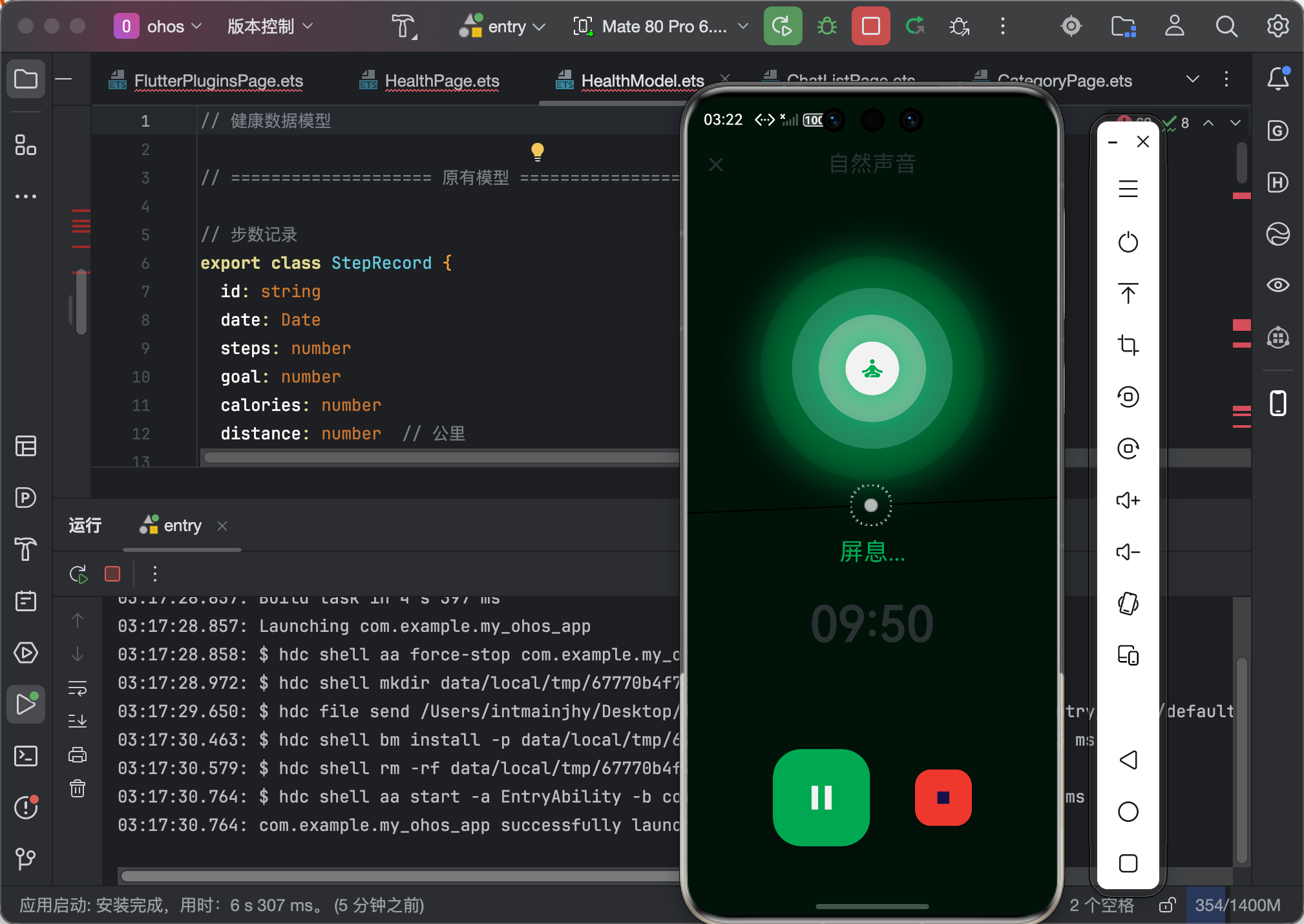
八、真机运行截图标注
┌─────────────────────────────────────┐
│                                     │
│           专注冥想中                 │  ← 标题淡入
│                                     │
│             05:32                   │  ← 时间显示
│                                     │
│         ┌─────────────┐             │
│       ╱    ╱  ╲  ╲    ╲           │
│      ╱   ╱    ╲  ╲    ╲          │  ← 外层:渐变光环
│     │  │   ┌───┐   │  │          │
│     │  │   │ 🧘 │   │  │          │  ← 中心:冥想图标
│     │  │   └───┘   │  │          │
│      ╲   ╲    ╱  ╱    ╱          │
│       ╲    ╲╱  ╱    ╱           │  ← 内层:缩放动画
│         └─────────────┘             │
│                                     │
│       保持呼吸,专注当下              │  ← 提示文字
│                                     │
└─────────────────────────────────────┘
九、大一学生真实学习总结
说实话,flutter_animate 这个库真的太好用了!
以前写动画,我都是用 AnimationController + Tween,代码特别长。现在用 flutter_animate,几行代码就能实现很酷的动画效果。
我学到的几点:
-
动画要自然
- 冥想是一种放松的活动,动画不能太突兀
- 缩放动画用
Curves.easeInOut最合适
-
多层动画增加层次感
- 单层圆形显得单薄
- 三层圆形让画面更有深度
-
性能很重要
- 不是所有设备都支持高帧率动画
- 要在效果和性能之间找平衡
-
鸿蒙设备需要额外注意
- 某些设备动画表现和 Android 不同
- 建议在真机上测试
作者:IntMainJhy
创作时间:2026年5月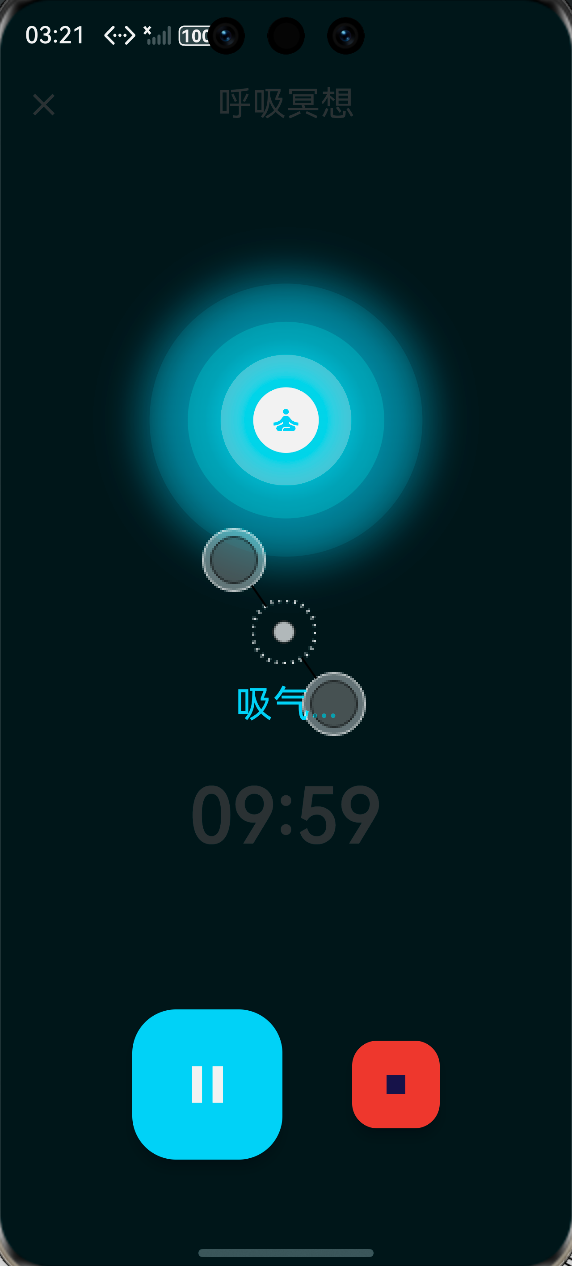

作为“人工智能6S店”的官方数字引擎,为AI开发者与企业提供一个覆盖软硬件全栈、一站式门户。
更多推荐
 0
0 0
0- 0


 已为社区贡献93条内容

所有评论(0)