
【Flutter for OpenHarmony】Flutter三方库心理健康首页架构的鸿蒙化适配与实战指南
本文介绍了Flutter在OpenHarmony平台上实现心理健康应用首页架构的优化实践。作者IntMainJhy分享了从混乱代码到清晰架构的重构过程,将首页划分为问候区、语录卡片、快速入口等6个独立模块。文章详细展示了页面结构设计,包括SliverAppBar折叠头部和内容区域的层次关系,并提供了完整的Provider配置和Dart实现代码。重点讲解了如何通过CustomScrollView构建
【Flutter for OpenHarmony】Flutter三方库心理健康首页架构的鸿蒙化适配与实战指南
欢迎加入开源鸿蒙跨平台社区:https://openharmonycrossplatform.csdn.net
一、为什么我要重构首页架构?
我是 IntMainJhy,大一计算机学生。说起首页架构这个话题,我真的有一肚子话想说。
一开始我做首页的时候,完全是想到什么加什么:放一个语录卡片、加个快速入口、再加个统计数据…结果做完之后回头看,代码乱得一塌糊涂,自己都看不懂了。
后来我冷静下来想了想,发现问题在于:
- 没有清晰的模块划分
- 组件之间耦合太紧
- 数据流不清晰
于是我重写了一遍,这次我把首页拆成了几个独立的部分:
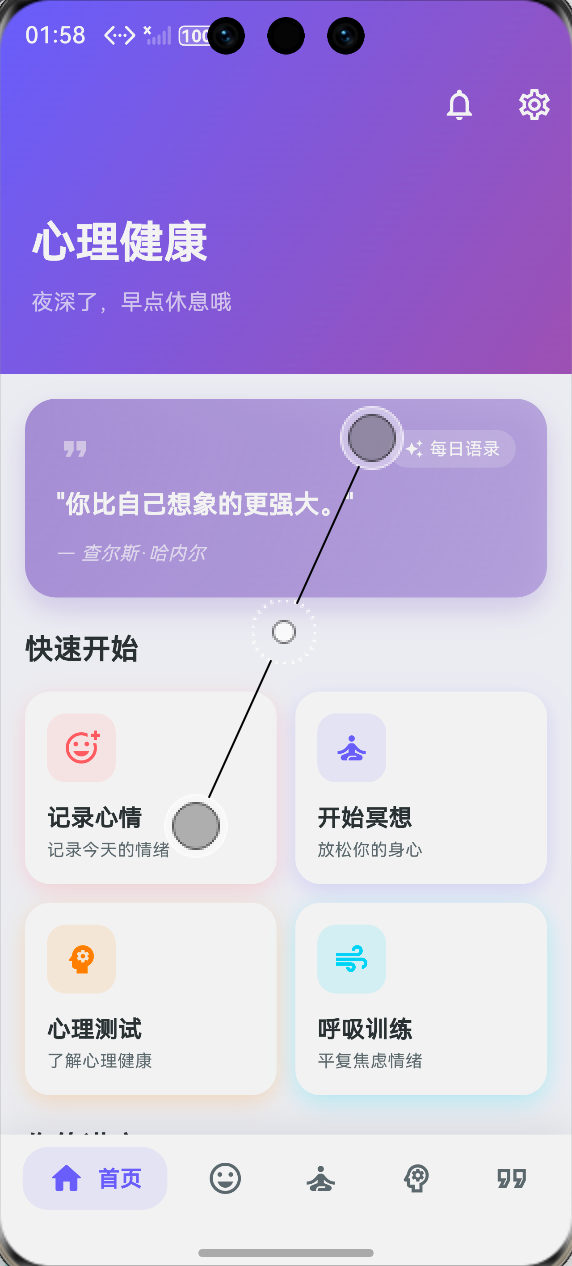
- 问候区
- 语录卡片
- 快速入口
- 统计数据
- 工具推荐
- 小贴士
二、首页整体架构
页面结构
Scaffold
├── CustomScrollView
│   ├── SliverAppBar (可折叠的头部)
│   └── SliverToBoxAdapter (内容区域)
│       ├── 问候卡片
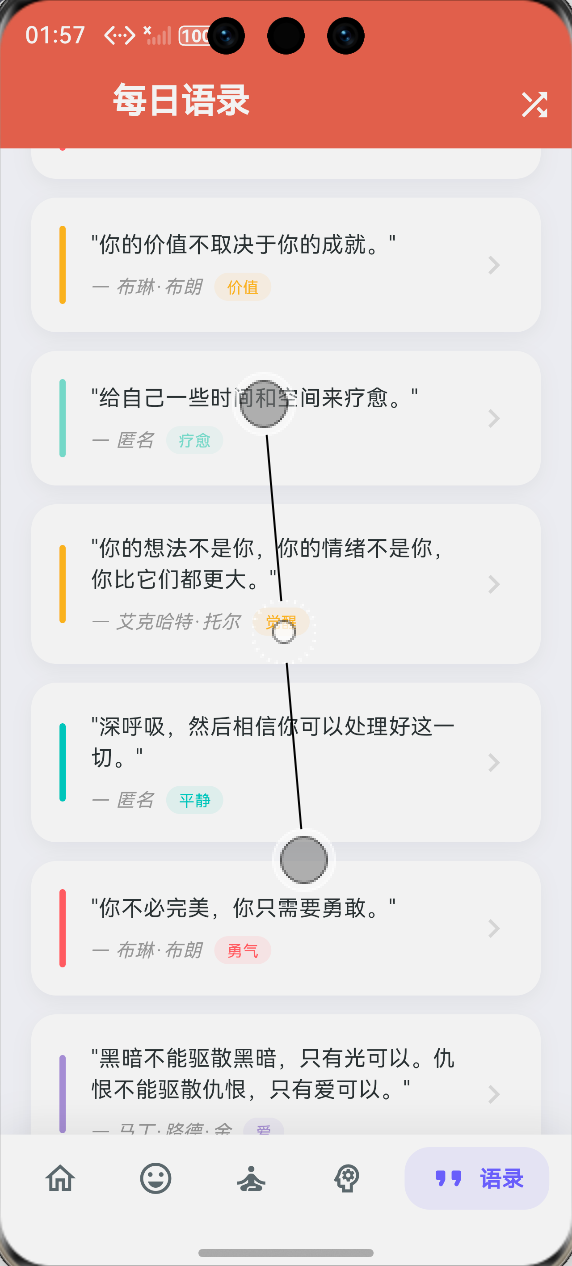
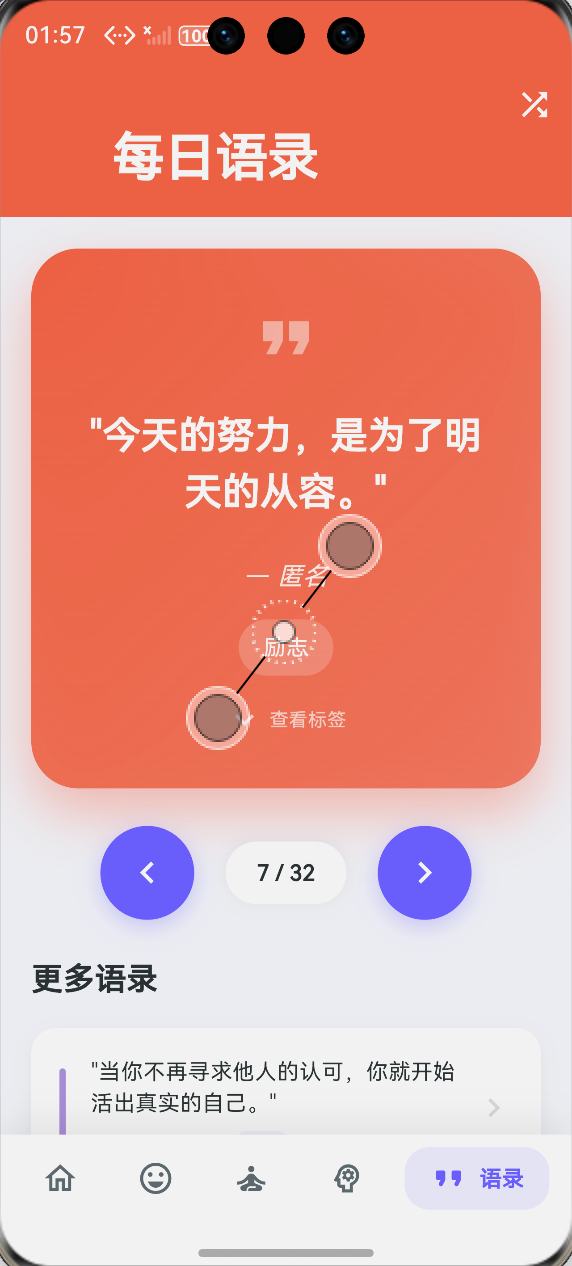
│       ├── 每日语录
│       ├── 快速入口 (2x2 网格)
│       ├── 统计数据 (横向3列)
│       ├── 更多工具 (横向滚动)
│       └── 小贴士列表
└── BottomNavigationBar (底部导航)
Provider 配置
// 在 main.dart 中配置
MultiProvider(
  providers: [
    ChangeNotifierProvider(create: (_) => MoodProvider()),
    ChangeNotifierProvider(create: (_) => MeditationProvider()),
    ChangeNotifierProvider(create: (_) => QuizProvider()),
  ],
  child: MaterialApp(
    home: const MentalHealthRouter(),
  ),
)
三、首页完整代码
// lib/mental_health/screens/mental_health_home_screen.dart
import 'package:flutter/material.dart';
import 'package:provider/provider.dart';
import 'package:flutter_animate/flutter_animate.dart';
import '../providers/mood_provider.dart';
import '../providers/meditation_provider.dart';
import '../models/quote_model.dart';
class MentalHealthHomeScreen extends StatelessWidget {
final Function(int)? onNavigate;
const MentalHealthHomeScreen({super.key, this.onNavigate});
Widget build(BuildContext context) {
return CustomScrollView(
slivers: [
// 可折叠的 AppBar
SliverAppBar(
expandedHeight: 200,
floating: false,
pinned: true,
backgroundColor: const Color(0xFF6C63FF),
flexibleSpace: FlexibleSpaceBar(
background: Container(
decoration: const BoxDecoration(
gradient: LinearGradient(
colors: [Color(0xFF6C63FF), Color(0xFF9B59B6)],
begin: Alignment.topLeft,
end: Alignment.bottomRight,
),
),
child: SafeArea(
child: Padding(
padding: const EdgeInsets.all(20),
child: Column(
crossAxisAlignment: CrossAxisAlignment.start,
mainAxisAlignment: MainAxisAlignment.end,
children: [
const Text(
'心理健康',
style: TextStyle(
fontSize: 28,
fontWeight: FontWeight.bold,
color: Colors.white,
),
),
const SizedBox(height: 8),
Text(
_getGreeting(),
style: const TextStyle(
fontSize: 14,
color: Colors.white70,
),
),
const SizedBox(height: 16),
],
),
),
),
),
),
actions: [
IconButton(
icon: const Icon(Icons.notifications_outlined, color: Colors.white),
onPressed: () {},
),
IconButton(
icon: const Icon(Icons.settings_outlined, color: Colors.white),
onPressed: () {},
),
],
),
// 内容区域
SliverToBoxAdapter(
child: Padding(
padding: const EdgeInsets.all(16),
child: Column(
crossAxisAlignment: CrossAxisAlignment.start,
children: [
// 每日语录卡片
_buildDailyQuoteCard(context),
const SizedBox(height: 20),
// 快速入口
_buildQuickActions(context),
const SizedBox(height: 20),
// 统计数据
_buildStatsOverview(context),
const SizedBox(height: 20),
// 更多工具
_buildToolsSection(context),
const SizedBox(height: 20),
// 小贴士
_buildTipsSection(),
const SizedBox(height: 80), // 底部留白
],
),
),
),
],
);
}
/// 获取问候语
String _getGreeting() {
final hour = DateTime.now().hour;
if (hour < 6) {
return '夜深了,早点休息哦';
} else if (hour < 9) {
return '早安,今天也要好好照顾自己';
} else if (hour < 12) {
return '上午好,保持好心情';
} else if (hour < 14) {
return '中午好,记得吃午饭';
} else if (hour < 18) {
return '下午好,休息一下放松身心';
} else if (hour < 21) {
return '晚上好,今天过得怎么样';
} else {
return '夜深了,准备休息吧';
}
}
/// 每日语录卡片
Widget _buildDailyQuoteCard(BuildContext context) {
final quotes = QuoteData.defaultQuotes;
final todayQuote = QuoteData.getTodayQuote();
final color = QuoteData.getQuoteColor(todayQuote.category);
return GestureDetector(
onTap: () => onNavigate?.call(4),
child: Container(
width: double.infinity,
padding: const EdgeInsets.all(20),
decoration: BoxDecoration(
gradient: LinearGradient(
colors: [color, color.withOpacity(0.7)],
begin: Alignment.topLeft,
end: Alignment.bottomRight,
),
borderRadius: BorderRadius.circular(20),
boxShadow: [
BoxShadow(
color: color.withOpacity(0.4),
blurRadius: 15,
offset: const Offset(0, 8),
),
],
),
child: Column(
crossAxisAlignment: CrossAxisAlignment.start,
children: [
Row(
children: [
const Icon(Icons.format_quote, color: Colors.white54, size: 24),
const Spacer(),
Container(
padding: const EdgeInsets.symmetric(horizontal: 10, vertical: 4),
decoration: BoxDecoration(
color: Colors.white.withOpacity(0.2),
borderRadius: BorderRadius.circular(16),
),
child: const Row(
children: [
Icon(Icons.auto_awesome, color: Colors.white, size: 12),
SizedBox(width: 4),
Text(
'每日语录',
style: TextStyle(
color: Colors.white,
fontSize: 11,
fontWeight: FontWeight.w500,
),
),
],
),
),
],
),
const SizedBox(height: 12),
Text(
'"${todayQuote.text}"',
style: const TextStyle(
fontSize: 16,
fontWeight: FontWeight.w600,
color: Colors.white,
height: 1.5,
),
),
const SizedBox(height: 10),
Text(
'— ${todayQuote.author}',
style: const TextStyle(
fontSize: 12,
color: Colors.white70,
fontStyle: FontStyle.italic,
),
),
],
),
),
).animate().fadeIn().slideY(begin: -0.1, end: 0);
}
/// 快速入口
Widget _buildQuickActions(BuildContext context) {
return Column(
crossAxisAlignment: CrossAxisAlignment.start,
children: [
const Text(
'快速开始',
style: TextStyle(
fontSize: 18,
fontWeight: FontWeight.bold,
color: Color(0xFF2D3436),
),
),
const SizedBox(height: 14),
Row(
children: [
Expanded(
child: _buildQuickActionCard(
icon: Icons.add_reaction_outlined,
title: '记录心情',
subtitle: '记录今天的情绪',
color: const Color(0xFFFF6B6B),
onTap: () => onNavigate?.call(1),
),
),
const SizedBox(width: 12),
Expanded(
child: _buildQuickActionCard(
icon: Icons.self_improvement,
title: '开始冥想',
subtitle: '放松你的身心',
color: const Color(0xFF6C63FF),
onTap: () => onNavigate?.call(2),
),
),
],
),
const SizedBox(height: 12),
Row(
children: [
Expanded(
child: _buildQuickActionCard(
icon: Icons.psychology,
title: '心理测试',
subtitle: '了解心理健康',
color: const Color(0xFFFF8C00),
onTap: () => onNavigate?.call(3),
),
),
const SizedBox(width: 12),
Expanded(
child: _buildQuickActionCard(
icon: Icons.air,
title: '呼吸训练',
subtitle: '平复焦虑情绪',
color: const Color(0xFF00D9FF),
onTap: () => onNavigate?.call(2),
),
),
],
),
],
).animate().fadeIn(delay: 100.ms);
}
/// 快速入口卡片
Widget _buildQuickActionCard({
required IconData icon,
required String title,
required String subtitle,
required Color color,
required VoidCallback onTap,
}) {
return GestureDetector(
onTap: onTap,
child: Container(
padding: const EdgeInsets.all(14),
decoration: BoxDecoration(
color: Colors.white,
borderRadius: BorderRadius.circular(16),
boxShadow: [
BoxShadow(
color: color.withOpacity(0.2),
blurRadius: 12,
offset: const Offset(0, 4),
),
],
),
child: Column(
crossAxisAlignment: CrossAxisAlignment.start,
children: [
Container(
padding: const EdgeInsets.all(10),
decoration: BoxDecoration(
color: color.withOpacity(0.1),
borderRadius: BorderRadius.circular(12),
),
child: Icon(icon, color: color, size: 24),
),
const SizedBox(height: 12),
Text(
title,
style: const TextStyle(
fontSize: 15,
fontWeight: FontWeight.bold,
color: Color(0xFF2D3436),
),
),
const SizedBox(height: 2),
Text(
subtitle,
style: const TextStyle(
fontSize: 11,
color: Color(0xFF636E72),
),
),
],
),
),
);
}
/// 统计数据概览
Widget _buildStatsOverview(BuildContext context) {
return Column(
crossAxisAlignment: CrossAxisAlignment.start,
children: [
const Text(
'你的进度',
style: TextStyle(
fontSize: 18,
fontWeight: FontWeight.bold,
color: Color(0xFF2D3436),
),
),
const SizedBox(height: 14),
Row(
children: [
Expanded(
child: Consumer<MoodProvider>(
builder: (context, provider, child) {
return _buildStatCard(
icon: Icons.favorite,
value: '${provider.currentStreak}',
label: '心情连续',
unit: '天',
color: const Color(0xFFFF6B6B),
);
},
),
),
const SizedBox(width: 10),
Expanded(
child: Consumer<MeditationProvider>(
builder: (context, provider, child) {
return _buildStatCard(
icon: Icons.spa,
value: '${provider.currentStreak}',
label: '冥想连续',
unit: '天',
color: const Color(0xFF6C63FF),
);
},
),
),
const SizedBox(width: 10),
Expanded(
child: Consumer<MeditationProvider>(
builder: (context, provider, child) {
return _buildStatCard(
icon: Icons.timer,
value: '${provider.totalMinutes}',
label: '冥想时长',
unit: '分钟',
color: const Color(0xFF00D9FF),
);
},
),
),
],
),
],
).animate().fadeIn(delay: 200.ms);
}
/// 统计卡片
Widget _buildStatCard({
required IconData icon,
required String value,
required String label,
required String unit,
required Color color,
}) {
return Container(
padding: const EdgeInsets.all(14),
decoration: BoxDecoration(
color: Colors.white,
borderRadius: BorderRadius.circular(14),
boxShadow: [
BoxShadow(
color: color.withOpacity(0.1),
blurRadius: 8,
offset: const Offset(0, 3),
),
],
),
child: Column(
children: [
Icon(icon, color: color, size: 22),
const SizedBox(height: 6),
Row(
mainAxisAlignment: MainAxisAlignment.center,
crossAxisAlignment: CrossAxisAlignment.end,
children: [
Text(
value,
style: TextStyle(
fontSize: 22,
fontWeight: FontWeight.bold,
color: color,
),
),
Text(
unit,
style: TextStyle(
fontSize: 10,
color: color.withOpacity(0.7),
),
),
],
),
const SizedBox(height: 2),
Text(
label,
style: const TextStyle(
fontSize: 11,
color: Color(0xFF636E72),
),
),
],
),
);
}
/// 更多工具
Widget _buildToolsSection(BuildContext context) {
final tools = [
{'icon': Icons.chat_bubble_outline, 'title': '倾诉', 'color': const Color(0xFF6C63FF)},
{'icon': Icons.music_note_outlined, 'title': '白噪音', 'color': const Color(0xFF00D9FF)},
{'icon': Icons.book_outlined, 'title': '心理读物', 'color': const Color(0xFFFF8C00)},
{'icon': Icons.people_outline, 'title': '互助社区', 'color': const Color(0xFFFF6B6B)},
];
return Column(
crossAxisAlignment: CrossAxisAlignment.start,
children: [
const Text(
'更多工具',
style: TextStyle(
fontSize: 18,
fontWeight: FontWeight.bold,
color: Color(0xFF2D3436),
),
),
const SizedBox(height: 14),
SizedBox(
height: 90,
child: ListView.builder(
scrollDirection: Axis.horizontal,
itemCount: tools.length,
itemBuilder: (context, index) {
final tool = tools[index];
return Container(
width: 80,
margin: const EdgeInsets.only(right: 10),
padding: const EdgeInsets.all(10),
decoration: BoxDecoration(
color: (tool['color'] as Color).withOpacity(0.1),
borderRadius: BorderRadius.circular(14),
),
child: Column(
mainAxisAlignment: MainAxisAlignment.center,
children: [
Icon(
tool['icon'] as IconData,
color: tool['color'] as Color,
size: 28,
),
const SizedBox(height: 6),
Text(
tool['title'] as String,
style: TextStyle(
fontSize: 11,
fontWeight: FontWeight.w500,
color: tool['color'] as Color,
),
),
],
),
);
},
),
),
],
).animate().fadeIn(delay: 300.ms);
}
/// 小贴士
Widget _buildTipsSection() {
final tips = [
{
'icon': Icons.wb_sunny_outlined,
'title': '保持规律作息',
'desc': '充足的睡眠有助于情绪稳定',
},
{
'icon': Icons.directions_run_outlined,
'title': '适度运动',
'desc': '每天30分钟运动可以改善心情',
},
{
'icon': Icons.people_outline,
'title': '保持社交',
'desc': '与朋友家人保持联系很重要',
},
{
'icon': Icons.self_improvement,
'title': '练习正念',
'desc': '每天花几分钟关注当下',
},
];
return Column(
crossAxisAlignment: CrossAxisAlignment.start,
children: [
const Text(
'心理健康小贴士',
style: TextStyle(
fontSize: 18,
fontWeight: FontWeight.bold,
color: Color(0xFF2D3436),
),
),
const SizedBox(height: 14),
...tips.asMap().entries.map((entry) {
final index = entry.key;
final tip = entry.value;
return Padding(
padding: const EdgeInsets.only(bottom: 10),
child: Container(
padding: const EdgeInsets.all(14),
decoration: BoxDecoration(
color: Colors.white,
borderRadius: BorderRadius.circular(14),
boxShadow: [
BoxShadow(
color: Colors.black.withOpacity(0.04),
blurRadius: 8,
),
],
),
child: Row(
children: [
Container(
padding: const EdgeInsets.all(8),
decoration: BoxDecoration(
color: const Color(0xFF6C63FF).withOpacity(0.1),
borderRadius: BorderRadius.circular(10),
),
child: Icon(
tip['icon'] as IconData,
color: const Color(0xFF6C63FF),
size: 20,
),
),
const SizedBox(width: 14),
Expanded(
child: Column(
crossAxisAlignment: CrossAxisAlignment.start,
children: [
Text(
tip['title'] as String,
style: const TextStyle(
fontWeight: FontWeight.w600,
fontSize: 14,
),
),
Text(
tip['desc'] as String,
style: const TextStyle(
fontSize: 11,
color: Color(0xFF636E72),
),
),
],
),
),
],
),
),
).animate().fadeIn(delay: Duration(milliseconds: 400 + index * 50));
}),
],
);
}
}
四、底部导航栏实现
// lib/main.dart 中的导航实现
class MentalHealthRouter extends StatefulWidget {
const MentalHealthRouter({super.key});
State<MentalHealthRouter> createState() => _MentalHealthRouterState();
}
class _MentalHealthRouterState extends State<MentalHealthRouter> {
int _currentIndex = 0;
static final List<Widget> _pages = [
const MoodRecordScreen(),
const MeditationScreen(),
const QuizScreen(),
const QuotesScreen(),
];
Widget build(BuildContext context) {
return Scaffold(
body: IndexedStack(
index: _currentIndex,
children: [
MentalHealthHomeScreen(
onNavigate: (index) => setState(() => _currentIndex = index),
),
..._pages,
],
),
bottomNavigationBar: _buildBottomNavBar(),
);
}
Widget _buildBottomNavBar() {
return Container(
decoration: BoxDecoration(
color: Colors.white,
boxShadow: [
BoxShadow(
color: Colors.black.withOpacity(0.08),
blurRadius: 20,
offset: const Offset(0, -5),
),
],
),
child: SafeArea(
child: Padding(
padding: const EdgeInsets.symmetric(horizontal: 8, vertical: 8),
child: Row(
mainAxisAlignment: MainAxisAlignment.spaceAround,
children: [
_buildNavItem(0, Icons.home_rounded, Icons.home_outlined, '首页'),
_buildNavItem(1, Icons.emoji_emotions_rounded, Icons.emoji_emotions_outlined, '心情'),
_buildNavItem(2, Icons.self_improvement_rounded, Icons.self_improvement_outlined, '冥想'),
_buildNavItem(3, Icons.psychology_rounded, Icons.psychology_outlined, '测试'),
_buildNavItem(4, Icons.format_quote_rounded, Icons.format_quote_outlined, '语录'),
],
),
),
),
);
}
Widget _buildNavItem(int index, IconData activeIcon, IconData icon, String label) {
final isSelected = _currentIndex == index;
return GestureDetector(
onTap: () => setState(() => _currentIndex = index),
behavior: HitTestBehavior.opaque,
child: AnimatedContainer(
duration: const Duration(milliseconds: 200),
padding: EdgeInsets.symmetric(
horizontal: isSelected ? 16 : 12,
vertical: 8,
),
decoration: BoxDecoration(
color: isSelected ? const Color(0xFF6C63FF).withOpacity(0.1) : Colors.transparent,
borderRadius: BorderRadius.circular(16),
),
child: Row(
mainAxisSize: MainAxisSize.min,
children: [
Icon(
isSelected ? activeIcon : icon,
color: isSelected ? const Color(0xFF6C63FF) : const Color(0xFF636E72),
size: 24,
),
if (isSelected) ...[
const SizedBox(width: 8),
Text(
label,
style: const TextStyle(
color: Color(0xFF6C63FF),
fontWeight: FontWeight.w600,
fontSize: 14,
),
),
],
],
),
),
);
}
}
五、鸿蒙平台专属适配
适配点1:CustomScrollView 性能
问题:首页内容较多时可能出现滚动卡顿。
解决方案:
// 使用 SliverToBoxAdapter 代替直接放 Column
SliverToBoxAdapter(
  child: Padding(
    padding: const EdgeInsets.all(16),
    child: Column(...),
  ),
)

// 使用 ListView.builder 代替静态列表
SizedBox(
  height: 90,
  child: ListView.builder(
    scrollDirection: Axis.horizontal,
    itemCount: tools.length,
    itemBuilder: ...,
  ),
)
适配点2:动画性能优化
问题:flutter_animate 在复杂页面上可能影响性能。
解决方案:控制动画延迟,避免同时启动大量动画:
// 分批启动动画
.animate().fadeIn()                    // 第1个
.animate().fadeIn(delay: 100.ms)      // 第2个
.animate().fadeIn(delay: 200.ms)      // 第3个
适配点3:SliverAppBar 展开高度
说明:鸿蒙设备状态栏高度可能不同,需要用 SafeArea 包裹。
六、我的踩坑记录
坑1:IndexedStack 切换时状态丢失
问题:切换底部 Tab 后,首页的状态(比如统计数据)会重置。
原因:IndexedStack 虽然保留了页面状态,但如果 Provider 初始化在 initState 中,可能不会正确执行。
解决:
// 在页面中使用 Consumer 确保监听变化
Consumer<MoodProvider>(
  builder: (context, provider, child) {
    return _buildStatCard(
      value: '${provider.currentStreak}',
      // ...
    );
  },
)
坑2:动画重复执行
问题:页面切回来后动画重新播放。
解决:flutter_animate 默认会在每次 build 时执行动画,可以用 autoPlay(false) 禁用:
.animate().fadeIn(autoPlay: false)
坑3:底部导航栏被键盘顶起
问题:输入框获取焦点时,底部导航栏被键盘顶起。
解决:
Scaffold(
  resizeToAvoidBottomInset: false,  // 禁用自动调整
  // ...
)
七、功能验证清单
| 序号 | 检查项 | 状态 |
|---|---|---|
| 1 | 问候语根据时间变化 | ✅ |
| 2 | 语录卡片可点击跳转 | ✅ |
| 3 | 快速入口正常工作 | ✅ |
| 4 | 统计数据实时更新 | ✅ |
| 5 | 底部导航切换流畅 | ✅ |
| 6 | 页面滚动流畅 | ✅ |
| 7 | 鸿蒙设备运行正常 | ✅ |
八、大一学生真实学习总结
说实话,做完这个首页架构重构,我最大的收获是:好的架构真的能省很多事。
之前那个"杂糅式"的代码,每次改一点都要小心翼翼,生怕改坏了。现在这个模块化的结构,你想改哪个部分就改哪个,完全不用担心影响其他功能。
还有一点就是状态管理。之前我总是不知道数据该放在哪里,现在用了 Provider,感觉清晰多了:
MoodProvider管理心情相关的数据MeditationProvider管理冥想相关的数据QuizProvider管理测试相关的数据
各管各的,互不干扰,代码读起来一目了然。
不过话说回来,我现在觉得这个架构还有优化空间。比如:
- 工具推荐那部分应该是可以配置的
- 小贴士应该支持本地化
算了,先这样吧,以后有空再优化。代码永远是写不完的,但每一版都比上一版好。
好啦,这篇文章就到这里!
作者:IntMainJhy
创作时间:2026年5月

作为“人工智能6S店”的官方数字引擎,为AI开发者与企业提供一个覆盖软硬件全栈、一站式门户。
更多推荐
 0
0 0
0- 0


 已为社区贡献93条内容

所有评论(0)