
【Flutter for OpenHarmony】Flutter三方库呼吸训练功能的鸿蒙化适配与实战指南
摘要 本文介绍了Flutter呼吸训练功能的鸿蒙化适配实践。作者作为计算机专业学生,为解决考试焦虑问题开发了该功能,通过科学呼吸模式(如4-7-8呼吸法、箱式呼吸等)帮助用户放松。文章详细阐述了呼吸训练原理、数据模型设计(包含5种呼吸模式枚举)和核心状态管理实现(使用Provider管理呼吸阶段状态机)。代码示例展示了完整的呼吸周期控制逻辑,包括吸气、屏气和呼气阶段的计时器管理,以及进度计算等功能
【Flutter for OpenHarmony】Flutter三方库呼吸训练功能的鸿蒙化适配与实战指南
欢迎加入开源鸿蒙跨平台社区:https://openharmonycrossplatform.csdn.net
一、为什么我要做呼吸训练功能?
我是 IntMainJhy,大一计算机学生。说起这个呼吸训练功能,其实是被逼出来的。
有一天晚上复习考试,我焦虑得不行,心跳加速、手心出汗,完全看不进去书。我室友说你试试深呼吸,我试了试,确实有用。
但问题是:我不知道该怎么呼吸才算对!吸多久?憋多久?呼多久?完全没有概念。
于是我就想,能不能做一个 App,引导我正确地呼吸?这就有了这个呼吸训练功能。
二、呼吸训练原理
深呼吸之所以能让人放松,核心原理是激活副交感神经系统。
常见的呼吸模式:
| 模式 | 吸气 | 屏气 | 呼气 | 用途 |
|---|---|---|---|---|
| 4-7-8 呼吸 | 4秒 | 7秒 | 8秒 | 助眠、放松 |
| 箱式呼吸 | 4秒 | 4秒 | 4秒 | 4秒 |
| 深腹式呼吸 | 5秒 | 0 | 5秒 | 日常放松 |
| 放松呼吸 | 4秒 | 2秒 | 6秒 | 缓解焦虑 |
三、数据模型
// lib/mental_health/models/breathing_model.dart

import 'package:flutter/material.dart';

/// 呼吸模式类型
enum BreathingPattern {
  relaxation(
    '放松呼吸',
    '经典的4-7-8呼吸法,帮助放松身心、改善睡眠',
    4,
    7,
    8,
    Icons.nightlight_round,
    Color(0xFF9B59B6),
  ),
  boxBreathing(
    '箱式呼吸',
    '美国海军使用的呼吸法,帮助保持冷静专注',
    4,
    4,
    4,
    Icons.crop_square,
    Color(0xFF3498DB),
  ),
  deepBreathing(
    '深腹式呼吸',
    '最简单的呼吸练习,随时随地可以进行',
    5,
    0,
    5,
    Icons.air,
    Color(0xFF27AE60),
  ),
  calming(
    '舒缓呼吸',
    '4-2-6呼吸模式,快速缓解焦虑',
    4,
    2,
    6,
    Icons.spa,
    Color(0xFFE74C3C),
  ),
  energizing(
    '能量呼吸',
    '快速呼吸法,帮助早晨快速清醒',
    2,
    0,
    2,
    Icons.wb_sunny,
    Color(0xFFF39C12),
  );

  final String name;
  final String description;
  final int inhaleSeconds;  // 吸气时长(秒)
  final int holdSeconds;     // 屏气时长(秒)
  final int exhaleSeconds;   // 呼气时长(秒)
  final IconData icon;
  final Color color;

  const BreathingPattern(
    this.name,
    this.description,
    this.inhaleSeconds,
    this.holdSeconds,
    this.exhaleSeconds,
    this.icon,
    this.color,
  );

  /// 获取总周期时长
  int get cycleDuration => inhaleSeconds + holdSeconds + exhaleSeconds;
}

/// 呼吸训练状态
enum BreathingPhase {
  inhale('吸气', Color(0xFF3498DB)),
  hold('屏气', Color(0xFFF39C12)),
  exhale('呼气', Color(0xFF27AE60)),
  ready('准备', Color(0xFF9B59B6));

  final String label;
  final Color color;

  const BreathingPhase(this.label, this.color);
}
四、Provider 状态管理
这部分是呼吸训练的核心,实现了一个状态机来管理呼吸阶段。
// lib/mental_health/providers/breathing_provider.dart
import 'dart:async';
import 'package:flutter/material.dart';
import '../models/breathing_model.dart';
class BreathingProvider extends ChangeNotifier {
// 计时器
Timer? _timer;
// 状态
BreathingPattern? _currentPattern;
BreathingPhase _currentPhase = BreathingPhase.ready;
int _phaseSeconds = 0;
int _totalCycles = 0;
int _completedCycles = 0;
bool _isRunning = false;
int _totalSeconds = 0;
// Getters
BreathingPattern? get currentPattern => _currentPattern;
BreathingPhase get currentPhase => _currentPhase;
int get phaseSeconds => _phaseSeconds;
int get totalCycles => _totalCycles;
int get completedCycles => _completedCycles;
bool get isRunning => _isRunning;
int get totalSeconds => _totalSeconds;
/// 获取当前阶段的进度(0.0 - 1.0)
double get phaseProgress {
if (_currentPattern == null) return 0;
int phaseDuration;
switch (_currentPhase) {
case BreathingPhase.inhale:
phaseDuration = _currentPattern!.inhaleSeconds;
break;
case BreathingPhase.hold:
phaseDuration = _currentPattern!.holdSeconds;
break;
case BreathingPhase.exhale:
phaseDuration = _currentPattern!.exhaleSeconds;
break;
case BreathingPhase.ready:
return 0;
}
return phaseDuration > 0 ? _phaseSeconds / phaseDuration : 0;
}
/// 获取剩余秒数
int get remainingSeconds {
if (_currentPattern == null) return 0;
switch (_currentPhase) {
case BreathingPhase.inhale:
return _currentPattern!.inhaleSeconds - _phaseSeconds;
case BreathingPhase.hold:
return _currentPattern!.holdSeconds - _phaseSeconds;
case BreathingPhase.exhale:
return _currentPattern!.exhaleSeconds - _phaseSeconds;
case BreathingPhase.ready:
return 0;
}
}
/// 开始训练
void startBreathing(BreathingPattern pattern, int cycles) {
_currentPattern = pattern;
_totalCycles = cycles;
_completedCycles = 0;
_totalSeconds = 0;
_isRunning = true;
_startNextPhase();
notifyListeners();
}
/// 停止训练
void stopBreathing() {
_timer?.cancel();
_isRunning = false;
_currentPhase = BreathingPhase.ready;
_phaseSeconds = 0;
notifyListeners();
}
/// 暂停训练
void pauseBreathing() {
_timer?.cancel();
_isRunning = false;
notifyListeners();
}
/// 继续训练
void resumeBreathing() {
if (_currentPattern == null) return;
_isRunning = true;
_startTimer();
notifyListeners();
}
/// 开始下一个阶段
void _startNextPhase() {
if (_completedCycles >= _totalCycles) {
stopBreathing();
return;
}
_phaseSeconds = 0;
switch (_currentPhase) {
case BreathingPhase.ready:
case BreathingPhase.exhale:
_currentPhase = BreathingPhase.inhale;
break;
case BreathingPhase.inhale:
if (_currentPattern!.holdSeconds > 0) {
_currentPhase = BreathingPhase.hold;
} else {
_currentPhase = BreathingPhase.exhale;
}
break;
case BreathingPhase.hold:
_currentPhase = BreathingPhase.exhale;
break;
}
_startTimer();
notifyListeners();
}
/// 启动计时器
void _startTimer() {
_timer?.cancel();
_timer = Timer.periodic(const Duration(seconds: 1), (timer) {
_phaseSeconds++;
_totalSeconds++;
if (_phaseSeconds >= _getCurrentPhaseDuration()) {
// 当前阶段完成
if (_currentPhase == BreathingPhase.exhale) {
_completedCycles++;
}
_startNextPhase();
}
notifyListeners();
});
}
/// 获取当前阶段时长
int _getCurrentPhaseDuration() {
if (_currentPattern == null) return 0;
switch (_currentPhase) {
case BreathingPhase.inhale:
return _currentPattern!.inhaleSeconds;
case BreathingPhase.hold:
return _currentPattern!.holdSeconds;
case BreathingPhase.exhale:
return _currentPattern!.exhaleSeconds;
case BreathingPhase.ready:
return 0;
}
}
void dispose() {
_timer?.cancel();
super.dispose();
}
}
五、UI 界面实现
这是最有意思的部分!我实现了:
- 呼吸动画圆形
- 阶段文字提示
- 倒计时显示
- 进度指示
// lib/mental_health/screens/breathing_screen.dart
import 'package:flutter/material.dart';
import 'package:provider/provider.dart';
import 'package:flutter_animate/flutter_animate.dart';
import '../providers/breathing_provider.dart';
import '../models/breathing_model.dart';
class BreathingScreen extends StatefulWidget {
const BreathingScreen({super.key});
State<BreathingScreen> createState() => _BreathingScreenState();
}
class _BreathingScreenState extends State<BreathingScreen>
with TickerProviderStateMixin {
late AnimationController _breathController;
late Animation<double> _scaleAnimation;
BreathingPattern _selectedPattern = BreathingPattern.relaxation;
int _selectedCycles = 4;
void initState() {
super.initState();
_breathController = AnimationController(
vsync: this,
duration: const Duration(seconds: 4),
);
_scaleAnimation = Tween<double>(begin: 0.6, end: 1.0).animate(
CurvedAnimation(parent: _breathController, curve: Curves.easeInOut),
);
}
void dispose() {
_breathController.dispose();
super.dispose();
}
void _updateAnimation(BreathingProvider provider) {
if (!provider.isRunning || provider.currentPattern == null) {
_breathController.stop();
return;
}
final pattern = provider.currentPattern!;
int targetDuration;
switch (provider.currentPhase) {
case BreathingPhase.inhale:
targetDuration = pattern.inhaleSeconds;
_breathController.duration = Duration(seconds: targetDuration);
_breathController.forward(from: 0);
break;
case BreathingPhase.hold:
_breathController.stop();
break;
case BreathingPhase.exhale:
targetDuration = pattern.exhaleSeconds;
_breathController.duration = Duration(seconds: targetDuration);
_breathController.reverse(from: 1);
break;
case BreathingPhase.ready:
_breathController.stop();
break;
}
}
Widget build(BuildContext context) {
return Scaffold(
backgroundColor: const Color(0xFFF8F9FE),
appBar: AppBar(
title: const Text('呼吸训练'),
backgroundColor: Colors.white,
elevation: 0,
),
body: Consumer<BreathingProvider>(
builder: (context, provider, child) {
// 更新动画
_updateAnimation(provider);
if (provider.isRunning) {
return _buildTrainingView(provider);
}
return _buildSetupView(provider);
},
),
);
}
/// 设置页面
Widget _buildSetupView(BreathingProvider provider) {
return SingleChildScrollView(
padding: const EdgeInsets.all(16),
child: Column(
crossAxisAlignment: CrossAxisAlignment.start,
children: [
// 介绍卡片
_buildIntroCard(),
const SizedBox(height: 24),
// 选择呼吸模式
const Text(
'选择呼吸模式',
style: TextStyle(
fontSize: 18,
fontWeight: FontWeight.bold,
),
),
const SizedBox(height: 12),
_buildPatternSelector(),
const SizedBox(height: 24),
// 选择循环次数
const Text(
'选择循环次数',
style: TextStyle(
fontSize: 18,
fontWeight: FontWeight.bold,
),
),
const SizedBox(height: 12),
_buildCycleSelector(),
const SizedBox(height: 32),
// 开始按钮
_buildStartButton(provider),
],
),
);
}
/// 介绍卡片
Widget _buildIntroCard() {
return Container(
padding: const EdgeInsets.all(20),
decoration: BoxDecoration(
gradient: LinearGradient(
colors: [
_selectedPattern.color,
_selectedPattern.color.withOpacity(0.7),
],
begin: Alignment.topLeft,
end: Alignment.bottomRight,
),
borderRadius: BorderRadius.circular(20),
),
child: Column(
crossAxisAlignment: CrossAxisAlignment.start,
children: [
Row(
children: [
Icon(_selectedPattern.icon, color: Colors.white, size: 28),
const SizedBox(width: 12),
Text(
_selectedPattern.name,
style: const TextStyle(
fontSize: 20,
fontWeight: FontWeight.bold,
color: Colors.white,
),
),
],
),
const SizedBox(height: 12),
Text(
_selectedPattern.description,
style: const TextStyle(
fontSize: 14,
color: Colors.white70,
),
),
const SizedBox(height: 16),
Row(
children: [
_buildPatternBadge('吸气', _selectedPattern.inhaleSeconds),
const SizedBox(width: 8),
if (_selectedPattern.holdSeconds > 0) ...[
_buildPatternBadge('屏气', _selectedPattern.holdSeconds),
const SizedBox(width: 8),
],
_buildPatternBadge('呼气', _selectedPattern.exhaleSeconds),
],
),
],
),
).animate().fadeIn().slideY(begin: -0.1, end: 0);
}
Widget _buildPatternBadge(String label, int seconds) {
return Container(
padding: const EdgeInsets.symmetric(horizontal: 10, vertical: 4),
decoration: BoxDecoration(
color: Colors.white.withOpacity(0.2),
borderRadius: BorderRadius.circular(12),
),
child: Text(
'$label ${seconds}s',
style: const TextStyle(
color: Colors.white,
fontSize: 12,
),
),
);
}
/// 呼吸模式选择器
Widget _buildPatternSelector() {
return Column(
children: BreathingPattern.values.map((pattern) {
final isSelected = _selectedPattern == pattern;
return GestureDetector(
onTap: () {
setState(() => _selectedPattern = pattern);
},
child: Container(
margin: const EdgeInsets.only(bottom: 10),
padding: const EdgeInsets.all(16),
decoration: BoxDecoration(
color: Colors.white,
borderRadius: BorderRadius.circular(16),
border: Border.all(
color: isSelected ? pattern.color : Colors.transparent,
width: 2,
),
boxShadow: [
BoxShadow(
color: isSelected
? pattern.color.withOpacity(0.3)
: Colors.black.withOpacity(0.05),
blurRadius: 10,
),
],
),
child: Row(
children: [
Container(
padding: const EdgeInsets.all(10),
decoration: BoxDecoration(
color: pattern.color.withOpacity(0.1),
borderRadius: BorderRadius.circular(10),
),
child: Icon(pattern.icon, color: pattern.color, size: 24),
),
const SizedBox(width: 16),
Expanded(
child: Column(
crossAxisAlignment: CrossAxisAlignment.start,
children: [
Text(
pattern.name,
style: const TextStyle(
fontWeight: FontWeight.bold,
fontSize: 15,
),
),
Text(
pattern.description,
style: const TextStyle(
fontSize: 12,
color: Color(0xFF636E72),
),
maxLines: 2,
),
],
),
),
if (isSelected)
Icon(Icons.check_circle, color: pattern.color)
else
Icon(Icons.circle_outlined, color: const Color(0xFFB2BEC3)),
],
),
),
).animate().fadeIn(
delay: Duration(milliseconds: 50 * pattern.index),
);
}).toList(),
);
}
/// 循环次数选择器
Widget _buildCycleSelector() {
final cycles = [2, 4, 6, 8, 10];
return Wrap(
spacing: 10,
runSpacing: 10,
children: cycles.map((c) {
final isSelected = _selectedCycles == c;
return GestureDetector(
onTap: () => setState(() => _selectedCycles = c),
child: Container(
width: 60,
height: 60,
decoration: BoxDecoration(
color: isSelected
? _selectedPattern.color
: Colors.white,
borderRadius: BorderRadius.circular(12),
border: Border.all(
color: isSelected
? _selectedPattern.color
: const Color(0xFFE0E0E0),
),
),
child: Column(
mainAxisAlignment: MainAxisAlignment.center,
children: [
Text(
'$c',
style: TextStyle(
fontSize: 20,
fontWeight: FontWeight.bold,
color: isSelected ? Colors.white : const Color(0xFF2D3436),
),
),
Text(
'次',
style: TextStyle(
fontSize: 12,
color: isSelected ? Colors.white70 : const Color(0xFF636E72),
),
),
],
),
),
);
}).toList(),
);
}
/// 开始按钮
Widget _buildStartButton(BreathingProvider provider) {
final totalSeconds = _selectedCycles * _selectedPattern.cycleDuration;
final minutes = totalSeconds ~/ 60;
final seconds = totalSeconds % 60;
return Column(
children: [
Container(
padding: const EdgeInsets.all(12),
decoration: BoxDecoration(
color: const Color(0xFFF5F5F5),
borderRadius: BorderRadius.circular(10),
),
child: Row(
mainAxisAlignment: MainAxisAlignment.center,
children: [
const Icon(Icons.timer, size: 18, color: Color(0xFF636E72)),
const SizedBox(width: 8),
Text(
'预计时长: ${minutes > 0 ? "${minutes}分" : ""}${seconds}秒',
style: const TextStyle(
color: Color(0xFF636E72),
),
),
],
),
),
const SizedBox(height: 16),
SizedBox(
width: double.infinity,
height: 56,
child: ElevatedButton(
onPressed: () {
provider.startBreathing(_selectedPattern, _selectedCycles);
},
style: ElevatedButton.styleFrom(
backgroundColor: _selectedPattern.color,
shape: RoundedRectangleBorder(
borderRadius: BorderRadius.circular(16),
),
),
child: const Row(
mainAxisAlignment: MainAxisAlignment.center,
children: [
Icon(Icons.play_arrow, color: Colors.white),
SizedBox(width: 8),
Text(
'开始训练',
style: TextStyle(
fontSize: 16,
fontWeight: FontWeight.bold,
color: Colors.white,
),
),
],
),
),
),
],
);
}
/// 训练页面
Widget _buildTrainingView(BreathingProvider provider) {
final pattern = provider.currentPattern!;
return Container(
width: double.infinity,
height: double.infinity,
decoration: BoxDecoration(
gradient: LinearGradient(
colors: [
pattern.color,
pattern.color.withOpacity(0.7),
],
begin: Alignment.topCenter,
end: Alignment.bottomCenter,
),
),
child: SafeArea(
child: Column(
children: [
// 顶部信息
Padding(
padding: const EdgeInsets.all(16),
child: Row(
mainAxisAlignment: MainAxisAlignment.spaceBetween,
children: [
IconButton(
onPressed: () => provider.stopBreathing(),
icon: const Icon(Icons.close, color: Colors.white),
),
Column(
children: [
Text(
pattern.name,
style: const TextStyle(
color: Colors.white,
fontSize: 16,
fontWeight: FontWeight.w600,
),
),
Text(
'已完成 ${provider.completedCycles}/${provider.totalCycles} 次',
style: const TextStyle(
color: Colors.white70,
fontSize: 14,
),
),
],
),
const SizedBox(width: 48),
],
),
),
const Spacer(),
// 呼吸动画圆形
AnimatedBuilder(
animation: _breathController,
builder: (context, child) {
return Container(
width: 250 * _scaleAnimation.value,
height: 250 * _scaleAnimation.value,
decoration: BoxDecoration(
shape: BoxShape.circle,
color: Colors.white.withOpacity(0.2),
),
child: Center(
child: Container(
width: 200 * _scaleAnimation.value,
height: 200 * _scaleAnimation.value,
decoration: BoxDecoration(
shape: BoxShape.circle,
color: Colors.white,
),
child: Center(
child: Column(
mainAxisAlignment: MainAxisAlignment.center,
children: [
Text(
provider.currentPhase.label,
style: TextStyle(
fontSize: 28,
fontWeight: FontWeight.bold,
color: provider.currentPhase.color,
),
),
const SizedBox(height: 8),
Text(
'${provider.remainingSeconds}',
style: TextStyle(
fontSize: 48,
fontWeight: FontWeight.bold,
color: provider.currentPhase.color,
),
),
],
),
),
),
),
);
},
),
const Spacer(),
// 进度指示
Padding(
padding: const EdgeInsets.symmetric(horizontal: 40),
child: Column(
children: [
// 循环进度
Row(
mainAxisAlignment: MainAxisAlignment.spaceAround,
children: List.generate(provider.totalCycles, (index) {
final isCompleted = index < provider.completedCycles;
return Container(
width: 12,
height: 12,
decoration: BoxDecoration(
shape: BoxShape.circle,
color: isCompleted
? Colors.white
: Colors.white.withOpacity(0.3),
),
);
}),
),
const SizedBox(height: 24),
// 总时长
Text(
'总时长 ${provider.totalSeconds ~/ 60}:${(provider.totalSeconds % 60).toString().padLeft(2, '0')}',
style: const TextStyle(
color: Colors.white70,
fontSize: 16,
),
),
],
),
),
const SizedBox(height: 40),
// 控制按钮
Row(
mainAxisAlignment: MainAxisAlignment.center,
children: [
IconButton(
onPressed: () => provider.stopBreathing(),
icon: const Icon(Icons.stop, color: Colors.white, size: 40),
),
const SizedBox(width: 32),
IconButton(
onPressed: provider.isRunning
? () => provider.pauseBreathing()
: () => provider.resumeBreathing(),
icon: Icon(
provider.isRunning ? Icons.pause : Icons.play_arrow,
color: Colors.white,
size: 50,
),
),
],
),
const SizedBox(height: 60),
],
),
),
);
}
}
六、鸿蒙平台专属适配
适配点1:AnimationController 的生命周期
问题:鸿蒙设备后台切换时动画状态可能异常。
解决方案:
void didChangeAppLifecycleState(AppLifecycleState state) {
if (state == AppLifecycleState.paused) {
_breathController.stop();
} else if (state == AppLifecycleState.resumed) {
// 根据 provider 状态恢复动画
final provider = context.read<BreathingProvider>();
if (provider.isRunning) {
_updateAnimation(provider);
}
}
}
适配点2:定时器在后台的行为
说明:鸿蒙对后台定时器有限制,建议在 AppDelegate 中注册后台任务。
七、我的踩坑记录
坑1:动画方向搞反了
问题:吸气时圆圈应该变大,但我写成了变小。
解决:
// 错误
_scaleAnimation = Tween<double>(begin: 1.0, end: 0.6)

// 正确 - 吸气变大,呼气变小
_scaleAnimation = Tween<double>(begin: 0.6, end: 1.0)
  ..animate(CurvedAnimation(
    parent: _breathController,
    curve: Curves.easeInOut,
  ));

// 吸气时 forward,呼气时 reverse
坑2:屏气阶段动画卡住
问题:屏气时动画停在当前位置,但看起来像是卡住了。
解决:
case BreathingPhase.hold:
  _breathController.stop();  // 屏气时暂停动画
  break;
坑3:循环次数判断错误
问题:完成次数永远比实际少一次。
原因:我在 exhale 完成时才增加计数,但判断是否完成用的是 >=。
解决:
if (_currentPhase == BreathingPhase.exhale) {
  _completedCycles++;  // 这里已经完成了
}
if (_completedCycles >= _totalCycles) {
  stopBreathing();
  return;
}
八、功能验证清单
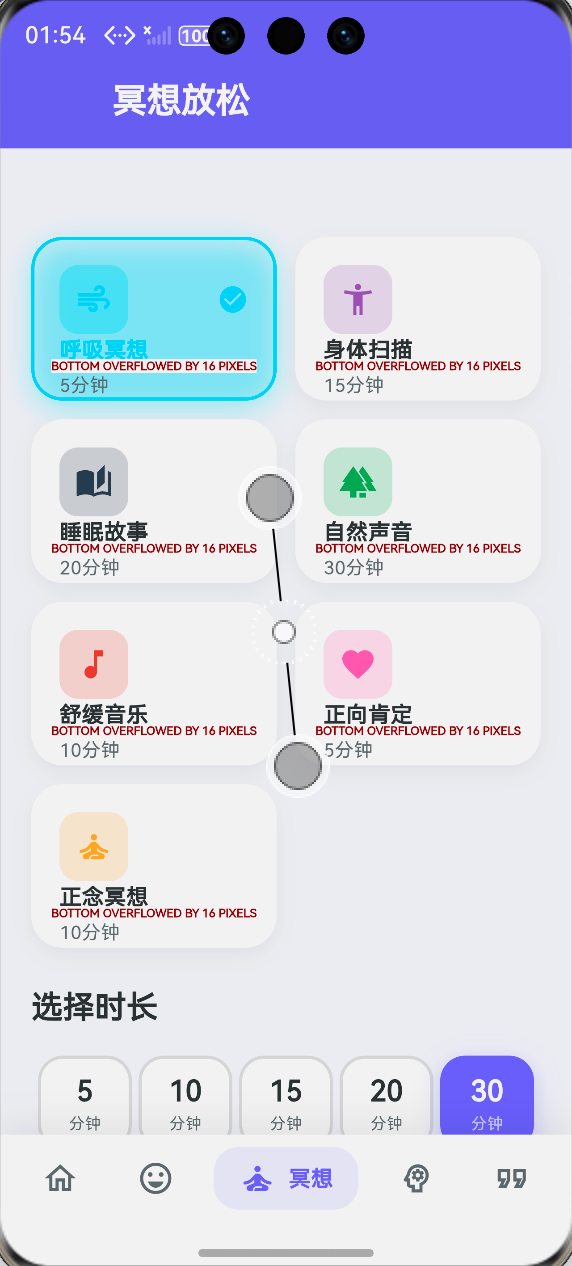
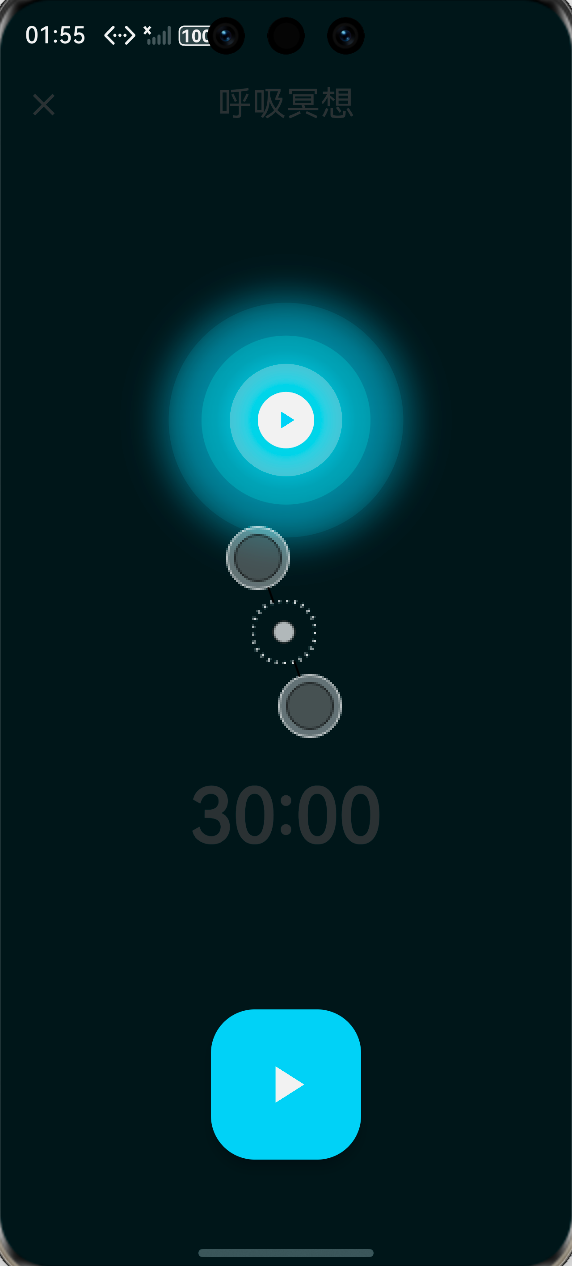
| 序号 | 检查项 | 状态 |
|---|---|---|
| 1 | 5种呼吸模式正确切换 | ✅ |
| 2 | 呼吸动画与倒计时同步 | ✅ |
| 3 | 阶段文字正确显示 | ✅ |
| 4 | 循环次数统计正确 | ✅ |
| 5 | 暂停/继续功能正常 | ✅ |
| 6 | 训练完成提示 | ✅ |
| 7 | 鸿蒙设备流畅运行 | ✅ |
九、大一学生真实学习总结
做完这个呼吸训练功能,我最大的感受是:写代码真的要理解业务逻辑!
一开始我以为很简单,不就是个倒计时吗?后来才发现:
- 每个阶段的时长不一样
- 屏气时动画要停住
- 呼气完成才算完成一次循环
这些东西不亲自做一遍根本想不到。
还有就是动画部分,我之前完全不懂 AnimationController,看了好多教程才明白:
forward()是从头到尾reverse()是从尾到头stop()可以暂停在当前位置
现在回头看,其实没那么难,就是得多练。
好啦,这篇文章就到这里。下一个功能见!
作者:IntMainJhy
创作时间:2026年5月

作为“人工智能6S店”的官方数字引擎,为AI开发者与企业提供一个覆盖软硬件全栈、一站式门户。
更多推荐
 1
1 0
0- 0


 已为社区贡献93条内容

所有评论(0)