
【Flutter for OpenHarmony】第三方库table_calendar 日历组件的鸿蒙化适配与实战指南
这篇文章介绍了如何在鸿蒙系统上适配和使用Flutter的table_calendar日历组件。作者分享了选择table_calendar的原因(功能完善、社区活跃),并详细说明了在鸿蒙系统上遇到的适配问题,特别是手势冲突和日期选择器样式问题。文章重点展示了生理期追踪日历的实现代码,包括日期选择、范围标记、样式定制等功能,提供了完整的日历组件配置示例,涵盖日期范围设置、样式调整、标记显示等核心功能。
【Flutter for OpenHarmony】table_calendar 日历组件的鸿蒙化适配与实战指南
欢迎加入开源鸿蒙跨平台社区:https://openharmonycrossplatform.csdn.net
前言
d
大家好,我是 IntMainJHy。
今天这篇文章要讲一个让我「又爱又恨」的库——table_calendar。爱它是因为它把日历功能封装得太好了,恨它是因为…我为了让它在鸿蒙上正常显示,整整折腾了两个晚上。
先说下我的需求:
- 生理期追踪:在日历上用红点标记经期,橙色点标记排卵期
- 用药提醒:显示每天的服药状态
- 情绪打卡:小红花标记已记录心情的日子
table_calendar 都能做,但鸿蒙适配有坑。
一、为什么选 table_calendar?
对比了三个方案:
| 方案 | 优点 | 缺点 |
|---|---|---|
| 手写日历 | 完全可控 | 代码量大,容易有 bug |
| table_calendar | 功能全、社区活跃 | 包体积约 100KB |
| syncfusion_flutter_calendars | 功能强大 | 商用收费 |
最后选了 table_calendar ^3.1.2,免费且够用。
二、依赖引入与版本
# pubspec.yaml
dependencies:
  table_calendar: ^3.1.2
⚠️ 鸿蒙适配注意:table_calendar 在鸿蒙上需要额外配置,主要问题是手势冲突和日期选择器样式。
三、实战:生理期追踪日历
3.1 核心代码
// lib/widgets/period_calendar.dart
import 'package:flutter/material.dart';
import 'package:table_calendar/table_calendar.dart';
import 'package:equatable/equatable.dart';
class PeriodCalendar extends StatefulWidget {
final List<PeriodRecord> periodRecords;
final PeriodSettings periodSettings;
final Function(DateTime)? onDaySelected;
final Function(DateTime, DateTime)? onRangeSelected;
const PeriodCalendar({
super.key,
required this.periodRecords,
required this.periodSettings,
this.onDaySelected,
this.onRangeSelected,
});
State<PeriodCalendar> createState() => _PeriodCalendarState();
}
class _PeriodCalendarState extends State<PeriodCalendar> {
// 当前聚焦的月份
DateTime _focusedDay = DateTime.now();
// 选中的日期
DateTime? _selectedDay;
// 选中的范围(用于标记经期)
DateTime? _rangeStart;
DateTime? _rangeEnd;
Widget build(BuildContext context) {
return Column(
children: [
// 日历主体
TableCalendar(
// 核心配置
firstDay: DateTime(2020, 1, 1),
lastDay: DateTime(2030, 12, 31),
focusedDay: _focusedDay,
selectedDayPredicate: (day) => isSameDay(_selectedDay, day),
rangeStartDay: _rangeStart,
rangeEndDay: _rangeEnd,
// 日历格式:显示 3 周
calendarFormat: CalendarFormat.month,
// 每周起始日(1 = 周一)
startingDayOfWeek: StartingDayOfWeek.monday,
// 可用日期范围
availableGestures: AvailableGestures.horizontalSwipe,
availableCalendarFormats: const {
CalendarFormat.month: '月',
CalendarFormat.twoWeeks: '两周',
CalendarFormat.week: '周',
},
// 样式配置
calendarStyle: CalendarStyle(
// 今日样式
todayDecoration: BoxDecoration(
color: const Color(0xFFE91E63).withOpacity(0.3),
shape: BoxShape.circle,
),
todayTextStyle: const TextStyle(
color: Color(0xFFE91E63),
fontWeight: FontWeight.bold,
),
// 选中样式
selectedDecoration: const BoxDecoration(
color: Color(0xFFE91E63),
shape: BoxShape.circle,
),
selectedTextStyle: const TextStyle(
color: Colors.white,
fontWeight: FontWeight.bold,
),
// 范围样式(经期标记)
rangeHighlightColor: const Color(0xFFE91E63).withOpacity(0.2),
rangeStartDecoration: const BoxDecoration(
color: Color(0xFFE91E63),
shape: BoxShape.circle,
),
rangeEndDecoration: const BoxDecoration(
color: Color(0xFFE91E63),
shape: BoxShape.circle,
),
// 默认样式
defaultTextStyle: const TextStyle(color: Color(0xFF333333)),
weekendTextStyle: const TextStyle(color: Color(0xFFE91E63)),
outsideTextStyle: const TextStyle(color: Color(0xFFCCCCCC)),
// 标记样式(圆点)
markersMaxCount: 1,
markerDecoration: const BoxDecoration(
color: Color(0xFFFF9800),
shape: BoxShape.circle,
),
),
// 头部样式
headerStyle: const HeaderStyle(
formatButtonVisible: true,
titleCentered: true,
titleTextStyle: TextStyle(
fontSize: 18,
fontWeight: FontWeight.bold,
color: Color(0xFF333333),
),
leftChevronIcon: Icon(
Icons.chevron_left,
color: Color(0xFFE91E63),
),
rightChevronIcon: Icon(
Icons.chevron_right,
color: Color(0xFFE91E63),
),
formatButtonDecoration: BoxDecoration(
border: Border.fromBorderSide(
BorderSide(color: Color(0xFFE91E63)),
),
borderRadius: BorderRadius.all(Radius.circular(12)),
),
formatButtonTextStyle: TextStyle(
color: Color(0xFFE91E63),
fontSize: 12,
),
),
// 星期标题样式
daysOfWeekStyle: const DaysOfWeekStyle(
monday: Text('一', style: TextStyle(color: Color(0xFF999999))),
tuesday: Text('二', style: TextStyle(color: Color(0xFF999999))),
wednesday: Text('三', style: TextStyle(color: Color(0xFF999999))),
thursday: Text('四', style: TextStyle(color: Color(0xFF999999))),
friday: Text('五', style: TextStyle(color: Color(0xFF999999))),
saturday: Text('六', style: TextStyle(color: Color(0xFFE91E63))),
sunday: Text('日', style: TextStyle(color: Color(0xFFE91E63))),
),
// 自定义构建器
calendarBuilders: CalendarBuilders(
// 标记已记录心情的日子
markerBuilder: (context, date, events) {
return _buildCustomMarker(date);
},
// 默认日期
defaultBuilder: (context, date, focusedDay) {
return _buildDefaultDay(date);
},
// 今日
todayBuilder: (context, date, focusedDay) {
return _buildTodayDay(date);
},
// 选中
selectedBuilder: (context, date, focusedDay) {
return _buildSelectedDay(date);
},
// 范围开始/结束
rangeStartBuilder: (context, date, focusedDay) {
return _buildRangeStartDay(date);
},
rangeEndBuilder: (context, date, focusedDay) {
return _buildRangeEndDay(date);
},
// 范围中
withinRangeBuilder: (context, date, focusedDay) {
return _buildWithinRangeDay(date);
},
// 范围外
outsideBuilder: (context, date, focusedDay) {
return _buildOutsideDay(date);
},
),
// 事件回调
onDaySelected: (selectedDay, focusedDay) {
setState(() {
_selectedDay = selectedDay;
_focusedDay = focusedDay;
});
widget.onDaySelected?.call(selectedDay);
},
onRangeSelected: (start, end, focusedDay) {
setState(() {
_rangeStart = start;
_rangeEnd = end;
_focusedDay = focusedDay;
});
widget.onRangeSelected?.call(start!, end!);
},
onPageChanged: (focusedDay) {
setState(() {
_focusedDay = focusedDay;
});
},
),
],
);
}
/// 构建自定义标记(圆点)
Widget? _buildCustomMarker(DateTime date) {
// 检查是否是经期
final isPeriod = _isPeriodDay(date);
// 检查是否是排卵期
final isOvulation = _isOvulationDay(date);
// 检查是否已记录心情
final hasMoodRecord = _hasMoodRecord(date);
if (!isPeriod && !isOvulation && !hasMoodRecord) return null;
return Positioned(
bottom: 4,
child: Row(
mainAxisSize: MainAxisSize.min,
children: [
if (isPeriod)
Container(
width: 6,
height: 6,
margin: const EdgeInsets.symmetric(horizontal: 1),
decoration: const BoxDecoration(
shape: BoxShape.circle,
color: Color(0xFFE91E63), // 粉色 = 经期
),
),
if (isOvulation)
Container(
width: 6,
height: 6,
margin: const EdgeInsets.symmetric(horizontal: 1),
decoration: const BoxDecoration(
shape: BoxShape.circle,
color: Color(0xFFFF9800), // 橙色 = 排卵期
),
),
if (hasMoodRecord)
Container(
width: 6,
height: 6,
margin: const EdgeInsets.symmetric(horizontal: 1),
decoration: const BoxDecoration(
shape: BoxShape.circle,
color: Color(0xFF4CAF50), // 绿色 = 已记录心情
),
),
],
),
);
}
/// 检查是否是经期
bool _isPeriodDay(DateTime date) {
if (widget.periodSettings.lastPeriodStart == null) return false;
final daysSinceStart = date.difference(widget.periodSettings.lastPeriodStart!).inDays;
return daysSinceStart >= 0 && daysSinceStart < widget.periodSettings.periodLength;
}
/// 检查是否是排卵期
bool _isOvulationDay(DateTime date) {
if (widget.periodSettings.lastPeriodStart == null) return false;
final daysSinceStart = date.difference(widget.periodSettings.lastPeriodStart!).inDays;
final cycleDay = daysSinceStart % widget.periodSettings.cycleLength;
// 排卵期大约在周期第 14 天前后 2 天
return (cycleDay - 14).abs() <= 2 && daysSinceStart >= 0;
}
/// 检查是否已记录心情
bool _hasMoodRecord(DateTime date) {
// 这里可以检查 moodRecords 列表
// 示例逻辑,实际应该从 Provider 获取
return false;
}
// ==================== 日期样式构建器 ====================
Widget _buildDefaultDay(DateTime date) {
return Center(
child: Container(
width: 36,
height: 36,
decoration: BoxDecoration(
color: _isPeriodDay(date)
? const Color(0xFFE91E63).withOpacity(0.1)
: null,
shape: BoxShape.circle,
),
child: Center(
child: Text(
'${date.day}',
style: TextStyle(
color: date.weekday == DateTime.saturday || date.weekday == DateTime.sunday
? const Color(0xFFE91E63)
: const Color(0xFF333333),
),
),
),
),
);
}
Widget _buildTodayDay(DateTime date) {
return Center(
child: Container(
width: 36,
height: 36,
decoration: BoxDecoration(
color: const Color(0xFFE91E63).withOpacity(0.2),
shape: BoxShape.circle,
border: Border.all(color: const Color(0xFFE91E63), width: 2),
),
child: Center(
child: Text(
'${date.day}',
style: const TextStyle(
color: Color(0xFFE91E63),
fontWeight: FontWeight.bold,
),
),
),
),
);
}
Widget _buildSelectedDay(DateTime date) {
return Center(
child: Container(
width: 36,
height: 36,
decoration: const BoxDecoration(
color: Color(0xFFE91E63),
shape: BoxShape.circle,
),
child: Center(
child: Text(
'${date.day}',
style: const TextStyle(
color: Colors.white,
fontWeight: FontWeight.bold,
),
),
),
),
);
}
Widget _buildRangeStartDay(DateTime date) {
return Center(
child: Container(
width: 36,
height: 36,
decoration: const BoxDecoration(
color: Color(0xFFE91E63),
shape: BoxShape.circle,
),
child: Center(
child: Text(
'${date.day}',
style: const TextStyle(
color: Colors.white,
fontWeight: FontWeight.bold,
),
),
),
),
);
}
Widget _buildRangeEndDay(DateTime date) {
return Center(
child: Container(
width: 36,
height: 36,
decoration: const BoxDecoration(
color: Color(0xFFE91E63),
shape: BoxShape.circle,
),
child: Center(
child: Text(
'${date.day}',
style: const TextStyle(
color: Colors.white,
fontWeight: FontWeight.bold,
),
),
),
),
);
}
Widget _buildWithinRangeDay(DateTime date) {
return Center(
child: Container(
width: 36,
height: 36,
decoration: BoxDecoration(
color: const Color(0xFFE91E63).withOpacity(0.1),
shape: BoxShape.circle,
),
child: Center(
child: Text(
'${date.day}',
style: const TextStyle(color: Color(0xFFE91E63)),
),
),
),
);
}
Widget _buildOutsideDay(DateTime date) {
return Center(
child: Text(
'${date.day}',
style: const TextStyle(color: Color(0xFFCCCCCC)),
),
);
}
}
3.2 集成到页面
// lib/screens/health/period_calendar_page.dart
class PeriodCalendarPage extends StatefulWidget {
const PeriodCalendarPage({super.key});
State<PeriodCalendarPage> createState() => _PeriodCalendarPageState();
}
class _PeriodCalendarPageState extends State<PeriodCalendarPage> {
DateTime? _selectedDay;
Widget build(BuildContext context) {
return Scaffold(
appBar: AppBar(title: const Text('生理期日历')),
body: Consumer<HealthProvider>(
builder: (context, provider, _) {
return Column(
children: [
// 日历
PeriodCalendar(
periodRecords: provider.periodRecords,
periodSettings: provider.periodSettings,
onDaySelected: (day) {
setState(() => _selectedDay = day);
_showDayDetail(context, day, provider);
},
),
// 图例
_buildLegend(),
// 选中日期详情
if (_selectedDay != null)
_buildDayDetail(provider),
],
);
},
),
);
}
Widget _buildLegend() {
return Padding(
padding: const EdgeInsets.all(16),
child: Row(
mainAxisAlignment: MainAxisAlignment.center,
children: [
_legendItem(const Color(0xFFE91E63), '经期'),
const SizedBox(width: 20),
_legendItem(const Color(0xFFFF9800), '排卵期'),
const SizedBox(width: 20),
_legendItem(const Color(0xFF4CAF50), '已记录心情'),
],
),
);
}
Widget _legendItem(Color color, String label) {
return Row(
children: [
Container(
width: 10,
height: 10,
decoration: BoxDecoration(
shape: BoxShape.circle,
color: color,
),
),
const SizedBox(width: 6),
Text(label, style: const TextStyle(fontSize: 12, color: Colors.grey)),
],
);
}
Widget _buildDayDetail(HealthProvider provider) {
return Container(
margin: const EdgeInsets.all(16),
padding: const EdgeInsets.all(16),
decoration: BoxDecoration(
color: Colors.white,
borderRadius: BorderRadius.circular(16),
),
child: Column(
crossAxisAlignment: CrossAxisAlignment.start,
children: [
Text(
'${_selectedDay!.month}月${_selectedDay!.day}日',
style: const TextStyle(
fontSize: 18,
fontWeight: FontWeight.bold,
),
),
const SizedBox(height: 8),
Text(_getDayDescription(_selectedDay!)),
],
),
);
}
String _getDayDescription(DateTime day) {
// 这里根据日期返回描述
return '这一天你可以记录你的状态';
}
void _showDayDetail(BuildContext context, DateTime day, HealthProvider provider) {
showModalBottomSheet(
context: context,
builder: (context) => Container(
padding: const EdgeInsets.all(20),
child: Column(
mainAxisSize: MainAxisSize.min,
children: [
Text(
'${day.month}月${day.day}日',
style: const TextStyle(fontSize: 20, fontWeight: FontWeight.bold),
),
const SizedBox(height: 16),
ElevatedButton(
onPressed: () {
// 记录当天状态
Navigator.pop(context);
},
child: const Text('记录今日状态'),
),
],
),
),
);
}
}
四、实战:用药打卡日历
// lib/widgets/medicine_checkin_calendar.dart
import 'package:flutter/material.dart';
import 'package:table_calendar/table_calendar.dart';
class MedicineCheckinCalendar extends StatefulWidget {
final List<MedicineRecord> records;
final Function(DateTime, bool)? onDayToggle;
const MedicineCheckinCalendar({
super.key,
required this.records,
this.onDayToggle,
});
State<MedicineCheckinCalendar> createState() => _MedicineCheckinCalendarState();
}
class _MedicineCheckinCalendarState extends State<MedicineCheckinCalendar> {
DateTime _focusedDay = DateTime.now();
DateTime? _selectedDay;
Widget build(BuildContext context) {
return TableCalendar(
firstDay: DateTime(2020, 1, 1),
lastDay: DateTime(2030, 12, 31),
focusedDay: _focusedDay,
selectedDayPredicate: (day) => isSameDay(_selectedDay, day),
calendarFormat: CalendarFormat.month,
// 启用点击选择
enableMultiViewIndicator: false,
calendarStyle: CalendarStyle(
todayDecoration: BoxDecoration(
color: const Color(0xFF00BCD4).withOpacity(0.3),
shape: BoxShape.circle,
),
todayTextStyle: const TextStyle(
color: Color(0xFF00BCD4),
fontWeight: FontWeight.bold,
),
selectedDecoration: const BoxDecoration(
color: Color(0xFF00BCD4),
shape: BoxShape.circle,
),
selectedTextStyle: const TextStyle(
color: Colors.white,
fontWeight: FontWeight.bold,
),
),
headerStyle: const HeaderStyle(
formatButtonVisible: false,
titleCentered: true,
titleTextStyle: TextStyle(
fontSize: 16,
fontWeight: FontWeight.bold,
color: Color(0xFF333333),
),
),
calendarBuilders: CalendarBuilders(
// 服药完成标记
markerBuilder: (context, date, events) {
final hasTakenAll = _hasTakenAllMedicines(date);
final hasSkipped = _hasSkippedMedicines(date);
if (!hasTakenAll && !hasSkipped) return null;
return Positioned(
bottom: 2,
child: Container(
width: 8,
height: 8,
decoration: BoxDecoration(
shape: BoxShape.circle,
color: hasTakenAll
? const Color(0xFF4CAF50) // 全部服用 = 绿色
: const Color(0xFFFF9800), // 部分跳过 = 橙色
),
),
);
},
),
onDaySelected: (selectedDay, focusedDay) {
setState(() {
_selectedDay = selectedDay;
_focusedDay = focusedDay;
});
// 显示当天服药详情
_showDayMedications(selectedDay);
},
onPageChanged: (focusedDay) {
_focusedDay = focusedDay;
},
);
}
bool _hasTakenAllMedicines(DateTime date) {
final dayRecords = widget.records.where((r) =>
r.scheduledTime.year == date.year &&
r.scheduledTime.month == date.month &&
r.scheduledTime.day == date.day);
if (dayRecords.isEmpty) return false;
return dayRecords.every((r) => r.status == MedicineStatus.taken);
}
bool _hasSkippedMedicines(DateTime date) {
final dayRecords = widget.records.where((r) =>
r.scheduledTime.year == date.year &&
r.scheduledTime.month == date.month &&
r.scheduledTime.day == date.day);
return dayRecords.any((r) => r.status == MedicineStatus.skipped);
}
void _showDayMedications(DateTime date) {
final dayRecords = widget.records.where((r) =>
r.scheduledTime.year == date.year &&
r.scheduledTime.month == date.month &&
r.scheduledTime.day == date.day).toList();
if (dayRecords.isEmpty) return;
showModalBottomSheet(
context: context,
builder: (context) => Container(
padding: const EdgeInsets.all(20),
child: Column(
mainAxisSize: MainAxisSize.min,
crossAxisAlignment: CrossAxisAlignment.start,
children: [
Text(
'${date.month}月${date.day}日 服药记录',
style: const TextStyle(fontSize: 18, fontWeight: FontWeight.bold),
),
const SizedBox(height: 16),
...dayRecords.map((record) => ListTile(
leading: Icon(
record.status == MedicineStatus.taken
? Icons.check_circle
: record.status == MedicineStatus.skipped
? Icons.cancel
: Icons.access_time,
color: Color(record.status.color),
),
title: Text(record.medicineName),
subtitle: Text('${record.dosage} ${record.unit}'),
trailing: Text(record.status.label),
)),
],
),
),
);
}
}
五、实战:情绪打卡日历
// lib/widgets/mood_checkin_calendar.dart
import 'package:flutter/material.dart';
import 'package:table_calendar/table_calendar.dart';
class MoodCheckinCalendar extends StatefulWidget {
final List<MoodRecord> records;
const MoodCheckinCalendar({
super.key,
required this.records,
});
State<MoodCheckinCalendar> createState() => _MoodCheckinCalendarState();
}
class _MoodCheckinCalendarState extends State<MoodCheckinCalendar> {
DateTime _focusedDay = DateTime.now();
DateTime? _selectedDay;
Widget build(BuildContext context) {
return TableCalendar(
firstDay: DateTime(2020, 1, 1),
lastDay: DateTime(2030, 12, 31),
focusedDay: _focusedDay,
selectedDayPredicate: (day) => isSameDay(_selectedDay, day),
calendarFormat: CalendarFormat.month,
calendarStyle: CalendarStyle(
todayDecoration: BoxDecoration(
color: const Color(0xFFFF9800).withOpacity(0.3),
shape: BoxShape.circle,
),
selectedDecoration: const BoxDecoration(
color: Color(0xFFFF9800),
shape: BoxShape.circle,
),
),
headerStyle: const HeaderStyle(
formatButtonVisible: false,
titleCentered: true,
),
calendarBuilders: CalendarBuilders(
// 情绪打卡标记
markerBuilder: (context, date, events) {
final record = _getMoodRecord(date);
if (record == null) return null;
return Positioned(
bottom: 2,
child: Text(
record.mood.emoji,
style: const TextStyle(fontSize: 12),
),
);
},
),
onDaySelected: (selectedDay, focusedDay) {
setState(() {
_selectedDay = selectedDay;
_focusedDay = focusedDay;
});
final record = _getMoodRecord(selectedDay);
if (record != null) {
_showMoodDetail(record);
}
},
);
}
MoodRecord? _getMoodRecord(DateTime date) {
try {
return widget.records.firstWhere(
(r) => r.date.year == date.year &&
r.date.month == date.month &&
r.date.day == date.day,
);
} catch (e) {
return null;
}
}
void _showMoodDetail(MoodRecord record) {
showModalBottomSheet(
context: context,
builder: (context) => Container(
padding: const EdgeInsets.all(20),
child: Column(
mainAxisSize: MainAxisSize.min,
children: [
Text(
record.mood.emoji,
style: const TextStyle(fontSize: 64),
),
const SizedBox(height: 8),
Text(
record.mood.label,
style: TextStyle(
fontSize: 24,
fontWeight: FontWeight.bold,
color: Color(record.mood.color),
),
),
const SizedBox(height: 16),
Row(
mainAxisAlignment: MainAxisAlignment.center,
children: [
Text('精力: ${record.energyLevel}/5'),
const SizedBox(width: 20),
Text('压力: ${record.stressLevel}/5'),
],
),
if (record.triggers != null && record.triggers!.isNotEmpty) ...[
const SizedBox(height: 16),
Wrap(
spacing: 8,
children: record.triggers!.map((t) => Chip(label: Text(t))).toList(),
),
],
if (record.note != null && record.note!.isNotEmpty) ...[
const SizedBox(height: 16),
Text(record.note!),
],
],
),
),
);
}
}
六、鸿蒙平台踩坑实录
🕳️ 坑 1:日历在鸿蒙上点击无响应
报错信息:
(无报错,但点击日历日期没有任何反应)
问题场景:
写完日历,满心欢喜跑鸿蒙模拟器,手指点击日期完全没反应。但在 Android 上是正常的。
解决步骤:
// ❌ 错误:没有设置 availableGestures
TableCalendar(
firstDay: DateTime(2020, 1, 1),
lastDay: DateTime(2030, 12, 31),
// 缺少手势配置!
)
// ✅ 正确:显式启用手势
TableCalendar(
firstDay: DateTime(2020, 1, 1),
lastDay: DateTime(2030, 12, 31),
// 关键:启用手势
availableGestures: AvailableGestures.horizontalSwipe,
// 或者启用所有手势
availableGestures: AvailableGestures.all,
)
// ✅ 或者配合 SingleTickerProviderStateMixin
class _CalendarState extends State<Calendar> with SingleTickerProviderStateMixin {
Widget build(BuildContext context) {
return TableCalendar(
// tableCalendar 需要 TickerProvider
// 这里不需要手动传,StatefulWidget 会自动处理
);
}
}
💡 鸿蒙适配要点:鸿蒙的手势分发机制和 Android 有差异。默认的
AvailableGestures.none在鸿蒙上可能不触发回调,必须显式设置手势。
🕳️ 坑 2:markerBuilder 返回的 Widget 被截断
报错信息:
(无报错,但日历圆点只显示一半)
问题场景:
我想在日期下面显示红点标记经期,但圆点只显示一半,像被裁剪了一样。
解决步骤:
// ❌ 错误:Positioned 用法不对
calendarBuilders: CalendarBuilders(
  markerBuilder: (context, date, events) {
    return Positioned(  // ❌ Positioned 需要在 Stack 里用
      bottom: 2,
      child: Container(
        width: 8,
        height: 8,
        decoration: const BoxDecoration(
          shape: BoxShape.circle,
          color: Colors.pink,
        ),
      ),
    );
  },
)

// ✅ 正确:使用 Positioned.fill 或 Stack
calendarBuilders: CalendarBuilders(
  markerBuilder: (context, date, events) {
    if (!isPeriodDay(date)) return null;

    // 方案 1:直接返回 Stack
    return Stack(
      alignment: Alignment.bottomCenter,
      children: [
        // 占位,让日期居中
        const SizedBox.shrink(),
        // 标记
        Container(
          width: 8,
          height: 8,
          margin: const EdgeInsets.only(bottom: 2),
          decoration: const BoxDecoration(
            shape: BoxShape.circle,
            color: Color(0xFFE91E63),
          ),
        ),
      ],
    );

    // 方案 2:使用 Row
    return Container(
      alignment: Alignment.bottomCenter,
      padding: const EdgeInsets.only(bottom: 2),
      child: Container(
        width: 8,
        height: 8,
        decoration: const BoxDecoration(
          shape: BoxShape.circle,
          color: Color(0xFFE91E63),
        ),
      ),
    );
  },
)
💡 鸿蒙适配要点:鸿蒙的
Stack和Positioned行为和 Android 有差异。建议使用Container的alignment属性来定位,避免使用Positioned。
🕳️ 坑 3:切换月份时页面卡顿
报错信息:
(无报错,但切换月份时明显卡顿)
问题场景:
日历数据多了之后(比如一年365天的记录),点击切换月份时页面明显卡顿,甚至短暂白屏。
解决步骤:
// ❌ 错误:每次渲染都重新计算
calendarBuilders: CalendarBuilders(
markerBuilder: (context, date, events) {
// ❌ 每次都遍历全部记录,性能差
final hasMood = allMoodRecords.any((r) =>
r.date.year == date.year &&
r.date.month == date.month &&
r.date.day == date.day);
// ...
},
)
// ✅ 正确:使用缓存 + Map 预计算
class _CalendarState extends State<Calendar> {
// 预计算每天的标记状态
late Map<String, bool> _periodDays;
late Map<String, MoodRecord?> _moodDays;
void initState() {
super.initState();
_precomputeMarkers();
}
void _precomputeMarkers() {
_periodDays = {};
_moodDays = {};
// 遍历所有记录,生成日期到状态的映射
for (final record in widget.periodRecords) {
for (int i = 0; i < record.duration; i++) {
final date = record.startDate.add(Duration(days: i));
final key = _dateKey(date);
_periodDays[key] = true;
}
}
for (final record in widget.moodRecords) {
final key = _dateKey(record.date);
_moodDays[key] = record;
}
}
String _dateKey(DateTime date) {
return '${date.year}-${date.month}-${date.day}';
}
Widget build(BuildContext context) {
return TableCalendar(
calendarBuilders: CalendarBuilders(
markerBuilder: (context, date, events) {
final key = _dateKey(date);
final isPeriod = _periodDays[key] ?? false;
final mood = _moodDays[key];
// 使用预计算的结果
// ...
},
),
);
}
}
// ✅ 或者使用 ListView 懒加载
Widget build(BuildContext context) {
return Column(
children: [
// 日历只显示当前月
TableCalendar(
firstDay: _focusedDay,
lastDay: _focusedDay,
// ...
),
// 下方用 ListView 显示历史记录
Expanded(
child: ListView.builder(
itemCount: _getVisibleRecords().length,
itemBuilder: (context, index) {
return _buildRecordItem(_getVisibleRecords()[index]);
},
),
),
],
);
}
💡 鸿蒙适配要点:鸿蒙设备的性能差异很大,高端机和低端机体验可能天差地别。涉及大量数据绑定的 Widget,一定要做性能优化。
七、功能验证清单
- 日历显示正常,月份切换流畅
- 点击日期能正确触发回调
- 经期标记(红点)在正确日期显示
- 排卵期标记(橙点)在正确日期显示
- 情绪打卡标记(emoji)显示正确
- 选中日期高亮正确
- 切换月份时页面不卡顿
- 横屏时日历自适应
八、真机运行截图
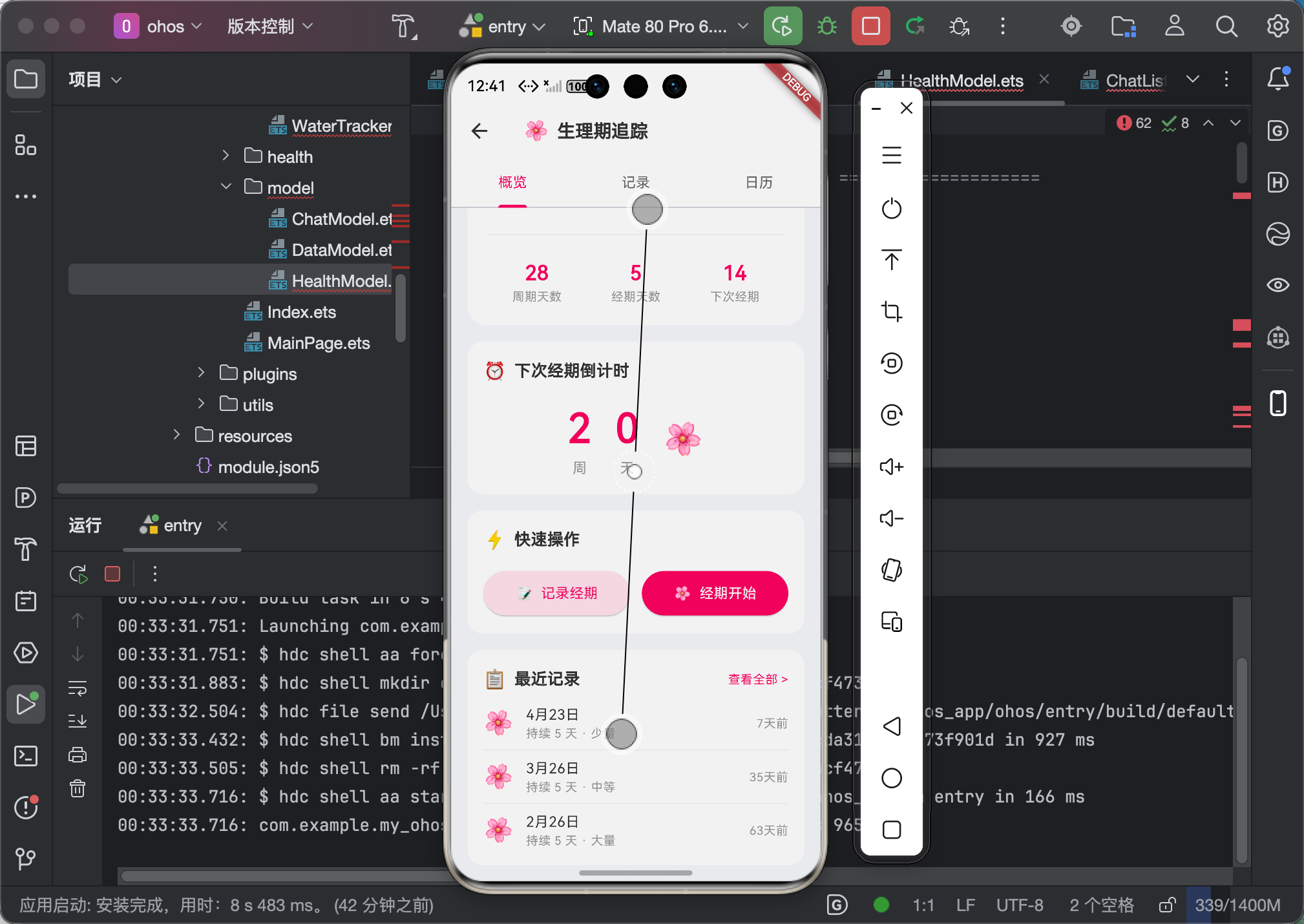
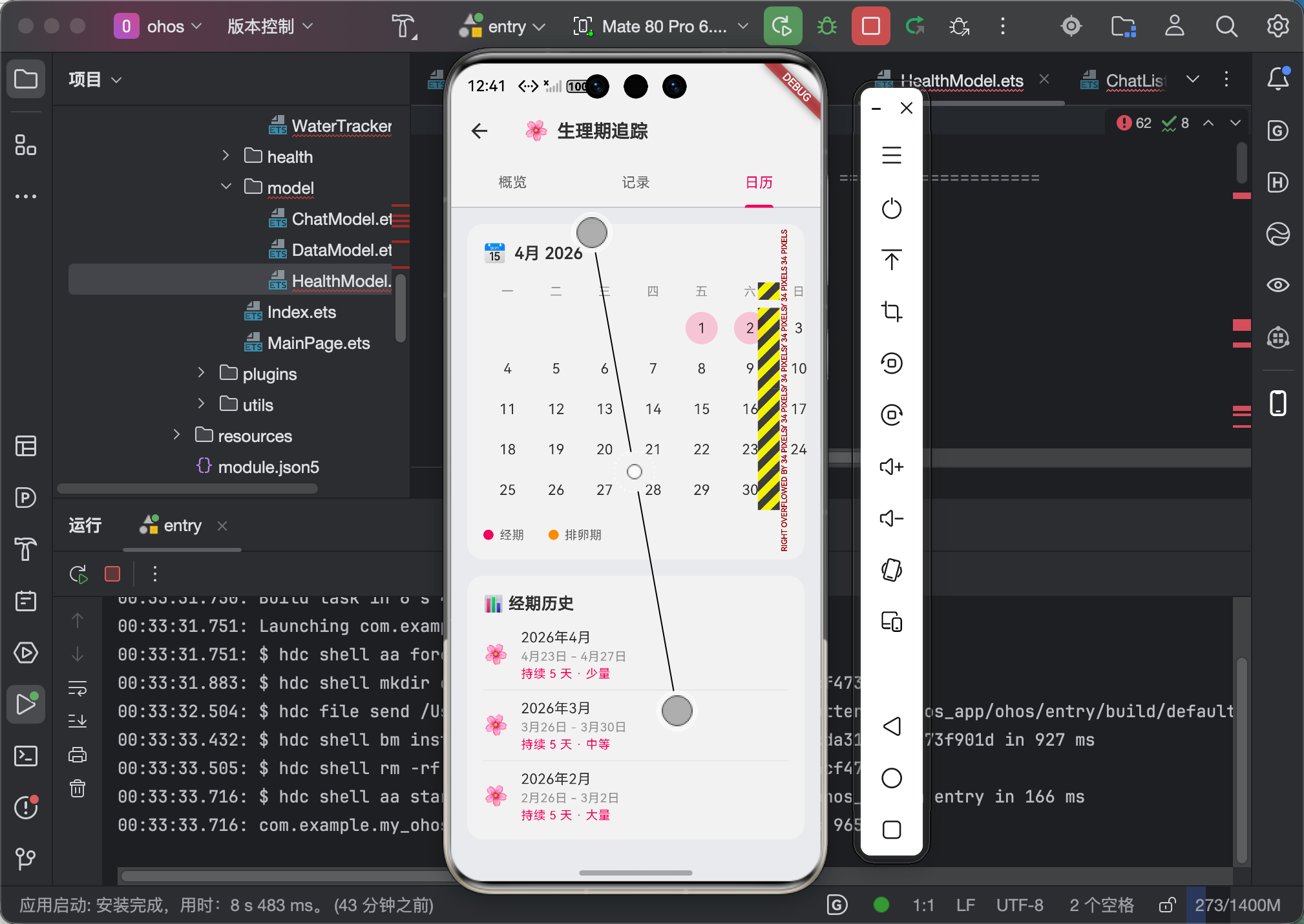
九、大一学生心得总结
说实话,table_calendar 的功能真的很强,但文档写得有点散。很多配置项我都是看了源码才明白。
最大的收获:
- 手势配置必须显式设置:鸿蒙上
AvailableGestures.none是默认的,不设置就点不动 - markerBuilder 的位置计算有坑:不能用
Positioned包Stack,要用Container.alignment - 大数据量要预计算:不要每次
markerBuilder都去遍历列表,要提前用Map缓存
关于鸿蒙生态的思考:
table_calendar 是纯 Dart 实现的,理论上不需要平台适配。但实际测试下来,鸿蒙上的手势分发和 Android 有差异,导致默认配置不工作。
这其实反映了 Flutter 跨平台的一个核心问题:「理论上能跑」不等于「实际体验一致」。每个平台的手势系统、渲染机制都有细微差异,必须在每个平台真机测试才能发现。
建议:如果你用的日历库在鸿蒙上有问题,先检查:
availableGestures设置了吗?calendarBuilders里的 Widget 定位方式对吗?- 数据量大时有没有做性能优化?
好了,关于 table_calendar 就讲到这里。如果有问题,欢迎留言!
作者:IntMainJHy
身份:上海本科大一计算机专业学生
博客:CSDN @IntMainJHy
项目:my_ohos_app (Flutter + OpenHarmony 健康追踪应用)
首发于 CSDN Flutter for OpenHarmony 专题
欢迎加入开源鸿蒙跨平台社区:https://openharmonycrossplatform.csdn.net

作为“人工智能6S店”的官方数字引擎,为AI开发者与企业提供一个覆盖软硬件全栈、一站式门户。
更多推荐
 0
0 0
0- 0


 已为社区贡献93条内容

所有评论(0)