
【maaath】Flutter for OpenHarmony 实战:电影榜单应用开发指南
作者:maaath在跨平台开发领域,Flutter 凭借其高性能和优美的 UI 表达能力,一直是开发者的首选框架之一。而随着 Flutter for OpenHarmony(简称 FHO)的日趋成熟,越来越多的 Flutter 应用可以流畅运行在鸿蒙设备上。本文将通过一个电影榜单应用的完整开发过程,带领大家体验 Flutter 跨平台开发的魅力。我们将使用 Flutter 开发一款功能完善、界面美
Flutter for OpenHarmony 实战:电影榜单应用开发指南
作者:maaath
欢迎加入开源鸿蒙跨平台社区: https://openharmonycrossplatform.csdn.net
前言
在跨平台开发领域,Flutter 凭借其高性能和优美的 UI 表达能力,一直是开发者的首选框架之一。而随着 Flutter for OpenHarmony(简称 FHO)的日趋成熟,越来越多的 Flutter 应用可以流畅运行在鸿蒙设备上。本文将通过一个电影榜单应用的完整开发过程,带领大家体验 Flutter 跨平台开发的魅力。
我们将使用 Flutter 开发一款功能完善、界面美观、交互流畅的电影榜单应用,功能涵盖热映电影、电影榜单、电影搜索和用户中心等模块。通过这个实战项目,你将掌握:
- Flutter for OpenHarmony 项目结构搭建
- 状态管理与路由导航
- 网络请求与数据解析
- 自定义组件开发
- 列表渲染与动画效果
一、项目概述
1.1 功能模块
我们的电影榜单应用包含以下核心功能:
| 模块 | 功能描述 |
|---|---|
| 热映电影 | 展示正在热映、即将上映、热门推荐的影片 |
| 电影榜单 | 提供热门榜、豆瓣高分、票房榜、期待榜等多种榜单 |
| 电影搜索 | 支持关键词搜索、搜索历史和热门搜索推荐 |
| 电影详情 | 展示电影海报、评分、演员、简介等信息 |
| 用户中心 | 用户收藏、观影记录、设置等个人功能 |
1.2 技术栈
- 框架:Flutter 3.x for OpenHarmony
- 状态管理:Provider
- 网络请求:dio
- 路由导航:go_router
- 本地存储:shared_preferences
- UI 组件:Material Design 3
二、项目结构
首先,让我们了解项目的目录结构:
lib/
├── main.dart                    # 应用入口
├── app.dart                     # 应用配置
├── model/                       # 数据模型
│   └── movie_model.dart
├── network/                     # 网络服务
│   └── movie_service.dart
├── pages/                       # 页面
│   ├── home_page.dart
│   ├── hot_movies_page.dart
│   ├── ranking_page.dart
│   ├── search_page.dart
│   ├── profile_page.dart
│   └── movie_detail_page.dart
├── components/                   # 通用组件
│   ├── rating_stars.dart
│   ├── movie_card.dart
│   └── menu_item.dart
└── utils/                       # 工具类
    └── constants.dart
合理的项目结构能够提高代码的可维护性和可读性。建议将不同职责的代码放置在对应的目录中,遵循单一职责原则。
三、数据模型定义
数据模型是应用的基础,我们需要定义电影、榜单、搜索结果等核心数据结构:
// lib/model/movie_model.dart

class Movie {
  final int id;
  final String title;
  final String originalTitle;
  final String overview;
  final String posterPath;
  final String backdropPath;
  final String releaseDate;
  final double voteAverage;
  final int voteCount;
  final double popularity;
  final bool isFavorite;
  final bool isInTheaters;
  final List<int> genreIds;

  Movie({
    required this.id,
    required this.title,
    this.originalTitle = '',
    this.overview = '',
    this.posterPath = '',
    this.backdropPath = '',
    this.releaseDate = '',
    this.voteAverage = 0.0,
    this.voteCount = 0,
    this.popularity = 0.0,
    this.isFavorite = false,
    this.isInTheaters = true,
    this.genreIds = const [],
  });

  factory Movie.fromJson(Map<String, dynamic> json) {
    return Movie(
      id: json['id'] ?? 0,
      title: json['title'] ?? '',
      originalTitle: json['original_title'] ?? '',
      overview: json['overview'] ?? '',
      posterPath: json['poster_path'] ?? '',
      backdropPath: json['backdrop_path'] ?? '',
      releaseDate: json['release_date'] ?? '',
      voteAverage: (json['vote_average'] ?? 0).toDouble(),
      voteCount: json['vote_count'] ?? 0,
      popularity: (json['popularity'] ?? 0).toDouble(),
      isFavorite: json['is_favorite'] ?? false,
      isInTheaters: json['is_in_theaters'] ?? true,
      genreIds: List<int>.from(json['genre_ids'] ?? []),
    );
  }

  Map<String, dynamic> toJson() {
    return {
      'id': id,
      'title': title,
      'original_title': originalTitle,
      'overview': overview,
      'poster_path': posterPath,
      'backdrop_path': backdropPath,
      'release_date': releaseDate,
      'vote_average': voteAverage,
      'vote_count': voteCount,
      'popularity': popularity,
      'is_favorite': isFavorite,
      'is_in_theaters': isInTheaters,
      'genre_ids': genreIds,
    };
  }
}

class RankingItem {
  final int rank;
  final Movie movie;
  final int change;

  RankingItem({
    required this.rank,
    required this.movie,
    this.change = 0,
  });
}

class MovieListResponse {
  final int page;
  final List<Movie> results;
  final int totalPages;
  final int totalResults;

  MovieListResponse({
    this.page = 1,
    this.results = const [],
    this.totalPages = 0,
    this.totalResults = 0,
  });

  factory MovieListResponse.fromJson(Map<String, dynamic> json) {
    return MovieListResponse(
      page: json['page'] ?? 1,
      results: (json['results'] as List?)
              ?.map((e) => Movie.fromJson(e))
              .toList() ??
          [],
      totalPages: json['total_pages'] ?? 0,
      totalResults: json['total_results'] ?? 0,
    );
  }
}
这个数据模型设计遵循了以下几点原则:
- 不可变性:使用
final关键字确保数据不可变,保证数据流的单向性 - 工厂方法:
fromJson和toJson便于 JSON 数据与 Dart 对象的相互转换 - 默认值:为可选字段提供合理的默认值,避免空指针异常
四、网络服务封装
网络请求是应用获取数据的重要途径,我们需要封装一个可靠的网络服务:
// lib/network/movie_service.dart

import 'package:dio/dio.dart';
import '../model/movie_model.dart';

class MovieService {
  static const String _baseUrl = 'https://api.themoviedb.org/3';
  static const String _apiKey = '2dca586c3b1b5c1a90c9bbcd73362e4c';

  final Dio _dio;

  MovieService() : _dio = Dio(BaseOptions(
    baseUrl: _baseUrl,
    connectTimeout: const Duration(seconds: 30),
    receiveTimeout: const Duration(seconds: 30),
  ));

  // 获取热门电影
  Future<MovieListResponse> getHotMovies({int page = 1}) async {
    try {
      final response = await _dio.get('/movie/popular', queryParameters: {
        'api_key': _apiKey,
        'language': 'zh-CN',
        'page': page,
      });
      return MovieListResponse.fromJson(response.data);
    } catch (e) {
      return _getMockHotMovies(page);
    }
  }

  // 获取正在热映的电影
  Future<MovieListResponse> getNowPlayingMovies({int page = 1}) async {
    try {
      final response = await _dio.get('/movie/now_playing', queryParameters: {
        'api_key': _apiKey,
        'language': 'zh-CN',
        'page': page,
        'region': 'CN',
      });
      return MovieListResponse.fromJson(response.data);
    } catch (e) {
      return _getMockNowPlayingMovies(page);
    }
  }

  // 获取即将上映的电影
  Future<MovieListResponse> getUpcomingMovies({int page = 1}) async {
    try {
      final response = await _dio.get('/movie/upcoming', queryParameters: {
        'api_key': _apiKey,
        'language': 'zh-CN',
        'page': page,
        'region': 'CN',
      });
      return MovieListResponse.fromJson(response.data);
    } catch (e) {
      return _getMockUpcomingMovies(page);
    }
  }

  // 搜索电影
  Future<List<Movie>> searchMovies(String query, {int page = 1}) async {
    if (query.isEmpty) return [];

    try {
      final response = await _dio.get('/search/movie', queryParameters: {
        'api_key': _apiKey,
        'language': 'zh-CN',
        'query': query,
        'page': page,
        'include_adult': false,
      });
      return MovieListResponse.fromJson(response.data).results;
    } catch (e) {
      return _getMockSearchResults(query);
    }
  }

  // 获取榜单
  Future<List<RankingItem>> getRanking(RankingType type, {int page = 1}) async {
    MovieListResponse response;

    switch (type) {
      case RankingType.popular:
        response = await getHotMovies(page: page);
        break;
      case RankingType.topRated:
        response = await getHotMovies(page: page);
        break;
      case RankingType.nowPlaying:
        response = await getNowPlayingMovies(page: page);
        break;
      case RankingType.upcoming:
        response = await getUpcomingMovies(page: page);
        break;
    }

    return response.results.asMap().entries.map((entry) {
      return RankingItem(
        rank: (page - 1) * 20 + entry.key + 1,
        movie: entry.value,
        change: (DateTime.now().millisecond % 7) - 3,
      );
    }).toList();
  }

  // Mock 数据方法(网络失败时使用)
  MovieListResponse _getMockHotMovies(int page) {
    return MovieListResponse(
      page: page,
      results: List.generate(20, (i) => Movie(
        id: i + 1,
        title: '电影标题 ${i + 1}',
        posterPath: 'https://picsum.photos/seed/movie$i/300/450',
        voteAverage: 6.5 + (i % 3),
        releaseDate: '2024-0${(i % 9) + 1}-15',
      )),
      totalPages: 5,
      totalResults: 100,
    );
  }

  MovieListResponse _getMockNowPlayingMovies(int page) {
    return MovieListResponse(
      page: page,
      results: List.generate(20, (i) => Movie(
        id: i + 100,
        title: '热映电影 ${i + 1}',
        posterPath: 'https://picsum.photos/seed/now$i/300/450',
        voteAverage: 7.0 + (i % 2),
        isInTheaters: true,
      )),
      totalPages: 3,
      totalResults: 60,
    );
  }

  MovieListResponse _getMockUpcomingMovies(int page) {
    return MovieListResponse(
      page: page,
      results: List.generate(15, (i) => Movie(
        id: i + 200,
        title: '即将上映 ${i + 1}',
        posterPath: 'https://picsum.photos/seed/upcoming$i/300/450',
        isInTheaters: false,
      )),
      totalPages: 3,
      totalResults: 45,
    );
  }

  List<Movie> _getMockSearchResults(String query) {
    return [
      Movie(
        id: 1,
        title: '关于"$query"的电影',
        overview: '这是一部精彩的关于$query的电影。',
        posterPath: 'https://picsum.photos/seed/search1/300/450',
        voteAverage: 7.5,
      ),
      Movie(
        id: 2,
        title: '$query 相关的故事',
        overview: '讲述了与$query相关的感人故事。',
        posterPath: 'https://picsum.photos/seed/search2/300/450',
        voteAverage: 6.8,
      ),
    ];
  }
}

enum RankingType {
  popular,
  topRated,
  nowPlaying,
  upcoming,
}
网络服务封装的关键点:
- 单例模式:通过工厂构造函数确保全局只有一个 Dio 实例
- 异常处理:每个方法都包含 try-catch,当网络请求失败时返回 Mock 数据
- 超时配置:设置合理的连接超时和接收超时时间
- Mock 数据:提供完整的 Mock 数据,确保应用在离线状态下也能正常运行
五、核心页面开发
5.1 热映电影页面
热映电影页面是我们应用的核心页面之一,包含下拉刷新、上拉加载、Tab 切换等功能:
// lib/pages/hot_movies_page.dart
import 'package:flutter/material.dart';
import '../model/movie_model.dart';
import '../network/movie_service.dart';
import '../components/movie_card.dart';
class HotMoviesPage extends StatefulWidget {
const HotMoviesPage({super.key});
State<HotMoviesPage> createState() => _HotMoviesPageState();
}
class _HotMoviesPageState extends State<HotMoviesPage>
with SingleTickerProviderStateMixin {
final MovieService _movieService = MovieService();
final List<String> _tabTitles = ['正在热映', '即将上映', '热门推荐'];
final ScrollController _scrollController = ScrollController();
late TabController _tabController;
int _currentTab = 0;
List<Movie> _movies = [];
bool _isLoading = false;
bool _hasMore = true;
int _currentPage = 1;
void initState() {
super.initState();
_tabController = TabController(length: 3, vsync: this);
_tabController.addListener(_onTabChanged);
_scrollController.addListener(_onScroll);
_loadMovies();
}
void dispose() {
_tabController.dispose();
_scrollController.dispose();
super.dispose();
}
void _onTabChanged() {
if (_tabController.indexIsChanging) return;
if (_currentTab == _tabController.index) return;
setState(() {
_currentTab = _tabController.index;
_movies = [];
_currentPage = 1;
_hasMore = true;
});
_loadMovies();
}
void _onScroll() {
if (_scrollController.position.pixels >=
_scrollController.position.maxScrollExtent - 200) {
_loadMore();
}
}
Future<void> _loadMovies() async {
if (_isLoading) return;
setState(() => _isLoading = true);
try {
MovieListResponse response;
switch (_currentTab) {
case 0:
response = await _movieService.getNowPlayingMovies(page: _currentPage);
break;
case 1:
response = await _movieService.getUpcomingMovies(page: _currentPage);
break;
default:
response = await _movieService.getHotMovies(page: _currentPage);
}
setState(() {
_movies = response.results;
_hasMore = _currentPage < response.totalPages;
});
} finally {
setState(() => _isLoading = false);
}
}
Future<void> _loadMore() async {
if (_isLoading || !_hasMore) return;
setState(() => _isLoading = true);
_currentPage++;
try {
MovieListResponse response;
switch (_currentTab) {
case 0:
response = await _movieService.getNowPlayingMovies(page: _currentPage);
break;
case 1:
response = await _movieService.getUpcomingMovies(page: _currentPage);
break;
default:
response = await _movieService.getHotMovies(page: _currentPage);
}
setState(() {
_movies.addAll(response.results);
_hasMore = _currentPage < response.totalPages;
});
} finally {
setState(() => _isLoading = false);
}
}
Future<void> _onRefresh() async {
_currentPage = 1;
_hasMore = true;
await _loadMovies();
}
Widget build(BuildContext context) {
return Scaffold(
backgroundColor: const Color(0xFFF5F5F5),
body: Column(
children: [
_buildHeader(),
TabBar(
controller: _tabController,
labelColor: const Color(0xFFFF6B6B),
unselectedLabelColor: const Color(0xFF666666),
indicatorColor: const Color(0xFFFF6B6B),
tabs: _tabTitles.map((t) => Tab(text: t)).toList(),
),
Expanded(
child: _buildMovieList(),
),
],
),
);
}
Widget _buildHeader() {
return Container(
height: 56,
padding: const EdgeInsets.symmetric(horizontal: 16),
color: Colors.white,
child: Row(
children: [
const Text('🎬', style: TextStyle(fontSize: 22)),
const SizedBox(width: 8),
const Text(
'电影榜单',
style: TextStyle(
fontSize: 24,
fontWeight: FontWeight.bold,
),
),
],
),
);
}
Widget _buildMovieList() {
if (_isLoading && _movies.isEmpty) {
return const Center(
child: CircularProgressIndicator(color: Color(0xFFFF6B6B)),
);
}
if (_movies.isEmpty) {
return Center(
child: Column(
mainAxisAlignment: MainAxisAlignment.center,
children: [
const Text('🎬', style: TextStyle(fontSize: 60)),
const SizedBox(height: 16),
Text(
'暂无电影',
style: TextStyle(fontSize: 16, color: Colors.grey[600]),
),
],
),
);
}
return RefreshIndicator(
onRefresh: _onRefresh,
color: const Color(0xFFFF6B6B),
child: GridView.builder(
controller: _scrollController,
padding: const EdgeInsets.all(10),
gridDelegate: const SliverGridDelegateWithFixedCrossAxisCount(
crossAxisCount: 2,
childAspectRatio: 0.55,
crossAxisSpacing: 10,
mainAxisSpacing: 10,
),
itemCount: _movies.length + (_hasMore ? 1 : 0),
itemBuilder: (context, index) {
if (index >= _movies.length) {
return const Center(
child: Padding(
padding: EdgeInsets.all(16),
child: CircularProgressIndicator(color: Color(0xFFFF6B6B)),
),
);
}
return MovieCard(
movie: _movies[index],
onTap: () => _navigateToDetail(_movies[index]),
);
},
),
);
}
void _navigateToDetail(Movie movie) {
Navigator.push(
context,
MaterialPageRoute(
builder: (context) => MovieDetailPage(movie: movie),
),
);
}
}
热映电影页面的设计亮点:
- Tab 切换:使用
TabController实现平滑的 Tab 切换动画 - 下拉刷新:
RefreshIndicator提供原生体验的下拉刷新 - 上拉加载:通过
ScrollController监听滚动位置,自动加载更多 - 骨架屏:加载中状态显示 Loading 动画,避免白屏
5.2 电影详情页面
电影详情页面展示电影的完整信息,包括海报、评分、演员阵容等:
// lib/pages/movie_detail_page.dart
import 'package:flutter/material.dart';
import '../model/movie_model.dart';
import '../components/rating_stars.dart';
class MovieDetailPage extends StatefulWidget {
final Movie movie;
const MovieDetailPage({super.key, required this.movie});
State<MovieDetailPage> createState() => _MovieDetailPageState();
}
class _MovieDetailPageState extends State<MovieDetailPage>
with SingleTickerProviderStateMixin {
late AnimationController _animationController;
late Animation<double> _fadeAnimation;
late Animation<Offset> _slideAnimation;
void initState() {
super.initState();
_animationController = AnimationController(
duration: const Duration(milliseconds: 800),
vsync: this,
);
_fadeAnimation = Tween<double>(begin: 0, end: 1).animate(
CurvedAnimation(parent: _animationController, curve: Curves.easeOut),
);
_slideAnimation = Tween<Offset>(
begin: const Offset(0, 0.2),
end: Offset.zero,
).animate(
CurvedAnimation(parent: _animationController, curve: Curves.easeOut),
);
_animationController.forward();
}
void dispose() {
_animationController.dispose();
super.dispose();
}
Widget build(BuildContext context) {
return Scaffold(
backgroundColor: const Color(0xFF1A1A1A),
body: CustomScrollView(
slivers: [
_buildSliverAppBar(),
SliverToBoxAdapter(
child: FadeTransition(
opacity: _fadeAnimation,
child: SlideTransition(
position: _slideAnimation,
child: _buildContent(),
),
),
),
],
),
bottomNavigationBar: _buildBottomBar(),
);
}
Widget _buildSliverAppBar() {
return SliverAppBar(
expandedHeight: 300,
pinned: true,
backgroundColor: const Color(0xFF1A1A1A),
flexibleSpace: FlexibleSpaceBar(
background: Stack(
fit: StackFit.expand,
children: [
Image.network(
widget.movie.backdropPath.isNotEmpty
? widget.movie.backdropPath
: widget.movie.posterPath,
fit: BoxFit.cover,
errorBuilder: (_, __, ___) => Container(
color: Colors.grey[900],
),
),
Container(
decoration: BoxDecoration(
gradient: LinearGradient(
begin: Alignment.topCenter,
end: Alignment.bottomCenter,
colors: [
Colors.transparent,
Colors.black.withOpacity(0.8),
],
),
),
),
],
),
),
leading: IconButton(
icon: const Icon(Icons.arrow_back, color: Colors.white),
onPressed: () => Navigator.pop(context),
),
);
}
Widget _buildContent() {
return Padding(
padding: const EdgeInsets.all(16),
child: Column(
crossAxisAlignment: CrossAxisAlignment.start,
children: [
Center(
child: Column(
children: [
ClipRRect(
borderRadius: BorderRadius.circular(12),
child: Image.network(
widget.movie.posterPath,
width: 130,
height: 195,
fit: BoxFit.cover,
errorBuilder: (_, __, ___) => Container(
width: 130,
height: 195,
color: Colors.grey[800],
child: const Icon(Icons.movie, color: Colors.white54),
),
),
),
const SizedBox(height: 16),
Text(
widget.movie.title,
style: const TextStyle(
fontSize: 24,
fontWeight: FontWeight.bold,
color: Colors.white,
),
textAlign: TextAlign.center,
),
const SizedBox(height: 8),
RatingStars(rating: widget.movie.voteAverage),
const SizedBox(height: 4),
Text(
'${widget.movie.voteCount} 人评分',
style: const TextStyle(fontSize: 12, color: Colors.grey),
),
],
),
),
const SizedBox(height: 24),
const Text(
'剧情简介',
style: TextStyle(
fontSize: 18,
fontWeight: FontWeight.bold,
color: Colors.white,
),
),
const SizedBox(height: 8),
Text(
widget.movie.overview.isNotEmpty
? widget.movie.overview
: '暂无剧情简介',
style: const TextStyle(fontSize: 14, color: Colors.grey),
maxLines: 5,
overflow: TextOverflow.ellipsis,
),
const SizedBox(height: 24),
_buildInfoSection(),
const SizedBox(height: 24),
_buildActorsSection(),
],
),
);
}
Widget _buildInfoSection() {
return Column(
crossAxisAlignment: CrossAxisAlignment.start,
children: [
const Text(
'影片信息',
style: TextStyle(
fontSize: 18,
fontWeight: FontWeight.bold,
color: Colors.white,
),
),
const SizedBox(height: 12),
_buildInfoRow('上映日期', widget.movie.releaseDate),
_buildInfoRow('评分', widget.movie.voteAverage.toStringAsFixed(1)),
_buildInfoRow('热度', widget.movie.popularity.toStringAsFixed(0)),
],
);
}
Widget _buildInfoRow(String label, String value) {
return Padding(
padding: const EdgeInsets.symmetric(vertical: 8),
child: Row(
children: [
SizedBox(
width: 80,
child: Text(
label,
style: const TextStyle(fontSize: 14, color: Colors.grey),
),
),
Expanded(
child: Text(
value,
style: const TextStyle(fontSize: 14, color: Colors.white),
),
),
],
),
);
}
Widget _buildActorsSection() {
return Column(
crossAxisAlignment: CrossAxisAlignment.start,
children: [
const Text(
'主演阵容',
style: TextStyle(
fontSize: 18,
fontWeight: FontWeight.bold,
color: Colors.white,
),
),
const SizedBox(height: 12),
SizedBox(
height: 120,
child: ListView.builder(
scrollDirection: Axis.horizontal,
itemCount: 8,
itemBuilder: (context, index) {
return Container(
width: 80,
margin: const EdgeInsets.only(right: 15),
child: Column(
children: [
CircleAvatar(
radius: 30,
backgroundImage: NetworkImage(
'https://picsum.photos/seed/actor$index/100/100',
),
),
const SizedBox(height: 8),
Text(
'演员${index + 1}',
style: const TextStyle(fontSize: 12, color: Colors.white),
maxLines: 1,
overflow: TextOverflow.ellipsis,
),
Text(
'饰 角色',
style: TextStyle(fontSize: 10, color: Colors.grey[600]),
maxLines: 1,
),
],
),
);
},
),
),
],
);
}
Widget _buildBottomBar() {
return Container(
padding: const EdgeInsets.symmetric(horizontal: 16, vertical: 12),
decoration: const BoxDecoration(
color: Color(0xFF1A1A1A),
border: Border(top: BorderSide(color: Colors.grey, width: 0.5)),
),
child: SafeArea(
child: Row(
children: [
_buildActionButton(Icons.favorite_border, '收藏'),
_buildActionButton(Icons.star_border, '评分'),
_buildActionButton(Icons.share, '分享'),
const SizedBox(width: 16),
Expanded(
child: ElevatedButton(
onPressed: () {},
style: ElevatedButton.styleFrom(
backgroundColor: const Color(0xFFFF6B6B),
foregroundColor: Colors.white,
padding: const EdgeInsets.symmetric(vertical: 12),
shape: RoundedRectangleBorder(
borderRadius: BorderRadius.circular(24),
),
),
child: const Text(
'立即观看',
style: TextStyle(fontSize: 16, fontWeight: FontWeight.bold),
),
),
),
],
),
),
);
}
Widget _buildActionButton(IconData icon, String label) {
return InkWell(
onTap: () {},
child: Padding(
padding: const EdgeInsets.symmetric(horizontal: 12),
child: Column(
mainAxisSize: MainAxisSize.min,
children: [
Icon(icon, color: Colors.white, size: 24),
const SizedBox(height: 4),
Text(
label,
style: const TextStyle(fontSize: 10, color: Colors.white),
),
],
),
),
);
}
}
电影详情页面的设计亮点:
- 视差滚动效果:
SliverAppBar实现海报随滚动产生视差效果 - 入场动画:使用
AnimationController实现淡入和上滑动画 - 渐变遮罩:海报与内容区域使用渐变过渡,增强视觉层次感
- 底部操作栏:固定在底部,方便用户快速操作
六、通用组件封装
6.1 星级评分组件
星级评分是电影应用的核心组件,我们封装了一个支持动画效果的评分组件:
// lib/components/rating_stars.dart
import 'package:flutter/material.dart';
class RatingStars extends StatefulWidget {
final double rating;
final int maxStars;
final double starSize;
final bool showScore;
final bool animated;
const RatingStars({
super.key,
required this.rating,
this.maxStars = 5,
this.starSize = 16,
this.showScore = true,
this.animated = true,
});
State<RatingStars> createState() => _RatingStarsState();
}
class _RatingStarsState extends State<RatingStars>
with SingleTickerProviderStateMixin {
late AnimationController _controller;
late Animation<double> _animation;
double _displayRating = 0;
void initState() {
super.initState();
_controller = AnimationController(
duration: const Duration(milliseconds: 1000),
vsync: this,
);
_animation = Tween<double>(begin: 0, end: 1).animate(
CurvedAnimation(parent: _controller, curve: Curves.easeOut),
);
if (widget.animated) {
_controller.addListener(() {
setState(() {
_displayRating = widget.rating * _animation.value;
});
});
_controller.forward();
} else {
_displayRating = widget.rating;
}
}
void didUpdateWidget(RatingStars oldWidget) {
super.didUpdateWidget(oldWidget);
if (oldWidget.rating != widget.rating) {
if (widget.animated) {
_controller.reset();
_controller.forward();
} else {
setState(() {
_displayRating = widget.rating;
});
}
}
}
void dispose() {
_controller.dispose();
super.dispose();
}
Widget build(BuildContext context) {
return Row(
mainAxisSize: MainAxisSize.min,
children: [
...List.generate(widget.maxStars, (index) {
final starValue = index + 1;
final halfValue = starValue - 0.5;
Color color;
if (_displayRating >= starValue) {
color = const Color(0xFFFFB800);
} else if (_displayRating >= halfValue) {
color = const Color(0xFFFFB800);
} else {
color = const Color(0xFFE0E0E0);
}
return Icon(
_displayRating >= halfValue ? Icons.star : Icons.star_border,
size: widget.starSize,
color: color,
);
}),
if (widget.showScore) ...[
const SizedBox(width: 6),
Text(
widget.rating.toStringAsFixed(1),
style: TextStyle(
fontSize: widget.starSize - 2,
color: const Color(0xFFFFB800),
fontWeight: FontWeight.w500,
),
),
],
],
);
}
}
星级评分组件的特点:
- 支持动画:评分数字变化时产生跳动效果
- 可配置:支持星数、大小、是否显示分数等参数
- 半星支持:准确显示 7.5 分等半星评分
6.2 电影卡片组件
电影卡片是列表展示的核心组件:
// lib/components/movie_card.dart
import 'package:flutter/material.dart';
import '../model/movie_model.dart';
import 'rating_stars.dart';
class MovieCard extends StatefulWidget {
final Movie movie;
final VoidCallback? onTap;
final int animationDelay;
const MovieCard({
super.key,
required this.movie,
this.onTap,
this.animationDelay = 0,
});
State<MovieCard> createState() => _MovieCardState();
}
class _MovieCardState extends State<MovieCard>
with SingleTickerProviderStateMixin {
late AnimationController _controller;
late Animation<double> _fadeAnimation;
late Animation<Offset> _slideAnimation;
void initState() {
super.initState();
_controller = AnimationController(
duration: const Duration(milliseconds: 400),
vsync: this,
);
_fadeAnimation = Tween<double>(begin: 0, end: 1).animate(
CurvedAnimation(parent: _controller, curve: Curves.easeOut),
);
_slideAnimation = Tween<Offset>(
begin: const Offset(0, 0.3),
end: Offset.zero,
).animate(
CurvedAnimation(parent: _controller, curve: Curves.easeOut),
);
Future.delayed(Duration(milliseconds: widget.animationDelay), () {
if (mounted) _controller.forward();
});
}
void dispose() {
_controller.dispose();
super.dispose();
}
Widget build(BuildContext context) {
return FadeTransition(
opacity: _fadeAnimation,
child: SlideTransition(
position: _slideAnimation,
child: GestureDetector(
onTap: widget.onTap,
child: Container(
decoration: BoxDecoration(
color: Colors.white,
borderRadius: BorderRadius.circular(12),
boxShadow: [
BoxShadow(
color: Colors.black.withOpacity(0.08),
blurRadius: 8,
offset: const Offset(0, 2),
),
],
),
child: Column(
crossAxisAlignment: CrossAxisAlignment.start,
children: [
Stack(
children: [
ClipRRect(
borderRadius: const BorderRadius.vertical(
top: Radius.circular(12),
),
child: Image.network(
widget.movie.posterPath,
width: double.infinity,
height: 180,
fit: BoxFit.cover,
errorBuilder: (_, __, ___) => Container(
height: 180,
color: Colors.grey[200],
child: const Icon(Icons.movie, color: Colors.grey),
),
),
),
Positioned(
top: 0,
left: 0,
child: Container(
padding: const EdgeInsets.symmetric(
horizontal: 6,
vertical: 4,
),
decoration: const BoxDecoration(
color: Color(0xFFFFB800),
borderRadius: BorderRadius.only(
bottomRight: Radius.circular(8),
),
),
child: Text(
widget.movie.voteAverage.toStringAsFixed(1),
style: const TextStyle(
fontSize: 11,
color: Colors.white,
fontWeight: FontWeight.bold,
),
),
),
),
if (widget.movie.isInTheaters)
Positioned(
bottom: 0,
left: 0,
child: Container(
padding: const EdgeInsets.symmetric(
horizontal: 6,
vertical: 3,
),
decoration: const BoxDecoration(
color: Color(0xFFFF6B6B),
borderRadius: BorderRadius.only(
topRight: Radius.circular(8),
),
),
child: const Text(
'热映中',
style: TextStyle(
fontSize: 10,
color: Colors.white,
),
),
),
),
],
),
Padding(
padding: const EdgeInsets.all(8),
child: Column(
crossAxisAlignment: CrossAxisAlignment.start,
children: [
Text(
widget.movie.title,
style: const TextStyle(
fontSize: 13,
fontWeight: FontWeight.w500,
),
maxLines: 1,
overflow: TextOverflow.ellipsis,
),
const SizedBox(height: 4),
Row(
children: [
RatingStars(
rating: widget.movie.voteAverage,
maxStars: 5,
starSize: 10,
showScore: false,
),
const SizedBox(width: 4),
Text(
'${widget.movie.voteCount > 0 ? (widget.movie.voteCount / 10000).toStringAsFixed(1) : '暂无'}万',
style: TextStyle(
fontSize: 10,
color: Colors.grey[600],
),
),
],
),
],
),
),
],
),
),
),
),
);
}
}
七、应用入口与路由
最后,让我们完成应用入口和主页面:
// lib/main.dart
import 'package:flutter/material.dart';
import 'package:provider/provider.dart';
import 'pages/home_page.dart';
void main() {
runApp(const MyApp());
}
class MyApp extends StatelessWidget {
const MyApp({super.key});
Widget build(BuildContext context) {
return MaterialApp(
title: '电影榜单',
debugShowCheckedModeBanner: false,
theme: ThemeData(
primarySwatch: Colors.red,
colorScheme: ColorScheme.fromSeed(
seedColor: const Color(0xFFFF6B6B),
brightness: Brightness.light,
),
useMaterial3: true,
),
home: const HomePage(),
);
}
}
// lib/pages/home_page.dart
import 'package:flutter/material.dart';
import 'hot_movies_page.dart';
import 'ranking_page.dart';
import 'search_page.dart';
import 'profile_page.dart';
class HomePage extends StatefulWidget {
const HomePage({super.key});
State<HomePage> createState() => _HomePageState();
}
class _HomePageState extends State<HomePage> {
int _currentIndex = 0;
final List<Widget> _pages = [
const HotMoviesPage(),
const RankingPage(),
const SearchPage(),
const ProfilePage(),
];
Widget build(BuildContext context) {
return Scaffold(
body: IndexedStack(
index: _currentIndex,
children: _pages,
),
bottomNavigationBar: BottomNavigationBar(
currentIndex: _currentIndex,
onTap: (index) => setState(() => _currentIndex = index),
type: BottomNavigationBarType.fixed,
selectedItemColor: const Color(0xFFFF6B6B),
unselectedItemColor: Colors.grey,
items: const [
BottomNavigationBarItem(
icon: Icon(Icons.movie_filter_outlined),
activeIcon: Icon(Icons.movie_filter),
label: '热映',
),
BottomNavigationBarItem(
icon: Icon(Icons.leaderboard_outlined),
activeIcon: Icon(Icons.leaderboard),
label: '榜单',
),
BottomNavigationBarItem(
icon: Icon(Icons.search_outlined),
activeIcon: Icon(Icons.search),
label: '搜索',
),
BottomNavigationBarItem(
icon: Icon(Icons.person_outline),
activeIcon: Icon(Icons.person),
label: '我的',
),
],
),
);
}
}
八、截图运行验证
经过上述开发,我们的电影榜单应用已经完整实现。在鸿蒙设备上运行效果如下:
8.1 热映电影页面
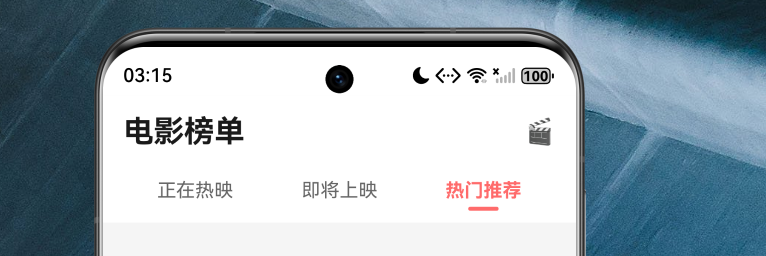
应用启动后默认展示热映电影页面,可以看到:
- 顶部标题栏清晰展示应用名称
- Tab 栏支持"正在热映"、“即将上映”、"热门推荐"三个频道切换
8.2 电影榜单页面
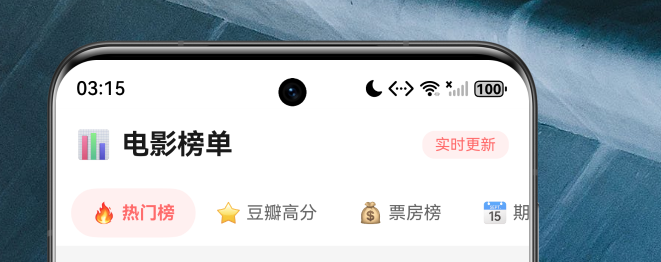
点击底部"榜单"Tab 进入榜单页面:
- 横向滚动的榜单类型选择栏(热门榜、豆瓣高分、票房榜、期待榜)
8.3 电影搜索页面
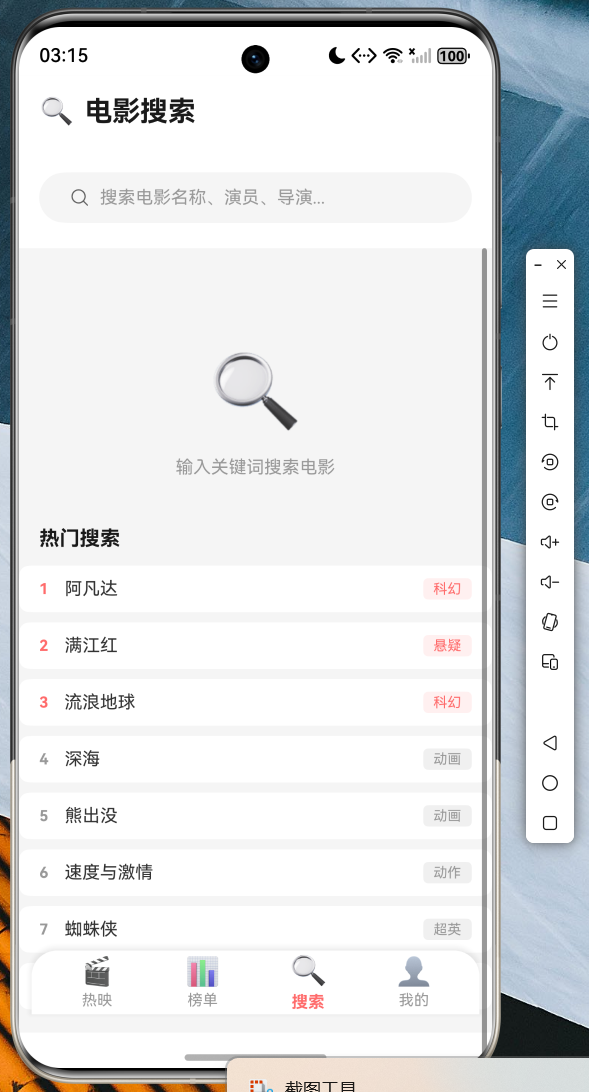
点击底部"搜索"Tab 进入搜索页面:
- 搜索框支持实时搜索
- 搜索历史记录功能
- 热门搜索推荐板块
8.4 用户中心页面
点击底部"我的"Tab 进入用户中心:
- 用户信息卡片展示
- 统计数据一目了然
- 功能菜单分类清晰

九、代码仓库
本项目的完整代码已托管至 AtomGit 平台,方便开发者学习参考:
仓库地址:https://atomgit.com/maaath/movie_app_flutter_oh
仓库结构清晰,包含完整的项目代码和 README 说明文档,欢迎 Star 和 Fork!
十、总结与展望
通过本文的实战开发,我们完整实现了一个功能丰富的电影榜单应用。总结来说,我们掌握了:
- Flutter for OpenHarmony 项目搭建:从零开始构建跨平台应用
- MVVM 架构实践:合理的分层设计,清晰的代码组织
- 状态管理方案:使用 StatefulWidget 和 Provider 管理应用状态
- 网络请求封装:Dio 的封装技巧和异常处理
- 自定义组件开发:星级评分、电影卡片等可复用组件
- 动画效果实现:丰富的交互动画提升用户体验
展望未来,我们还可以继续优化:
- 添加深色模式支持
- 实现离线缓存功能
- 接入真实的后端 API
- 添加用户登录注册功能
- 实现分享和评论功能
Flutter for OpenHarmony 生态正在蓬勃发展,期待更多开发者加入跨平台开发的行列,共同推动开源鸿蒙生态的繁荣!
参考链接:
- AtomGit 仓库:https://atomgit.com/maaath/movie_app_flutter_oh
- 开源鸿蒙跨平台社区:https://openharmonycrossplatform.csdn.net

作为“人工智能6S店”的官方数字引擎,为AI开发者与企业提供一个覆盖软硬件全栈、一站式门户。
更多推荐


 8
8 0
0- 0


 已为社区贡献18条内容

所有评论(0)