
【flutter for open harmony】第三方库Flutter 鸿蒙版 倒计时 实战指南(适配 1.0.0)✨
倒计时是日常生活和工作中常用的功能,可以帮助用户管理时间。本文将介绍如何在Flutter鸿蒙应用中实现倒计时功能。倒计时应用使用Flutter的Timer实现定时更新,通过CircularProgressIndicator显示进度。添加自定义时间输入功能。本文详细介绍了Flutter鸿蒙倒计时功能的实现过程,包括预设时间选择、进度显示和结束提醒。通过本实例,开发者可以掌握Flutter Timer
【flutter for open harmony】第三方库Flutter 鸿蒙版 倒计时 实战指南(适配 1.0.0)✨
Flutter 三方库 cached_network_image 的鸿蒙化适配与实战指南
欢迎加入开源鸿蒙跨平台社区: https://openharmonycrossplatform.csdn.net
本文详细介绍如何在Flutter鸿蒙应用中实现倒计时功能,包括预设时间选择、进度显示和结束提醒。
一、前言
倒计时是日常生活和工作中常用的功能,可以帮助用户管理时间。本文将介绍如何在Flutter鸿蒙应用中实现倒计时功能。
二、效果展示
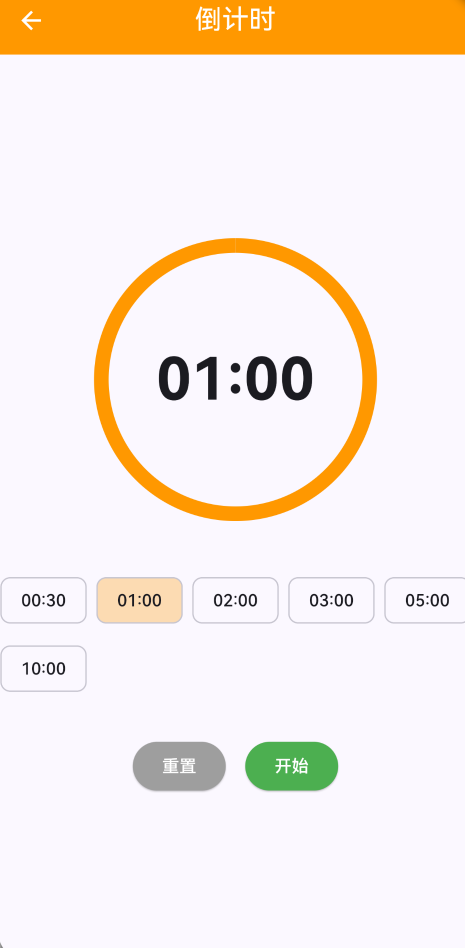
2.1 功能特性
| 功能 | 描述 |
|---|---|
| 预设时间 | 提供常用时间预设 |
| 进度显示 | 圆形进度条显示剩余时间 |
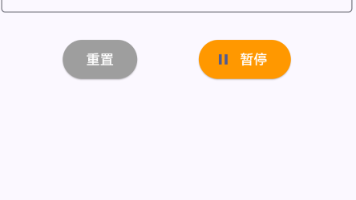
| 开始/暂停 | 控制倒计时状态 |
| 结束提醒 | 倒计时结束时提醒用户 |
三、项目背景与目标
3.1 项目背景
倒计时广泛应用于烹饪、运动、学习等场景,帮助用户在限定时间内完成任务。
3.2 项目目标
- 实现预设时间选择
- 实现进度显示
- 实现开始/暂停控制
- 实现结束提醒
四、技术架构设计
4.1 架构概述
倒计时应用使用Flutter的Timer实现定时更新,通过CircularProgressIndicator显示进度。
4.2 时间计算
进度 = 剩余时间 / 初始时间
五、详细实现
5.1 Flutter端实现
import 'dart:async';
import 'package:flutter/material.dart';
class SimpleCountdownPage extends StatefulWidget {
const SimpleCountdownPage({super.key});
State<SimpleCountdownPage> createState() => _SimpleCountdownPageState();
}
class _SimpleCountdownPageState extends State<SimpleCountdownPage> {
Timer? _timer;
int _seconds = 60;
int _initialSeconds = 60;
bool _isRunning = false;
final List<int> _presets = [30, 60, 120, 180, 300, 600];
void _start() {
setState(() => _isRunning = true);
_timer = Timer.periodic(const Duration(seconds: 1), (timer) {
setState(() {
if (_seconds > 0) {
_seconds--;
} else {
_stop();
ScaffoldMessenger.of(context).showSnackBar(
const SnackBar(content: Text('倒计时结束!')),
);
}
});
});
}
void _stop() {
_timer?.cancel();
setState(() => _isRunning = false);
}
void _reset() {
_timer?.cancel();
setState(() {
_seconds = _initialSeconds;
_isRunning = false;
});
}
void _setTime(int seconds) {
setState(() {
_initialSeconds = seconds;
_seconds = seconds;
});
}
String _formatTime(int totalSeconds) {
final minutes = (totalSeconds ~/ 60).toString().padLeft(2, '0');
final seconds = (totalSeconds % 60).toString().padLeft(2, '0');
return '$minutes:$seconds';
}
void dispose() {
_timer?.cancel();
super.dispose();
}
Widget build(BuildContext context) {
final progress = _seconds / _initialSeconds;
return Scaffold(
appBar: AppBar(
title: const Text('倒计时'),
centerTitle: true,
backgroundColor: Colors.orange,
foregroundColor: Colors.white,
),
body: Center(
child: Column(
mainAxisAlignment: MainAxisAlignment.center,
children: [
SizedBox(
width: 250,
height: 250,
child: Stack(
alignment: Alignment.center,
children: [
SizedBox(
width: 220,
height: 220,
child: CircularProgressIndicator(
value: progress,
strokeWidth: 12,
backgroundColor: Colors.grey[200],
valueColor: const AlwaysStoppedAnimation<Color>(Colors.orange),
),
),
Text(
_formatTime(_seconds),
style: const TextStyle(fontSize: 48, fontWeight: FontWeight.bold),
),
],
),
),
const SizedBox(height: 32),
Wrap(
spacing: 8,
runSpacing: 8,
children: _presets.map((preset) {
return ActionChip(
label: Text(_formatTime(preset)),
backgroundColor: _initialSeconds == preset ? Colors.orange.withOpacity(0.3) : null,
onPressed: _isRunning ? null : () => _setTime(preset),
);
}).toList(),
),
const SizedBox(height: 32),
Row(
mainAxisAlignment: MainAxisAlignment.center,
children: [
ElevatedButton(
onPressed: _reset,
style: ElevatedButton.styleFrom(backgroundColor: Colors.grey, foregroundColor: Colors.white),
child: const Text('重置'),
),
const SizedBox(width: 16),
ElevatedButton(
onPressed: _isRunning ? _stop : _start,
style: ElevatedButton.styleFrom(
backgroundColor: _isRunning ? Colors.red : Colors.green,
foregroundColor: Colors.white,
),
child: Text(_isRunning ? '暂停' : '开始'),
),
],
),
],
),
),
);
}
}
5.2 核心功能解析
预设时间选择
使用ActionChip提供常用时间预设,点击后设置倒计时时间。
进度显示
使用CircularProgressIndicator显示剩余时间比例,直观展示倒计时进度。
结束提醒
倒计时结束时通过SnackBar提醒用户。
六、实际应用场景
6.1 烹饪计时
设置烹饪时间,避免食物煮糊。
6.2 运动休息
设置运动休息时间,控制训练节奏。
6.3 学习番茄钟
设置25分钟学习时间,提高学习效率。
七、优化建议
7.1 自定义时间
添加自定义时间输入功能。
7.2 声音提醒
倒计时结束时播放提示音。
7.3 后台运行
支持应用进入后台后继续倒计时。
八、常见问题与解决方案
8.1 进度条不更新
确保使用setState更新UI。
8.2 倒计时不准确
使用更精确的计时方式或考虑系统时间。
8.3 重置后时间错误
确保重置时同时更新_seconds和_initialSeconds。
九、总结
本文详细介绍了Flutter鸿蒙倒计时功能的实现过程,包括预设时间选择、进度显示和结束提醒。通过本实例,开发者可以掌握Flutter Timer使用、进度条组件、状态管理等关键技术点。
十、参考资料
- Flutter官方文档:https://flutter.dev
- HarmonyOS开发者文档:https://developer.harmonyos.com
- Flutter中国社区:https://flutter-io.cn

作为“人工智能6S店”的官方数字引擎,为AI开发者与企业提供一个覆盖软硬件全栈、一站式门户。
更多推荐
 0
0 0
0- 0


 已为社区贡献1条内容

所有评论(0)