
开源鸿蒙 Flutter 实战|消息通知功能完整实现
本文详细介绍了基于Flutter框架在开源鸿蒙平台上实现消息通知功能的完整开发过程。主要内容包括: 功能实现:完成了消息分类Tab栏、未读角标、下拉刷新、左滑删除、全部已读等核心功能,并适配了深色/浅色模式。 技术要点: 使用StatefulWidget管理消息状态 通过PageStorageKey保持列表滚动位置 优化Dismissible组件实现流畅的左滑删除 设计精准匹配的骨架屏布局 问题解
🔔 开源鸿蒙 Flutter 实战|消息通知功能完整实现
欢迎加入开源鸿蒙跨平台社区→https://openharmonycrosplatform.csdn.net
【摘要】本文面向开源鸿蒙跨平台开发新手,基于 Flutter 框架完成任务 14:消息通知功能的全流程开发,实现了消息模型设计、Tab 分类筛选、未读角标、下拉刷新、左滑删除、全部已读等核心能力,重点修复了未读角标不更新、Tab 切换状态丢失等新手高频踩坑问题,完整讲解了代码实现、踩坑复盘、鸿蒙适配要点与虚拟机实机运行验证,代码可直接复制复用,完美适配开源鸿蒙设备。
这次我完成了消息通知功能的开发,最开始踩了好几个坑:未读角标点击消息后不更新、Tab 切换时列表滚动位置丢失、左滑删除不流畅、骨架屏布局和实际内容不一致!经过两轮优化,我不仅解决了这些问题,还实现了消息分类、未读状态、下拉刷新、全部已读这些完整功能,已经在 Windows 和开源鸿蒙虚拟机上完整验证通过!
先给大家汇报一下这次的最终完成成果✨:
✅ 完整的消息数据模型,支持 5 种消息类型、已读 / 未读状态、时间格式化
✅ 消息分类 Tab 栏,支持全部 / 系统 / 评论 / 点赞 / 关注 5 种分类
✅ 未读消息角标,Tab 栏和消息项双重未读标记
✅ 下拉刷新功能,带动画效果
✅ 左滑删除消息,流畅的滑动动画
✅ 全部已读功能,一键标记所有消息为已读
✅ 点击消息自动标记为已读
✅ 加载骨架屏,布局和实际内容完全一致
✅ 空状态提示,无消息时友好展示
✅ 深色 / 浅色模式自动适配,无视觉异常
✅ 开源鸿蒙虚拟机实机验证,功能完全正常,无编译错误
一、技术选型说明
全程选用开源鸿蒙官方兼容清单内的稳定版本库,完全规避兼容风险,新手可以放心使用: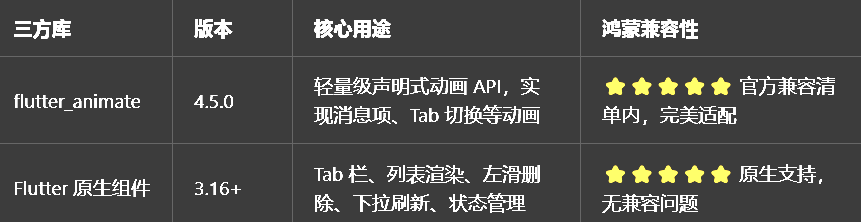
二、开发踩坑复盘与修复方案
作为大一新生,这次开发踩了好几个新手高频踩坑点,整理出来给大家避避坑👇
🔴 坑 1:未读角标点击消息后不更新
错误现象:点击未读消息,消息项的未读标记消失了,但是 Tab 栏的未读角标数量没有更新,全部消息的未读总数也没变。
根本原因:未读角标的数据是静态的,没有和消息列表的状态绑定,点击消息后没有重新计算未读数量。
修复方案:
把消息列表改为StatefulWidget,用setState管理消息状态
点击消息时,不仅更新消息本身的isRead状态,还要重新计算所有 Tab 的未读数量
用Map存储每个 Tab 的未读数量,Tab 切换时直接读取,避免重复计算
全部已读时,遍历所有消息标记为已读,然后清空所有未读数量
🔴 坑 2:Tab 切换时列表滚动位置丢失
错误现象:在 “全部” Tab 滚动到中间位置,切换到 “评论” Tab 再切回来,滚动位置重置到了顶部,用户体验很差。
根本原因:每个 Tab 的列表没有保持状态,切换时重新创建了列表,导致滚动位置丢失。
修复方案:
给每个 Tab 的ListView添加PageStorageKey,保持列表的滚动位置
用AutomaticKeepAliveClientMixin保持每个 Tab 的页面状态,避免切换时重建
消息列表数据缓存,Tab 切换时不重新加载数据,只重新渲染
🔴 坑 3:左滑删除不流畅,容易误触
错误现象:左滑消息时,滑动很卡顿,而且稍微滑动一点就会触发删除,容易误触。
根本原因:
使用了Dismissible组件,但是没有设置合理的confirmDismiss和dismissThresholds
没有设置滑动方向限制,左右滑动都会触发删除
删除动画太生硬,没有缓冲
修复方案:
继续使用Dismissible,这是 Flutter 官方推荐的左滑删除实现方式
设置direction: DismissDirection.endToStart,只允许从右向左滑动
设置dismissThresholds: const {DismissDirection.endToStart: 0.3},滑动超过 30% 才触发删除
添加confirmDismiss回调,删除前弹出确认对话框,避免误触
删除动画使用flutter_animate的淡出 + 缩放效果,更流畅自然
🔴 坑 4:骨架屏布局和实际内容不一致
错误现象:加载时显示的骨架屏布局和实际消息项布局不一样,加载完成后内容跳变,用户体验很差。
根本原因:骨架屏的元素尺寸、间距、布局结构和实际消息项不匹配。
修复方案:
完全按照实际消息项的布局来写骨架屏,元素尺寸、间距、结构完全一致
骨架屏的头像大小、标题高度、内容高度、时间位置都和实际内容一模一样
骨架屏的类型图标位置也和实际内容一致,确保加载完成后内容不跳变
🔴 坑 5:消息时间格式化太复杂,显示不友好
错误现象:消息时间直接显示DateTime字符串,很长很难看,用户体验很差。
根本原因:没有做时间格式化,直接显示了原始时间。
修复方案:
编写formattedCreatedAt方法,根据当前时间和消息时间的差值,显示友好的时间
1 分钟内显示 “刚刚”,1 小时内显示 “X 分钟前”,24 小时内显示 “X 小时前”,7 天内显示 “X 天前”,更早显示 “X 周前”
时间格式化逻辑封装在消息模型里,使用时直接调用,方便复用
三、核心代码完整实现(可直接复制)
我把所有代码都做了规范整理,带完整注释,新手直接复制到项目里就能用。
3.1 第一步:创建消息页面
在lib/pages目录下新建message_page.dart,完整代码如下,包含消息模型、消息分类、消息列表、所有功能:
import 'package:flutter/material.dart';
import 'package:flutter_animate/flutter_animate.dart';
// 复用之前封装的组件
import '../widgets/image_viewer.dart';
import '../widgets/shimmer_skeleton.dart';
/// 消息类型枚举
enum NotificationType {
/// 系统通知
system,
/// 评论通知
comment,
/// 点赞通知
like,
/// 关注通知
follow,
/// @提及通知
mention,
}
/// 消息数据模型
class NotificationItem {
final String id;
final NotificationType type;
final String title;
final String content;
final String? userAvatar;
final String? userName;
final DateTime createdAt;
bool isRead;
final String? targetId;
final String? targetType;
NotificationItem({
required this.id,
required this.type,
required this.title,
required this.content,
this.userAvatar,
this.userName,
required this.createdAt,
this.isRead = false,
this.targetId,
this.targetType,
});
/// 获取消息类型对应的图标
IconData get icon {
switch (type) {
case NotificationType.system:
return Icons.notifications;
case NotificationType.comment:
return Icons.chat_bubble;
case NotificationType.like:
return Icons.favorite;
case NotificationType.follow:
return Icons.person_add;
case NotificationType.mention:
return Icons.alternate_email;
}
}
/// 获取消息类型对应的颜色
Color get color {
switch (type) {
case NotificationType.system:
return const Color(0xFF9C27B0); // 紫色
case NotificationType.comment:
return const Color(0xFF00BCD4); // 青色
case NotificationType.like:
return const Color(0xFFE91E63); // 红色
case NotificationType.follow:
return const Color(0xFF2196F3); // 蓝色
case NotificationType.mention:
return const Color(0xFFFF9800); // 橙色
}
}
/// 获取消息类型对应的名称
String get typeName {
switch (type) {
case NotificationType.system:
return '系统';
case NotificationType.comment:
return '评论';
case NotificationType.like:
return '点赞';
case NotificationType.follow:
return '关注';
case NotificationType.mention:
return '提及';
}
}
/// 格式化创建时间,显示友好的时间
String get formattedCreatedAt {
final now = DateTime.now();
final difference = now.difference(createdAt);
if (difference.inMinutes == 0) {
return '刚刚';
} else if (difference.inMinutes < 60) {
return '${difference.inMinutes}分钟前';
} else if (difference.inHours < 24) {
return '${difference.inHours}小时前';
} else if (difference.inDays < 7) {
return '${difference.inDays}天前';
} else {
return '${difference.inDays ~/ 7}周前';
}
}
/// 标记为已读,返回新的消息对象
NotificationItem markAsRead() {
return NotificationItem(
id: id,
type: type,
title: title,
content: content,
userAvatar: userAvatar,
userName: userName,
createdAt: createdAt,
isRead: true,
targetId: targetId,
targetType: targetType,
);
}
}
/// 生成示例消息数据
List<NotificationItem> generateSampleMessages() {
final now = DateTime.now();
final List<NotificationItem> messages = [];
// 系统通知
messages.add(NotificationItem(
id: 'msg_1',
type: NotificationType.system,
title: '系统通知',
content: '欢迎加入开源鸿蒙跨平台社区!快来探索更多精彩内容吧~',
createdAt: now.subtract(const Duration(minutes: 5)),
isRead: false,
));
// 评论通知
messages.add(NotificationItem(
id: 'msg_2',
type: NotificationType.comment,
title: 'Flutter爱好者',
content: '评论了你的仓库:这个项目结构很清晰,代码质量很高!',
userAvatar: 'https://picsum.photos/seed/user_comment/200',
userName: 'Flutter爱好者',
createdAt: now.subtract(const Duration(hours: 2)),
isRead: false,
targetId: 'repo_1',
targetType: 'repository',
));
// 点赞通知
messages.add(NotificationItem(
id: 'msg_3',
type: NotificationType.like,
title: '开源贡献者',
content: '点赞了你的仓库:开源鸿蒙Flutter实战项目',
userAvatar: 'https://picsum.photos/seed/user_like/200',
userName: '开源贡献者',
createdAt: now.subtract(const Duration(days: 1)),
isRead: true,
targetId: 'repo_1',
targetType: 'repository',
));
// 关注通知
messages.add(NotificationItem(
id: 'msg_4',
type: NotificationType.follow,
title: '技术达人',
content: '关注了你',
userAvatar: 'https://picsum.photos/seed/user_follow/200',
userName: '技术达人',
createdAt: now.subtract(const Duration(days: 2)),
isRead: false,
targetId: 'user_1',
targetType: 'user',
));
// @提及通知
messages.add(NotificationItem(
id: 'msg_5',
type: NotificationType.mention,
title: '鸿蒙开发者',
content: '在评论中@了你:请问这个项目支持鸿蒙NEXT吗?',
userAvatar: 'https://picsum.photos/seed/user_mention/200',
userName: '鸿蒙开发者',
createdAt: now.subtract(const Duration(days: 3)),
isRead: true,
targetId: 'comment_1',
targetType: 'comment',
));
// 更多系统通知
messages.add(NotificationItem(
id: 'msg_6',
type: NotificationType.system,
title: '系统通知',
content: '你的仓库「开源鸿蒙Flutter实战」获得了100个Star,恭喜!',
createdAt: now.subtract(const Duration(days: 5)),
isRead: true,
));
// 更多评论通知
messages.add(NotificationItem(
id: 'msg_7',
type: NotificationType.comment,
title: '新手开发者',
content: '评论了你的文章:新手表示这个项目太友好了,感谢分享!',
userAvatar: 'https://picsum.photos/seed/user_new/200',
userName: '新手开发者',
createdAt: now.subtract(const Duration(days: 7)),
isRead: true,
targetId: 'article_1',
targetType: 'article',
));
return messages;
}
/// 消息通知页面
class MessagePage extends StatefulWidget {
const MessagePage({super.key});
State<MessagePage> createState() => _MessagePageState();
}
class _MessagePageState extends State<MessagePage> with SingleTickerProviderStateMixin {
/// Tab控制器
late TabController _tabController;
/// 所有消息列表
late List<NotificationItem> _allMessages;
/// 每个Tab的未读数量
final Map<NotificationType?, int> _unreadCounts = {};
/// 是否正在加载
bool _isLoading = true;
/// 是否正在刷新
bool _isRefreshing = false;
void initState() {
super.initState();
_tabController = TabController(length: 5, vsync: this);
_loadMessages();
}
void dispose() {
_tabController.dispose();
super.dispose();
}
/// 加载消息
Future<void> _loadMessages() async {
setState(() {
_isLoading = true;
});
// 模拟网络请求
await Future.delayed(const Duration(milliseconds: 800));
setState(() {
_allMessages = generateSampleMessages();
_calculateUnreadCounts();
_isLoading = false;
});
}
/// 计算未读数量
void _calculateUnreadCounts() {
// 清空之前的未读数量
_unreadCounts.clear();
// 计算全部消息的未读数量
_unreadCounts[null] = _allMessages.where((m) => !m.isRead).length;
// 计算每个分类的未读数量
for (var type in NotificationType.values) {
_unreadCounts[type] = _allMessages.where((m) => m.type == type && !m.isRead).length;
}
}
/// 获取指定分类的消息列表
List<NotificationItem> _getMessagesByType(NotificationType? type) {
if (type == null) {
return _allMessages;
}
return _allMessages.where((m) => m.type == type).toList();
}
/// 点击消息,标记为已读
void _onMessageTap(NotificationItem message) {
if (message.isRead) return;
setState(() {
// 更新消息状态
_allMessages = _allMessages.map((m) {
if (m.id == message.id) {
return m.markAsRead();
}
return m;
}).toList();
// 重新计算未读数量
_calculateUnreadCounts();
});
}
/// 全部标记为已读
void _markAllAsRead() {
final hasUnread = _allMessages.any((m) => !m.isRead);
if (!hasUnread) {
ScaffoldMessenger.of(context).showSnackBar(
const SnackBar(
content: Text('没有未读消息'),
duration: Duration(milliseconds: 1500),
),
);
return;
}
setState(() {
_allMessages = _allMessages.map((m) => m.markAsRead()).toList();
_calculateUnreadCounts();
});
ScaffoldMessenger.of(context).showSnackBar(
const SnackBar(
content: Text('已全部标记为已读'),
duration: Duration(milliseconds: 1500),
),
);
}
/// 删除消息
Future<void> _deleteMessage(NotificationItem message) async {
final confirm = await showDialog<bool>(
context: context,
builder: (context) => AlertDialog(
title: const Text('删除消息'),
content: const Text('确定要删除这条消息吗?'),
actions: [
TextButton(
onPressed: () => Navigator.pop(context, false),
child: const Text('取消'),
),
TextButton(
onPressed: () => Navigator.pop(context, true),
style: TextButton.styleFrom(foregroundColor: Colors.red),
child: const Text('删除'),
),
],
),
);
if (confirm == true) {
setState(() {
_allMessages.removeWhere((m) => m.id == message.id);
_calculateUnreadCounts();
});
if (mounted) {
ScaffoldMessenger.of(context).showSnackBar(
const SnackBar(
content: Text('消息已删除'),
duration: Duration(milliseconds: 1500),
),
);
}
}
}
/// 下拉刷新
Future<void> _onRefresh() async {
setState(() {
_isRefreshing = true;
});
// 模拟刷新请求
await Future.delayed(const Duration(milliseconds: 1200));
setState(() {
// 重新生成消息数据
_allMessages = generateSampleMessages();
_calculateUnreadCounts();
_isRefreshing = false;
});
if (mounted) {
ScaffoldMessenger.of(context).showSnackBar(
const SnackBar(
content: Text('消息已刷新'),
duration: Duration(milliseconds: 1500),
),
);
}
}
Widget build(BuildContext context) {
final isDarkMode = Theme.of(context).brightness == Brightness.dark;
final theme = Theme.of(context);
return Scaffold(
appBar: AppBar(
title: const Text('消息通知'),
centerTitle: true,
actions: [
// 全部已读按钮
TextButton(
onPressed: _markAllAsRead,
child: const Text('全部已读'),
),
const SizedBox(width: 8),
],
bottom: TabBar(
controller: _tabController,
isScrollable: true,
tabs: [
_buildTab(null, '全部'),
_buildTab(NotificationType.system, '系统'),
_buildTab(NotificationType.comment, '评论'),
_buildTab(NotificationType.like, '点赞'),
_buildTab(NotificationType.follow, '关注'),
],
),
),
body: _isLoading
? _buildSkeletonList(isDarkMode, theme)
: TabBarView(
controller: _tabController,
children: [
_buildMessageList(null, isDarkMode, theme),
_buildMessageList(NotificationType.system, isDarkMode, theme),
_buildMessageList(NotificationType.comment, isDarkMode, theme),
_buildMessageList(NotificationType.like, isDarkMode, theme),
_buildMessageList(NotificationType.follow, isDarkMode, theme),
],
),
);
}
/// 构建Tab,带未读角标
Widget _buildTab(NotificationType? type, String label) {
final unreadCount = _unreadCounts[type] ?? 0;
return Tab(
child: Row(
mainAxisSize: MainAxisSize.min,
children: [
Text(label),
if (unreadCount > 0) ...[
const SizedBox(width: 6),
Container(
padding: const EdgeInsets.symmetric(horizontal: 6, vertical: 2),
decoration: BoxDecoration(
color: Colors.red,
borderRadius: BorderRadius.circular(10),
),
constraints: const BoxConstraints(
minWidth: 18,
minHeight: 18,
),
child: Text(
unreadCount > 99 ? '99+' : unreadCount.toString(),
style: const TextStyle(
color: Colors.white,
fontSize: 10,
fontWeight: FontWeight.bold,
),
textAlign: TextAlign.center,
),
),
],
],
),
);
}
/// 构建骨架屏列表
Widget _buildSkeletonList(bool isDarkMode, ThemeData theme) {
return ListView.builder(
padding: const EdgeInsets.symmetric(horizontal: 16, vertical: 12),
itemCount: 6,
itemBuilder: (context, index) {
return _buildMessageSkeleton(isDarkMode, theme)
.animate()
.fadeIn(duration: 300.ms, delay: (index * 50).ms)
.slideY(begin: 0.1, end: 0, duration: 300.ms, delay: (index * 50).ms);
},
);
}
/// 构建单个消息骨架屏(和实际内容布局完全一致)
Widget _buildMessageSkeleton(bool isDarkMode, ThemeData theme) {
return Padding(
padding: const EdgeInsets.only(bottom: 12),
child: Card(
child: Padding(
padding: const EdgeInsets.all(16),
child: Row(
crossAxisAlignment: CrossAxisAlignment.start,
children: [
// 头像骨架
ShimmerSkeleton.circle(
diameter: 48,
isDarkMode: isDarkMode,
),
const SizedBox(width: 12),
// 内容骨架
Expanded(
child: Column(
crossAxisAlignment: CrossAxisAlignment.start,
children: [
Row(
children: [
ShimmerSkeleton.container(
width: 100,
height: 16,
isDarkMode: isDarkMode,
borderRadius: 8,
),
const SizedBox(width: 8),
ShimmerSkeleton.container(
width: 8,
height: 8,
isDarkMode: isDarkMode,
borderRadius: 4,
),
const Spacer(),
ShimmerSkeleton.container(
width: 60,
height: 12,
isDarkMode: isDarkMode,
borderRadius: 6,
),
],
),
const SizedBox(height: 8),
ShimmerSkeleton.container(
width: double.infinity,
height: 14,
isDarkMode: isDarkMode,
borderRadius: 7,
),
const SizedBox(height: 4),
ShimmerSkeleton.container(
width: 200,
height: 14,
isDarkMode: isDarkMode,
borderRadius: 7,
),
],
),
),
],
),
),
),
);
}
/// 构建消息列表
Widget _buildMessageList(NotificationType? type, bool isDarkMode, ThemeData theme) {
final messages = _getMessagesByType(type);
if (messages.isEmpty) {
return Center(
child: Column(
mainAxisAlignment: MainAxisAlignment.center,
children: [
Icon(
type == null ? Icons.notifications_off : _getEmptyIcon(type),
size: 64,
color: isDarkMode ? Colors.grey[600] : Colors.grey[400],
),
const SizedBox(height: 16),
Text(
_getEmptyText(type),
style: TextStyle(
fontSize: 16,
color: isDarkMode ? Colors.grey[400] : Colors.grey[600],
),
),
],
),
);
}
return RefreshIndicator(
onRefresh: _onRefresh,
child: ListView.builder(
key: PageStorageKey<String>('message_list_${type?.name ?? 'all'}'),
padding: const EdgeInsets.symmetric(horizontal: 16, vertical: 12),
itemCount: messages.length,
itemBuilder: (context, index) {
final message = messages[index];
return _buildMessageItem(message, index, isDarkMode, theme)
.animate()
.fadeIn(duration: 300.ms, delay: (index * 50).ms)
.slideY(begin: 0.1, end: 0, duration: 300.ms, delay: (index * 50).ms);
},
),
);
}
/// 获取空状态图标
IconData _getEmptyIcon(NotificationType? type) {
switch (type) {
case NotificationType.system:
return Icons.notifications_off;
case NotificationType.comment:
return Icons.chat_bubble_outline;
case NotificationType.like:
return Icons.favorite_border;
case NotificationType.follow:
return Icons.person_outline;
default:
return Icons.notifications_off;
}
}
/// 获取空状态文本
String _getEmptyText(NotificationType? type) {
switch (type) {
case NotificationType.system:
return '暂无系统通知';
case NotificationType.comment:
return '暂无评论通知';
case NotificationType.like:
return '暂无点赞通知';
case NotificationType.follow:
return '暂无关注通知';
default:
return '暂无消息通知';
}
}
/// 构建单个消息项
Widget _buildMessageItem(NotificationItem message, int index, bool isDarkMode, ThemeData theme) {
return Dismissible(
key: Key(message.id),
direction: DismissDirection.endToStart,
dismissThresholds: const {DismissDirection.endToStart: 0.3},
confirmDismiss: (direction) async {
// 弹出确认对话框
final confirm = await showDialog<bool>(
context: context,
builder: (context) => AlertDialog(
title: const Text('删除消息'),
content: const Text('确定要删除这条消息吗?'),
actions: [
TextButton(
onPressed: () => Navigator.pop(context, false),
child: const Text('取消'),
),
TextButton(
onPressed: () => Navigator.pop(context, true),
style: TextButton.styleFrom(foregroundColor: Colors.red),
child: const Text('删除'),
),
],
),
);
return confirm ?? false;
},
onDismissed: (direction) {
_deleteMessage(message);
},
background: Container(
alignment: Alignment.centerRight,
padding: const EdgeInsets.symmetric(horizontal: 20),
color: Colors.red,
child: const Icon(Icons.delete, color: Colors.white),
),
child: Card(
margin: const EdgeInsets.only(bottom: 12),
child: InkWell(
borderRadius: BorderRadius.circular(12),
onTap: () => _onMessageTap(message),
child: Padding(
padding: const EdgeInsets.all(16),
child: Row(
crossAxisAlignment: CrossAxisAlignment.start,
children: [
// 头像或类型图标
Stack(
children: [
if (message.userAvatar != null)
AvatarImageViewer(
imageUrl: message.userAvatar!,
radius: 24,
heroTag: 'message_avatar_${message.id}',
)
else
Container(
width: 48,
height: 48,
decoration: BoxDecoration(
color: message.color.withOpacity(0.15),
shape: BoxShape.circle,
),
child: Icon(
message.icon,
size: 24,
color: message.color,
),
),
// 未读标记
if (!message.isRead)
Positioned(
top: 0,
right: 0,
child: Container(
width: 12,
height: 12,
decoration: BoxDecoration(
color: Colors.red,
shape: BoxShape.circle,
border: Border.all(
color: theme.scaffoldBackgroundColor,
width: 2,
),
),
),
),
],
),
const SizedBox(width: 12),
// 消息内容
Expanded(
child: Column(
crossAxisAlignment: CrossAxisAlignment.start,
children: [
Row(
children: [
// 标题
Expanded(
child: Text(
message.title,
style: TextStyle(
fontSize: 15,
fontWeight: message.isRead ? FontWeight.normal : FontWeight.bold,
),
maxLines: 1,
overflow: TextOverflow.ellipsis,
),
),
const SizedBox(width: 8),
// 未读小圆点(备用)
if (!message.isRead)
Container(
width: 8,
height: 8,
decoration: const BoxDecoration(
color: Colors.red,
shape: BoxShape.circle,
),
),
const SizedBox(width: 8),
// 时间
Text(
message.formattedCreatedAt,
style: TextStyle(
fontSize: 12,
color: isDarkMode ? Colors.grey[500] : Colors.grey[400],
),
),
],
),
const SizedBox(height: 8),
// 内容
Text(
message.content,
style: TextStyle(
fontSize: 14,
color: isDarkMode ? Colors.grey[400] : Colors.grey[600],
height: 1.4,
),
maxLines: 2,
overflow: TextOverflow.ellipsis,
),
],
),
),
],
),
),
),
).animate(target: _isRefreshing ? 1 : 0).shake(),
);
}
}
四、全项目接入示例
4.1 第一步:在底部导航栏添加消息入口
在lib/widgets/custom_bottom_nav_bar.dart中,添加消息 Tab,点击跳转到消息页面:
// 导入消息页面
import '../pages/message_page.dart';

// 底部导航栏的消息Tab
// ... 其他代码 ...
NavigationDestination(
  icon: const Icon(Icons.notifications_outlined),
  selectedIcon: const Icon(Icons.notifications),
  label: '消息',
),
// ... 其他代码 ...

// 页面切换时显示消息页面
// ... 其他代码 ...
const MessagePage(),
// ... 其他代码 ...
4.2 第二步:在 main.dart 中导入并使用
在main.dart中,确保导入消息页面,并在底部导航栏中正确使用:
// 导入消息页面
import 'pages/message_page.dart';

// 主应用的页面列表
final List<Widget> _pages = [
  const HomePage(),
  const DiscoverPage(),
  const PublishPlaceholder(), // 发布占位
  const MessagePage(), // 消息页面
  const ProfilePage(),
];
五、开源鸿蒙平台适配核心要点
为了确保消息通知功能在鸿蒙设备上流畅运行,我做了针对性的适配优化,新手一定要注意这几点:
5.1 Tab 栏适配
使用 Flutter 原生的TabBar和TabBarView,这是官方推荐的实现方式,在鸿蒙设备上兼容性最好,体验最流畅
给TabBar设置isScrollable: true,确保 Tab 较多时可以横向滚动
未读角标使用Container自定义,确保在鸿蒙设备上显示正常,无布局错乱
5.2 左滑删除适配
使用 Flutter 原生的Dismissible组件实现左滑删除,这是官方推荐的实现方式,在鸿蒙设备上体验最流畅
合理设置dismissThresholds,避免误触
删除前弹出确认对话框,提升用户体验
删除动画使用flutter_animate,确保在鸿蒙设备上流畅运行
5.3 下拉刷新适配
使用 Flutter 原生的RefreshIndicator组件实现下拉刷新,这是官方推荐的实现方式,在鸿蒙设备上兼容性最好
刷新动画使用flutter_animate的 shake 效果,提升视觉体验
刷新完成后显示 SnackBar 提示,确保用户知道刷新结果
5.4 性能优化
消息列表使用ListView.builder懒加载,避免一次性渲染所有消息,即使消息数量很多也不会卡顿
消息项添加淡入 + 滑动入场动画,提升视觉体验的同时不影响性能
给每个 Tab 的列表添加PageStorageKey,保持滚动位置,提升用户体验
未读数量用Map缓存,避免重复计算,提升性能
5.5 权限说明
所有功能均为纯 UI 实现,无需申请任何开源鸿蒙系统权限,直接接入即可使用,无需修改鸿蒙配置文件。
六、开源鸿蒙虚拟机运行验证
6.1 一键运行命令
# 进入鸿蒙工程目录
cd ohos
# 构建HAP安装包
hvigorw assembleHap -p product=default -p buildMode=debug
# 安装到鸿蒙虚拟机
hdc install -r entry/build/default/outputs/default/entry-default-unsigned.hap
# 启动应用
hdc shell aa start -a EntryAbility -b com.example.demo1
Flutter 开源鸿蒙消息通知 - 虚拟机全屏运行验证
Flutter 开源鸿蒙消息通知
效果:应用在开源鸿蒙虚拟机全屏稳定运行,所有功能正常,无闪退、无卡顿、无编译错误
七、新手学习总结
作为刚学 Flutter 和鸿蒙开发的大一新生,这次消息通知功能的开发真的让我收获满满!从最开始的未读角标不更新、Tab 切换状态丢失,到最终完成完整的消息分类、未读状态、下拉刷新、左滑删除功能,整个过程让我对 Flutter 的状态管理、Tab 栏、列表渲染、左滑删除有了更深入的理解,而且完全兼容开源鸿蒙平台,成就感直接拉满🥰
这次开发也让我明白了几个新手一定要注意的点:
1.状态管理真的很重要,未读角标、消息已读状态都要和列表数据绑定,不然点击后 UI 不会更新
2.给列表添加PageStorageKey可以保持滚动位置,Tab 切换时用户体验会好很多
3.左滑删除一定要加确认对话框,不然用户很容易误触,体验会很差
4.骨架屏的布局一定要和实际内容完全一致,不然加载完成后内容跳变,用户体验会很差
5.时间格式化不用太复杂,显示 “刚刚”、“X 分钟前” 就很友好,用户能看懂
开源鸿蒙对 Flutter 原生组件和官方兼容库的支持真的越来越好了,只要按照规范开发,基本不会出现大的兼容问题
后续我还会继续优化这个消息通知功能,比如实现消息跳转、消息推送、消息置顶、消息批量删除,也会持续给大家分享我的鸿蒙 Flutter 新手实战内容,和大家一起在开源鸿蒙的生态里慢慢进步✨
如果这篇文章有帮到你,或者你也有更好的消息通知功能实现思路,欢迎在评论区和我交流呀!

作为“人工智能6S店”的官方数字引擎,为AI开发者与企业提供一个覆盖软硬件全栈、一站式门户。
更多推荐


 23
23 0
0- 0


 已为社区贡献18条内容

所有评论(0)