
鸿蒙计算器实战:从表达式显示到连续运算
本文介绍了一个基于HarmonyOS 5.0+的MVVM架构计算器实现方案。该计算器支持四则运算、连续运算、实时表达式显示、退格等功能,采用浅色主题和区分色彩的按钮设计。核心设计包括:通过ViewModel管理计算状态(如当前输入、运算符、表达式等),实现实时显示用户输入的全过程;利用状态变量控制运算流程,支持连续计算;采用分层架构将UI与业务逻辑分离。文章详细解析了数字输入、运算符处理、等号计算
源码已整理 HarmonyCalculator
HarmonyOS 5.0+,基于 MVVM 架构,浅色主题,不规则网格布局,支持加减乘除、连续运算、退格、正负号、百分比
一、设计目标
计算器是移动应用中的经典组件,看似简单却涉及状态管理、表达式解析、连续运算等细节。本文从零实现一款功能完整的鸿蒙计算器,核心需求如下:
- 基础四则运算(加、减、乘、除)
- 实时表达式显示(例如输入
7+8时屏幕显示完整的7+8,而不是只显示当前数字8) - 连续运算(
7+8-3=能正确得到12) - 退格删除、正负号切换、百分比转换
- 浅色主题,按钮文字颜色区分(运算符蓝色,数字黑色)
为了实现这些目标,我们采用 MVVM 架构,将 UI 与业务逻辑彻底分离。ViewModel 负责管理所有计算状态和逻辑,View 仅负责渲染和事件分发。
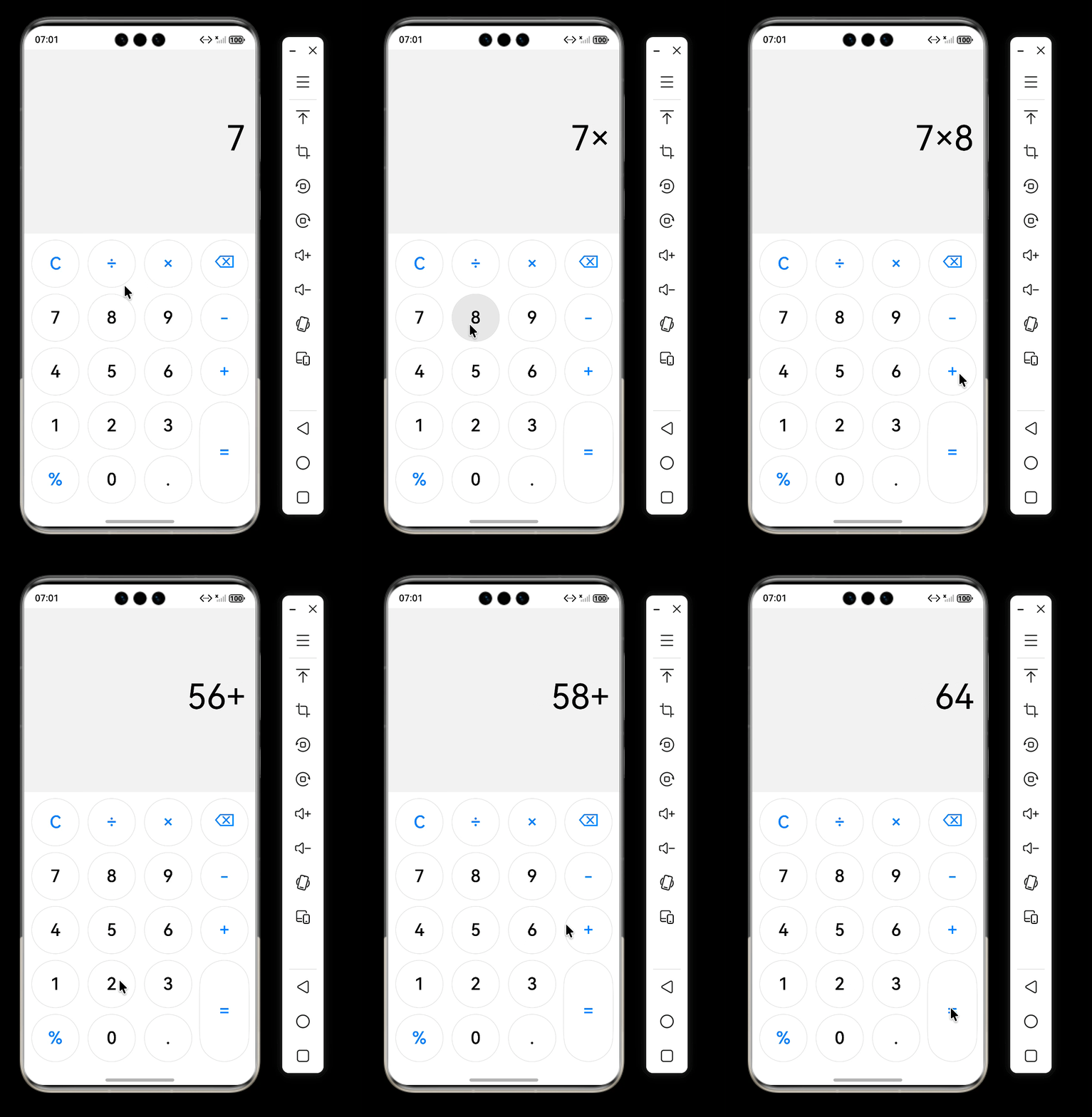
运行效果
二、核心设计思路
2.1 状态管理
计算器的核心在于准确记录用户的输入序列,并实时更新显示。我们为 ViewModel 设计了以下几个关键状态:
| 状态变量 | 类型 | 作用 |
|---|---|---|
displayText |
string | 最终显示在屏幕上的内容(表达式或结果) |
currentInput |
string | 当前正在输入的数字(例如用户刚按下 8) |
previousValue |
number | 上一个参与运算的值(用于连续计算) |
operator |
string | 当前待执行的运算符(+、-、*、/) |
waitingForOperand |
boolean | 是否正在等待下一个操作数(即刚按过运算符) |
expression |
string | 累积的表达式字符串(如 7+ 或 7+8) |
其中 expression 和 currentInput 的配合是实现实时表达式显示的关键。
2.2 实时表达式显示原理
普通计算器往往只显示当前输入的数字,用户看不到完整的算式,体验不佳。我们希望做到:
- 按
7→ 显示7 - 按
+→ 显示7+ - 按
8→ 显示7+8 - 按
=→ 显示15
设计思路:
expression存储已确定的部分(数字+运算符),例如7+。currentInput存储当前正在输入的数字,例如8。- 在非等待操作数状态下,显示内容为
expression + currentInput。 - 当按下运算符后,将
currentInput和运算符追加到expression,并清空currentInput,进入等待操作数状态,此时显示expression(末尾带运算符)。 - 当按下数字时,如果处于等待操作数状态,则开始新的
currentInput,退出等待状态,显示重新变为expression + currentInput。
这样就能平滑地实现表达式的逐字构建。
2.3 连续运算的支持
连续运算是指用户输入 7+8-3= 时,计算器能正确得到 12,而不是只计算最后一步。实现策略:
- 当用户按下运算符(例如
-)且已有运算符且未等待操作数时,说明用户想要连续计算(例如7+8后按-)。此时先计算前一步的结果(7+8=15),将结果显示并作为新的previousValue,然后将新运算符(-)保存,进入等待操作数状态。 - 这样无论用户连续输入多少个运算符,都能保证每一步及时计算,最终等号只需计算最后一步。
三、关键代码实现与文字说明
3.1 数字输入
onDigit(digit: string) {
  if (this.waitingForOperand) {
    // 刚按过运算符,开始新数字
    this.currentInput = digit;
    this.waitingForOperand = false;
  } else {
    // 正常追加数字,处理前导零
    if (this.currentInput === '0' && digit !== '.') {
      this.currentInput = digit;
    } else {
      this.currentInput += digit;
    }
  }
  this.updateDisplay();
}
逻辑说明:
- 如果处于等待操作数状态(即上次输入是运算符),则当前输入的数字是新操作数的开始,直接赋值给
currentInput,并退出等待状态。 - 否则,将数字追加到
currentInput末尾,但需避免多个前导零(例如00不合法)。 - 每次修改后调用
updateDisplay()刷新屏幕。
3.2 运算符处理(含连续运算)
onOperator(op: string) {
  const currentVal = parseFloat(this.currentInput);
  // 连续运算分支:已有运算符且未等待操作数
  if (this.operator && !this.waitingForOperand) {
    this.previousValue = this.calculate(this.previousValue, currentVal, this.operator);
    this.displayText = this.previousValue.toString();
    this.currentInput = this.displayText;
    // 表达式更新为结果 + 新运算符
    this.expression = this.displayText + this.getDisplayOperator(op);
    this.operator = op;
    this.waitingForOperand = true;
    this.updateDisplay();
    return;
  }
  // 正常情况:将当前数字和运算符追加到表达式
  if (this.expression === '') {
    this.expression = this.currentInput + this.getDisplayOperator(op);
  } else {
    this.expression += this.currentInput + this.getDisplayOperator(op);
  }
  this.operator = op;
  this.previousValue = currentVal;
  this.waitingForOperand = true;
  this.updateDisplay();
}
逻辑说明:
- 首先将当前输入的字符串转为数字
currentVal。 - 连续运算判断:如果
operator非空且不是等待操作数状态(说明用户已经输入了第二个操作数),则先计算前一步结果,将结果设为新的currentInput,并用结果和新运算符重建expression。 - 正常情况(首次按下运算符,或连续运算完成后的新运算符):将
currentInput和运算符追加到expression中,保存运算符和previousValue,进入等待操作数状态。 - 注意使用
getDisplayOperator()将内部运算符(*、/)转换为显示用的×、÷。
3.3 等号计算
onEqual() {
  if (!this.operator || this.waitingForOperand) return;
  this.expression += this.currentInput;            // 将最后一个数字补全
  const result = this.calculate(this.previousValue, parseFloat(this.currentInput), this.operator);
  this.displayText = result.toString();
  // 清空状态,但将结果作为下次运算的起点
  this.currentInput = this.displayText;
  this.previousValue = 0;
  this.operator = '';
  this.waitingForOperand = true;
  this.expression = '';
}
逻辑说明:
- 只有存在运算符且不在等待操作数状态时才能计算。
- 先将最后一个数字追加到表达式(用于显示完整算式,虽然等号后我们会清空它)。
- 计算结果,更新显示。
- 清空表达式和运算符,但将结果存入
currentInput,并将waitingForOperand设为true。这样做的好处是:用户按下等号后,如果接着按下运算符,可以直接对结果进行下一步运算,符合使用习惯。
3.4 显示更新逻辑
private updateDisplay() {
  if (this.waitingForOperand && this.expression !== '') {
    // 刚按过运算符,显示表达式(末尾已带运算符)
    this.displayText = this.expression;
  } else {
    if (this.expression === '') {
      this.displayText = this.currentInput === '' ? '0' : this.currentInput;
    } else {
      // 显示表达式 + 当前输入的数字
      this.displayText = this.expression + this.currentInput;
    }
  }
}
逻辑说明:
- 等待操作数状态:此时
currentInput是上一个数字(已被移入表达式),我们只显示expression(例如7+)。 - 非等待状态:如果表达式为空,直接显示当前输入数字(或
0);否则将表达式和当前数字拼接显示(例如7+8)。 - 这样保证了用户始终看到完整的输入过程。
3.5 辅助功能
退格:
onDelete() {
  if (this.waitingForOperand) return;
  if (this.currentInput.length > 0) {
    this.currentInput = this.currentInput.slice(0, -1);
    if (this.currentInput === '' || this.currentInput === '-') {
      this.currentInput = '0';
    }
    this.updateDisplay();
  }
}
仅当不在等待操作数状态时允许删除当前输入的最后一位,删除后若为空或仅剩负号则重置为 0。
正负号:
onSign() {
  if (this.currentInput === '') return;
  let val = parseFloat(this.currentInput);
  val = -val;
  this.currentInput = val.toString();
  this.updateDisplay();
}
百分比:
onPercent() {
  if (this.currentInput === '') return;
  let val = parseFloat(this.currentInput);
  val = val / 100;
  this.currentInput = val.toString();
  this.updateDisplay();
}
清除:
重置所有状态变量,displayText 置为 '0'。
四、完整 ViewModel 代码
export class CalculatorViewModel {
  // 显示内容:表达式或结果
  displayText: string = '0';
  // 当前正在输入的数字(字符串形式)
  private currentInput: string = '';
  // 上一个参与运算的值(用于连续计算)
  private previousValue: number = 0;
  // 当前待执行的运算符(+、-、*、/)
  private operator: string = '';
  // 是否正在等待下一个操作数(即刚按过运算符)
  private waitingForOperand: boolean = false;
  // 累积的表达式字符串(例如 "7+" 或 "7+8")
  private expression: string = '';

  // 处理数字键输入
  onDigit(digit: string) {
    if (this.waitingForOperand) {
      // 正在等待操作数 -> 开始新数字
      this.currentInput = digit;
      this.waitingForOperand = false;
    } else {
      // 正常追加数字,避免前导零(如 "00")
      if (this.currentInput === '0' && digit !== '.') {
        this.currentInput = digit;
      } else {
        this.currentInput += digit;
      }
    }
    this.updateDisplay();
  }

  // 处理小数点输入
  onDot() {
    if (this.waitingForOperand) {
      // 等待操作数时,直接开始 "0."
      this.currentInput = '0.';
      this.waitingForOperand = false;
    } else if (this.currentInput.indexOf('.') === -1) {
      // 当前数字没有小数点时,才追加小数点
      if (this.currentInput === '') {
        this.currentInput = '0.';
      } else {
        this.currentInput += '.';
      }
    }
    this.updateDisplay();
  }

  // 处理运算符输入(+、-、×、÷)
  onOperator(op: string) {
    const currentVal = parseFloat(this.currentInput);
    // 连续运算:已有运算符且未等待操作数 -> 先计算前一步
    if (this.operator && !this.waitingForOperand) {
      this.previousValue = this.calculate(this.previousValue, currentVal, this.operator);
      this.displayText = this.previousValue.toString();
      this.currentInput = this.displayText;
      // 用计算结果和新运算符重建表达式
      this.expression = this.displayText + this.getDisplayOperator(op);
      this.operator = op;
      this.waitingForOperand = true;
      this.updateDisplay();
      return;
    }
    // 正常情况:将当前数字和运算符追加到表达式
    if (this.expression === '') {
      this.expression = this.currentInput + this.getDisplayOperator(op);
    } else {
      this.expression += this.currentInput + this.getDisplayOperator(op);
    }
    this.operator = op;
    this.previousValue = currentVal;
    this.waitingForOperand = true;
    this.updateDisplay();
  }

  // 处理等号:计算结果并更新状态
  onEqual() {
    if (!this.operator || this.waitingForOperand) return;
    // 将最后一个数字补全到表达式(仅用于显示,计算后清空)
    this.expression += this.currentInput;
    const currentVal = parseFloat(this.currentInput);
    const result = this.calculate(this.previousValue, currentVal, this.operator);
    this.displayText = result.toString();
    // 清空运算状态,但保留结果作为下次运算的起点
    this.currentInput = this.displayText;
    this.previousValue = 0;
    this.operator = '';
    this.waitingForOperand = true;
    this.expression = '';
  }

  // 清除所有状态,显示归零
  onClear() {
    this.currentInput = '';
    this.previousValue = 0;
    this.operator = '';
    this.waitingForOperand = false;
    this.expression = '';
    this.displayText = '0';
  }

  // 切换当前数字的正负号
  onSign() {
    if (this.currentInput === '') return;
    let val = parseFloat(this.currentInput);
    val = -val;
    this.currentInput = val.toString();
    this.updateDisplay();
  }

  // 将当前数字转换为百分比(除以100)
  onPercent() {
    if (this.currentInput === '') return;
    let val = parseFloat(this.currentInput);
    val = val / 100;
    this.currentInput = val.toString();
    this.updateDisplay();
  }

  // 退格:删除当前输入的最后一位字符
  onDelete() {
    if (this.waitingForOperand) return; // 等待操作数时,退格无效
    if (this.currentInput.length > 0) {
      this.currentInput = this.currentInput.slice(0, -1);
      // 删除后若为空或仅剩负号,则重置为0
      if (this.currentInput === '' || this.currentInput === '-') {
        this.currentInput = '0';
      }
      this.updateDisplay();
    }
  }

  // 将内部运算符转换为显示用的符号(*→×,/→÷)
  private getDisplayOperator(op: string): string {
    switch (op) {
      case '*': return '×';
      case '/': return '÷';
      default: return op;
    }
  }

  // 更新屏幕显示:根据当前状态组合表达式和当前输入
  private updateDisplay() {
    if (this.waitingForOperand && this.expression !== '') {
      // 刚按过运算符,显示表达式(末尾已有运算符)
      this.displayText = this.expression;
    } else {
      if (this.expression === '') {
        // 无表达式时,显示当前输入(若无则显示0)
        this.displayText = this.currentInput === '' ? '0' : this.currentInput;
      } else {
        // 显示完整表达式 + 当前输入
        this.displayText = this.expression + this.currentInput;
      }
    }
  }

  // 执行实际的计算
  private calculate(a: number, b: number, op: string): number {
    switch (op) {
      case '+': return a + b;
      case '-': return a - b;
      case '*': return a * b;
      case '/': return b !== 0 ? a / b : 0;
      default: return b;
    }
  }
}
四、布局页面
import { ButtonItem } from '../model/ButtonItem';
import { CalculatorViewModel } from '../viewmodel/CalculatorViewModel';

@Entry
@Component
struct CalculatorPage {
  @State viewModel: CalculatorViewModel = new CalculatorViewModel();
  private scroller: Scroller = new Scroller();

  private buttons: ButtonItem[] = [
    // 第一行:功能键和运算符
    { label: 'C', fontColor: '#007AFF', action: () => { this.viewModel.onClear(); } },
    { label: '÷', fontColor: '#007AFF', action: () => { this.viewModel.onOperator('/'); } },
    { label: '×', fontColor: '#007AFF', action: () => { this.viewModel.onOperator('*'); } },
    { label: '⌫', fontColor: '#007AFF', action: () => { this.viewModel.onDelete(); } },
    // 第二行:7 8 9 减号
    { label: '7', fontColor: '#000000', action: () => { this.viewModel.onDigit('7'); } },
    { label: '8', fontColor: '#000000', action: () => { this.viewModel.onDigit('8'); } },
    { label: '9', fontColor: '#000000', action: () => { this.viewModel.onDigit('9'); } },
    { label: '-', fontColor: '#007AFF', action: () => { this.viewModel.onOperator('-'); } },
    // 第三行:4 5 6 加号
    { label: '4', fontColor: '#000000', action: () => { this.viewModel.onDigit('4'); } },
    { label: '5', fontColor: '#000000', action: () => { this.viewModel.onDigit('5'); } },
    { label: '6', fontColor: '#000000', action: () => { this.viewModel.onDigit('6'); } },
    { label: '+', fontColor: '#007AFF', action: () => { this.viewModel.onOperator('+'); } },
    // 第四行:1 2 3 等号
    { label: '1', fontColor: '#000000', action: () => { this.viewModel.onDigit('1'); } },
    { label: '2', fontColor: '#000000', action: () => { this.viewModel.onDigit('2'); } },
    { label: '3', fontColor: '#000000', action: () => { this.viewModel.onDigit('3'); } },
    { label: '=', fontColor: '#007AFF', action: () => { this.viewModel.onEqual(); } },
    // 第五行:百分比 0 小数点
    { label: '%', fontColor: '#007AFF', action: () => { this.viewModel.onPercent(); } },
    { label: '0', fontColor: '#000000', action: () => { this.viewModel.onDigit('0'); } },
    { label: '.', fontColor: '#000000', action: () => { this.viewModel.onDot(); } }
  ];

  // 不规则布局配置:使 "=" 按钮跨两行
   private layoutOptions: GridLayoutOptions = {
    regularSize: [1, 1],
    onGetRectByIndex: (index: number) => {
      if (index === 15) {
        return [3, 3, 2, 1];
      }else{
        const row = Math.floor(index / 4);
        const col = index % 4;
        return [row, col, 1, 1];
      }
    }
  };

  build() {
    Column() {
      Text(this.viewModel.displayText)
        .width('100%')
        .fontSize(56)
        .fontColor(Color.Black)
        .textAlign(TextAlign.End)
        .backgroundColor('#F2F2F2')
        .padding(16)
        .margin({ bottom: 10 })
        .layoutWeight(1)

      // 按钮网格:使用不规则布局
      Grid(this.scroller, this.layoutOptions) {
        ForEach(this.buttons, (item: ButtonItem, index: number) => {
          GridItem() {
            this.buttonItem(item)
          }
        }, (item: ButtonItem, index: number) => index.toString())
      }
      .columnsTemplate('1fr 1fr 1fr 1fr')
      .rowsTemplate('1fr 1fr 1fr 1fr 1fr')   // 5行,适应等号跨行
      .columnsGap(10)
      .rowsGap(10)
      .padding(10)
      .width('100%')
      .height('60%')
      .backgroundColor(Color.White)
    }
    .width('100%')
    .height('100%')
    .backgroundColor('#F2F2F2')
  }

  // 单个按钮构建器
  @Builder
  buttonItem(item: ButtonItem) {
    Button(item.label, {
      buttonStyle: ButtonStyleMode.NORMAL,
      type: item.label === '=' ? ButtonType.Capsule : ButtonType.Circle
    })
      .width('100%')
      .height('100%')
      .fontSize(28)
      .fontColor(item.fontColor)
      .backgroundColor(Color.White)
      .borderRadius(40)
      .border({ width: 1, color: '#E0E0E0' })
      .shadow({ radius: 2, color: '#00000020', offsetX: 0, offsetY: 1 })
      .onClick(() => {
        if (item.action) item.action();
      })
  }
}
五、总结
基础计算器功能很简单但是我们的重点是通过 ViewModel 中表达式构建和连续运算的核心设计思路,并辅以关键代码片段。可以根据此思路快速实现一个功能完整的计算器,并轻松扩展科学计算等高级功能。如果觉得有用,请点赞、收藏、转发支持!谢谢

作为“人工智能6S店”的官方数字引擎,为AI开发者与企业提供一个覆盖软硬件全栈、一站式门户。
更多推荐

 6
6 0
0- 0


 已为社区贡献81条内容

所有评论(0)