
Flutter for OpenHarmony萌系搜索功能实战:打造超Q搜索体验
好啦,今天咱们一起用Flutter for OpenHarmony魔法,打造了一个超级可爱的搜索功能!粉粉嫩嫩的萌系搜索框UI聪明的实时搜索逻辑软萌的空状态提示温柔的防抖性能优化希望这个萌系搜索功能能让你的应用变得更加可爱,让用户爱不释手~最后,祝大家在鸿蒙跨平台开发的道路上,像小兔子一样蹦蹦跳跳,充满活力!✨。
Flutter for OpenHarmony萌系搜索功能实战:打造超Q搜索体验
欢迎加入开源鸿蒙跨平台社区: https://openharmonycrossplatform.csdn.net
一、搜索功能也要萌萌哒~
哈喽呀~各位可爱的开发者小伙伴们!今天咱们要一起给Flutter for OpenHarmony应用加上一个超萌超好用的搜索功能!✨
想象一下,当用户打开你的应用,看到一个粉粉嫩嫩的搜索框,输入关键词时还有可爱的动画效果,搜索结果瞬间呈现在眼前,找不到东西时还会有软萌的提示…是不是想想就觉得很治愈呀?
好啦,废话不多说,咱们开始动手吧!这次我们要实现的是一个完整的搜索功能,包括萌系UI设计、实时搜索、空状态提示和性能优化,保证让你的应用瞬间变得超有灵气~
二、技术准备:装备清单
首先,咱们来准备一下需要的技术装备:
- Flutter for OpenHarmony:咱们的跨平台魔法棒,能让代码在不同设备上都变得可可爱爱
- Dio:网络请求小助手,帮咱们从云端获取数据
- StatefulWidget:状态管理小管家,负责管理搜索时的各种小情绪
- Timer:防抖小精灵,让搜索变得更流畅不卡顿
三、开始魔法:萌系搜索功能实现
3.1 数据模型:给数据穿上可爱的小衣服
首先,咱们需要定义一个萌萌哒的Todo数据模型,让每条待办事项都有自己的小个性:
class TodoItem {
  final int userId;
  final int id;
  final String title;
  final bool completed;

  TodoItem({
    required this.userId,
    required this.id,
    required this.title,
    required this.completed,
  });

  factory TodoItem.fromJson(Map<String, dynamic> json) {
    return TodoItem(
      userId: json['userId'] as int,
      id: json['id'] as int,
      title: json['title'] as String,
      completed: json['completed'] as bool,
    );
  }

  Map<String, dynamic> toJson() {
    return {
      'userId': userId,
      'id': id,
      'title': title,
      'completed': completed,
    };
  }
}
3.2 网络服务:数据搬运工来啦
接下来,咱们需要一个网络服务小助手,帮咱们从网上把数据搬过来:
class TodoService {
  static const String _baseUrl = 'https://jsonplaceholder.typicode.com';
  final Dio _dio = Dio(
    BaseOptions(
      connectTimeout: const Duration(seconds: 30),
      receiveTimeout: const Duration(seconds: 30),
      sendTimeout: const Duration(seconds: 30),
      headers: {
        'Content-Type': 'application/json',
        'Accept': 'application/json',
      },
    ),
  );

  Future<List<TodoItem>> getTodos() async {
    try {
      final response = await _dio.get('$_baseUrl/todos');
      final List<dynamic> data = response.data;
      return data.map((json) => TodoItem.fromJson(json)).toList();
    } on DioException catch (e) {
      throw Exception(_handleError(e));
    }
  }

  Future<TodoItem> getTodoById(int id) async {
    try {
      final response = await _dio.get('$_baseUrl/todos/$id');
      return TodoItem.fromJson(response.data);
    } on DioException catch (e) {
      throw Exception(_handleError(e));
    }
  }

  String _handleError(DioException e) {
    switch (e.type) {
      case DioExceptionType.connectionTimeout:
        return '连接超时啦~';
      case DioExceptionType.sendTimeout:
        return '发送超时啦~';
      case DioExceptionType.receiveTimeout:
        return '接收超时啦~';
      case DioExceptionType.badResponse:
        return '服务器有点小情绪:${e.response?.statusCode}';
      case DioExceptionType.cancel:
        return '请求被取消啦~';
      case DioExceptionType.connectionError:
        return '网络连接出错啦~';
      default:
        return '未知错误:${e.message}';
    }
  }
}
3.3 搜索框UI:粉粉嫩嫩的小框框
现在,咱们来设计一个超级可爱的搜索框!要粉粉的、圆滚滚的,像小脸蛋一样惹人爱:
Widget _buildSearchBar() {
  return Container(
    margin: const EdgeInsets.all(12),
    decoration: BoxDecoration(
      color: Colors.pink.shade50,
      borderRadius: BorderRadius.circular(20),
      border: Border.all(
        color: _isSearching ? Colors.pink.shade300 : Colors.transparent,
        width: 2,
      ),
      boxShadow: [
        BoxShadow(
          color: Colors.pink.withOpacity(0.1),
          blurRadius: 8,
          offset: const Offset(0, 2),
        ),
      ],
    ),
    child: TextField(
      controller: _searchController,
      decoration: InputDecoration(
        hintText: '输入关键词搜索~',
        hintStyle: TextStyle(color: Colors.pink.shade300),
        prefixIcon: Icon(
          Icons.search,
          color: _isSearching ? Colors.pink : Colors.pink.shade300,
        ),
        suffixIcon: _isSearching
            ? IconButton(
                icon: const Icon(Icons.clear, color: Colors.pink.shade300),
                onPressed: _clearSearch,
              )
            : null,
        border: InputBorder.none,
        contentPadding: const EdgeInsets.symmetric(horizontal: 16, vertical: 14),
      ),
      style: TextStyle(
        fontSize: 15,
        color: Colors.pink.shade800,
      ),
    ),
  );
}
3.4 搜索逻辑:聪明的小脑袋瓜
搜索逻辑要像小兔子一样聪明,能快速找到用户想要的东西:
List<TodoItem> get _filteredTodos {
  if (_searchQuery.isEmpty) {
    return _todos;
  }
  return _todos.where((todo) {
    final titleMatch = todo.title.toLowerCase().contains(_searchQuery);
    final idMatch = todo.id.toString().contains(_searchQuery);
    final userIdMatch = todo.userId.toString().contains(_searchQuery);
    return titleMatch || idMatch || userIdMatch;
  }).toList();
}
3.5 防抖处理:温柔的小缓冲
搜索时要有防抖处理,就像给小兔子垫了一层软乎乎的棉花,让搜索更温柔:
void _onSearchChanged() {
  if (_debounceTimer?.isActive ?? false) {
    _debounceTimer!.cancel();
  }

  _debounceTimer = Timer(const Duration(milliseconds: 300), () {
    setState(() {
      _searchQuery = _searchController.text.toLowerCase().trim();
      _isSearching = _searchQuery.isNotEmpty;
    });
  });
}
3.6 空状态提示:软萌的小委屈
当搜索不到东西时,要有软萌的提示,就像小兔子找不到胡萝卜时的委屈表情:
if (_filteredTodos.isEmpty) {
  if (_isSearching) {
    return Center(
      child: Column(
        mainAxisAlignment: MainAxisAlignment.center,
        children: [
          Icon(
            Icons.search_off,
            size: 64,
            color: Colors.pink.shade200,
          ),
          const SizedBox(height: 16),
          Text(
            '没找到相关内容呢~',
            style: TextStyle(
              fontSize: 18,
              color: Colors.pink.shade600,
              fontWeight: FontWeight.w500,
            ),
          ),
          const SizedBox(height: 8),
          Text(
            '试试其他关键词吧:"$_searchQuery"',
            style: TextStyle(
              fontSize: 14,
              color: Colors.pink.shade400,
            ),
          ),
          const SizedBox(height: 24),
          OutlinedButton.icon(
            style: OutlinedButton.styleFrom(
              foregroundColor: Colors.pink,
              side: BorderSide(color: Colors.pink.shade300),
            ),
            onPressed: _clearSearch,
            icon: const Icon(Icons.clear),
            label: const Text('清空搜索'),
          ),
        ],
      ),
    );
  }
  return Center(
    child: Column(
      mainAxisAlignment: MainAxisAlignment.center,
      children: [
        Icon(
          Icons.inbox_outlined,
          size: 64,
          color: Colors.pink.shade200,
        ),
        const SizedBox(height: 16),
        Text(
          '暂无数据哦~',
          style: TextStyle(
            fontSize: 18,
            color: Colors.pink.shade600,
          ),
        ),
      ],
    ),
  );
}
四、完整魔法咒语:全部代码
好啦,现在咱们把所有的魔法咒语都放在一起,组成一个完整的搜索功能:
import 'dart:async';
import 'package:flutter/material.dart';
import 'package:dio/dio.dart';
void main() {
runApp(const MyApp());
}
class TodoItem {
final int userId;
final int id;
final String title;
final bool completed;
TodoItem({
required this.userId,
required this.id,
required this.title,
required this.completed,
});
factory TodoItem.fromJson(Map<String, dynamic> json) {
return TodoItem(
userId: json['userId'] as int,
id: json['id'] as int,
title: json['title'] as String,
completed: json['completed'] as bool,
);
}
Map<String, dynamic> toJson() {
return {
'userId': userId,
'id': id,
'title': title,
'completed': completed,
};
}
}
class TodoService {
static const String _baseUrl = 'https://jsonplaceholder.typicode.com';
final Dio _dio = Dio(
BaseOptions(
connectTimeout: const Duration(seconds: 30),
receiveTimeout: const Duration(seconds: 30),
sendTimeout: const Duration(seconds: 30),
headers: {
'Content-Type': 'application/json',
'Accept': 'application/json',
},
),
);
Future<List<TodoItem>> getTodos() async {
try {
final response = await _dio.get('$_baseUrl/todos');
final List<dynamic> data = response.data;
return data.map((json) => TodoItem.fromJson(json)).toList();
} on DioException catch (e) {
throw Exception(_handleError(e));
}
}
Future<TodoItem> getTodoById(int id) async {
try {
final response = await _dio.get('$_baseUrl/todos/$id');
return TodoItem.fromJson(response.data);
} on DioException catch (e) {
throw Exception(_handleError(e));
}
}
String _handleError(DioException e) {
switch (e.type) {
case DioExceptionType.connectionTimeout:
return '连接超时啦~';
case DioExceptionType.sendTimeout:
return '发送超时啦~';
case DioExceptionType.receiveTimeout:
return '接收超时啦~';
case DioExceptionType.badResponse:
return '服务器有点小情绪:${e.response?.statusCode}';
case DioExceptionType.cancel:
return '请求被取消啦~';
case DioExceptionType.connectionError:
return '网络连接出错啦~';
default:
return '未知错误:${e.message}';
}
}
}
class MyApp extends StatelessWidget {
const MyApp({super.key});
Widget build(BuildContext context) {
return MaterialApp(
title: '萌系Todo列表',
theme: ThemeData(
colorScheme: ColorScheme.fromSeed(seedColor: Colors.pink),
useMaterial3: true,
),
home: const TodoListPage(),
);
}
}
class TodoListPage extends StatefulWidget {
const TodoListPage({super.key});
State<TodoListPage> createState() => _TodoListPageState();
}
class _TodoListPageState extends State<TodoListPage> {
final TodoService _todoService = TodoService();
List<TodoItem> _todos = [];
bool _isLoading = true;
String? _errorMessage;
final TextEditingController _searchController = TextEditingController();
String _searchQuery = '';
Timer? _debounceTimer;
bool _isSearching = false;
void initState() {
super.initState();
_loadTodos();
_searchController.addListener(_onSearchChanged);
}
void dispose() {
_searchController.removeListener(_onSearchChanged);
_searchController.dispose();
_debounceTimer?.cancel();
super.dispose();
}
void _onSearchChanged() {
if (_debounceTimer?.isActive ?? false) {
_debounceTimer!.cancel();
}
_debounceTimer = Timer(const Duration(milliseconds: 300), () {
setState(() {
_searchQuery = _searchController.text.toLowerCase().trim();
_isSearching = _searchQuery.isNotEmpty;
});
});
}
void _clearSearch() {
_searchController.clear();
setState(() {
_searchQuery = '';
_isSearching = false;
});
}
List<TodoItem> get _filteredTodos {
if (_searchQuery.isEmpty) {
return _todos;
}
return _todos.where((todo) {
final titleMatch = todo.title.toLowerCase().contains(_searchQuery);
final idMatch = todo.id.toString().contains(_searchQuery);
final userIdMatch = todo.userId.toString().contains(_searchQuery);
return titleMatch || idMatch || userIdMatch;
}).toList();
}
Future<void> _loadTodos() async {
setState(() {
_isLoading = true;
_errorMessage = null;
});
try {
final todos = await _todoService.getTodos();
setState(() {
_todos = todos;
_isLoading = false;
});
} catch (e) {
setState(() {
_errorMessage = e.toString();
_isLoading = false;
});
}
}
Widget build(BuildContext context) {
return Scaffold(
appBar: AppBar(
backgroundColor: Colors.pink.shade100,
title: const Text('萌系Todo列表'),
actions: [
IconButton(
icon: const Icon(Icons.refresh),
onPressed: _loadTodos,
),
],
),
body: Column(
children: [
_buildSearchBar(),
Expanded(child: _buildBody()),
],
),
);
}
Widget _buildSearchBar() {
return Container(
margin: const EdgeInsets.all(12),
decoration: BoxDecoration(
color: Colors.pink.shade50,
borderRadius: BorderRadius.circular(20),
border: Border.all(
color: _isSearching ? Colors.pink.shade300 : Colors.transparent,
width: 2,
),
boxShadow: [
BoxShadow(
color: Colors.pink.withOpacity(0.1),
blurRadius: 8,
offset: const Offset(0, 2),
),
],
),
child: TextField(
controller: _searchController,
decoration: InputDecoration(
hintText: '输入关键词搜索~',
hintStyle: TextStyle(color: Colors.pink.shade300),
prefixIcon: Icon(
Icons.search,
color: _isSearching ? Colors.pink : Colors.pink.shade300,
),
suffixIcon: _isSearching
? IconButton(
icon: const Icon(Icons.clear, color: Colors.pink.shade300),
onPressed: _clearSearch,
)
: null,
border: InputBorder.none,
contentPadding: const EdgeInsets.symmetric(horizontal: 16, vertical: 14),
),
style: TextStyle(
fontSize: 15,
color: Colors.pink.shade800,
),
),
);
}
Widget _buildBody() {
if (_isLoading) {
return const Center(
child: Column(
mainAxisAlignment: MainAxisAlignment.center,
children: [
CircularProgressIndicator(),
SizedBox(height: 16),
Text('加载中...'),
],
),
);
}
if (_errorMessage != null) {
return Center(
child: Column(
mainAxisAlignment: MainAxisAlignment.center,
children: [
const Icon(Icons.error_outline, size: 64, color: Colors.pink),
const SizedBox(height: 16),
Text(
'错误:$_errorMessage',
textAlign: TextAlign.center,
style: const TextStyle(color: Colors.pink),
),
const SizedBox(height: 16),
ElevatedButton(
style: ElevatedButton.styleFrom(
backgroundColor: Colors.pink,
),
onPressed: _loadTodos,
child: const Text('重试'),
),
],
),
);
}
if (_filteredTodos.isEmpty) {
if (_isSearching) {
return Center(
child: Column(
mainAxisAlignment: MainAxisAlignment.center,
children: [
Icon(
Icons.search_off,
size: 64,
color: Colors.pink.shade200,
),
const SizedBox(height: 16),
Text(
'没找到相关内容呢~',
style: TextStyle(
fontSize: 18,
color: Colors.pink.shade600,
fontWeight: FontWeight.w500,
),
),
const SizedBox(height: 8),
Text(
'试试其他关键词吧:"$_searchQuery"',
style: TextStyle(
fontSize: 14,
color: Colors.pink.shade400,
),
),
const SizedBox(height: 24),
OutlinedButton.icon(
style: OutlinedButton.styleFrom(
foregroundColor: Colors.pink,
side: BorderSide(color: Colors.pink.shade300),
),
onPressed: _clearSearch,
icon: const Icon(Icons.clear),
label: const Text('清空搜索'),
),
],
),
);
}
return Center(
child: Column(
mainAxisAlignment: MainAxisAlignment.center,
children: [
Icon(
Icons.inbox_outlined,
size: 64,
color: Colors.pink.shade200,
),
const SizedBox(height: 16),
Text(
'暂无数据哦~',
style: TextStyle(
fontSize: 18,
color: Colors.pink.shade600,
),
),
],
),
);
}
return ListView.builder(
itemCount: _filteredTodos.length,
itemBuilder: (context, index) {
final todo = _filteredTodos[index];
return Card(
margin: const EdgeInsets.symmetric(horizontal: 8, vertical: 4),
elevation: 2,
shape: RoundedRectangleBorder(
borderRadius: BorderRadius.circular(12),
),
child: ListTile(
leading: CircleAvatar(
backgroundColor: todo.completed ? Colors.green.shade300 : Colors.pink.shade300,
child: Icon(
todo.completed ? Icons.check : Icons.pending,
color: Colors.white,
),
),
title: Text(
todo.title,
style: TextStyle(
decoration: todo.completed ? TextDecoration.lineThrough : null,
color: Colors.pink.shade800,
),
),
subtitle: Text(
'用户ID: ${todo.userId} | ID: ${todo.id}',
style: TextStyle(
color: Colors.pink.shade400,
),
),
trailing: Checkbox(
value: todo.completed,
onChanged: null,
activeColor: Colors.pink,
),
),
);
},
);
}
}
五、魔法验证:在鸿蒙设备上测试
好啦,魔法咒语已经写好了,现在咱们要在鸿蒙设备上验证一下这个魔法是否有效!
5.1 编译运行
在DevEco Studio中,选择你的鸿蒙设备作为目标设备,点击运行按钮,让咱们的萌系搜索功能在设备上绽放~
5.2 测试场景
- 初始状态:打开应用,看到粉粉的搜索框和可爱的列表
- 搜索测试:输入关键词,看看搜索结果是不是马上就出来啦
- 空结果测试:输入一个不存在的关键词,看看软萌的提示是不是很可爱
- 性能测试:快速输入多个关键词,看看是不是很流畅不卡顿
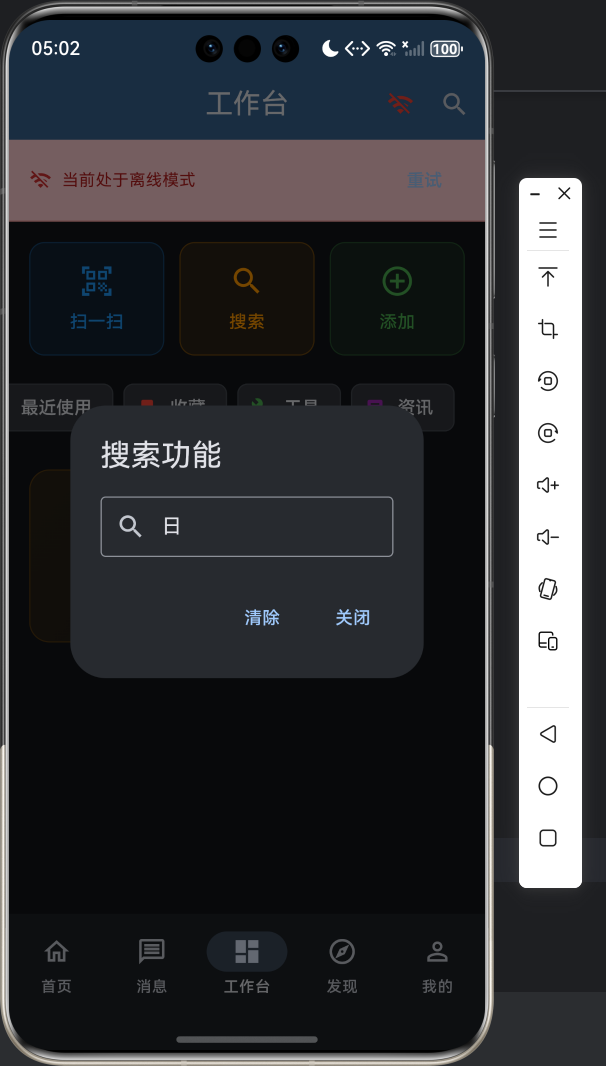
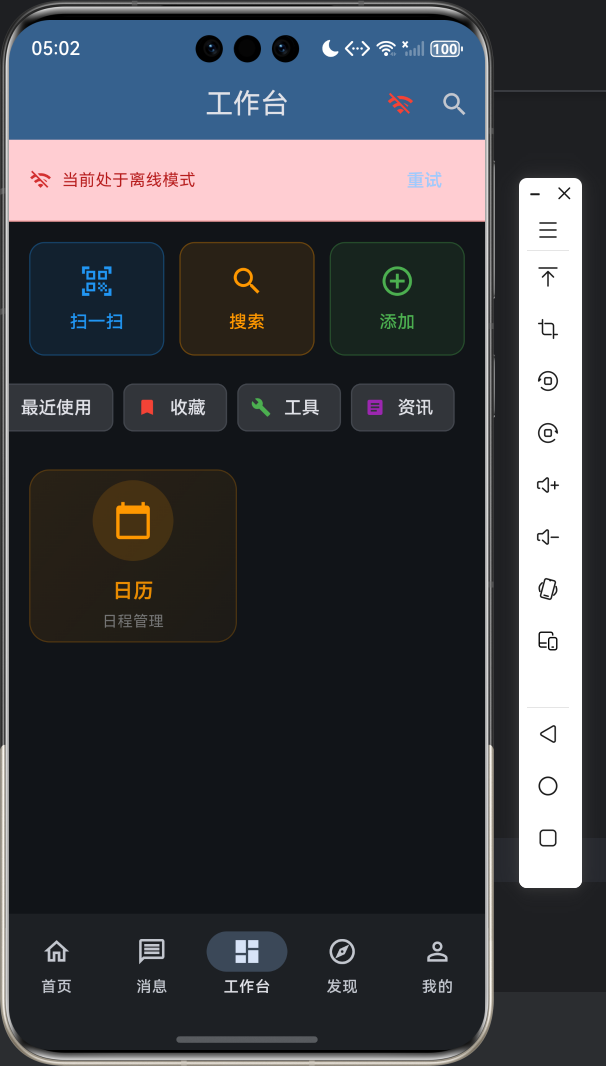
5.3 魔法效果截图
以下是我们的搜索功能在鸿蒙设备上的魔法效果:
六、魔法进阶:让搜索功能更可爱
咱们的萌系搜索功能已经基本完成啦,但是还有一些小魔法可以让它变得更可爱:
- 搜索历史:记住用户的搜索历史,下次可以快速选择
- 热门搜索:显示当前热门的搜索关键词
- 语音搜索:添加语音输入功能,让用户可以用声音搜索
- 搜索动画:添加可爱的搜索动画效果
七、魔法总结:可爱的搜索功能
好啦,今天咱们一起用Flutter for OpenHarmony魔法,打造了一个超级可爱的搜索功能!咱们实现了:
- 粉粉嫩嫩的萌系搜索框UI
- 聪明的实时搜索逻辑
- 软萌的空状态提示
- 温柔的防抖性能优化
希望这个萌系搜索功能能让你的应用变得更加可爱,让用户爱不释手~
最后,祝大家在鸿蒙跨平台开发的道路上,像小兔子一样蹦蹦跳跳,充满活力!✨
八、魔法社区
如果你对Flutter for OpenHarmony开发感兴趣,欢迎加入我们的魔法社区:
- 开源鸿蒙跨平台社区:https://openharmonycrossplatform.csdn.net
- Flutter for OpenHarmony官方文档:https://developer.harmonyos.com/cn/docs/documentation/doc-guides/flutter-overview-0000001108767065
让我们一起用魔法创造更多可爱的应用吧!

作为“人工智能6S店”的官方数字引擎,为AI开发者与企业提供一个覆盖软硬件全栈、一站式门户。
更多推荐
 1
1 0
0- 0


 已为社区贡献17条内容

所有评论(0)