
新手入门harmonyOS开发:手把手教你用ArkTS实现一个天气应用
天气应用是移动开发中最经典的入门项目之一。它涵盖了网络请求、JSON数据解析、UI布局、状态管理、动态背景等核心技术点。今天,我们就用鸿蒙的ArkTS语言,一步步实现一个功能完备、界面精美的天气应用。话不多说,开始实战!我们即将实现的天气应用包含以下功能:二、数据模型设计2.1 天气数据接口定义首先,我们需要定义数据结构来接收API返回的JSON数据。wttr.in API返回的数据结构比较复杂,
前言
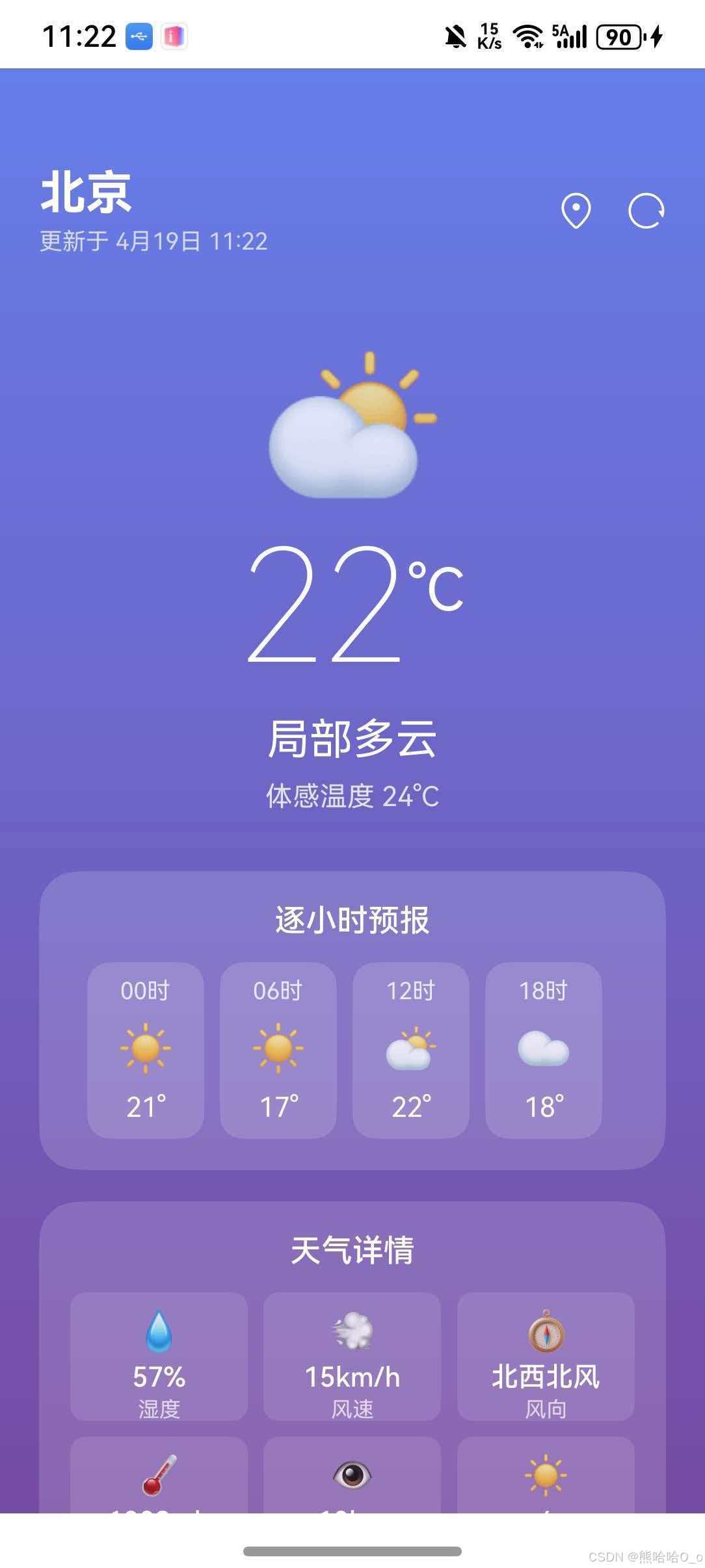
天气应用是移动开发中最经典的入门项目之一。它涵盖了网络请求、JSON数据解析、UI布局、状态管理、动态背景等核心技术点。今天,我们就用鸿蒙的ArkTS语言,一步步实现一个功能完备、界面精美的天气应用。
话不多说,开始实战!
一、项目概述
1.1 功能清单
我们即将实现的天气应用包含以下功能:
天气应用
├── 实时天气
│   ├── 当前温度 ✓
│   ├── 天气状况 ✓
│   ├── 体感温度 ✓
│   └── 天气图标 ✓
├── 天气详情
│   ├── 湿度 ✓
│   ├── 风速/风向 ✓
│   ├── 气压 ✓
│   ├── 能见度 ✓
│   └── 紫外线指数 ✓
├── 天气预报
│   ├── 逐小时预报 ✓
│   └── 7日预报 ✓
├── 城市管理
│   ├── 城市搜索 ✓
│   ├── 热门城市 ✓
│   └── 城市切换 ✓
└── 视觉效果
    ├── 动态背景 ✓
    └── 加载动画 ✓
二、数据模型设计
2.1 天气数据接口定义
首先,我们需要定义数据结构来接收API返回的JSON数据。wttr.in API返回的数据结构比较复杂,我们只提取需要的字段:
interface WeatherData {
  current_condition: CurrentCondition[]  // 当前天气
  weather: DailyWeather[]                // 天气预报
  nearest_area: NearestArea[]            // 最近区域(城市信息)
}
2.2 当前天气数据结构
interface CurrentCondition {
  temp_C: string              // 摄氏温度
  weatherCode: string         // 天气代码
  weatherDesc: WeatherDesc[]  // 天气描述(英文)
  lang_zh: WeatherDesc[]      // 天气描述(中文)
  humidity: string            // 湿度
  windspeedKmph: string       // 风速(km/h)
  winddir16Point: string      // 风向(16方位)
  pressure: string            // 气压
  visibility: string          // 能见度
  FeelsLikeC: string          // 体感温度
  uvIndex: string             // 紫外线指数
  localObsDateTime: string    // 观测时间
}
💡 小贴士:API返回的字段大多是字符串类型,使用时需要注意类型转换。
2.3 天气描述通用结构
interface WeatherDesc {
  value: string  // 描述文本
}
2.4 每日预报数据结构
interface DailyWeather {
  date: string            // 日期
  maxtempC: string        // 最高温度
  mintempC: string        // 最低温度
  hourly: HourlyWeather[] // 逐小时数据
}
2.5 逐小时预报数据结构
interface HourlyWeather {
  time: string        // 时间(如 "0", "100", "1200")
  tempC: string       // 温度
  weatherCode: string // 天气代码
}
2.6 区域信息数据结构
interface NearestArea {
  areaName: WeatherDesc[]  // 区域名称
}
2.7 城市信息数据结构
用于城市搜索功能:
interface CityInfo {
  name: string     // 城市名
  region: string   // 省份/地区
  country: string  // 国家
}
三、页面组件基础结构
3.1 组件定义与状态变量
@Entry
@Component
struct Index {
  // 当前天气数据
  @State currentTemp: string = '--'
  @State currentConditionText: string = '加载中...'
  @State humidity: string = '--'
  @State windSpeed: string = '--'
  @State windDir: string = '--'
  @State pressure: string = '--'
  @State visibilityValue: string = '--'
  @State feelsLike: string = '--'
  @State uvIndex: string = '--'

  // 城市与时间
  @State cityName: string = '北京'
  @State displayCityName: string = '北京'
  @State weatherCode: string = '113'
  @State lastUpdate: string = ''

  // 预报数据
  @State dailyForecast: DailyWeather[] = []
  @State hourlyForecast: HourlyWeather[] = []

  // 交互状态
  @State isLoading: boolean = false
  @State showCitySearch: boolean = false
  @State searchCity: string = ''
  @State searchResults: CityInfo[] = []

  // 热门城市列表
  @State popularCities: CityInfo[] = [
    { name: '北京', region: '北京', country: '中国' },
    { name: '上海', region: '上海', country: '中国' },
    { name: '广州', region: '广东', country: '中国' },
    { name: '深圳', region: '广东', country: '中国' },
    { name: '杭州', region: '浙江', country: '中国' },
    { name: '成都', region: '四川', country: '中国' }
  ]
}
状态变量分类:
| 类别 | 变量 | 用途 |
|---|---|---|
| 天气数据 | currentTemp, humidity… | 存储API返回的天气信息 |
| 城市信息 | cityName, displayCityName | 当前选择的城市 |
| 预报数据 | dailyForecast, hourlyForecast | 未来天气预测 |
| 交互状态 | isLoading, showCitySearch… | 控制UI交互 |
3.2 生命周期方法
aboutToAppear(): void {
  this.loadWeatherData(this.cityName)
}
aboutToAppear() 在页面即将显示时调用,我们在这里触发首次天气数据加载。
四、网络请求与数据解析
4.1 发送HTTP请求
鸿蒙提供了 @kit.NetworkKit 模块来处理网络请求:
import { http } from '@kit.NetworkKit'

private async loadWeatherData(city: string): Promise<void> {
  this.isLoading = true

  try {
    const httpRequest = http.createHttp()
    const url = `https://wttr.in/${encodeURIComponent(city)}?format=j1&lang=zh`

    const response = await httpRequest.request(url, {
      method: http.RequestMethod.GET,
      header: {
        'Content-Type': 'application/json',
        'Accept': 'application/json',
        'User-Agent': 'curl'
      },
      connectTimeout: 30000,
      readTimeout: 30000,
      expectDataType: http.HttpDataType.STRING
    })

    if (response.responseCode === 200 && response.result) {
      const data: WeatherData = JSON.parse(response.result as string)
      this.parseWeatherData(data)
    }
    httpRequest.destroy()
  } catch (error) {
    console.error('获取天气数据失败:', JSON.stringify(error))
  } finally {
    this.isLoading = false
  }
}
关键点解析:
- API地址:
wttr.in是一个免费的天气API,无需注册和API Key - URL参数:
format=j1:返回JSON格式lang=zh:中文描述
- 请求配置:
User-Agent: curl:某些API需要设置才能正常返回expectDataType:指定返回数据类型,提高解析效率
- 资源释放:
httpRequest.destroy()释放网络资源
⚠️ 注意:网络请求是异步操作,使用
async/await语法处理。
4.2 解析天气数据
private parseWeatherData(data: WeatherData): void {
  // 解析当前天气
  if (data.current_condition && data.current_condition.length > 0) {
    const current = data.current_condition[0]
    this.currentTemp = current.temp_C || '--'
    this.currentConditionText = current.lang_zh?.[0]?.value || current.weatherDesc?.[0]?.value || '未知'
    this.humidity = current.humidity || '--'
    this.windSpeed = current.windspeedKmph || '--'
    this.windDir = this.translateWindDir(current.winddir16Point || '--')
    this.pressure = current.pressure || '--'
    this.visibilityValue = current.visibility || '--'
    this.feelsLike = current.FeelsLikeC || '--'
    this.uvIndex = current.uvIndex || '--'
    this.weatherCode = current.weatherCode || '113'
    this.lastUpdate = this.formatUpdateTime(current.localObsDateTime)
  }

  // 解析城市信息
  if (data.nearest_area && data.nearest_area.length > 0) {
    const area = data.nearest_area[0]
    if (area.areaName && area.areaName.length > 0) {
      const apiCityName = area.areaName[0].value
      if (!this.popularCities.some((c: CityInfo): boolean => c.name === apiCityName)) {
        this.displayCityName = this.cityName
      }
    }
  }

  // 解析预报数据
  if (data.weather) {
    this.dailyForecast = data.weather.slice(0, 7)
    if (data.weather.length > 0 && data.weather[0].hourly) {
      this.hourlyForecast = data.weather[0].hourly.filter((_: HourlyWeather, index: number): boolean => index % 2 === 0)
    }
  }
}
💡 小贴士:使用可选链操作符
?.安全访问嵌套属性,避免空值错误。
五、工具方法实现
5.1 天气代码转Emoji图标
wttr.in 使用数字代码表示天气状况,我们需要将其转换为直观的Emoji:
private getWeatherEmoji(code: string): string {
  const codeNum = parseInt(code)
  if (codeNum === 113) return '☀️'        // 晴天
  if (codeNum === 116) return '⛅'        // 局部多云
  if (codeNum === 119) return '☁️'        // 多云
  if (codeNum === 122) return '🌫️'       // 阴天/雾
  if (codeNum >= 176 && codeNum <= 200) return '🌧️'  // 小雨
  if (codeNum >= 227 && codeNum <= 230) return '❄️'  // 雪
  if (codeNum >= 248 && codeNum <= 260) return '🌫️'  // 雾
  if (codeNum >= 263 && codeNum <= 284) return '🌦️'  // 阵雨
  if (codeNum >= 293 && codeNum <= 302) return '🌧️'  // 中雨
  if (codeNum >= 308 && codeNum <= 314) return '⛈️'  // 雷雨
  if (codeNum >= 317 && codeNum <= 338) return '🌨️'  // 雪
  if (codeNum >= 350 && codeNum <= 377) return '🌨️'  // 冰雹
  if (codeNum >= 386 && codeNum <= 395) return '⛈️'  // 雷暴
  return '🌤️'  // 默认
}
天气代码对照表:
| 代码范围 | 天气状况 | Emoji |
|---|---|---|
| 113 | 晴天 | ☀️ |
| 116 | 局部多云 | ⛅ |
| 119 | 多云 | ☁️ |
| 176-200 | 小雨 | 🌧️ |
| 227-230 | 雪 | ❄️ |
| 308-314 | 雷雨 | ⛈️ |
5.2 风向英文转中文
API返回的风向是英文缩写,需要转换为中文:
private translateWindDir(english: string): string {
  const map: Record<string, string> = {
    'N': '北风', 'NNE': '北东北风', 'NE': '东北风',
    'ENE': '东东北风', 'E': '东风', 'ESE': '东东南风',
    'SE': '东南风', 'SSE': '南东南风', 'S': '南风',
    'SSW': '南西南风', 'SW': '西南风', 'WSW': '西西南风',
    'W': '西风', 'WNW': '西西北风', 'NW': '西北风',
    'NNW': '北西北风', 'Variable': '无持续风向'
  }
  return map[english] || english
}
16方位风向示意图:
        N(北风)
        ↑
   NW ↖   ↗ NE
W ←——●——→ E
   SW ↙   ↘ SE
        ↓
        S(南风)
5.3 时间格式化
将API返回的时间字符串格式化为友好的显示格式:
private formatUpdateTime(timeStr: string): string {
  if (!timeStr) {
    const now = new Date()
    return `${now.getMonth() + 1}月${now.getDate()}日 ${String(now.getHours()).padStart(2, '0')}:${String(now.getMinutes()).padStart(2, '0')}`
  }
  try {
    const date = new Date(timeStr)
    if (isNaN(date.getTime())) {
      const now = new Date()
      return `${now.getMonth() + 1}月${now.getDate()}日 ${String(now.getHours()).padStart(2, '0')}:${String(now.getMinutes()).padStart(2, '0')}`
    }
    return `${date.getMonth() + 1}月${date.getDate()}日 ${String(date.getHours()).padStart(2, '0')}:${String(date.getMinutes()).padStart(2, '0')}`
  } catch (e) {
    return ''
  }
}
格式化效果:
输入: "2026-04-19 09:22 AM"
输出: "4月19日 09:22"
5.4 动态背景渐变
根据天气状况动态改变背景颜色,增强视觉体验:
private getBackgroundGradient(code: string): LinearGradient {
  const codeNum = parseInt(code)
  if (codeNum === 113) {
    // 晴天:蓝色渐变
    return { angle: 180, colors: [['#4facfe', 0], ['#00f2fe', 1]] }
  }
  if (codeNum >= 116 && codeNum <= 122) {
    // 多云:紫色渐变
    return { angle: 180, colors: [['#667eea', 0], ['#764ba2', 1]] }
  }
  if (codeNum >= 176 && codeNum <= 395) {
    // 雨雪:深色渐变
    return { angle: 180, colors: [['#373B44', 0], ['#4286f4', 1]] }
  }
  // 默认:蓝色渐变
  return { angle: 180, colors: [['#4facfe', 0], ['#00f2fe', 1]] }
}
背景效果:
| 天气 | 渐变色 |
|---|---|
| ☀️ 晴天 | 蓝色 → 青色 |
| ⛅ 多云 | 紫色 → 深紫 |
| 🌧️ 雨天 | 深灰 → 蓝色 |
5.5 日期格式化
将日期字符串格式化为"今天"、“明天"或"周X”:
private formatDate(dateStr: string): string {
  const date = new Date(dateStr)
  const weekdays = ['周日', '周一', '周二', '周三', '周四', '周五', '周六']
  const today = new Date()
  if (date.toDateString() === today.toDateString()) return '今天'
  const tomorrow = new Date(today)
  tomorrow.setDate(tomorrow.getDate() + 1)
  if (date.toDateString() === tomorrow.toDateString()) return '明天'
  return weekdays[date.getDay()]
}
5.6 小时格式化
API返回的小时格式需要转换(如 “0” → “00时”,“1200” → “12时”):
private formatHour(time: string): string {
  const hourNum = parseInt(time)
  const hour = hourNum >= 100 ? Math.floor(hourNum / 100) : hourNum
  return `${String(hour).padStart(2, '0')}时`
}
转换示例:
"0"    → "00时"
"300"  → "03时"
"1200" → "12时"
"2100" → "21时"
六、UI构建详解
6.1 主页面结构
使用 Stack 作为根容器,实现层叠布局:
build() {
  Stack() {
    Column() {
      this.HeaderBuilder()
      this.MainContentBuilder()
    }
    .width('100%')
    .height('100%')
    .linearGradient(this.getBackgroundGradient(this.weatherCode))

    if (this.showCitySearch) {
      this.CitySearchOverlayBuilder()
    }

    if (this.isLoading) {
      this.LoadingOverlayBuilder()
    }
  }
  .width('100%')
  .height('100%')
}
布局层次:
Stack(层叠容器)
├── Column(主内容)
│   ├── HeaderBuilder(标题栏)
│   └── MainContentBuilder(滚动内容)
│       ├── CurrentWeatherBuilder
│       ├── HourlyForecastBuilder
│       ├── WeatherDetailsBuilder
│       └── DailyForecastBuilder
├── CitySearchOverlayBuilder(城市搜索弹窗)← 条件渲染
└── LoadingOverlayBuilder(加载遮罩)← 条件渲染
6.2 标题栏
@Builder
HeaderBuilder() {
  Row() {
    Column() {
      Text(this.displayCityName)
        .fontSize(24)
        .fontColor('#ffffff')
        .fontWeight(FontWeight.Bold)

      Text(this.lastUpdate ? `更新于 ${this.lastUpdate}` : '')
        .fontSize(12)
        .fontColor('rgba(255,255,255,0.7)')
        .margin({ top: 4 })
    }
    .alignItems(HorizontalAlign.Start)

    Blank()

    Row() {
      SymbolGlyph($r('sys.symbol.local'))
        .fontSize(20)
        .fontColor([Color.White])
        .onClick(() => {
          this.showCitySearch = true
        })

      SymbolGlyph($r('sys.symbol.arrow_clockwise'))
        .fontSize(20)
        .fontColor([Color.White])
        .margin({ left: 16 })
        .onClick(() => {
          this.loadWeatherData(this.cityName)
        })
    }
  }
  .width('100%')
  .padding({ left: 20, right: 20, top: 50, bottom: 20 })
}
布局解析:
Row(水平排列)
├── Column(左侧信息)
│   ├── Text("北京")        ← 城市名
│   └── Text("更新于...")   ← 更新时间
├── Blank()                 ← 弹性空白
└── Row(右侧按钮)
    ├── SymbolGlyph(📍)     ← 城市选择
    └── SymbolGlyph(🔄)     ← 刷新
💡 SymbolGlyph组件:用于显示鸿蒙系统图标,使用
sys.symbol.xxx格式引用。
6.3 主内容区域
使用 Scroll 组件实现垂直滚动:
@Builder
MainContentBuilder() {
  Scroll() {
    Column() {
      this.CurrentWeatherBuilder()
      this.HourlyForecastBuilder()
      this.WeatherDetailsBuilder()
      this.DailyForecastBuilder()
    }
    .width('100%')
    .padding({ left: 20, right: 20, bottom: 30 })
  }
  .scrollBar(BarState.Off)
  .edgeEffect(EdgeEffect.Spring)
  .width('100%')
  .layoutWeight(1)
}
关键属性:
| 属性 | 值 | 说明 |
|---|---|---|
| scrollBar | BarState.Off | 隐藏滚动条 |
| edgeEffect | EdgeEffect.Spring | iOS风格的回弹效果 |
| layoutWeight | 1 | 填充剩余空间 |
6.4 当前天气展示
@Builder
CurrentWeatherBuilder() {
  Column() {
    Text(this.getWeatherEmoji(this.weatherCode))
      .fontSize(80)
      .margin({ top: 20 })

    Row() {
      Text(this.currentTemp)
        .fontSize(80)
        .fontColor('#ffffff')
        .fontWeight(FontWeight.Lighter)

      Text('°C')
        .fontSize(30)
        .fontColor('#ffffff')
        .margin({ top: 20 })
    }
    .alignItems(VerticalAlign.Top)

    Text(this.currentConditionText)
      .fontSize(22)
      .fontColor('#ffffff')
      .margin({ top: 8 })

    Text(`体感温度 ${this.feelsLike}°C`)
      .fontSize(14)
      .fontColor('rgba(255,255,255,0.8)')
      .margin({ top: 8 })
  }
  .width('100%')
  .alignItems(HorizontalAlign.Center)
  .margin({ bottom: 30 })
}
6.5 逐小时预报
使用水平滚动的卡片列表:
@Builder
HourlyForecastBuilder() {
  Column() {
    Text('逐小时预报')
      .fontSize(16)
      .fontColor('#ffffff')
      .fontWeight(FontWeight.Medium)
      .margin({ bottom: 12 })

    Scroll() {
      Row() {
        ForEach(this.hourlyForecast, (hour: HourlyWeather) => {
          Column() {
            Text(this.formatHour(hour.time))
              .fontSize(12)
              .fontColor('rgba(255,255,255,0.8)')

            Text(this.getWeatherEmoji(hour.weatherCode))
              .fontSize(24)
              .margin({ top: 8 })

            Text(`${hour.tempC}°`)
              .fontSize(14)
              .fontColor('#ffffff')
              .margin({ top: 8 })
          }
          .width(60)
          .padding(8)
          .borderRadius(12)
          .backgroundColor('rgba(255,255,255,0.15)')
          .margin({ right: 8 })
        })
      }
    }
    .scrollable(ScrollDirection.Horizontal)
    .scrollBar(BarState.Off)
    .width('100%')
  }
  .width('100%')
  .padding(16)
  .borderRadius(20)
  .backgroundColor('rgba(255,255,255,0.15)')
  .margin({ bottom: 16 })
}
布局解析:
Column
├── Text("逐小时预报")
└── Scroll(水平滚动)
    └── Row
        ├── Column(小时卡片)
        │   ├── Text("00时")
        │   ├── Text("☀️")
        │   └── Text("18°")
        ├── Column
        │   ├── Text("02时")
        │   ├── Text("☀️")
        │   └── Text("17°")
        └── ...
6.6 天气详情网格
使用 Grid 组件实现3列2行的网格布局:
@Builder
WeatherDetailsBuilder() {
  Column() {
    Text('天气详情')
      .fontSize(16)
      .fontColor('#ffffff')
      .fontWeight(FontWeight.Medium)
      .margin({ bottom: 12 })

    Grid() {
      GridItem() {
        Column() {
          Text('💧').fontSize(20)
          Text(`${this.humidity}%`).fontSize(14).fontColor('#ffffff').fontWeight(FontWeight.Medium).margin({ top: 4 })
          Text('湿度').fontSize(11).fontColor('rgba(255,255,255,0.7)').margin({ top: 2 })
        }.width('100%').padding(8).borderRadius(8).backgroundColor('rgba(255,255,255,0.1)').justifyContent(FlexAlign.Center)
      }
      // ... 其他5个GridItem
    }
    .columnsTemplate('1fr 1fr 1fr')  // 3列等宽
    .rowsTemplate('1fr 1fr')          // 2行等高
    .columnsGap(8)
    .rowsGap(8)
    .width('100%')
    .height(140)
  }
  .width('100%')
  .padding(16)
  .borderRadius(20)
  .backgroundColor('rgba(255,255,255,0.15)')
  .margin({ bottom: 16 })
}
Grid关键属性:
| 属性 | 值 | 说明 |
|---|---|---|
| columnsTemplate | ‘1fr 1fr 1fr’ | 3列等宽 |
| rowsTemplate | ‘1fr 1fr’ | 2行等高 |
| columnsGap | 8 | 列间距 |
| rowsGap | 8 | 行间距 |
6.7 7日预报
使用 ForEach 渲染每日预报列表:
@Builder
DailyForecastBuilder() {
  Column() {
    Text('7日预报')
      .fontSize(16)
      .fontColor('#ffffff')
      .fontWeight(FontWeight.Medium)
      .margin({ bottom: 12 })

    ForEach(this.dailyForecast, (day: DailyWeather, index: number) => {
      Row() {
        Text(this.formatDate(day.date))
          .fontSize(14)
          .fontColor('#ffffff')
          .width(60)

        Text(this.getWeatherEmoji(day.hourly[4]?.weatherCode || '113'))
          .fontSize(24)
          .margin({ left: 16 })

        Blank()

        Text(`${day.mintempC}°`)
          .fontSize(14)
          .fontColor('rgba(255,255,255,0.7)')
          .width(40)
          .textAlign(TextAlign.End)

        Row() {
          Row()
            .width(60)
            .height(4)
            .borderRadius(2)
            .linearGradient({
              angle: 90,
              colors: [['#4facfe', 0], ['#ff6b6b', 1]]
            })
        }
        .width(80)
        .justifyContent(FlexAlign.Center)

        Text(`${day.maxtempC}°`)
          .fontSize(14)
          .fontColor('#ffffff')
          .width(40)
          .textAlign(TextAlign.Start)
      }
      .width('100%')
      .padding({ top: 12, bottom: 12 })
      .border({ width: { bottom: index < this.dailyForecast.length - 1 ? 0.5 : 0 }, color: 'rgba(255,255,255,0.2)' })
    })
  }
  .width('100%')
  .padding(16)
  .borderRadius(20)
  .backgroundColor('rgba(255,255,255,0.15)')
}
视觉效果:
今天    ☀️    12° ━━━━━━━ 22°
明天    ⛅    14° ━━━━━━━ 24°
周三    ☁️    15° ━━━━━━  23°
温度条渐变:从蓝色(低温)到红色(高温),直观展示温差。
七、城市搜索功能
7.1 城市搜索弹窗
@Builder
CitySearchOverlayBuilder() {
  Column() {
    Column() {
      Row() {
        Text('选择城市')
          .fontSize(18)
          .fontWeight(FontWeight.Medium)
          .fontColor('#2c3e50')

        Blank()

        SymbolGlyph($r('sys.symbol.xmark'))
          .fontSize(20)
          .fontColor([Color.Gray])
          .onClick(() => {
            this.showCitySearch = false
            this.searchCity = ''
            this.searchResults = []
          })
      }
      .width('100%')
      .padding({ bottom: 16 })

      TextInput({ placeholder: '搜索城市...', text: $$this.searchCity })
        .fontSize(15)
        .width('100%')
        .height(44)
        .borderRadius(22)
        .backgroundColor('#f5f6fa')
        .padding({ left: 16, right: 16 })
        .onChange((value: string) => {
          if (value.length > 0) {
            this.searchResults = this.popularCities.filter((city: CityInfo): boolean =>
              city.name.includes(value) || city.region.includes(value)
            )
          } else {
            this.searchResults = []
          }
        })

      if (this.searchResults.length > 0 || this.searchCity.length === 0) {
        Text(this.searchCity.length === 0 ? '热门城市' : '搜索结果')
          .fontSize(14)
          .fontColor('#95a5a6')
          .margin({ top: 16, bottom: 8 })

        ForEach(this.searchCity.length === 0 ? this.popularCities : this.searchResults, (city: CityInfo) => {
          Row() {
            SymbolGlyph($r('sys.symbol.local'))
              .fontSize(18)
              .fontColor([Color.Gray])

            Column() {
              Text(city.name)
                .fontSize(15)
                .fontColor('#2c3e50')

              Text(`${city.region}, ${city.country}`)
                .fontSize(12)
                .fontColor('#95a5a6')
                .margin({ top: 2 })
            }
            .alignItems(HorizontalAlign.Start)
            .margin({ left: 12 })
          }
          .width('100%')
          .padding({ top: 12, bottom: 12 })
          .border({ width: { bottom: 0.5 }, color: '#ecf0f1' })
          .onClick(() => {
            this.cityName = city.name
            this.displayCityName = city.name
            this.showCitySearch = false
            this.searchCity = ''
            this.searchResults = []
            this.loadWeatherData(city.name)
          })
        })
      }
    }
    .width('85%')
    .padding(20)
    .borderRadius(20)
    .backgroundColor('#ffffff')
  }
  .width('100%')
  .height('100%')
  .justifyContent(FlexAlign.Center)
  .backgroundColor('rgba(0,0,0,0.5)')
  .onClick(() => {
    this.showCitySearch = false
    this.searchCity = ''
    this.searchResults = []
  })
}
搜索逻辑:
用户输入 → onChange事件
    ↓
过滤popularCities数组
    ↓
更新searchResults状态
    ↓
UI自动刷新
7.2 双向绑定
TextInput({ placeholder: '搜索城市...', text: $$this.searchCity })
$$ 语法实现双向绑定:
- 输入框内容变化 → 自动更新
searchCity searchCity变化 → 输入框显示同步更新
八、加载状态处理
8.1 加载遮罩
@Builder
LoadingOverlayBuilder() {
  Column() {
    LoadingProgress()
      .width(50)
      .height(50)
      .color('#ffffff')

    Text('加载中...')
      .fontSize(14)
      .fontColor('#ffffff')
      .margin({ top: 12 })
  }
  .width('100%')
  .height('100%')
  .justifyContent(FlexAlign.Center)
  .backgroundColor('rgba(0,0,0,0.3)')
}
加载流程:
loadWeatherData() 开始
    ↓
isLoading = true → 显示LoadingOverlayBuilder
    ↓
HTTP请求...
    ↓
数据解析...
    ↓
isLoading = false → 隐藏LoadingOverlayBuilder
九、完整代码
9.1 完整源码
import { http } from '@kit.NetworkKit'

interface WeatherData {
  current_condition: CurrentCondition[]
  weather: DailyWeather[]
  nearest_area: NearestArea[]
}

interface CurrentCondition {
  temp_C: string
  weatherCode: string
  weatherDesc: WeatherDesc[]
  lang_zh: WeatherDesc[]
  humidity: string
  windspeedKmph: string
  winddir16Point: string
  pressure: string
  visibility: string
  FeelsLikeC: string
  uvIndex: string
  localObsDateTime: string
}

interface WeatherDesc {
  value: string
}

interface DailyWeather {
  date: string
  maxtempC: string
  mintempC: string
  hourly: HourlyWeather[]
}

interface HourlyWeather {
  time: string
  tempC: string
  weatherCode: string
}

interface NearestArea {
  areaName: WeatherDesc[]
}

interface CityInfo {
  name: string
  region: string
  country: string
}

@Entry
@Component
struct Index {
  @State currentTemp: string = '--'
  @State currentConditionText: string = '加载中...'
  @State humidity: string = '--'
  @State windSpeed: string = '--'
  @State windDir: string = '--'
  @State pressure: string = '--'
  @State visibilityValue: string = '--'
  @State feelsLike: string = '--'
  @State uvIndex: string = '--'
  @State cityName: string = '北京'
  @State displayCityName: string = '北京'
  @State weatherCode: string = '113'
  @State dailyForecast: DailyWeather[] = []
  @State hourlyForecast: HourlyWeather[] = []
  @State isLoading: boolean = false
  @State lastUpdate: string = ''
  @State showCitySearch: boolean = false
  @State searchCity: string = ''
  @State searchResults: CityInfo[] = []
  @State popularCities: CityInfo[] = [
    { name: '北京', region: '北京', country: '中国' },
    { name: '上海', region: '上海', country: '中国' },
    { name: '广州', region: '广东', country: '中国' },
    { name: '深圳', region: '广东', country: '中国' },
    { name: '杭州', region: '浙江', country: '中国' },
    { name: '成都', region: '四川', country: '中国' }
  ]

  aboutToAppear(): void {
    this.loadWeatherData(this.cityName)
  }

  private async loadWeatherData(city: string): Promise<void> {
    this.isLoading = true

    try {
      const httpRequest = http.createHttp()
      const url = `https://wttr.in/${encodeURIComponent(city)}?format=j1&lang=zh`
      const response = await httpRequest.request(url, {
        method: http.RequestMethod.GET,
        header: {
          'Content-Type': 'application/json',
          'Accept': 'application/json',
          'User-Agent': 'curl'
        },
        connectTimeout: 30000,
        readTimeout: 30000,
        expectDataType: http.HttpDataType.STRING
      })

      if (response.responseCode === 200 && response.result) {
        const data: WeatherData = JSON.parse(response.result as string)
        this.parseWeatherData(data)
      }
      httpRequest.destroy()
    } catch (error) {
      console.error('获取天气数据失败:', JSON.stringify(error))
    } finally {
      this.isLoading = false
    }
  }

  private parseWeatherData(data: WeatherData): void {
    if (data.current_condition && data.current_condition.length > 0) {
      const current = data.current_condition[0]
      this.currentTemp = current.temp_C || '--'
      this.currentConditionText = current.lang_zh?.[0]?.value || current.weatherDesc?.[0]?.value || '未知'
      this.humidity = current.humidity || '--'
      this.windSpeed = current.windspeedKmph || '--'
      this.windDir = this.translateWindDir(current.winddir16Point || '--')
      this.pressure = current.pressure || '--'
      this.visibilityValue = current.visibility || '--'
      this.feelsLike = current.FeelsLikeC || '--'
      this.uvIndex = current.uvIndex || '--'
      this.weatherCode = current.weatherCode || '113'
      this.lastUpdate = this.formatUpdateTime(current.localObsDateTime)
    }

    if (data.nearest_area && data.nearest_area.length > 0) {
      const area = data.nearest_area[0]
      if (area.areaName && area.areaName.length > 0) {
        const apiCityName = area.areaName[0].value
        if (!this.popularCities.some((c: CityInfo): boolean => c.name === apiCityName)) {
          this.displayCityName = this.cityName
        }
      }
    }

    if (data.weather) {
      this.dailyForecast = data.weather.slice(0, 7)
      if (data.weather.length > 0 && data.weather[0].hourly) {
        this.hourlyForecast = data.weather[0].hourly.filter((_: HourlyWeather, index: number): boolean => index % 2 === 0)
      }
    }
  }

  private getWeatherEmoji(code: string): string {
    const codeNum = parseInt(code)
    if (codeNum === 113) return '☀️'
    if (codeNum === 116) return '⛅'
    if (codeNum === 119) return '☁️'
    if (codeNum === 122) return '🌫️'
    if (codeNum >= 176 && codeNum <= 200) return '🌧️'
    if (codeNum >= 227 && codeNum <= 230) return '❄️'
    if (codeNum >= 248 && codeNum <= 260) return '🌫️'
    if (codeNum >= 263 && codeNum <= 284) return '🌦️'
    if (codeNum >= 293 && codeNum <= 302) return '🌧️'
    if (codeNum >= 308 && codeNum <= 314) return '⛈️'
    if (codeNum >= 317 && codeNum <= 338) return '🌨️'
    if (codeNum >= 350 && codeNum <= 377) return '🌨️'
    if (codeNum >= 386 && codeNum <= 395) return '⛈️'
    return '🌤️'
  }

  private translateWindDir(english: string): string {
    const map: Record<string, string> = {
      'N': '北风', 'NNE': '北东北风', 'NE': '东北风',
      'ENE': '东东北风', 'E': '东风', 'ESE': '东东南风',
      'SE': '东南风', 'SSE': '南东南风', 'S': '南风',
      'SSW': '南西南风', 'SW': '西南风', 'WSW': '西西南风',
      'W': '西风', 'WNW': '西西北风', 'NW': '西北风',
      'NNW': '北西北风', 'Variable': '无持续风向'
    }
    return map[english] || english
  }

  private formatUpdateTime(timeStr: string): string {
    if (!timeStr) {
      const now = new Date()
      return `${now.getMonth() + 1}月${now.getDate()}日 ${String(now.getHours()).padStart(2, '0')}:${String(now.getMinutes()).padStart(2, '0')}`
    }
    try {
      const date = new Date(timeStr)
      if (isNaN(date.getTime())) {
        const now = new Date()
        return `${now.getMonth() + 1}月${now.getDate()}日 ${String(now.getHours()).padStart(2, '0')}:${String(now.getMinutes()).padStart(2, '0')}`
      }
      return `${date.getMonth() + 1}月${date.getDate()}日 ${String(date.getHours()).padStart(2, '0')}:${String(date.getMinutes()).padStart(2, '0')}`
    } catch (e) {
      return ''
    }
  }

  private getBackgroundGradient(code: string): LinearGradient {
    const codeNum = parseInt(code)
    if (codeNum === 113) {
      return { angle: 180, colors: [['#4facfe', 0], ['#00f2fe', 1]] }
    }
    if (codeNum >= 116 && codeNum <= 122) {
      return { angle: 180, colors: [['#667eea', 0], ['#764ba2', 1]] }
    }
    if (codeNum >= 176 && codeNum <= 395) {
      return { angle: 180, colors: [['#373B44', 0], ['#4286f4', 1]] }
    }
    return { angle: 180, colors: [['#4facfe', 0], ['#00f2fe', 1]] }
  }

  private formatDate(dateStr: string): string {
    const date = new Date(dateStr)
    const weekdays = ['周日', '周一', '周二', '周三', '周四', '周五', '周六']
    const today = new Date()
    if (date.toDateString() === today.toDateString()) return '今天'
    const tomorrow = new Date(today)
    tomorrow.setDate(tomorrow.getDate() + 1)
    if (date.toDateString() === tomorrow.toDateString()) return '明天'
    return weekdays[date.getDay()]
  }

  private formatHour(time: string): string {
    const hourNum = parseInt(time)
    const hour = hourNum >= 100 ? Math.floor(hourNum / 100) : hourNum
    return `${String(hour).padStart(2, '0')}时`
  }

  build() {
    Stack() {
      Column() {
        this.HeaderBuilder()
        this.MainContentBuilder()
      }
      .width('100%')
      .height('100%')
      .linearGradient(this.getBackgroundGradient(this.weatherCode))

      if (this.showCitySearch) {
        this.CitySearchOverlayBuilder()
      }

      if (this.isLoading) {
        this.LoadingOverlayBuilder()
      }
    }
    .width('100%')
    .height('100%')
  }

  @Builder
  HeaderBuilder() {
    Row() {
      Column() {
        Text(this.displayCityName)
          .fontSize(24)
          .fontColor('#ffffff')
          .fontWeight(FontWeight.Bold)

        Text(this.lastUpdate ? `更新于 ${this.lastUpdate}` : '')
          .fontSize(12)
          .fontColor('rgba(255,255,255,0.7)')
          .margin({ top: 4 })
      }
      .alignItems(HorizontalAlign.Start)

      Blank()

      Row() {
        SymbolGlyph($r('sys.symbol.local'))
          .fontSize(20)
          .fontColor([Color.White])
          .onClick(() => {
            this.showCitySearch = true
          })

        SymbolGlyph($r('sys.symbol.arrow_clockwise'))
          .fontSize(20)
          .fontColor([Color.White])
          .margin({ left: 16 })
          .onClick(() => {
            this.loadWeatherData(this.cityName)
          })
      }
    }
    .width('100%')
    .padding({ left: 20, right: 20, top: 50, bottom: 20 })
  }

  @Builder
  MainContentBuilder() {
    Scroll() {
      Column() {
        this.CurrentWeatherBuilder()
        this.HourlyForecastBuilder()
        this.WeatherDetailsBuilder()
        this.DailyForecastBuilder()
      }
      .width('100%')
      .padding({ left: 20, right: 20, bottom: 30 })
    }
    .scrollBar(BarState.Off)
    .edgeEffect(EdgeEffect.Spring)
    .width('100%')
    .layoutWeight(1)
  }

  @Builder
  CurrentWeatherBuilder() {
    Column() {
      Text(this.getWeatherEmoji(this.weatherCode))
        .fontSize(80)
        .margin({ top: 20 })

      Row() {
        Text(this.currentTemp)
          .fontSize(80)
          .fontColor('#ffffff')
          .fontWeight(FontWeight.Lighter)

        Text('°C')
          .fontSize(30)
          .fontColor('#ffffff')
          .margin({ top: 20 })
      }
      .alignItems(VerticalAlign.Top)

      Text(this.currentConditionText)
        .fontSize(22)
        .fontColor('#ffffff')
        .margin({ top: 8 })

      Text(`体感温度 ${this.feelsLike}°C`)
        .fontSize(14)
        .fontColor('rgba(255,255,255,0.8)')
        .margin({ top: 8 })
    }
    .width('100%')
    .alignItems(HorizontalAlign.Center)
    .margin({ bottom: 30 })
  }

  @Builder
  HourlyForecastBuilder() {
    Column() {
      Text('逐小时预报')
        .fontSize(16)
        .fontColor('#ffffff')
        .fontWeight(FontWeight.Medium)
        .margin({ bottom: 12 })

      Scroll() {
        Row() {
          ForEach(this.hourlyForecast, (hour: HourlyWeather) => {
            Column() {
              Text(this.formatHour(hour.time))
                .fontSize(12)
                .fontColor('rgba(255,255,255,0.8)')

              Text(this.getWeatherEmoji(hour.weatherCode))
                .fontSize(24)
                .margin({ top: 8 })

              Text(`${hour.tempC}°`)
                .fontSize(14)
                .fontColor('#ffffff')
                .margin({ top: 8 })
            }
            .width(60)
            .padding(8)
            .borderRadius(12)
            .backgroundColor('rgba(255,255,255,0.15)')
            .margin({ right: 8 })
          })
        }
      }
      .scrollable(ScrollDirection.Horizontal)
      .scrollBar(BarState.Off)
      .width('100%')
    }
    .width('100%')
    .padding(16)
    .borderRadius(20)
    .backgroundColor('rgba(255,255,255,0.15)')
    .margin({ bottom: 16 })
  }

  @Builder
  WeatherDetailsBuilder() {
    Column() {
      Text('天气详情')
        .fontSize(16)
        .fontColor('#ffffff')
        .fontWeight(FontWeight.Medium)
        .margin({ bottom: 12 })

      Grid() {
        GridItem() {
          Column() {
            Text('💧').fontSize(20)
            Text(`${this.humidity}%`).fontSize(14).fontColor('#ffffff').fontWeight(FontWeight.Medium).margin({ top: 4 })
            Text('湿度').fontSize(11).fontColor('rgba(255,255,255,0.7)').margin({ top: 2 })
          }.width('100%').padding(8).borderRadius(8).backgroundColor('rgba(255,255,255,0.1)').justifyContent(FlexAlign.Center)
        }
        GridItem() {
          Column() {
            Text('💨').fontSize(20)
            Text(`${this.windSpeed}km/h`).fontSize(14).fontColor('#ffffff').fontWeight(FontWeight.Medium).margin({ top: 4 })
            Text('风速').fontSize(11).fontColor('rgba(255,255,255,0.7)').margin({ top: 2 })
          }.width('100%').padding(8).borderRadius(8).backgroundColor('rgba(255,255,255,0.1)').justifyContent(FlexAlign.Center)
        }
        GridItem() {
          Column() {
            Text('🧭').fontSize(20)
            Text(this.windDir).fontSize(14).fontColor('#ffffff').fontWeight(FontWeight.Medium).margin({ top: 4 })
            Text('风向').fontSize(11).fontColor('rgba(255,255,255,0.7)').margin({ top: 2 })
          }.width('100%').padding(8).borderRadius(8).backgroundColor('rgba(255,255,255,0.1)').justifyContent(FlexAlign.Center)
        }
        GridItem() {
          Column() {
            Text('🌡️').fontSize(20)
            Text(`${this.pressure}mb`).fontSize(14).fontColor('#ffffff').fontWeight(FontWeight.Medium).margin({ top: 4 })
            Text('气压').fontSize(11).fontColor('rgba(255,255,255,0.7)').margin({ top: 2 })
          }.width('100%').padding(8).borderRadius(8).backgroundColor('rgba(255,255,255,0.1)').justifyContent(FlexAlign.Center)
        }
        GridItem() {
          Column() {
            Text('👁️').fontSize(20)
            Text(`${this.visibilityValue}km`).fontSize(14).fontColor('#ffffff').fontWeight(FontWeight.Medium).margin({ top: 4 })
            Text('能见度').fontSize(11).fontColor('rgba(255,255,255,0.7)').margin({ top: 2 })
          }.width('100%').padding(8).borderRadius(8).backgroundColor('rgba(255,255,255,0.1)').justifyContent(FlexAlign.Center)
        }
        GridItem() {
          Column() {
            Text('☀️').fontSize(20)
            Text(this.uvIndex).fontSize(14).fontColor('#ffffff').fontWeight(FontWeight.Medium).margin({ top: 4 })
            Text('紫外线').fontSize(11).fontColor('rgba(255,255,255,0.7)').margin({ top: 2 })
          }.width('100%').padding(8).borderRadius(8).backgroundColor('rgba(255,255,255,0.1)').justifyContent(FlexAlign.Center)
        }
      }
      .columnsTemplate('1fr 1fr 1fr')
      .rowsTemplate('1fr 1fr')
      .columnsGap(8)
      .rowsGap(8)
      .width('100%')
      .height(140)
    }
    .width('100%')
    .padding(16)
    .borderRadius(20)
    .backgroundColor('rgba(255,255,255,0.15)')
    .margin({ bottom: 16 })
  }

  @Builder
  DailyForecastBuilder() {
    Column() {
      Text('7日预报')
        .fontSize(16)
        .fontColor('#ffffff')
        .fontWeight(FontWeight.Medium)
        .margin({ bottom: 12 })

      ForEach(this.dailyForecast, (day: DailyWeather, index: number) => {
        Row() {
          Text(this.formatDate(day.date))
            .fontSize(14)
            .fontColor('#ffffff')
            .width(60)

          Text(this.getWeatherEmoji(day.hourly[4]?.weatherCode || '113'))
            .fontSize(24)
            .margin({ left: 16 })

          Blank()

          Text(`${day.mintempC}°`)
            .fontSize(14)
            .fontColor('rgba(255,255,255,0.7)')
            .width(40)
            .textAlign(TextAlign.End)

          Row() {
            Row()
              .width(60)
              .height(4)
              .borderRadius(2)
              .linearGradient({
                angle: 90,
                colors: [['#4facfe', 0], ['#ff6b6b', 1]]
              })
          }
          .width(80)
          .justifyContent(FlexAlign.Center)

          Text(`${day.maxtempC}°`)
            .fontSize(14)
            .fontColor('#ffffff')
            .width(40)
            .textAlign(TextAlign.Start)
        }
        .width('100%')
        .padding({ top: 12, bottom: 12 })
        .border({ width: { bottom: index < this.dailyForecast.length - 1 ? 0.5 : 0 }, color: 'rgba(255,255,255,0.2)' })
      })
    }
    .width('100%')
    .padding(16)
    .borderRadius(20)
    .backgroundColor('rgba(255,255,255,0.15)')
  }

  @Builder
  CitySearchOverlayBuilder() {
    Column() {
      Column() {
        Row() {
          Text('选择城市')
            .fontSize(18)
            .fontWeight(FontWeight.Medium)
            .fontColor('#2c3e50')

          Blank()

          SymbolGlyph($r('sys.symbol.xmark'))
            .fontSize(20)
            .fontColor([Color.Gray])
            .onClick(() => {
              this.showCitySearch = false
              this.searchCity = ''
              this.searchResults = []
            })
        }
        .width('100%')
        .padding({ bottom: 16 })

        TextInput({ placeholder: '搜索城市...', text: $$this.searchCity })
          .fontSize(15)
          .width('100%')
          .height(44)
          .borderRadius(22)
          .backgroundColor('#f5f6fa')
          .padding({ left: 16, right: 16 })
          .onChange((value: string) => {
            if (value.length > 0) {
              this.searchResults = this.popularCities.filter((city: CityInfo): boolean =>
                city.name.includes(value) || city.region.includes(value)
              )
            } else {
              this.searchResults = []
            }
          })

        if (this.searchResults.length > 0 || this.searchCity.length === 0) {
          Text(this.searchCity.length === 0 ? '热门城市' : '搜索结果')
            .fontSize(14)
            .fontColor('#95a5a6')
            .margin({ top: 16, bottom: 8 })

          ForEach(this.searchCity.length === 0 ? this.popularCities : this.searchResults, (city: CityInfo) => {
            Row() {
              SymbolGlyph($r('sys.symbol.local'))
                .fontSize(18)
                .fontColor([Color.Gray])

              Column() {
                Text(city.name)
                  .fontSize(15)
                  .fontColor('#2c3e50')

                Text(`${city.region}, ${city.country}`)
                  .fontSize(12)
                  .fontColor('#95a5a6')
                  .margin({ top: 2 })
              }
              .alignItems(HorizontalAlign.Start)
              .margin({ left: 12 })
            }
            .width('100%')
            .padding({ top: 12, bottom: 12 })
            .border({ width: { bottom: 0.5 }, color: '#ecf0f1' })
            .onClick(() => {
              this.cityName = city.name
              this.displayCityName = city.name
              this.showCitySearch = false
              this.searchCity = ''
              this.searchResults = []
              this.loadWeatherData(city.name)
            })
          })
        }
      }
      .width('85%')
      .padding(20)
      .borderRadius(20)
      .backgroundColor('#ffffff')
    }
    .width('100%')
    .height('100%')
    .justifyContent(FlexAlign.Center)
    .backgroundColor('rgba(0,0,0,0.5)')
    .onClick(() => {
      this.showCitySearch = false
      this.searchCity = ''
      this.searchResults = []
    })
  }

  @Builder
  LoadingOverlayBuilder() {
    Column() {
      LoadingProgress()
        .width(50)
        .height(50)
        .color('#ffffff')

      Text('加载中...')
        .fontSize(14)
        .fontColor('#ffffff')
        .margin({ top: 12 })
    }
    .width('100%')
    .height('100%')
    .justifyContent(FlexAlign.Center)
    .backgroundColor('rgba(0,0,0,0.3)')
  }
}
十、总结与扩展
10.1 核心知识点回顾
通过这个天气应用,我们学习了:
| 知识点 | 应用场景 |
|---|---|
| HTTP请求 | 获取天气API数据 |
| JSON解析 | 解析API返回的数据 |
| @State状态管理 | 驱动UI自动更新 |
| @Builder装饰器 | 封装可复用的UI组件 |
| Grid组件 | 天气详情网格布局 |
| Scroll组件 | 横向/纵向滚动 |
| LinearGradient | 动态背景渐变 |
| SymbolGlyph | 系统图标显示 |
| 条件渲染 | 弹窗和加载状态 |
| 双向绑定 | 搜索输入框 |
10.2 可扩展功能
如果你想继续完善这个应用,可以考虑添加:
扩展功能
├── 定位功能
│   └── 使用geoLocationManager获取当前位置
├── 天气预警
│   └── 解析API中的weather_alert数据
├── 空气质量
│   └── 添加AQI指数显示
├── 天气地图
│   └── 使用Map组件展示天气分布
├── 语音播报
│   └── 使用textToSpeech播报天气
└── 桌面小组件
    └── 使用FormExtensionAbility
10.3 常见问题
Q1: 网络请求失败怎么办?
确保在 module.json5 中添加了网络权限:
"requestPermissions": [
  {
    "name": "ohos.permission.INTERNET"
  }
]
Q2: 为什么UI不更新?
检查是否使用了 @State 装饰器,只有被 @State 标记的变量变化时才会触发UI刷新。
Q3: 如何调试网络请求?
使用 console.info() 打印请求和响应数据,在DevEco Studio的日志面板查看。

作为“人工智能6S店”的官方数字引擎,为AI开发者与企业提供一个覆盖软硬件全栈、一站式门户。
更多推荐
 13
13 0
0- 0


 已为社区贡献9条内容

所有评论(0)