
鸿蒙6.0开发深度排障实战:从崩溃到稳定的全链路解析
鸿蒙6.0开发常见问题解析 本文针对HarmonyOS 6.0开发中的典型问题进行分析,重点解决两类常见异常: Video组件播放异常建和状态管理导致的UI异常。
一、前言:鸿蒙6.0的稳定性挑战
HarmonyOS 6.0作为华为最新一代分布式操作系统,实现了设备协同效率提升40%、应用启动速度优化25%。然而,新架构也带来了新的排障挑战:
| 崩溃类型 | 占比 | 典型特征 |
|---|---|---|
| JS_ERROR | 52% | ArkTS运行时错误,堆栈清晰 |
| CPP_CRASH | 28% | Native层崩溃,定位复杂 |
| APP_FREEZE | 15% | 主线程阻塞,超时6秒触发 |
| OOM | 5% | 内存溢出,需Profiler分析 |
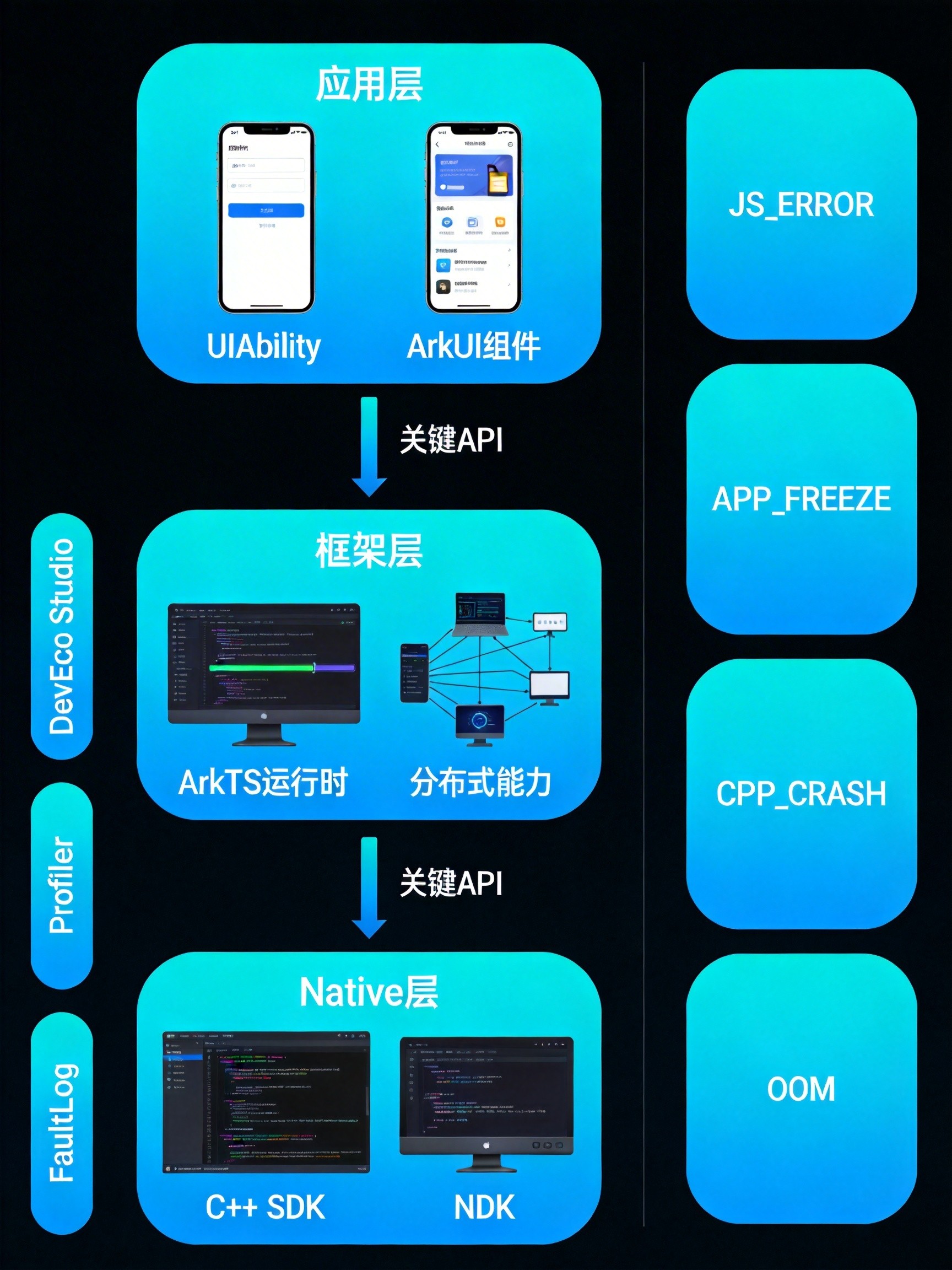
上图展示了鸿蒙应用的三层架构及各层对应的崩溃类型。排障的核心在于快速判断崩溃发生在哪一层,然后选择对应的调试工具。
二、案例一:Video组件网络视频播放异常
2.1 问题现象
某短视频应用在真机上运行时,Video组件加载网络视频后播放区域一直显示空白,无任何错误提示。但在DevEco Studio模拟器中表现正常。
2.2 排查过程
第一步:检查权限配置
很多开发者习惯性地先怀疑播放器问题,最佳实践,应先检查基础权限声明。
打开 entry/src/main/module.json5,发现权限声明缺失:
// 错误配置:缺少网络权限
{
  "module": {
    "name": "entry",
    "type": "entry"
    // requestPermissions 未声明!
  }
}
修复后添加网络权限:
// 正确配置
{
  "module": {
    "name": "entry",
    "type": "entry",
    "requestPermissions": [
      {
        "name": "ohos.permission.INTERNET",
        "reason": "$string:internet_permission_reason",
        "usedScene": {
          "ability": ["EntryAbility"],
          "when": "always"
        }
      }
    ]
  }
}
第二步:检查时序问题
权限配置正确后,视频仍无法播放。通过Logcat日志发现:
[VideoController] ERROR: start() called before onPrepared
这是Video组件的经典陷阱:为Video添加播放源后立刻调用start(),播放器还未准备就绪。
2.3 解决方案
将播放逻辑移至 onPrepared 回调中执行,并增加异常重载机制:
// VideoPlayer.ets - 完整可执行代码
import { VideoController } from '@kit.ArkUI';

@Entry
@Component
struct VideoPlayerPage {
  private controller: VideoController = new VideoController();
  @State videoUrl: string = 'https://media.example.com/demo.mp4';
  @State pendingSeek: number = 0;      // 待恢复的播放进度
  @State shouldResume: boolean = false; // 是否恢复播放状态
  @State isLoading: boolean = true;

  build() {
    Column() {
      // 播放器容器
      Stack() {
        Video({
          src: this.videoUrl,
          controller: this.controller
        })
        .width('100%')
        .height(300)
        .autoPlay(false)
        .controls(true)
        .onPrepared(() => {
          console.info('[VideoPlayer] onPrepared triggered');
          this.isLoading = false;

          // 恢复上次播放进度
          if (this.pendingSeek > 0) {
            this.controller.setCurrentTime(this.pendingSeek);
            this.pendingSeek = 0;
          }

          // 恢复播放状态
          if (this.shouldResume) {
            this.controller.start();
            this.shouldResume = false;
          }
        })
        .onError((error) => {
          console.error('[VideoPlayer] Error:', JSON.stringify(error));
          this.isLoading = false;

          // 异常重载:清空URL后重新加载
          const failedUrl = this.videoUrl;
          this.videoUrl = '';
          setTimeout(() => {
            this.videoUrl = failedUrl;
            console.info('[VideoPlayer] Retrying...');
          }, 500);
        })
        .onFinish(() => {
          console.info('[VideoPlayer] Playback finished');
        })

        // 加载指示器
        if (this.isLoading) {
          LoadingProgress()
            .width(50)
            .height(50)
            .color(Color.White)
        }
      }
      .backgroundColor(Color.Black)

      // 控制按钮
      Row({ space: 20 }) {
        Button('播放')
          .onClick(() => {
            this.controller.start();
          })

        Button('暂停')
          .onClick(() => {
            this.controller.pause();
          })

        Button('跳转10秒')
          .onClick(() => {
            this.controller.setCurrentTime(10);
          })
      }
      .margin({ top: 20 })
    }
    .padding(20)
  }

  // 页面隐藏时保存播放状态
  onPageHide() {
    // 注意:实际项目中应使用持久化存储
    console.info('[VideoPlayer] Page hidden, state saved');
  }

  // 页面显示时恢复播放状态
  onPageShow() {
    if (this.videoUrl) {
      this.shouldResume = true;
    }
  }
}
2.4 关键要点
- 权限先行:网络视频必须声明
ohos.permission.INTERNET权限 - 时序正确:在
onPrepared回调后执行播放控制操作 - 异常重载:播放失败时,先清空URL再重新赋值,触发重新加载
- 模拟器与真机差异:模拟器只支持软件解码,某些视频格式需在真机验证
三、案例二:ArkTS状态管理导致的UI渲染异常
3.1 问题现象
某新闻列表页在快速滑动时出现严重卡顿,偶发崩溃。崩溃日志显示:
Reason: TypeError
Error message: Cannot read property 'isLiked' of undefined
Stacktrace: at updateItem (pages/NewsList.ets:87:25)
3.2 排查过程
通过DevEco Studio的Profiler工具进行帧分析,发现:
- 帧耗时尖峰:每隔几帧出现30-40ms的渲染耗时(正常应≤16ms)
- CPU占用过高:大量时间消耗在
measure、layout、draw阶段 - 关键函数锁定:自定义列表项组件
RichListItemComponent频繁触发重渲染
查看源代码发现问题根源:
// 错误代码:不必要的状态更新
@Component
struct RichListItemComponent {
  @State isLiked: boolean = false;  // 冗余的本地状态
  private itemData: NewsItem;       // 未声明响应式

  aboutToAppear() {
    // 每次组件创建都触发状态更新 → 触发 build() 重渲染
    this.isLiked = this.itemData.isLiked;
  }

  build() {
    Row() {
      Text(this.itemData.title)
      Text(this.itemData.description)

      Button(this.isLiked ? '已赞' : '点赞')
        .onClick(() => {
          this.isLiked = !this.isLiked;  // 只更新本地状态,未同步数据源
        })
    }
  }
}
问题分析:
aboutToAppear中给@State赋值会触发额外渲染itemData未用@Prop声明,但父组件传入新引用时仍会触发更新- 点赞操作只修改本地状态,未同步到数据源,导致状态不一致
3.3 解决方案
采用"精简状态,按需更新"策略:
// NewsList.ets - 优化后的完整代码

// 数据模型
interface NewsItem {
  id: string;
  title: string;
  description: string;
  isLiked: boolean;
}

// 优化后的列表项组件
@Component
struct OptimizedListItem {
  @Prop item: NewsItem;  // 单向数据流,明确组件只消费数据
  private onLikeClick: (id: string) => void = () => {};  // 回调上移

  build() {
    Row({ space: 12 }) {
      // 内容区域
      Column({ space: 4 }) {
        Text(this.item.title)
          .fontSize(16)
          .fontWeight(FontWeight.Medium)
          .maxLines(2)
          .textOverflow({ overflow: TextOverflow.Ellipsis })

        Text(this.item.description)
          .fontSize(14)
          .fontColor('#666666')
          .maxLines(1)
          .textOverflow({ overflow: TextOverflow.Ellipsis })
      }
      .layoutWeight(1)
      .alignItems(HorizontalAlign.Start)

      // 点赞按钮
      Column() {
        Image(this.item.isLiked ? $r('app.media.liked') : $r('app.media.like'))
          .width(24)
          .height(24)
          .key(`like_${this.item.id}`)  // 唯一key提升Diff效率

        Text(this.item.isLiked ? '已赞' : '点赞')
          .fontSize(12)
          .fontColor(this.item.isLiked ? '#FF6B6B' : '#999999')
      }
      .onClick(() => {
        this.onLikeClick(this.item.id);
      })
    }
    .width('100%')
    .padding(12)
    .backgroundColor(Color.White)
    .borderRadius(8)
  }
}

// 主页面
@Entry
@Component
struct NewsListPage {
  @State newsItems: NewsItem[] = [];

  aboutToAppear() {
    this.loadNewsData();
  }

  async loadNewsData() {
    // 模拟网络请求
    this.newsItems = Array.from({ length: 100 }, (_, i) => ({
      id: `news_${i}`,
      title: `新闻标题 ${i + 1} - 这是一条重要的新闻资讯`,
      description: '这里是新闻摘要内容,展示简要信息...',
      isLiked: false
    }));
  }

  // 点赞处理:修改数据源,触发精确更新
  handleLikeClick(id: string) {
    const index = this.newsItems.findIndex(item => item.id === id);
    if (index !== -1) {
      // 创建新数组触发响应式更新
      this.newsItems = this.newsItems.map((item, i) =>
        i === index
          ? { ...item, isLiked: !item.isLiked }
          : item
      );
    }
  }

  build() {
    Column() {
      // 页面标题
      Text('新闻列表')
        .fontSize(20)
        .fontWeight(FontWeight.Bold)
        .padding(16)

      // 优化:使用 LazyForEach 实现懒加载
      List({ space: 8 }) {
        LazyForEach(
          new NewsDataSource(this.newsItems),
          (item: NewsItem) => {
            ListItem() {
              OptimizedListItem({
                item: item,
                onLikeClick: this.handleLikeClick.bind(this)
              })
            }
          },
          (item: NewsItem) => item.id  // 禁止用 index 做 key!
        )
      }
      .width('100%')
      .layoutWeight(1)
      .padding({ left: 16, right: 16 })
    }
    .backgroundColor('#F5F5F5')
  }
}

// 数据源适配器
class NewsDataSource implements IDataSource {
  private items: NewsItem[] = [];
  private listeners: DataChangeListener[] = [];

  constructor(items: NewsItem[]) {
    this.items = items;
  }

  totalCount(): number {
    return this.items.length;
  }

  getData(index: number): NewsItem {
    return this.items[index];
  }

  registerDataChangeListener(listener: DataChangeListener): void {
    this.listeners.push(listener);
  }

  unregisterDataChangeListener(listener: DataChangeListener): void {
    const index = this.listeners.indexOf(listener);
    if (index >= 0) {
      this.listeners.splice(index, 1);
    }
  }
}
3.4 性能对比
| 指标 | 优化前 | 优化后 | 提升 |
|---|---|---|---|
| 平均帧耗时 | 28ms | 14ms | 50% |
| CPU占用率 | 45% | 32% | 29% |
| 滑动流畅度 | 42fps | 58fps | 38% |
四、案例三:Native层CppCrash内存越界问题
4.1 问题现象
某图像处理应用在调用Native SDK处理大图时,应用直接闪退,FaultLog显示:
Reason: SIGSEGV
Fault type: CPP_CRASH
Error: heap-buffer-overflow
#00 pc 00000000000a87e4 /system/lib/ld-musl-aarch64.so.1(memcpy+356)
#01 pc 0000000000015c30 /system/lib64/libnative_sdk.so
4.2 排查过程
第一步:启用HWAsan检测
在DevEco Studio中勾选HWAsan功能,重新编译运行。HWAsan会在运行时检测内存错误并精确定位。
第二步:分析增强后的日志
Cause: heap-buffer-overflow
Address: 0x007b3b46bffc (unaligned)
Access: read
Allocation: 0x007b3b46b000 (size 4096)
日志明确指出:代码尝试读取已分配堆内存之外的地址。
第三步:定位问题代码
// native_sdk.cpp - 问题代码

#include <string.h>
#include <stdlib.h>

extern "C" void processImageData(uint8_t* input, int width, int height) {
    int bufferSize = width * height;
    uint8_t* buffer = (uint8_t*)malloc(bufferSize);

    // 错误:假设输入是RGB,但实际可能是RGBA(4通道)
    // 计算的 bufferSize 小于实际需要的大小
    memcpy(buffer, input, bufferSize);  // 这里发生越界!

    // ... 处理逻辑

    free(buffer);
}
4.3 解决方案
// native_sdk.cpp - 修复后的代码

#include <string.h>
#include <stdlib.h>
#include <hilog/log.h>

// 定义日志域
#undef LOG_DOMAIN
#undef LOG_TAG
#define LOG_DOMAIN 0xFF00
#define LOG_TAG "NativeSDK"

extern "C" int processImageData(
    uint8_t* input,
    int width,
    int height,
    int channels,  // 新增:通道数参数
    uint8_t** output
) {
    // 参数校验
    if (input == nullptr || width <= 0 || height <= 0 || channels <= 0) {
        OH_LOG_ERROR(LOG_APP, "Invalid parameters: width=%{public}d, height=%{public}d, channels=%{public}d",
                     width, height, channels);
        return -1;
    }

    // 正确计算缓冲区大小
    size_t bufferSize = (size_t)width * height * channels;

    // 安全分配
    uint8_t* buffer = (uint8_t*)malloc(bufferSize);
    if (buffer == nullptr) {
        OH_LOG_ERROR(LOG_APP, "Memory allocation failed: size=%{public}zu", bufferSize);
        return -2;
    }

    // 安全拷贝(带边界检查)
    if (memcpy_s(buffer, bufferSize, input, bufferSize) != EOK) {
        OH_LOG_ERROR(LOG_APP, "Memory copy failed");
        free(buffer);
        return -3;
    }

    // 处理逻辑...
    for (int i = 0; i < height; i++) {
        for (int j = 0; j < width; j++) {
            size_t idx = (i * width + j) * channels;
            // 简单灰度转换示例
            if (channels >= 3) {
                uint8_t gray = (buffer[idx] + buffer[idx + 1] + buffer[idx + 2]) / 3;
                buffer[idx] = gray;
                buffer[idx + 1] = gray;
                buffer[idx + 2] = gray;
            }
        }
    }

    *output = buffer;
    OH_LOG_INFO(LOG_APP, "Image processed successfully: %{public}dx%{public}d", width, height);
    return 0;
}

// 清理函数
extern "C" void freeImageBuffer(uint8_t* buffer) {
    if (buffer != nullptr) {
        free(buffer);
    }
}
ArkTS层调用代码:
// ImageProcessor.ets
import nativeSDK from 'libnative_sdk.so';

@Entry
@Component
struct ImageProcessorPage {
  @State resultImage: PixelMap | null = null;
  @State statusMessage: string = '准备就绪';

  async processImage(sourceImage: PixelMap) {
    const imageInfo = await sourceImage.getImageInfo();
    const width = imageInfo.size.width;
    const height = imageInfo.size.height;

    // 获取像素数据
    const readingOptions: image.DecodingOptions = {
      editable: true,
      desiredPixelFormat: image.PixelMapFormat.RGBA_8888
    };

    const bytes = await sourceImage.readPixelsToBuffer();

    // 调用Native处理
    let outputPtr: number = 0;
    const result = nativeSDK.processImageData(
      bytes.buffer,
      width,
      height,
      4,  // RGBA = 4 channels
      outputPtr
    );

    if (result === 0 && outputPtr !== 0) {
      // 创建新的PixelMap...
      this.statusMessage = '处理完成';

      // 释放Native内存
      nativeSDK.freeImageBuffer(outputPtr);
    } else {
      this.statusMessage = `处理失败: 错误码 ${result}`;
    }
  }

  build() {
    Column() {
      Text(this.statusMessage)
        .fontSize(16)
        .margin({ bottom: 20 })

      if (this.resultImage) {
        Image(this.resultImage)
          .width(300)
          .height(300)
          .objectFit(ImageFit.Contain)
      }
    }
    .padding(20)
  }
}
4.4 关键防护措施
- 参数校验:所有Native API入口必须校验参数有效性
- 安全函数:使用
memcpy_s替代memcpy,带边界检查 - 内存管理:提供明确的资源释放接口,避免泄漏
- 日志埋点:关键路径添加OH_LOG,便于问题追踪
五、排障方法论总结
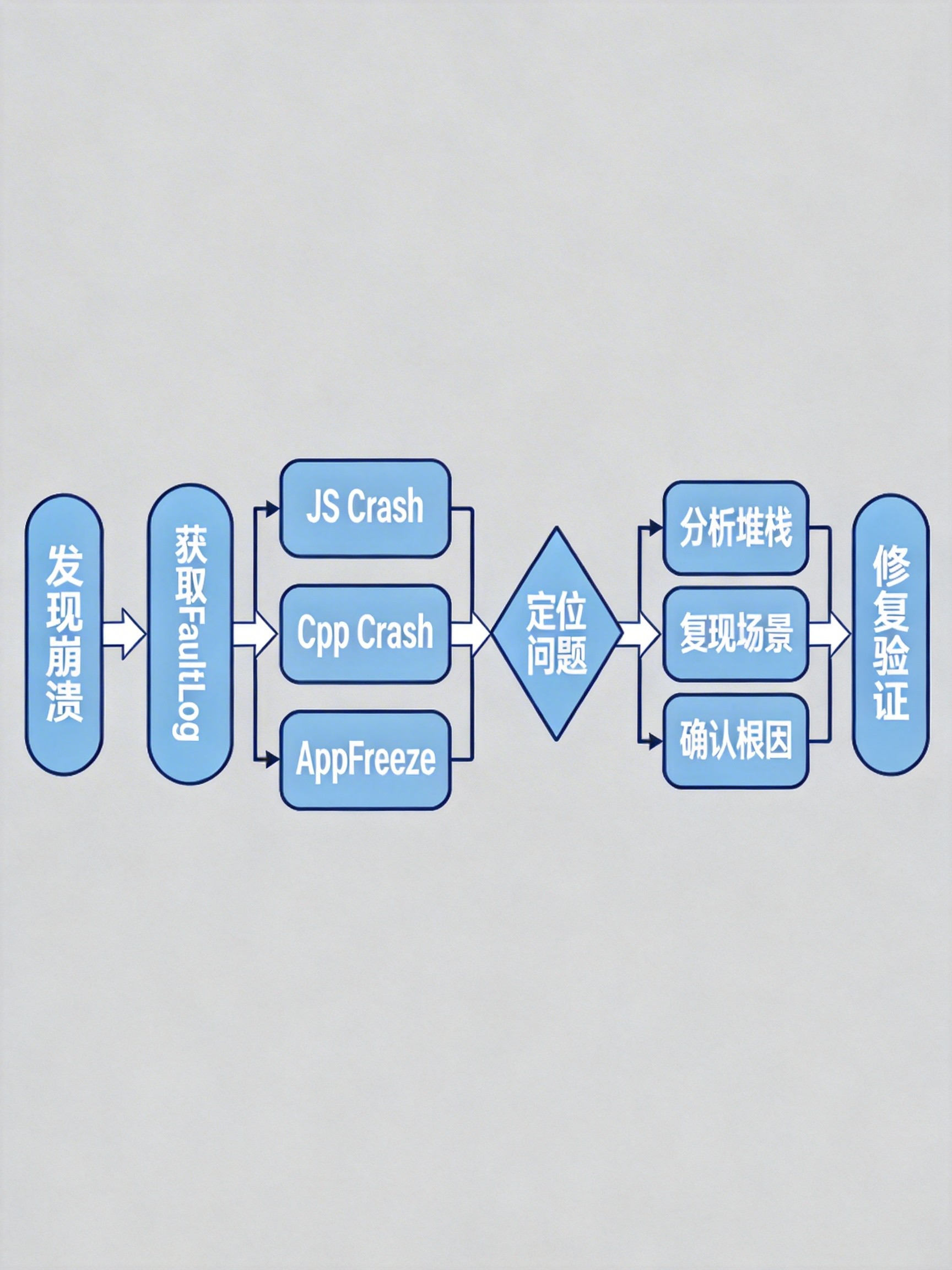
5.1 四步排障法
Step 1:获取崩溃日志
# 方法一:DevEco Studio FaultLog面板
# 方法二:hdc命令行
hdc shell hilog -w | grep "CRASH"
hdc file recv /data/log/faultlog/ ./
Step 2:判断崩溃类型
| 日志关键字 | 崩溃类型 | 调试工具 |
|---|---|---|
| JS_ERROR / TypeError | ArkTS运行时错误 | IDE断点调试 |
| CPP_CRASH / SIGSEGV | Native层错误 | HWAsan + GDB |
| APP_FREEZE / THREAD_BLOCK | 主线程阻塞 | Profiler |
| OOM / OutOfMemory | 内存溢出 | Memory Profiler |
Step 3:定位问题代码
- JS_ERROR:直接查看堆栈中的文件路径和行号
- CPP_CRASH:启用HWAsan后获取精确的内存错误类型
- APP_FREEZE:Profiler分析主线程耗时操作
Step 4:修复与验证
- 针对性修复,避免"地毯式"修改
- 编写单元测试覆盖异常路径
- 使用DevEco Testing进行稳定性测试
六、最佳实践建议
6.1 代码层面
// 1. 全局异常拦截(应用入口)
import errorManager from '@ohos.app.ability.errorManager';

export default class EntryAbility extends UIAbility {
  onCreate() {
    // 注册全局错误监听
    errorManager.on('error', {
      onUnhandledException: (err) => {
        console.error('[GlobalErrorHandler]', err.message);
        // 上报错误日志到服务器
        this.reportError(err);
      }
    });
  }

  private reportError(err: Error) {
    // 实现错误上报逻辑
  }
}

// 2. 资源生命周期管理
@Component
struct SafeComponent {
  private timer: number = -1;

  aboutToAppear() {
    this.timer = setInterval(() => {
      // 定时任务
    }, 1000);
  }

  aboutToDisappear() {
    // 必须清理资源!
    if (this.timer !== -1) {
      clearInterval(this.timer);
      this.timer = -1;
    }
  }
}

// 3. 空值安全访问
interface UserData {
  profile?: {
    name?: string;
    avatar?: string;
  };
}

function getUserName(user: UserData | undefined): string {
  // 使用可选链 + 空值合并
  return user?.profile?.name ?? '未知用户';
}
6.2 工具层面
| 工具 | 用途 | 使用场景 |
|---|---|---|
| FaultLog | 崩溃日志分析 | 所有崩溃问题 |
| Memory Profiler | 内存泄漏检测 | OOM、性能问题 |
| HiChecker | 线程模型检测 | APP_FREEZE |
| HWAsan | 内存错误检测 | CPP_CRASH |
| DevEco Testing | 自动化测试 | 发布前验证 |
6.3 流程层面
- 代码Review:重点关注空值处理、资源释放、异步时序
- 持续集成:每次提交运行自动化测试
- 灰度发布:先小范围用户验证,再全量发布
- 监控告警:接入AppGallery Connect崩溃监控
七、结语
鸿蒙6.0的稳定性排障需要建立系统化的方法论:从架构理解入手,通过工具精确定位,以规范代码根治问题。
掌握这些排障技能,不仅能快速解决线上问题,更能在开发阶段规避常见陷阱,构建稳定流畅的鸿蒙原生应用。

作为“人工智能6S店”的官方数字引擎,为AI开发者与企业提供一个覆盖软硬件全栈、一站式门户。
更多推荐

 2
2 0
0- 0


 已为社区贡献7条内容

所有评论(0)