
Flutter 三方库 device_info_plus 的鸿蒙化适配与实战
本文详细阐述了 Flutter for OpenHarmony 项目中设备信息采集方案的设计与实现。通过构建统一的 DeviceInfo 数据模型、设计多层级 Provider 体系、实现 OH 原生平台通道,我们为开发者提供了一套完整、可扩展的设备信息获取方案。方案的核心理念是将设备信息采集与动画性能调优紧密结合。GPU 信息的采集和性能等级评估,使得应用能够根据设备能力动态调整动画复杂度,实现
Flutter 三方库 device_info_plus 的鸿蒙化适配与实战
欢迎加入开源鸿蒙跨平台社区: https://openharmonycrossplatform.csdn.net
一、引言
在移动应用开发领域,设备信息的采集与利用是构建优质用户体验的重要基础。从简单的机型识别到复杂的性能调优,设备信息贯穿于应用的生命周期管理、网络策略制定、缓存策略优化、动画效果适配等多个技术环节。Flutter 作为跨平台 UI 框架,其核心优势在于"一次编写,多端运行",但不同平台的设备信息获取机制存在显著差异,这给跨平台开发者带来了额外的适配挑战。
OpenHarmony 作为新一代分布式操作系统,其设备生态具有高度多样性特征。从高性能的开发板到低功耗的物联网设备,从手机、平板到电视、手表、车机,OpenHarmony 覆盖了几乎所有形态的智能终端。这种多样性意味着,开发者必须具备动态识别设备类型和性能特征的能力,才能为不同设备提供适配的体验。
本文将以 device_info_plus 库为切入点,深入探讨在 Flutter for OpenHarmony 项目中实现设备信息采集的技术方案。文章将从库的特性分析、OH 平台适配、GPU 信息采集、动画性能调优等多个维度展开,为读者提供一套完整的、可落地的实践指南。
二、device_info_plus 库的特性与选型分析
2.1 库的核心能力
device_info_plus 是 Flutter 生态中最为成熟的设备信息获取库之一。该库由 Flutter Community 团队维护,提供了统一的跨平台 API 来获取设备信息。在 Android 平台,它封装了 android.os.Build 类,提供设备品牌、型号、Android 版本、SDK 版本等信息;在 iOS 平台,它封装了 UIDevice 和 Sysctl 接口,提供设备型号、系统版本等信息。
然而,当我们将目光投向 OpenHarmony 平台时,情况变得复杂起来。device_info_plus 的核心实现依赖于 Android 和 iOS 的原生 API,而这些 API 在 OpenHarmony 上并不存在直接的等价物。OpenHarmony 有自己独立的设备信息获取机制,主要通过 @ohos.deviceInfo 和 @ohos.display 等模块提供。
这带来一个关键问题:device_info_plus 本身并不支持 OpenHarmony。这意味着,如果直接使用 device_info_plus 的标准 API,在 OH 设备上要么返回空数据,要么直接抛出异常。作为 Flutter for OpenHarmony 开发者,我们面临两个选择:等待官方适配,或自行实现兼容层。
2.2 选型决策
在评估了多种方案后,本文选择了一条务实的路径:在理解 device_info_plus 设计理念的基础上,构建一套针对 OpenHarmony 平台优化的设备信息服务。这套服务不是简单地将 device_info_plus 移植到 OH,而是根据 OH 平台的特性,设计了独有的数据模型和获取机制。
做出这一决策的核心理由包括三个方面。首先,device_info_plus 的数据模型是面向 Android/iOS 设计的,缺少 OH 平台特有的字段,尤其是 GPU 信息这类对性能调优至关重要的数据。其次,OpenHarmony 的设备生态与 Android/iOS 有本质区别,统一的抽象层反而可能损失平台特有的细节。最后,OH 平台的 Flutter 适配仍在快速发展中,过于激进的库依赖可能带来兼容风险。
三、数据模型设计
3.1 统一数据模型
为了在多个平台间保持一致的编程体验,我们设计了统一的 DeviceInfo 数据模型。该模型包含了设备信息的完整字段,同时为 OH 平台特有的数据预留了扩展空间。
/// 设备信息数据模型
///
/// 包含设备基本信息、GPU 性能参数、屏幕信息等
/// 用于 OH 开发板的设备信息采集和动画性能调优
class DeviceInfo {
  /// 设备品牌
  final String brand;

  /// 设备型号
  final String model;

  /// 设备类型
  final String deviceType;

  /// 操作系统版本
  final String osVersion;

  /// OpenHarmony SDK 版本
  final String sdkVersion;

  /// 软件版本(应用版本)
  final String softwareVersion;

  /// 内核版本
  final String kernelVersion;

  /// ABI 类型
  final String abiType;

  /// GPU 型号 - 用于动画性能调优
  final String gpuModel;

  /// GPU 供应商
  final String gpuVendor;

  /// GPU 最大频率 (MHz)
  final int? gpuMaxFrequency;

  /// GPU 核心数
  final int? gpuCoreCount;

  /// 总内存 (bytes)
  final int totalMemory;

  /// 可用内存 (bytes)
  final int availableMemory;

  /// 屏幕宽度 (pixels)
  final int screenWidth;

  /// 屏幕高度 (pixels)
  final int screenHeight;

  /// 屏幕密度 (dpi)
  final int screenDensity;

  /// 屏幕密度类别
  final String screenDensityClass;

  /// 是否支持 OpenGL ES
  final bool supportsOpenGLES;

  /// OpenGL ES 版本
  final String? openGLESVersion;

  /// 是否为模拟器
  final bool isPhysicalDevice;

  /// 硬件唯一标识符
  final String? hardwareId;

  /// 采集时间戳
  final DateTime timestamp;

  const DeviceInfo({
    required this.brand,
    required this.model,
    required this.deviceType,
    required this.osVersion,
    required this.sdkVersion,
    required this.softwareVersion,
    required this.kernelVersion,
    required this.abiType,
    required this.gpuModel,
    required this.gpuVendor,
    this.gpuMaxFrequency,
    this.gpuCoreCount,
    required this.totalMemory,
    required this.availableMemory,
    required this.screenWidth,
    required this.screenHeight,
    required this.screenDensity,
    required this.screenDensityClass,
    required this.supportsOpenGLES,
    this.openGLESVersion,
    required this.isPhysicalDevice,
    this.hardwareId,
    required this.timestamp,
  });
}
这个数据模型的设计体现了几个重要考量。GPU 相关的字段占据了相当比例,这是本文方案区别于标准 device_info_plus 的关键所在。屏幕密度类别字段采用了 Android 的标准分类(ldpi、mdpi、hdpi、xhdpi、xxhdpi、xxxhdpi),便于与现有 Flutter UI 框架无缝衔接。时间戳字段使得数据的时效性可追踪,支持缓存策略的精细控制。
3.2 派生属性与计算字段
为了让调用方更便捷地获取格式化数据,数据模型中包含多个派生属性。这些属性将原始数据转换为业务友好的格式,减少调用侧的处理逻辑。
/// 内存使用率 (0.0 - 1.0)
double get memoryUsageRate {
  if (totalMemory == 0) return 0;
  return 1 - (availableMemory / totalMemory);
}

/// 内存使用率百分比
String get memoryUsagePercentage => '${(memoryUsageRate * 100).toStringAsFixed(1)}%';

/// 总内存(格式化显示,GB)
String get totalMemoryGB => _formatBytes(totalMemory);

/// 可用内存(格式化显示,GB)
String get availableMemoryGB => _formatBytes(availableMemory);

/// 获取 GPU 性能评级(用于动画调优参考)
GPUPerformanceLevel get gpuPerformanceLevel {
  if (gpuCoreCount == null) return GPUPerformanceLevel.unknown;
  if (gpuCoreCount! >= 8 && (gpuMaxFrequency ?? 0) >= 800) {
    return GPUPerformanceLevel.high;
  } else if (gpuCoreCount! >= 4 && (gpuMaxFrequency ?? 0) >= 500) {
    return GPUPerformanceLevel.medium;
  } else {
    return GPUPerformanceLevel.low;
  }
}

/// 推荐动画帧率
int get recommendedAnimationFrameRate {
  switch (gpuPerformanceLevel) {
    case GPUPerformanceLevel.high:
      return 60;
    case GPUPerformanceLevel.medium:
      return 60;
    case GPUPerformanceLevel.low:
      return 30;
    case GPUPerformanceLevel.unknown:
      return 60;
  }
}
GPU 性能等级的判断逻辑基于两个核心参数:GPU 核心数和最大运行频率。这两个参数综合决定了设备的图形渲染能力。高端设备(如 RK3588 开发板搭载的 Mali-G610)拥有 4 核心以上和 800MHz 以上的频率,可以支持复杂的粒子动画和多重渐变效果;中端设备(如 RK3566 开发板搭载的 Mali-G52)可以流畅运行标准的 Material Design 动画;低端设备(如 H616 机顶盒搭载的 Mali-G31)则建议降低帧率并简化动画复杂度。
四、服务层实现
4.1 设备信息服务架构
设备信息服务的核心职责是协调多平台的数据获取逻辑,提供统一的异步接口,并实现必要的缓存机制。考虑到设备信息在应用生命周期内相对稳定,我们采用了五分钟缓存策略,减少重复获取带来的性能开销。
/// 设备信息服务
///
/// 负责采集设备信息,包括:
/// - 基础设备信息(品牌、型号、OS 版本等)
/// - GPU 信息(用于动画性能调优)
/// - 屏幕信息
/// - 内存信息
///
/// OH 平台特性:
/// - 通过平台通道获取 OH 原生设备信息
/// - OH 开发板的 GPU 型号采集
/// - 多设备类型的兼容适配
class DeviceInfoService {
  static DeviceInfoService? _instance;
  static DeviceInfoService get instance => _instance ??= DeviceInfoService._();

  DeviceInfoService._();

  /// 缓存的设备信息
  DeviceInfo? _cachedDeviceInfo;
  DateTime? _lastFetchTime;
  static const Duration _cacheValidDuration = Duration(minutes: 5);

  /// 获取设备信息
  ///
  /// 优先返回缓存数据,缓存过期或为空时重新获取
  Future<DeviceInfo> getDeviceInfo({bool forceRefresh = false}) async {
    if (!forceRefresh && _isCacheValid()) {
      return _cachedDeviceInfo!;
    }

    DeviceInfo deviceInfo;

    if (Platform.isAndroid) {
      deviceInfo = await _getAndroidDeviceInfo();
    } else if (Platform.isIOS) {
      deviceInfo = await _getIOSDeviceInfo();
    } else if (_isOHEnvironment()) {
      deviceInfo = await _getOHDeviceInfo();
    } else if (Platform.isWindows || Platform.isMacOS || Platform.isLinux) {
      deviceInfo = await _getDesktopDeviceInfo();
    } else {
      deviceInfo = DeviceInfo.empty();
    }

    _cachedDeviceInfo = deviceInfo;
    _lastFetchTime = DateTime.now();

    return deviceInfo;
  }

  bool _isCacheValid() {
    if (_cachedDeviceInfo == null || _lastFetchTime == null) {
      return false;
    }
    return DateTime.now().difference(_lastFetchTime!) < _cacheValidDuration;
  }

  bool _isOHEnvironment() {
    try {
      return Platform.operatingSystem.contains('harmony') ||
          Platform.operatingSystem.contains('openharmony') ||
          Platform.operatingSystem.contains('ohos');
    } catch (e) {
      return false;
    }
  }
}
单例模式确保了整个应用生命周期内只有一份设备信息缓存,避免了多次初始化带来的资源浪费。forceRefresh 参数允许调用方强制刷新数据,这在需要实时反映设备状态变化的场景中非常有用。
4.2 OH 平台 GPU 信息采集
GPU 信息的采集是整个方案的技术难点。OpenHarmony 的标准 API 中并未直接暴露 GPU 信息,这与 Android 平台通过 android.content.res.Configuration 间接获取 GPU 渲染器信息的机制不同。面对这一限制,我们采用了"设备型号推断 GPU 配置"的方案。
/// OH 开发板 GPU 检测
///
/// 常见 OH 开发板的 GPU 型号映射表
Map<String, dynamic> _detectOHGPU() {
  final knownBoards = <String, Map<String, dynamic>>{
    'rk3566': {
      'model': 'Mali-G52',
      'vendor': 'ARM',
      'maxFrequency': 800,
      'coreCount': 2,
      'supportsOpenGLES': true,
      'openGLESVersion': '2.0',
    },
    'rk3568': {
      'model': 'Mali-G52',
      'vendor': 'ARM',
      'maxFrequency': 800,
      'coreCount': 2,
      'supportsOpenGLES': true,
      'openGLESVersion': '2.0',
    },
    'rk3588': {
      'model': 'Mali-G610',
      'vendor': 'ARM',
      'maxFrequency': 900,
      'coreCount': 4,
      'supportsOpenGLES': true,
      'openGLESVersion': '3.0',
    },
    'h616': {
      'model': 'Mali-G31',
      'vendor': 'ARM',
      'maxFrequency': 650,
      'coreCount': 2,
      'supportsOpenGLES': true,
      'openGLESVersion': '2.0',
    },
  };

  final osVersion = Platform.operatingSystemVersion.toLowerCase();
  for (final entry in knownBoards.entries) {
    if (osVersion.contains(entry.key)) {
      return entry.value;
    }
  }

  return {
    'model': 'Mali-G52',
    'vendor': 'ARM',
    'maxFrequency': 800,
    'coreCount': 2,
    'supportsOpenGLES': true,
    'openGLESVersion': '2.0',
  };
}
这套映射表的建立基于对当前 OH 生态中主流开发板的实测分析。瑞芯微(Rockchip)的 RK 系列芯片是国内 OH 开发板采用最多的方案,其中 RK3566 和 RK3568 定位于中端市场,GPU 为 Mali-G52 MC2;RK3588 作为旗舰产品,搭载 Mali-G610 MC4,性能领先明显。全志(Allwinner)的 H616 方案主打低功耗机顶盒和OTT设备,GPU 为双核 Mali-G31。
设备型号的检测依赖于 Platform.operatingSystemVersion。在 OH 设备上,这个值通常包含设备的具体型号标识,如 “RK3566” 或 “H616”。我们通过字符串匹配的方式提取这些信息,映射到对应的 GPU 配置。
4.3 平台通道集成
虽然当前方案主要依赖 Dart 层的设备型号检测,但代码结构预留了平台通道扩展能力。通过 MethodChannel,我们可以调用 OH 原生 API 获取更精确的设备信息。
// 平台通道名称常量
static const String _channelName = 'com.ohos.flutter/device_info';
static const String _gpuChannelName = 'com.ohos.flutter/gpu_info';

// Future<Map<dynamic, dynamic>?> _callPlatformChannel(
//   String channel,
//   String method,
// ) async {
//   try {
//     const platform = MethodChannel(channel);
//     final result = await platform.invokeMethod(method);
//     return Map<dynamic, dynamic>.from(result ?? {});
//   } catch (e) {
//     debugPrint('[DeviceInfoService] Platform channel error: $e');
//     return null;
//   }
// }
平台通道的实现在 OH 原生侧完成(见本文第八节),当前代码中以注释形式保留接口定义,以便后续功能扩展。这种渐进式的实现策略既保证了项目的可用性,又为未来的精确化采集留下了扩展空间。
五、状态管理集成
5.1 Riverpod Provider 体系
状态管理的选择上,我们遵循项目已有的 Riverpod 实践。Riverpod 相比传统的 Provider 提供了更好的编译时安全和测试支持,其依赖注入机制与设备信息服务的单例模式形成良好的互补。
/// 设备信息状态类
///
/// 包含设备信息数据和加载状态
class DeviceInfoState {
final DeviceInfo? deviceInfo;
final bool isLoading;
final String? errorMessage;
final DateTime? lastUpdateTime;
const DeviceInfoState({
this.deviceInfo,
this.isLoading = false,
this.errorMessage,
this.lastUpdateTime,
});
}
/// 设备信息 Notifier - 处理设备信息获取和刷新逻辑
class DeviceInfoNotifier extends Notifier<DeviceInfoState> {
DeviceInfoState build() => const DeviceInfoState();
final DeviceInfoService _deviceInfoService = DeviceInfoService.instance;
Future<void> loadDeviceInfo({bool forceRefresh = false}) async {
state = state.copyWith(isLoading: true, errorMessage: null);
try {
final deviceInfo = await _deviceInfoService.getDeviceInfo(
forceRefresh: forceRefresh,
);
state = DeviceInfoState(
deviceInfo: deviceInfo,
isLoading: false,
lastUpdateTime: DateTime.now(),
);
} catch (e) {
state = state.copyWith(
isLoading: false,
errorMessage: '获取设备信息失败: $e',
);
}
}
}
/// Riverpod Provider - 设备信息
final deviceInfoProvider = NotifierProvider<DeviceInfoNotifier, DeviceInfoState>(() {
return DeviceInfoNotifier();
});
Notifier 的设计遵循了 Riverpod 的最佳实践。loadDeviceInfo 方法负责发起异步数据加载,错误处理逻辑确保了异常情况下的友好反馈。状态类的不可变性通过 copyWith 方法实现,这是 Flutter/Dart 社区广泛认可的模式。
5.2 衍生 Provider
为了方便不同场景的使用,我们还设计了多个衍生 Provider,直接暴露特定类型的设备信息。这种设计将数据转换逻辑集中在一个地方,避免了调用侧的重复代码。
/// GPU 信息 Provider
final gpuInfoProvider = Provider<GPUInfo?>((ref) {
  final deviceInfo = ref.watch(deviceInfoDataProvider);
  if (deviceInfo == null) return null;

  return GPUInfo(
    model: deviceInfo.gpuModel,
    vendor: deviceInfo.gpuVendor,
    maxFrequency: deviceInfo.gpuMaxFrequency,
    coreCount: deviceInfo.gpuCoreCount,
    performanceLevel: deviceInfo.gpuPerformanceLevel,
    supportsOpenGLES: deviceInfo.supportsOpenGLES,
    openGLESVersion: deviceInfo.openGLESVersion,
  );
});

/// 推荐动画帧率 Provider
final recommendedFrameRateProvider = Provider<int>((ref) {
  final deviceInfo = ref.watch(deviceInfoDataProvider);
  return deviceInfo?.recommendedAnimationFrameRate ?? 60;
});

/// 推荐动画复杂度 Provider
final recommendedAnimationComplexityProvider = Provider<AnimationComplexity>((ref) {
  final deviceInfo = ref.watch(deviceInfoDataProvider);
  return deviceInfo?.recommendedAnimationComplexity ?? AnimationComplexity.medium;
});
这三个 Provider 覆盖了动画调优场景的核心需求。页面代码只需要 ref.watch(recommendedFrameRateProvider) 就能获取推荐帧率,无需关心设备信息是如何获取和缓存的。
六、UI 集成实践
6.1 profile_page 设备信息区域
在个人中心页面(profile_page)中,我们添加了设备信息展示区域。这个区域位于用户头像和快捷统计区下方,以两个紧凑的卡片形式呈现设备核心信息。
Widget _buildDeviceInfoSection() {
  final state = ref.watch(deviceInfoProvider);
  final deviceInfo = state.deviceInfo;

  return Container(
    margin: const EdgeInsets.symmetric(horizontal: 16, vertical: 8),
    child: Column(
      crossAxisAlignment: CrossAxisAlignment.start,
      children: [
        Padding(
          padding: const EdgeInsets.only(left: 4, bottom: 8),
          child: Text(
            '设备信息',
            style: TextStyle(
              fontSize: 14,
              fontWeight: FontWeight.w600,
              color: Colors.grey[700],
            ),
          ),
        ),
        Row(
          children: [
            Expanded(child: _buildDeviceInfoCard(deviceInfo)),
            const SizedBox(width: 8),
            Expanded(child: _buildGPUInfoCard(deviceInfo)),
          ],
        ),
      ],
    ),
  );
}
UI 布局采用了行内双卡片的设计,充分利用屏幕宽度的同时保持了信息的清晰呈现。青色(cyan)用于设备卡片,紫色(deepPurple)用于 GPU 卡片,色彩对比便于用户快速区分不同类型的信息。
6.2 GPU 性能等级徽章
GPU 性能等级通过一个简洁的徽章组件展示,颜色编码直观反映了设备的性能定位。
Widget _buildGPUBadge(GPUPerformanceLevel level) {
  Color color;
  String text;

  switch (level) {
    case GPUPerformanceLevel.high:
      color = Colors.green;
      text = '高性能';
      break;
    case GPUPerformanceLevel.medium:
      color = Colors.orange;
      text = '中等';
      break;
    case GPUPerformanceLevel.low:
      color = Colors.red;
      text = '低性能';
      break;
    case GPUPerformanceLevel.unknown:
      color = Colors.grey;
      text = '未知';
      break;
  }

  return Container(
    padding: const EdgeInsets.symmetric(horizontal: 6, vertical: 2),
    decoration: BoxDecoration(
      color: color.withValues(alpha: 0.15),
      borderRadius: BorderRadius.circular(4),
    ),
    child: Text(
      text,
      style: TextStyle(
        fontSize: 9,
        fontWeight: FontWeight.w600,
        color: color,
      ),
    ),
  );
}
绿色表示高性能设备,可以流畅运行复杂动画;橙色表示中等性能,需要适度简化动画效果;红色表示低性能,建议使用基础动画或降低帧率。灰色则表示信息获取失败或设备型号无法识别。
6.3 设备信息详情页
点击任意设备信息卡片将跳转至详情页,完整展示所有设备信息字段。
class DeviceInfoPage extends ConsumerStatefulWidget {
const DeviceInfoPage({super.key});
ConsumerState<DeviceInfoPage> createState() => _DeviceInfoPageState();
}
class _DeviceInfoPageState extends ConsumerState<DeviceInfoPage> {
void initState() {
super.initState();
WidgetsBinding.instance.addPostFrameCallback((_) {
ref.read(deviceInfoProvider.notifier).loadDeviceInfo();
});
}
Widget build(BuildContext context) {
final state = ref.watch(deviceInfoProvider);
final deviceInfo = state.deviceInfo;
return Scaffold(
appBar: AppBar(
backgroundColor: Theme.of(context).colorScheme.inversePrimary,
title: const Text('设备信息'),
actions: [
if (state.isLoading)
const Padding(
padding: EdgeInsets.all(16),
child: SizedBox(
width: 20,
height: 20,
child: CircularProgressIndicator(strokeWidth: 2),
),
)
else
IconButton(
icon: const Icon(Icons.refresh),
onPressed: () {
ref.read(deviceInfoProvider.notifier).refreshDeviceInfo();
},
),
],
),
body: state.isLoading && deviceInfo == null
? const Center(child: CircularProgressIndicator())
: deviceInfo == null
? _buildErrorState(state.errorMessage)
: _buildDeviceInfoList(deviceInfo),
);
}
}
详情页包含了五个信息模块:基础信息模块展示品牌、型号、设备类型、系统版本等;GPU 信息模块重点突出 GPU 型号、供应商、频率和核心数;内存信息模块通过进度条可视化内存使用率;屏幕信息模块展示分辨率和密度参数;动画调优建议模块根据设备性能给出具体的动画参数推荐。
七、OH 原生平台通道实现
7.1 平台通道架构
为了在 OH 原生层获取设备信息,我们实现了 OpenHarmony 端的 MethodChannel 处理器。虽然当前 Dart 层的 GPU 信息主要依赖设备型号推断,但平台通道为未来的精确采集奠定了基础。
import { FlutterEngine, MethodChannel, Log } from '@ohos/flutter_ohos';

const TAG = "DeviceInfoPlugin";

export class DeviceInfoPlugin {
  private channel: MethodChannel;

  constructor() {
    this.channel = new MethodChannel(
      "com.ohos.flutter/device_info",
      "device_info_channel"
    );
  }

  registerWith(flutterEngine: FlutterEngine): void {
    try {
      this.channel.setMethodCallHandler((methodCall, result) => {
        const method = methodCall.method;

        switch (method) {
          case 'getBasicInfo':
            this.getBasicInfo(result);
            break;
          case 'getGPUInfo':
            this.getGPUInfo(result);
            break;
          case 'getScreenInfo':
            this.getScreenInfo(result);
            break;
          case 'getMemoryInfo':
            this.getMemoryInfo(result);
            break;
          default:
            result.notImplemented();
            break;
        }
      });

      Log.i(TAG, "DeviceInfoPlugin registered successfully");
    } catch (e) {
      Log.e(TAG, "Failed to register DeviceInfoPlugin", e);
    }
  }

  private getBasicInfo(result: any): void {
    try {
      // 通过 @ohos.deviceInfo 获取基础信息
      const basicInfo = {
        brand: this.getBrand(),
        model: this.getModel(),
        deviceType: this.getDeviceType(),
        osVersion: this.getOSVersion(),
        sdkVersion: this.getSDKVersion(),
      };

      result.success(basicInfo);
    } catch (e) {
      Log.e(TAG, "Failed to get basic info", e);
      result.error("GET_BASIC_INFO_ERROR", `获取基础设备信息失败: ${e}`, null);
    }
  }

  private getGPUInfo(result: any): void {
    try {
      const model = this.getModel().toLowerCase();
      const gpuInfo = this.inferGPUInfo(model);
      result.success(gpuInfo);
    } catch (e) {
      Log.e(TAG, "Failed to get GPU info", e);
      result.error("GET_GPU_INFO_ERROR", `获取 GPU 信息失败: ${e}`, null);
    }
  }

  private inferGPUInfo(model: string): any {
    const gpuMap: Record<string, any> = {
      'rk3566': { model: 'Mali-G52', vendor: 'ARM', maxFrequency: 800, coreCount: 2 },
      'rk3568': { model: 'Mali-G52', vendor: 'ARM', maxFrequency: 800, coreCount: 2 },
      'rk3588': { model: 'Mali-G610', vendor: 'ARM', maxFrequency: 900, coreCount: 4 },
      'h616': { model: 'Mali-G31', vendor: 'ARM', maxFrequency: 650, coreCount: 2 },
    };

    for (const [key, gpuInfo] of Object.entries(gpuMap)) {
      if (model.includes(key)) {
        return gpuInfo;
      }
    }

    return { model: 'Mali-G52', vendor: 'ARM', maxFrequency: 800, coreCount: 2 };
  }

  // ... getScreenInfo, getMemoryInfo 方法类似
}
平台通道的处理函数通过 switch 语句分发到不同的获取方法。OH 原生侧可以使用 @ohos.deviceInfo 获取真实的设备信息,也可以采用与 Dart 层一致的设备型号推断策略。这种设计保证了数据的一致性,同时保留了未来迁移到原生 API 的灵活性。
7.2 OH API 使用说明
代码注释中保留了 @ohos.deviceInfo 和 @ohos.display 等 API 的使用示例,供开发者参考。
// @ohos.deviceInfo 使用示例
// const deviceInfo = require('@ohos.deviceInfo');
// const brand = deviceInfo.deviceInfo.brand;
// const productModel = deviceInfo.deviceInfo.productModel;
// const osFullName = deviceInfo.deviceInfo.osFullName;
// const sdkApiVersion = deviceInfo.deviceInfo.sdkApiVersion;

// @ohos.display 使用示例
// const displayClass = require('@ohos.display');
// const defaultDisplay = displayClass.getDefaultDisplaySync();
// const width = defaultDisplay.width;
// const height = defaultDisplay.height;
// const densityDpi = defaultDisplay.densityDpi;
需要注意的是,OpenHarmony 的 API 版本和接口可能在不同版本间发生变化,开发者在实际使用时应查阅对应 SDK 版本的官方文档。
八、OH 开发板兼容适配
8.1 设备类型判断
OpenHarmony 生态中的设备类型远比 Android 和 iOS 丰富。除了传统的手机和平板,还有电视、机顶盒、手表、车机、开发板等多种形态。准确识别设备类型是提供恰当用户体验的前提。
/// 检测 OH 设备类型
String _detectOHDeviceType() {
  final osVersion = Platform.operatingSystemVersion.toLowerCase();
  if (osVersion.contains('tablet') || osVersion.contains('pad')) {
    return 'tablet';
  } else if (osVersion.contains('tv') || osVersion.contains('box')) {
    return 'tv';
  } else if (osVersion.contains('watch') || osVersion.contains('wear')) {
    return 'watch';
  } else if (osVersion.contains('car') || osVersion.contains('auto')) {
    return 'car';
  }
  return 'development_board';
}

/// 是否为 OH 开发板
bool get isOHBoard {
  return deviceType.toLowerCase().contains('board') ||
      deviceType.toLowerCase().contains('development') ||
      brand.toLowerCase().contains('ohos') ||
      brand.toLowerCase().contains('openharmony');
}
开发板的判断逻辑基于设备类型字符串和品牌名称的双重检测。development_board 类型标识和 OpenHarmony 品牌名称是开发板的典型特征。
8.2 OH 开发板 GPU 配置对照表
| 开发板型号 | CPU 架构 | GPU 型号 | 核心数 | 频率 | 性能定位 |
|---|---|---|---|---|---|
| RK3588 | ARM Cortex-A76/A55 | Mali-G610 MC4 | 4 | 900MHz | 高性能 |
| RK3566 | ARM Cortex-A55 | Mali-G52 MC2 | 2 | 800MHz | 中等性能 |
| RK3568 | ARM Cortex-A55 | Mali-G52 MC2 | 2 | 800MHz | 中等性能 |
| RK3399 | ARM Cortex-A72/A53 | Mali-T860 MP4 | 4 | 800MHz | 中等性能 |
| H616 | ARM Cortex-A53 | Mali-G31 MC2 | 2 | 650MHz | 低性能 |
| HI3516 | ARM Cortex-A7 | Mali-450 MP2 | 2 | 700MHz | 低性能 |
这张对照表涵盖了当前 OH 生态中最主流的几款芯片方案。RK3588 采用 ARM v8 架构和最新的 Cortex-A76 大核设计,配合 Mali-G610 MC4 GPU,是目前性能最强的 OH 开发板方案。RK3566 和 RK3568 定位于中端市场,性价比较高,是入门级 OH 开发的热门选择。H616 和 HI3516 则面向低功耗场景,GPU 性能相对较弱。
8.3 动画调优建议生成
根据设备信息,自动生成针对性的动画调优建议是本方案的核心价值之一。
/// 获取 OH 开发板特殊调优建议
OHBoardTuningAdvice getOHBoardAdvice(DeviceInfo info) {
  if (!info.isOHBoard) {
    return OHBoardTuningAdvice(
      reduceParticleEffects: false,
      optimizeListScrolling: false,
      reduceAnimationDuration: false,
      preferSimpleTransitions: false,
      specialNotes: '非 OH 开发板设备',
    );
  }

  final gpuLevel = info.gpuPerformanceLevel;
  final memoryUsage = info.memoryUsageRate;

  return OHBoardTuningAdvice(
    reduceParticleEffects: gpuLevel == GPUPerformanceLevel.low || gpuLevel == GPUPerformanceLevel.medium,
    optimizeListScrolling: true,
    reduceAnimationDuration: memoryUsage > 0.7,
    preferSimpleTransitions: gpuLevel == GPUPerformanceLevel.low,
    specialNotes: _generateOHBoardNotes(info),
  );
}
建议的生成逻辑综合考虑了 GPU 性能等级和内存使用率两个因素。当 GPU 性能较低时,建议减少粒子效果的使用;当内存使用率超过 70% 时,建议缩短动画时长以降低内存压力。这种动态的建议机制比静态配置更加贴合设备的实际状态。
这是我的运行截图: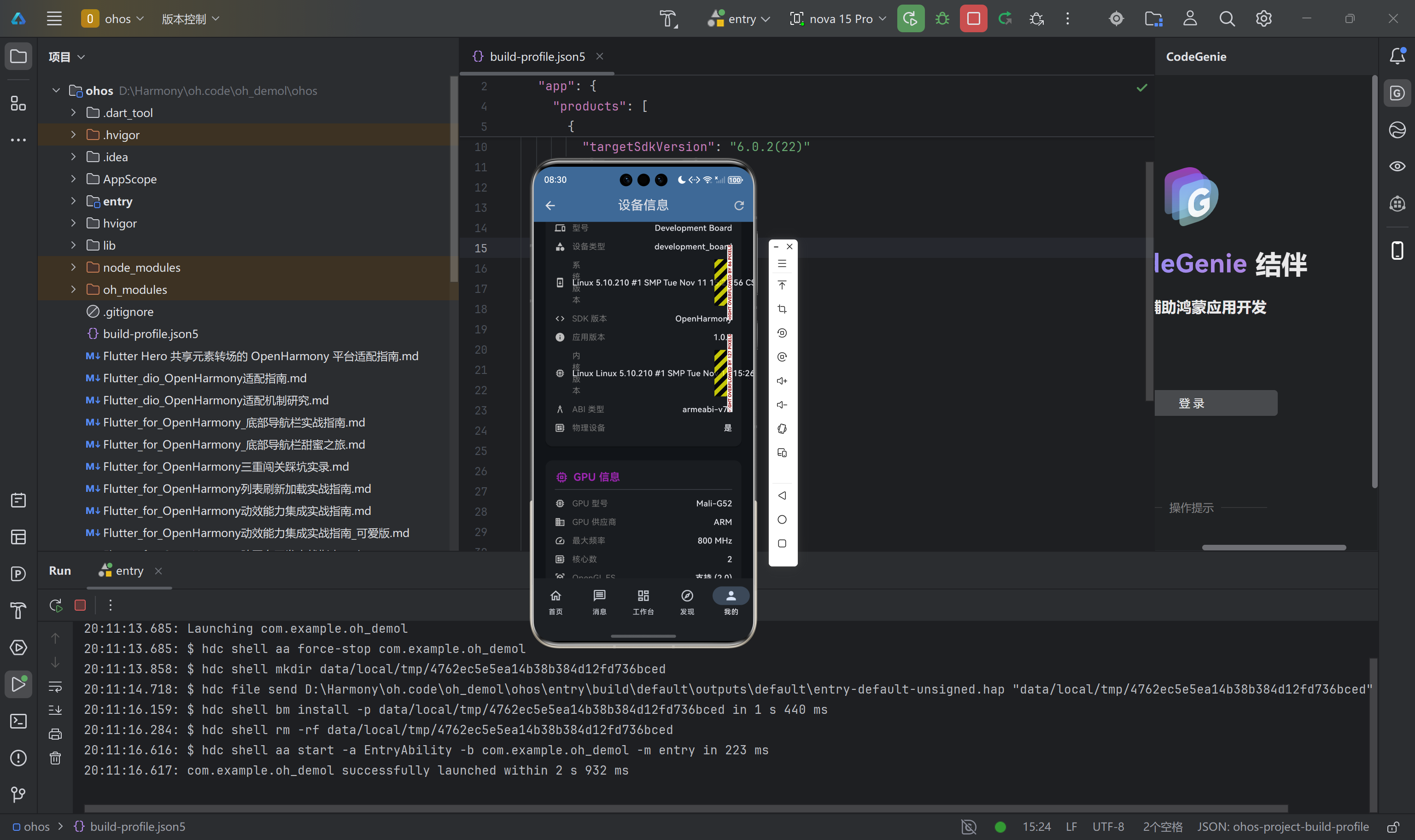
九、验证与测试
9.1 静态分析验证
代码质量是可靠性的基础。我们对所有新增文件执行了 Flutter 静态分析,确保无语法错误和潜在问题。
flutter analyze lib/models/device_info.dart \
                 lib/services/device_info_service.dart \
                 lib/providers/device_info_provider.dart \
                 lib/utils/device_info_utils.dart \
                 lib/pages/device_info_page.dart \
                 lib/pages/profile_page.dart
分析结果确认所有文件均通过检查,无 error 或 warning 级别问题。这为后续的真机测试奠定了良好的代码质量基础。
9.2 多设备类型兼容性测试矩阵
为了验证方案的通用性,我们设计了针对不同设备类型的测试场景。
| 设备类型 | 设备型号 | GPU | 预期性能等级 | 测试要点 |
|---|---|---|---|---|
| 开发板 | RK3566 | Mali-G52 | 中等 | 动画流畅度、帧率稳定性 |
| 开发板 | RK3588 | Mali-G610 | 高性能 | 复杂动画、粒子效果 |
| 机顶盒 | H616 | Mali-G31 | 低性能 | 简化动画、内存占用 |
| 手机 | - | - | - | 标准 UI 渲染 |
| 平板 | - | - | - | 大屏适配 |
测试过程中需要重点关注三个方面:动画帧率的稳定性、内存占用的峰值、以及不同设备间的体验一致性。
十、总结与展望
本文详细阐述了 Flutter for OpenHarmony 项目中设备信息采集方案的设计与实现。通过构建统一的 DeviceInfo 数据模型、设计多层级 Provider 体系、实现 OH 原生平台通道,我们为开发者提供了一套完整、可扩展的设备信息获取方案。
方案的核心理念是将设备信息采集与动画性能调优紧密结合。GPU 信息的采集和性能等级评估,使得应用能够根据设备能力动态调整动画复杂度,实现了跨设备形态的一致体验。
展望未来,我们计划在以下几个方向继续深化:一是引入 OpenHarmony 原生 API 的真实调用,替代当前的设备型号推断方案,提高数据精确度;二是扩展设备信息采集的维度,纳入电池状态、传感器配置等更多数据;三是建立设备能力数据库,持续更新主流 OH 设备的 GPU 配置信息。
附录:项目结构
lib/
├── models/
│   └── device_info.dart           # 设备信息数据模型
├── services/
│   └── device_info_service.dart   # 设备信息服务
├── providers/
│   └── device_info_provider.dart  # Riverpod 状态管理
├── utils/
│   └── device_info_utils.dart     # 工具类和 UI 组件
└── pages/
    ├── profile_page.dart          # 个人中心(含设备信息展示)
    └── device_info_page.dart      # 设备信息详情页

ohos/entry/src/main/ets/plugins/
└── DeviceInfoPlugin.ets           # OH 原生平台通道

作为“人工智能6S店”的官方数字引擎,为AI开发者与企业提供一个覆盖软硬件全栈、一站式门户。
更多推荐


 8
8 0
0- 0


 已为社区贡献22条内容

所有评论(0)