
React Native跨平台鸿蒙开发实战系列:TextInput表单事件绑定
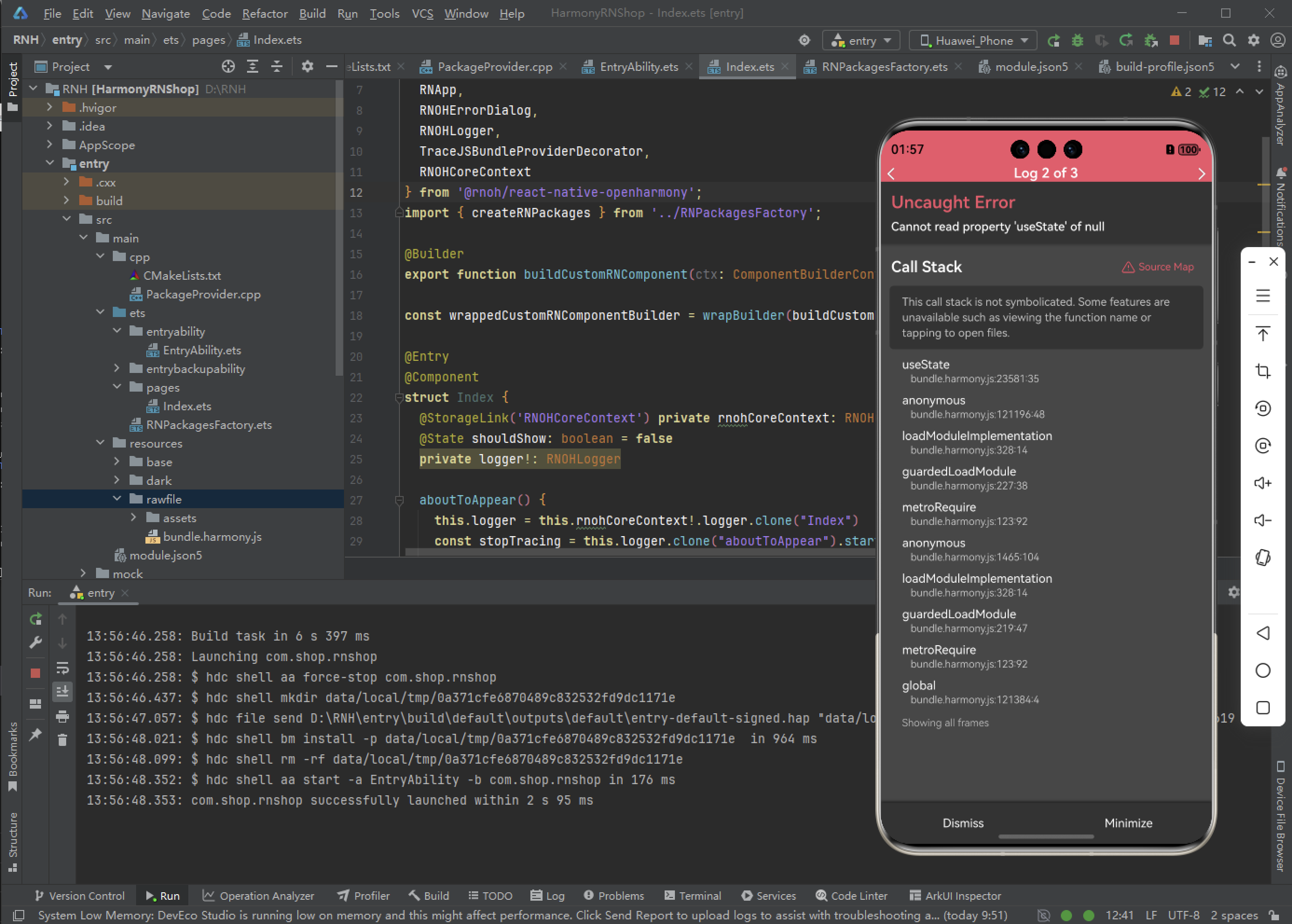
这个错误通常是因为在React组件中尝试访问值为null的对象的useState属性。
Uncaught Error
cannot read propertry 'useState' of null
这个错误通常是因为在React组件中尝试访问值为null的对象的useState属性。以下是常见的解决方案:
主要原因和解决方法
1. React导入问题
确保在文件顶部正确导入React:
import React from 'react';
2. 组件使用位置错误
useState只能在函数组件内部使用,不能在类组件、普通函数或组件外部使用 =》 检查到这里
3. React版本冲突
如果是本地调试时出现,可能是React版本冲突导致,可以尝试:
- 统一项目中的React版本
- 检查是否有多个React实例
import React from 'react';
import { View, Text, Dimensions, StyleSheet, Image, TextInput, AppRegistry } from 'react-native';

//获取屏幕的宽高
const screenWidth =Math.round( Dimensions.get('window').width);
const screenHight =Math.round( Dimensions.get('window').height);

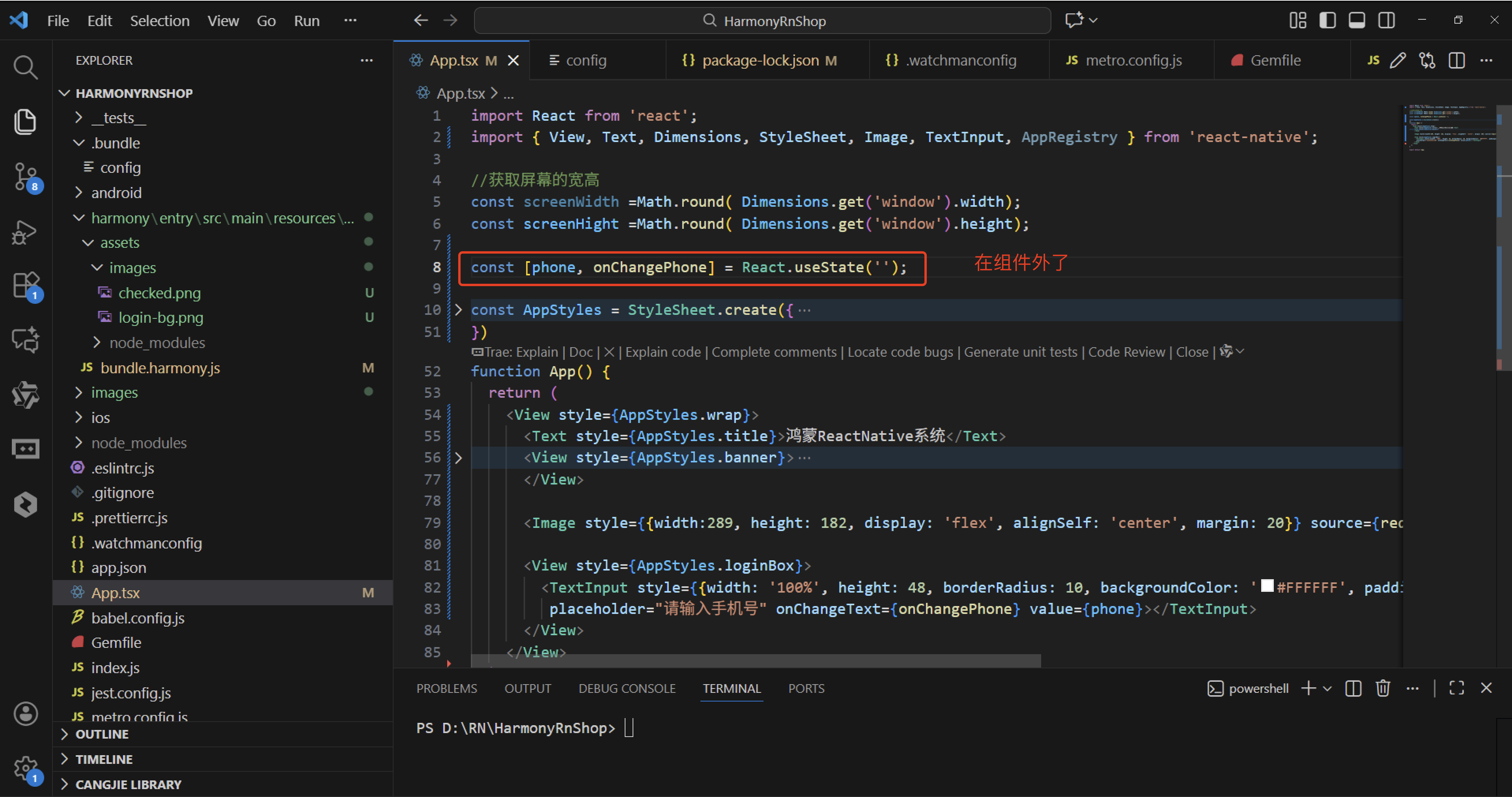
const [phone, onChangePhone] = React.useState('');

const AppStyles = StyleSheet.create({
  wrap: {
    width: '100%',
    height: screenHight,
    backgroundColor: '#85BDFF'
  },
  title: {
    width: '100%',
    height: 72,
    fontFamily: 'OPPOSans, OPPOSans',
    fontWeight: 'normal',
    paddingTop: 50,
    fontSize: 36,
    color: '#304057',
    lineHeight: 72,
    textAlign: 'center',
    fontStyle: 'normal'
  },
  banner: {
    paddingTop: 50,
    paddingRight: 32,
    paddingLeft: 32,
  },
  bannerItem: {
    paddingTop: 10,
    display: 'flex',
    flexDirection:'row',
    alignItems: 'center',
    justifyContent: 'center',
    width: '50%',
  },
  loginBox: {
    width: '100%',
    paddingTop: 29,
    paddingLeft: 20,
    paddingRight: 20,
    borderTopRightRadius: 30,
    borderTopLeftRadius: 30,
    backgroundColor: '#F2F8FF',
    flex: 1
  }
})
function App() {
  return (
    <View style={AppStyles.wrap}>
      <Text style={AppStyles.title}>鸿蒙ReactNative系统</Text>
      <View style={AppStyles.banner}>
        <View style={{display:'flex',flexDirection:'row',justifyContent:'space-between'}}>
          <View style={AppStyles.bannerItem}>
            <Image style={{width:27,height:27}} source={require('./images/checked.png')}></Image>
            <Text style={{paddingLeft: 4}}>实时业绩便捷查询</Text>
          </View>
          <View style={AppStyles.bannerItem}>
            <Image style={{width:27,height:27}} source={require('./images/checked.png')}></Image>
            <Text style={{paddingLeft: 4}}>订单状态轻松把控</Text>
          </View>
        </View>
        <View style={{display:'flex',flexDirection:'row',justifyContent:'space-between'}}>
          <View style={AppStyles.bannerItem}>
            <Image style={{width:27,height:27}} source={require('./images/checked.png')}></Image>
            <Text style={{paddingLeft: 4}}>宣传数据全程管理</Text>
          </View>
          <View style={AppStyles.bannerItem}>
            <Image style={{width:27,height:27}} source={require('./images/checked.png')}></Image>
            <Text style={{paddingLeft: 4}}>海量素材一站转发</Text>
          </View>
        </View>
      </View>

      <Image style={{width:289, height: 182, display: 'flex', alignSelf: 'center', margin: 20}} source={require('./images/login-bg.png')}></Image>

      <View style={AppStyles.loginBox}>
        <TextInput style={{width: '100%', height: 48, borderRadius: 10, backgroundColor: '#FFFFFF', paddingLeft: 16, paddingRight: 16, fontSize: 14, color: '#304057'}}
         placeholder="请输入手机号" onChangeText={onChangePhone} value={phone}></TextInput>
      </View>
    </View>
  );
}

export default App;
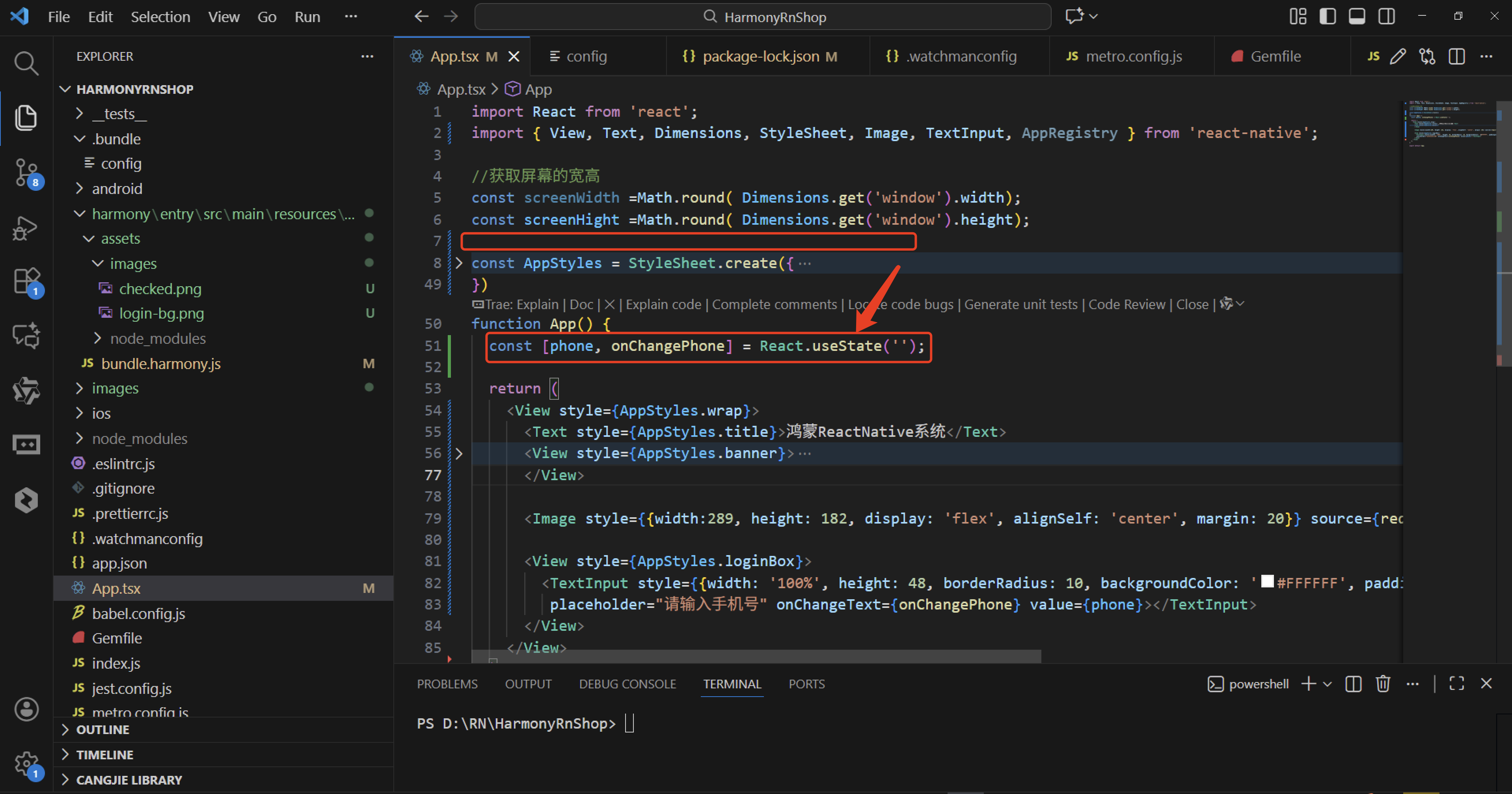
经过上面的代码检查,根据useState只能在函数组件内部使用,不能在类组件、普通函数或组件外部使用,发现const [phone, onChangePhone] = React.useState(‘’);代码写错了位置。
当你在 JavaScript 中遇到错误 “Uncaught Error: Cannot read property ‘useState’ of null” 时,这通常意味着你尝试访问一个不存在的属性。在这种情况下,属性是 useState,它应该是从 React 的库中导入的。这个错误最常见的原因是没有正确导入 React 或者导入的 React 对象为 null。或者,如果你使用的是函数组件,确保你的文件扩展名是 .jsx 并且你的项目配置了支持 JSX。useState只能在函数组件内部使用,不能在类组件、普通函数或组件外部使用,
import React from 'react';
import { View, Text, Dimensions, StyleSheet, Image, TextInput, AppRegistry } from 'react-native';

//获取屏幕的宽高
const screenWidth =Math.round( Dimensions.get('window').width);
const screenHight =Math.round( Dimensions.get('window').height);

const [phone, onChangePhone] = React.useState('');

const AppStyles = StyleSheet.create({
  wrap: {
    width: '100%',
    height: screenHight,
    backgroundColor: '#85BDFF'
  },
  title: {
    width: '100%',
    height: 72,
    fontFamily: 'OPPOSans, OPPOSans',
    fontWeight: 'normal',
    paddingTop: 50,
    fontSize: 36,
    color: '#304057',
    lineHeight: 72,
    textAlign: 'center',
    fontStyle: 'normal'
  },
  banner: {
    paddingTop: 50,
    paddingRight: 32,
    paddingLeft: 32,
  },
  bannerItem: {
    paddingTop: 10,
    display: 'flex',
    flexDirection:'row',
    alignItems: 'center',
    justifyContent: 'center',
    width: '50%',
  },
  loginBox: {
    width: '100%',
    paddingTop: 29,
    paddingLeft: 20,
    paddingRight: 20,
    borderTopRightRadius: 30,
    borderTopLeftRadius: 30,
    backgroundColor: '#F2F8FF',
    flex: 1
  }
})
function App() {
  return (
    <View style={AppStyles.wrap}>
      <Text style={AppStyles.title}>鸿蒙ReactNative系统</Text>
      <View style={AppStyles.banner}>
        <View style={{display:'flex',flexDirection:'row',justifyContent:'space-between'}}>
          <View style={AppStyles.bannerItem}>
            <Image style={{width:27,height:27}} source={require('./images/checked.png')}></Image>
            <Text style={{paddingLeft: 4}}>实时业绩便捷查询</Text>
          </View>
          <View style={AppStyles.bannerItem}>
            <Image style={{width:27,height:27}} source={require('./images/checked.png')}></Image>
            <Text style={{paddingLeft: 4}}>订单状态轻松把控</Text>
          </View>
        </View>
        <View style={{display:'flex',flexDirection:'row',justifyContent:'space-between'}}>
          <View style={AppStyles.bannerItem}>
            <Image style={{width:27,height:27}} source={require('./images/checked.png')}></Image>
            <Text style={{paddingLeft: 4}}>宣传数据全程管理</Text>
          </View>
          <View style={AppStyles.bannerItem}>
            <Image style={{width:27,height:27}} source={require('./images/checked.png')}></Image>
            <Text style={{paddingLeft: 4}}>海量素材一站转发</Text>
          </View>
        </View>
      </View>

      <Image style={{width:289, height: 182, display: 'flex', alignSelf: 'center', margin: 20}} source={require('./images/login-bg.png')}></Image>

      <View style={AppStyles.loginBox}>
        <TextInput style={{width: '100%', height: 48, borderRadius: 10, backgroundColor: '#FFFFFF', paddingLeft: 16, paddingRight: 16, fontSize: 14, color: '#304057'}}
         placeholder="请输入手机号" onChangeText={onChangePhone} value={phone}></TextInput>
      </View>
    </View>
  );
}

export default App;
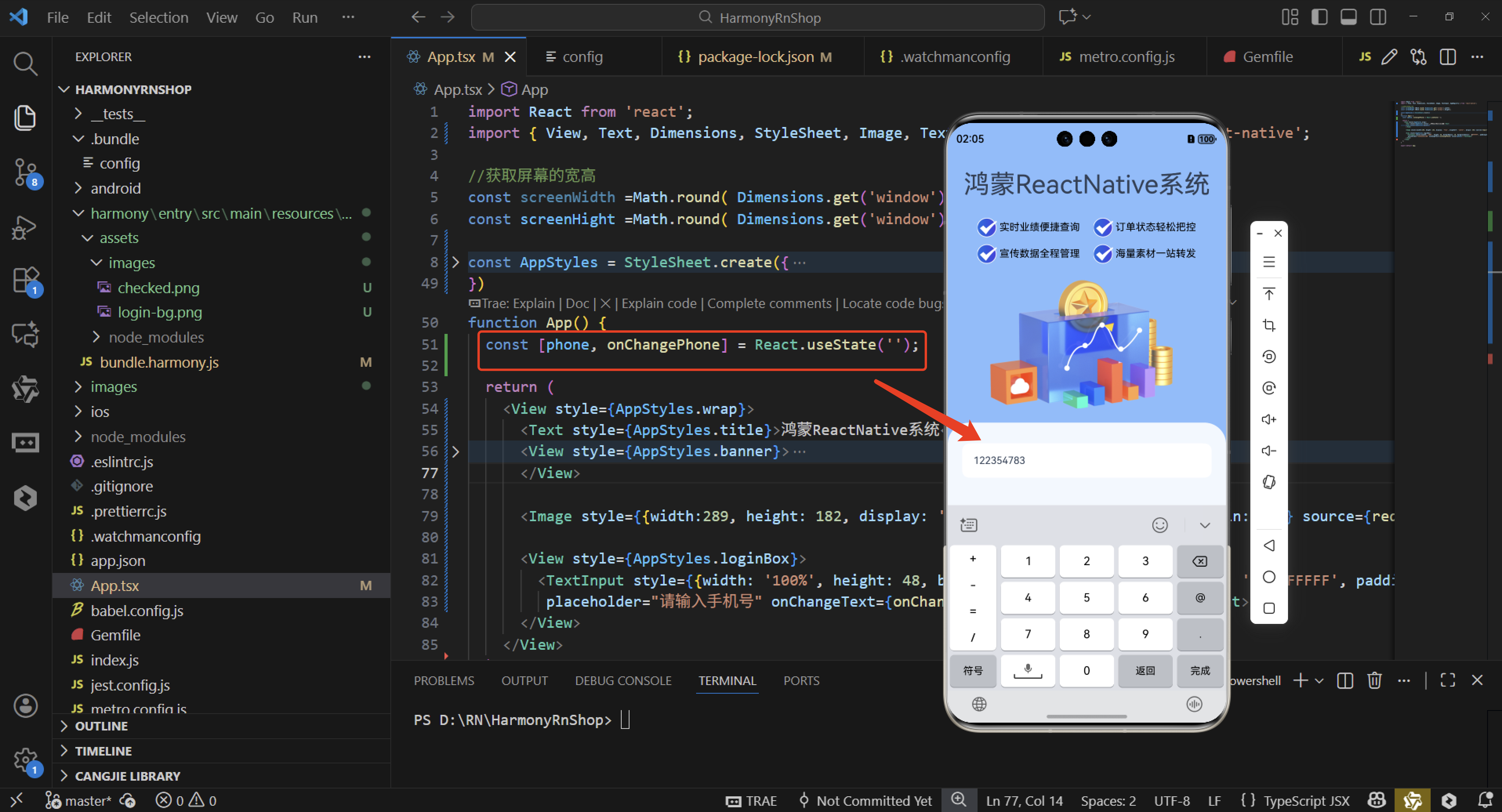
这个错误表明你尝试在React组件外部或类组件中使用了useState Hook,但React无法识别它。以下是关键点:
Hook的定位限制
useState是React Hooks API的一部分,必须在函数组件顶层调用。它不能出现在:
类组件中(应使用this.state)
普通函数或条件语句内部
任何React组件外部
错误本质
当React在非函数组件环境(如全局作用域)遇到useState时,会因找不到React上下文而抛出"null"错误。这类似于尝试在未初始化的对象上访问属性。
与类组件的区别
类组件通过this.state管理状态,而函数组件必须使用Hooks。两者不能混用状态管理方式。
解决方案方向
检查代码中所有使用useState的位置,确保它们:
- 位于function Component() {…}内部
- 不在条件/循环中
- 没有意外在全局作用域调用
这种设计是React Hooks的核心规则,确保状态与组件生命周期正确绑定。
欢迎大家加入开源鸿蒙跨平台开发者社区,一起共建开源鸿蒙跨平台生态。

作为“人工智能6S店”的官方数字引擎,为AI开发者与企业提供一个覆盖软硬件全栈、一站式门户。
更多推荐


 4
4 0
0- 0



 已为社区贡献27条内容

所有评论(0)