
Flutter 框架跨平台鸿蒙开发 - 家庭食谱创新器应用
摘要: 家庭食谱创新器是一款基于开源鸿蒙的生活服务应用,通过AI智能推荐解决"有食材不知做什么菜"的痛点。核心功能包括食材管理、智能推荐(支持口味定制)、菜谱浏览与收藏,采用食材匹配算法提供个性化推荐。应用采用暖色调UI设计,包含食材卡片、菜谱详情等组件,数据模型涵盖8类食材、6种菜系和5种烹饪方式。通过CSDN开源社区协同开发,实现减少食材浪费、激发烹饪灵感的实用价值。(14
·
欢迎加入开源鸿蒙跨平台社区:
https://openharmonycrossplatform.csdn.net
一、应用概述
运行效果图
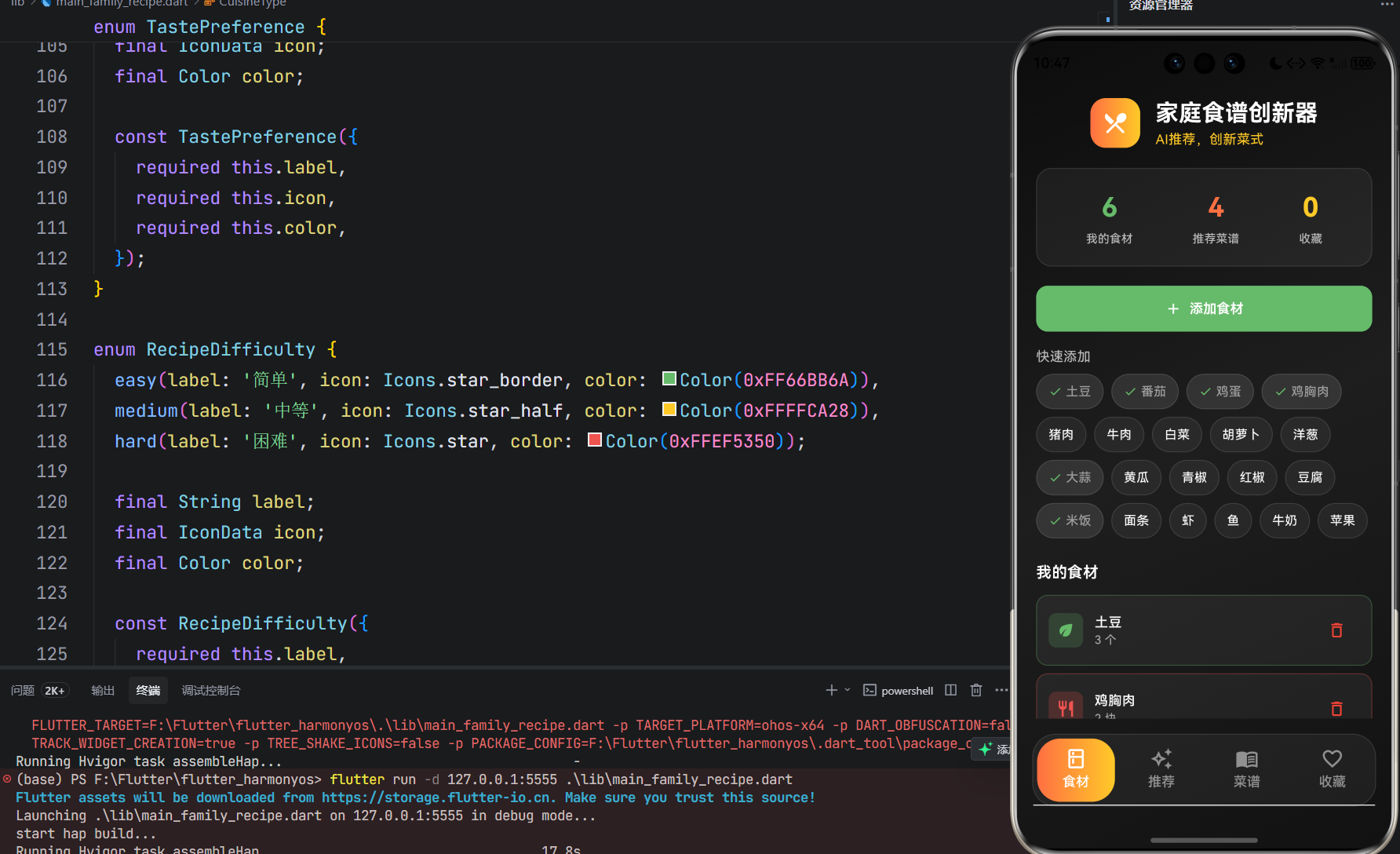
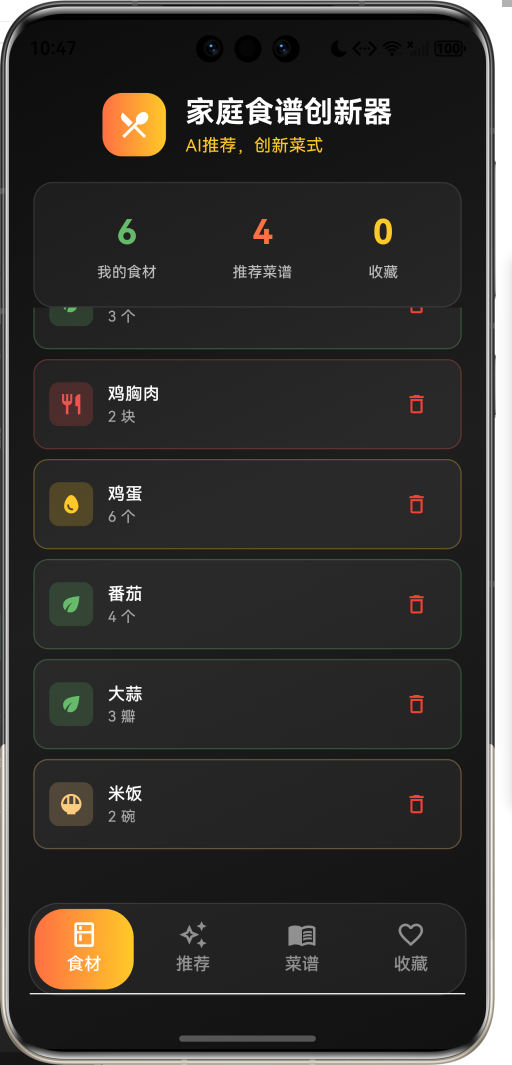
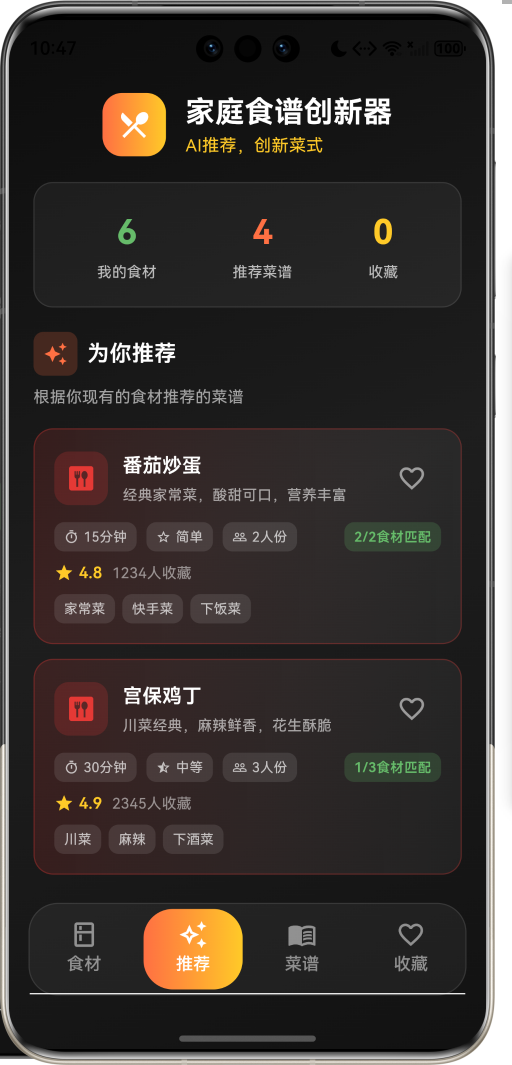
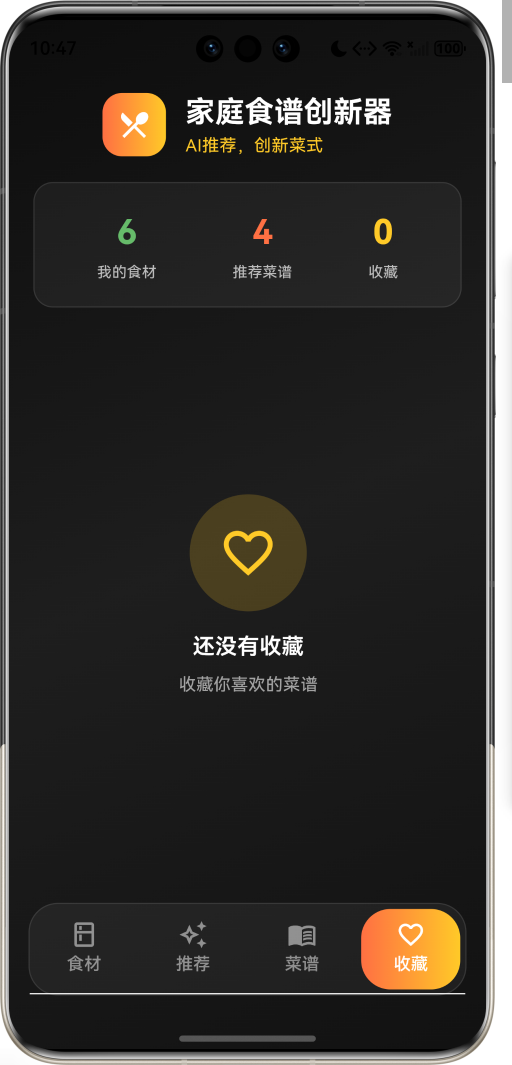
家庭食谱创新器是一款生活服务类应用,用户只需输入家里现有的食材,AI就能智能推荐创新菜谱,还能根据口味偏好调整,让每天都有新菜式。解决了"家里有食材却不知道做什么菜"的日常难题。
核心价值
| 维度 | 描述 |
|---|---|
| 食材利用 | 充分利用现有食材,减少浪费 |
| 灵感启发 | 提供创新菜谱灵感,告别重复菜单 |
| 口味定制 | 根据个人口味偏好调整推荐 |
| 烹饪指导 | 详细的步骤指导,新手也能轻松上手 |
二、功能架构
三、数据模型设计
3.1 食材分类枚举
| 类型 | 标签 | 图标 | 颜色值 |
|---|---|---|---|
| vegetable | 蔬菜 | eco | #66BB6A |
| meat | 肉类 | restaurant | #EF5350 |
| seafood | 海鲜 | set_meal | #42A5F5 |
| egg | 蛋类 | egg | #FFCA28 |
| tofu | 豆制品 | square | #D7CCC8 |
| staple | 主食 | rice_bowl | #FFCC80 |
| seasoning | 调味 | blur_on | #AB47BC |
| fruit | 水果 | apple | #EC407A |
3.2 菜系类型枚举
| 类型 | 标签 | 图标 | 颜色值 |
|---|---|---|---|
| chinese | 中餐 | dining | #E53935 |
| western | 西餐 | lunch_dining | #1E88E5 |
| japanese | 日料 | ramen_dining | #FF8A65 |
| korean | 韩餐 | rice | #8E24AA |
| italian | 意餐 | local_pizza | #43A047 |
| thai | 泰餐 | soup_kitchen | #FFB300 |
3.3 烹饪方式枚举
| 类型 | 标签 | 图标 | 颜色值 |
|---|---|---|---|
| stirFry | 炒 | whatshot | #FF5722 |
| steam | 蒸 | soup_kitchen | #03A9F4 |
| boil | 煮 | local_cafe | #4CAF50 |
| fry | 炸 | oil_barrel | #FF9800 |
| bake | 烤 | microwave | #795548 |
| salad | 凉拌 | eco_outlined | #8BC34A |
3.4 口味偏好枚举
| 类型 | 标签 | 图标 | 颜色值 |
|---|---|---|---|
| mild | 清淡 | water_drop | #81D4FA |
| medium | 适中 | balance | #AED581 |
| spicy | 麻辣 | whatshot | #FF5252 |
| sweet | 甜口 | cake | #F48FB1 |
| sour | 酸口 | science | #FFE082 |
| savory | 鲜香 | restaurant_menu | #BCAAA4 |
3.5 难度等级枚举
| 类型 | 标签 | 图标 | 颜色值 |
|---|---|---|---|
| easy | 简单 | star_border | #66BB6A |
| medium | 中等 | star_half | #FFCA28 |
| hard | 困难 | star | #EF5350 |
3.6 食材模型
class Ingredient {
  final String id;              // 食材ID
  final String name;            // 名称
  final IngredientCategory category; // 分类
  final String unit;            // 单位
  final int quantity;           // 数量
}
3.7 菜谱步骤模型
class RecipeStep {
  final int stepNumber;         // 步骤编号
  final String description;     // 步骤描述
  final int? durationMinutes;   // 预计时间
}
3.8 菜谱模型
class Recipe {
  final String id;              // 菜谱ID
  final String name;            // 菜名
  final String description;     // 描述
  final CuisineType cuisine;    // 菜系
  final List<CookingMethod> methods; // 烹饪方式
  final RecipeDifficulty difficulty; // 难度
  final int prepTimeMinutes;    // 准备时间
  final int cookTimeMinutes;    // 烹饪时间
  final int servings;           // 份量
  final List<Ingredient> ingredients; // 食材列表
  final List<String> seasonings; // 调料列表
  final List<RecipeStep> steps; // 烹饪步骤
  final List<String> tags;      // 标签
  final double rating;          // 评分
  final int collectCount;       // 收藏数
}
四、界面设计
4.1 整体布局
应用采用底部标签导航结构,包含四个主要页面:
4.2 配色方案
应用采用暖色调主题,营造温馨、食欲的氛围:
| 元素 | 颜色值 | 用途 |
|---|---|---|
| Primary | #FF7043 | 主色调,温暖橙 |
| Secondary | #66BB6A | 辅助色,健康绿 |
| Tertiary | #FFCA28 | 点缀色,明黄 |
| Background | #0D0D0D | 背景色,深黑 |
| Surface | #1E1E1E | 卡片背景 |
4.3 核心组件
食材卡片组件
每个食材卡片展示:
- 食材分类图标与颜色
- 食材名称与数量
- 删除按钮
菜谱卡片组件
每个菜谱卡片展示:
- 菜系图标与颜色
- 菜名与描述
- 烹饪时间、难度、份量
- 食材匹配度(推荐页)
- 评分与收藏数
- 标签列表
- 收藏按钮
菜谱详情弹窗
点击菜谱卡片后展示:
- 菜名与描述
- 准备时间、烹饪时间、份量、难度
- 食材列表
- 调料列表
- 烹饪步骤
五、核心功能实现
5.1 食材添加流程
5.2 智能推荐算法
void _generateRecommendations() {
  if (_myIngredients.isEmpty) {
    _recommendedRecipes.clear();
    return;
  }

  final availableNames = _myIngredients.map((i) => i.name).toSet();
  final matched = _allRecipes.where((recipe) {
    final recipeIngredients = recipe.ingredients.map((i) => i.name).toSet();
    final matchCount = recipeIngredients.intersection(availableNames).length;
    return matchCount > 0;
  }).toList();

  matched.sort((a, b) {
    final aNames = a.ingredients.map((i) => i.name).toSet();
    final bNames = b.ingredients.map((i) => i.name).toSet();
    final aMatch = aNames.intersection(availableNames).length;
    final bMatch = bNames.intersection(availableNames).length;
    return bMatch.compareTo(aMatch);
  });

  _recommendedRecipes.clear();
  _recommendedRecipes.addAll(matched.take(6));
}
5.3 推荐匹配流程
5.4 收藏管理流程
六、状态管理
6.1 主页状态
class _FamilyRecipeHomePageState extends State<FamilyRecipeHomePage>
    with SingleTickerProviderStateMixin {
  late TabController _tabController;
  final List<MyIngredient> _myIngredients = [];
  final List<Recipe> _recommendedRecipes = [];
  final List<FavoriteRecipe> _favoriteRecipes = [];
  final List<Recipe> _allRecipes = [];
  CuisineType? _selectedCuisine;
  TastePreference _selectedTaste = TastePreference.medium;
  int _totalRecipes = 0;
  int _totalFavorites = 0;
}
6.2 数据更新方法
void _addIngredient(String name, IngredientCategory category) {
  setState(() {
    _myIngredients.add(MyIngredient(
      id: DateTime.now().millisecondsSinceEpoch.toString(),
      name: name,
      category: category,
    ));
  });
  _generateRecommendations();
}

void _toggleFavorite(Recipe recipe) {
  setState(() {
    final index = _favoriteRecipes.indexWhere((f) => f.recipe.id == recipe.id);
    if (index != -1) {
      _favoriteRecipes.removeAt(index);
    } else {
      _favoriteRecipes.insert(0, FavoriteRecipe(recipe: recipe, addedAt: DateTime.now()));
    }
    _updateStatistics();
  });
}
七、技术实现细节
7.1 依赖配置
dependencies:
  flutter:
    sdk: flutter
  cupertino_icons: ^1.0.2

environment:
  sdk: '>=3.0.0 <4.0.0'
7.2 主题配置
ThemeData(
  useMaterial3: true,
  brightness: Brightness.dark,
  colorScheme: ColorScheme.dark(
    primary: const Color(0xFFFF7043),
    secondary: const Color(0xFF66BB6A),
    tertiary: const Color(0xFFFFCA28),
    surface: const Color(0xFF1E1E1E),
    background: const Color(0xFF121212),
  ),
)
7.3 智能分类识别
IngredientCategory _getCategoryByName(String name) {
  final meatWords = ['肉', '鸡', '猪', '牛', '羊', '鱼', '虾'];
  final vegWords = ['菜', '番茄', '土豆', '胡萝卜', '洋葱', '蒜', '黄瓜'];
  final eggWords = ['蛋'];
  final stapleWords = ['米饭', '面条', '面粉', '面包'];

  if (meatWords.any((w) => name.contains(w))) return IngredientCategory.meat;
  if (eggWords.any((w) => name.contains(w))) return IngredientCategory.egg;
  if (stapleWords.any((w) => name.contains(w))) return IngredientCategory.staple;
  if (vegWords.any((w) => name.contains(w))) return IngredientCategory.vegetable;
  return IngredientCategory.vegetable;
}
九、扩展功能规划
9.1 短期规划
| 功能 | 描述 | 优先级 |
|---|---|---|
| AI菜谱生成 | 基于食材AI生成创新菜谱 | 高 |
| 数据持久化 | 本地存储食材与收藏数据 | 高 |
| 食材过期提醒 | 提醒食材即将过期 | 中 |
| 营养分析 | 分析菜谱营养成分 | 中 |
9.2 中期规划
| 功能 | 描述 | 优先级 |
|---|---|---|
| 购物清单 | 根据菜谱生成购物清单 | 中 |
| 视频教程 | 集成烹饪视频教程 | 中 |
| 社区分享 | 分享菜谱到社区 | 低 |
| 语音输入 | 语音添加食材 | 低 |
9.3 长期规划
| 功能 | 描述 | 优先级 |
|---|---|---|
| 智能冰箱对接 | 与智能冰箱数据同步 | 低 |
| 健康饮食计划 | 个性化健康饮食规划 | 低 |
| 厨师直播 | 专业厨师直播教学 | 低 |
十、项目结构
lib/
├── main_family_recipe.dart      # 应用入口
│   ├── FamilyRecipeApp          # 应用配置
│   ├── FamilyRecipeHomePage     # 主页面
│   ├── _IngredientsTab          # 食材管理页
│   ├── _RecommendTab            # 智能推荐页
│   ├── _RecipesTab              # 菜谱浏览页
│   ├── _FavoritesTab            # 收藏管理页
│   └── _RecipeCard              # 菜谱卡片组件
│
├── models/
│   ├── ingredient.dart          # 食材模型
│   ├── recipe.dart              # 菜谱模型
│   ├── recipe_step.dart         # 步骤模型
│   ├── my_ingredient.dart       # 我的食材模型
│   └── favorite_recipe.dart     # 收藏菜谱模型
│
├── enums/
│   ├── ingredient_category.dart # 食材分类枚举
│   ├── cuisine_type.dart        # 菜系类型枚举
│   ├── cooking_method.dart      # 烹饪方式枚举
│   ├── taste_preference.dart    # 口味偏好枚举
│   └── recipe_difficulty.dart   # 难度等级枚举
│
└── utils/
    └── category_utils.dart      # 分类工具类
十一、开发说明
11.1 运行方式
# 获取依赖
flutter pub get

# 运行应用
flutter run -d <device_id>

# 指定入口文件运行
flutter run -d <device_id> -t lib/main_family_recipe.dart
11.2 注意事项
- 食材匹配:当前使用简单的字符串匹配,后续可优化为模糊匹配
- 数据存储:当前版本使用内存存储,重启后数据丢失
- 菜谱数据:示例菜谱为硬编码,实际应用需接入菜谱数据库
- AI推荐:当前为简单匹配算法,可接入AI模型提升推荐质量
输入食材,AI推荐创新菜谱
Family Recipe Innovator - New Dishes Every Day

作为“人工智能6S店”的官方数字引擎,为AI开发者与企业提供一个覆盖软硬件全栈、一站式门户。
更多推荐
 7
7 0
0- 0


 已为社区贡献10条内容

所有评论(0)