
Flutter 框架跨平台鸿蒙开发 - 家庭食谱传承系统
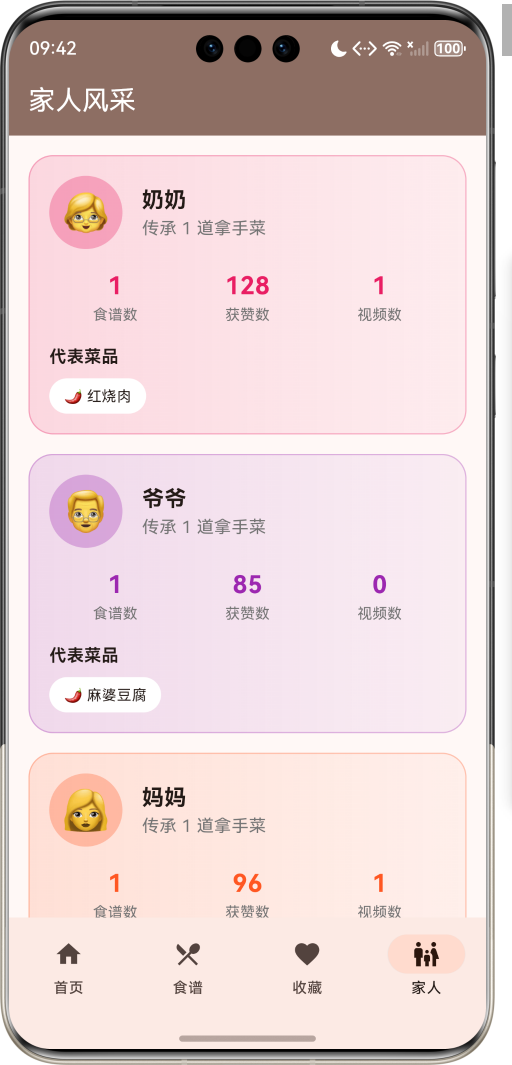
运行效果图家庭食谱传承系统是一款生活服务类应用,致力于记录和传承家庭传统菜谱。支持按家庭成员分类管理,包含奶奶、爷爷、妈妈、爸爸、阿姨、叔叔六位家人的拿手菜谱,配有详细的食材清单、烹饪步骤、视频教程,让家的味道代代相传。每道菜谱背后都有一段温馨的故事,承载着家人之间的爱与记忆。应用以温暖的棕色为主色调,象征家的温馨与传承。序号成员名称Emoji色值1奶奶👵#E91E632爷爷👴#9C27B03
家庭食谱传承系统应用
欢迎加入开源鸿蒙跨平台社区:
https://openharmonycrossplatform.csdn.net
一、项目概述
运行效果图
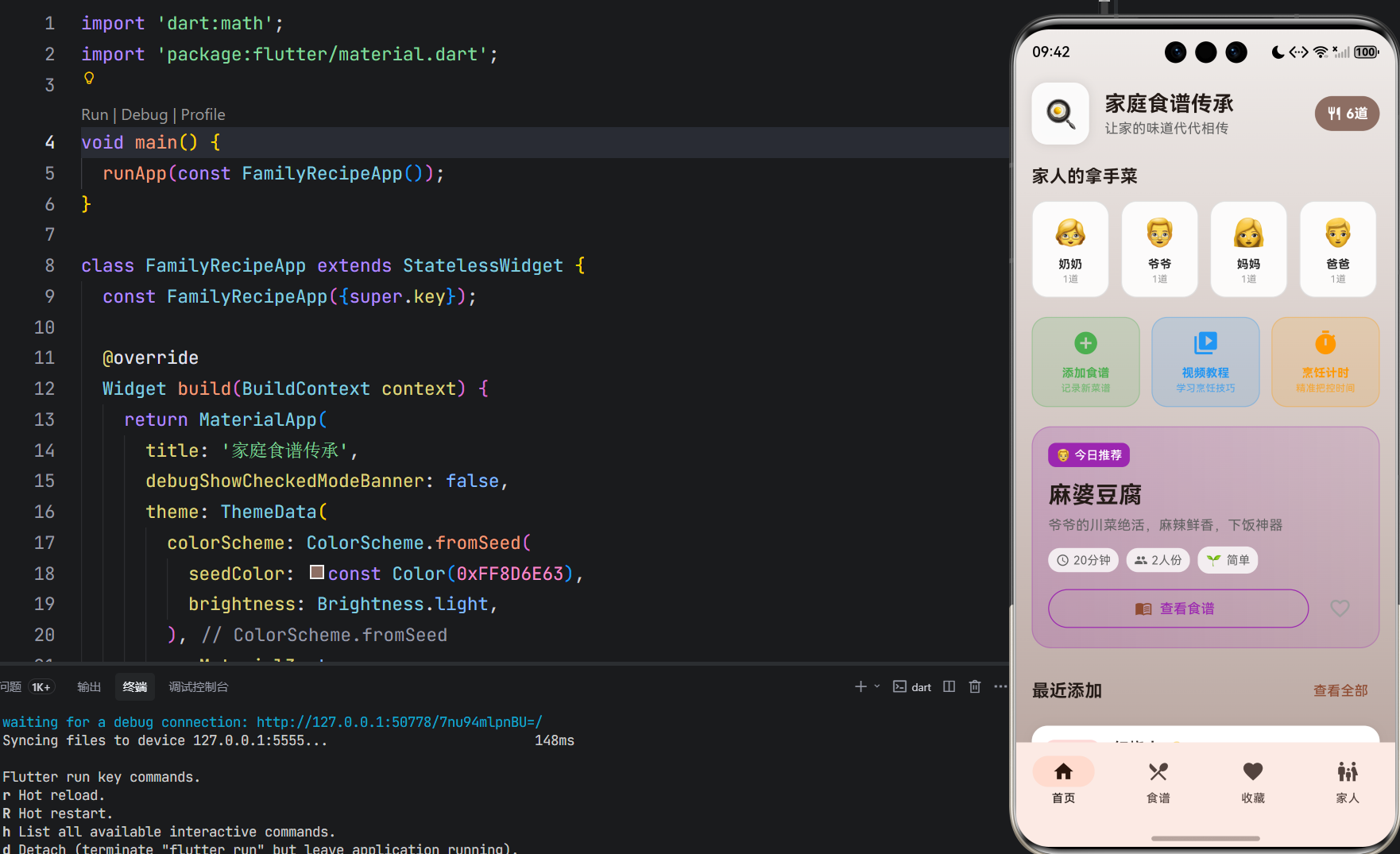
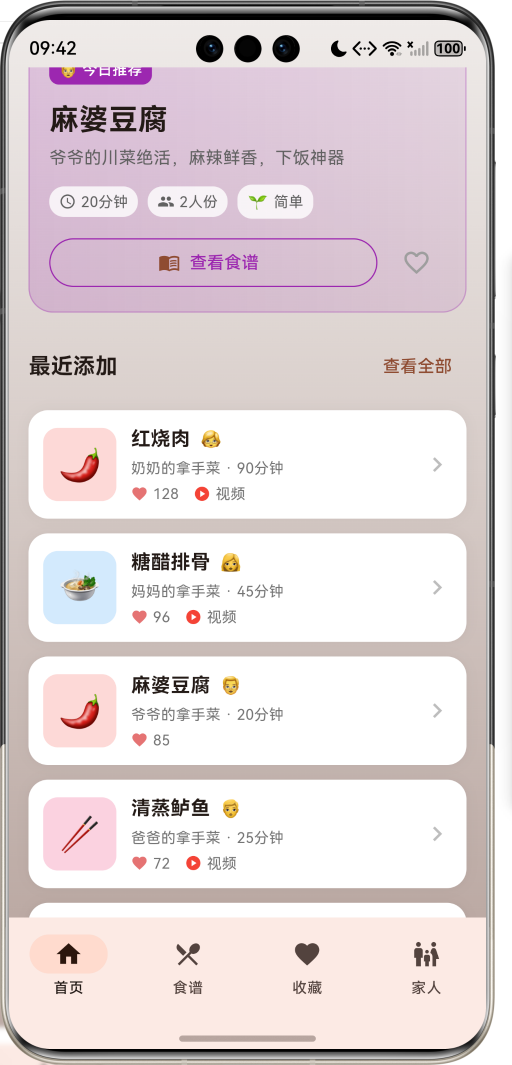
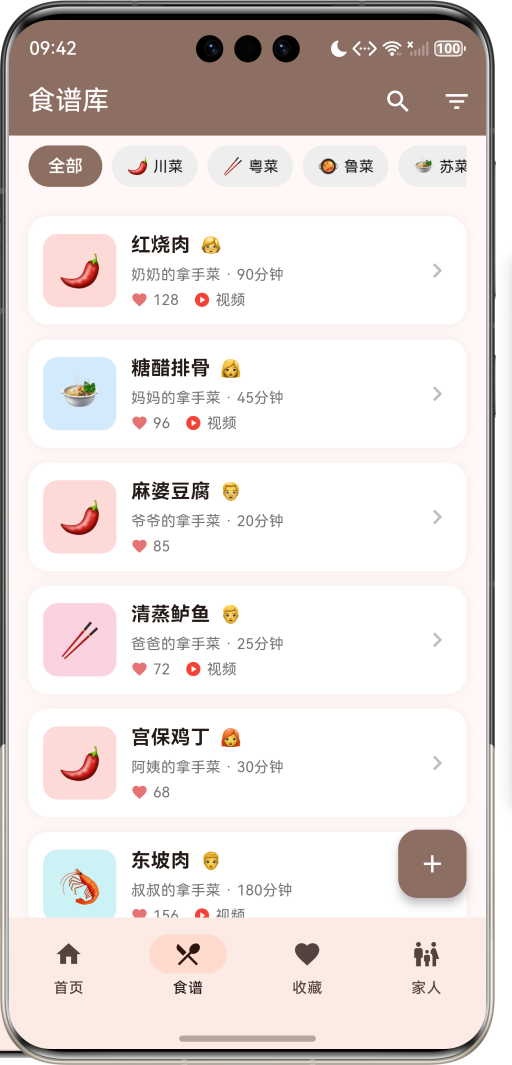
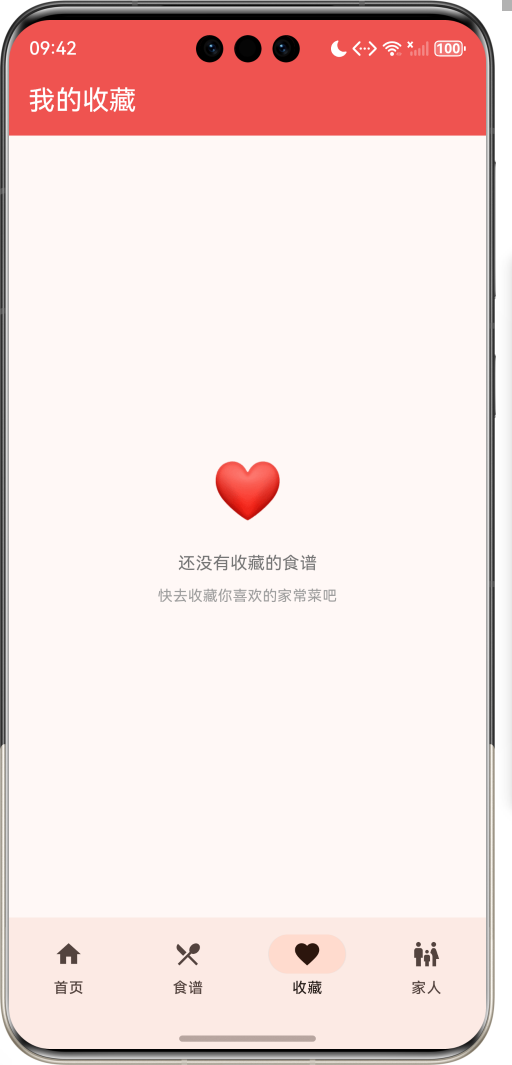
1.1 应用简介
家庭食谱传承系统是一款生活服务类应用,致力于记录和传承家庭传统菜谱。支持按家庭成员分类管理,包含奶奶、爷爷、妈妈、爸爸、阿姨、叔叔六位家人的拿手菜谱,配有详细的食材清单、烹饪步骤、视频教程,让家的味道代代相传。每道菜谱背后都有一段温馨的故事,承载着家人之间的爱与记忆。
应用以温暖的棕色为主色调,象征家的温馨与传承。涵盖首页导航、食谱库、收藏夹、家人风采四大模块。用户可以浏览家人菜谱、查看烹饪教程、收藏喜欢的菜品、添加新食谱,让每一道家常菜都成为珍贵的家族记忆。
1.2 核心功能
| 功能模块 | 功能描述 | 实现方式 |
|---|---|---|
| 家人分类 | 6位家庭成员分类 | 枚举定义 |
| 菜系筛选 | 8大菜系筛选 | 横向滚动 |
| 食谱详情 | 食材+步骤+故事 | 详情页面 |
| 视频教程 | 烹饪视频教程 | 标签展示 |
| 收藏功能 | 收藏喜欢的食谱 | 状态管理 |
| 烹饪计时 | 多步骤计时器 | 底部弹窗 |
1.3 家庭成员定义
| 序号 | 成员名称 | Emoji | 色值 |
|---|---|---|---|
| 1 | 奶奶 | 👵 | #E91E63 |
| 2 | 爷爷 | 👴 | #9C27B0 |
| 3 | 妈妈 | 👩 | #FF5722 |
| 4 | 爸爸 | 👨 | #2196F3 |
| 5 | 阿姨 | 👩🦰 | #4CAF50 |
| 6 | 叔叔 | 👨🦱 | #FF9800 |
1.4 菜系类型定义
| 序号 | 菜系名称 | Emoji | 色值 |
|---|---|---|---|
| 1 | 川菜 | 🌶️ | #F44336 |
| 2 | 粤菜 | 🥢 | #E91E63 |
| 3 | 鲁菜 | 🥘 | #FF9800 |
| 4 | 苏菜 | 🍲 | #2196F3 |
| 5 | 浙菜 | 🦐 | #00BCD4 |
| 6 | 湘菜 | 🔥 | #E91E63 |
| 7 | 闽菜 | 🐟 | #4CAF50 |
| 8 | 徽菜 | 🥬 | #8BC34A |
1.5 难度等级定义
| 序号 | 等级名称 | Emoji | 色值 |
|---|---|---|---|
| 1 | 简单 | 🌱 | #8BC34A |
| 2 | 中等 | 🌿 | #FFC107 |
| 3 | 复杂 | 🌳 | #FF5722 |
1.6 技术栈
| 技术领域 | 技术选型 | 版本要求 |
|---|---|---|
| 开发框架 | Flutter | >= 3.0.0 |
| 编程语言 | Dart | >= 2.17.0 |
| 设计规范 | Material Design 3 | - |
| 动画控制 | AnimationController | - |
| 状态管理 | setState | - |
| 目标平台 | 鸿蒙OS / Web | API 21+ |
1.7 项目结构
lib/
└── main_family_recipe.dart
    ├── FamilyRecipeApp              # 应用入口
    ├── FamilyMember                 # 家庭成员枚举
    ├── CuisineType                  # 菜系类型枚举
    ├── Difficulty                   # 难度等级枚举
    ├── Recipe                       # 食谱模型
    ├── CookingTimer                 # 烹饪计时器模型
    ├── FamilyRecipeHomePage         # 主页面(底部导航)
    ├── _buildHomePage               # 首页模块
    ├── _buildRecipesPage            # 食谱库模块
    ├── _buildFavoritesPage          # 收藏夹模块
    ├── _buildProfilePage            # 家人风采模块
    ├── RecipeDetailPage             # 食谱详情页面
    ├── AddRecipeSheet               # 添加食谱弹窗
    └── CookingTimerSheet            # 烹饪计时器弹窗
二、系统架构
2.1 整体架构图
2.2 类图设计
2.3 页面导航流程
2.4 食谱浏览流程
三、核心模块设计
3.1 数据模型设计
3.1.1 家庭成员枚举 (FamilyMember)
enum FamilyMember {
grandma('奶奶', '👵', Color(0xFFE91E63)),
grandpa('爷爷', '👴', Color(0xFF9C27B0)),
mom('妈妈', '👩', Color(0xFFFF5722)),
dad('爸爸', '👨', Color(0xFF2196F3)),
aunt('阿姨', '👩🦰', Color(0xFF4CAF50)),
uncle('叔叔', '👨🦱', Color(0xFFFF9800));
final String label;
final String emoji;
final Color color;
const FamilyMember(this.label, this.emoji, this.color);
}
3.1.2 菜系类型枚举 (CuisineType)
enum CuisineType {
  sichuan('川菜', '🌶️', Color(0xFFF44336)),
  cantonese('粤菜', '🥢', Color(0xFFE91E63)),
  shandong('鲁菜', '🥘', Color(0xFFFF9800)),
  jiangsu('苏菜', '🍲', Color(0xFF2196F3)),
  zhejiang('浙菜', '🦐', Color(0xFF00BCD4)),
  hunan('湘菜', '🔥', Color(0xFFE91E63)),
  fujian('闽菜', '🐟', Color(0xFF4CAF50)),
  anhui('徽菜', '🥬', Color(0xFF8BC34A));

  final String label;
  final String emoji;
  final Color color;

  const CuisineType(this.label, this.emoji, this.color);
}
3.1.3 食谱模型 (Recipe)
class Recipe {
  final String id;              // 食谱ID
  final String name;            // 菜名
  final String description;     // 描述
  final FamilyMember author;    // 作者(家人)
  final CuisineType cuisine;    // 菜系
  final Difficulty difficulty;  // 难度
  final int cookTime;           // 烹饪时间(分钟)
  final int servings;           // 份量
  final List<String> ingredients; // 食材清单
  final List<String> steps;     // 烹饪步骤
  final String story;           // 背后故事
  final String tips;            // 小贴士
  final bool hasVideo;          // 是否有视频
  final bool isFavorite;        // 是否收藏
  final int likes;              // 点赞数
  final DateTime createdAt;     // 创建时间
}
3.1.4 烹饪计时器模型 (CookingTimer)
class CookingTimer {
  final String id;        // 计时器ID
  final String stepName;  // 步骤名称
  final int duration;     // 设定时长(分钟)
  int remaining;          // 剩余时间(秒)
  bool isRunning;         // 是否运行中
}
3.1.5 食谱来源分布
3.2 页面结构设计
3.2.1 主页面布局
3.2.2 首页结构
3.2.3 食谱详情页结构
3.2.4 家人风采页结构
3.3 收藏功能逻辑
3.4 烹饪计时器逻辑
四、UI设计规范
4.1 配色方案
应用以温暖的棕色为主色调,象征家的温馨与传承:
| 颜色类型 | 色值 | 用途 |
|---|---|---|
| 主色 | #8D6E63 (Brown) | 导航、主题元素 |
| 辅助色 | #A1887F | 次要元素 |
| 强调色 | #BCAAA4 | 背景渐变 |
| 背景色 | #EFEBE9 → #BCAAA4 | 首页渐变背景 |
| 卡片背景 | #FFFFFF | 内容卡片 |
4.2 家人专属配色
| 家人 | 色值 | 视觉效果 |
|---|---|---|
| 奶奶 | #E91E63 | 温馨粉红 |
| 爷爷 | #9C27B0 | 睿智紫色 |
| 妈妈 | #FF5722 | 温暖橙色 |
| 爸爸 | #2196F3 | 稳重蓝色 |
| 阿姨 | #4CAF50 | 活力绿色 |
| 叔叔 | #FF9800 | 热情橙色 |
4.3 字体规范
| 元素 | 字号 | 字重 | 颜色 |
|---|---|---|---|
| 页面标题 | 22px | Bold | #000000 |
| 菜名 | 24px | Bold | 作者色 |
| 描述文字 | 14px | Regular | #757575 |
| 步骤文字 | 14px | Regular | #424242 |
| 统计数字 | 20px | Bold | 家人色 |
4.4 组件规范
4.4.1 家人选择卡片
┌─────────────────────────────────────┐
│  家人的拿手菜                        │
│                                     │
│  ┌────┐ ┌────┐ ┌────┐ ┌────┐      │
│  │ 👵 │ │ 👴 │ │ 👩 │ │ 👨 │      │
│  │奶奶│ │爷爷│ │妈妈│ │爸爸│      │
│  │ 2道│ │ 1道│ │ 2道│ │ 1道│      │
│  └────┘ └────┘ └────┘ └────┘      │
└─────────────────────────────────────┘
4.4.2 今日推荐卡片
┌─────────────────────────────────────┐
│  [👵 今日推荐]          [▶ 视频]    │
│                                     │
│  红烧肉                              │
│  奶奶的招牌红烧肉,肥而不腻          │
│                                     │
│  ⏱ 90分钟  👥 4人份  🌿 中等        │
│                                     │
│  ┌──────────────┐  ❤️               │
│  │ 📖 查看食谱  │                   │
│  └──────────────┘                   │
└─────────────────────────────────────┘
4.4.3 食谱卡片
┌─────────────────────────────────────┐
│  ┌────┐  红烧肉 👵                   │
│  │ 🌶️ │  奶奶的拿手菜 · 90分钟      │
│  │    │  ❤️ 128  ▶ 视频             │
│  └────┘                         >   │
└─────────────────────────────────────┘
4.4.4 食谱详情头部
┌─────────────────────────────────────┐
│  ┌─────────────────────────────┐   │
│  │                             │   │
│  │           🌶️                │   │
│  │                             │   │
│  └─────────────────────────────┘   │
│                                     │
│  👵 奶奶的拿手菜       [▶ 视频教程] │
│                                     │
│  ⏱ 90分钟  👥 4人份  🌿 中等  ❤️ 128│
└─────────────────────────────────────┘
4.4.5 烹饪步骤卡片
┌─────────────────────────────────────┐
│  烹饪步骤                            │
│                                     │
│  ┌─────────────────────────────┐   │
│  │ ① 五花肉切成3厘米见方的块    │   │
│  └─────────────────────────────┘   │
│  ┌─────────────────────────────┐   │
│  │ ② 冷水下锅焯水,撇去浮沫    │   │
│  └─────────────────────────────┘   │
│  ┌─────────────────────────────┐   │
│  │ ③ 锅中放油,小火炒化冰糖    │   │
│  └─────────────────────────────┘   │
└─────────────────────────────────────┘
4.4.6 烹饪计时器卡片
┌─────────────────────────────────────┐
│  ⏱ 烹饪计时器                       │
│                                     │
│  ┌──────────┐  ┌──────────┐        │
│  │ 步骤     ▼│  │ 时间     ▼│        │
│  └──────────┘  └──────────┘        │
│                                     │
│  ┌─────────────────────────────┐   │
│  │  ⏱ 05:00   焯水            │   │
│  │  设定 5 分钟   ▶ 🔄 🗑      │   │
│  └─────────────────────────────┘   │
└─────────────────────────────────────┘
五、核心功能实现
5.1 家人选择实现
Widget _buildFamilyMembers() {
  return Column(
    crossAxisAlignment: CrossAxisAlignment.start,
    children: [
      const Text('家人的拿手菜', style: TextStyle(fontSize: 18, fontWeight: FontWeight.bold)),
      const SizedBox(height: 12),
      SizedBox(
        height: 100,
        child: ListView.builder(
          scrollDirection: Axis.horizontal,
          itemCount: FamilyMember.values.length,
          itemBuilder: (context, index) {
            final member = FamilyMember.values[index];
            final count = _recipes.where((r) => r.author == member).length;
            return GestureDetector(
              onTap: () {
                setState(() {
                  _selectedMember = _selectedMember == member ? null : member;
                });
              },
              child: Container(
                width: 80,
                margin: const EdgeInsets.only(right: 12),
                decoration: BoxDecoration(
                  gradient: _selectedMember == member
                      ? LinearGradient(colors: [member.color, member.color.withValues(alpha: 0.7)])
                      : null,
                  color: _selectedMember == member ? null : Colors.white.withValues(alpha: 0.9),
                  borderRadius: BorderRadius.circular(16),
                ),
                child: Column(
                  mainAxisAlignment: MainAxisAlignment.center,
                  children: [
                    Text(member.emoji, style: const TextStyle(fontSize: 28)),
                    Text(member.label, style: TextStyle(fontSize: 12, fontWeight: FontWeight.bold)),
                    Text('$count道', style: TextStyle(fontSize: 10)),
                  ],
                ),
              ),
            );
          },
        ),
      ),
    ],
  );
}
5.2 今日推荐实现
Widget _buildTodayRecommend() {
  final random = Random();
  final recipe = _recipes.isNotEmpty ? _recipes[random.nextInt(_recipes.length)] : null;

  if (recipe == null) return const SizedBox();

  return Container(
    padding: const EdgeInsets.all(16),
    decoration: BoxDecoration(
      gradient: LinearGradient(
        colors: [
          recipe.author.color.withValues(alpha: 0.2),
          recipe.author.color.withValues(alpha: 0.1),
        ],
      ),
      borderRadius: BorderRadius.circular(20),
      border: Border.all(color: recipe.author.color.withValues(alpha: 0.3)),
    ),
    child: Column(
      crossAxisAlignment: CrossAxisAlignment.start,
      children: [
        Row(
          children: [
            Container(
              padding: const EdgeInsets.symmetric(horizontal: 8, vertical: 4),
              decoration: BoxDecoration(
                color: recipe.author.color,
                borderRadius: BorderRadius.circular(8),
              ),
              child: Row(
                mainAxisSize: MainAxisSize.min,
                children: [
                  Text(recipe.author.emoji, style: const TextStyle(fontSize: 12)),
                  const SizedBox(width: 4),
                  const Text('今日推荐', style: TextStyle(fontSize: 12, color: Colors.white)),
                ],
              ),
            ),
          ],
        ),
        const SizedBox(height: 12),
        Text(recipe.name, style: const TextStyle(fontSize: 24, fontWeight: FontWeight.bold)),
        Text(recipe.description, style: TextStyle(color: Colors.grey[700])),
      ],
    ),
  );
}
5.3 收藏功能实现
void _toggleFavorite(Recipe recipe) {
  setState(() {
    final index = _recipes.indexWhere((r) => r.id == recipe.id);
    if (index != -1) {
      _recipes[index] = recipe.copyWith(
        isFavorite: !recipe.isFavorite,
        likes: recipe.isFavorite ? recipe.likes - 1 : recipe.likes + 1,
      );

      if (_recipes[index].isFavorite) {
        _favoriteRecipes.add(_recipes[index]);
        ScaffoldMessenger.of(context).showSnackBar(
          SnackBar(
            content: Text('已收藏 ${recipe.name}'),
            backgroundColor: Colors.red[400],
          ),
        );
      } else {
        _favoriteRecipes.removeWhere((r) => r.id == recipe.id);
      }
    }
  });

  _heartController.forward().then((_) {
    _heartController.reverse();
  });
}
5.4 食谱详情实现
Widget _buildStepsSection() {
  return Column(
    crossAxisAlignment: CrossAxisAlignment.start,
    children: [
      const Text('烹饪步骤', style: TextStyle(fontSize: 18, fontWeight: FontWeight.bold)),
      const SizedBox(height: 12),
      ...widget.recipe.steps.asMap().entries.map((entry) {
        final index = entry.key;
        final step = entry.value;
        final isCurrent = index == _currentStep;

        return GestureDetector(
          onTap: () {
            setState(() {
              _currentStep = index;
            });
          },
          child: Container(
            margin: const EdgeInsets.only(bottom: 12),
            padding: const EdgeInsets.all(16),
            decoration: BoxDecoration(
              color: isCurrent
                  ? widget.recipe.author.color.withValues(alpha: 0.1)
                  : Colors.grey[100],
              borderRadius: BorderRadius.circular(16),
              border: Border.all(
                color: isCurrent ? widget.recipe.author.color : Colors.transparent,
                width: 2,
              ),
            ),
            child: Row(
              crossAxisAlignment: CrossAxisAlignment.start,
              children: [
                Container(
                  width: 32,
                  height: 32,
                  decoration: BoxDecoration(
                    color: isCurrent ? widget.recipe.author.color : Colors.grey[300],
                    shape: BoxShape.circle,
                  ),
                  child: Center(
                    child: Text(
                      '${index + 1}',
                      style: TextStyle(
                        color: isCurrent ? Colors.white : Colors.grey[600],
                        fontWeight: FontWeight.bold,
                      ),
                    ),
                  ),
                ),
                const SizedBox(width: 12),
                Expanded(child: Text(step, style: const TextStyle(fontSize: 14, height: 1.5))),
              ],
            ),
          ),
        );
      }),
    ],
  );
}
5.5 烹饪计时器实现
Widget _buildTimerCard(CookingTimer timer, int index) {
  final minutes = timer.remaining ~/ 60;
  final seconds = timer.remaining % 60;

  return Container(
    margin: const EdgeInsets.only(bottom: 12),
    padding: const EdgeInsets.all(16),
    decoration: BoxDecoration(
      color: timer.isRunning ? Colors.orange[50] : Colors.grey[100],
      borderRadius: BorderRadius.circular(16),
      border: Border.all(
        color: timer.isRunning ? Colors.orange[300]! : Colors.grey[300]!,
      ),
    ),
    child: Row(
      children: [
        Container(
          width: 50,
          height: 50,
          decoration: BoxDecoration(
            color: timer.isRunning ? Colors.orange[400] : Colors.grey[400],
            shape: BoxShape.circle,
          ),
          child: Center(
            child: Text(
              '${minutes.toString().padLeft(2, '0')}:${seconds.toString().padLeft(2, '0')}',
              style: const TextStyle(color: Colors.white, fontWeight: FontWeight.bold, fontSize: 12),
            ),
          ),
        ),
        const SizedBox(width: 16),
        Expanded(
          child: Column(
            crossAxisAlignment: CrossAxisAlignment.start,
            children: [
              Text(timer.stepName, style: const TextStyle(fontWeight: FontWeight.bold)),
              Text('设定 ${timer.duration} 分钟', style: TextStyle(fontSize: 12, color: Colors.grey[600])),
            ],
          ),
        ),
        IconButton(
          icon: Icon(timer.isRunning ? Icons.pause : Icons.play_arrow, color: Colors.orange),
          onPressed: () {
            setState(() {
              _timers[index] = CookingTimer(
                id: timer.id,
                stepName: timer.stepName,
                duration: timer.duration,
                remaining: timer.remaining,
                isRunning: !timer.isRunning,
              );
            });
          },
        ),
      ],
    ),
  );
}
六、交互设计
6.1 食谱浏览流程
6.2 收藏管理流程
6.3 烹饪计时流程
七、扩展功能规划
7.1 后续版本规划
7.2 功能扩展建议
7.2.1 真实视频播放
视频功能:
- 支持本地视频上传
- 在线视频流播放
- 倍速播放控制
- 进度记忆功能
7.2.2 食谱导入导出
导入导出功能:
- 导出PDF食谱书
- 导入其他食谱格式
- 批量导入功能
- 分享食谱链接
7.2.3 AI菜谱推荐
AI功能:
- 根据口味推荐
- 季节性推荐
- 营养搭配建议
- 食材替代建议
八、注意事项
8.1 开发注意事项
-
数据持久化:食谱数据需本地存储,支持云端同步
-
性能优化:大量食谱需分页加载,图片需缓存
-
视频处理:视频文件较大,需压缩和流式播放
-
动画控制:AnimationController需正确释放
-
状态管理:收藏状态需及时同步更新
8.2 常见问题
| 问题 | 原因 | 解决方案 |
|---|---|---|
| 收藏状态不同步 | 状态未更新 | 检查setState |
| 计时器不准 | 后台暂停 | 使用后台服务 |
| 视频加载慢 | 文件过大 | 压缩视频 |
| 食谱列表卡顿 | 数据量大 | 分页加载 |
| 筛选无效 | 条件未生效 | 检查筛选逻辑 |
8.3 使用技巧
🍳 家常菜烹饪技巧 🍳
食材准备
- 提前备齐所有食材,避免烹饪时手忙脚乱
- 肉类提前腌制,更加入味
- 蔬菜洗净切好,保持新鲜
烹饪要点
- 掌握火候是关键,大火爆炒小火慢炖
- 调味要循序渐进,边尝边调整
- 善用计时器,精准把控时间
食谱传承
- 记录每道菜背后的故事
- 保留原始做法,记录改良版本
- 定期更新,添加新菜品
九、运行说明
9.1 环境要求
| 环境 | 版本要求 |
|---|---|
| Flutter SDK | >= 3.0.0 |
| Dart SDK | >= 2.17.0 |
| 鸿蒙OS | API 21+ |
| Web浏览器 | Chrome 90+ |
9.2 运行命令
# 查看可用设备
flutter devices

# 运行到Web服务器
flutter run -d web-server -t lib/main_family_recipe.dart --web-port 8141

# 运行到鸿蒙设备
flutter run -d 127.0.0.1:5555 lib/main_family_recipe.dart

# 代码分析
flutter analyze lib/main_family_recipe.dart
十、总结
家庭食谱传承系统通过首页导航、食谱库、收藏夹、家人风采四大模块,为用户提供了一个温馨的家庭菜谱管理平台。应用支持6位家庭成员分类、8大菜系筛选、3种难度等级,让家的味道代代相传。
核心功能涵盖家人分类、菜系筛选、食谱详情、视频教程、收藏管理、烹饪计时六大模块。家人分类包括奶奶、爷爷、妈妈、爸爸、阿姨、叔叔六位成员;菜系筛选覆盖川菜、粤菜、鲁菜、苏菜、浙菜、湘菜、闽菜、徽菜八大菜系;食谱详情展示食材清单、烹饪步骤、背后故事、小贴士;视频教程提供直观的烹饪指导;收藏管理方便用户保存喜欢的菜品;烹饪计时器帮助精准把控每个步骤。
应用采用 Material Design 3 设计规范,以温暖的棕色为主色调,象征家的温馨与传承。通过本应用,希望能够帮助用户记录和传承家庭传统菜谱,让每一道家常菜都成为珍贵的家族记忆,让家的味道代代相传。
家庭食谱传承系统——让家的味道代代相传

作为“人工智能6S店”的官方数字引擎,为AI开发者与企业提供一个覆盖软硬件全栈、一站式门户。
更多推荐
 1
1 0
0- 0


 已为社区贡献11条内容

所有评论(0)