
雾色配色器:鸿蒙Flutter框架 实现的配色方案生成工具
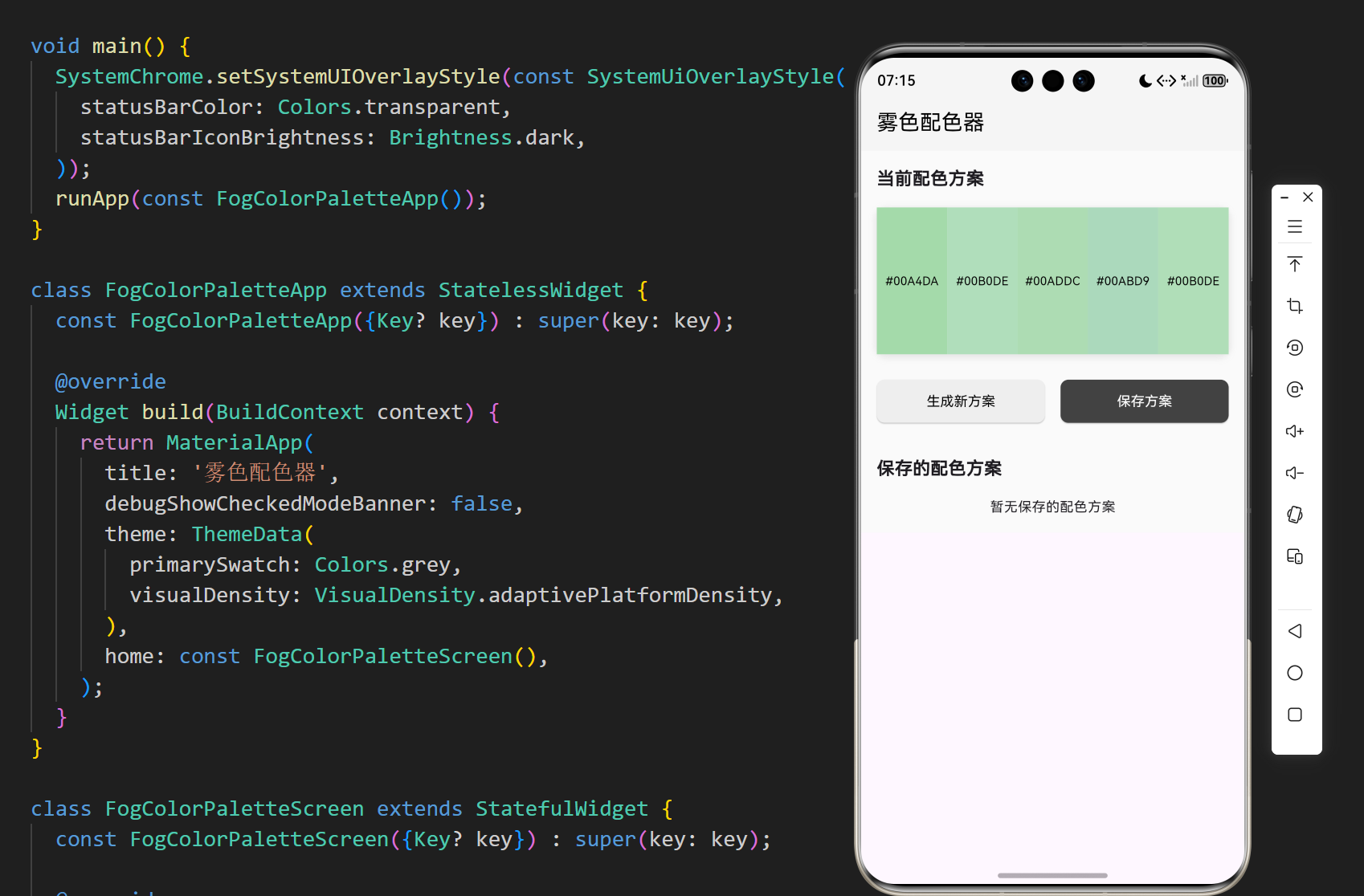
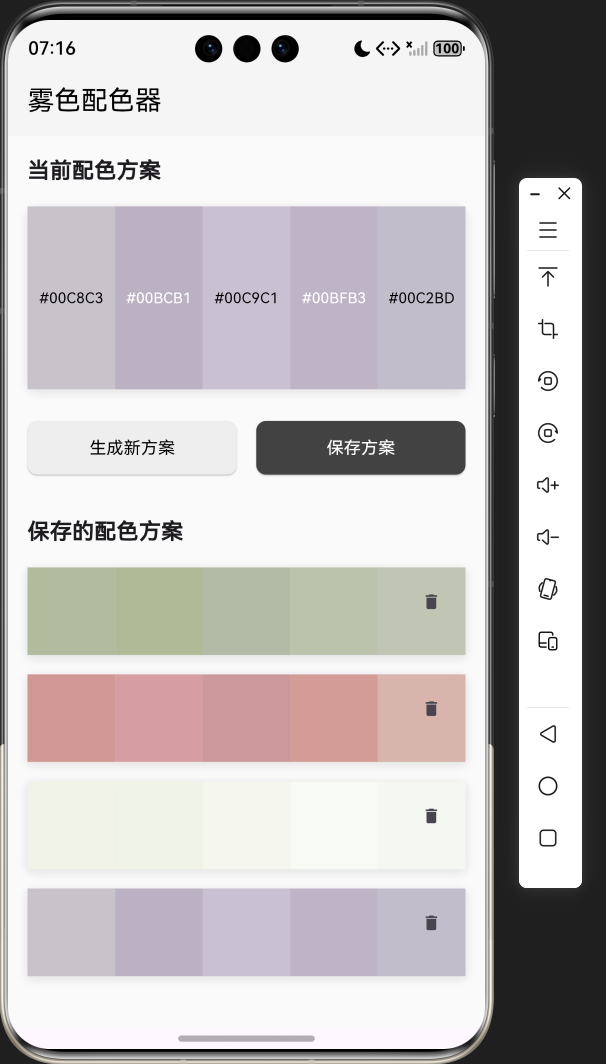
开源鸿蒙跨平台社区推出Flutter雾色配色器 该项目是一个基于Flutter开发的雾色风格配色方案生成工具,主要面向设计师和开发者。核心功能包括: 智能生成 - 采用HSL颜色模型随机生成5种低饱和度柔和配色 方案管理 - 支持保存/删除配色方案,使用shared_preferences持久化存储 便捷操作 - 点击即可复制HEX色值,自动适配文字颜色对比度 响应式UI - 卡片式布局配合加载动
·
欢迎加入开源鸿蒙跨平台社区:
https://openharmonycrossplatform.csdn.net
1. 项目介绍
在设计和开发过程中,选择合适的配色方案是一个重要的环节。一个好的配色方案可以提升产品的视觉效果,增强用户体验。雾色配色器是一个基于 Flutter 开发的配色方案生成工具,它能够生成柔和、优雅的雾色风格配色方案,帮助设计师和开发者快速找到合适的颜色组合。本文将详细介绍如何使用 Flutter 实现这个实用的配色方案生成工具。
1.1 项目目标
- 实现一个生成雾色风格配色方案的应用
- 支持保存和管理配色方案
- 提供颜色代码复制功能
- 采用简洁美观的界面设计
- 确保在不同平台上的一致性表现
1.2 技术栈
- Flutter:跨平台 UI 框架
- Dart:编程语言
- StatefulWidget:用于管理应用状态
- HSLColor:用于生成雾色风格的颜色
- shared_preferences:用于保存配色方案
- Clipboard:用于复制颜色代码
2. 核心功能设计
2.1 配色方案生成
- 雾色风格:生成柔和、低饱和度的雾色风格配色方案
- 随机生成:每次点击生成按钮,随机生成新的配色方案
- 颜色数量:每个配色方案包含5种颜色
- 颜色模型:使用 HSL 颜色模型生成颜色
2.2 配色方案管理
- 保存功能:保存喜欢的配色方案
- 删除功能:删除不需要的配色方案
- 持久化存储:使用 shared_preferences 保存配色方案
2.3 颜色操作
- 颜色代码复制:点击颜色块复制颜色的十六进制代码
- 颜色预览:显示颜色的十六进制代码
- 颜色对比度:根据颜色亮度自动调整文字颜色
2.4 界面设计
- 简洁风格:采用灰色主题,符合雾色风格
- 卡片式布局:配色方案以卡片形式展示
- 响应式设计:适应不同屏幕尺寸
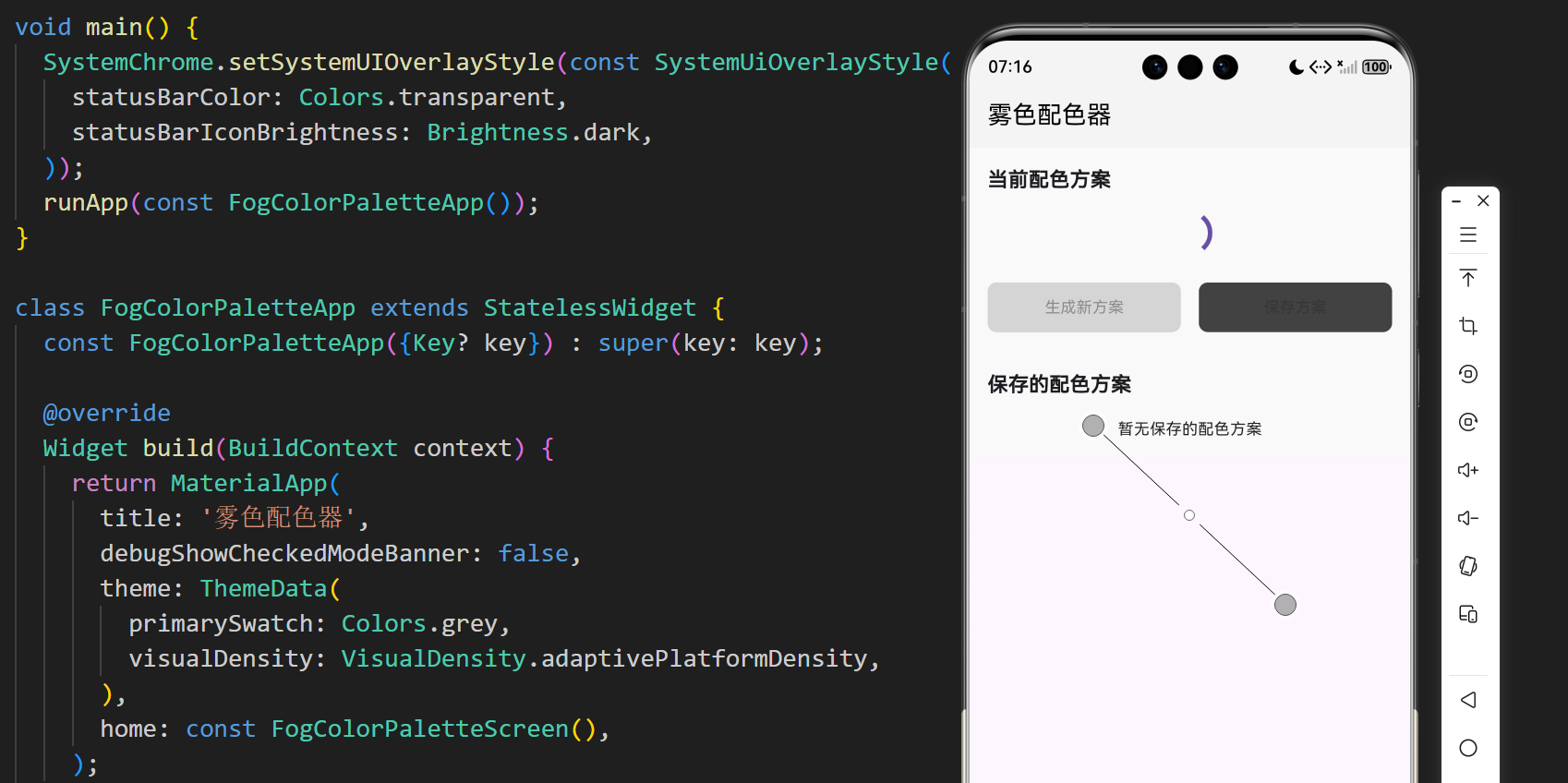
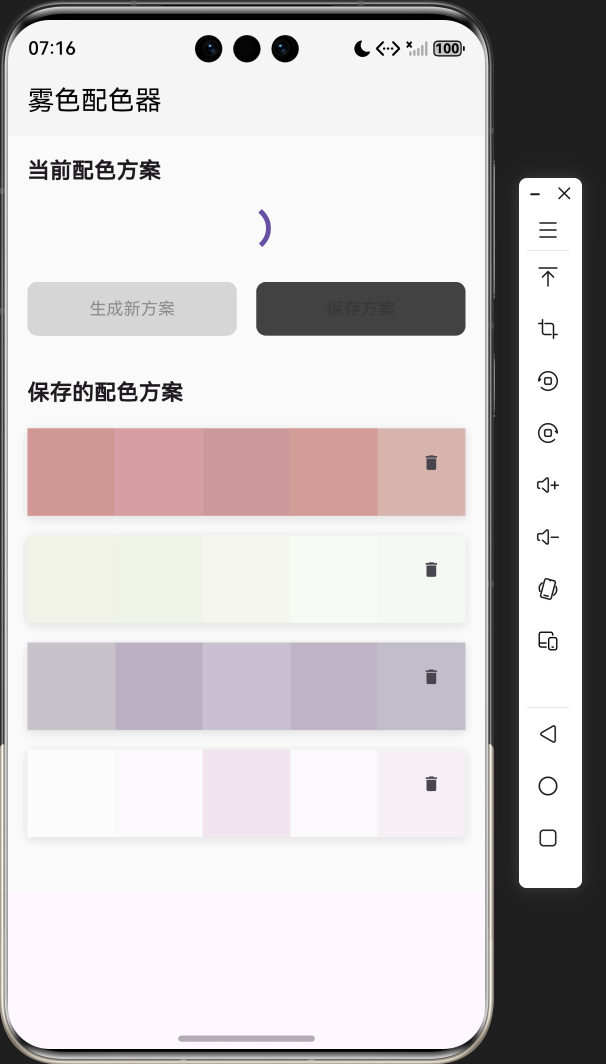
- 流畅动画:生成配色方案时的加载动画
3. 技术架构
3.1 项目结构
lib/
└── main.dart          # 主应用文件,包含所有代码
3.2 组件结构
FogColorPaletteApp
└── FogColorPaletteScreen
    ├── State management (currentPalette, savedPalettes, isGenerating)
    ├── Palette operations (_generateNewPalette, _savePalette, _removeSavedPalette)
    ├── Storage operations (_loadSavedPalettes, _savePalettesToStorage)
    ├── Color operations (_copyColor, _colorToHex, _isLightColor)
    └── UI components
        ├── Current palette display
        ├── Action buttons
        └── Saved palettes list
3.3 数据模型
- 当前配色方案:
List<Color>类型,存储当前生成的配色方案 - 保存的配色方案:
List<List<Color>>类型,存储所有保存的配色方案 - 生成状态:
bool类型,标记是否正在生成配色方案
4. 关键代码解析
4.1 配色方案生成
List<Color> _generateFogPalette() {
  final random = Random();
  final baseHue = random.nextInt(360);
  final baseSaturation = random.nextInt(30) + 10; // 10-40%
  final baseLightness = random.nextInt(30) + 70; // 70-100%

  final colors = <Color>[];
  for (int i = 0; i < 5; i++) {
    final hue = (baseHue + random.nextInt(20) - 10) % 360;
    final saturation = baseSaturation + random.nextInt(10) - 5;
    final lightness = baseLightness + random.nextInt(10) - 5;

    colors.add(HSLColor.fromAHSL(1.0, hue.toDouble(), saturation / 100.0, lightness / 100.0).toColor());
  }

  return colors;
}
代码解析:
_generateFogPalette方法:生成雾色风格配色方案的核心方法- 随机生成基础色相、饱和度和亮度
- 基于基础值生成5个颜色,每个颜色有轻微的变化
- 使用
HSLColor类创建颜色,确保雾色风格
4.2 配色方案保存和加载
void _savePalette() async {
  if (_currentPalette.isNotEmpty) {
    setState(() {
      _savedPalettes.add(List.from(_currentPalette));
    });
    await _savePalettesToStorage();
    ScaffoldMessenger.of(context).showSnackBar(
      const SnackBar(content: Text('配色方案已保存')),
    );
  }
}

void _loadSavedPalettes() async {
  final prefs = await SharedPreferences.getInstance();
  final paletteData = prefs.getStringList('saved_palettes');
  if (paletteData != null) {
    final palettes = <List<Color>>[];
    for (int i = 0; i < paletteData.length; i += 5) {
      if (i + 4 < paletteData.length) {
        final palette = [
          Color(int.parse(paletteData[i])),
          Color(int.parse(paletteData[i + 1])),
          Color(int.parse(paletteData[i + 2])),
          Color(int.parse(paletteData[i + 3])),
          Color(int.parse(paletteData[i + 4])),
        ];
        palettes.add(palette);
      }
    }
    setState(() {
      _savedPalettes = palettes;
    });
  }
}

Future<void> _savePalettesToStorage() async {
  final prefs = await SharedPreferences.getInstance();
  final paletteData = <String>[];
  for (final palette in _savedPalettes) {
    for (final color in palette) {
      paletteData.add(color.value.toString());
    }
  }
  await prefs.setStringList('saved_palettes', paletteData);
}
代码解析:
_savePalette方法:保存当前配色方案_loadSavedPalettes方法:从存储中加载保存的配色方案_savePalettesToStorage方法:将配色方案保存到存储中- 使用
SharedPreferences进行持久化存储 - 使用
SnackBar提供操作反馈
4.3 颜色操作
void _copyColor(Color color) async {
  final hexColor = _colorToHex(color);
  await Clipboard.setData(ClipboardData(text: hexColor));
  ScaffoldMessenger.of(context).showSnackBar(
    SnackBar(content: Text('已复制: $hexColor')),
  );
}

String _colorToHex(Color color) {
  return '#${color.value.toRadixString(16).substring(2).padLeft(8, '0').toUpperCase()}';
}

bool _isLightColor(Color color) {
  return color.computeLuminance() > 0.5;
}
代码解析:
_copyColor方法:复制颜色的十六进制代码到剪贴板_colorToHex方法:将颜色转换为十六进制代码_isLightColor方法:判断颜色是否为亮色,用于调整文字颜色- 使用
ClipboardAPI 复制颜色代码
4.4 界面构建
Widget build(BuildContext context) {
return Scaffold(
appBar: AppBar(
title: const Text('雾色配色器'),
backgroundColor: Colors.grey.shade100,
foregroundColor: Colors.black,
),
body: Container(
color: Colors.grey.shade50,
child: SingleChildScrollView(
padding: const EdgeInsets.all(16),
child: Column(
crossAxisAlignment: CrossAxisAlignment.start,
children: [
// 当前配色方案
const Text(
'当前配色方案',
style: TextStyle(
fontSize: 18,
fontWeight: FontWeight.bold,
),
),
const SizedBox(height: 16),
// 配色方案预览
_isGenerating
? const Center(child: CircularProgressIndicator())
: Container(
height: 150,
decoration: BoxDecoration(
borderRadius: BorderRadius.circular(12),
boxShadow: [
BoxShadow(
color: Colors.grey.withOpacity(0.2),
spreadRadius: 2,
blurRadius: 4,
offset: const Offset(0, 2),
),
],
),
child: Row(
children: _currentPalette.asMap().entries.map((entry) {
final index = entry.key;
final color = entry.value;
return Expanded(
child: GestureDetector(
onTap: () => _copyColor(color),
child: Container(
color: color,
child: Center(
child: Text(
_colorToHex(color).substring(0, 7),
style: TextStyle(
color: _isLightColor(color) ? Colors.black : Colors.white,
fontSize: 12,
),
),
),
),
),
);
}).toList(),
),
),
const SizedBox(height: 24),
// 操作按钮
Row(
children: [
Expanded(
child: ElevatedButton(
onPressed: _isGenerating ? null : _generateNewPalette,
style: ElevatedButton.styleFrom(
backgroundColor: Colors.grey.shade200,
foregroundColor: Colors.black,
padding: const EdgeInsets.symmetric(vertical: 12),
shape: RoundedRectangleBorder(
borderRadius: BorderRadius.circular(8),
),
),
child: const Text('生成新方案'),
),
),
const SizedBox(width: 16),
Expanded(
child: ElevatedButton(
onPressed: _isGenerating ? null : _savePalette,
style: ElevatedButton.styleFrom(
backgroundColor: Colors.grey.shade800,
foregroundColor: Colors.white,
padding: const EdgeInsets.symmetric(vertical: 12),
shape: RoundedRectangleBorder(
borderRadius: BorderRadius.circular(8),
),
),
child: const Text('保存方案'),
),
),
],
),
const SizedBox(height: 32),
// 保存的配色方案
const Text(
'保存的配色方案',
style: TextStyle(
fontSize: 18,
fontWeight: FontWeight.bold,
),
),
const SizedBox(height: 16),
_savedPalettes.isEmpty
? const Center(
child: Text('暂无保存的配色方案'),
)
: GridView.builder(
shrinkWrap: true,
physics: const NeverScrollableScrollPhysics(),
gridDelegate: const SliverGridDelegateWithFixedCrossAxisCount(
crossAxisCount: 1,
crossAxisSpacing: 16,
mainAxisSpacing: 16,
childAspectRatio: 5,
),
itemCount: _savedPalettes.length,
itemBuilder: (context, index) {
final palette = _savedPalettes[index];
return Container(
decoration: BoxDecoration(
borderRadius: BorderRadius.circular(8),
boxShadow: [
BoxShadow(
color: Colors.grey.withOpacity(0.2),
spreadRadius: 2,
blurRadius: 4,
offset: const Offset(0, 2),
),
],
),
child: Stack(
children: [
Row(
children: palette.asMap().entries.map((entry) {
final color = entry.value;
return Expanded(
child: GestureDetector(
onTap: () => _copyColor(color),
child: Container(
color: color,
),
),
);
}).toList(),
),
Positioned(
top: 4,
right: 4,
child: IconButton(
icon: const Icon(Icons.delete, size: 16),
onPressed: () => _removeSavedPalette(index),
),
),
],
),
);
},
),
],
),
),
),
);
}
代码解析:
build方法:构建应用界面- 顶部标题栏:显示应用名称
- 当前配色方案:显示当前生成的配色方案,带有加载动画
- 操作按钮:提供生成新方案和保存方案的功能
- 保存的配色方案:显示所有保存的配色方案,支持删除操作
- 响应式设计:使用
SingleChildScrollView确保在小屏幕上也能正常显示
5. 技术亮点与创新
5.1 雾色风格生成
- HSL 颜色模型:使用 HSL 颜色模型生成雾色风格的颜色
- 参数控制:通过控制色相、饱和度和亮度的范围,确保生成的颜色具有雾色风格
- 颜色协调:基于基础色相生成一组协调的颜色,确保配色方案的和谐性
5.2 持久化存储
- SharedPreferences:使用 SharedPreferences 实现配色方案的持久化存储
- 数据格式:将颜色值转换为字符串存储,确保数据的正确保存和加载
- 自动加载:应用启动时自动加载保存的配色方案
5.3 用户交互
- 颜色复制:点击颜色块即可复制颜色的十六进制代码
- 操作反馈:使用 SnackBar 提供操作反馈,增强用户体验
- 加载动画:生成配色方案时显示加载动画,提供视觉反馈
5.4 视觉设计
- 雾色主题:采用灰色主题,符合雾色风格
- 卡片式布局:配色方案以卡片形式展示,层次分明
- 响应式设计:适应不同屏幕尺寸
- 文字对比度:根据颜色亮度自动调整文字颜色,确保可读性
6. 应用场景与扩展
6.1 应用场景
- 设计工作:设计师可以使用雾色配色器生成配色方案,用于UI设计、网页设计等
- 开发工作:开发者可以使用雾色配色器为应用选择颜色方案
- 学习参考:学生和初学者可以通过雾色配色器学习颜色搭配的原理
- 个人使用:个人用户可以使用雾色配色器为自己的项目或作品选择颜色
6.2 扩展方向
- 颜色调整:添加颜色调整功能,允许用户手动调整生成的颜色
- 颜色分类:添加颜色分类功能,如暖色调、冷色调、中性色调等
- 颜色导出:支持将配色方案导出为不同格式,如JSON、CSS等
- 颜色分享:支持将配色方案分享到社交平台
- 颜色历史:添加颜色历史记录功能,方便用户查看之前生成的配色方案
- 颜色搜索:添加颜色搜索功能,根据关键词搜索配色方案
- 多语言支持:添加多语言支持,扩大应用的适用范围
- 主题切换:支持不同主题风格,如深色模式
7. 代码优化建议
7.1 性能优化
- 使用 const 构造函数:对于不变的 Widget,使用 const 构造函数,减少不必要的重建
- 优化状态管理:对于更复杂的应用,可以使用
Provider、Riverpod等状态管理库 - 使用 RepaintBoundary:对于频繁更新的部分,使用
RepaintBoundary包裹,减少不必要的重绘
7.2 代码结构优化
- 组件化:将 UI 组件拆分为更小的、可复用的组件
- 逻辑分离:将业务逻辑与 UI 逻辑分离,提高代码的可维护性
- 参数化:将颜色、字体大小等参数提取为可配置的常量
- 错误处理:添加适当的错误处理,提高应用的稳定性
7.3 用户体验优化
- 添加动画效果:添加配色方案切换的动画效果,提升用户体验
- 触觉反馈:在支持的设备上,添加触觉反馈
- ** accessibility**:添加无障碍支持,提高应用的可访问性
- 网络错误处理:如果添加网络功能,添加网络错误处理
7.4 功能优化
- 颜色调整:添加颜色调整功能,允许用户手动调整生成的颜色
- 颜色分类:添加颜色分类功能,如暖色调、冷色调、中性色调等
- 颜色导出:支持将配色方案导出为不同格式,如JSON、CSS等
- 颜色分享:支持将配色方案分享到社交平台
8. 测试与调试
8.1 测试策略
- 功能测试:测试配色方案生成、保存、删除等核心功能
- 性能测试:测试应用在不同设备上的性能表现
- 兼容性测试:测试在不同平台、不同屏幕尺寸上的表现
- 用户体验测试:测试应用的易用性和用户体验
8.2 调试技巧
- 使用 Flutter DevTools:利用 Flutter DevTools 分析性能瓶颈和调试问题
- 添加日志:在关键位置添加日志,便于调试
- 使用模拟器:在不同尺寸的模拟器上测试,确保适配性
- 用户测试:邀请用户测试,收集反馈,不断改进
9. 总结与展望
9.1 项目总结
本项目成功实现了一个美观实用的雾色配色器应用,主要功能包括:
- 生成雾色风格的配色方案
- 保存和管理配色方案
- 复制颜色的十六进制代码
- 简洁美观的界面设计
- 流畅的动画效果
9.2 技术价值
- 学习价值:展示了如何使用 Flutter 实现一个完整的配色方案生成工具
- 实用价值:提供了一个可直接使用的配色方案生成工具
- 参考价值:为类似功能的开发提供了参考方案
9.3 未来展望
- 颜色调整:添加颜色调整功能,允许用户手动调整生成的颜色
- 颜色分类:添加颜色分类功能,如暖色调、冷色调、中性色调等
- 颜色导出:支持将配色方案导出为不同格式,如JSON、CSS等
- 颜色分享:支持将配色方案分享到社交平台
- 颜色历史:添加颜色历史记录功能,方便用户查看之前生成的配色方案
- 颜色搜索:添加颜色搜索功能,根据关键词搜索配色方案
- 多语言支持:添加多语言支持,扩大应用的适用范围
- 主题切换:支持不同主题风格,如深色模式
10. 附录
10.1 完整代码
import 'package:flutter/material.dart';
import 'dart:math';
import 'package:flutter/services.dart';
import 'package:shared_preferences/shared_preferences.dart';
void main() {
SystemChrome.setSystemUIOverlayStyle(const SystemUiOverlayStyle(
statusBarColor: Colors.transparent,
statusBarIconBrightness: Brightness.dark,
));
runApp(const FogColorPaletteApp());
}
class FogColorPaletteApp extends StatelessWidget {
const FogColorPaletteApp({Key? key}) : super(key: key);
Widget build(BuildContext context) {
return MaterialApp(
title: '雾色配色器',
debugShowCheckedModeBanner: false,
theme: ThemeData(
primarySwatch: Colors.grey,
visualDensity: VisualDensity.adaptivePlatformDensity,
),
home: const FogColorPaletteScreen(),
);
}
}
class FogColorPaletteScreen extends StatefulWidget {
const FogColorPaletteScreen({Key? key}) : super(key: key);
State<FogColorPaletteScreen> createState() => _FogColorPaletteScreenState();
}
class _FogColorPaletteScreenState extends State<FogColorPaletteScreen> {
List<Color> _currentPalette = [];
List<List<Color>> _savedPalettes = [];
bool _isGenerating = false;
void initState() {
super.initState();
_generateNewPalette();
_loadSavedPalettes();
}
void _generateNewPalette() {
setState(() {
_isGenerating = true;
});
// 模拟生成过程
Future.delayed(const Duration(milliseconds: 500), () {
setState(() {
_currentPalette = _generateFogPalette();
_isGenerating = false;
});
});
}
List<Color> _generateFogPalette() {
final random = Random();
final baseHue = random.nextInt(360);
final baseSaturation = random.nextInt(30) + 10; // 10-40%
final baseLightness = random.nextInt(30) + 70; // 70-100%
final colors = <Color>[];
for (int i = 0; i < 5; i++) {
final hue = (baseHue + random.nextInt(20) - 10) % 360;
final saturation = baseSaturation + random.nextInt(10) - 5;
final lightness = baseLightness + random.nextInt(10) - 5;
colors.add(HSLColor.fromAHSL(1.0, hue.toDouble(), saturation / 100.0, lightness / 100.0).toColor());
}
return colors;
}
void _savePalette() async {
if (_currentPalette.isNotEmpty) {
setState(() {
_savedPalettes.add(List.from(_currentPalette));
});
await _savePalettesToStorage();
ScaffoldMessenger.of(context).showSnackBar(
const SnackBar(content: Text('配色方案已保存')),
);
}
}
void _loadSavedPalettes() async {
final prefs = await SharedPreferences.getInstance();
final paletteData = prefs.getStringList('saved_palettes');
if (paletteData != null) {
final palettes = <List<Color>>[];
for (int i = 0; i < paletteData.length; i += 5) {
if (i + 4 < paletteData.length) {
final palette = [
Color(int.parse(paletteData[i])),
Color(int.parse(paletteData[i + 1])),
Color(int.parse(paletteData[i + 2])),
Color(int.parse(paletteData[i + 3])),
Color(int.parse(paletteData[i + 4])),
];
palettes.add(palette);
}
}
setState(() {
_savedPalettes = palettes;
});
}
}
Future<void> _savePalettesToStorage() async {
final prefs = await SharedPreferences.getInstance();
final paletteData = <String>[];
for (final palette in _savedPalettes) {
for (final color in palette) {
paletteData.add(color.value.toString());
}
}
await prefs.setStringList('saved_palettes', paletteData);
}
void _copyColor(Color color) async {
final hexColor = _colorToHex(color);
await Clipboard.setData(ClipboardData(text: hexColor));
ScaffoldMessenger.of(context).showSnackBar(
SnackBar(content: Text('已复制: $hexColor')),
);
}
String _colorToHex(Color color) {
return '#${color.value.toRadixString(16).substring(2).padLeft(8, '0').toUpperCase()}';
}
void _removeSavedPalette(int index) async {
setState(() {
_savedPalettes.removeAt(index);
});
await _savePalettesToStorage();
ScaffoldMessenger.of(context).showSnackBar(
const SnackBar(content: Text('配色方案已删除')),
);
}
Widget build(BuildContext context) {
return Scaffold(
appBar: AppBar(
title: const Text('雾色配色器'),
backgroundColor: Colors.grey.shade100,
foregroundColor: Colors.black,
),
body: Container(
color: Colors.grey.shade50,
child: SingleChildScrollView(
padding: const EdgeInsets.all(16),
child: Column(
crossAxisAlignment: CrossAxisAlignment.start,
children: [
// 当前配色方案
const Text(
'当前配色方案',
style: TextStyle(
fontSize: 18,
fontWeight: FontWeight.bold,
),
),
const SizedBox(height: 16),
// 配色方案预览
_isGenerating
? const Center(child: CircularProgressIndicator())
: Container(
height: 150,
decoration: BoxDecoration(
borderRadius: BorderRadius.circular(12),
boxShadow: [
BoxShadow(
color: Colors.grey.withOpacity(0.2),
spreadRadius: 2,
blurRadius: 4,
offset: const Offset(0, 2),
),
],
),
child: Row(
children: _currentPalette.asMap().entries.map((entry) {
final index = entry.key;
final color = entry.value;
return Expanded(
child: GestureDetector(
onTap: () => _copyColor(color),
child: Container(
color: color,
child: Center(
child: Text(
_colorToHex(color).substring(0, 7),
style: TextStyle(
color: _isLightColor(color) ? Colors.black : Colors.white,
fontSize: 12,
),
),
),
),
),
);
}).toList(),
),
),
const SizedBox(height: 24),
// 操作按钮
Row(
children: [
Expanded(
child: ElevatedButton(
onPressed: _isGenerating ? null : _generateNewPalette,
style: ElevatedButton.styleFrom(
backgroundColor: Colors.grey.shade200,
foregroundColor: Colors.black,
padding: const EdgeInsets.symmetric(vertical: 12),
shape: RoundedRectangleBorder(
borderRadius: BorderRadius.circular(8),
),
),
child: const Text('生成新方案'),
),
),
const SizedBox(width: 16),
Expanded(
child: ElevatedButton(
onPressed: _isGenerating ? null : _savePalette,
style: ElevatedButton.styleFrom(
backgroundColor: Colors.grey.shade800,
foregroundColor: Colors.white,
padding: const EdgeInsets.symmetric(vertical: 12),
shape: RoundedRectangleBorder(
borderRadius: BorderRadius.circular(8),
),
),
child: const Text('保存方案'),
),
),
],
),
const SizedBox(height: 32),
// 保存的配色方案
const Text(
'保存的配色方案',
style: TextStyle(
fontSize: 18,
fontWeight: FontWeight.bold,
),
),
const SizedBox(height: 16),
_savedPalettes.isEmpty
? const Center(
child: Text('暂无保存的配色方案'),
)
: GridView.builder(
shrinkWrap: true,
physics: const NeverScrollableScrollPhysics(),
gridDelegate: const SliverGridDelegateWithFixedCrossAxisCount(
crossAxisCount: 1,
crossAxisSpacing: 16,
mainAxisSpacing: 16,
childAspectRatio: 5,
),
itemCount: _savedPalettes.length,
itemBuilder: (context, index) {
final palette = _savedPalettes[index];
return Container(
decoration: BoxDecoration(
borderRadius: BorderRadius.circular(8),
boxShadow: [
BoxShadow(
color: Colors.grey.withOpacity(0.2),
spreadRadius: 2,
blurRadius: 4,
offset: const Offset(0, 2),
),
],
),
child: Stack(
children: [
Row(
children: palette.asMap().entries.map((entry) {
final color = entry.value;
return Expanded(
child: GestureDetector(
onTap: () => _copyColor(color),
child: Container(
color: color,
),
),
);
}).toList(),
),
Positioned(
top: 4,
right: 4,
child: IconButton(
icon: const Icon(Icons.delete, size: 16),
onPressed: () => _removeSavedPalette(index),
),
),
],
),
);
},
),
],
),
),
),
);
}
bool _isLightColor(Color color) {
return color.computeLuminance() > 0.5;
}
}
10.2 依赖项
- flutter:Flutter 框架
- dart:math:提供 Random 类,用于生成随机数
- flutter/services.dart:提供 Clipboard 类,用于复制颜色代码
- shared_preferences:用于保存配色方案
10.3 运行环境
- Flutter SDK:3.0.0 或更高版本
- Dart SDK:2.17.0 或更高版本
- 支持的平台:Android、iOS、Web、Windows、macOS、Linux
10.4 参考资源

作为“人工智能6S店”的官方数字引擎,为AI开发者与企业提供一个覆盖软硬件全栈、一站式门户。
更多推荐
 2
2 0
0- 0


 已为社区贡献19条内容

所有评论(0)