
公式速查应用:鸿蒙Flutter跨端架构的公式管理系统设计
摘要: 公式速查应用是一款基于Flutter开发的跨平台工具,旨在解决传统公式查阅方式分散、低效的问题。应用采用分层架构设计,包含数据层、业务逻辑层和UI层。核心功能包括:1) 集中管理多学科公式;2) 按学科分类浏览;3) 支持名称、描述和标签搜索;4) 现代化UI界面。技术栈选用Flutter 3.0+和Dart 2.17+,数据模型设计灵活,支持公式分类和快速检索。主界面实现响应式更新,公式
欢迎加入开源鸿蒙跨平台社区:
https://openharmonycrossplatform.csdn.net
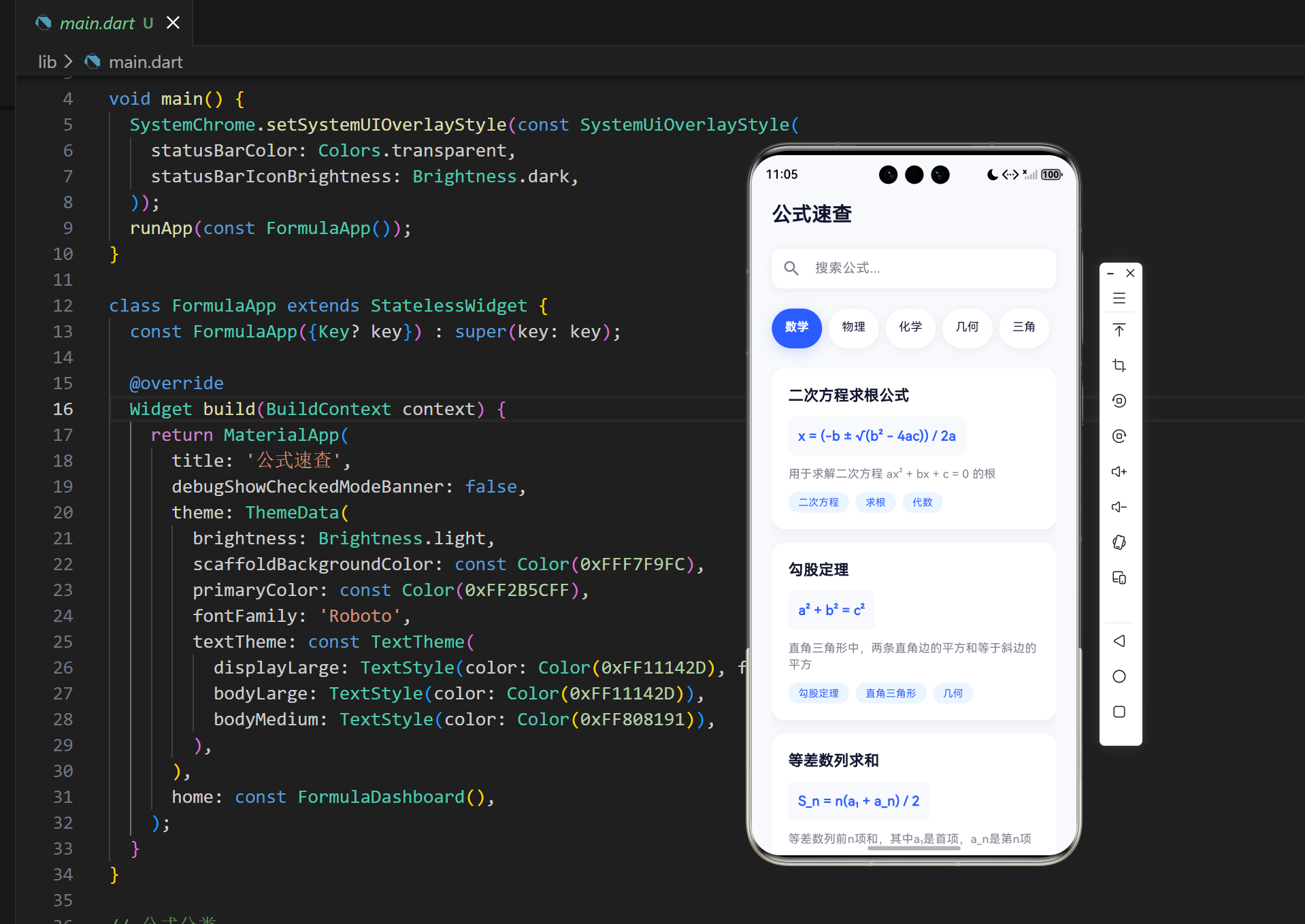
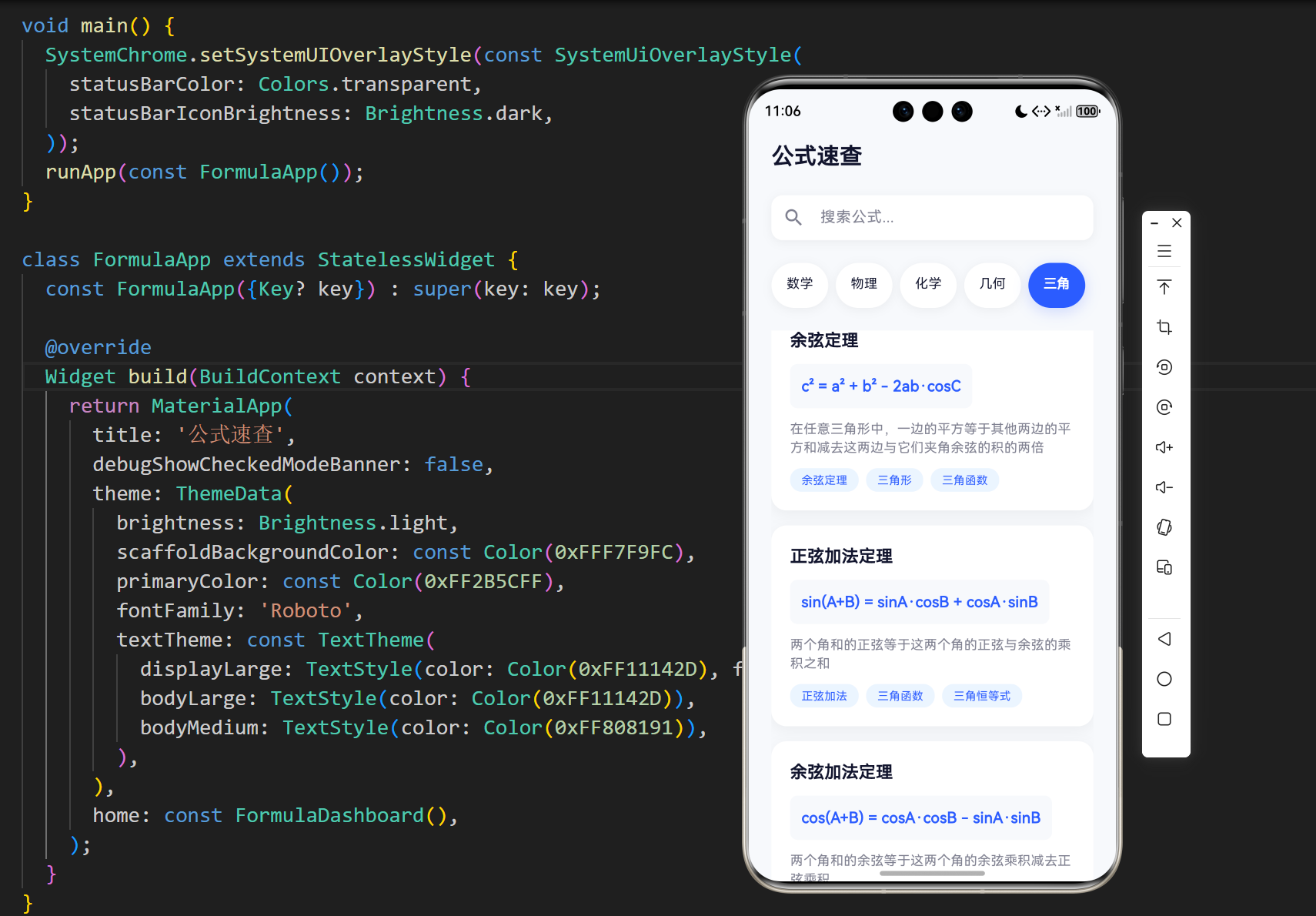

1. 项目背景与目标
在现代教育和科研中,公式是学科知识的重要组成部分。学生、教师和研究人员经常需要快速查阅各种学科的公式,如数学、物理、化学等。然而,传统的公式查阅方式存在以下问题:
- 分散性:公式散落在各种教材和参考资料中,难以快速定位
- 不系统性:缺乏统一的分类和组织方式
- 查找效率低:需要手动翻阅书籍或搜索网页
- 移动端不便:传统参考资料在移动设备上使用体验差
基于这些问题,我们开发了一款公式速查应用,旨在为用户提供一个集中、分类、高效的公式查阅平台。
1.1 项目目标
- 集中管理:将各学科公式集中管理,方便用户一站式查阅
- 分类清晰:按照学科和类型对公式进行分类,便于导航
- 搜索便捷:提供快速搜索功能,支持按名称、描述和标签搜索
- 界面友好:设计简洁美观的用户界面,提供良好的用户体验
- 跨平台支持:基于Flutter开发,支持多平台运行
2. 技术架构设计
2.1 技术栈选择
| 技术 | 版本 | 用途 |
|---|---|---|
| Flutter | 3.0+ | 跨平台应用开发框架 |
| Dart | 2.17+ | 开发语言 |
| Material Design | - | UI设计规范 |
2.2 系统架构
我们采用了分层架构设计,将应用分为以下几层:
- 数据层:负责公式数据的管理和存储
- 业务逻辑层:处理核心业务逻辑,如分类和搜索
- UI层:负责用户界面的展示和交互
2.3 数据流设计
3. 核心功能实现
3.1 公式数据模型
公式数据模型是整个应用的基础,我们设计了一个灵活的Formula类来表示各种公式:
class Formula {
  final String id;
  final String name;
  final String formula;
  final String description;
  final FormulaCategory category;
  final List<String> tags;

  Formula({
    required this.id,
    required this.name,
    required this.formula,
    required this.description,
    required this.category,
    required this.tags,
  });
}
设计要点:
- id:唯一标识符,用于区分不同公式
- name:公式名称,如"二次方程求根公式"
- formula:公式表达式,如"x = (-b ± √(b² - 4ac)) / 2a"
- description:公式描述,解释公式的用途和含义
- category:公式分类,如数学、物理等
- tags:标签列表,用于辅助搜索和分类
3.2 公式分类系统
我们定义了一个枚举类型来表示不同的公式分类:
enum FormulaCategory {
  mathematics, // 数学
  physics,     // 物理
  chemistry,   // 化学
  geometry,    // 几何
  trigonometry, // 三角
}
设计要点:
- 覆盖了常见的学科领域
- 便于后续扩展其他分类
- 提供了清晰的分类体系
3.3 数据管理
我们创建了一个FormulaData类来管理所有公式数据:
class FormulaData {
  static List<Formula> get allFormulas => [
    // 数学公式
    Formula(
      id: 'math1',
      name: '二次方程求根公式',
      formula: 'x = (-b ± √(b² - 4ac)) / 2a',
      description: '用于求解二次方程 ax² + bx + c = 0 的根',
      category: FormulaCategory.mathematics,
      tags: ['二次方程', '求根', '代数'],
    ),
    // 其他公式...
  ];

  static List<Formula> getFormulasByCategory(FormulaCategory category) {
    return allFormulas.where((formula) => formula.category == category).toList();
  }

  static List<Formula> searchFormulas(String query) {
    final lowerQuery = query.toLowerCase();
    return allFormulas.where((formula) {
      return formula.name.toLowerCase().contains(lowerQuery) ||
             formula.description.toLowerCase().contains(lowerQuery) ||
             formula.tags.any((tag) => tag.toLowerCase().contains(lowerQuery));
    }).toList();
  }
}
设计要点:
- 静态数据:使用静态列表存储公式数据,便于快速访问
- 分类筛选:提供按分类筛选公式的方法
- 搜索功能:支持按名称、描述和标签搜索公式
- 大小写不敏感:搜索时忽略大小写,提高搜索体验
3.4 主界面实现
主界面是用户与应用交互的核心,我们设计了一个现代化的仪表盘界面:
class FormulaDashboard extends StatefulWidget {
const FormulaDashboard({Key? key}) : super(key: key);
State<FormulaDashboard> createState() => _FormulaDashboardState();
}
class _FormulaDashboardState extends State<FormulaDashboard> {
FormulaCategory _selectedCategory = FormulaCategory.mathematics;
String _searchQuery = '';
List<Formula> _filteredFormulas = FormulaData.getFormulasByCategory(FormulaCategory.mathematics);
void initState() {
super.initState();
_updateFilteredFormulas();
}
void _updateFilteredFormulas() {
if (_searchQuery.isEmpty) {
setState(() {
_filteredFormulas = FormulaData.getFormulasByCategory(_selectedCategory);
});
} else {
setState(() {
_filteredFormulas = FormulaData.searchFormulas(_searchQuery);
});
}
}
void _onCategoryChanged(FormulaCategory category) {
setState(() {
_selectedCategory = category;
_updateFilteredFormulas();
});
}
void _onSearchChanged(String query) {
setState(() {
_searchQuery = query;
_updateFilteredFormulas();
});
}
Widget build(BuildContext context) {
return Scaffold(
body: SafeArea(
bottom: false,
child: Column(
children: [
// 顶部标题
// 搜索栏
// 分类选择
// 公式列表
],
),
),
);
}
}
设计要点:
- 状态管理:使用setState管理界面状态
- 响应式更新:分类切换和搜索输入时实时更新公式列表
- 安全区域:使用SafeArea确保内容不被系统UI遮挡
- 模块化设计:将界面拆分为多个部分,提高代码可读性
3.5 公式卡片设计
公式卡片是展示公式信息的核心组件:
Widget _buildFormulaCard(Formula formula) {
  return Container(
    margin: const EdgeInsets.only(bottom: 16),
    padding: const EdgeInsets.all(20),
    decoration: BoxDecoration(
      color: Colors.white,
      borderRadius: BorderRadius.circular(16),
      boxShadow: [
        BoxShadow(
          color: Colors.black.withOpacity(0.05),
          offset: const Offset(0, 4),
          blurRadius: 12,
        ),
      ],
    ),
    child: Column(
      crossAxisAlignment: CrossAxisAlignment.start,
      children: [
        // 公式名称
        Text(
          formula.name,
          style: const TextStyle(
            fontSize: 18,
            fontWeight: FontWeight.bold,
            color: Color(0xFF11142D),
          ),
        ),

        const SizedBox(height: 12),

        // 公式表达式
        Container(
          padding: const EdgeInsets.all(12),
          decoration: BoxDecoration(
            color: const Color(0xFFF7F9FC),
            borderRadius: BorderRadius.circular(8),
          ),
          child: Text(
            formula.formula,
            style: const TextStyle(
              fontSize: 16,
              fontWeight: FontWeight.w600,
              color: Color(0xFF2B5CFF),
              fontFamily: 'Roboto Mono',
            ),
          ),
        ),

        const SizedBox(height: 12),

        // 公式描述
        Text(
          formula.description,
          style: const TextStyle(
            fontSize: 14,
            color: Color(0xFF808191),
          ),
        ),

        const SizedBox(height: 12),

        // 标签
        Wrap(
          spacing: 8,
          runSpacing: 4,
          children: formula.tags.map((tag) => _buildTag(tag)).toList(),
        ),
      ],
    ),
  );
}
设计要点:
- 卡片式设计:使用卡片布局展示公式信息,层次分明
- 视觉层次:通过字体大小、颜色和间距创建清晰的视觉层次
- 代码字体:公式表达式使用等宽字体,提高可读性
- 标签系统:使用标签展示公式的关键词,便于快速识别
3.6 分类选择组件
分类选择是用户导航的重要部分:
SizedBox(
  height: 48,
  child: ListView.builder(
    scrollDirection: Axis.horizontal,
    padding: const EdgeInsets.symmetric(horizontal: 20),
    itemCount: FormulaCategory.values.length,
    itemBuilder: (context, index) {
      final category = FormulaCategory.values[index];
      final isSelected = _selectedCategory == category;

      return GestureDetector(
        onTap: () => _onCategoryChanged(category),
        child: Container(
          margin: const EdgeInsets.symmetric(horizontal: 4),
          padding: const EdgeInsets.symmetric(horizontal: 16, vertical: 12),
          decoration: BoxDecoration(
            color: isSelected ? const Color(0xFF2B5CFF) : Colors.white,
            borderRadius: BorderRadius.circular(24),
            boxShadow: [
              if (isSelected)
                BoxShadow(
                  color: const Color(0xFF2B5CFF).withOpacity(0.2),
                  offset: const Offset(0, 4),
                  blurRadius: 12,
                ),
              if (!isSelected)
                BoxShadow(
                  color: Colors.black.withOpacity(0.05),
                  offset: const Offset(0, 2),
                  blurRadius: 8,
                ),
            ],
          ),
          child: Text(
            _getCategoryName(category),
            style: TextStyle(
              color: isSelected ? Colors.white : const Color(0xFF11142D),
              fontWeight: isSelected ? FontWeight.bold : FontWeight.normal,
            ),
          ),
        ),
      );
    },
  ),
),
设计要点:
- 水平滚动:使用ListView.builder实现水平滚动的分类选择
- 视觉反馈:选中状态有明显的视觉差异,包括颜色和阴影
- 响应式设计:分类项数量增加时自动适应
- 触摸反馈:使用GestureDetector提供触摸反馈
4. 核心代码解析
4.1 公式数据管理系统
代码位置:lib/main.dart:64-266
核心功能:
- 集中管理所有公式数据
- 提供按分类筛选功能
- 实现多维度搜索功能
技术亮点:
- 使用静态列表存储数据,提高访问速度
- 采用流式API进行数据筛选,代码简洁高效
- 搜索功能支持多字段匹配,提高搜索准确性
代码解析:
// 公式数据管理类
class FormulaData {
  // 所有公式数据
  static List<Formula> get allFormulas => [
    // 数学公式
    Formula(
      id: 'math1',
      name: '二次方程求根公式',
      formula: 'x = (-b ± √(b² - 4ac)) / 2a',
      description: '用于求解二次方程 ax² + bx + c = 0 的根',
      category: FormulaCategory.mathematics,
      tags: ['二次方程', '求根', '代数'],
    ),
    // 其他公式...
  ];

  // 按分类获取公式
  static List<Formula> getFormulasByCategory(FormulaCategory category) {
    return allFormulas.where((formula) => formula.category == category).toList();
  }

  // 搜索公式
  static List<Formula> searchFormulas(String query) {
    final lowerQuery = query.toLowerCase();
    return allFormulas.where((formula) {
      return formula.name.toLowerCase().contains(lowerQuery) ||
             formula.description.toLowerCase().contains(lowerQuery) ||
             formula.tags.any((tag) => tag.toLowerCase().contains(lowerQuery));
    }).toList();
  }
}
4.2 状态管理与数据更新
代码位置:lib/main.dart:276-311
核心功能:
- 管理当前选中的分类
- 处理搜索输入
- 实时更新公式列表
技术亮点:
- 使用setState实现响应式UI更新
- 封装数据更新逻辑,提高代码可维护性
- 搜索和分类切换时自动更新数据
代码解析:
class _FormulaDashboardState extends State<FormulaDashboard> {
FormulaCategory _selectedCategory = FormulaCategory.mathematics;
String _searchQuery = '';
List<Formula> _filteredFormulas = FormulaData.getFormulasByCategory(FormulaCategory.mathematics);
void initState() {
super.initState();
_updateFilteredFormulas();
}
void _updateFilteredFormulas() {
if (_searchQuery.isEmpty) {
setState(() {
_filteredFormulas = FormulaData.getFormulasByCategory(_selectedCategory);
});
} else {
setState(() {
_filteredFormulas = FormulaData.searchFormulas(_searchQuery);
});
}
}
void _onCategoryChanged(FormulaCategory category) {
setState(() {
_selectedCategory = category;
_updateFilteredFormulas();
});
}
void _onSearchChanged(String query) {
setState(() {
_searchQuery = query;
_updateFilteredFormulas();
});
}
}
4.3 公式卡片UI组件
代码位置:lib/main.dart:438-509
核心功能:
- 展示公式的详细信息
- 提供美观的视觉布局
- 增强用户阅读体验
技术亮点:
- 使用卡片式设计,层次分明
- 合理运用间距和颜色,创造良好的视觉体验
- 响应式布局,适应不同屏幕尺寸
代码解析:
Widget _buildFormulaCard(Formula formula) {
  return Container(
    margin: const EdgeInsets.only(bottom: 16),
    padding: const EdgeInsets.all(20),
    decoration: BoxDecoration(
      color: Colors.white,
      borderRadius: BorderRadius.circular(16),
      boxShadow: [
        BoxShadow(
          color: Colors.black.withOpacity(0.05),
          offset: const Offset(0, 4),
          blurRadius: 12,
        ),
      ],
    ),
    child: Column(
      crossAxisAlignment: CrossAxisAlignment.start,
      children: [
        // 公式名称
        Text(
          formula.name,
          style: const TextStyle(
            fontSize: 18,
            fontWeight: FontWeight.bold,
            color: Color(0xFF11142D),
          ),
        ),

        const SizedBox(height: 12),

        // 公式表达式
        Container(
          padding: const EdgeInsets.all(12),
          decoration: BoxDecoration(
            color: const Color(0xFFF7F9FC),
            borderRadius: BorderRadius.circular(8),
          ),
          child: Text(
            formula.formula,
            style: const TextStyle(
              fontSize: 16,
              fontWeight: FontWeight.w600,
              color: Color(0xFF2B5CFF),
              fontFamily: 'Roboto Mono',
            ),
          ),
        ),

        const SizedBox(height: 12),

        // 公式描述
        Text(
          formula.description,
          style: const TextStyle(
            fontSize: 14,
            color: Color(0xFF808191),
          ),
        ),

        const SizedBox(height: 12),

        // 标签
        Wrap(
          spacing: 8,
          runSpacing: 4,
          children: formula.tags.map((tag) => _buildTag(tag)).toList(),
        ),
      ],
    ),
  );
}
4.4 分类选择组件
代码位置:lib/main.dart:369-414
核心功能:
- 提供公式分类的快速切换
- 显示当前选中的分类
- 支持水平滚动浏览所有分类
技术亮点:
- 使用ListView.builder实现水平滚动
- 选中状态有明显的视觉反馈
- 触摸反馈增强用户体验
代码解析:
SizedBox(
  height: 48,
  child: ListView.builder(
    scrollDirection: Axis.horizontal,
    padding: const EdgeInsets.symmetric(horizontal: 20),
    itemCount: FormulaCategory.values.length,
    itemBuilder: (context, index) {
      final category = FormulaCategory.values[index];
      final isSelected = _selectedCategory == category;

      return GestureDetector(
        onTap: () => _onCategoryChanged(category),
        child: Container(
          margin: const EdgeInsets.symmetric(horizontal: 4),
          padding: const EdgeInsets.symmetric(horizontal: 16, vertical: 12),
          decoration: BoxDecoration(
            color: isSelected ? const Color(0xFF2B5CFF) : Colors.white,
            borderRadius: BorderRadius.circular(24),
            boxShadow: [
              if (isSelected)
                BoxShadow(
                  color: const Color(0xFF2B5CFF).withOpacity(0.2),
                  offset: const Offset(0, 4),
                  blurRadius: 12,
                ),
              if (!isSelected)
                BoxShadow(
                  color: Colors.black.withOpacity(0.05),
                  offset: const Offset(0, 2),
                  blurRadius: 8,
                ),
            ],
          ),
          child: Text(
            _getCategoryName(category),
            style: TextStyle(
              color: isSelected ? Colors.white : const Color(0xFF11142D),
              fontWeight: isSelected ? FontWeight.bold : FontWeight.normal,
            ),
          ),
        ),
      );
    },
  ),
),
5. 性能优化与用户体验
5.1 性能优化策略
- 数据缓存:使用静态列表存储公式数据,避免重复计算
- 惰性加载:只在需要时更新公式列表,减少不必要的计算
- UI优化:使用const构造器和缓存Widget,减少重建
- 搜索优化:使用流式API和提前计算小写查询,提高搜索速度
5.2 用户体验提升
- 视觉设计:采用现代化的Material Design风格,界面简洁美观
- 交互反馈:分类切换和搜索时提供实时反馈
- 响应式布局:适配不同屏幕尺寸
- 搜索功能:支持多维度搜索,提高查找效率
- 标签系统:使用标签快速识别公式类型
6. 测试与部署
6.1 测试策略
- 单元测试:测试核心功能,如公式搜索和分类
- UI测试:测试界面布局和交互
- 性能测试:测试应用在不同设备上的性能表现
6.2 部署方案
- Web部署:使用
flutter build web构建Web版本 - 移动部署:使用
flutter build apk和flutter build ios构建移动版本 - 桌面部署:使用
flutter build windows、flutter build macos和flutter build linux构建桌面版本
7. 未来展望
- 公式编辑器:添加公式编辑功能,允许用户自定义公式
- 公式收藏:支持收藏常用公式,方便快速访问
- 公式导出:支持将公式导出为图片或PDF
- 深色模式:添加深色主题,适应不同使用环境
- 云同步:支持公式数据云同步,跨设备访问
- 更多学科:扩展更多学科的公式,如生物学、经济学等
- 公式计算器:集成公式计算功能,输入参数直接计算结果
8. 总结
公式速查应用是一个为学生、教师和研究人员设计的实用工具,通过集中管理、分类清晰、搜索便捷的特点,解决了传统公式查阅的痛点。应用采用Flutter跨平台技术,确保在各种设备上都能提供一致的用户体验。
8.1 技术亮点
- 模块化设计:清晰的代码结构,便于维护和扩展
- 响应式UI:适配不同屏幕尺寸,提供良好的视觉体验
- 高效搜索:多维度搜索功能,快速定位所需公式
- 现代化设计:采用Material Design风格,界面美观易用
- 跨平台支持:基于Flutter开发,支持Web、移动和桌面平台
8.2 应用价值
- 提高学习效率:快速查阅公式,节省时间
- 促进知识共享:集中管理各学科公式,便于知识传播
- 辅助教学工作:教师可以快速查找和展示公式
- 支持科研工作:研究人员可以方便地参考各种公式
公式速查应用不仅是一个实用工具,也是Flutter跨平台开发的优秀案例,展示了如何构建一个功能完整、用户友好的应用。通过不断优化和扩展,它有望成为学生和专业人士的必备工具。
欢迎加入开源鸿蒙跨平台社区:
https://openharmonycrossplatform.csdn.net

作为“人工智能6S店”的官方数字引擎,为AI开发者与企业提供一个覆盖软硬件全栈、一站式门户。
更多推荐

 1
1 0
0- 0


 已为社区贡献20条内容

所有评论(0)