
Flutter 框架跨平台鸿蒙开发 - 今天吃什么
运行效果图今天吃什么是一款专为"午餐选择困难症"用户打造的美食决策助手。每当饭点来临,面对琳琅满目的美食选择,你是否也曾陷入"不知道吃什么"的困境?这款应用通过趣味性的"摇一摇"交互方式,让命运替你做出决定,彻底终结选择困难。应用以温暖的橙红色为主色调,营造出食欲满满的视觉氛围。内置十大美食分类,涵盖中餐、西餐、日料、韩餐、快餐、小吃、甜点、饮品、火锅、烧烤等常见选择,收录27道经典美食。每次决定
今天吃什么应用
欢迎加入开源鸿蒙跨平台社区:
https://openharmonycrossplatform.csdn.net
一、项目概述
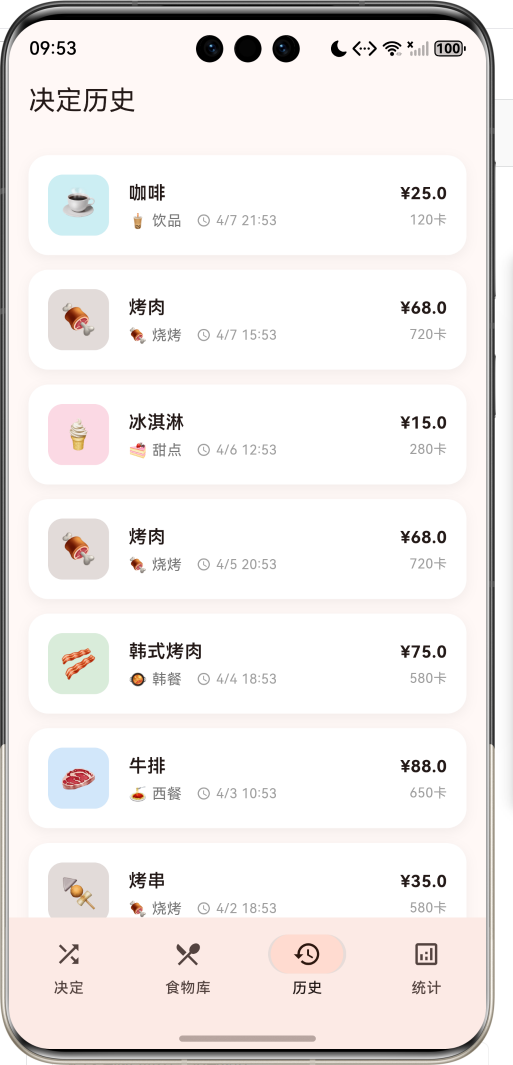
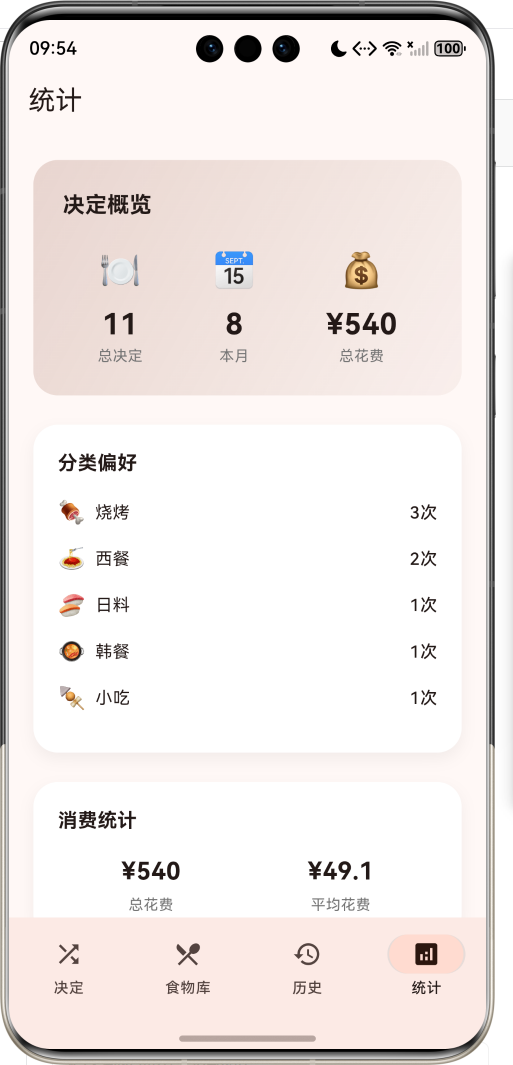
运行效果图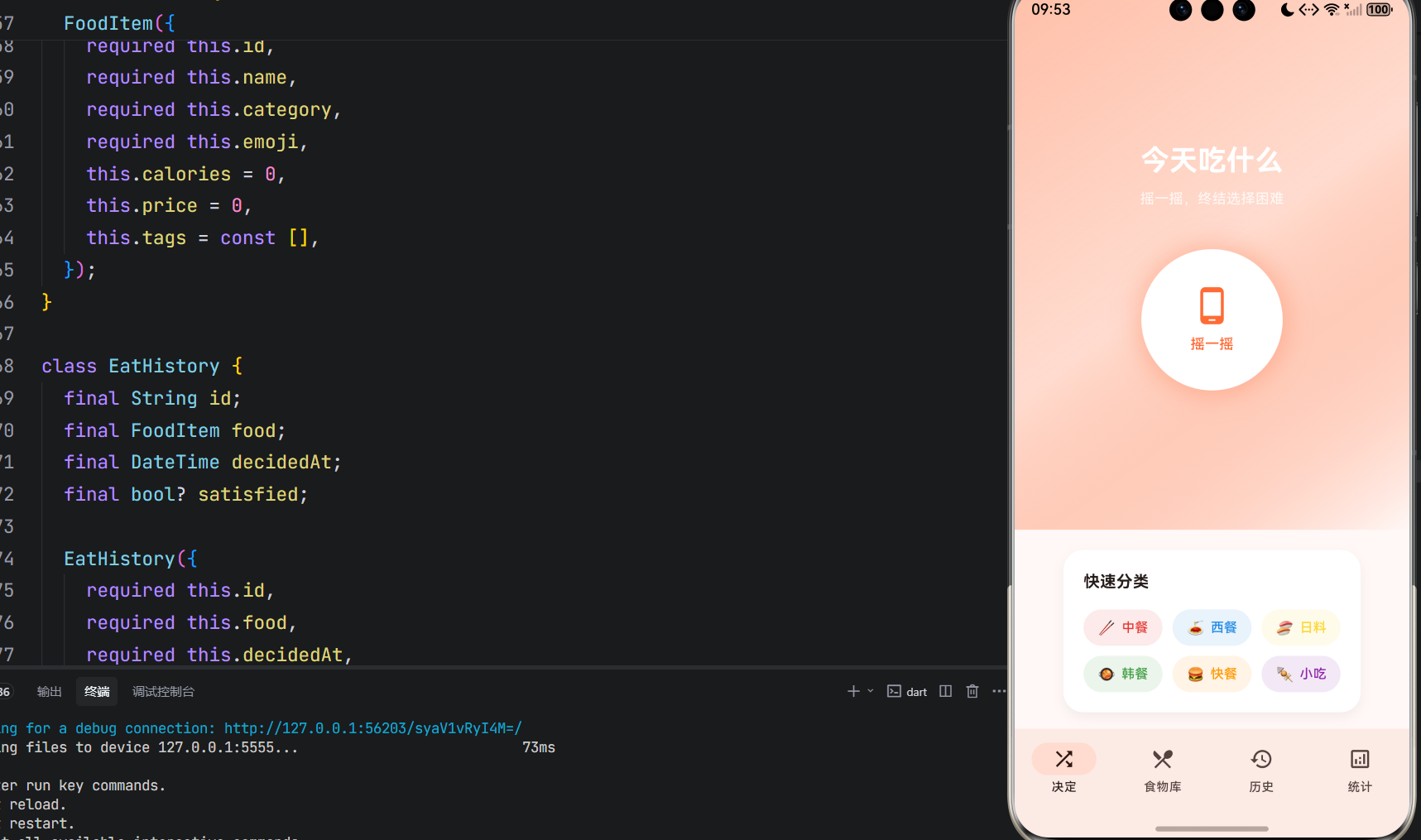
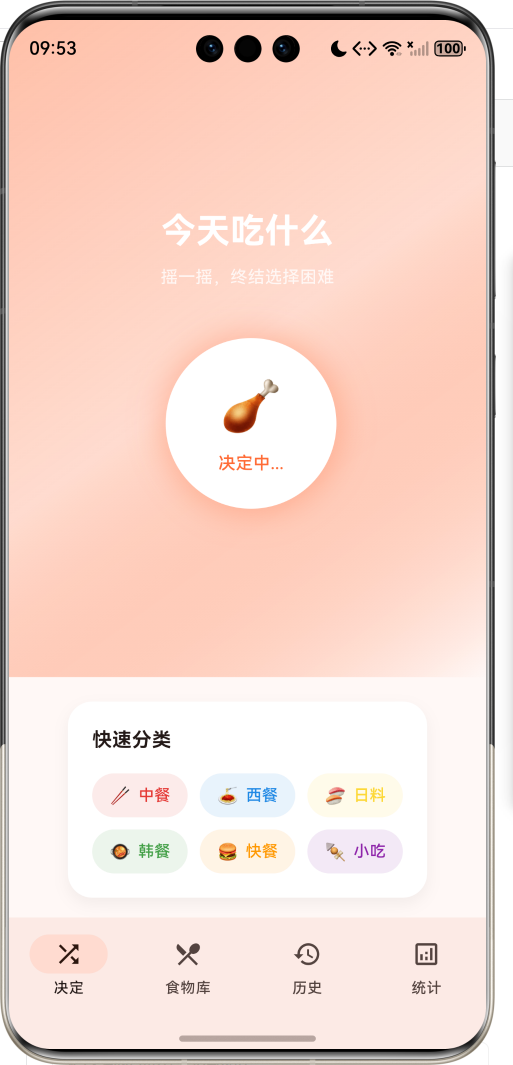
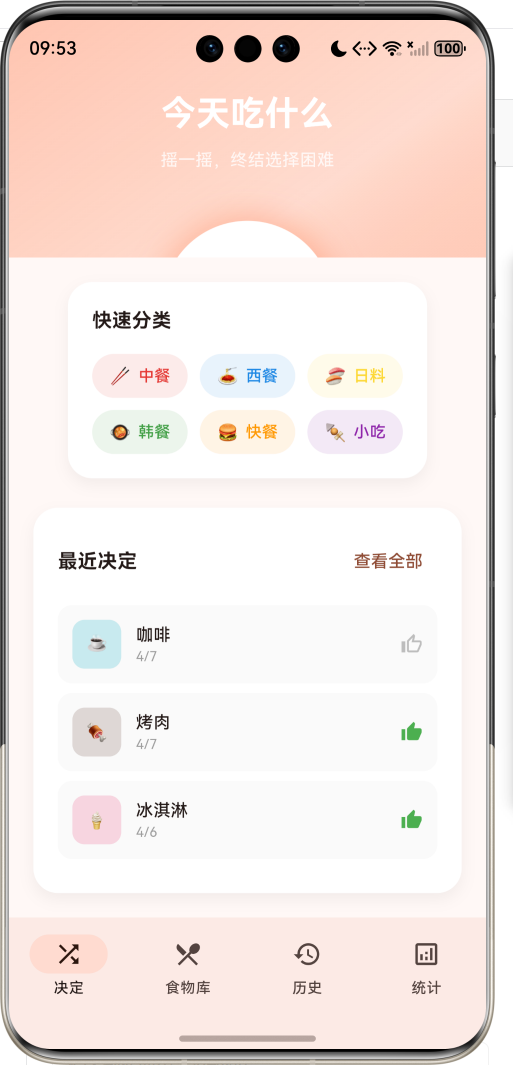
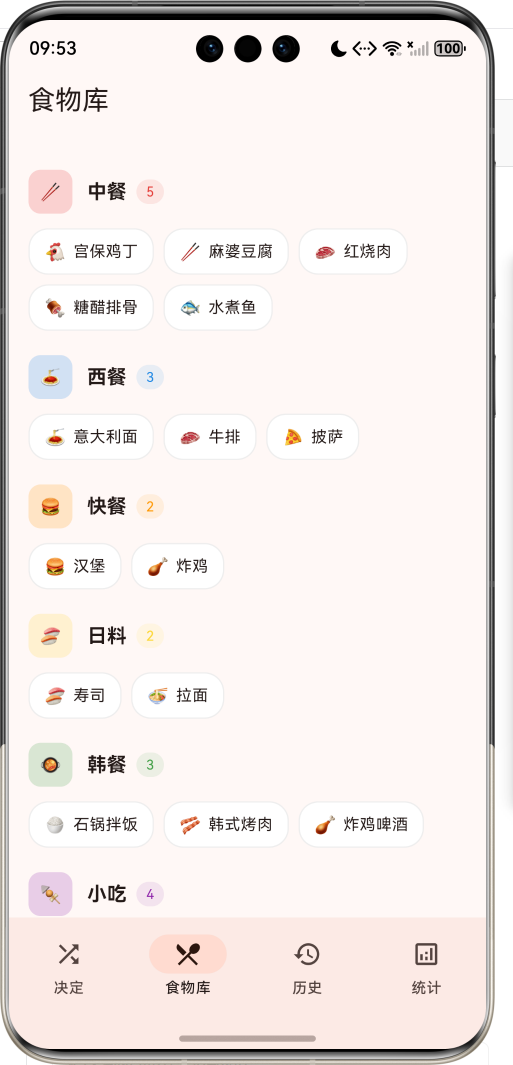
1.1 应用简介
今天吃什么是一款专为"午餐选择困难症"用户打造的美食决策助手。每当饭点来临,面对琳琅满目的美食选择,你是否也曾陷入"不知道吃什么"的困境?这款应用通过趣味性的"摇一摇"交互方式,让命运替你做出决定,彻底终结选择困难。
应用以温暖的橙红色为主色调,营造出食欲满满的视觉氛围。内置十大美食分类,涵盖中餐、西餐、日料、韩餐、快餐、小吃、甜点、饮品、火锅、烧烤等常见选择,收录27道经典美食。每次决定都会记录在历史中,并生成消费统计和偏好分析,帮助用户了解自己的饮食习惯。
1.2 核心功能
| 功能模块 | 功能描述 | 实现方式 |
|---|---|---|
| 摇一摇决定 | 随机选择美食 | 抖动动画+随机算法 |
| 快速分类 | 十大美食分类 | 分类标签卡片 |
| 食物库 | 美食数据库展示 | 分组列表 |
| 历史记录 | 决定历史回顾 | 时间线卡片 |
| 统计分析 | 消费和偏好统计 | 数据可视化 |
1.3 美食分类
| 序号 | 分类名称 | 图标 | 颜色 | 代表美食 |
|---|---|---|---|---|
| 1 | 中餐 | 🥢 | #E53935 | 宫保鸡丁、麻婆豆腐、红烧肉 |
| 2 | 西餐 | 🍝 | #1E88E5 | 意大利面、牛排、披萨 |
| 3 | 日料 | 🍣 | #FDD835 | 寿司、拉面 |
| 4 | 韩餐 | 🥘 | #43A047 | 石锅拌饭、韩式烤肉 |
| 5 | 快餐 | 🍔 | #FF9800 | 汉堡、炸鸡 |
| 6 | 小吃 | 🍢 | #8E24AA | 麻辣烫、煎饼果子、肉夹馍 |
| 7 | 甜点 | 🍰 | #EC407A | 蛋糕、冰淇淋 |
| 8 | 饮品 | 🧋 | #00ACC1 | 奶茶、咖啡 |
| 9 | 火锅 | 🍲 | #D32F2F | 火锅、串串香 |
| 10 | 烧烤 | 🍖 | #6D4C41 | 烤肉、烤串 |
1.4 技术栈
| 技术领域 | 技术选型 | 版本要求 |
|---|---|---|
| 开发框架 | Flutter | >= 3.0.0 |
| 编程语言 | Dart | >= 2.17.0 |
| 设计规范 | Material Design 3 | - |
| 状态管理 | setState | - |
| 动画系统 | AnimationController | - |
| 目标平台 | 鸿蒙OS / Web | API 21+ |
1.5 项目结构
lib/
└── main_what_to_eat.dart
    ├── WhatToEatApp              # 应用入口
    ├── FoodCategory              # 美食分类枚举
    ├── FoodItem                  # 美食数据模型
    ├── EatHistory                # 决定历史模型
    ├── WhatToEatHomePage         # 主页面(底部导航)
    ├── _buildDecidePage          # 决定页面
    ├── _buildFoodLibraryPage     # 食物库页面
    ├── _buildHistoryPage         # 历史页面
    └── _buildStatsPage           # 统计页面
二、系统架构
2.1 整体架构图
2.2 类图设计
2.3 页面导航流程
2.4 摇一摇决策流程时序图
三、核心模块设计
3.1 数据模型设计
3.1.1 美食分类枚举 (FoodCategory)
enum FoodCategory {
  chinese('中餐', '🥢', Color(0xFFE53935)),
  western('西餐', '🍝', Color(0xFF1E88E5)),
  japanese('日料', '🍣', Color(0xFFFDD835)),
  korean('韩餐', '🥘', Color(0xFF43A047)),
  fastFood('快餐', '🍔', Color(0xFFFF9800)),
  snack('小吃', '🍢', Color(0xFF8E24AA)),
  dessert('甜点', '🍰', Color(0xFFEC407A)),
  drink('饮品', '🧋', Color(0xFF00ACC1)),
  hotpot('火锅', '🍲', Color(0xFFD32F2F)),
  bbq('烧烤', '🍖', Color(0xFF6D4C41));

  final String label;
  final String emoji;
  final Color color;

  const FoodCategory(this.label, this.emoji, this.color);
}
3.1.2 美食数据模型 (FoodItem)
class FoodItem {
  final String id;              // 唯一标识
  final String name;            // 美食名称
  final FoodCategory category;  // 所属分类
  final String emoji;           // 表情图标
  final int calories;           // 卡路里
  final double price;           // 参考价格
  final List<String> tags;      // 标签列表
}
3.1.3 决定历史模型 (EatHistory)
class EatHistory {
  final String id;              // 唯一标识
  final FoodItem food;          // 选中的美食
  final DateTime decidedAt;     // 决定时间
  final bool? satisfied;        // 是否满意(可选)
}
3.1.4 美食分类分布
3.2 页面结构设计
3.2.1 主页面布局
3.2.2 决定页面结构
3.2.3 结果弹窗结构
3.3 动画系统设计
四、UI设计规范
4.1 配色方案
应用采用温暖的橙红色为主色调,营造食欲满满的视觉氛围:
| 颜色类型 | 色值 | 用途 |
|---|---|---|
| 主色 | #FF6B35 | 导航、按钮、强调元素 |
| 渐变起始 | #FF6B35 (40%透明) | 头部渐变 |
| 渐变结束 | #FF6B35 (20%透明) | 头部渐变 |
| 中餐色 | #E53935 | 红色 |
| 西餐色 | #1E88E5 | 蓝色 |
| 日料色 | #FDD835 | 黄色 |
| 韩餐色 | #43A047 | 绿色 |
| 快餐色 | #FF9800 | 橙色 |
| 小吃色 | #8E24AA | 紫色 |
| 甜点色 | #EC407A | 粉色 |
| 饮品色 | #00ACC1 | 青色 |
| 火锅色 | #D32F2F | 深红 |
| 烧烤色 | #6D4C41 | 棕色 |
4.2 字体规范
| 元素 | 字号 | 字重 | 颜色 |
|---|---|---|---|
| 应用标题 | 28px | Bold | #FFFFFF |
| 食物名称 | 32px | Bold | 分类色 |
| 分类标签 | 13px | Medium | 分类色 |
| 卡路里/价格 | 14px | Medium | #000000 |
| 历史时间 | 11px | Regular | #757575 |
| 统计数值 | 24px | Bold | #000000 |
4.3 组件规范
4.3.1 摇一摇按钮
        ┌─────────────────┐
        │                 │
        │    ┌───────┐    │
        │    │  📱   │    │
        │    │       │    │
        │    │摇一摇 │    │
        │    └───────┘    │
        │                 │
        └─────────────────┘
           圆形白色背景
          橙色阴影效果
4.3.2 分类标签
┌──────────────────┐
│  🥢  中餐        │
└──────────────────┘
   圆角矩形背景
   分类色+透明度
4.3.3 结果弹窗
┌─────────────────────────────────────┐
│              ──────                 │
│                                     │
│           ┌─────────┐              │
│           │   🐔    │              │
│           └─────────┘              │
│                                     │
│            今天吃                   │
│                                     │
│          宫保鸡丁                   │
│                                     │
│        ┌──────────┐                │
│        │ 🥢 中餐  │                │
│        └──────────┘                │
│                                     │
│    🔥 450卡    💰 ¥35              │
│                                     │
│  ┌─────────┐  ┌─────────┐         │
│  │ 换一个  │  │ 就这个  │         │
│  └─────────┘  └─────────┘         │
│                                     │
└─────────────────────────────────────┘
五、核心功能实现
5.1 摇一摇随机选择
void _startShake() {
  if (_isShaking || _isDeciding) return;

  setState(() {
    _isShaking = true;
    _isDeciding = true;
  });

  int shakeCount = 0;
  const maxShakes = 15;

  void doShake() {
    if (shakeCount >= maxShakes) {
      _decideFood();
      return;
    }

    setState(() {
      _currentFood = _foodList[_random.nextInt(_foodList.length)];
    });

    _shakeController.forward(from: 0);

    shakeCount++;
    Future.delayed(const Duration(milliseconds: 100), doShake);
  }

  doShake();
}
5.2 决定结果处理
void _decideFood() {
  setState(() {
    _isShaking = false;
  });

  _bounceController.forward(from: 0);
  _confettiController.forward(from: 0);

  final history = EatHistory(
    id: DateTime.now().millisecondsSinceEpoch.toString(),
    food: _currentFood!,
    decidedAt: DateTime.now(),
  );

  setState(() {
    _history.insert(0, history);
    _isDeciding = false;
  });

  _showResultDialog();
}
5.3 结果弹窗实现
Widget _buildResultSheet() {
  final food = _currentFood!;

  return DraggableScrollableSheet(
    initialChildSize: 0.6,
    maxChildSize: 0.8,
    minChildSize: 0.4,
    builder: (context, scrollController) => Container(
      decoration: const BoxDecoration(
        color: Colors.white,
        borderRadius: BorderRadius.vertical(top: Radius.circular(24)),
      ),
      child: ListView(
        controller: scrollController,
        padding: const EdgeInsets.all(24),
        children: [
          // 拖动指示器
          Center(
            child: Container(
              width: 40,
              height: 4,
              decoration: BoxDecoration(
                color: Colors.grey[300],
                borderRadius: BorderRadius.circular(2),
              ),
            ),
          ),
          const SizedBox(height: 24),
          // 食物图标(带弹性动画)
          Center(
            child: AnimatedBuilder(
              animation: _bounceController,
              builder: (context, child) {
                return Transform.scale(
                  scale: 1.0 + _bounceController.value * 0.2,
                  child: Container(
                    width: 120,
                    height: 120,
                    decoration: BoxDecoration(
                      color: food.category.color.withValues(alpha: 0.2),
                      shape: BoxShape.circle,
                    ),
                    child: Center(
                      child: Text(food.emoji, style: const TextStyle(fontSize: 56)),
                    ),
                  ),
                );
              },
            ),
          ),
          // 食物名称和分类
          const SizedBox(height: 16),
          Center(
            child: Text('今天吃', style: TextStyle(fontSize: 16, color: Colors.grey[600])),
          ),
          const SizedBox(height: 8),
          Center(
            child: Text(
              food.name,
              style: TextStyle(
                fontSize: 32,
                fontWeight: FontWeight.bold,
                color: food.category.color,
              ),
            ),
          ),
          // 操作按钮
          Row(
            children: [
              Expanded(
                child: OutlinedButton.icon(
                  onPressed: () {
                    Navigator.pop(context);
                    _startShake();
                  },
                  icon: const Icon(Icons.refresh),
                  label: const Text('换一个'),
                ),
              ),
              const SizedBox(width: 16),
              Expanded(
                child: FilledButton.icon(
                  onPressed: () {
                    Navigator.pop(context);
                    ScaffoldMessenger.of(context).showSnackBar(
                      SnackBar(
                        content: Text('决定了!今天吃${food.name}'),
                        backgroundColor: food.category.color,
                      ),
                    );
                  },
                  icon: const Icon(Icons.check),
                  label: const Text('就这个'),
                ),
              ),
            ],
          ),
        ],
      ),
    ),
  );
}
5.4 统计数据计算
Map<String, dynamic> _getStatistics() {
  final now = DateTime.now();
  final thisMonth = _history.where((h) =>
      h.decidedAt.year == now.year && h.decidedAt.month == now.month).toList();

  final categoryCounts = <FoodCategory, int>{};
  for (var category in FoodCategory.values) {
    categoryCounts[category] = _history.where((h) => h.food.category == category).length;
  }

  final totalExpense = _history.fold(0.0, (sum, h) => sum + h.food.price);
  final avgExpense = _history.isNotEmpty ? totalExpense / _history.length : 0.0;

  return {
    'total': _history.length,
    'thisMonth': thisMonth.length,
    'categoryCounts': categoryCounts,
    'totalExpense': totalExpense,
    'avgExpense': avgExpense,
  };
}
5.5 快速分类选择
Widget _buildQuickCategories() {
  return Container(
    padding: const EdgeInsets.all(20),
    decoration: BoxDecoration(
      color: Colors.white,
      borderRadius: BorderRadius.circular(20),
      boxShadow: [
        BoxShadow(
          color: Colors.black.withValues(alpha: 0.05),
          blurRadius: 10,
          offset: const Offset(0, 5),
        ),
      ],
    ),
    child: Column(
      crossAxisAlignment: CrossAxisAlignment.start,
      children: [
        const Text(
          '快速分类',
          style: TextStyle(fontSize: 16, fontWeight: FontWeight.bold),
        ),
        const SizedBox(height: 16),
        Wrap(
          spacing: 10,
          runSpacing: 10,
          children: FoodCategory.values.take(6).map((category) {
            return GestureDetector(
              onTap: () {
                final foods = _foodList.where((f) => f.category == category).toList();
                if (foods.isNotEmpty) {
                  setState(() {
                    _currentFood = foods[_random.nextInt(foods.length)];
                  });
                  _showResultDialog();
                }
              },
              child: Container(
                padding: const EdgeInsets.symmetric(horizontal: 14, vertical: 8),
                decoration: BoxDecoration(
                  color: category.color.withValues(alpha: 0.1),
                  borderRadius: BorderRadius.circular(20),
                ),
                child: Row(
                  mainAxisSize: MainAxisSize.min,
                  children: [
                    Text(category.emoji),
                    const SizedBox(width: 6),
                    Text(
                      category.label,
                      style: TextStyle(
                        color: category.color,
                        fontWeight: FontWeight.w500,
                        fontSize: 13,
                      ),
                    ),
                  ],
                ),
              ),
            );
          }).toList(),
        ),
      ],
    ),
  );
}
六、交互设计
6.1 摇一摇交互流程
6.2 分类快速选择流程
6.3 页面切换状态
七、扩展功能规划
7.1 后续版本规划
7.2 功能扩展建议
7.2.1 自定义食物
用户个性化管理:
- 添加自定义美食
- 设置偏好权重
- 标记不喜欢的食物
7.2.2 排除功能
临时排除选项:
- 今天不想吃火锅
- 最近吃过的不再推荐
- 临时排除列表管理
7.2.3 附近餐厅
位置服务集成:
- 显示附近餐厅
- 一键导航
- 优惠信息推送
八、注意事项
8.1 开发注意事项
-
随机算法:使用dart:math的Random类生成随机数,确保每次决定公平
-
动画控制:四个AnimationController需要在dispose时释放
-
状态管理:使用setState管理本地状态,注意_isShaking和_isDeciding的互斥
-
表单验证:结果弹窗使用DraggableScrollableSheet实现
8.2 常见问题
| 问题 | 原因 | 解决方案 |
|---|---|---|
| 抖动动画不播放 | 控制器未初始化 | 检查initState |
| 重复点击摇一摇 | 状态未锁定 | 检查_isDeciding |
| 结果不记录 | 历史列表未更新 | 检查setState调用 |
| 分类筛选为空 | 过滤条件问题 | 检查where条件 |
8.3 使用提示
🍜 今天吃什么使用小贴士 🍜
选择困难时,让命运替你做决定。
不要纠结,相信第一直觉。
如果不喜欢结果,就换一个!
记住,吃饭本身就是一件快乐的事。
九、运行说明
9.1 环境要求
| 环境 | 版本要求 |
|---|---|
| Flutter SDK | >= 3.0.0 |
| Dart SDK | >= 2.17.0 |
| 鸿蒙OS | API 21+ |
9.2 运行命令
# 查看可用设备
flutter devices

# 运行到Web服务器
flutter run -d web-server -t lib/main_what_to_eat.dart --web-port 8121

# 运行到鸿蒙设备
flutter run -d 127.0.0.1:5555 lib/main_what_to_eat.dart

# 运行到Windows
flutter run -d windows -t lib/main_what_to_eat.dart

# 代码分析
flutter analyze lib/main_what_to_eat.dart
十、总结
今天吃什么应用通过趣味性的"摇一摇"交互方式,为选择困难症患者提供了一个轻松愉快的美食决策工具。应用内置十大美食分类,收录27道经典美食,每次决定都会记录在历史中,并生成消费统计和偏好分析。
核心功能涵盖摇一摇决定、快速分类、食物库、历史记录、统计分析五大模块。摇一摇决定采用抖动动画过渡,增加趣味性和仪式感;快速分类支持一键选择特定类型美食;食物库以分组列表形式展示所有美食;历史记录按时间线展示所有决定;统计分析提供消费概览和偏好分析。
应用采用Material Design 3设计规范,以温暖的橙红色为主色调,营造食欲满满的视觉氛围。通过本应用,希望能够帮助用户摆脱"今天吃什么"的选择困难,轻松愉快地享受每一餐。
让每一餐都充满期待

作为“人工智能6S店”的官方数字引擎,为AI开发者与企业提供一个覆盖软硬件全栈、一站式门户。
更多推荐
 0
0 0
0- 0


 已为社区贡献12条内容

所有评论(0)