
开源鸿蒙跨平台Flutter开发:应对重症监护警报疲劳:BLoC 架构下的 FSM (有限状态机) 建模与全局消息干预机制
摘要: 本文针对医疗监护中的“警报疲劳”问题,提出基于有限状态机(FSM)和BLoC架构的智能预警系统。通过定义Safe、Warning、Critical、Intervention四态流转模型,结合Dart原生StreamController实现纯BLoC引擎,解决了传统硬编码阈值告警的噪音问题。系统引入医生介入阻断机制,在急救期间启动静默倒计时,并强制状态不可变性(Immutability)保障
欢迎加入开源鸿蒙跨平台社区:
https://openharmonycrossplatform.csdn.net
绪论:临床“警报疲劳”危机与架构层面的救赎
在现代医学尤其是重症监护室(ICU)的环境中,各类生命体征监护仪器构筑了一道保护患者生命的电子防线。然而,伴随设备密度的急剧上升,一个严峻的临床隐患逐渐浮出水面——警报疲劳(Alarm Fatigue)。
当患者因翻身导致心电极片松动、亦或是血氧夹接触不良时,系统往往会抛出海量的、刺耳的冗余警告。护士与医生在日复一日的噪音轰炸下,极易产生脱敏反应,从而导致在真正出现致命的心室颤动或深度休克时,错失了那最为关键的“黄金三分钟”。
从软件工程的视角来解剖,这一问题的症结在于传统医疗软件往往采用“硬编码阈值触发器(Hard-coded Threshold Triggers)”。数据一旦越界,警报立刻响起;数据一经恢复,警报瞬间解除。这种缺乏上下文(Context)记忆和生命周期流转控制的单极逻辑,在复杂的现实医疗场景中显得极为脆弱。
本篇文章将引入计算机科学中极为经典的**有限状态机(Finite State Machine, FSM)**理论,结合 Flutter 生态内享有盛誉的 **BLoC(Business Logic Component)**响应式编程架构,彻底重构患者体征异常预警机制。笔者将通过深度的代码剥离分析,展示如何建立一套具备“预警推演、医生介入阻断、静默期自我恢复”三位一体智能流转网络。
演示效果
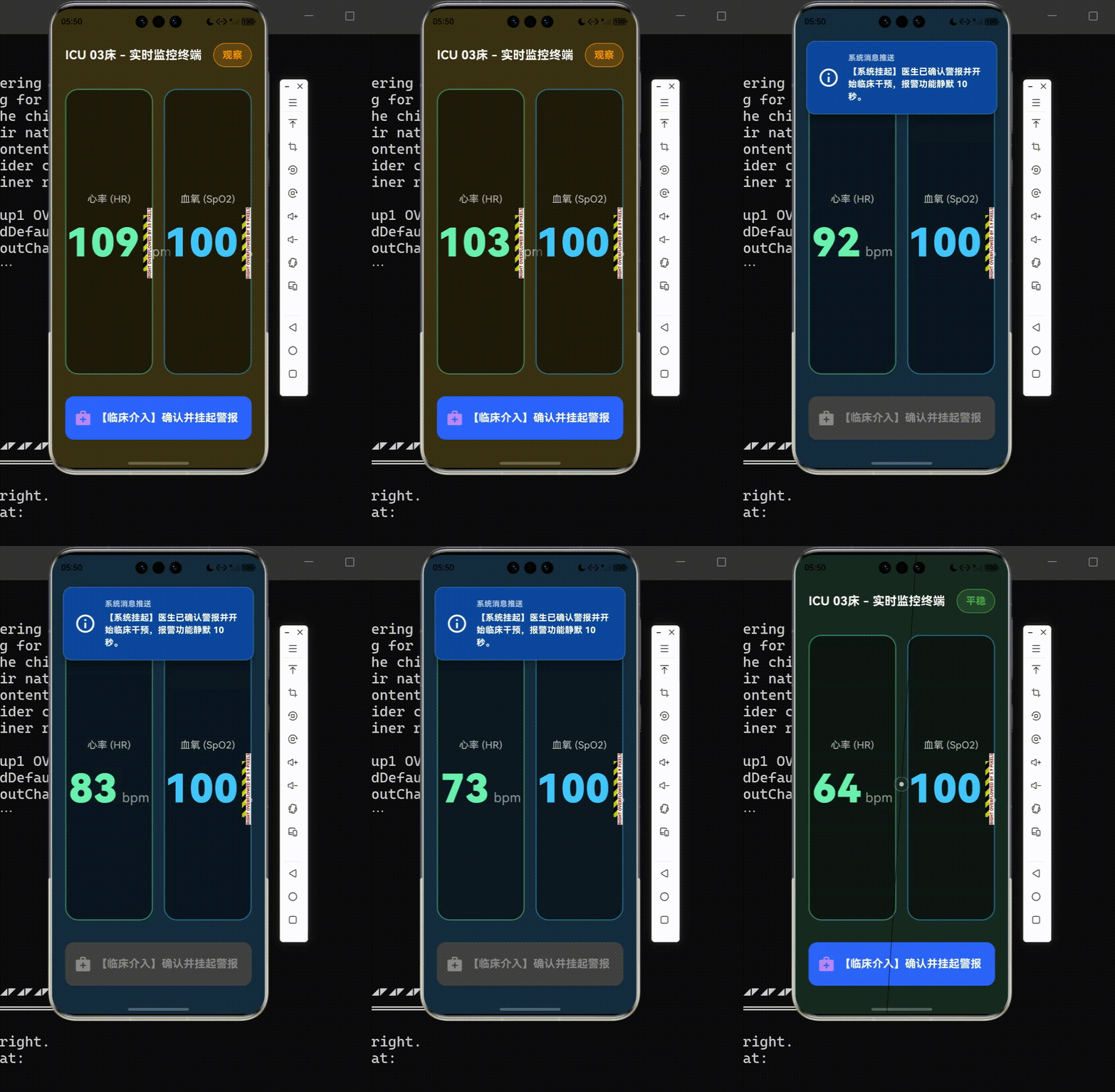
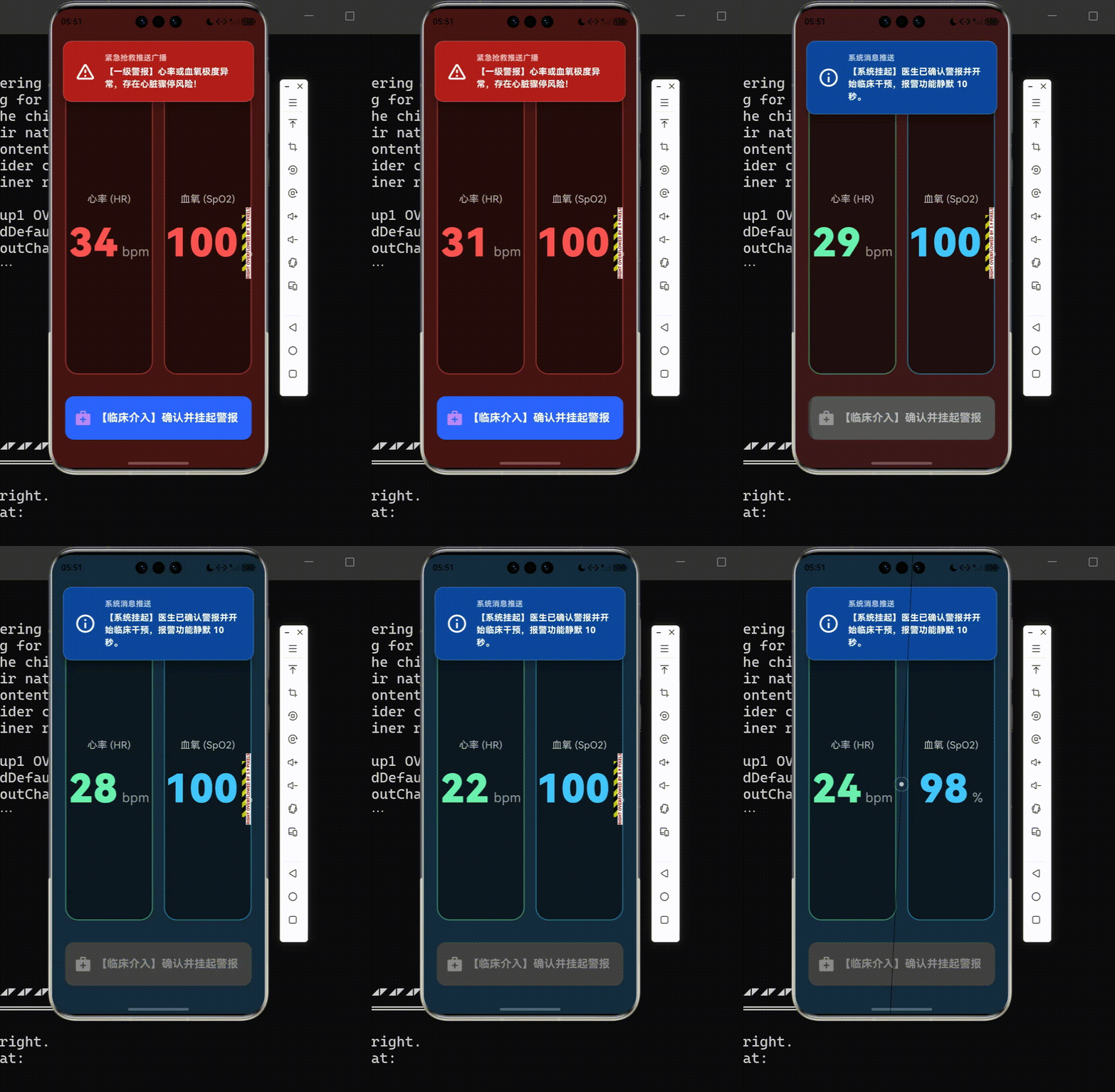
一、 理论基石:有限状态机(FSM)的医学场景映射
1.1 FSM 概念的数学形式化定义
有限状态机是一个由五个核心要素构成的数学计算模型。用标准数学符号可表示为一个五元组:
M = ( Σ , S , s 0 , δ , F ) M = ( \Sigma, S, s_0, \delta, F ) M=(Σ,S,s0,δ,F)
其中:
- Σ \Sigma Σ 代表系统可接收的有限事件字母表(Events)。在本项目中,对应了底层传来的
VitalsTickEvent(体征刷新事件)以及医生的DoctorAcknowledgeEvent(人工介入阻断事件)。 - S S S 表示系统具备的有限状态集合(States)。包含:
Safe(平稳)、Warning(警告)、Critical(危重)、Intervention(人工干预)。 - s 0 s_0 s0 是唯一的初始状态(Initial State),即患者接入设备时的默认态
Safe。 - δ \delta δ 是状态转移函数(Transition Function),即映射规律 δ : S × Σ → S \delta: S \times \Sigma \rightarrow S δ:S×Σ→S,它决定了系统如何在不同情况间穿梭。
- F F F 是最终状态集合(此处为持续运行系统,故不作严格终止限定)。
1.2 医疗预警 FSM 流转架构 UML
通过建立严密的 FSM,我们可以确保系统状态的变更是绝对确定的,彻底消除条件判断(if-else)嵌套所带来的逻辑死锁隐患。以下为本文构建的医疗状态流转路径:
上图极为清晰地揭示了一个痛点解决方案:一旦进入 InterventionState(医生干预阻断态),系统将在规定的倒计时窗口内(如打针、心脏起搏等急救操作时间),完全屏蔽底层体征波动引发的噪音警报,从而给予抢救人员极为专注的无声环境。
二、 架构选型:为何引入 BLoC 范式构建中枢?
在此前的项目中,我们尝试了简单的 MVVM 架构。但随着 FSM 概念的引入,系统的复杂维度上升了一个台阶。
BLoC(业务逻辑组件)的核心哲学是:万物皆流(Everything is a Stream)。它强制要求开发者将**“输入的事件流(Sink / Event Stream)”与“输出的状态流(State Stream)”**进行严格割裂。这种类似于中央处理器(CPU)流水线的设计,简直是为有限状态机(FSM)量身定制的法宝。
相比直接把 FSM 丢在视图层的 setState 中,BLoC 架构拥有以下不可比拟的申论级工程优势:
- 单一事实来源(Single Source of Truth):UI 层变得极为愚蠢,它只负责接收最新的
PatientState并渲染颜色,禁止执行任何运算。 - 多终端可移植性:同一套 BLoC 代码,既能驱动 Flutter 绘制病床前的监护仪屏幕,也能分毫不差地移植入 HarmonyOS 驱动的医生腕表上。
- 时序回溯能力:所有的历史状态犹如录像带般存在于 Stream 中,为医疗事故的事后溯源提供了坚实的数据证据。
三、 核心代码结构性剥离解构
本章节我们将剖析单文件 main.dart 中的技术精髓。请注意,为了验证技术底蕴,我们在代码中并未引用任何第三方的 flutter_bloc 依赖库,而是利用 Dart 语言极其底层的原生 API——StreamController 手工锻造了一座纯粹的 BLoC 引擎。
3.1 第一层:状态快照的不可变性保障 (Immutable State)
在医学严谨的约束下,任何状态对象在诞生后都是神圣不可侵犯的。我们使用了 copyWith 设计模式来强制执行对象的不可变性(Immutability)。
// 选自领域模型区域代码
enum ClinicalStatus { safe, warning, critical, intervention }

class PatientState {
  final ClinicalStatus status;
  final int heartRate;
  final int spO2;
  final String message;
  final DateTime timestamp;

  PatientState({
    required this.status,
    required this.heartRate,
    // ... 省略构造参数
  });

  // 任何状态变更都不是去修改原有对象,
  // 而是生成一个保留了历史参数的全新克隆体。
  PatientState copyWith({
    ClinicalStatus? status,
    int? heartRate,
    int? spO2,
    String? message,
  }) {
    return PatientState(
      status: status ?? this.status,
      heartRate: heartRate ?? this.heartRate,
      spO2: spO2 ?? this.spO2,
      message: message ?? this.message,
      timestamp: DateTime.now(),
    );
  }
}
任何企图直接篡改状态内存地址的行为都将被编译器扼杀,极大降低了异步多线程中的脏读风险。
3.2 第二层:纯粹的 BLoC 反应堆与 FSM 逻辑熔接
接下来是系统的心脏:PatientMonitorBloc。在这里,我们承接外接传感器的数据,完成阈值鉴定,并进行状态派发。
// 选自 BLoC 中枢逻辑代码

class PatientMonitorBloc {
  // 定义状态下行通道 (广播流)
  final _stateController = StreamController<PatientState>.broadcast();
  Stream<PatientState> get stateStream => _stateController.stream;

  // 定义事件上行通道
  final _eventController = StreamController<MonitorEvent>();
  Sink<MonitorEvent> get eventSink => _eventController.sink;

  PatientState _currentState = PatientState.initial();
  Timer? _interventionTimer; // 干预静默期计时器

  PatientMonitorBloc() {
    // 启动监听:所有抛向 Sink 的事件,都会被推入这个黑盒车间加工
    _eventController.stream.listen(_mapEventToState);
  }

  void _mapEventToState(MonitorEvent event) {
    if (event is VitalsTickEvent) {
      _handleVitalsTick(event); // 处理常规体征更迭
    } else if (event is DoctorAcknowledgeEvent) {
      _handleDoctorIntervention(); // 处理突发人工阻断
    }
  }
尤为值得关注的是阈值判断与“人工阻断防御网”的实现:
// (续上) BLoC 内部核心判定函数

  void _handleVitalsTick(VitalsTickEvent event) {
    // 【核心防御逻辑】:拦截静默期的报警降级/升级
    // 倘若医生正在执行心肺复苏等干预操作,FSM 将无视新数据的刺激,维持干预态蓝灯。
    if (_currentState.status == ClinicalStatus.intervention) {
      // 仅更新后台实时数字,但不改变状态节点,不触发报警 UI 切换
      _currentState = _currentState.copyWith(heartRate: event.hr, spO2: event.spO2);
      _stateController.add(_currentState);
      return;
    }

    // 采用改良版早期预警评分逻辑(MEWS 简化版)
    ClinicalStatus nextStatus;
    if (event.hr > 120 || event.spO2 < 90) {
      nextStatus = ClinicalStatus.critical; // 红灯抢救
    } else if (event.hr > 100 || event.spO2 < 95) {
      nextStatus = ClinicalStatus.warning;  // 黄灯预警
    } else {
      nextStatus = ClinicalStatus.safe;     // 绿灯平安
    }

    // 将 FSM 推演结果推入下行通道
    _currentState = _currentState.copyWith(status: nextStatus, /*...*/);
    _stateController.add(_currentState);
  }
3.3 第三层:响应式 UI 映射与模拟系统推送交互
UI 层只需挂载一个 StreamBuilder,根据下落的 PatientState 对象改变颜色与展现逻辑。这里最为精妙的视觉工程在于:如何用动画模拟系统级的消息推送下坠效果。
我们利用 AnimatedPositioned 构建了一个虚拟的横幅(Banner)。
// 选自视图层:消息推送模拟器

  Widget _buildPushNotificationBanner(PatientState state) {
    // FSM 的判断依据:仅在重危与医生干预状态时强行展露
    final bool showBanner =
        state.status == ClinicalStatus.critical ||
        state.status == ClinicalStatus.intervention;

    return AnimatedPositioned(
      duration: const Duration(milliseconds: 500),
      curve: Curves.elasticOut, // 弹性物理动效,模拟急迫感
      // 巧妙的空间控制:触发时下落到 Y轴 20,隐匿时收缩至负数界外
      top: showBanner ? 20 : -150,
      left: 20, right: 20,
      child: Material(
        elevation: 12, // 深邃的阴影体现 UI 的层级悬浮感
        borderRadius: BorderRadius.circular(16),
        child: Container(
          // 根据 FSM 节点变异色彩:干预蓝 vs 极危红
          color: state.status == ClinicalStatus.intervention ? Colors.blue.shade900 : Colors.red.shade900,
          // ...此处省略内部 Text 渲染逻辑
        ),
      ),
    );
  }
借由此套逻辑,当我们的体征模拟器(基于正弦波算法 sin 合成的随机波动数据)飙升越过红线时,屏幕将立刻随着 Stream 渲染为暗红,一条刺目的横幅将从屏幕顶部坠落;
而当护士点击了“【临床介入】确认并挂起警报”按钮(向 eventSink 掷入了 DoctorAcknowledgeEvent),FSM 立即切入 Intervention 节点,UI 瞬间平滑过渡为令人冷静的临床蓝。即便后台数据持续飙红,系统也会维持 10 秒钟的神圣静默期,坚决阻断任何干扰,最终在时间结束后回归常态追踪。
四、 全局研发统筹与甘特图审视
随着本篇章《体征异常预警机制》的终章落笔,我们在跨平台生命科学系统的架构搭建上已经具备了四项重量级积淀:
- 框架搭建:定调医疗主题的 MVVM 雏形。
- 图形极致:Canvas 解决底层刷新性能瓶颈。
- 数据管理:利用生成器与流解决极巨量文件解析造成的 OOM。
- 状态中枢:BLoC + FSM 攻克复杂业务状态机流转。
技术本不具备温度,但当冰冷的代码通过 FSM 精准的计算逻辑去挽救一条鲜活的生命,去阻断无谓的噪音,去赋予医护人员一份宁静时,代码便拥有了悲天悯人的灵魂。我们距离真正构建一套完善的生命科学综合平台的终点,又近了坚实的一步。
完整代码
import 'dart:async';
import 'dart:math';
import 'package:flutter/material.dart';

/// ---------------------------------------------------------------------------
/// 应用程序入口
/// ---------------------------------------------------------------------------
void main() {
  WidgetsFlutterBinding.ensureInitialized();
  runApp(const PatientMonitoringApp());
}

class PatientMonitoringApp extends StatelessWidget {
  const PatientMonitoringApp({super.key});

  @override
  Widget build(BuildContext context) {
    return MaterialApp(
      title: '医疗急救 FSM 预警阻断系统',
      debugShowCheckedModeBanner: false,
      theme: ThemeData(
        useMaterial3: true,
        colorScheme: const ColorScheme.dark(
          background: Color(0xFF121212),
          surface: Color(0xFF1E1E1E),
        ),
      ),
      home: const ICUWardScreen(),
    );
  }
}

/// ---------------------------------------------------------------------------
/// 领域模型与有限状态机 (FSM) 定义
/// ---------------------------------------------------------------------------

/// 状态机的四个核心节点枚举
enum ClinicalStatus {
  safe,        // 生命体征平稳 (绿)
  warning,     // 早期预警,指标触碰阈值边界 (黄)
  critical,    // 严重异常,需要立即抢救 (红)
  intervention // 医生已介入阻断警报,正在处理 (蓝)
}

/// 统合状态快照 (State)
class PatientState {
  final ClinicalStatus status;
  final int heartRate;
  final int spO2;
  final String message;
  final DateTime timestamp;

  PatientState({
    required this.status,
    required this.heartRate,
    required this.spO2,
    required this.message,
    required this.timestamp,
  });

  // 初始安全状态
  factory PatientState.initial() => PatientState(
        status: ClinicalStatus.safe,
        heartRate: 75,
        spO2: 98,
        message: '患者体征平稳,持续监控中',
        timestamp: DateTime.now(),
      );

  PatientState copyWith({
    ClinicalStatus? status,
    int? heartRate,
    int? spO2,
    String? message,
  }) {
    return PatientState(
      status: status ?? this.status,
      heartRate: heartRate ?? this.heartRate,
      spO2: spO2 ?? this.spO2,
      message: message ?? this.message,
      timestamp: DateTime.now(),
    );
  }
}

/// 业务动作事件 (Event)
abstract class MonitorEvent {}

/// 传感器产生的新体征数据事件
class VitalsTickEvent extends MonitorEvent {
  final int hr;
  final int spO2;
  VitalsTickEvent(this.hr, this.spO2);
}

/// 医生点击确认/阻断报警事件
class DoctorAcknowledgeEvent extends MonitorEvent {}

/// ---------------------------------------------------------------------------
/// BLoC 业务逻辑组件 (纯 Dart Stream 实现,无需引入第三方依赖)
/// ---------------------------------------------------------------------------
class PatientMonitorBloc {
  // 状态流向外广播
  final _stateController = StreamController<PatientState>.broadcast();
  Stream<PatientState> get stateStream => _stateController.stream;

  // 事件流接收外部输入
  final _eventController = StreamController<MonitorEvent>();
  Sink<MonitorEvent> get eventSink => _eventController.sink;

  PatientState _currentState = PatientState.initial();
  Timer? _interventionTimer;

  PatientMonitorBloc() {
    // 启动即推送初始状态
    _stateController.add(_currentState);

    // 核心流转枢纽:监听事件流并根据 FSM 逻辑进行状态推演
    _eventController.stream.listen(_mapEventToState);
  }

  void _mapEventToState(MonitorEvent event) {
    if (event is VitalsTickEvent) {
      _handleVitalsTick(event);
    } else if (event is DoctorAcknowledgeEvent) {
      _handleDoctorIntervention();
    }
  }

  /// 有限状态机 (FSM) 核心流转逻辑
  void _handleVitalsTick(VitalsTickEvent event) {
    // 如果当前处于医生强制介入的"阻断期",则屏蔽普通体征异常导致的警报升降级
    if (_currentState.status == ClinicalStatus.intervention) {
      _currentState = _currentState.copyWith(
        heartRate: event.hr,
        spO2: event.spO2,
      );
      _stateController.add(_currentState);
      return;
    }

    // MEWS 早期预警简易评分推导
    ClinicalStatus nextStatus;
    String nextMessage;

    if (event.hr > 120 || event.hr < 50 || event.spO2 < 90) {
      nextStatus = ClinicalStatus.critical;
      nextMessage = '【一级警报】心率或血氧极度异常,存在心脏骤停风险!';
    } else if (event.hr > 100 || event.hr < 60 || event.spO2 < 95) {
      nextStatus = ClinicalStatus.warning;
      nextMessage = '【二级警报】体征指标越限,请护士站密切关注。';
    } else {
      nextStatus = ClinicalStatus.safe;
      nextMessage = '患者体征平稳,持续监控中';
    }

    _currentState = _currentState.copyWith(
      status: nextStatus,
      heartRate: event.hr,
      spO2: event.spO2,
      message: nextMessage,
    );

    _stateController.add(_currentState);
  }

  /// 医生人为阻断警报,进入临时安全干预态
  void _handleDoctorIntervention() {
    _currentState = _currentState.copyWith(
      status: ClinicalStatus.intervention,
      message: '【系统挂起】医生已确认警报并开始临床干预,报警功能静默 10 秒。',
    );
    _stateController.add(_currentState);

    // 撤销可能存在的旧定时器
    _interventionTimer?.cancel();
    // 设定阻断时间窗口,模拟抢救或打针等操作完成后,重置状态机
    _interventionTimer = Timer(const Duration(seconds: 10), () {
      _currentState = _currentState.copyWith(
        status: ClinicalStatus.safe,
        message: '干预静默期结束,恢复自动化状态机监控。',
      );
      _stateController.add(_currentState);
    });
  }

  void dispose() {
    _interventionTimer?.cancel();
    _stateController.close();
    _eventController.close();
  }
}

/// ---------------------------------------------------------------------------
/// 视图层:UI 渲染与全局模拟消息推送展示
/// ---------------------------------------------------------------------------
class ICUWardScreen extends StatefulWidget {
  const ICUWardScreen({super.key});

  @override
  State<ICUWardScreen> createState() => _ICUWardScreenState();
}

class _ICUWardScreenState extends State<ICUWardScreen> with TickerProviderStateMixin {
  late PatientMonitorBloc _bloc;
  late Timer _mockDataTimer;

  // 模拟数据生成器相关
  double _timeParam = 0;
  final Random _random = Random();

  @override
  void initState() {
    super.initState();
    _bloc = PatientMonitorBloc();
    _startSimulatingVitals();
  }

  /// 制造不断劣化的体征数据,迫使状态机发生流转
  void _startSimulatingVitals() {
    _mockDataTimer = Timer.periodic(const Duration(seconds: 1), (timer) {
      _timeParam += 0.05;

      // 用正弦波叠加噪声模拟心率异常飙升
      int hr = 75 + (sin(_timeParam) * 55).round() + _random.nextInt(5);

      // 模拟血氧缓慢下降
      int spo2 = 98 - (cos(_timeParam) * 10).round() - _random.nextInt(3);
      if (spo2 > 100) spo2 = 100;

      // 推送事件给 BLoC
      _bloc.eventSink.add(VitalsTickEvent(hr, spo2));
    });
  }

  @override
  void dispose() {
    _mockDataTimer.cancel();
    _bloc.dispose();
    super.dispose();
  }

  /// 根据当前 FSM 节点获取场景背景色
  Color _getBackgroundColor(ClinicalStatus status) {
    switch (status) {
      case ClinicalStatus.safe:
        return const Color(0xFF1B2821); // 幽暗绿
      case ClinicalStatus.warning:
        return const Color(0xFF3E3114); // 警示黄
      case ClinicalStatus.critical:
        return const Color(0xFF4A1515); // 危险红
      case ClinicalStatus.intervention:
        return const Color(0xFF172C42); // 临床蓝
    }
  }

  @override
  Widget build(BuildContext context) {
    return StreamBuilder<PatientState>(
      stream: _bloc.stateStream,
      initialData: PatientState.initial(),
      builder: (context, snapshot) {
        final state = snapshot.data!;

        return Scaffold(
          // 使用 AnimatedContainer 实现状态切换时的视觉平滑呼吸感
          body: AnimatedContainer(
            duration: const Duration(milliseconds: 800),
            color: _getBackgroundColor(state.status),
            child: SafeArea(
              child: Stack(
                children: [
                  _buildDashboard(state),
                  _buildPushNotificationBanner(state),
                ],
              ),
            ),
          ),
        );
      },
    );
  }

  Widget _buildDashboard(PatientState state) {
    return Padding(
      padding: const EdgeInsets.all(24.0),
      child: Column(
        crossAxisAlignment: CrossAxisAlignment.stretch,
        children: [
          Row(
            mainAxisAlignment: MainAxisAlignment.spaceBetween,
            children: [
              const Text('ICU 03床 - 实时监控终端', style: TextStyle(fontSize: 22, fontWeight: FontWeight.bold, color: Colors.white)),
              _buildStatusBadge(state.status),
            ],
          ),
          const SizedBox(height: 40),
          Expanded(
            child: Row(
              children: [
                Expanded(child: _buildMetricCard('心率 (HR)', '${state.heartRate}', 'bpm', state.status == ClinicalStatus.critical ? Colors.redAccent : Colors.greenAccent)),
                const SizedBox(width: 20),
                Expanded(child: _buildMetricCard('血氧 (SpO2)', '${state.spO2}', '%', state.status == ClinicalStatus.critical ? Colors.redAccent : Colors.lightBlueAccent)),
              ],
            ),
          ),
          const SizedBox(height: 40),

          // 状态阻断按钮
          SizedBox(
            height: 80,
            child: ElevatedButton.icon(
              onPressed: state.status == ClinicalStatus.intervention
                  ? null
                  : () => _bloc.eventSink.add(DoctorAcknowledgeEvent()),
              icon: const Icon(Icons.medical_services, size: 32),
              label: const Text('【临床介入】确认并挂起警报', style: TextStyle(fontSize: 20, fontWeight: FontWeight.bold)),
              style: ElevatedButton.styleFrom(
                backgroundColor: Colors.blueAccent.shade700,
                foregroundColor: Colors.white,
                disabledBackgroundColor: Colors.grey.shade800,
                shape: RoundedRectangleBorder(borderRadius: BorderRadius.circular(16)),
              ),
            ),
          )
        ],
      ),
    );
  }

  Widget _buildMetricCard(String label, String value, String unit, Color color) {
    return Container(
      decoration: BoxDecoration(
        color: Colors.black45,
        borderRadius: BorderRadius.circular(24),
        border: Border.all(color: color.withOpacity(0.5), width: 2),
      ),
      child: Column(
        mainAxisAlignment: MainAxisAlignment.center,
        children: [
          Text(label, style: const TextStyle(color: Colors.white70, fontSize: 18)),
          const SizedBox(height: 16),
          Row(
            mainAxisAlignment: MainAxisAlignment.center,
            crossAxisAlignment: CrossAxisAlignment.baseline,
            textBaseline: TextBaseline.alphabetic,
            children: [
              Text(value, style: TextStyle(color: color, fontSize: 72, fontWeight: FontWeight.w900)),
              const SizedBox(width: 8),
              Text(unit, style: const TextStyle(color: Colors.white54, fontSize: 24)),
            ],
          )
        ],
      ),
    );
  }

  Widget _buildStatusBadge(ClinicalStatus status) {
    Color badgeColor;
    String badgeText;
    switch (status) {
      case ClinicalStatus.safe: badgeColor = Colors.green; badgeText = '平稳'; break;
      case ClinicalStatus.warning: badgeColor = Colors.orange; badgeText = '观察'; break;
      case ClinicalStatus.critical: badgeColor = Colors.red; badgeText = '抢救'; break;
      case ClinicalStatus.intervention: badgeColor = Colors.blue; badgeText = '干预中'; break;
    }

    return Container(
      padding: const EdgeInsets.symmetric(horizontal: 16, vertical: 8),
      decoration: BoxDecoration(
        color: badgeColor.withOpacity(0.2),
        border: Border.all(color: badgeColor),
        borderRadius: BorderRadius.circular(30),
      ),
      child: Text(badgeText, style: TextStyle(color: badgeColor, fontWeight: FontWeight.bold, fontSize: 18)),
    );
  }

  /// 模拟操作系统的顶部 Banner 消息推送弹窗
  Widget _buildPushNotificationBanner(PatientState state) {
    // 只有在 Critical 或者 Intervention 状态才显示横幅
    final bool showBanner = state.status == ClinicalStatus.critical || state.status == ClinicalStatus.intervention;

    return AnimatedPositioned(
      duration: const Duration(milliseconds: 500),
      curve: Curves.elasticOut,
      top: showBanner ? 20 : -150, // 弹出与隐藏动画
      left: 20,
      right: 20,
      child: Material(
        elevation: 12,
        borderRadius: BorderRadius.circular(16),
        child: Container(
          padding: const EdgeInsets.all(20),
          decoration: BoxDecoration(
            color: state.status == ClinicalStatus.intervention ? Colors.blue.shade900 : Colors.red.shade900,
            borderRadius: BorderRadius.circular(16),
            border: Border.all(color: Colors.white24),
          ),
          child: Row(
            children: [
              Icon(
                state.status == ClinicalStatus.intervention ? Icons.info_outline : Icons.warning_amber_rounded,
                color: Colors.white,
                size: 40,
              ),
              const SizedBox(width: 16),
              Expanded(
                child: Column(
                  crossAxisAlignment: CrossAxisAlignment.start,
                  children: [
                    Text(
                      state.status == ClinicalStatus.intervention ? '系统消息推送' : '紧急抢救推送广播',
                      style: const TextStyle(color: Colors.white70, fontWeight: FontWeight.bold),
                    ),
                    const SizedBox(height: 4),
                    Text(
                      state.message,
                      style: const TextStyle(color: Colors.white, fontSize: 16, fontWeight: FontWeight.bold),
                    ),
                  ],
                ),
              ),
            ],
          ),
        ),
      ),
    );
  }
}

作为“人工智能6S店”的官方数字引擎,为AI开发者与企业提供一个覆盖软硬件全栈、一站式门户。
更多推荐
 1
1 0
0- 0


 已为社区贡献5条内容

所有评论(0)