
Flutter 框架跨平台鸿蒙开发 - 时间胶囊
运行效果图时间胶囊应用是一款专注于情感寄托与时间记录的社交类应用,旨在帮助用户给未来的自己或陌生人写一封信,设定开启时间,待时光流转,胶囊开启的那一刻,便是与过去对话的开始。应用以紫色为主色调,营造神秘而温馨的时间胶囊氛围。应用涵盖了给自己、给陌生人、给朋友、公开胶囊四大类型,支持经典、现代、浪漫、神秘、自然五种主题风格。通过胶囊创建、状态管理、陌生人交换、公开广场等模块,帮助用户记录此刻心声,期
时间胶囊应用
欢迎加入开源鸿蒙跨平台社区:
https://openharmonycrossplatform.csdn.net
一、项目概述
运行效果图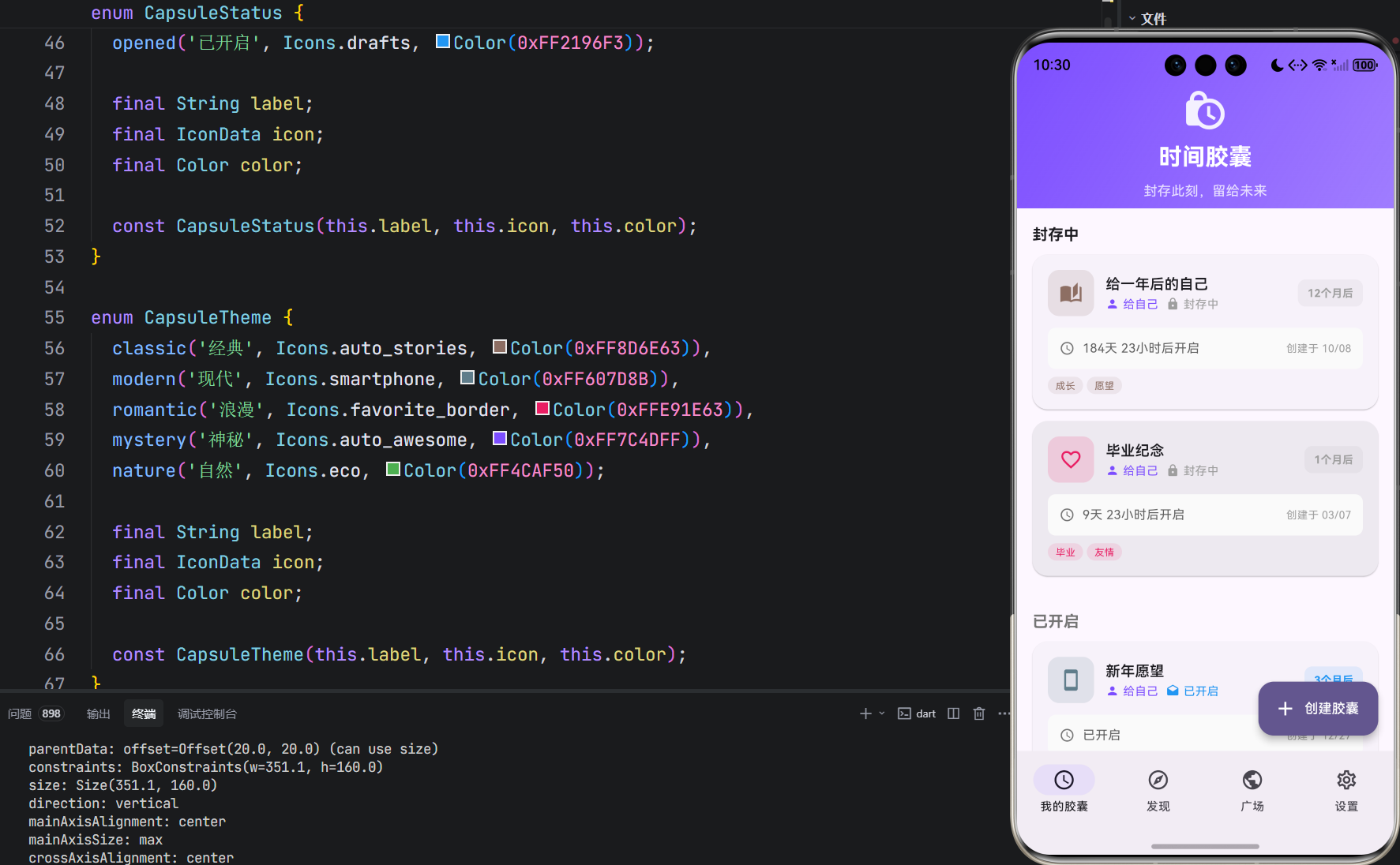
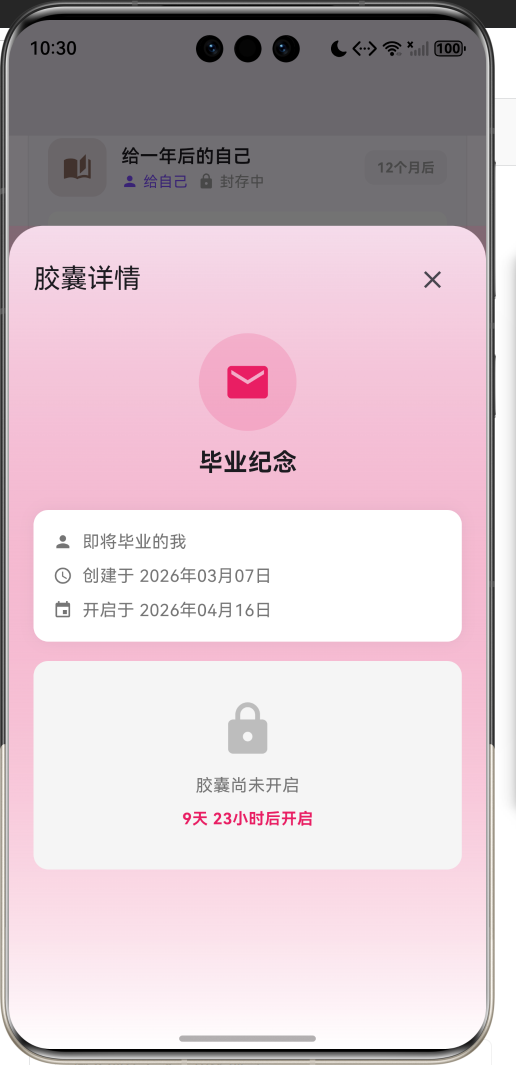
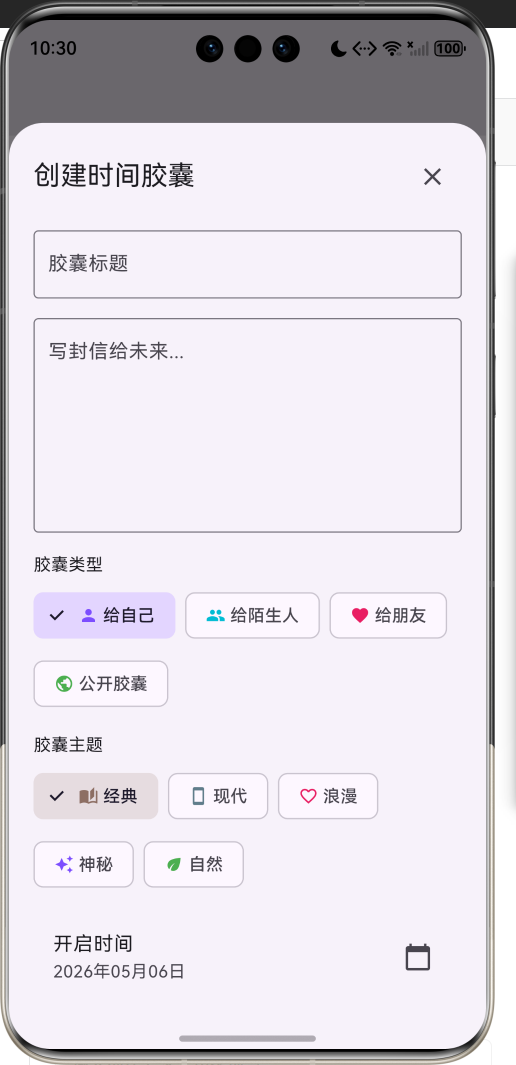
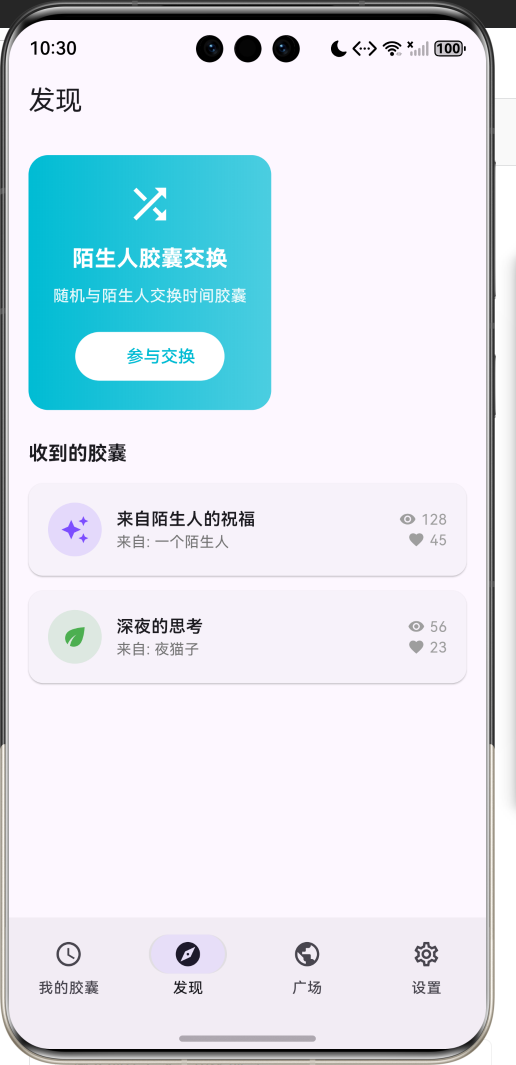
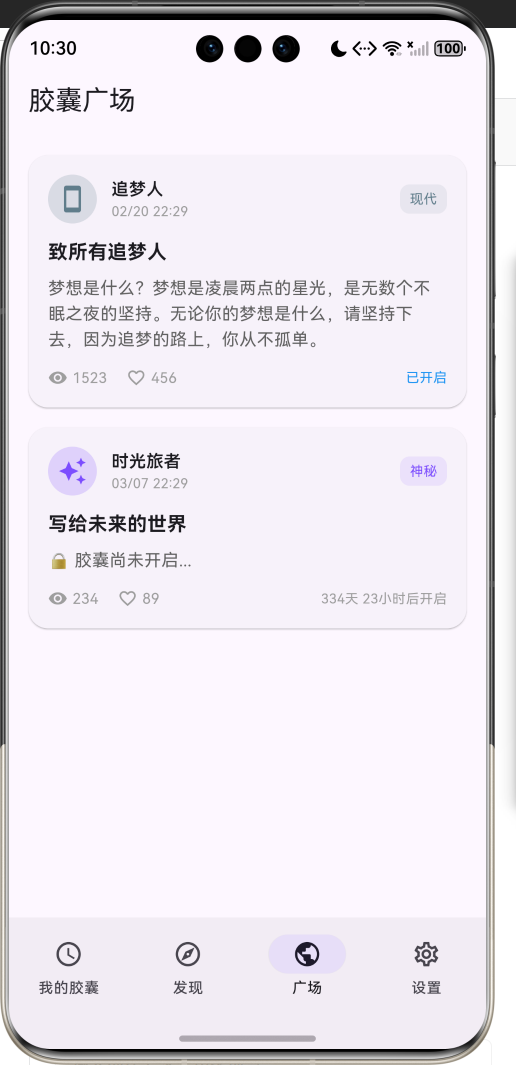
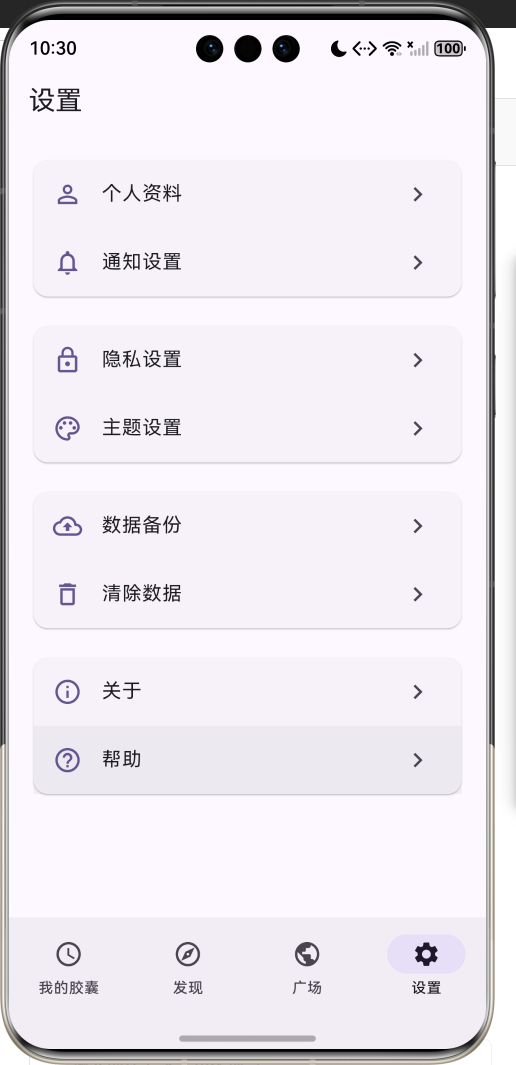
1.1 应用简介
时间胶囊应用是一款专注于情感寄托与时间记录的社交类应用,旨在帮助用户给未来的自己或陌生人写一封信,设定开启时间,待时光流转,胶囊开启的那一刻,便是与过去对话的开始。应用以紫色为主色调,营造神秘而温馨的时间胶囊氛围。
应用涵盖了给自己、给陌生人、给朋友、公开胶囊四大类型,支持经典、现代、浪漫、神秘、自然五种主题风格。通过胶囊创建、状态管理、陌生人交换、公开广场等模块,帮助用户记录此刻心声,期待未来重逢。
1.2 核心功能
| 功能模块 | 功能描述 | 实现方式 |
|---|---|---|
| 我的胶囊 | 管理个人创建的所有时间胶囊 | 列表+状态标签 |
| 发现胶囊 | 与陌生人交换时间胶囊 | 随机匹配机制 |
| 公开广场 | 浏览公开的时间胶囊 | 瀑布流展示 |
| 设置中心 | 个性化配置与提醒设置 | 开关选项 |
| 胶囊创建 | 创建新的时间胶囊 | 底部弹窗表单 |
| 胶囊开启 | 开启已到期的时间胶囊 | 动画展示 |
1.3 胶囊类型
| 序号 | 类型名称 | 特点描述 | 适用场景 |
|---|---|---|---|
| 1 | 给自己 | 写给未来的自己 | 自我对话、目标记录 |
| 2 | 给陌生人 | 随机交换给陌生人 | 匿名交流、惊喜体验 |
| 3 | 给朋友 | 分享给指定好友 | 情感传递、节日祝福 |
| 4 | 公开胶囊 | 所有人可见 | 故事分享、经验传承 |
1.4 技术栈
| 技术领域 | 技术选型 | 版本要求 |
|---|---|---|
| 开发框架 | Flutter | >= 3.0.0 |
| 编程语言 | Dart | >= 2.17.0 |
| 设计规范 | Material Design 3 | - |
| 状态管理 | setState + Timer | - |
| 目标平台 | 鸿蒙OS / Web | API 21+ |
1.5 项目结构
lib/
└── main_time_capsule.dart
    ├── TimeCapsuleApp          # 应用入口
    ├── TimeCapsule             # 胶囊数据模型
    ├── CapsuleType             # 胶囊类型枚举
    ├── CapsuleTheme            # 胶囊主题枚举
    ├── CapsuleStatus           # 胶囊状态枚举
    ├── MainPage                # 主页面(底部导航)
    ├── MyCapsulesPage          # 我的胶囊页面
    ├── DiscoverPage            # 发现胶囊页面
    ├── PublicSquarePage        # 公开广场页面
    └── SettingsPage            # 设置页面
二、系统架构
2.1 整体架构图
2.2 类图设计
2.3 页面导航流程
2.4 数据流向图
三、核心模块设计
3.1 数据模型设计
3.1.1 胶囊模型 (TimeCapsule)
class TimeCapsule {
  final String id;              // 唯一标识
  final String title;           // 胶囊标题
  final String content;         // 胶囊内容
  final CapsuleType type;       // 胶囊类型
  final CapsuleTheme theme;     // 胶囊主题
  final DateTime createdAt;     // 创建时间
  final DateTime openAt;        // 开启时间
  final bool isOpened;          // 是否已开启
  final DateTime? openedAt;     // 开启时间
  final String? fromUser;       // 发送者
  final String? toUser;         // 接收者
  final int viewCount;          // 浏览次数
  final int likeCount;          // 点赞次数
}
3.1.2 胶囊类型枚举 (CapsuleType)
enum CapsuleType {
  self('给自己', Icons.person, Color(0xFF7C4DFF), '写给未来的自己'),
  stranger('给陌生人', Icons.people, Color(0xFF00BCD4), '随机交换给陌生人'),
  friend('给朋友', Icons.favorite, Color(0xFFE91E63), '分享给指定好友'),
  public('公开胶囊', Icons.public, Color(0xFF4CAF50), '所有人可见');

  final String label;
  final IconData icon;
  final Color color;
  final String description;
}
3.1.3 胶囊状态枚举 (CapsuleStatus)
enum CapsuleStatus {
  sealed('封存中', Icons.lock, Color(0xFF9E9E9E)),
  ready('可开启', Icons.lock_open, Color(0xFF4CAF50)),
  opened('已开启', Icons.drafts, Color(0xFF2196F3));

  final String label;
  final IconData icon;
  final Color color;
}
3.1.4 胶囊状态分布
3.2 页面结构设计
3.2.1 主页面布局
3.2.2 我的胶囊页面结构
3.2.3 胶囊详情弹窗结构
3.3 状态计算设计
3.4 陌生人匹配机制
四、UI设计规范
4.1 配色方案
应用采用紫色为主色调,营造神秘而温馨的时间胶囊氛围:
| 颜色类型 | 色值 | 用途 |
|---|---|---|
| 主色 | #6750A4 (Purple) | 导航、强调元素 |
| 渐变起始 | #7C4DFF (Deep Purple) | 头部渐变 |
| 渐变结束 | #6750A4 (Purple) | 头部渐变 |
| 类型-自己 | #7C4DFF | 给自己胶囊 |
| 类型-陌生人 | #00BCD4 | 给陌生人胶囊 |
| 类型-朋友 | #E91E63 | 给朋友胶囊 |
| 类型-公开 | #4CAF50 | 公开胶囊 |
| 状态-封存 | #9E9E9E | 封存中状态 |
| 状态-可开启 | #4CAF50 | 可开启状态 |
| 状态-已开启 | #2196F3 | 已开启状态 |
4.2 字体规范
| 元素 | 字号 | 字重 | 颜色 |
|---|---|---|---|
| 页面标题 | 24px | Bold | #000000 |
| 胶囊标题 | 16px | Medium | #000000 |
| 胶囊内容 | 14px | Regular | #424242 |
| 状态标签 | 12px | Medium | 对应状态色 |
| 剩余时间 | 13px | Regular | #757575 |
| 统计数字 | 20px | Bold | 主色 |
4.3 组件规范
4.3.1 胶囊卡片
┌─────────────────────────────────────────────────┐
│ ┌────┐  给未来的一封信                    封存中 │
│ │ 📬 │  创建于 2024-01-15                      │
│ │    │  将于 2025-01-15 开启                   │
│ └────┘  剩余 365 天                       >     │
└─────────────────────────────────────────────────┘
4.3.2 状态标签
┌─────────────┐   ┌─────────────┐   ┌─────────────┐
│  🔒 封存中   │   │  🔓 可开启   │   │  📩 已开启   │
└─────────────┘   └─────────────┘   └─────────────┘
     灰色              绿色              蓝色
4.3.3 创建表单
┌─────────────────────────────────────────────────┐
│              创建时间胶囊                    ✕   │
├─────────────────────────────────────────────────┤
│                                                 │
│  胶囊标题                                        │
│  ┌─────────────────────────────────────────┐   │
│  │ 给未来的一封信                            │   │
│  └─────────────────────────────────────────┘   │
│                                                 │
│  胶囊内容                                        │
│  ┌─────────────────────────────────────────┐   │
│  │                                          │   │
│  │  亲爱的未来的我...                        │   │
│  │                                          │   │
│  └─────────────────────────────────────────┘   │
│                                                 │
│  胶囊类型                                        │
│  [给自己] [给陌生人] [给朋友] [公开]            │
│                                                 │
│  开启时间                                        │
│  ┌─────────────────────────────────────────┐   │
│  │ 2025-01-15                              │   │
│  └─────────────────────────────────────────┘   │
│                                                 │
│         ┌─────────────────────────┐            │
│         │       创建胶囊          │            │
│         └─────────────────────────┘            │
└─────────────────────────────────────────────────┘
五、核心功能实现
5.1 状态计算实现
CapsuleStatus get status {
  if (isOpened) return CapsuleStatus.opened;
  if (DateTime.now().isAfter(openAt)) return CapsuleStatus.ready;
  return CapsuleStatus.sealed;
}

bool get canOpen => DateTime.now().isAfter(openAt) && !isOpened;
5.2 剩余时间计算实现
String get remainingTime {
  final diff = openAt.difference(DateTime.now());
  if (diff.isNegative) return '已可开启';

  if (diff.inDays > 0) {
    return '${diff.inDays}天${diff.inHours % 24}小时';
  } else if (diff.inHours > 0) {
    return '${diff.inHours}小时${diff.inMinutes % 60}分钟';
  } else if (diff.inMinutes > 0) {
    return '${diff.inMinutes}分钟';
  } else {
    return '${diff.inSeconds}秒';
  }
}
5.3 胶囊卡片实现
Widget _buildCapsuleCard(TimeCapsule capsule) {
  return Container(
    margin: const EdgeInsets.only(bottom: 12),
    decoration: BoxDecoration(
      color: Colors.white,
      borderRadius: BorderRadius.circular(16),
      boxShadow: [
        BoxShadow(
          color: Colors.black.withValues(alpha: 0.05),
          blurRadius: 10,
        ),
      ],
    ),
    child: ListTile(
      leading: Container(
        width: 48,
        height: 48,
        decoration: BoxDecoration(
          color: capsule.theme.color.withValues(alpha: 0.1),
          borderRadius: BorderRadius.circular(12),
        ),
        child: Icon(capsule.type.icon, color: capsule.theme.color),
      ),
      title: Text(capsule.title, style: TextStyle(fontWeight: FontWeight.w500)),
      subtitle: Column(
        crossAxisAlignment: CrossAxisAlignment.start,
        children: [
          Text('创建于 ${_formatDate(capsule.createdAt)}'),
          Text('剩余 ${capsule.remainingTime}'),
        ],
      ),
      trailing: _buildStatusChip(capsule.status),
      onTap: () => _showCapsuleDetail(capsule),
    ),
  );
}
5.4 创建表单实现
void _showCreateCapsuleSheet() {
  showModalBottomSheet(
    context: context,
    isScrollControlled: true,
    backgroundColor: Colors.transparent,
    builder: (context) => DraggableScrollableSheet(
      initialChildSize: 0.9,
      minChildSize: 0.5,
      maxChildSize: 0.95,
      builder: (context, scrollController) => Container(
        decoration: BoxDecoration(
          color: Colors.white,
          borderRadius: BorderRadius.vertical(top: Radius.circular(20)),
        ),
        child: SingleChildScrollView(
          controller: scrollController,
          child: Padding(
            padding: const EdgeInsets.all(20),
            child: Column(
              children: [
                Text('创建时间胶囊', style: TextStyle(fontSize: 20, fontWeight: FontWeight.bold)),
                TextField(
                  decoration: InputDecoration(
                    labelText: '胶囊标题',
                    border: OutlineInputBorder(),
                  ),
                ),
                TextField(
                  decoration: InputDecoration(
                    labelText: '胶囊内容',
                    border: OutlineInputBorder(),
                  ),
                  maxLines: 5,
                ),
                // 更多表单字段...
              ],
            ),
          ),
        ),
      ),
    ),
  );
}
5.5 开启动画实现
void _playOpenAnimation(TimeCapsule capsule) {
  showDialog(
    context: context,
    barrierDismissible: false,
    builder: (context) => StatefulBuilder(
      builder: (context, setDialogState) {
        return AlertDialog(
          content: Column(
            mainAxisSize: MainAxisSize.min,
            children: [
              AnimatedBuilder(
                animation: _animationController,
                builder: (context, child) {
                  return Transform.scale(
                    scale: 1.0 + _animationController.value * 0.2,
                    child: Icon(
                      Icons.mark_email_read,
                      size: 80,
                      color: capsule.theme.color,
                    ),
                  );
                },
              ),
              SizedBox(height: 20),
              Text('胶囊已开启!', style: TextStyle(fontSize: 18, fontWeight: FontWeight.bold)),
              SizedBox(height: 10),
              Text(capsule.content),
            ],
          ),
          actions: [
            TextButton(
              onPressed: () => Navigator.pop(context),
              child: Text('关闭'),
            ),
          ],
        );
      },
    ),
  );

  _animationController.forward();
}
5.6 定时刷新实现
void initState() {
super.initState();
_startTimer();
}
void _startTimer() {
_timer = Timer.periodic(const Duration(seconds: 1), (_) {
if (mounted) setState(() {});
});
}
void dispose() {
_timer?.cancel();
super.dispose();
}
六、交互设计
6.1 胶囊创建流程
6.2 胶囊开启流程
6.3 陌生人匹配流程
七、扩展功能规划
7.1 后续版本规划
7.2 功能扩展建议
7.2.1 推送通知
提醒功能增强:
- 胶囊即将开启提醒
- 收到陌生人胶囊通知
- 公开胶囊被点赞通知
7.2.2 多媒体胶囊
内容形式扩展:
- 图片胶囊
- 语音胶囊
- 视频胶囊
7.2.3 社交功能
互动体验增强:
- 胶囊评论系统
- 关注好友功能
- 热门胶囊推荐
八、注意事项
8.1 开发注意事项
-
状态计算:胶囊状态通过getter动态计算,不存储
-
时间处理:使用DateTime进行时间比较和计算
-
定时刷新:使用Timer.periodic实现秒级刷新
-
底部表单:使用DraggableScrollableSheet实现可拖拽表单
8.2 常见问题
| 问题 | 原因 | 解决方案 |
|---|---|---|
| 倒计时不更新 | Timer未启动 | 在initState中启动Timer |
| 状态显示错误 | 计算逻辑错误 | 检查status getter逻辑 |
| 表单无法提交 | 验证未通过 | 检查必填字段验证 |
| 动画不播放 | Controller未初始化 | 初始化AnimationController |
8.3 使用提示
📬 时间胶囊使用指南 📬
创建胶囊:点击右下角浮动按钮,填写内容并设置开启时间。
等待开启:胶囊创建后进入封存状态,等待开启时间到来。
开启胶囊:当胶囊状态变为"可开启"时,点击即可查看内容。
交换胶囊:在发现页面可以与陌生人交换时间胶囊,体验未知的惊喜。
九、运行说明
9.1 环境要求
| 环境 | 版本要求 |
|---|---|
| Flutter SDK | >= 3.0.0 |
| Dart SDK | >= 2.17.0 |
| 鸿蒙OS | API 21+ |
9.2 运行命令
# 查看可用设备
flutter devices

# 运行到Web服务器
flutter run -d web-server -t lib/main_time_capsule.dart --web-port 8113

# 运行到鸿蒙设备
flutter run -d 127.0.0.1:5555 lib/main_time_capsule.dart

# 运行到Windows
flutter run -d windows -t lib/main_time_capsule.dart

# 代码分析
flutter analyze lib/main_time_capsule.dart
十、总结
时间胶囊应用通过情感化的设计理念,为用户提供了一个记录当下、期待未来的平台。应用涵盖了给自己、给陌生人、给朋友、公开胶囊四大类型,支持五种主题风格,帮助用户以独特的方式与未来的自己或他人对话。
核心功能涵盖胶囊创建、状态管理、陌生人交换、公开广场四大模块。胶囊创建支持标题、内容、类型、主题、开启时间的完整设置;状态管理通过动态计算实现封存中、可开启、已开启三种状态的实时展示;陌生人交换提供随机匹配机制,带来未知的惊喜;公开广场以瀑布流形式展示公开胶囊,支持点赞互动。
应用采用Material Design 3设计规范,以紫色为主色调,界面神秘而温馨。通过本应用,希望能够帮助用户记录此刻心声,在未来的某一天,收获一份来自过去的感动。
写给未来的信,等待时光的回响

作为“人工智能6S店”的官方数字引擎,为AI开发者与企业提供一个覆盖软硬件全栈、一站式门户。
更多推荐
 2
2 0
0- 0


 已为社区贡献2条内容

所有评论(0)