
Flutter 框架跨平台鸿蒙开发 - 密码管理器应用
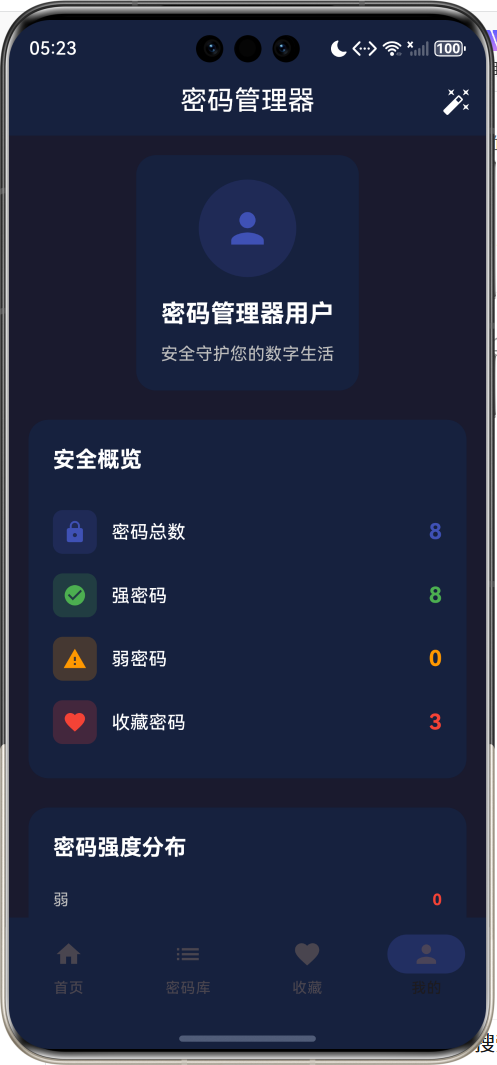
运行效果图密码管理器是一款安全便捷的密码存储与管理工具,旨在帮助用户安全地管理和保护各类账号密码。在数字化时代,每个人都需要管理数十甚至上百个账号密码,使用相同密码或简单密码会带来巨大的安全风险。本应用通过加密存储、密码强度检测、随机密码生成等功能,帮助用户建立良好的密码管理习惯,提升数字生活的安全性。密码安全是网络安全的第一道防线。弱密码、重复密码、明文存储密码等不良习惯是导致账号被盗的主要原因
密码管理器应用
欢迎加入开源鸿蒙跨平台社区:
https://openharmonycrossplatform.csdn.net
一、项目概述
运行效果图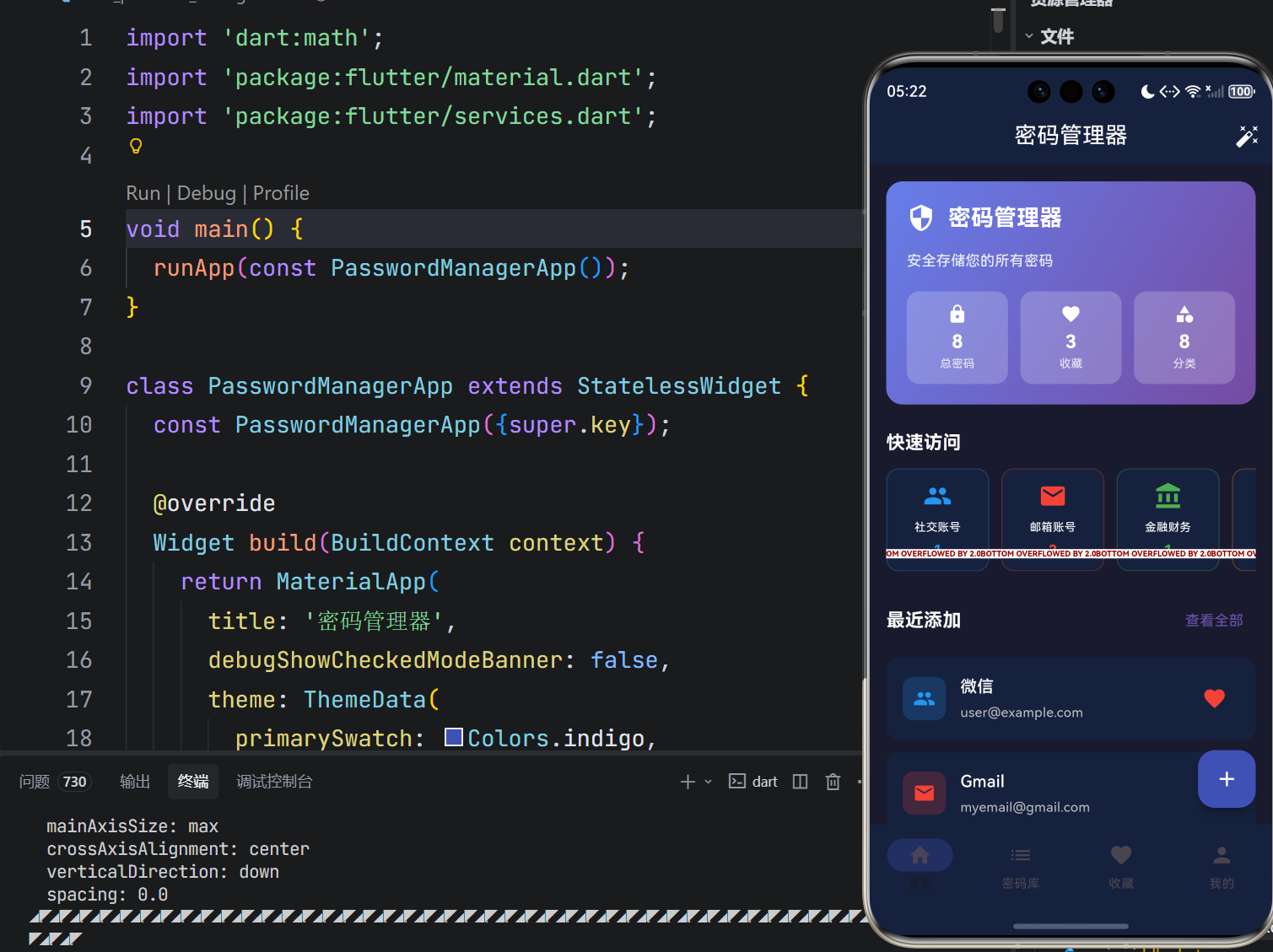
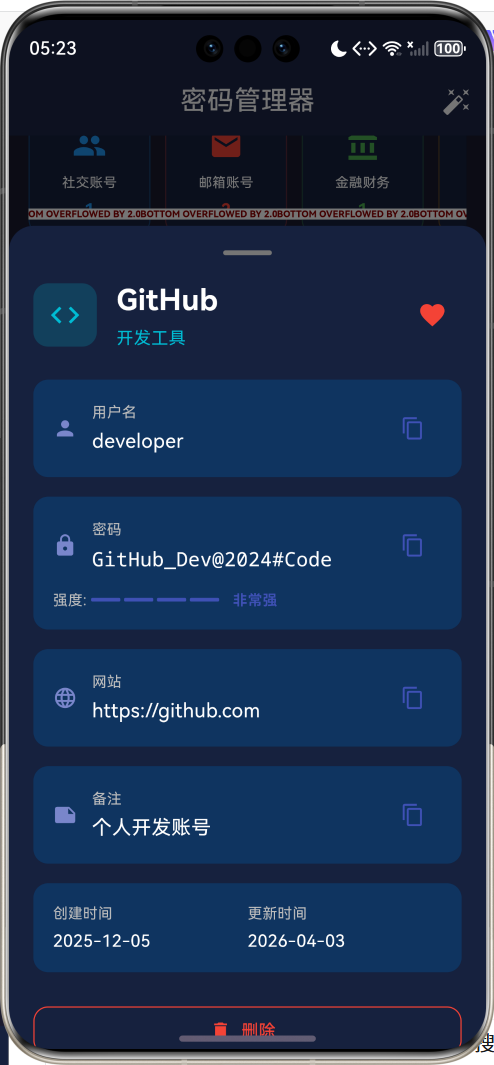
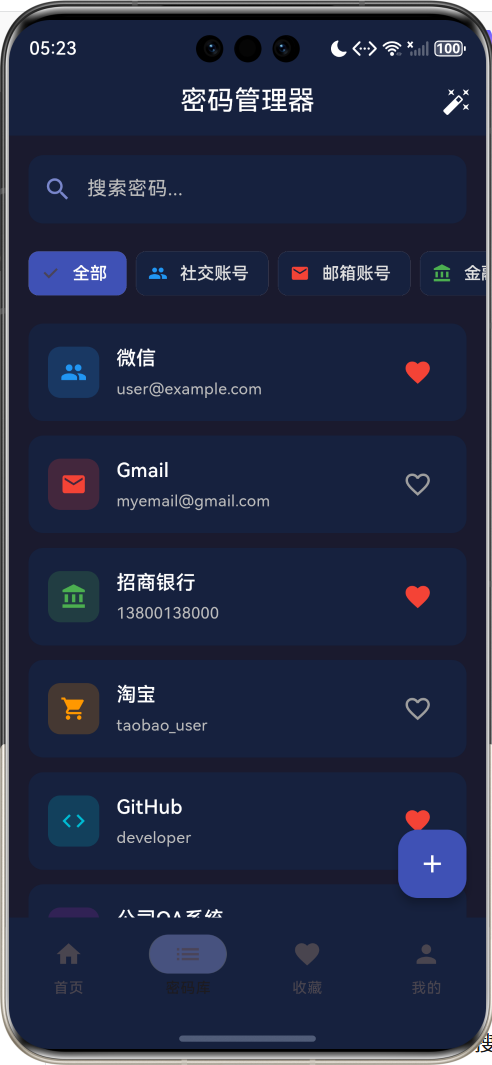
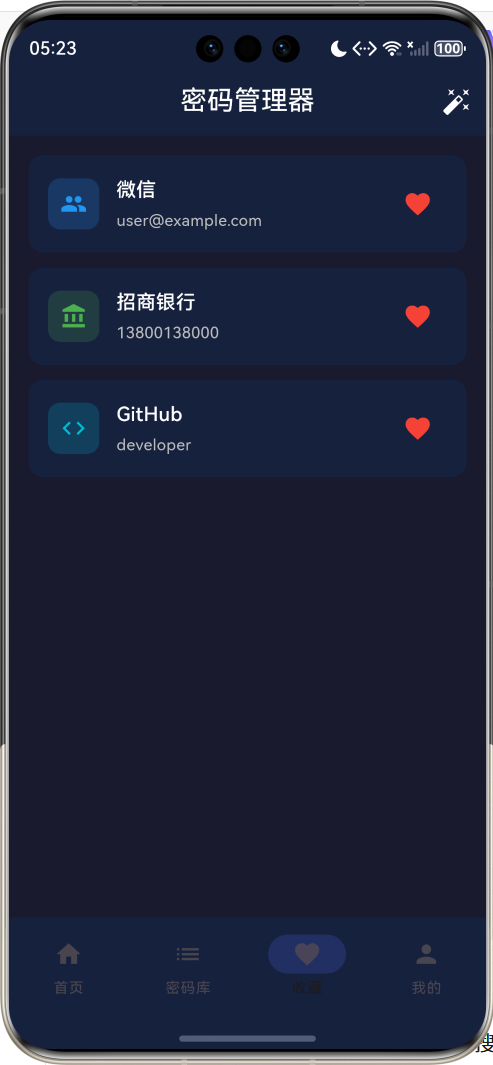
1.1 应用简介
密码管理器是一款安全便捷的密码存储与管理工具,旨在帮助用户安全地管理和保护各类账号密码。在数字化时代,每个人都需要管理数十甚至上百个账号密码,使用相同密码或简单密码会带来巨大的安全风险。本应用通过加密存储、密码强度检测、随机密码生成等功能,帮助用户建立良好的密码管理习惯,提升数字生活的安全性。
密码安全是网络安全的第一道防线。弱密码、重复密码、明文存储密码等不良习惯是导致账号被盗的主要原因。本应用采用本地存储方式,确保密码数据不会上传到云端,从根本上杜绝数据泄露风险。同时提供密码强度评估、安全建议等功能,帮助用户持续改进密码安全状况。
1.2 核心功能
| 功能模块 | 功能描述 | 实现方式 |
|---|---|---|
| 密码存储 | 安全存储账号密码信息 | 本地数据模型 |
| 密码生成 | 随机生成高强度密码 | Random.secure() |
| 强度检测 | 评估密码安全等级 | 正则表达式分析 |
| 分类管理 | 按类型组织密码条目 | 枚举分类 + 筛选 |
| 收藏功能 | 快速访问重要密码 | Set集合管理 |
| 一键复制 | 快速复制账号密码 | Clipboard API |
| 安全概览 | 统计密码安全状况 | 数据分析 + 可视化 |
1.3 密码分类
| 分类 | 英文标识 | 图标 | 颜色 | 典型应用 |
|---|---|---|---|---|
| 社交账号 | social | people | 蓝色 | 微信、QQ、微博 |
| 邮箱账号 | 红色 | Gmail、Outlook、QQ邮箱 | ||
| 金融财务 | finance | account_balance | 绿色 | 银行、支付宝、证券 |
| 购物网站 | shopping | shopping_cart | 橙色 | 淘宝、京东、拼多多 |
| 工作相关 | work | work | 紫色 | OA系统、企业邮箱 |
| 娱乐休闲 | entertainment | movie | 粉色 | Netflix、Steam、游戏 |
| 开发工具 | development | code | 青色 | GitHub、GitLab、服务器 |
| 其他 | other | folder | 灰色 | 其他类型账号 |
1.4 密码强度等级
| 等级 | 英文标识 | 颜色 | 评分 | 判定标准 |
|---|---|---|---|---|
| 弱 | weak | 红色 | 1 | 长度<6或评分≤2 |
| 中等 | medium | 橙色 | 2 | 评分3-4 |
| 强 | strong | 绿色 | 3 | 评分5 |
| 非常强 | veryStrong | 靛蓝色 | 4 | 评分≥6 |
1.5 技术栈
| 技术领域 | 技术选型 | 版本要求 |
|---|---|---|
| 开发框架 | Flutter | >= 3.0.0 |
| 编程语言 | Dart | >= 2.17.0 |
| 设计规范 | Material Design 3 | - |
| 状态管理 | setState | - |
| 目标平台 | 鸿蒙OS | API 21+ |
1.6 项目结构
lib/
└── main_password_manager.dart
    ├── PasswordManagerApp         # 应用入口
    ├── PasswordCategory           # 密码分类枚举
    ├── PasswordStrength           # 密码强度枚举
    ├── PasswordEntry              # 密码条目模型
    ├── HomePage                   # 主页面
    │   ├── _buildHomePage()       # 首页
    │   ├── _buildListPage()       # 密码库页
    │   ├── _buildFavoritesPage()  # 收藏页
    │   └── _buildProfilePage()    # 个人中心
    └── 辅助方法
二、系统架构
2.1 整体架构图
2.2 类图设计
2.3 数据流程图
2.4 密码生成流程
三、核心模块设计
3.1 数据模型设计
3.1.1 密码条目模型 (PasswordEntry)
class PasswordEntry {
  final String id;                    // 唯一标识
  final String title;                 // 标题
  final String username;              // 用户名
  final String password;              // 密码
  final String website;               // 网站地址
  final String notes;                 // 备注
  final PasswordCategory category;    // 分类
  final DateTime createdAt;           // 创建时间
  final DateTime updatedAt;           // 更新时间
  final bool isFavorite;              // 是否收藏
}
3.1.2 密码分类枚举 (PasswordCategory)
| 分类 | 英文标识 | 图标 | 颜色 | 安全等级 |
|---|---|---|---|---|
| 社交账号 | social | people | 蓝色 | 中等 |
| 邮箱账号 | 红色 | 高 | ||
| 金融财务 | finance | account_balance | 绿色 | 极高 |
| 购物网站 | shopping | shopping_cart | 橙色 | 中等 |
| 工作相关 | work | work | 紫色 | 高 |
| 娱乐休闲 | entertainment | movie | 粉色 | 低 |
| 开发工具 | development | code | 青色 | 高 |
| 其他 | other | folder | 灰色 | 中等 |
3.1.3 密码强度枚举 (PasswordStrength)
| 等级 | 英文标识 | 颜色 | 评分 | 特征 |
|---|---|---|---|---|
| 弱 | weak | 红色 | 1 | 纯数字、纯字母、长度<6 |
| 中等 | medium | 橙色 | 2 | 字母+数字、长度6-8 |
| 强 | strong | 绿色 | 3 | 大小写+数字、长度8-12 |
| 非常强 | veryStrong | 靛蓝色 | 4 | 大小写+数字+符号、长度≥12 |
3.2 页面结构设计
3.2.1 首页模块
3.2.2 密码库页面
3.2.3 密码生成器
3.2.4 密码详情页
┌─────────────────────────────────────────────────┐
│ ─────────────────────────────────────────────── │
│                    ●                            │
│                                                 │
│ ┌────┐                                          │
│ │ 🔒 │  微信                          [❤️]     │
│ └────┘  社交账号                               │
│                                                 │
│ ───────────────────────────────────────────────│
│                                                 │
│ ┌───────────────────────────────────────────┐  │
│ │ 👤 用户名                          [复制] │  │
│ │ user@example.com                         │  │
│ └───────────────────────────────────────────┘  │
│                                                 │
│ ┌───────────────────────────────────────────┐  │
│ │ 🔒 密码                            [复制] │  │
│ │ WeChat@2024#Secure                       │  │
│ │ ──────────────────────────────────────── │  │
│ │ 强度: ████░ 强                           │  │
│ └───────────────────────────────────────────┘  │
│                                                 │
│ ┌───────────────────────────────────────────┐  │
│ │ 🌐 网站                            [复制] │  │
│ │ https://weixin.qq.com                    │  │
│ └───────────────────────────────────────────┘  │
│                                                 │
│ ┌───────────────────────────────────────────┐  │
│ │ 创建时间        更新时间                   │  │
│ │ 2024-01-01      2024-01-25               │  │
│ └───────────────────────────────────────────┘  │
│                                                 │
│ [🗑️ 删除]                                      │
│                                                 │
└─────────────────────────────────────────────────┘
3.3 状态管理
3.3.1 核心状态变量
class _HomePageState extends State<HomePage> {
  // 导航状态
  int _currentIndex = 0;

  // 数据状态
  final List<PasswordEntry> _passwords = [];
  final Set<String> _favorites = {};

  // 筛选状态
  PasswordCategory? _selectedCategory;
  String _searchQuery = '';

  // 表单控制器
  final TextEditingController _titleController = TextEditingController();
  final TextEditingController _usernameController = TextEditingController();
  final TextEditingController _passwordController = TextEditingController();
  final TextEditingController _websiteController = TextEditingController();
  final TextEditingController _notesController = TextEditingController();
  PasswordCategory _selectedCategoryForAdd = PasswordCategory.other;

  // 随机数生成器
  final Random _random = Random.secure();
}
3.3.2 筛选逻辑
List<PasswordEntry> get _filteredPasswords {
  var passwords = _passwords;

  // 分类筛选
  if (_selectedCategory != null) {
    passwords = passwords.where((p) => p.category == _selectedCategory).toList();
  }

  // 搜索筛选
  if (_searchQuery.isNotEmpty) {
    passwords = passwords.where((p) =>
        p.title.toLowerCase().contains(_searchQuery.toLowerCase()) ||
        p.username.toLowerCase().contains(_searchQuery.toLowerCase()) ||
        p.website.toLowerCase().contains(_searchQuery.toLowerCase())).toList();
  }

  return passwords;
}
四、UI设计规范
4.1 配色方案
应用采用深色主题设计,营造安全专业的氛围:
| 颜色类型 | 色值 | 用途 |
|---|---|---|
| 主色 | #3949AB (Indigo) | AppBar、按钮、强调元素 |
| 背景色 | #1A1A2E | 页面背景 |
| 卡片背景 | #16213E | 卡片、弹窗 |
| 输入框背景 | #0F3460 | 输入框、选择器 |
| 文字主色 | #FFFFFF | 主要文字 |
| 文字次色 | #B0BEC5 | 次要文字 |
分类专属颜色:
// 社交账号 - 蓝色
Colors.blue

// 邮箱账号 - 红色
Colors.red

// 金融财务 - 绿色
Colors.green

// 购物网站 - 橙色
Colors.orange

// 工作相关 - 紫色
Colors.purple

// 娱乐休闲 - 粉色
Colors.pink

// 开发工具 - 青色
Colors.cyan

// 其他 - 灰色
Colors.grey
4.2 字体规范
| 元素 | 字号 | 字重 | 颜色 |
|---|---|---|---|
| 详情页标题 | 24px | Bold | #FFFFFF |
| 列表标题 | 16px | Medium | #FFFFFF |
| 章节标题 | 18px | Bold | #FFFFFF |
| 内容文本 | 15px | Regular | #B0BEC5 |
| 密码文本 | 16px | Regular | #FFFFFF (monospace) |
| 辅助信息 | 12px | Regular | #78909C |
4.3 组件规范
4.3.1 密码卡片
┌─────────────────────────────────────────────────┐
│ ┌────┐  微信                          [❤️]     │
│ │ 👥 │  user@example.com                       │
│ └────┘                                          │
└─────────────────────────────────────────────────┘
4.3.2 密码强度指示器
弱密码:   █░░░ 弱
中等密码: ██░░ 中等
强密码:   ███░ 强
非常强:   ████ 非常强
4.3.3 分类选择器
Wrap(
  spacing: 8,
  runSpacing: 8,
  children: PasswordCategory.values.map((category) {
    return FilterChip(
      selected: isSelected,
      label: Text(category.categoryName),
      avatar: Icon(category.categoryIcon),
      selectedColor: category.categoryColor,
      onSelected: (_) { /* 选择逻辑 */ },
    );
  }).toList(),
)
五、核心功能实现
5.1 密码生成
String _generatePassword({
  int length = 16,
  bool includeLowercase = true,
  bool includeUppercase = true,
  bool includeNumbers = true,
  bool includeSymbols = true,
}) {
  const lowercase = 'abcdefghijklmnopqrstuvwxyz';
  const uppercase = 'ABCDEFGHIJKLMNOPQRSTUVWXYZ';
  const numbers = '0123456789';
  const symbols = '!@#\$%^&*(),.?":{}|<>';

  String chars = '';
  if (includeLowercase) chars += lowercase;
  if (includeUppercase) chars += uppercase;
  if (includeNumbers) chars += numbers;
  if (includeSymbols) chars += symbols;

  if (chars.isEmpty) chars = lowercase;

  return List.generate(
    length,
    (_) => chars[_random.nextInt(chars.length)]
  ).join();
}
5.2 密码强度检测
static PasswordStrength _calculateStrength(String password) {
  if (password.length < 6) return PasswordStrength.weak;

  int score = 0;

  if (password.length >= 8) score++;
  if (password.length >= 12) score++;
  if (RegExp(r'[a-z]').hasMatch(password)) score++;
  if (RegExp(r'[A-Z]').hasMatch(password)) score++;
  if (RegExp(r'[0-9]').hasMatch(password)) score++;
  if (RegExp(r'[!@#$%^&*(),.?":{}|<>]').hasMatch(password)) score++;

  if (score <= 2) return PasswordStrength.weak;
  if (score <= 4) return PasswordStrength.medium;
  if (score <= 5) return PasswordStrength.strong;
  return PasswordStrength.veryStrong;
}
5.3 收藏功能
void _toggleFavorite(String id) {
  setState(() {
    if (_favorites.contains(id)) {
      _favorites.remove(id);
    } else {
      _favorites.add(id);
    }
  });
}

List<PasswordEntry> get _favoritePasswords {
  return _passwords.where((p) => _favorites.contains(p.id)).toList();
}
5.4 剪贴板操作
void _copyToClipboard(String text, String label) {
  Clipboard.setData(ClipboardData(text: text));
  ScaffoldMessenger.of(context).showSnackBar(
    SnackBar(content: Text('$label 已复制到剪贴板')),
  );
}
5.5 添加密码
void _addPassword() {
  if (_titleController.text.isEmpty ||
      _usernameController.text.isEmpty ||
      _passwordController.text.isEmpty) {
    ScaffoldMessenger.of(context).showSnackBar(
      const SnackBar(content: Text('请填写必填项')),
    );
    return;
  }

  setState(() {
    _passwords.add(PasswordEntry(
      id: DateTime.now().millisecondsSinceEpoch.toString(),
      title: _titleController.text,
      username: _usernameController.text,
      password: _passwordController.text,
      website: _websiteController.text,
      notes: _notesController.text,
      category: _selectedCategoryForAdd,
      createdAt: DateTime.now(),
      updatedAt: DateTime.now(),
    ));
  });

  Navigator.pop(context);
  _clearControllers();
}
六、安全特性
6.1 密码安全建议
| 建议 | 说明 | 重要性 |
|---|---|---|
| 使用强密码 | 至少12位,包含大小写字母、数字、符号 | ★★★★★ |
| 避免重复 | 不同账号使用不同密码 | ★★★★★ |
| 定期更换 | 每3-6个月更换重要密码 | ★★★★☆ |
| 启用2FA | 为重要账号启用双因素认证 | ★★★★★ |
| 警惕钓鱼 | 不在可疑网站输入密码 | ★★★★☆ |
6.2 密码强度评分规则
6.3 安全最佳实践
// 使用安全随机数生成器
final Random _random = Random.secure();

// 避免使用可预测的随机数
// 错误示例: Random() // 使用默认种子,可预测

// 正确示例: Random.secure() // 使用加密安全的随机源
七、预置数据
7.1 示例密码条目
| 序号 | 标题 | 分类 | 用户名 | 密码强度 |
|---|---|---|---|---|
| 1 | 微信 | 社交账号 | user@example.com | 非常强 |
| 2 | Gmail | 邮箱账号 | myemail@gmail.com | 中等 |
| 3 | 招商银行 | 金融财务 | 13800138000 | 强 |
| 4 | 淘宝 | 购物网站 | taobao_user | 中等 |
| 5 | GitHub | 开发工具 | developer | 非常强 |
| 6 | 公司OA系统 | 工作相关 | employee001 | 强 |
| 7 | Netflix | 娱乐休闲 | netflix_user@email.com | 强 |
| 8 | QQ邮箱 | 邮箱账号 | 123456789 | 中等 |
八、扩展功能规划
8.1 后续版本规划
8.2 功能扩展建议
8.2.1 数据加密
使用AES加密存储密码:
- 主密码派生加密密钥
- PBKDF2密钥派生函数
- 本地安全存储
8.2.2 生物识别
集成指纹/面容解锁:
- local_auth插件
- 快速解锁体验
- 安全验证机制
8.2.3 数据同步
安全的云端同步:
- 端到端加密
- 多设备同步
- 冲突解决机制
九、注意事项
9.1 开发注意事项
-
安全随机数:使用
Random.secure()而非Random() -
密码显示:默认隐藏密码,点击显示
-
剪贴板清理:考虑定时清理剪贴板中的密码
-
数据持久化:生产环境需实现加密本地存储
9.2 常见问题
| 问题 | 原因 | 解决方案 |
|---|---|---|
| 枚举属性未定义 | 缺少Extension | 添加对应的Extension扩展 |
| Set没有size属性 | API混淆 | 使用length属性 |
| 密码强度计算错误 | 正则表达式问题 | 检查正则模式 |
| 剪贴板复制失败 | 权限问题 | 检查系统权限 |
9.3 安全提示
⚠️ 重要提示 ⚠️
本应用为演示版本,密码数据仅存储在内存中。
生产环境请实现加密存储和安全认证机制。
切勿在不安全的环境下存储敏感密码信息。
十、运行说明
10.1 环境要求
| 环境 | 版本要求 |
|---|---|
| Flutter SDK | >= 3.0.0 |
| Dart SDK | >= 2.17.0 |
| 鸿蒙OS | API 21+ |
10.2 运行命令
# 查看可用设备
flutter devices

# 运行到鸿蒙设备
flutter run -d 127.0.0.1:5555 lib/main_password_manager.dart

# 运行到Windows
flutter run -d windows -t lib/main_password_manager.dart

# 代码分析
flutter analyze lib/main_password_manager.dart
十一、总结
密码管理器通过安全的密码存储、智能的密码生成和全面的强度检测功能,为用户提供了一个便捷且安全的密码管理解决方案。应用采用深色主题设计,符合安全工具的专业定位;代码结构清晰,遵循Flutter最佳实践;数据模型设计合理,便于后续扩展加密存储等功能。
核心功能涵盖八大密码分类,从社交账号到金融财务,帮助用户系统化管理各类密码。密码强度检测功能通过多维度评估,帮助用户识别和改进弱密码。随机密码生成器支持自定义字符类型和长度,满足不同安全需求。
通过本应用,希望能够帮助用户建立良好的密码管理习惯,提升数字生活的安全性,让每一个账号都得到应有的保护。
安全密码,从管理开始

作为“人工智能6S店”的官方数字引擎,为AI开发者与企业提供一个覆盖软硬件全栈、一站式门户。
更多推荐


 9
9 0
0- 0


 已为社区贡献20条内容

所有评论(0)