
【Flutter for OpenHarmony第三方库】 Flutter for OpenHarmony第三方库:如何出现列表刷新加载
Flutter for OpenHarmony为开发者提供了在鸿蒙平台复用Flutter生态的技术方案。然而,平台差异带来的技术挑战需要开发者深入理解并妥善处理。本文将以列表刷新加载功能为切入点,介绍如何在OpenHarmony设备上实现稳定可靠的列表刷新加载功能。本文介绍了Flutter for OpenHarmony列表刷新加载功能的实现方法。实践证明,只要实现方式正确,Flutter for
[Flutter for OpenHarmony第三方库]如何出现列表刷新加载
欢迎加入开源鸿蒙跨平台社区:https://openharmonycrossplatform.csdn.net
前言
Flutter for OpenHarmony为开发者提供了在鸿蒙平台复用Flutter生态的技术方案。然而,平台差异带来的技术挑战需要开发者深入理解并妥善处理。本文将以列表刷新加载功能为切入点,介绍如何在OpenHarmony设备上实现稳定可靠的列表刷新加载功能。
一、技术难点分析
1.1 平台差异
Flutter for OpenHarmony在架构层面进行了大量适配工作,但平台差异仍然存在。网络权限配置方面,OpenHarmony需要在module.json5中配置ohos.permission.INTERNET权限,权限系统更加严格。UI渲染性能方面,OpenHarmony的图形渲染管线与Android存在差异,需要注重性能优化。生命周期管理方面,OpenHarmony的Ability生命周期与Android的Activity存在差异,需注意后台请求的处理。
1.2 传统方案局限
RefreshIndicator在部分OpenHarmony设备上存在稳定性问题,刷新指示器显示异常或回调不触发。滚动监听方案可能导致UI线程阻塞,引发卡顿。状态管理若缺乏清晰定义,容易产生状态冲突。
二、架构设计
2.1 状态机模型
列表刷新加载功能本质上是一个状态机,包含六种互斥状态:初始加载状态、数据展示状态、下拉刷新状态、上拉加载状态、加载完成状态、错误状态。实际实现中需确保状态变量组合合理,避免冲突。
2.2 分页策略
本项目采用偏移量分页,通过_start和_limit参数进行分页请求。相比页码分页,偏移量分页不受数据新增或删除影响,能有效避免数据重复或遗漏问题。
2.3 容错设计
网络请求设置30秒超时,针对不同类型DioException进行细分处理,并提供重试机制。
三、核心代码实现
3.1 数据模型
class TodoItem {
  final int userId;
  final int id;
  final String title;
  final bool completed;

  TodoItem({
    required this.userId,
    required this.id,
    required this.title,
    required this.completed,
  });

  factory TodoItem.fromJson(Map<String, dynamic> json) {
    return TodoItem(
      userId: json['userId'] as int,
      id: json['id'] as int,
      title: json['title'] as String,
      completed: json['completed'] as bool,
    );
  }
}
所有字段使用final修饰,采用不可变对象模式,避免并发问题和状态管理问题。
3.2 网络服务封装
class TodoService {
  static const String _baseUrl = 'https://jsonplaceholder.typicode.com';
  final Dio _dio = Dio(
    BaseOptions(
      connectTimeout: const Duration(seconds: 30),
      receiveTimeout: const Duration(seconds: 30),
      sendTimeout: const Duration(seconds: 30),
      headers: {
        'Content-Type': 'application/json',
        'Accept': 'application/json',
      },
    ),
  );

  Future<List<TodoItem>> getTodos({int start = 0, int limit = 20}) async {
    try {
      final response = await _dio.get(
        '$_baseUrl/todos',
        queryParameters: {'_start': start, '_limit': limit},
      );
      final List<dynamic> data = response.data;
      return data.map((json) => TodoItem.fromJson(json)).toList();
    } on DioException catch (e) {
      throw Exception(_handleError(e));
    }
  }

  String _handleError(DioException e) {
    switch (e.type) {
      case DioExceptionType.connectionTimeout:
        return 'Connection timeout';
      case DioExceptionType.sendTimeout:
        return 'Send timeout';
      case DioExceptionType.receiveTimeout:
        return 'Receive timeout';
      case DioExceptionType.badResponse:
        return 'Server error: ${e.response?.statusCode}';
      case DioExceptionType.cancel:
        return 'Request cancelled';
      case DioExceptionType.connectionError:
        return 'Connection error';
      default:
        return 'Unknown error: ${e.message}';
    }
  }
}
网络请求细节封装在服务层,业务代码只关心数据获取和处理。
3.3 状态管理
List<TodoItem> _todos = [];
bool _isLoading = true;
bool _isLoadingMore = false;
bool _hasMoreData = true;
bool _isRefreshing = false;
String? _errorMessage;
int _currentPage = 0;
static const int _pageSize = 20;
每个状态变量有明确用途,通过ScrollController监听滚动位置,当滚动到距离底部100像素时触发加载更多。
3.4 初始加载
Future<void> _loadInitialData() async {
  setState(() {
    _isLoading = true;
    _errorMessage = null;
    _currentPage = 0;
    _hasMoreData = true;
  });

  try {
    final todos = await _todoService.getTodos(start: 0, limit: _pageSize);
    setState(() {
      _todos = todos;
      _hasMoreData = todos.length >= _pageSize;
      _isLoading = false;
      _currentPage = 1;
    });
  } catch (e) {
    setState(() {
      _errorMessage = e.toString();
      _isLoading = false;
    });
  }
}
3.5 下拉刷新
Future<void> _onRefresh() async {
  setState(() {
    _isRefreshing = true;
    _errorMessage = null;
    _currentPage = 0;
    _hasMoreData = true;
  });

  try {
    final todos = await _todoService.getTodos(start: 0, limit: _pageSize);
    setState(() {
      _todos = todos;
      _hasMoreData = todos.length >= _pageSize;
      _currentPage = 1;
      _isRefreshing = false;
    });
  } catch (e) {
    setState(() {
      _errorMessage = e.toString();
      _isRefreshing = false;
    });
  }
}
3.6 上拉加载
Future<void> _onLoadMore() async {
  if (_isLoadingMore || !_hasMoreData) return;

  setState(() {
    _isLoadingMore = true;
  });

  try {
    final todos = await _todoService.getTodos(
      start: _currentPage * _pageSize,
      limit: _pageSize,
    );

    setState(() {
      if (todos.isEmpty) {
        _hasMoreData = false;
      } else {
        _todos.addAll(todos);
        _currentPage++;
        _hasMoreData = todos.length >= _pageSize;
      }
      _isLoadingMore = false;
    });
  } catch (e) {
    setState(() {
      _isLoadingMore = false;
    });
  }
}
方法开头判断两个条件避免重复加载,处理todos.isEmpty情况避免无效请求。
3.7 UI构建
Widget _buildBody() {
  if (_isLoading) {
    return _buildLoadingState();
  }

  if (_errorMessage != null && _todos.isEmpty) {
    return _buildErrorState();
  }

  if (_todos.isEmpty) {
    return _buildEmptyState();
  }

  return _buildRefreshView();
}
状态判断顺序确保每种状态都有对应UI,不会出现空白屏幕。
四、运行验证
4.1 构建部署
在OpenHarmony设备上运行Flutter应用,需配置开发环境、执行flutter build hap构建HAP包、通过DevEco Studio或hdc工具部署到设备。
4.2 运行截图
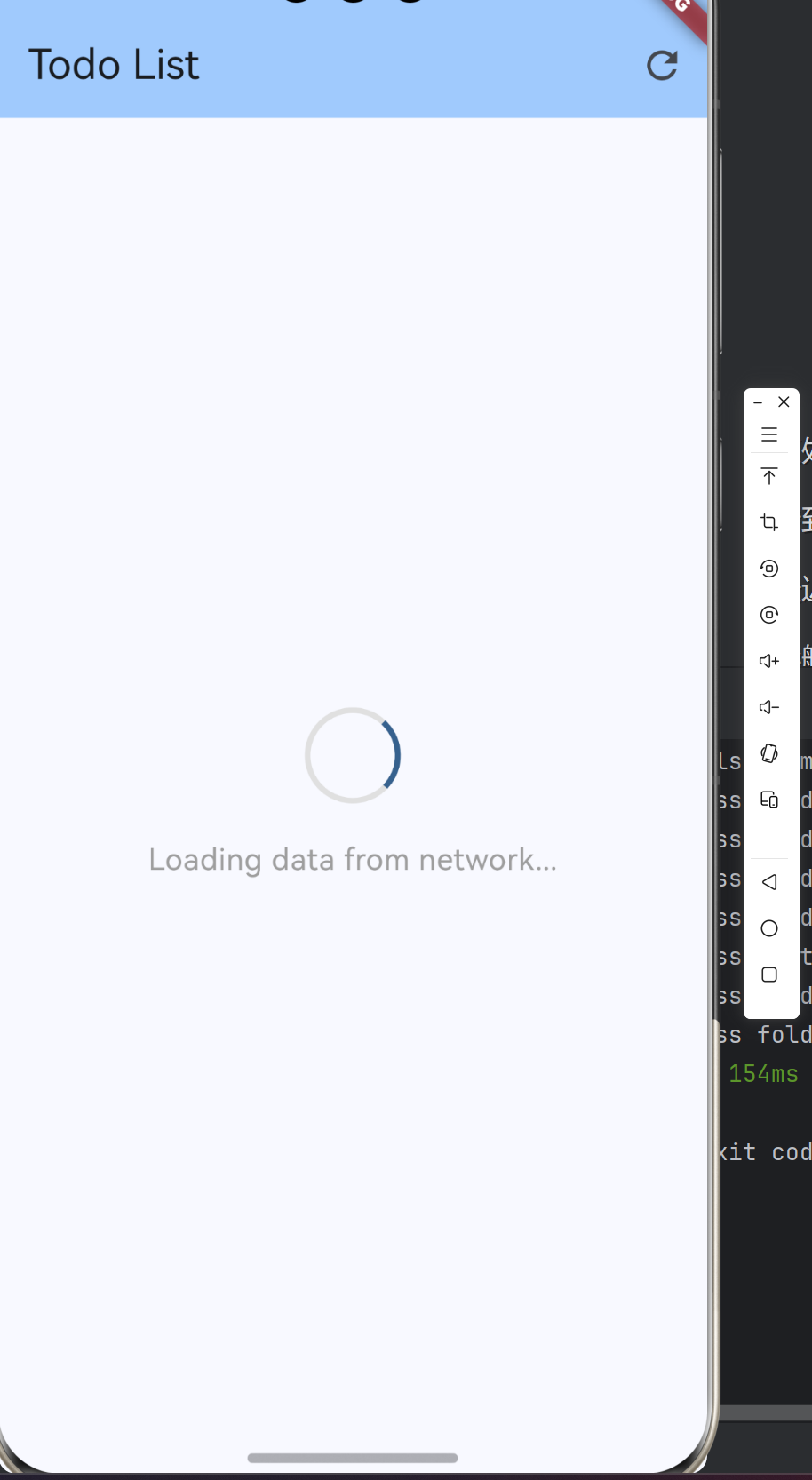
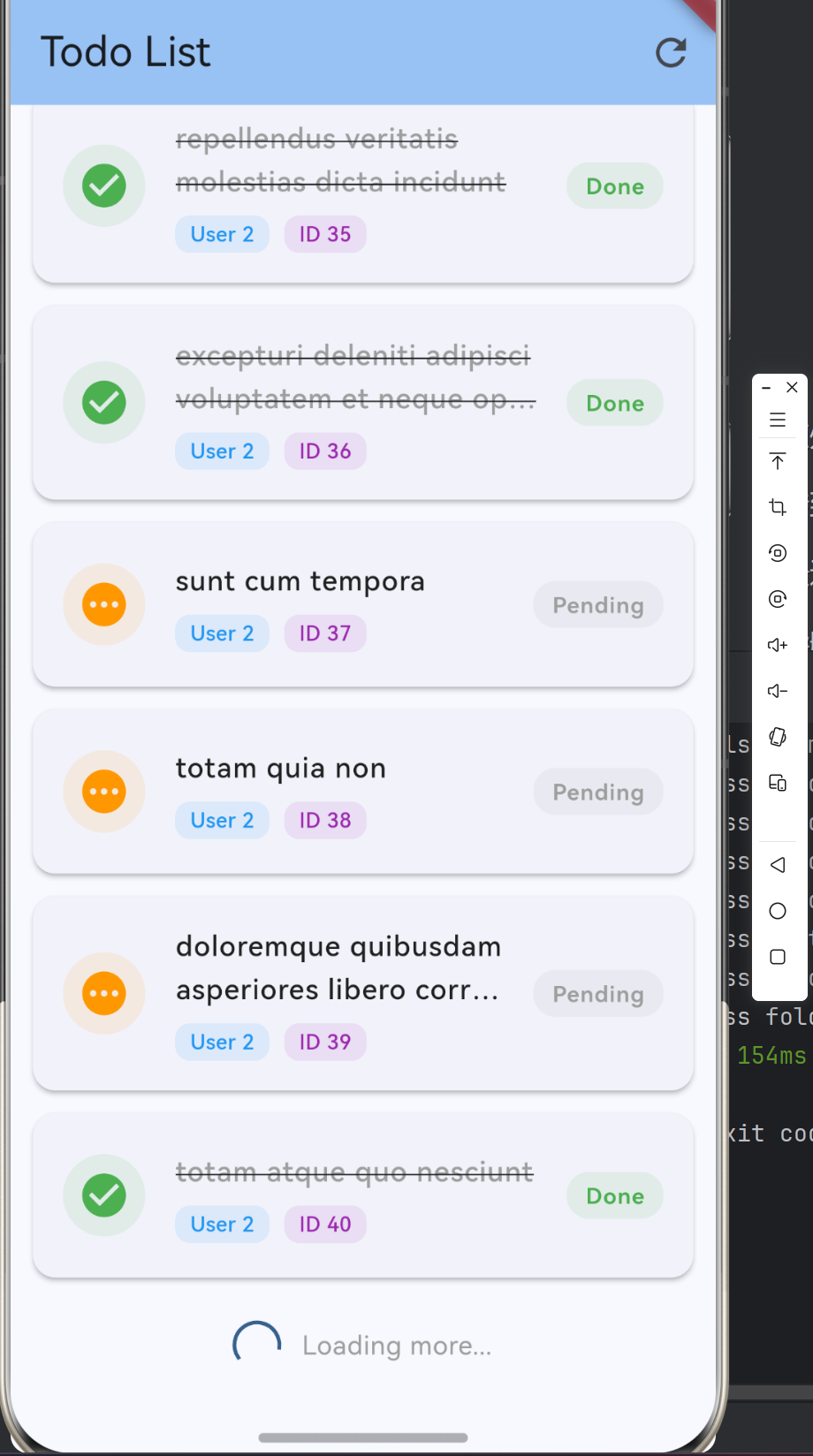
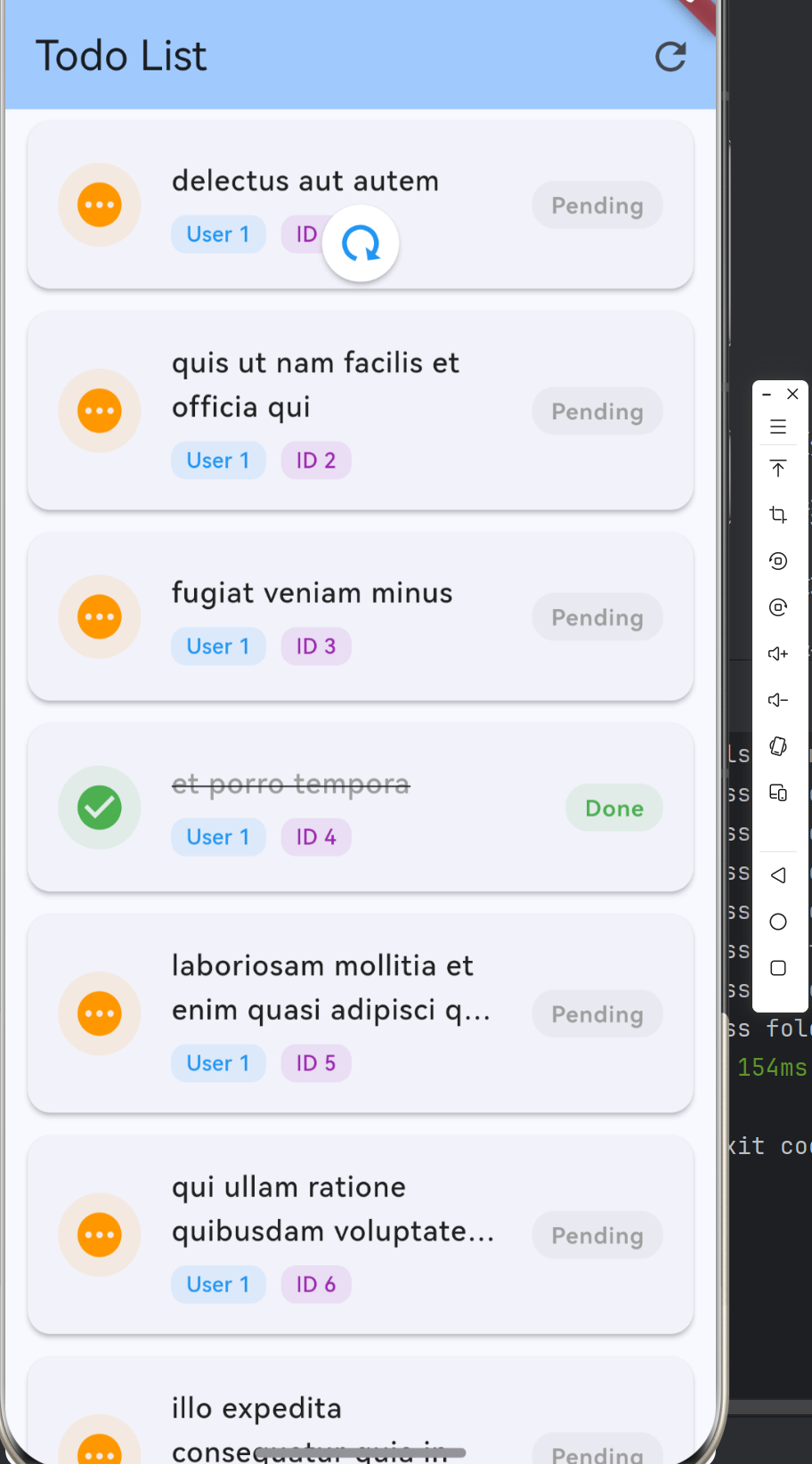
4.3 性能测试
| 测试项目 | 测试结果 |
|---|---|
| 初始加载时间 | WiFi环境下约1-2秒 |
| 列表滚动流畅度 | 流畅,无明显卡顿 |
| 刷新响应速度 | 响应及时 |
| 加载更多稳定性 | 触发准确,无重复加载 |
| 内存占用 | 稳定,无内存泄漏 |
五、常见问题
5.1 网络请求超时
OpenHarmony网络子系统与Android存在差异,DNS解析、TCP连接建立可能耗时更长。解决方案:延长超时时间至30秒,增加重试机制。
5.2 RefreshIndicator异常
OpenHarmony手势识别系统与Flutter预期存在差异。解决方案:设置physics: const AlwaysScrollableScrollPhysics(),添加刷新按钮作为备用入口。
5.3 列表滚动卡顿
itemBuilder函数不够轻量或未正确使用列表项复用机制。解决方案:确保itemBuilder函数轻量,考虑使用AutomaticKeepAliveClientMixin。
六、总结
本文介绍了Flutter for OpenHarmony列表刷新加载功能的实现方法。实践证明,只要实现方式正确,Flutter for OpenHarmony能够支撑功能完善、性能优良的列表应用。本文完整代码已托管至AtomGit平台(https://atomgit.com),欢迎开发者参考学习。

作为“人工智能6S店”的官方数字引擎,为AI开发者与企业提供一个覆盖软硬件全栈、一站式门户。
更多推荐

 0
0 0
0- 0


 已为社区贡献2条内容

所有评论(0)