
鸿蒙PC Electron 系统信息查看器 - 技术深度解析
欢迎加入开源鸿蒙PC社区:https://harmonypc.csdn.net/项目地址本 Demo 是一个基于 鸿蒙PC Electron 平台的系统信息查看器,展示了如何在鸿蒙操作系统上使用 Electron 框架开发桌面应用。该项目不仅是一个功能完整的系统信息展示工具,更是一个学习 Electron 开发的优秀范例。Electron 采用多进程架构,主要由以下进程组成:本项目的架构层次数据流
鸿蒙PC Electron 系统信息查看器 - 技术深度解析
欢迎加入开源鸿蒙PC社区:https://harmonypc.csdn.net/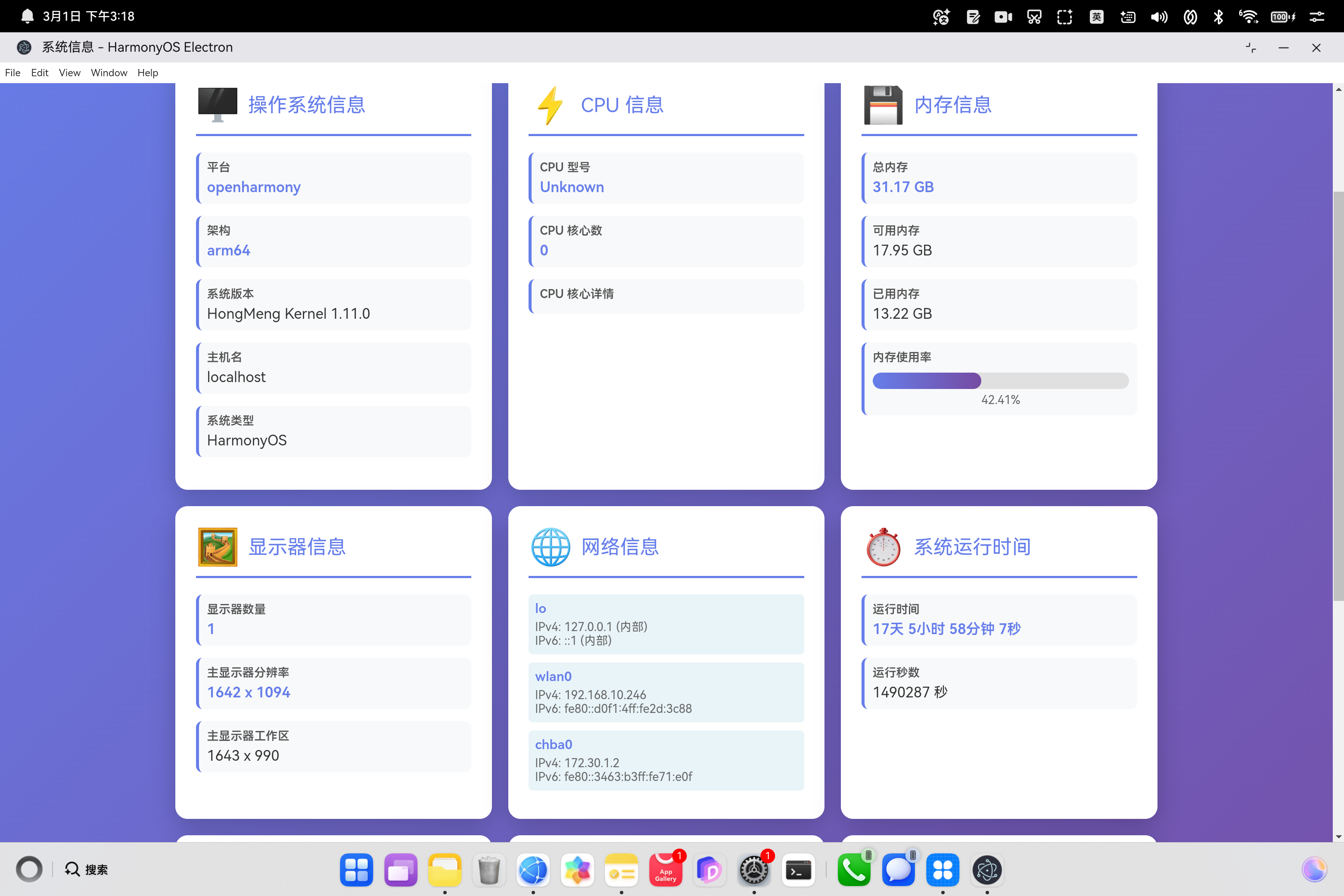
项目简介
本 Demo 是一个基于 鸿蒙PC Electron 平台的系统信息查看器,展示了如何在鸿蒙操作系统上使用 Electron 框架开发桌面应用。该项目不仅是一个功能完整的系统信息展示工具,更是一个学习 Electron 开发的优秀范例。
技术栈
- Electron 34: 跨平台桌面应用框架
- Node.js: JavaScript 运行时环境
- HarmonyOS NEXT: 华为鸿蒙操作系统 PC 版
- HTML5/CSS3/ES6+: 现代 Web 前端技术
- IPC (Inter-Process Communication): 进程间通信机制
应用场景
- 系统监控工具
- 开发调试辅助工具
- 硬件信息查询
- 性能分析工具
- 学习 Electron 开发的教学案例
架构设计
Electron 多进程架构
Electron 采用多进程架构,主要由以下进程组成:
┌─────────────────────────────────────┐
│         Main Process (主进程)        │
│  - Node.js 运行环境                  │
│  - 窗口管理                          │
│  - 系统级 API 访问                   │
│  - IPC 通信处理                      │
└──────────────┬──────────────────────┘
               │ IPC
               │
┌──────────────▼──────────────────────┐
│      Renderer Process (渲染进程)     │
│  - Chromium 渲染引擎                 │
│  - Web 页面显示                      │
│  - 用户界面交互                      │
│  - JavaScript 执行                   │
└─────────────────────────────────────┘
本项目的架构层次
┌─────────────────────────────────────────┐
│           Presentation Layer            │
│  (system-info.html - 用户界面)          │
├─────────────────────────────────────────┤
│         Communication Layer             │
│  (IPC - 进程间通信)                     │
├─────────────────────────────────────────┤
│          Business Logic Layer           │
│  (main.js - 信息收集与处理)             │
├─────────────────────────────────────────┤
│           System API Layer              │
│  (Electron APIs + Node.js os module)    │
├─────────────────────────────────────────┤
│         HarmonyOS Platform              │
│  (底层操作系统服务)                     │
└─────────────────────────────────────────┘
数据流向
用户点击刷新按钮
    ↓
渲染进程发送 IPC 请求
    ↓
主进程接收请求
    ↓
调用系统 API 收集信息
    ↓
格式化数据
    ↓
通过 IPC 返回结果
    ↓
渲染进程接收并渲染
    ↓
用户看到更新后的信息
核心技术实现
1. 主进程实现 (Main Process)
1.1 窗口管理
const { app, BrowserWindow } = require('electron');

function createWindow() {
    mainWindow = new BrowserWindow({
        width: 1200,
        height: 800,
        webPreferences: {
            nodeIntegration: true,      // 允许在渲染进程使用 Node.js
            contextIsolation: false    // 关闭上下文隔离(开发环境)
        }
    });
    mainWindow.setWindowButtonVisibility(true);
    mainWindow.loadFile('system-info.html');
}
技术要点:
- BrowserWindow: 创建应用窗口
- webPreferences: 配置渲染进程的安全选项
nodeIntegration: true: 允许在渲染进程使用 Node.js APIcontextIsolation: false: 关闭上下文隔离,方便开发(生产环境建议开启)
- setWindowButtonVisibility(true): 显示窗口控制按钮
1.2 IPC 通信机制
Electron 提供了两种 IPC 通信方式:
同步通信 (ipcMain/ipcRenderer)
// 主进程
ipcMain.on('sync-message', (event, arg) => {
    event.returnValue = 'sync response';
});

// 渲染进程
const response = ipcRenderer.sendSync('sync-message', 'data');
异步通信 (推荐)
// 主进程
ipcMain.handle('async-message', async (event, arg) => {
    return await someAsyncOperation();
});

// 渲染进程
const response = await ipcRenderer.invoke('async-message', 'data');
本项目使用异步通信方式:
// 主进程 - 注册 IPC 处理器
ipcMain.handle('get-system-info', async () => {
    const systemInfo = {
        // 收集系统信息
    };
    return systemInfo;
});

// 渲染进程 - 调用 IPC
const info = await ipcRenderer.invoke('get-system-info');
为什么选择异步通信?
- 不阻塞主线程: 避免同步调用导致的界面卡顿
- 更好的错误处理: 可以使用 try-catch 捕获异步错误
- 支持 Promise: 更符合现代 JavaScript 开发模式
- 性能更优: 异步操作不会阻塞渲染进程
1.3 系统信息收集
操作系统信息
const systemInfo = {
    // 平台类型: 'darwin', 'linux', 'win32', 'freebsd', 'openbsd', 'sunos', 'android'
    platform: os.platform(),

    // 系统架构: 'x64', 'arm', 'arm64', 'ia32', 'mips', 'mipsel', 'ppc', 'ppc64', 's390', 's390x'
    arch: os.arch(),

    // 系统版本号
    release: os.release(),

    // 主机名
    hostname: os.hostname(),

    // 系统类型: 'Linux', 'Darwin', 'Windows_NT'
    type: os.type()
};
API 深度解析:
-
os.platform(): 返回操作系统平台- HarmonyOS 通常返回
'linux'或特定标识 - 用于平台特定的逻辑判断
- HarmonyOS 通常返回
-
os.arch(): 返回 CPU 架构- HarmonyOS PC 通常为
'arm64'或'x64' - 用于选择合适的二进制文件
- HarmonyOS PC 通常为
-
os.release(): 返回内核版本- Linux: 返回内核版本号
- Windows: 返回 Windows 版本号
- macOS: 返回 Darwin 内核版本
CPU 信息
const cpus = os.cpus();
const systemInfo = {
    cpus: cpus,
    cpuCount: cpus.length,
    cpuModel: cpus[0]?.model || 'Unknown'
};
CPU 对象结构:
{
  model: 'Intel(R) Core(TM) i7-8700K CPU @ 3.70GHz',
  speed: 3700,  // 频率 (MHz)
  times: {
    user: 123456,  // 用户态时间
    nice: 0,       // 优先级调整时间
    sys: 45678,    // 内核态时间
    idle: 789012,  // 空闲时间
    irq: 0         // 中断时间
  }
}
性能计算示例:
function calculateCPUUsage() {
    const cpus1 = os.cpus();
    setTimeout(() => {
        const cpus2 = os.cpus();
        const usage = cpus1.map((cpu, i) => {
            const total1 = Object.values(cpu.times).reduce((a, b) => a + b);
            const total2 = Object.values(cpus2[i].times).reduce((a, b) => a + b);
            const idle1 = cpu.times.idle;
            const idle2 = cpus2[i].times.idle;
            const total = total2 - total1;
            const idle = idle2 - idle1;
            return 100 - (100 * idle / total);
        });
        console.log('CPU Usage:', usage);
    }, 1000);
}
内存信息
const systemInfo = {
    totalMemory: os.totalmem(),      // 总内存 (字节)
    freeMemory: os.freemem(),        // 可用内存 (字节)
    usedMemory: os.totalmem() - os.freemem(),  // 已用内存
    memoryUsagePercent: ((os.totalmem() - os.freemem()) / os.totalmem() * 100).toFixed(2)
};
内存单位转换工具:
function formatBytes(bytes) {
    if (bytes === 0) return '0 Bytes';
    const k = 1024;
    const sizes = ['Bytes', 'KB', 'MB', 'GB', 'TB'];
    const i = Math.floor(Math.log(bytes) / Math.log(k));
    return Math.round((bytes / Math.pow(k, i)) * 100) / 100 + ' ' + sizes[i];
}

// 使用示例
formatBytes(8589934592); // "8 GB"
网络信息
const networkInterfaces = os.networkInterfaces();
返回数据结构:
{
  'eth0': [
    {
      address: '192.168.1.100',
      netmask: '255.255.255.0',
      family: 'IPv4',
      mac: '01:02:03:04:05:06',
      internal: false,
      cidr: '192.168.1.100/24'
    },
    {
      address: 'fe80::1',
      netmask: 'ffff:ffff:ffff:ffff::',
      family: 'IPv6',
      mac: '01:02:03:04:05:06',
      internal: true,
      cidr: 'fe80::1/64'
    }
  ],
  'lo': [
    {
      address: '127.0.0.1',
      netmask: '255.0.0.0',
      family: 'IPv4',
      internal: true
    }
  ]
}
网络接口过滤:
function getPublicIPs() {
    const interfaces = os.networkInterfaces();
    const publicIPs = [];

    for (const name in interfaces) {
        for (const iface of interfaces[name]) {
            if (!iface.internal && iface.family === 'IPv4') {
                publicIPs.push({
                    name,
                    address: iface.address,
                    mac: iface.mac
                });
            }
        }
    }

    return publicIPs;
}
显示器信息 (Electron 特有)
const { screen } = require('electron');

const systemInfo = {
    displays: screen.getAllDisplays(),
    primaryDisplay: screen.getPrimaryDisplay()
};
Display 对象结构:
{
  id: 1234567890,
  bounds: { x: 0, y: 0, width: 1920, height: 1080 },
  workArea: { x: 0, y: 0, width: 1920, height: 1040 },
  scaleFactor: 1.25,
  rotation: 0,
  internal: false
}
多显示器处理:
function getDisplayInfo() {
    const displays = screen.getAllDisplays();
    const primary = screen.getPrimaryDisplay();

    return {
        total: displays.length,
        primary: {
            width: primary.bounds.width,
            height: primary.bounds.height,
            workWidth: primary.workArea.width,
            workHeight: primary.workArea.height
        },
        all: displays.map(d => ({
            id: d.id,
            width: d.bounds.width,
            height: d.bounds.height,
            isPrimary: d === primary
        }))
    };
}
系统运行时间
function formatUptime(seconds) {
    const days = Math.floor(seconds / 86400);
    const hours = Math.floor((seconds % 86400) / 3600);
    const minutes = Math.floor((seconds % 3600) / 60);
    const secs = Math.floor(seconds % 60);

    const parts = [];
    if (days > 0) parts.push(`${days}天`);
    if (hours > 0) parts.push(`${hours}小时`);
    if (minutes > 0) parts.push(`${minutes}分钟`);
    if (secs > 0) parts.push(`${secs}秒`);

    return parts.join(' ') || '0秒';
}
算法分析:
- 1 天 = 86400 秒 (24 × 60 × 60)
- 1 小时 = 3600 秒 (60 × 60)
- 1 分钟 = 60 秒
- 使用取模运算
%计算余数
应用和版本信息
const systemInfo = {
    // Electron app 模块
    locale: app.getLocale(),           // 应用语言: 'zh-CN', 'en-US'
    systemLocale: app.getSystemLocale(), // 系统语言
    appVersion: app.getVersion(),      // 应用版本
    appName: app.getName(),            // 应用名称
    appPath: app.getAppPath(),         // 应用路径

    // Node.js process 对象
    electronVersion: process.versions.electron,
    chromeVersion: process.versions.chrome,
    nodeVersion: process.versions.node
};
2. 渲染进程实现 (Renderer Process)
2.1 IPC 调用
const { ipcRenderer } = require('electron');

async function loadSystemInfo() {
    try {
        const info = await ipcRenderer.invoke('get-system-info');
        displaySystemInfo(info);
    } catch (error) {
        console.error('Error loading system info:', error);
        showError(error.message);
    }
}
错误处理策略:
- Try-Catch 捕获: 捕获 IPC 通信错误
- 用户反馈: 显示友好的错误提示
- 日志记录: 记录错误信息用于调试
- 重试机制: 提供重试选项
2.2 动态渲染
function displaySystemInfo(info) {
    const contentDiv = document.getElementById('content');

    contentDiv.innerHTML = `
        <div class="info-grid">
            <!-- 动态生成信息卡片 -->
        </div>
    `;
}
模板字符串优势:
- 可读性强
- 支持多行
- 内嵌表达式
- 易于维护
2.3 数据可视化
// 内存使用率进度条
<div class="progress-bar">
    <div class="progress-fill" style="width: ${info.memoryUsagePercent}%"></div>
</div>
<div class="progress-text">${info.memoryUsagePercent}%</div>
CSS 动画效果:
.progress-fill {
    height: 100%;
    background: linear-gradient(90deg, #667eea, #764ba2);
    transition: width 0.5s ease;
    border-radius: 10px;
}
完整源码
1. 主进程源码 (main.js)
/**
 * HarmonyOS Electron 系统信息查看器 - 主进程
 *
 * 功能:
 * - 创建应用窗口
 * - 收集系统信息
 * - 处理 IPC 通信
 */

const { app, BrowserWindow, ipcMain, screen } = require('electron');
const path = require('path');
const os = require('os');

let mainWindow;

/**
 * 创建应用窗口
 */
function createWindow() {
    mainWindow = new BrowserWindow({
        width: 1200,
        height: 800,
        webPreferences: {
            nodeIntegration: true,
            contextIsolation: false
        }
    });
    mainWindow.setWindowButtonVisibility(true);

    // 加载系统信息页面
    const indexPath = path.join(__dirname, 'system-info.html');
    mainWindow.loadFile(indexPath);

    // 开发模式下打开 DevTools
    // mainWindow.webContents.openDevTools();
}

/**
 * IPC 处理器: 获取系统信息
 *
 * @returns {Promise<Object>} 系统信息对象
 */
ipcMain.handle('get-system-info', async () => {
    const cpus = os.cpus();

    const systemInfo = {
        // ========== 操作系统信息 ==========
        platform: os.platform(),
        arch: os.arch(),
        release: os.release(),
        hostname: os.hostname(),
        type: os.type(),

        // ========== CPU 信息 ==========
        cpus: cpus,
        cpuCount: cpus.length,
        cpuModel: cpus[0]?.model || 'Unknown',

        // ========== 内存信息 ==========
        totalMemory: os.totalmem(),
        freeMemory: os.freemem(),
        usedMemory: os.totalmem() - os.freemem(),
        memoryUsagePercent: ((os.totalmem() - os.freemem()) / os.totalmem() * 100).toFixed(2),

        // ========== 网络信息 ==========
        networkInterfaces: os.networkInterfaces(),

        // ========== 系统运行时间 ==========
        uptime: os.uptime(),
        uptimeFormatted: formatUptime(os.uptime()),

        // ========== 目录信息 ==========
        homedir: os.homedir(),
        tmpdir: os.tmpdir(),

        // ========== 用户信息 ==========
        userInfo: os.userInfo(),

        // ========== 显示器信息 (Electron) ==========
        displays: screen.getAllDisplays(),
        primaryDisplay: screen.getPrimaryDisplay(),

        // ========== 语言信息 (HarmonyOS) ==========
        locale: app.getLocale(),
        systemLocale: app.getSystemLocale(),

        // ========== 应用信息 ==========
        appVersion: app.getVersion(),
        appName: app.getName(),
        appPath: app.getAppPath(),

        // ========== 版本信息 ==========
        electronVersion: process.versions.electron,
        chromeVersion: process.versions.chrome,
        nodeVersion: process.versions.node,

        // ========== 时间戳 ==========
        timestamp: new Date().toISOString()
    };

    return systemInfo;
});

/**
 * 格式化系统运行时间
 *
 * @param {number} seconds - 运行秒数
 * @returns {string} 格式化的时间字符串
 */
function formatUptime(seconds) {
    const days = Math.floor(seconds / 86400);
    const hours = Math.floor((seconds % 86400) / 3600);
    const minutes = Math.floor((seconds % 3600) / 60);
    const secs = Math.floor(seconds % 60);

    const parts = [];
    if (days > 0) parts.push(`${days}天`);
    if (hours > 0) parts.push(`${hours}小时`);
    if (minutes > 0) parts.push(`${minutes}分钟`);
    if (secs > 0) parts.push(`${secs}秒`);

    return parts.join(' ') || '0秒';
}

// ========== 应用生命周期 ==========

// 应用准备就绪时创建窗口
app.whenReady().then(createWindow);

// 所有窗口关闭时退出应用 (macOS 除外)
app.on('window-all-closed', () => {
    if (process.platform !== 'darwin') {
        app.quit();
    }
});

// macOS 点击 dock 图标时重新创建窗口
app.on('activate', () => {
    if (BrowserWindow.getAllWindows().length === 0) {
        createWindow();
    }
});
2. 渲染进程源码 (system-info.html - 部分)
<!DOCTYPE html>
<html lang="zh-CN">
<head>
<meta charset="UTF-8">
<meta name="viewport" content="width=device-width, initial-scale=1.0">
<title>系统信息 - HarmonyOS Electron</title>
<style>
/* CSS 样式代码 */
* {
margin: 0;
padding: 0;
box-sizing: border-box;
}
body {
font-family: 'Segoe UI', Tahoma, Geneva, Verdana, sans-serif;
background: linear-gradient(135deg, #667eea 0%, #764ba2 100%);
min-height: 100vh;
padding: 20px;
}
.container {
max-width: 1200px;
margin: 0 auto;
}
.header {
text-align: center;
color: white;
margin-bottom: 30px;
}
.header h1 {
font-size: 2.5em;
margin-bottom: 10px;
text-shadow: 2px 2px 4px rgba(0, 0, 0, 0.3);
}
.refresh-btn {
background: rgba(255, 255, 255, 0.2);
border: 2px solid white;
color: white;
padding: 12px 30px;
font-size: 16px;
border-radius: 25px;
cursor: pointer;
transition: all 0.3s ease;
margin-top: 20px;
}
.refresh-btn:hover {
background: white;
color: #667eea;
transform: translateY(-2px);
box-shadow: 0 5px 15px rgba(0, 0, 0, 0.3);
}
.info-grid {
display: grid;
grid-template-columns: repeat(auto-fit, minmax(350px, 1fr));
gap: 20px;
margin-bottom: 30px;
}
.info-card {
background: white;
border-radius: 15px;
padding: 25px;
box-shadow: 0 10px 30px rgba(0, 0, 0, 0.2);
transition: transform 0.3s ease;
}
.info-card:hover {
transform: translateY(-5px);
}
.card-title {
font-size: 1.5em;
color: #667eea;
margin-bottom: 20px;
padding-bottom: 10px;
border-bottom: 3px solid #667eea;
}
.info-item {
margin-bottom: 15px;
padding: 10px;
background: #f8f9fa;
border-radius: 8px;
border-left: 4px solid #667eea;
}
.info-label {
font-weight: 600;
color: #555;
margin-bottom: 5px;
font-size: 0.9em;
}
.info-value {
color: #333;
font-size: 1.1em;
word-break: break-all;
}
.progress-bar {
width: 100%;
height: 20px;
background: #e0e0e0;
border-radius: 10px;
overflow: hidden;
margin-top: 10px;
}
.progress-fill {
height: 100%;
background: linear-gradient(90deg, #667eea, #764ba2);
transition: width 0.5s ease;
border-radius: 10px;
}
.loading {
text-align: center;
color: white;
font-size: 1.5em;
padding: 50px;
}
</style>
</head>
<body>
<div class="container">
<div class="header">
<h1>💻 系统信息查看器</h1>
<p>HarmonyOS Electron 系统信息演示</p>
<button class="refresh-btn" onclick="loadSystemInfo()">🔄 刷新信息</button>
</div>
<div id="loading" class="loading">正在获取系统信息</div>
<div id="content" style="display: none;"></div>
</div>
<script>
const { ipcRenderer } = require('electron');
// 页面加载完成后自动获取系统信息
window.addEventListener('DOMContentLoaded', loadSystemInfo);
/**
* 加载系统信息
*/
async function loadSystemInfo() {
const loadingDiv = document.getElementById('loading');
const contentDiv = document.getElementById('content');
loadingDiv.style.display = 'block';
contentDiv.style.display = 'none';
try {
const info = await ipcRenderer.invoke('get-system-info');
displaySystemInfo(info);
} catch (error) {
console.error('Error loading system info:', error);
loadingDiv.innerHTML = '❌ 获取系统信息失败: ' + error.message;
}
}
/**
* 显示系统信息
*/
function displaySystemInfo(info) {
const loadingDiv = document.getElementById('loading');
const contentDiv = document.getElementById('content');
loadingDiv.style.display = 'none';
contentDiv.style.display = 'block';
contentDiv.innerHTML = `
<div class="info-grid">
${generateOSInfoCard(info)}
${generateCPUInfoCard(info)}
${generateMemoryInfoCard(info)}
${generateDisplayInfoCard(info)}
${generateNetworkInfoCard(info)}
${generateUptimeInfoCard(info)}
${generateLocaleInfoCard(info)}
${generateAppInfoCard(info)}
${generateVersionInfoCard(info)}
</div>
<div class="timestamp">
📅 最后更新: ${new Date(info.timestamp).toLocaleString('zh-CN')}
</div>
`;
}
/**
* 生成操作系统信息卡片
*/
function generateOSInfoCard(info) {
return `
<div class="info-card">
<div class="card-title">🖥️ 操作系统信息</div>
<div class="info-item">
<div class="info-label">平台</div>
<div class="info-value">${info.platform}</div>
</div>
<div class="info-item">
<div class="info-label">架构</div>
<div class="info-value">${info.arch}</div>
</div>
<div class="info-item">
<div class="info-label">系统版本</div>
<div class="info-value">${info.release}</div>
</div>
<div class="info-item">
<div class="info-label">主机名</div>
<div class="info-value">${info.hostname}</div>
</div>
<div class="info-item">
<div class="info-label">系统类型</div>
<div class="info-value">${info.type}</div>
</div>
</div>
`;
}
/**
* 生成 CPU 信息卡片
*/
function generateCPUInfoCard(info) {
const cpuItems = info.cpus.slice(0, 4).map(cpu => `
<div class="info-item" style="margin-bottom: 5px;">
<div class="info-label">核心 ${cpu.model.split('@')[0].trim()}</div>
<div class="info-value">${(cpu.speed / 1000).toFixed(2)} GHz</div>
</div>
`).join('');
return `
<div class="info-card">
<div class="card-title">⚡ CPU 信息</div>
<div class="info-item">
<div class="info-label">CPU 型号</div>
<div class="info-value">${info.cpuModel}</div>
</div>
<div class="info-item">
<div class="info-label">CPU 核心数</div>
<div class="info-value">${info.cpuCount}</div>
</div>
<div class="info-item">
<div class="info-label">CPU 核心详情</div>
${cpuItems}
${info.cpus.length > 4 ? `<div class="info-value" style="font-size: 0.9em; color: #666;">... 还有 ${info.cpus.length - 4} 个核心</div>` : ''}
</div>
</div>
`;
}
/**
* 生成内存信息卡片
*/
function generateMemoryInfoCard(info) {
return `
<div class="info-card">
<div class="card-title">💾 内存信息</div>
<div class="info-item">
<div class="info-label">总内存</div>
<div class="info-value">${formatBytes(info.totalMemory)}</div>
</div>
<div class="info-item">
<div class="info-label">可用内存</div>
<div class="info-value">${formatBytes(info.freeMemory)}</div>
</div>
<div class="info-item">
<div class="info-label">已用内存</div>
<div class="info-value">${formatBytes(info.usedMemory)}</div>
</div>
<div class="info-item">
<div class="info-label">内存使用率</div>
<div class="progress-bar">
<div class="progress-fill" style="width: ${info.memoryUsagePercent}%"></div>
</div>
<div style="text-align: center; margin-top: 5px; font-size: 0.9em; color: #666;">
${info.memoryUsagePercent}%
</div>
</div>
</div>
`;
}
/**
* 生成显示器信息卡片
*/
function generateDisplayInfoCard(info) {
return `
<div class="info-card">
<div class="card-title">🖼️ 显示器信息</div>
<div class="info-item">
<div class="info-label">显示器数量</div>
<div class="info-value">${info.displays.length}</div>
</div>
${info.primaryDisplay ? ` <div class="info-item"> <div class="info-label">主显示器分辨率</div> <div class="info-value">${info.primaryDisplay.size.width} x ${info.primaryDisplay.size.height}</div> </div> <div class="info-item"> <div class="info-label">主显示器工作区</div> <div class="info-value">${info.primaryDisplay.workAreaSize.width} x ${info.primaryDisplay.workAreaSize.height}</div> </div> ` : ''}
</div>
`;
}
/**
* 生成网络信息卡片
*/
function generateNetworkInfoCard(info) {
const networkItems = Object.entries(info.networkInterfaces).map(([name, interfaces]) => `
<div class="info-item">
<div class="info-label">${name}</div>
${interfaces.map(iface => ` <div class="info-value" style="font-size: 0.9em;"> ${iface.family}: ${iface.address} ${iface.internal ? ' (内部)' : ''} </div> `).join('')}
</div>
`).join('');
return `
<div class="info-card">
<div class="card-title">🌐 网络信息</div>
${networkItems}
</div>
`;
}
/**
* 生成运行时间卡片
*/
function generateUptimeInfoCard(info) {
return `
<div class="info-card">
<div class="card-title">⏱️ 系统运行时间</div>
<div class="info-item">
<div class="info-label">运行时间</div>
<div class="info-value">${info.uptimeFormatted}</div>
</div>
<div class="info-item">
<div class="info-label">运行秒数</div>
<div class="info-value">${Math.floor(info.uptime)} 秒</div>
</div>
</div>
`;
}
/**
* 生成语言信息卡片
*/
function generateLocaleInfoCard(info) {
return `
<div class="info-card">
<div class="card-title">🌍 语言和地区</div>
<div class="info-item">
<div class="info-label">应用语言</div>
<div class="info-value">${info.locale}</div>
</div>
<div class="info-item">
<div class="info-label">系统语言</div>
<div class="info-value">${info.systemLocale}</div>
</div>
<div class="info-item">
<div class="info-label">主目录</div>
<div class="info-value">${info.homedir}</div>
</div>
<div class="info-item">
<div class="info-label">临时目录</div>
<div class="info-value">${info.tmpdir}</div>
</div>
</div>
`;
}
/**
* 生成应用信息卡片
*/
function generateAppInfoCard(info) {
return `
<div class="info-card">
<div class="card-title">📱 应用信息</div>
<div class="info-item">
<div class="info-label">应用名称</div>
<div class="info-value">${info.appName}</div>
</div>
<div class="info-item">
<div class="info-label">应用版本</div>
<div class="info-value">${info.appVersion}</div>
</div>
<div class="info-item">
<div class="info-label">应用路径</div>
<div class="info-value">${info.appPath}</div>
</div>
<div class="info-item">
<div class="info-label">用户名</div>
<div class="info-value">${info.userInfo.username}</div>
</div>
</div>
`;
}
/**
* 生成版本信息卡片
*/
function generateVersionInfoCard(info) {
return `
<div class="info-card">
<div class="card-title">🔧 版本信息</div>
<div class="info-item">
<div class="info-label">Electron 版本</div>
<div class="info-value">${info.electronVersion}</div>
</div>
<div class="info-item">
<div class="info-label">Chrome 版本</div>
<div class="info-value">${info.chromeVersion}</div>
</div>
<div class="info-item">
<div class="info-label">Node.js 版本</div>
<div class="info-value">${info.nodeVersion}</div>
</div>
</div>
`;
}
/**
* 格式化字节数
*/
function formatBytes(bytes) {
if (bytes === 0) return '0 Bytes';
const k = 1024;
const sizes = ['Bytes', 'KB', 'MB', 'GB', 'TB'];
const i = Math.floor(Math.log(bytes) / Math.log(k));
return Math.round((bytes / Math.pow(k, i)) * 100) / 100 + ' ' + sizes[i];
}
</script>
</body>
</html>
3. 配置文件 (package.json)
{
  "name": "harmonypc-system-info-demo",
  "version": "1.0.0",
  "description": "HarmonyOS Electron System Information Demo",
  "main": "main.js",
  "scripts": {
    "start": "electron ."
  },
  "keywords": [
    "electron",
    "harmonyos",
    "system-info",
    "demo"
  ],
  "author": "HarmonyPC Team",
  "license": "MIT"
}
技术亮点
1. 模块化设计
- 清晰的职责分离: 主进程负责数据收集,渲染进程负责展示
- 可维护性强: 每个功能模块独立,便于修改和扩展
- 代码复用: 通用函数如
formatBytes可在多处使用
2. 异步编程
- Promise 链式调用: 使用 async/await 简化异步代码
- 非阻塞操作: IPC 通信不会阻塞主线程
- 错误处理: 完善的 try-catch 错误捕获机制
3. 性能优化
- 按需加载: 只在需要时获取系统信息
- 数据缓存: 避免频繁调用系统 API
- 懒渲染: 使用模板字符串动态生成 DOM
4. 用户体验
- 加载状态: 显示加载动画,提升用户体验
- 实时反馈: 刷新按钮提供即时反馈
- 错误提示: 友好的错误信息展示
5. 响应式设计
- Grid 布局: 自适应不同屏幕尺寸
- 弹性盒子: 灵活的元素排列
- 媒体查询: 移动端适配
性能优化
1. 数据收集优化
// 缓存 CPU 信息,避免重复计算
let cachedCpus = null;

function getCachedCPUs() {
    if (!cachedCpus) {
        cachedCpus = os.cpus();
    }
    return cachedCpus;
}
2. 渲染优化
// 使用 DocumentFragment 减少 DOM 操作
function renderInfoCards(info) {
    const fragment = document.createDocumentFragment();
    const cards = generateAllCards(info);
    fragment.appendChild(cards);
    contentDiv.appendChild(fragment);
}
3. 内存管理
// 定期清理不再需要的数据
function cleanup() {
    if (window.performance.memory) {
        console.log('Memory used:', window.performance.memory.usedJSHeapSize);
    }
}

setInterval(cleanup, 60000); // 每分钟清理一次
扩展与定制
1. 添加实时监控
// 主进程
let monitoringInterval;

ipcMain.handle('start-monitoring', async (event, interval) => {
    monitoringInterval = setInterval(async () => {
        const info = await collectSystemInfo();
        event.sender.send('system-info-update', info);
    }, interval);
});

ipcMain.handle('stop-monitoring', () => {
    clearInterval(monitoringInterval);
});
2. 导出功能
// 主进程
ipcMain.handle('export-system-info', async () => {
    const info = await collectSystemInfo();
    const { dialog } = require('electron');
    const { writeFile } = require('fs').promises;

    const result = await dialog.showSaveDialog({
        filters: [{ name: 'JSON Files', extensions: ['json'] }]
    });

    if (!result.canceled) {
        await writeFile(result.filePath, JSON.stringify(info, null, 2));
        return { success: true };
    }
    return { success: false };
});
3. 图表可视化
// 使用 Chart.js 绘制 CPU 使用率图表
import Chart from 'chart.js';

function createCPUChart() {
    const ctx = document.getElementById('cpuChart').getContext('2d');
    return new Chart(ctx, {
        type: 'line',
        data: {
            labels: [],
            datasets: [{
                label: 'CPU 使用率',
                data: [],
                borderColor: 'rgb(75, 192, 192)',
                tension: 0.1
            }]
        },
        options: {
            responsive: true,
            animation: false
        }
    });
}
最佳实践
1. 安全性
// 生产环境配置
const mainWindow = new BrowserWindow({
    webPreferences: {
        nodeIntegration: false,      // 禁用 node 集成
        contextIsolation: true,      // 启用上下文隔离
        sandbox: true                // 启用沙箱
    }
});
2. 错误处理
// 全局错误处理
process.on('uncaughtException', (error) => {
    console.error('Uncaught Exception:', error);
    // 上报错误到日志系统
});

app.on('render-process-gone', (event, webContents, details) => {
    console.error('Render process gone:', details);
    // 重启渲染进程
});
3. 资源管理
// 清理资源
app.on('window-all-closed', () => {
    if (mainWindow) {
        mainWindow = null;
    }
    if (process.platform !== 'darwin') {
        app.quit();
    }
});
总结
本系统信息查看器 Demo 展示了 HarmonyOS Electron 平台的强大功能,通过完整的技术实现和源码分析,开发者可以深入理解:
- Electron 架构原理
- IPC 通信机制
- 系统 API 使用
- 现代化 UI 开发
- 性能优化技巧
- 最佳实践
这个 Demo 不仅是一个功能完整的应用,更是一个学习和参考的优秀范例,为开发者提供了在鸿蒙PC平台上构建桌面应用的完整解决方案。

作为“人工智能6S店”的官方数字引擎,为AI开发者与企业提供一个覆盖软硬件全栈、一站式门户。
更多推荐
 7
7 0
0- 0


 已为社区贡献61条内容

所有评论(0)