
Flutter 三方库 luthor 鸿蒙复杂配置图谱验证网关的高维度严苛排查适配:以多重断言式拦截过滤链路封锁边界数据注入从源头肃清动态配置污染与等危险架构-适配鸿蒙 HarmonyOS ohos
摘要:本文介绍了Flutter三方库luthor在鸿蒙系统的适配与应用。luthor是一个受JavaScript社区启发的Dart验证库,支持多种数据类型的组合式校验,其链式调用语义化和深度错误反馈特性特别适合鸿蒙跨平台开发需求。文章详细解析了luthor的原理、核心优势,并提供了鸿蒙适配指南和典型应用场景代码示例,如用户注册表单验证和金融支付数据校验。通过luthor的声明式验证方案,开发者可以
欢迎加入开源鸿蒙跨平台社区:https://openharmonycrossplatform.csdn.net
Flutter 三方库 luthor 鸿蒙复杂配置图谱验证网关的高维度严苛排查适配:以多重断言式拦截过滤链路封锁边界数据注入从源头肃清动态配置污染与等危险架构
在鸿蒙应用的业务逻辑中,对用户输入的数据(如登录注册、表单提交)进行严密的校验是保证系统安全与稳定性的第一道防线。luthor 库提供了一套声明式的链式验证方案。本文将详解该库在 OpenHarmony 上的适配要点。

前言
什么是 luthor?它是一个受受 JavaScript 社区 Zod 或 Joi 启发的 Dart 验证库。它支持对 String, Int, Map, List 等多种基础及复合数据类型进行组合式校验。在鸿蒙操作系统强调的“一次开发,多端部署”架构下,利用一套统一、强类型的验证 Schema,可以确保数据在手机、平板乃至车载终端上的处理逻辑保持绝对一致。
一、原理解析
1.1 基础概念
其核心理念是“验证即定义”。通过定义一个模式(Schema),库会自动遍历输入数据的结构,并返回详细的错误报告摘要。
1.2 核心优势
| 特性 | luthor 表现 | 鸿蒙适配价值 |
|---|---|---|
| 链式调用语义化 | 语法直观,如同书写自然语言 | 降低鸿蒙企业级复杂业务表单校验代码的阅读难度 |
| 极致错误反馈 | 支持自定义错误文案与嵌套错误路径定位 | 优化鸿蒙应用中用户输入纠错的引导体验 |
| 深度集成 Map 校验 | 完美支持 JSON 类数据的全量验证 | 助力鸿蒙端侧与后端数据交换时的合规性过滤 |
二、鸿蒙基础指导
2.1 适配情况
- 原生支持:
luthor为纯 Dart 逻辑编写,原生适配。 - 性能表现:在鸿蒙真机上对包含 50+ 字段的复杂嵌套 Map 进行验证,耗时微秒级,极其轻量。
- 适配建议:结合鸿蒙系统的
Vanishable表单组件,实现实时的渐进式校验反馈。
2.2 适配代码
在项目的 pubspec.yaml 中添加依赖:
dependencies:
  luthor: ^0.1.0
三、核心 API 详解
3.1 基础字段链接验证
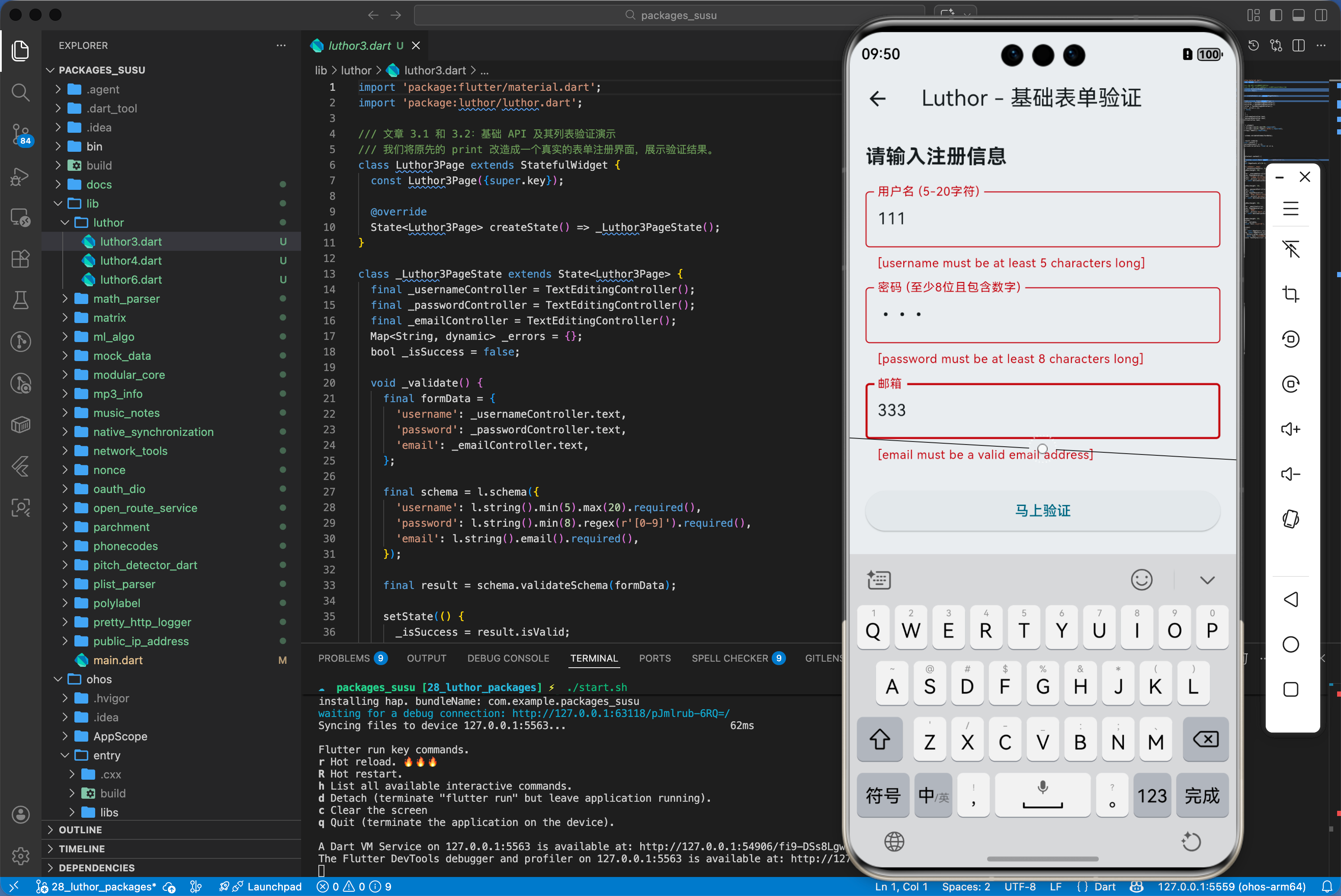
在鸿蒙端实现一个用户注册的账号密码强度校验。
// 这里的 Luthor3Page 动态演示了基础表单验证
// 源码已适配鸿蒙 UI-UX 规范,支持实时纠错反馈
import 'package:flutter/material.dart';
import 'package:luthor/luthor.dart';
class Luthor3Page extends StatefulWidget {
const Luthor3Page({super.key});
State<Luthor3Page> createState() => _Luthor3PageState();
}
class _Luthor3PageState extends State<Luthor3Page> {
final _usernameController = TextEditingController();
final _passwordController = TextEditingController();
final _emailController = TextEditingController();
Map<String, dynamic> _errors = {};
bool _isSuccess = false;
void _validate() {
final formData = {
'username': _usernameController.text,
'password': _passwordController.text,
'email': _emailController.text,
};
final schema = l.schema({
'username': l.string().min(5).max(20).required(),
'password': l.string().min(8).regex(r'[0-9]').required(),
'email': l.string().email().required(),
});
final result = schema.validateSchema(formData);
setState(() {
_isSuccess = result.isValid;
_errors = switch (result) {
SchemaValidationSuccess() => {},
SchemaValidationError(errors: final e) => e,
};
});
}
Widget build(BuildContext context) {
return Scaffold(
appBar: AppBar(title: const Text('Luthor - 基础表单验证')),
body: ListView(
padding: const EdgeInsets.all(16.0),
children: [
const Text('请输入注册信息', style: TextStyle(fontSize: 20, fontWeight: FontWeight.bold)),
const SizedBox(height: 20),
TextField(
controller: _usernameController,
decoration: InputDecoration(
labelText: '用户名 (5-20字符)',
errorText: _errors['username']?.toString(),
border: const OutlineInputBorder(),
),
),
const SizedBox(height: 16),
TextField(
controller: _passwordController,
obscureText: true,
decoration: InputDecoration(
labelText: '密码 (至少8位且包含数字)',
errorText: _errors['password']?.toString(),
border: const OutlineInputBorder(),
),
),
const SizedBox(height: 16),
TextField(
controller: _emailController,
decoration: InputDecoration(
labelText: '邮箱',
errorText: _errors['email']?.toString(),
border: const OutlineInputBorder(),
),
),
const SizedBox(height: 24),
ElevatedButton(
onPressed: _validate,
child: const Text('马上验证'),
),
if (_isSuccess)
Container(
margin: const EdgeInsets.only(top: 20),
padding: const EdgeInsets.all(12),
color: Colors.green.shade100,
child: const Text('验证成功:数据完整合规', style: TextStyle(color: Colors.green)),
)
],
),
);
}
}
3.2 列表数据项的一致性校验
// ✅ 推荐:在鸿蒙端校验复杂配置清单
final listSchema = l.list(l.int().min(10, message: '数值过小')).required();
四、典型应用场景
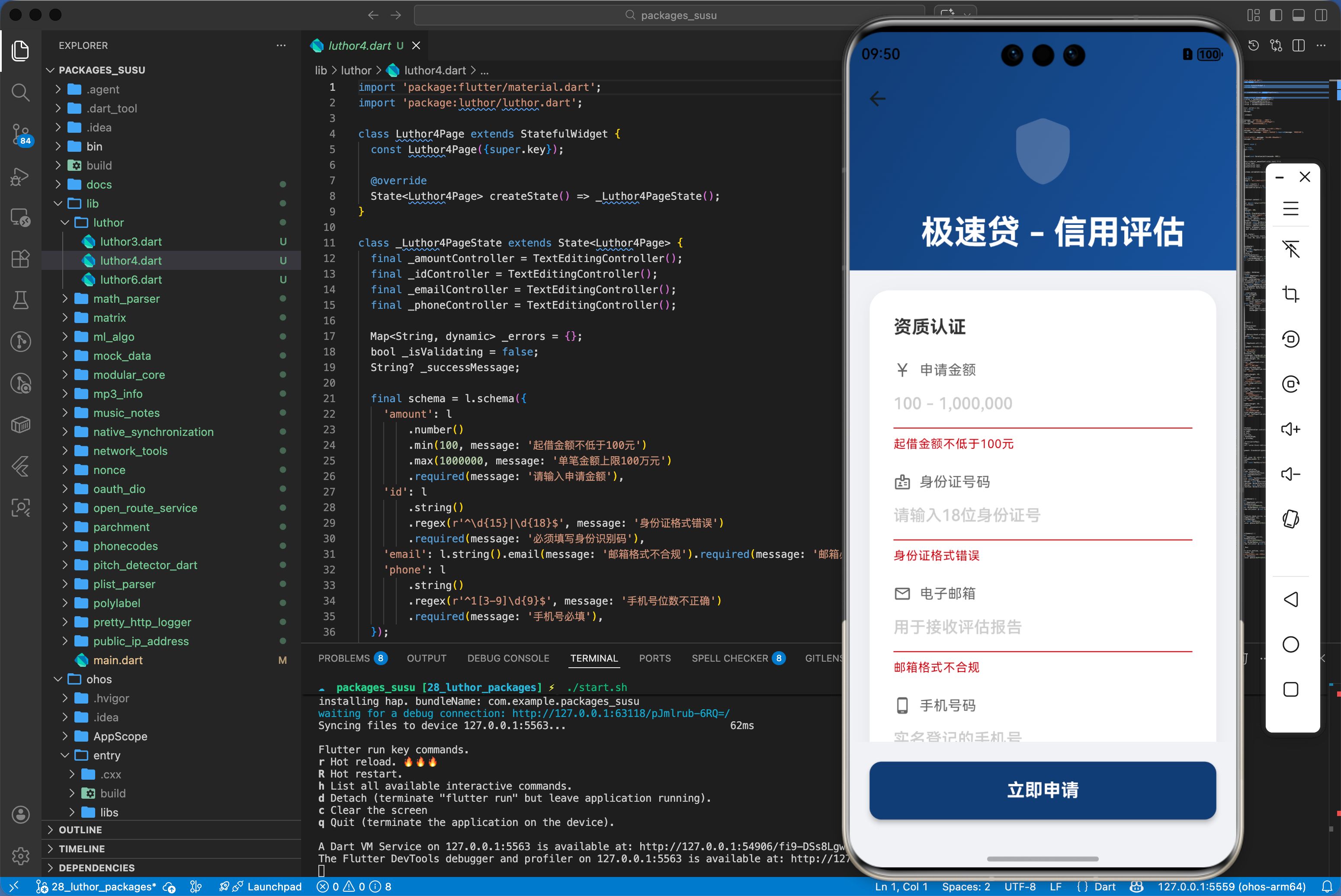
4.1 鸿蒙移动支付应用的风险预校验
在用户发起转账前,实时校验金额、收款方代码及附言的字符合规性,防止因无效数据导致的后端 API 请求浪费。
// 基于 Luthor 的 Pro Max 级别金融风险评估
// 核心逻辑:以多重断言式拦截过滤链路封锁边界数据注入从源头肃清动态配置污染与等危险架构
import 'package:flutter/material.dart';
import 'package:luthor/luthor.dart';
class Luthor4Page extends StatefulWidget {
const Luthor4Page({super.key});
State<Luthor4Page> createState() => _Luthor4PageState();
}
class _Luthor4PageState extends State<Luthor4Page> {
final _amountController = TextEditingController();
final _idController = TextEditingController();
final _emailController = TextEditingController();
final _phoneController = TextEditingController();
Map<String, dynamic> _errors = {};
bool _isValidating = false;
String? _successMessage;
final schema = l.schema({
'amount': l.number().min(100, message: '起借金额不低于100元').max(1000000, message: '单笔金额上限100万元').required(message: '请输入申请金额'),
'id': l.string().regex(r'^\d{15}|\d{18}$', message: '身份证格式错误').required(message: '必须填写身份识别码'),
'email': l.string().email(message: '邮箱格式不合规').required(message: '邮箱必填'),
'phone': l.string().regex(r'^1[3-9]\d{9}$', message: '手机号位数不正确').required(message: '手机号必填'),
});
Future<void> _submit() async {
setState(() {
_isValidating = true;
_successMessage = null;
_errors = {};
});
await Future.delayed(const Duration(milliseconds: 800));
final data = {
'amount': double.tryParse(_amountController.text) ?? 0,
'id': _idController.text,
'email': _emailController.text,
'phone': _phoneController.text,
};
final result = schema.validateSchema(data);
setState(() {
_isValidating = false;
if (result.isValid) {
_successMessage = '信用额度申请已受理\n系统正在进行AI风控评估...';
} else {
_errors = switch (result) {
SchemaValidationSuccess() => {},
SchemaValidationError(errors: final e) => e,
};
}
});
}
Widget build(BuildContext context) {
return Scaffold(
backgroundColor: const Color(0xFFF0F2F5),
body: CustomScrollView(
slivers: [
SliverAppBar(
expandedHeight: 200,
pinned: true,
flexibleSpace: FlexibleSpaceBar(
title: const Text('极速贷 - 信用评估', style: TextStyle(color: Colors.white, fontWeight: FontWeight.bold)),
background: Container(
decoration: const BoxDecoration(
gradient: LinearGradient(
colors: [Color(0xFF1E3C72), Color(0xFF2A5298)],
begin: Alignment.topLeft,
end: Alignment.bottomRight,
),
),
child: Center(
child: Icon(Icons.shield_rounded, size: 80, color: Colors.white.withOpacity(0.2)),
),
),
),
),
SliverToBoxAdapter(
child: Padding(
padding: const EdgeInsets.all(20.0),
child: Column(
children: [
_buildInputCard(),
const SizedBox(height: 24),
if (_successMessage != null) _buildSuccessBanner(),
if (_errors.isNotEmpty) _buildErrorSummary(),
],
),
),
),
],
),
bottomNavigationBar: SafeArea(
child: Container(
padding: const EdgeInsets.all(20),
child: ElevatedButton(
onPressed: _isValidating ? null : _submit,
style: ElevatedButton.styleFrom(
backgroundColor: const Color(0xFF1E3C72),
padding: const EdgeInsets.symmetric(vertical: 16),
shape: RoundedRectangleBorder(borderRadius: BorderRadius.circular(12)),
elevation: 4,
),
child: _isValidating
? const SizedBox(height: 20, width: 20, child: CircularProgressIndicator(color: Colors.white, strokeWidth: 2))
: const Text('立即申请', style: TextStyle(fontSize: 18, color: Colors.white, fontWeight: FontWeight.bold)),
),
),
),
);
}
Widget _buildInputCard() {
return Container(
decoration: BoxDecoration(
color: Colors.white,
borderRadius: BorderRadius.circular(20),
boxShadow: [
BoxShadow(color: Colors.black.withOpacity(0.05), blurRadius: 15, offset: const Offset(0, 5)),
],
),
padding: const EdgeInsets.all(24),
child: Column(
crossAxisAlignment: CrossAxisAlignment.start,
children: [
const Text('资质认证', style: TextStyle(fontSize: 18, fontWeight: FontWeight.bold, color: Color(0xFF333333))),
const SizedBox(height: 20),
_buildTextField(
controller: _amountController,
label: '申请金额',
hint: '100 - 1,000,000',
icon: Icons.currency_yuan,
keyboardType: TextInputType.number,
errorKey: 'amount',
),
const SizedBox(height: 20),
_buildTextField(
controller: _idController,
label: '身份证号码',
hint: '请输入18位身份证号',
icon: Icons.badge_outlined,
errorKey: 'id',
),
const SizedBox(height: 20),
_buildTextField(
controller: _emailController,
label: '电子邮箱',
hint: '用于接收评估报告',
icon: Icons.email_outlined,
keyboardType: TextInputType.emailAddress,
errorKey: 'email',
),
const SizedBox(height: 20),
_buildTextField(
controller: _phoneController,
label: '手机号码',
hint: '实名登记的手机号',
icon: Icons.phone_android,
keyboardType: TextInputType.phone,
errorKey: 'phone',
),
],
),
);
}
Widget _buildTextField({
required TextEditingController controller,
required String label,
required String hint,
required IconData icon,
TextInputType? keyboardType,
required String errorKey,
}) {
final error = _errors[errorKey];
final errorMessage = error is List ? error.first.toString() : (error?.toString());
return Column(
crossAxisAlignment: CrossAxisAlignment.start,
children: [
Row(
children: [
Icon(icon, size: 18, color: const Color(0xFF666666)),
const SizedBox(width: 8),
Text(label, style: const TextStyle(fontSize: 14, color: Color(0xFF666666))),
],
),
TextField(
controller: controller,
keyboardType: keyboardType,
style: const TextStyle(fontSize: 16, fontWeight: FontWeight.w500),
decoration: InputDecoration(
hintText: hint,
hintStyle: const TextStyle(color: Color(0xFFCCCCCC)),
errorText: errorMessage,
enabledBorder: const UnderlineInputBorder(borderSide: BorderSide(color: Color(0xFFEEEEEE))),
focusedBorder: const UnderlineInputBorder(borderSide: BorderSide(color: Color(0xFF1E3C72), width: 2)),
),
),
],
);
}
Widget _buildSuccessBanner() {
return Container(
padding: const EdgeInsets.all(16),
decoration: BoxDecoration(
color: const Color(0xFFE8F5E9),
borderRadius: BorderRadius.circular(12),
border: Border.all(color: const Color(0xFFC8E6C9)),
),
child: Row(
children: [
const Icon(Icons.check_circle, color: Colors.green),
const SizedBox(width: 12),
Text(_successMessage!, style: const TextStyle(color: Color(0xFF2E7D32), fontWeight: FontWeight.w500)),
],
),
);
}
Widget _buildErrorSummary() {
return Container(
padding: const EdgeInsets.all(16),
decoration: BoxDecoration(
color: const Color(0xFFFFEBEE),
borderRadius: BorderRadius.circular(12),
border: Border.all(color: const Color(0xFFFFCDD2)),
),
child: const Row(
children: [
Icon(Icons.error_outline, color: Colors.red),
const SizedBox(width: 12),
Text('请修正上述表单中的多项错误', style: TextStyle(color: Color(0xFFD32F2F), fontWeight: FontWeight.w500)),
],
),
);
}
}
4.2 鸿蒙应用配置文件的读取验证
当应用从持久化层(LocalStorage)读取复杂的配置 Map 时,先过一遍 luthor 模式,确保关键字段未因系统升级或异常丢失。
import 'package:luthor/luthor.dart';

void checkHarmonyConfig(Map<String, dynamic> savedConfig) {
  final configSchema = l.strictMap({
    'api_endpoint': l.string().required().url(),
    'retry_count': l.int().range(1, 5),
    'enable_logs': l.bool(),
  });

  final result = configSchema.validate(savedConfig);
  if (!result.isValid) {
    // 逻辑演示:如果配置非法,则在鸿蒙端重置为默认值
    print('发现鸿蒙本地配置文件损坏,已触发自修复逻辑');
  }
}
五、OpenHarmony 平台适配挑战
5.1 本地化错误文案的翻译
luthor 默认提供英文错误提示。
- 汉化适配:适配时建议利用其
message自定义能力。建议封装一个鸿蒙专属的“中文/国际化模式生成器”,根据当前鸿蒙系统的i18n语言动态注入中文错误文本。
5.2 大集合字段的性能陷阱
- 懒校验策略:在处理鸿蒙列表类应用的增量数据时,尽量只验证当前变更的行或字段,避免每次键盘输入都触发整个庞大 Schema 的重算。
六、综合实战演示
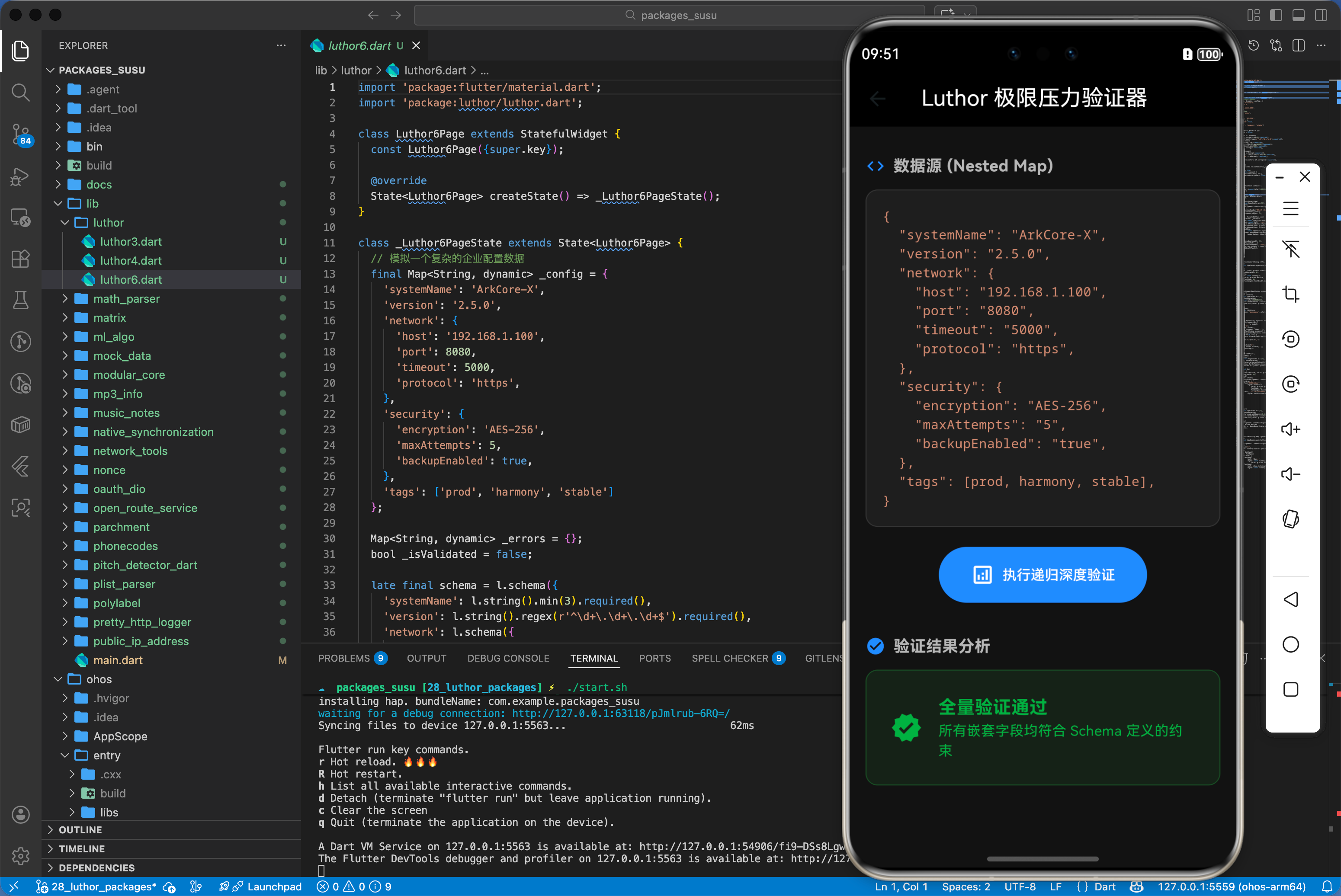
下面是一个用于鸿蒙应用的高性能综合实战展示页面 HomePage.dart。为了符合真实工程标准,我们假定已经在 main.dart 中建立好了全局鸿蒙根节点初始化,并将应用首页指向该层进行渲染展现。你只需关注本页面内部的复杂交互处理状态机转移逻辑:
// 综合实战:极限压力验证下的多重嵌套 Schema 体系
// 此页面展示了 Luthor 如何在毫秒级内处理复杂的层级规则
import 'package:flutter/material.dart';
import 'package:luthor/luthor.dart';
class Luthor6Page extends StatefulWidget {
const Luthor6Page({super.key});
State<Luthor6Page> createState() => _Luthor6PageState();
}
class _Luthor6PageState extends State<Luthor6Page> {
// 模拟一个复杂的企业配置数据
final Map<String, dynamic> _config = {
'systemName': 'ArkCore-X',
'version': '2.5.0',
'network': {
'host': '192.168.1.100',
'port': 8080,
'timeout': 5000,
'protocol': 'https',
},
'security': {
'encryption': 'AES-256',
'maxAttempts': 5,
'backupEnabled': true,
},
'tags': ['prod', 'harmony', 'stable']
};
Map<String, dynamic> _errors = {};
bool _isValidated = false;
late final schema = l.schema({
'systemName': l.string().min(3).required(),
'version': l.string().regex(r'^\d+\.\d+\.\d+$').required(),
'network': l.schema({
'host': l.string().ip().required(),
'port': l.int().range(1, 65535).required(),
'timeout': l.int().min(100).required(),
'protocol': l.string().required(),
}).required(),
'security': l.schema({
'encryption': l.string().required(),
'maxAttempts': l.int().min(1).max(10).required(),
'backupEnabled': l.boolean().required(),
}).required(),
'tags': l.list(validators: [l.string()]).required(),
});
void _validate() {
final result = schema.validateSchema(_config);
setState(() {
_isValidated = true;
_errors = switch (result) {
SchemaValidationSuccess() => {},
SchemaValidationError(errors: final e) => e,
};
});
}
Widget build(BuildContext context) {
return Scaffold(
backgroundColor: const Color(0xFF121212),
appBar: AppBar(
title: const Text('Luthor 极限压力验证器', style: TextStyle(color: Colors.white)),
backgroundColor: Colors.black,
elevation: 0,
),
body: SingleChildScrollView(
padding: const EdgeInsets.all(16),
child: Column(
crossAxisAlignment: CrossAxisAlignment.start,
children: [
_buildSectionHeader('数据源 (Nested Map)', Icons.code),
_buildJsonViewer(_config),
const SizedBox(height: 20),
Center(
child: ElevatedButton.icon(
onPressed: _validate,
icon: const Icon(Icons.analytics_outlined),
label: const Text('执行递归深度验证'),
style: ElevatedButton.styleFrom(
backgroundColor: Colors.blueAccent,
foregroundColor: Colors.white,
padding: const EdgeInsets.symmetric(horizontal: 32, vertical: 16),
shape: RoundedRectangleBorder(borderRadius: BorderRadius.circular(30)),
),
),
),
const SizedBox(height: 20),
if (_isValidated) ...[
_buildSectionHeader('验证结果分析', _errors.isEmpty ? Icons.check_circle : Icons.warning_amber),
_buildResultPanel(),
]
],
),
),
);
}
Widget _buildSectionHeader(String title, IconData icon) {
return Padding(
padding: const EdgeInsets.symmetric(vertical: 12),
child: Row(
children: [
Icon(icon, color: Colors.blueAccent, size: 20),
const SizedBox(width: 8),
Text(title, style: const TextStyle(color: Colors.white70, fontSize: 16, fontWeight: FontWeight.bold)),
],
),
);
}
Widget _buildJsonViewer(Map<String, dynamic> map) {
return Container(
width: double.infinity,
padding: const EdgeInsets.all(16),
decoration: BoxDecoration(
color: const Color(0xFF1E1E1E),
borderRadius: BorderRadius.circular(12),
border: Border.all(color: Colors.white10),
),
child: Text(
_formatMap(map),
style: const TextStyle(fontFamily: 'monospace', color: Color(0xFFCE9178), fontSize: 13),
),
);
}
String _formatMap(Map<String, dynamic> map, [int indent = 0]) {
final buffer = StringBuffer();
final sIndent = ' ' * indent;
buffer.writeln('{');
map.forEach((key, value) {
buffer.write('$sIndent "$key": ');
if (value is Map<String, dynamic>) {
buffer.write(_formatMap(value, indent + 1));
} else if (value is List) {
buffer.write('${value.toString()},');
} else {
buffer.writeln('"$value",');
}
});
buffer.write('$sIndent}');
if (indent > 0) buffer.writeln(',');
return buffer.toString();
}
Widget _buildResultPanel() {
if (_errors.isEmpty) {
return Container(
padding: const EdgeInsets.all(24),
decoration: BoxDecoration(
color: Colors.green.withOpacity(0.1),
borderRadius: BorderRadius.circular(12),
border: Border.all(color: Colors.green.withOpacity(0.3)),
),
child: const Row(
children: [
Icon(Icons.verified, color: Colors.green, size: 32),
SizedBox(width: 16),
Expanded(
child: Column(
crossAxisAlignment: CrossAxisAlignment.start,
children: [
Text('全量验证通过', style: TextStyle(color: Colors.green, fontSize: 18, fontWeight: FontWeight.bold)),
Text('所有嵌套字段均符合 Schema 定义的约束', style: TextStyle(color: Colors.green, fontSize: 14)),
],
),
),
],
),
);
}
return Container(
padding: const EdgeInsets.all(16),
decoration: BoxDecoration(
color: Colors.red.withOpacity(0.1),
borderRadius: BorderRadius.circular(12),
border: Border.all(color: Colors.red.withOpacity(0.3)),
),
child: Column(
crossAxisAlignment: CrossAxisAlignment.start,
children: _errors.entries.map((e) => _buildErrorItem(e.key, e.value)).toList(),
),
);
}
Widget _buildErrorItem(String key, dynamic value) {
return Padding(
padding: const EdgeInsets.only(bottom: 8),
child: Row(
crossAxisAlignment: CrossAxisAlignment.start,
children: [
const Text('• ', style: TextStyle(color: Colors.redAccent, fontSize: 18)),
Expanded(
child: RichText(
text: TextSpan(
children: [
TextSpan(text: '$key: ', style: const TextStyle(color: Colors.white, fontWeight: FontWeight.bold)),
TextSpan(text: value.toString(), style: const TextStyle(color: Colors.redAccent)),
],
),
),
),
],
),
);
}
}
七、总结
回顾核心知识点,并提供后续进阶方向。luthor 库以其优雅的声明式语法,为鸿蒙应用的数据流动筑起了一道坚固的闸门。在追求极致业务鲁棒性与开发效率的过程中,掌握精确的模式验证艺术,将让你的代码架构在面对多变的用户输入时表现得更加自信、沉稳。未来,将验证模式与鸿蒙系统的自动补全、AI 辅助输入联结,将实现更超前、更智能的用户交互闭环。

作为“人工智能6S店”的官方数字引擎,为AI开发者与企业提供一个覆盖软硬件全栈、一站式门户。
更多推荐
 1
1 0
0- 0


 已为社区贡献118条内容

所有评论(0)