
Harmony Flutter 跨平台开发实战:鸿蒙与音乐律动艺术、李萨如图形与谐振:振动叠加的视觉诗篇
李萨如图形是两个相互垂直的简谐振动叠加产生的美丽曲线,由法国物理学家朱尔·安托万·李萨如(Jules Antoine Lissajous)于1857年系统研究。历史里程碑:李萨如的实验方法:科学意义与应用:🔬 1.2 李萨如图形的数学原理参数方程:频率比决定图形形状:频率比与闭合性分析:相位差决定图形姿态:相位变化的动画效果:🎨 1.3 李萨如图形的分类按频率比分类:按对称性分类:按复杂度分类
·
欢迎加入开源鸿蒙跨平台社区:https://openharmonycrossplatform.csdn.net
📐 一、李萨如图形:振动叠加的几何之美
📚 1.1 李萨如图形的历史
李萨如图形是两个相互垂直的简谐振动叠加产生的美丽曲线,由法国物理学家朱尔·安托万·李萨如(Jules Antoine Lissajous)于1857年系统研究。
历史里程碑:
| 年份 | 人物 | 贡献 |
|---|---|---|
| 1815 | 纳撒尼尔·鲍迪奇 | 首次数学描述 |
| 1857 | 李萨如 | 系统实验研究 |
| 19世纪 | 声学研究者 | 音叉频率比较 |
| 20世纪 | 示波器 | 电子显示应用 |
| 现代 | 音乐可视化 | 艺术创作 |
李萨如的实验方法:
李萨如使用两面镜子反射光线:
一面镜子随音叉在水平方向振动
另一面镜子随另一个音叉在垂直方向振动

光线最终投射到屏幕上,形成美丽的曲线:

     ┌─────────────────────┐
     │    ╱╲    ╱╲    ╱╲   │
     │   ╱  ╲  ╱  ╲  ╱  ╲  │
     │  ╱    ╲╱    ╲╱    ╲ │
     │ ╱                    │
     │╱                     │
     └─────────────────────┘

这种方法可以精确比较两个音叉的频率!
通过观察图形的切点数,可以确定频率比。
科学意义与应用:
李萨如图形在科学史上的重要意义:

1. 频率测量:通过图形确定未知频率
   - 计算图形与边界的切点数
   - 频率比 = 切点数之比
   - 这是早期最精确的频率测量方法之一

2. 相位测量:确定两个信号的相位差
   - 椭圆的倾斜方向表示相位超前或滞后
   - 椭圆的宽窄程度表示相位差大小

3. 信号分析:示波器的核心显示原理
   - X-Y 模式显示
   - 利萨如图形分析
   - 现代电子测量仪器的基础

4. 艺术创作:音乐可视化的经典形式
   - 音频驱动的动态图形
   - 实时视觉反馈
   - 激光秀和灯光表演
🔬 1.2 李萨如图形的数学原理
参数方程:
标准李萨如图形的参数方程:

x(t) = A·sin(a·t + φ)
y(t) = B·sin(b·t)

其中:
- A, B:振幅(控制图形大小)
- a, b:角频率(控制图形形状)
- φ:相位差(控制图形姿态)
- t:时间参数

更一般的形式:
x(t) = A₁·sin(a·t + φ₁)
y(t) = A₂·sin(b·t + φ₂)

当 φ₁ = φ, φ₂ = 0 时,得到标准形式
频率比决定图形形状:
当 a:b 为简单整数比时,形成闭合曲线:

a:b = 1:1 (圆形/椭圆)
     ╭───╮
    ╱     ╲
   │       │
    ╲     ╱
     ╰───╯
    频率相同,相位决定形状
    相位差0°为直线,90°为圆形

a:b = 1:2 (抛物线形)
     ╱╲
    ╱  ╲
   ╱    ╲
  ╱      ╲
 ╱        ╲
╱          ╲
    一个完整的来回
    形状像躺着的8

a:b = 2:3 (八字形)
    ╱╲  ╱╲
   ╱  ╲╱  ╲
  ╱        ╲
 ╱          ╲
    经典的"8"字形
    纯五度音程对应

a:b = 3:4 (复杂闭合)
  ╱╲  ╱╲  ╱╲
 ╱  ╲╱  ╲╱  ╲
╱            ╲
    三个环与四个环的交织
    纯四度音程对应

a:b = 5:6 (高度复杂)
    多环交织的复杂图案
    需要更多周期才能闭合
    小三度音程对应
频率比与闭合性分析:
图形闭合条件:

当 a/b 为有理数时,图形闭合
当 a/b 为无理数时,图形永不闭合

有理数比:
a/b = p/q (p, q 为整数)
闭合周期 T = 2π·LCM(p,q)/p

示例:
a:b = 2:3 → 闭合周期 T = 6π/a
a:b = 3:4 → 闭合周期 T = 12π/a
a:b = √2:1 → 永不闭合

无理数比产生的图形会逐渐填满整个矩形区域!
这在音乐中对应不协和音程。
相位差决定图形姿态:
对于 a:b = 1:1:

φ = 0°:直线 ╱
    x 和 y 同相位
    y = (B/A)·x
    图形为斜线

φ = 45°:椭圆 ○
    部分相位差
    倾斜的椭圆
    图形开始"膨胀"

φ = 90°:圆形 ●
    完全正交
    x²/A² + y²/B² = 1
    当A=B时为正圆

φ = 135°:椭圆(反向)
    与45°相反方向倾斜
    图形开始"收缩"

φ = 180°:直线 ╲
    x 和 y 反相位
    y = -(B/A)·x
    图形为另一条斜线

相位差让图形"旋转"起来!
这是动画效果的关键。
相位变化的动画效果:
当相位差随时间变化时:

φ(t) = ω·t

图形会呈现"旋转"或"呼吸"效果:

t=0    t=π/4  t=π/2  t=3π/4  t=π
 ╱      ○      ●      ○       ╲
直线   椭圆   圆形   椭圆    直线

这种动画效果非常适合音乐可视化!
可以通过音频特征控制相位变化速度。
🎨 1.3 李萨如图形的分类
按频率比分类:
| 频率比 a:b | 图形名称 | 特点 | 音乐对应 | 协和度 |
|---|---|---|---|---|
| 1:1 | 圆/椭圆 | 最简单 | 纯一度 | 完全协和 |
| 1:2 | 抛物线形 | 单环 | 纯八度 | 完全协和 |
| 2:3 | 八字形 | 双环 | 纯五度 | 完全协和 |
| 3:4 | 三叶形 | 三环 | 纯四度 | 完全协和 |
| 3:5 | 五叶形 | 五环 | 大六度 | 不完全协和 |
| 4:5 | 四叶形 | 四环 | 大三度 | 不完全协和 |
| 5:6 | 复杂形 | 多环 | 小三度 | 不完全协和 |
| 8:9 | 极复杂 | 密集 | 大二度 | 不协和 |
按对称性分类:
奇偶性分析:

情况1:a, b 同为奇数
图形关于原点中心对称

示例:a=3, b=5
     ╱╲╱╲
    ╱    ╲
   ╱      ╲
    ╲    ╱
     ╲╱╲╱
    绕原点旋转180°后重合
    中心对称图形

情况2:a, b 一奇一偶
图形关于坐标轴对称

示例:a=2, b=3
    ╱╲  ╱╲
   ╱  ╲╱  ╲
  ╱        ╲
 ╱          ╲
╱            ╲
    关于 y 轴对称
    轴对称图形

情况3:a, b 同为偶数
图形有四重对称

示例:a=2, b=4
    ╱╲╱╲
   ╱    ╲
  ╱      ╲
   ╲    ╱
    ╲╱╲╱
    绕原点旋转90°后重合
    四重旋转对称
按复杂度分类:
复杂度 = a + b

简单 (2-4):
- 1:1, 1:2, 1:3, 2:3
- 图形清晰,易于识别
- 对应最协和的音程

中等 (5-7):
- 2:5, 3:4, 3:5, 4:5
- 图形较复杂,有多个环
- 对应较协和的音程

复杂 (8+):
- 3:7, 4:7, 5:6, 5:7
- 图形高度复杂,环数多
- 对应较不协和的音程

极复杂 (15+):
- 7:8, 8:9, 11:12
- 几乎填满整个区域
- 对应不协和音程
📐 1.4 李萨如图形的几何性质
包围盒与边界:
李萨如图形始终位于一个矩形内:

x ∈ [-A, A]
y ∈ [-B, B]

这个矩形称为"包围盒"

面积比:
图形面积 / 包围盒面积 ≤ 1
等号仅在 a:b = 1:1, φ = π/2 时成立(圆形)

边界接触:
- 图形会与包围盒的边界相切
- 切点数量与频率比相关
切点计数法确定频率比:
通过切点数确定频率比:

方法:
1. 画一条水平线穿过图形上部
2. 数与图形的切点数 nx
3. 画一条垂直线穿过图形右侧
4. 数与图形的切点数 ny
5. 频率比 a:b = ny:nx

示例:
      ╱╲  ╱╲
     ╱  ╲╱  ╲
────●────●────●───  nx = 3 (水平切点)
   ╱        ╲
  ╱          ╲
 ╱            ╲
●              ●
│              │
ny = 2 (垂直切点)

频率比 = 2:3

这是早期科学家测量频率的重要方法!
曲率与拐点分析:
李萨如图形的曲率:

κ = |x'y'' - y'x''| / (x'² + y'²)^(3/2)

曲率极值点:
- 对应图形的"拐角"
- 在这些点附近,曲线变化最快
- 视觉上最"尖锐"的地方

音乐应用:
- 曲率大的地方对应强拍
- 曲率小的地方对应弱拍
- 可以用于节奏可视化
🎵 二、谐振与音乐
🎼 2.1 谐振原理
共振现象详解:
当一个系统的固有频率与外力频率相同时,
系统会产生最大振幅的振动。

固有频率公式:
f₀ = (1/2π)·√(k/m)

其中:
- k:弹性系数(刚度)
- m:质量
- f₀:固有频率

共振条件:
f外力 = f固有

此时振幅最大,能量传递最有效!

共振振幅:
A = F₀ / (m·√((ω₀² - ω²)² + (γω)²))

当 ω = ω₀ 时:
A = F₀ / (m·γ·ω₀)

其中 γ 是阻尼系数
阻尼越小,共振峰越尖锐
共振曲线分析:
振幅随频率的变化:

振幅
  │
A │        ╱╲
  │       ╱  ╲
  │      ╱    ╲
  │     ╱      ╲
  │    ╱        ╲
  │___╱──────────╲___
  └─────────────────── 频率
     f₀-Δf  f₀  f₀+Δf

带宽 Δf 与品质因数 Q 的关系:
Q = f₀ / Δf

高 Q 值:窄峰,共振强烈
- 钟表、音叉等
- 选择性强,响应尖锐

低 Q 值:宽峰,共振温和
- 扬声器、耳机等
- 频响平坦,覆盖范围广
音乐中的谐振应用:
乐器发声原理:

弦乐器:
- 弦的振动频率 = 固有频率
- f = (1/2L)·√(T/μ)
- L:弦长,T:张力,μ:线密度
- 共鸣箱放大声音
- 通过改变弦长改变音高

管乐器:
- 空气柱的驻波频率
- 开管:f = n·v/(2L)
- 闭管:f = (2n-1)·v/(4L)
- 管长决定音高
- 通过按键改变有效管长

打击乐器:
- 膜或板的振动模式
- 二维驻波
- 不同模式产生不同音色
- 形状影响振动模式

人声:
- 声带的振动
- 声道共振(共鸣)
- 改变声道形状改变音色

所有这些都涉及谐振!
🎚️ 2.2 音程与频率比
纯音程的频率比:
西方音乐中的纯音程对应简单的频率比:

音程        频率比      示例        音分
─────────────────────────────────────────
纯一度      1:1        A4 - A4      0
小二度      16:15      E4 - F4     112
大二度      9:8        C4 - D4     204
小三度      6:5        A4 - C5     316
大三度      5:4        C4 - E4     386
纯四度      4:3        A4 - D5     498
三全音      45:32      F4 - B4     590
纯五度      3:2        A4 - E5     702
小六度      8:5        A4 - F5     814
大六度      5:3        C4 - A4     884
小七度      9:5        C4 - Bb4    1018
大七度      15:8       C4 - B4     1088
纯八度      2:1        A4 - A5     1200

音分计算:
cents = 1200 · log₂(f₂/f₁)

这些简单的频率比是音乐和谐的基础!
协和与不协和的物理原理:
音程的协和程度与频率比的复杂度相关:

完全协和音程:
- 纯一度 (1:1)
- 纯八度 (2:1)
- 纯五度 (3:2)
- 纯四度 (4:3)
→ 简单整数比,李萨如图形简单闭合
→ 听觉上感觉"融合"、"稳定"

不完全协和音程:
- 大三度 (5:4)
- 小三度 (6:5)
- 大六度 (5:3)
- 小六度 (8:5)
→ 较简单整数比,图形较复杂
→ 听觉上感觉"丰富"、"有色彩"

不协和音程:
- 小二度 (16:15)
- 大七度 (15:8)
- 三全音 (45:32)
→ 复杂整数比,图形复杂
→ 听觉上感觉"紧张"、"需要解决"
李萨如图形与音程的对应关系:
当两个音同时播放时,可以想象为李萨如图形:

纯五度 (2:3):
    ╱╲  ╱╲
   ╱  ╲╱  ╲
  ╱        ╲
 ╱          ╲
图形稳定、闭合,听觉和谐
简单的八字形,视觉舒适

大三度 (4:5):
  ╱╲╱╲╱╲
 ╱       ╲
╱         ╲
图形较复杂但仍闭合,听觉较和谐
多环交织,视觉丰富

三全音 (√2:1):
图形不闭合,不断变化
听觉紧张、不稳定
视觉上图形会"游走"

简单整数比 → 闭合图形 → 和谐音程
复杂比值 → 开放图形 → 不协和音程

这是音乐与数学的美妙联系!
📊 2.3 节拍与干涉
拍频现象:
当两个频率接近的音同时播放时,
会产生周期性的强弱变化:

f拍 = |f₁ - f₂|

示例:
f₁ = 440 Hz (A4)
f₂ = 444 Hz
f拍 = 4 Hz(每秒4次强弱变化)

这种现象在李萨如图形中表现为:
图形缓慢"呼吸"或"旋转"

数学描述:
sin(2πf₁t) + sin(2πf₂t)
= 2·cos(π(f₁-f₂)t)·sin(π(f₁+f₂)t)

包络:2·cos(π(f₁-f₂)t)
载波:sin(π(f₁+f₂)t)

拍频是调音的重要工具!
拍频的听觉效果:
拍频与听觉感受:

f拍 < 5 Hz:
- 感觉为"颤动"或"波动"
- 李萨如图形缓慢变形
- 常见于颤音效果

5 Hz < f拍 < 30 Hz:
- 感觉为"粗糙"
- 李萨如图形快速变化
- 产生"嗡嗡"声

f拍 > 30 Hz:
- 感觉为两个分离的音
- 李萨如图形趋于稳定
- 听觉上分辨为两个音

调音应用:
- 钢琴调音师利用拍频调律
- 当拍频消失时,两音完全同频
- 这是精确调音的标准方法
相位干涉原理:
两个波的叠加:

同相位:振幅相加
    ╱╲ + ╱╲ = ╱╲╱╲
   ╱  ╲   ╱  ╲   ╱  ╲
  (加强,振幅翻倍)
  建设性干涉

反相位:振幅相减
    ╱╲ - ╱╲ = ────
   ╱  ╲   ╱  ╲
  (抵消,振幅为零)
  破坏性干涉

部分相位差:
    ╱╲ +  ╱╲  = ╱╲
   ╱  ╲   ╱  ╲   ╱  ╲
  (部分加强)
  部分干涉

在李萨如图形中:
相位差变化 → 图形形态变化
这是图形"呼吸"效果的来源
🌊 2.4 驻波与振动模式
一维驻波:
弦上的驻波:

节点:振幅为零的点
波腹:振幅最大的点

基频模式 (n=1):
│     ╱╲     │
│    ╱  ╲    │
│   ╱    ╲   │
│  ╱      ╲  │
│ ╱        ╲ │
└─────────────┘
节点:两端
波腹:中心
频率:f₁

二次谐波 (n=2):
│   ╱╲  ╱╲   │
│  ╱  ╲╱  ╲  │
│ ╱        ╲ │
│╱          ╲│
└─────────────┘
节点:两端 + 中心
频率:2f₁

三次谐波 (n=3):
│ ╱╲╱╲╱╲╱╲ │
│╱        ╲│
└─────────────┘
节点:两端 + 两个内点
频率:3f₁

频率关系:
fₙ = n·f₁ (n = 1, 2, 3, ...)

这就是为什么乐器能产生泛音列!
二维驻波(克拉尼图形):
膜或板上的驻波:

模式 (m, n) 表示两个方向的波节数

(1,1) 模式:
┌─────────────┐
│             │
│             │
│             │
│             │
└─────────────┘
四边为节点
最低频率模式

(2,1) 模式:
┌──────┬──────┐
│      │      │
│      │      │
│      │      │
│      │      │
└──────┴──────┘
中间多一条垂直节线

(2,2) 模式:
┌──────┬──────┐
│      │      │
│      │      │
├──────┼──────┤
│      │      │
│      │      │
└──────┴──────┘
十字形节线

频率关系:
fₘₙ = c·√((m/Lₓ)² + (n/Lᵧ)²)

克拉尼图形就是二维驻波的视觉表现!
🔧 三、Dart/Flutter 中的李萨如图形实现
📐 3.1 基础李萨如图形计算器
import 'dart:math';

/// 李萨如图形计算器
class LissajousCalculator {
  final int freqA;
  final int freqB;
  final double phase;
  final double amplitudeA;
  final double amplitudeB;

  LissajousCalculator({
    required this.freqA,
    required this.freqB,
    this.phase = 0,
    this.amplitudeA = 1,
    this.amplitudeB = 1,
  });

  /// 计算给定时间点的位置
  Offset calculate(double t) {
    final x = amplitudeA * sin(2 * pi * freqA * t + phase);
    final y = amplitudeB * sin(2 * pi * freqB * t);
    return Offset(x, y);
  }

  /// 生成完整轨迹
  List<Offset> generateTrajectory({int points = 1000}) {
    final trajectory = <Offset>[];
    final period = 2 * pi * _lcm(freqA, freqB);
    final dt = period / points;

    for (double t = 0; t <= period; t += dt) {
      trajectory.add(calculate(t));
    }

    return trajectory;
  }

  /// 计算最小公倍数
  int _lcm(int a, int b) => (a * b) ~/ _gcd(a, b);

  /// 计算最大公约数
  int _gcd(int a, int b) {
    while (b != 0) {
      final t = b;
      b = a % b;
      a = t;
    }
    return a;
  }

  /// 判断图形是否闭合
  bool get isClosed => true;

  /// 计算闭合周期
  double get period => 2 * pi * _lcm(freqA, freqB);

  /// 获取图形描述
  String get description {
    final gcd = _gcd(freqA, freqB);
    final simplifiedA = freqA ~/ gcd;
    final simplifiedB = freqB ~/ gcd;
    return '频率比 $simplifiedA:$simplifiedB';
  }
}
🎨 3.2 李萨如图形绘制器
import 'package:flutter/material.dart';
import 'dart:math';
/// 李萨如图形绘制器
class LissajousPainter extends CustomPainter {
final List<Offset> trail;
final bool showTrail;
final int freqA;
final int freqB;
final double phase;
final double time;
final double lineWidth;
final Color baseColor;
final bool showGrid;
final bool showAxes;
LissajousPainter({
required this.trail,
this.showTrail = true,
this.freqA = 3,
this.freqB = 4,
this.phase = 0,
this.time = 0,
this.lineWidth = 2,
this.baseColor = Colors.indigo,
this.showGrid = true,
this.showAxes = true,
});
void paint(Canvas canvas, Size size) {
final center = Offset(size.width / 2, size.height / 2);
final scale = min(size.width, size.height) * 0.4;
_drawBackground(canvas, size);
if (showGrid) _drawGrid(canvas, size, center, scale);
if (showAxes) _drawAxes(canvas, size, center);
if (trail.isNotEmpty) {
if (showTrail && trail.length > 1) {
_drawTrail(canvas, center, scale);
}
_drawCurrentPoint(canvas, center, scale);
}
_drawLabels(canvas, size);
}
void _drawBackground(Canvas canvas, Size size) {
canvas.drawRect(
Rect.fromLTWH(0, 0, size.width, size.height),
Paint()..color = const Color(0xFF0a0a15),
);
}
void _drawGrid(Canvas canvas, Size size, Offset center, double scale) {
final paint = Paint()
..color = Colors.white.withOpacity(0.05)
..strokeWidth = 1;
for (int i = -5; i <= 5; i++) {
canvas.drawLine(
Offset(center.dx + i * scale / 5, 0),
Offset(center.dx + i * scale / 5, size.height),
paint,
);
canvas.drawLine(
Offset(0, center.dy + i * scale / 5),
Offset(size.width, center.dy + i * scale / 5),
paint,
);
}
}
void _drawAxes(Canvas canvas, Size size, Offset center) {
final paint = Paint()
..color = Colors.white.withOpacity(0.2)
..strokeWidth = 1;
canvas.drawLine(Offset(0, center.dy), Offset(size.width, center.dy), paint);
canvas.drawLine(Offset(center.dx, 0), Offset(center.dx, size.height), paint);
final textPainter = TextPainter(
textDirection: TextDirection.ltr,
textScaleFactor: 0.8,
);
textPainter.text = const TextSpan(
text: 'X',
style: TextStyle(color: Colors.white54, fontSize: 10),
);
textPainter.layout();
textPainter.paint(canvas, Offset(size.width - 20, center.dy + 5));
textPainter.text = const TextSpan(
text: 'Y',
style: TextStyle(color: Colors.white54, fontSize: 10),
);
textPainter.layout();
textPainter.paint(canvas, Offset(center.dx + 5, 10));
}
void _drawTrail(Canvas canvas, Offset center, double scale) {
for (int i = 1; i < trail.length; i++) {
final p1 = center + Offset(trail[i - 1].dx * scale, trail[i - 1].dy * scale);
final p2 = center + Offset(trail[i].dx * scale, trail[i].dy * scale);
final hue = (i / trail.length * 180 + time * 20) % 360;
final alpha = (i / trail.length * 0.8 + 0.2).clamp(0.0, 1.0);
canvas.drawLine(
p1, p2,
Paint()
..color = HSVColor.fromAHSV(alpha, hue, 0.8, 1).toColor()
..strokeWidth = lineWidth
..strokeCap = StrokeCap.round,
);
}
}
void _drawCurrentPoint(Canvas canvas, Offset center, double scale) {
final currentPoint = center + Offset(trail.last.dx * scale, trail.last.dy * scale);
canvas.drawCircle(
currentPoint, 10,
Paint()..color = baseColor.withOpacity(0.3),
);
canvas.drawCircle(currentPoint, 6, Paint()..color = Colors.white);
canvas.drawCircle(currentPoint, 4, Paint()..color = baseColor);
}
void _drawLabels(Canvas canvas, Size size) {
final textPainter = TextPainter(
text: TextSpan(
text: '频率比 $freqA:$freqB',
style: const TextStyle(color: Colors.white70, fontSize: 12),
),
textDirection: TextDirection.ltr,
);
textPainter.layout();
textPainter.paint(canvas, const Offset(10, 10));
}
bool shouldRepaint(covariant LissajousPainter old) => true;
}
🎵 3.3 音频驱动的李萨如控制器
import 'dart:math';
import 'dart:typed_data';

/// 音频驱动的李萨如控制器
class AudioLissajousController {
  int baseFreqA = 3;
  int baseFreqB = 4;
  double basePhase = pi / 4;

  Float32List audioData = Float32List(64);
  double energy = 0;
  double bass = 0;
  double mid = 0;
  double treble = 0;

  /// 动态频率A(受高频影响)
  int get dynamicFreqA => baseFreqA + (treble * 2).toInt();

  /// 动态频率B(受低频影响)
  int get dynamicFreqB => baseFreqB + (bass * 2).toInt();

  /// 动态相位(受中频影响)
  double get dynamicPhase => basePhase + mid * pi;

  /// 动态振幅A(受总能量影响)
  double get dynamicAmplitudeA => 0.7 + energy * 0.3;

  /// 动态振幅B(受低频影响)
  double get dynamicAmplitudeB => 0.7 + bass * 0.3;

  /// 更新音频数据
  void updateAudioData(Float32List data) {
    audioData = data;

    double total = 0;
    double bassE = 0;
    double midE = 0;
    double trebleE = 0;

    for (int i = 0; i < data.length; i++) {
      total += data[i];
      if (i < data.length * 0.25) {
        bassE += data[i];
      } else if (i < data.length * 0.6) {
        midE += data[i];
      } else {
        trebleE += data[i];
      }
    }

    energy = total / data.length;
    bass = bassE / (data.length * 0.25);
    mid = midE / (data.length * 0.35);
    treble = trebleE / (data.length * 0.4);
  }

  /// 计算当前位置
  Offset calculate(double time) {
    final x = dynamicAmplitudeA * sin(2 * pi * dynamicFreqA * time + dynamicPhase);
    final y = dynamicAmplitudeB * sin(2 * pi * dynamicFreqB * time);
    return Offset(x, y);
  }

  /// 重置状态
  void reset() {
    audioData = Float32List(64);
    energy = 0;
    bass = 0;
    mid = 0;
    treble = 0;
  }
}
💻 四、完整代码实现
import 'package:flutter/material.dart';
import 'package:just_audio_ohos/just_audio_ohos.dart';
import 'package:audio_session/audio_session.dart';
import 'dart:math';
import 'dart:typed_data';
void main() {
runApp(const LissajousApp());
}
class LissajousApp extends StatelessWidget {
const LissajousApp({super.key});
Widget build(BuildContext context) {
return MaterialApp(
title: '李萨如图形',
theme: ThemeData(
colorScheme: ColorScheme.fromSeed(seedColor: Colors.indigo, brightness: Brightness.dark),
useMaterial3: true,
),
home: const LissajousHomePage(),
debugShowCheckedModeBanner: false,
);
}
}
class LissajousHomePage extends StatelessWidget {
const LissajousHomePage({super.key});
Widget build(BuildContext context) {
return Scaffold(
appBar: AppBar(
title: const Text('李萨如图形'),
backgroundColor: Theme.of(context).colorScheme.inversePrimary,
),
body: ListView(
padding: const EdgeInsets.all(16),
children: [
_buildCard(context, title: '经典李萨如', description: '可调频率比与相位', icon: Icons.show_chart, color: Colors.indigo,
onTap: () => Navigator.push(context, MaterialPageRoute(builder: (_) => const ClassicLissajousDemo()))),
_buildCard(context, title: '音乐李萨如', description: '音频驱动的动态图形', icon: Icons.music_note, color: Colors.purple,
onTap: () => Navigator.push(context, MaterialPageRoute(builder: (_) => const MusicLissajousDemo()))),
_buildCard(context, title: '三维李萨如', description: '立体投影效果', icon: Icons.threed_rotation, color: Colors.teal,
onTap: () => Navigator.push(context, MaterialPageRoute(builder: (_) => const Lissajous3DDemo()))),
_buildCard(context, title: '谐振模式', description: '驻波与振动模式', icon: Icons.waves, color: Colors.orange,
onTap: () => Navigator.push(context, MaterialPageRoute(builder: (_) => const ResonanceModeDemo()))),
_buildCard(context, title: '音程可视化', description: '音程与图形对应', icon: Icons.piano, color: Colors.pink,
onTap: () => Navigator.push(context, MaterialPageRoute(builder: (_) => const IntervalVisualizer()))),
_buildCard(context, title: '多频叠加', description: '复杂振动合成', icon: Icons.layers, color: Colors.cyan,
onTap: () => Navigator.push(context, MaterialPageRoute(builder: (_) => const MultiFrequencyDemo()))),
_buildCard(context, title: '相位动画', description: '相位变化的动态效果', icon: Icons.animation, color: Colors.amber,
onTap: () => Navigator.push(context, MaterialPageRoute(builder: (_) => const PhaseAnimationDemo()))),
_buildCard(context, title: '频率扫描', description: '连续变化的频率比', icon: Icons.tune, color: Colors.deepPurple,
onTap: () => Navigator.push(context, MaterialPageRoute(builder: (_) => const FrequencySweepDemo()))),
],
),
);
}
Widget _buildCard(BuildContext context, {required String title, required String description, required IconData icon,
required Color color, required VoidCallback onTap}) {
return Card(
margin: const EdgeInsets.only(bottom: 12),
shape: RoundedRectangleBorder(borderRadius: BorderRadius.circular(16)),
child: InkWell(
onTap: onTap,
borderRadius: BorderRadius.circular(16),
child: Padding(
padding: const EdgeInsets.all(16),
child: Row(children: [
Container(width: 56, height: 56, decoration: BoxDecoration(color: color.withOpacity(0.1), borderRadius: BorderRadius.circular(12)),
child: Icon(icon, color: color, size: 28)),
const SizedBox(width: 16),
Expanded(child: Column(crossAxisAlignment: CrossAxisAlignment.start, children: [
Text(title, style: const TextStyle(fontSize: 16, fontWeight: FontWeight.bold)),
const SizedBox(height: 4),
Text(description, style: TextStyle(color: Colors.grey[600], fontSize: 14)),
])),
Icon(Icons.chevron_right, color: Colors.grey[400]),
]),
),
),
);
}
}
/// 经典李萨如图形演示
class ClassicLissajousDemo extends StatefulWidget {
const ClassicLissajousDemo({super.key});
State<ClassicLissajousDemo> createState() => _ClassicLissajousDemoState();
}
class _ClassicLissajousDemoState extends State<ClassicLissajousDemo> with SingleTickerProviderStateMixin {
late AnimationController _controller;
int _freqA = 3;
int _freqB = 4;
double _phase = 0;
double _amplitudeA = 1;
double _amplitudeB = 1;
double _time = 0;
double _speed = 1;
double _lineWidth = 2;
bool _showTrail = true;
bool _showGrid = true;
final List<Offset> _trail = [];
final int _maxTrailLength = 2000;
void initState() {
super.initState();
_controller = AnimationController(vsync: this, duration: const Duration(milliseconds: 16))..repeat();
_controller.addListener(() {
_time += 0.016 * _speed;
_updateTrail();
setState(() {});
});
}
void _updateTrail() {
final x = _amplitudeA * sin(2 * pi * _freqA * _time + _phase);
final y = _amplitudeB * sin(2 * pi * _freqB * _time);
_trail.add(Offset(x, y));
if (_trail.length > _maxTrailLength) _trail.removeAt(0);
}
void dispose() {
_controller.dispose();
super.dispose();
}
Widget build(BuildContext context) {
return Scaffold(
appBar: AppBar(title: const Text('经典李萨如')),
body: Stack(children: [
CustomPaint(painter: ClassicLissajousPainter(trail: _trail, showTrail: _showTrail, freqA: _freqA, freqB: _freqB,
phase: _phase, time: _time, lineWidth: _lineWidth, showGrid: _showGrid), size: Size.infinite),
Positioned(top: 20, left: 20, child: _buildInfo()),
Positioned(bottom: 20, left: 20, right: 20, child: _buildControls()),
]),
);
}
Widget _buildInfo() {
return Container(
padding: const EdgeInsets.all(12),
decoration: BoxDecoration(color: Colors.black.withOpacity(0.7), borderRadius: BorderRadius.circular(8)),
child: Column(crossAxisAlignment: CrossAxisAlignment.start, children: [
Text('频率比 $_freqA:$_freqB', style: const TextStyle(color: Colors.white, fontSize: 16)),
Text('相位 ${(_phase * 180 / pi).toStringAsFixed(0)}°', style: const TextStyle(color: Colors.white70, fontSize: 12)),
]),
);
}
Widget _buildControls() {
return Container(
padding: const EdgeInsets.all(16),
decoration: BoxDecoration(color: Colors.black.withOpacity(0.8), borderRadius: BorderRadius.circular(16)),
child: Column(mainAxisSize: MainAxisSize.min, children: [
Row(children: [
Expanded(child: _buildIntSlider('频率A', _freqA, 1, 10, (v) => setState(() { _freqA = v; _trail.clear(); }))),
Expanded(child: _buildIntSlider('频率B', _freqB, 1, 10, (v) => setState(() { _freqB = v; _trail.clear(); }))),
]),
Row(children: [
Expanded(child: _buildSlider('相位', _phase, 0, 2 * pi, (v) => setState(() { _phase = v; _trail.clear(); }))),
Expanded(child: _buildSlider('速度', _speed, 0.1, 3, (v) => setState(() => _speed = v))),
]),
Row(children: [
Expanded(child: _buildSlider('线宽', _lineWidth, 0.5, 5, (v) => setState(() => _lineWidth = v))),
Expanded(child: _buildSlider('振幅A', _amplitudeA, 0.1, 1, (v) => setState(() { _amplitudeA = v; _trail.clear(); }))),
]),
Row(mainAxisAlignment: MainAxisAlignment.center, children: [
_buildToggle('轨迹', _showTrail, () => setState(() => _showTrail = !_showTrail)),
const SizedBox(width: 16),
_buildToggle('网格', _showGrid, () => setState(() => _showGrid = !_showGrid)),
const SizedBox(width: 16),
_buildToggle('清除', false, () => setState(() => _trail.clear())),
]),
]),
);
}
Widget _buildIntSlider(String label, int value, int min, int max, Function(int) onChanged) {
return Column(children: [
Text('$label: $value', style: const TextStyle(color: Colors.white70, fontSize: 12)),
Slider(value: value.toDouble(), min: min.toDouble(), max: max.toDouble(), divisions: max - min,
onChanged: (v) => onChanged(v.toInt()), activeColor: Colors.indigo),
]);
}
Widget _buildSlider(String label, double value, double min, double max, Function(double) onChanged) {
return Column(children: [
Text('$label: ${value.toStringAsFixed(2)}', style: const TextStyle(color: Colors.white70, fontSize: 12)),
Slider(value: value, min: min, max: max, onChanged: onChanged, activeColor: Colors.indigo),
]);
}
Widget _buildToggle(String label, bool value, VoidCallback onTap) {
return GestureDetector(
onTap: onTap,
child: Container(
padding: const EdgeInsets.symmetric(horizontal: 16, vertical: 8),
decoration: BoxDecoration(color: value ? Colors.indigo : Colors.grey[700], borderRadius: BorderRadius.circular(8)),
child: Text(label, style: const TextStyle(color: Colors.white)),
),
);
}
}
class ClassicLissajousPainter extends CustomPainter {
final List<Offset> trail;
final bool showTrail;
final int freqA;
final int freqB;
final double phase;
final double time;
final double lineWidth;
final bool showGrid;
ClassicLissajousPainter({required this.trail, required this.showTrail, required this.freqA, required this.freqB,
required this.phase, required this.time, required this.lineWidth, required this.showGrid});
void paint(Canvas canvas, Size size) {
final center = Offset(size.width / 2, size.height / 2);
final scale = min(size.width, size.height) * 0.4;
canvas.drawRect(Rect.fromLTWH(0, 0, size.width, size.height), Paint()..color = const Color(0xFF0a0a15));
if (showGrid) {
final gridPaint = Paint()..color = Colors.white.withOpacity(0.05)..strokeWidth = 1;
for (int i = -5; i <= 5; i++) {
canvas.drawLine(Offset(center.dx + i * scale / 5, 0), Offset(center.dx + i * scale / 5, size.height), gridPaint);
canvas.drawLine(Offset(0, center.dy + i * scale / 5), Offset(size.width, center.dy + i * scale / 5), gridPaint);
}
}
final axisPaint = Paint()..color = Colors.white.withOpacity(0.2)..strokeWidth = 1;
canvas.drawLine(Offset(0, center.dy), Offset(size.width, center.dy), axisPaint);
canvas.drawLine(Offset(center.dx, 0), Offset(center.dx, size.height), axisPaint);
if (trail.isEmpty) return;
if (showTrail && trail.length > 1) {
for (int i = 1; i < trail.length; i++) {
final p1 = center + Offset(trail[i - 1].dx * scale, trail[i - 1].dy * scale);
final p2 = center + Offset(trail[i].dx * scale, trail[i].dy * scale);
final hue = (i / trail.length * 180 + time * 20) % 360;
final alpha = (i / trail.length * 0.8 + 0.2).clamp(0.0, 1.0);
canvas.drawLine(p1, p2, Paint()..color = HSVColor.fromAHSV(alpha, hue, 0.8, 1).toColor()..strokeWidth = lineWidth..strokeCap = StrokeCap.round);
}
}
final currentPoint = center + Offset(trail.last.dx * scale, trail.last.dy * scale);
canvas.drawCircle(currentPoint, 8, Paint()..color = Colors.indigo.withOpacity(0.3));
canvas.drawCircle(currentPoint, 6, Paint()..color = Colors.white);
canvas.drawCircle(currentPoint, 4, Paint()..color = Colors.indigo);
}
bool shouldRepaint(covariant ClassicLissajousPainter old) => true;
}
/// 音乐李萨如图形演示
class MusicLissajousDemo extends StatefulWidget {
const MusicLissajousDemo({super.key});
State<MusicLissajousDemo> createState() => _MusicLissajousDemoState();
}
class _MusicLissajousDemoState extends State<MusicLissajousDemo> with TickerProviderStateMixin {
late AnimationController _animController;
late AudioPlayer _audioPlayer;
int _freqA = 3, _freqB = 4;
double _phase = pi / 4;
double _time = 0;
bool _isPlaying = false;
Duration _position = Duration.zero;
Duration _duration = Duration.zero;
Float32List _audioData = Float32List(64);
double _energy = 0, _bass = 0, _mid = 0, _treble = 0;
final List<Offset> _trail = [];
static const String _audioUrl = 'https://www.soundhelix.com/examples/mp3/SoundHelix-Song-1.mp3';
void initState() {
super.initState();
_initAudio();
_animController = AnimationController(vsync: this, duration: const Duration(milliseconds: 16))..repeat();
_animController.addListener(_update);
}
Future<void> _initAudio() async {
_audioPlayer = AudioPlayer();
final session = await AudioSession.instance;
await session.configure(const AudioSessionConfiguration.music());
_audioPlayer.playerStateStream.listen((s) => setState(() => _isPlaying = s.playing));
_audioPlayer.positionStream.listen((p) => setState(() => _position = p));
_audioPlayer.durationStream.listen((d) => setState(() => _duration = d ?? Duration.zero));
try { await _audioPlayer.setUrl(_audioUrl); } catch (e) { debugPrint('加载失败: $e'); }
}
void _update() {
_time += 0.016;
for (int i = 0; i < 64; i++) {
if (_isPlaying) {
final freq = (i / 64) * 8 + 1;
_audioData[i] = _audioData[i] * 0.85 + (sin(_time * freq) * 0.5 + 0.5) * 0.15;
} else {
_audioData[i] *= 0.95;
}
}
double total = 0, bassE = 0, midE = 0, trebleE = 0;
for (int i = 0; i < 64; i++) {
total += _audioData[i];
if (i < 16) bassE += _audioData[i];
else if (i < 40) midE += _audioData[i];
else trebleE += _audioData[i];
}
_energy = total / 64;
_bass = bassE / 16;
_mid = midE / 24;
_treble = trebleE / 24;
final dynamicFreqA = _freqA + (_treble * 2).toInt();
final dynamicFreqB = _freqB + (_bass * 2).toInt();
final dynamicPhase = _phase + _mid * pi;
final amplitudeA = 0.7 + _energy * 0.3;
final amplitudeB = 0.7 + _bass * 0.3;
final x = amplitudeA * sin(2 * pi * dynamicFreqA * _time + dynamicPhase);
final y = amplitudeB * sin(2 * pi * dynamicFreqB * _time);
_trail.add(Offset(x, y));
if (_trail.length > 1500) _trail.removeAt(0);
setState(() {});
}
void dispose() {
_animController.dispose();
_audioPlayer.dispose();
super.dispose();
}
Widget build(BuildContext context) {
return Scaffold(
appBar: AppBar(title: const Text('音乐李萨如')),
body: Stack(children: [
CustomPaint(painter: MusicLissajousPainter(_trail, _energy, _time), size: Size.infinite),
Positioned(bottom: 30, left: 20, right: 20, child: _buildControls()),
]),
);
}
Widget _buildControls() {
return Container(
padding: const EdgeInsets.all(16),
decoration: BoxDecoration(color: Colors.black.withOpacity(0.8), borderRadius: BorderRadius.circular(16)),
child: Column(mainAxisSize: MainAxisSize.min, children: [
Row(children: [
const Icon(Icons.music_note, color: Colors.purple),
const SizedBox(width: 8),
const Expanded(child: Text('SoundHelix - Song 1', style: TextStyle(color: Colors.white, fontSize: 14))),
Container(padding: const EdgeInsets.symmetric(horizontal: 8, vertical: 4),
decoration: BoxDecoration(color: _isPlaying ? Colors.purple : Colors.grey[800], borderRadius: BorderRadius.circular(12)),
child: Text(_isPlaying ? '播放中' : '暂停', style: const TextStyle(color: Colors.white, fontSize: 12))),
]),
const SizedBox(height: 12),
Slider(value: _duration.inMilliseconds > 0 ? _position.inMilliseconds.toDouble().clamp(0, _duration.inMilliseconds.toDouble()) : 0,
max: _duration.inMilliseconds > 0 ? _duration.inMilliseconds.toDouble() : 1,
onChanged: (v) => _audioPlayer.seek(Duration(milliseconds: v.toInt())), activeColor: Colors.purple),
Row(mainAxisAlignment: MainAxisAlignment.center, children: [
IconButton(icon: Icon(_isPlaying ? Icons.pause : Icons.play_arrow, color: Colors.purple, size: 36),
onPressed: () => _isPlaying ? _audioPlayer.pause() : _audioPlayer.play()),
]),
Row(children: [
Expanded(child: _buildIntSlider('频率A', _freqA, 1, 10, (v) => setState(() { _freqA = v; _trail.clear(); }))),
Expanded(child: _buildIntSlider('频率B', _freqB, 1, 10, (v) => setState(() { _freqB = v; _trail.clear(); }))),
]),
_buildBandMeters(),
]),
);
}
Widget _buildIntSlider(String label, int value, int min, int max, Function(int) onChanged) {
return Column(children: [
Text('$label: $value', style: const TextStyle(color: Colors.white70, fontSize: 11)),
Slider(value: value.toDouble(), min: min.toDouble(), max: max.toDouble(), divisions: max - min,
onChanged: (v) => onChanged(v.toInt()), activeColor: Colors.purple),
]);
}
Widget _buildBandMeters() {
return Row(children: [
Expanded(child: _buildMeter('低频', _bass, Colors.red)),
const SizedBox(width: 8),
Expanded(child: _buildMeter('中频', _mid, Colors.yellow)),
const SizedBox(width: 8),
Expanded(child: _buildMeter('高频', _treble, Colors.cyan)),
const SizedBox(width: 8),
Expanded(child: _buildMeter('能量', _energy, Colors.purple)),
]);
}
Widget _buildMeter(String label, double value, Color color) {
return Column(children: [
Text(label, style: const TextStyle(color: Colors.white70, fontSize: 10)),
const SizedBox(height: 4),
Container(height: 40, decoration: BoxDecoration(color: Colors.grey[800], borderRadius: BorderRadius.circular(4)),
child: Align(alignment: Alignment.bottomCenter,
child: AnimatedContainer(duration: const Duration(milliseconds: 50), height: (value * 40).clamp(2.0, 40.0),
decoration: BoxDecoration(color: color, borderRadius: BorderRadius.circular(4))))),
]);
}
}
class MusicLissajousPainter extends CustomPainter {
final List<Offset> trail;
final double energy;
final double time;
MusicLissajousPainter(this.trail, this.energy, this.time);
void paint(Canvas canvas, Size size) {
final center = Offset(size.width / 2, size.height / 2);
final scale = min(size.width, size.height) * 0.35;
final bgColor = Color.lerp(const Color(0xFF0a0a15), const Color(0xFF150a20), energy)!;
canvas.drawRect(Rect.fromLTWH(0, 0, size.width, size.height), Paint()..color = bgColor);
if (trail.length < 2) return;
for (int i = 1; i < trail.length; i++) {
final p1 = center + Offset(trail[i - 1].dx * scale, trail[i - 1].dy * scale);
final p2 = center + Offset(trail[i].dx * scale, trail[i].dy * scale);
final hue = (i / trail.length * 120 + time * 30) % 360;
final alpha = (i / trail.length * 0.7 + 0.3).clamp(0.0, 1.0);
canvas.drawLine(p1, p2, Paint()..color = HSVColor.fromAHSV(alpha, hue, 0.9, 1).toColor()..strokeWidth = 1.5 + energy * 2..strokeCap = StrokeCap.round);
}
final currentPoint = center + Offset(trail.last.dx * scale, trail.last.dy * scale);
canvas.drawCircle(currentPoint, 5 + energy * 3, Paint()..color = Colors.white);
canvas.drawCircle(currentPoint, 3 + energy * 2, Paint()..color = Colors.purple);
}
bool shouldRepaint(covariant MusicLissajousPainter old) => true;
}
/// 三维李萨如图形演示
class Lissajous3DDemo extends StatefulWidget {
const Lissajous3DDemo({super.key});
State<Lissajous3DDemo> createState() => _Lissajous3DDemoState();
}
class _Lissajous3DDemoState extends State<Lissajous3DDemo> with SingleTickerProviderStateMixin {
late AnimationController _controller;
int _freqX = 3, _freqY = 4, _freqZ = 5;
double _phaseX = 0, _phaseY = pi / 3, _phaseZ = pi / 2;
double _time = 0;
double _rotationX = 0.3, _rotationY = 0;
bool _autoRotate = true;
final List<List<double>> _trail = [];
void initState() {
super.initState();
_controller = AnimationController(vsync: this, duration: const Duration(milliseconds: 16))..repeat();
_controller.addListener(() {
_time += 0.016;
if (_autoRotate) _rotationY += 0.005;
_updateTrail();
setState(() {});
});
}
void _updateTrail() {
final x = sin(2 * pi * _freqX * _time + _phaseX);
final y = sin(2 * pi * _freqY * _time + _phaseY);
final z = sin(2 * pi * _freqZ * _time + _phaseZ);
_trail.add([x, y, z]);
if (_trail.length > 2000) _trail.removeAt(0);
}
void dispose() {
_controller.dispose();
super.dispose();
}
Widget build(BuildContext context) {
return Scaffold(
appBar: AppBar(title: const Text('三维李萨如')),
body: Stack(children: [
CustomPaint(painter: Lissajous3DPainter(_trail, _rotationX, _rotationY, _time), size: Size.infinite),
Positioned(bottom: 20, left: 20, right: 20, child: _buildControls()),
]),
);
}
Widget _buildControls() {
return Container(
padding: const EdgeInsets.all(12),
decoration: BoxDecoration(color: Colors.black.withOpacity(0.7), borderRadius: BorderRadius.circular(12)),
child: Column(children: [
Row(children: [
Expanded(child: _buildIntSlider('X', _freqX, 1, 8, (v) => setState(() { _freqX = v; _trail.clear(); }))),
Expanded(child: _buildIntSlider('Y', _freqY, 1, 8, (v) => setState(() { _freqY = v; _trail.clear(); }))),
Expanded(child: _buildIntSlider('Z', _freqZ, 1, 8, (v) => setState(() { _freqZ = v; _trail.clear(); }))),
]),
Row(children: [
Expanded(child: _buildSlider('旋转X', _rotationX, -pi, pi, (v) => setState(() => _rotationX = v))),
Expanded(child: _buildSlider('旋转Y', _rotationY, 0, 2 * pi, (v) => setState(() => _rotationY = v))),
]),
GestureDetector(
onTap: () => setState(() => _autoRotate = !_autoRotate),
child: Container(
padding: const EdgeInsets.symmetric(horizontal: 16, vertical: 8),
decoration: BoxDecoration(color: _autoRotate ? Colors.teal : Colors.grey[700], borderRadius: BorderRadius.circular(8)),
child: Text(_autoRotate ? '自动旋转' : '手动旋转', style: const TextStyle(color: Colors.white)),
),
),
]),
);
}
Widget _buildIntSlider(String label, int value, int min, int max, Function(int) onChanged) {
return Column(children: [
Text('$label: $value', style: const TextStyle(color: Colors.white70, fontSize: 11)),
Slider(value: value.toDouble(), min: min.toDouble(), max: max.toDouble(), divisions: max - min,
onChanged: (v) => onChanged(v.toInt()), activeColor: Colors.teal),
]);
}
Widget _buildSlider(String label, double value, double min, double max, Function(double) onChanged) {
return Column(children: [
Text('$label: ${value.toStringAsFixed(2)}', style: const TextStyle(color: Colors.white70, fontSize: 11)),
Slider(value: value, min: min, max: max, onChanged: onChanged, activeColor: Colors.teal),
]);
}
}
class Lissajous3DPainter extends CustomPainter {
final List<List<double>> trail;
final double rotationX;
final double rotationY;
final double time;
Lissajous3DPainter(this.trail, this.rotationX, this.rotationY, this.time);
List<double> _rotate3D(double x, double y, double z) {
final x1 = x * cos(rotationY) - z * sin(rotationY);
final z1 = x * sin(rotationY) + z * cos(rotationY);
final y1 = y * cos(rotationX) - z1 * sin(rotationX);
final z2 = y * sin(rotationX) + z1 * cos(rotationX);
return [x1, y1, z2];
}
void paint(Canvas canvas, Size size) {
final center = Offset(size.width / 2, size.height / 2);
final scale = min(size.width, size.height) * 0.35;
canvas.drawRect(Rect.fromLTWH(0, 0, size.width, size.height), Paint()..color = const Color(0xFF050510));
final axes = <List<double>>[[1.5, 0, 0], [0, 1.5, 0], [0, 0, 1.5]];
final colors = [Colors.red.withOpacity(0.3), Colors.green.withOpacity(0.3), Colors.blue.withOpacity(0.3)];
for (int i = 0; i < 3; i++) {
final rotated = _rotate3D(axes[i][0], axes[i][1], axes[i][2]);
canvas.drawLine(center, center + Offset(rotated[0] * scale, rotated[1] * scale), Paint()..color = colors[i]..strokeWidth = 1);
}
if (trail.length < 2) return;
for (int i = 1; i < trail.length; i++) {
final p1_3d = _rotate3D(trail[i - 1][0], trail[i - 1][1], trail[i - 1][2]);
final p2_3d = _rotate3D(trail[i][0], trail[i][1], trail[i][2]);
final p1 = center + Offset(p1_3d[0] * scale, p1_3d[1] * scale);
final p2 = center + Offset(p2_3d[0] * scale, p2_3d[1] * scale);
final depth = (p2_3d[2] + 1) / 2;
final hue = (i / trail.length * 180 + time * 15) % 360;
final alpha = (i / trail.length * 0.6 + 0.2).clamp(0.0, 1.0) * depth;
canvas.drawLine(p1, p2, Paint()..color = HSVColor.fromAHSV(alpha, hue, 0.8, 1).toColor()..strokeWidth = 1 + depth..strokeCap = StrokeCap.round);
}
if (trail.isNotEmpty) {
final last = _rotate3D(trail.last[0], trail.last[1], trail.last[2]);
final lastPoint = center + Offset(last[0] * scale, last[1] * scale);
canvas.drawCircle(lastPoint, 4, Paint()..color = Colors.white);
}
}
bool shouldRepaint(covariant Lissajous3DPainter old) => true;
}
/// 谐振模式演示
class ResonanceModeDemo extends StatefulWidget {
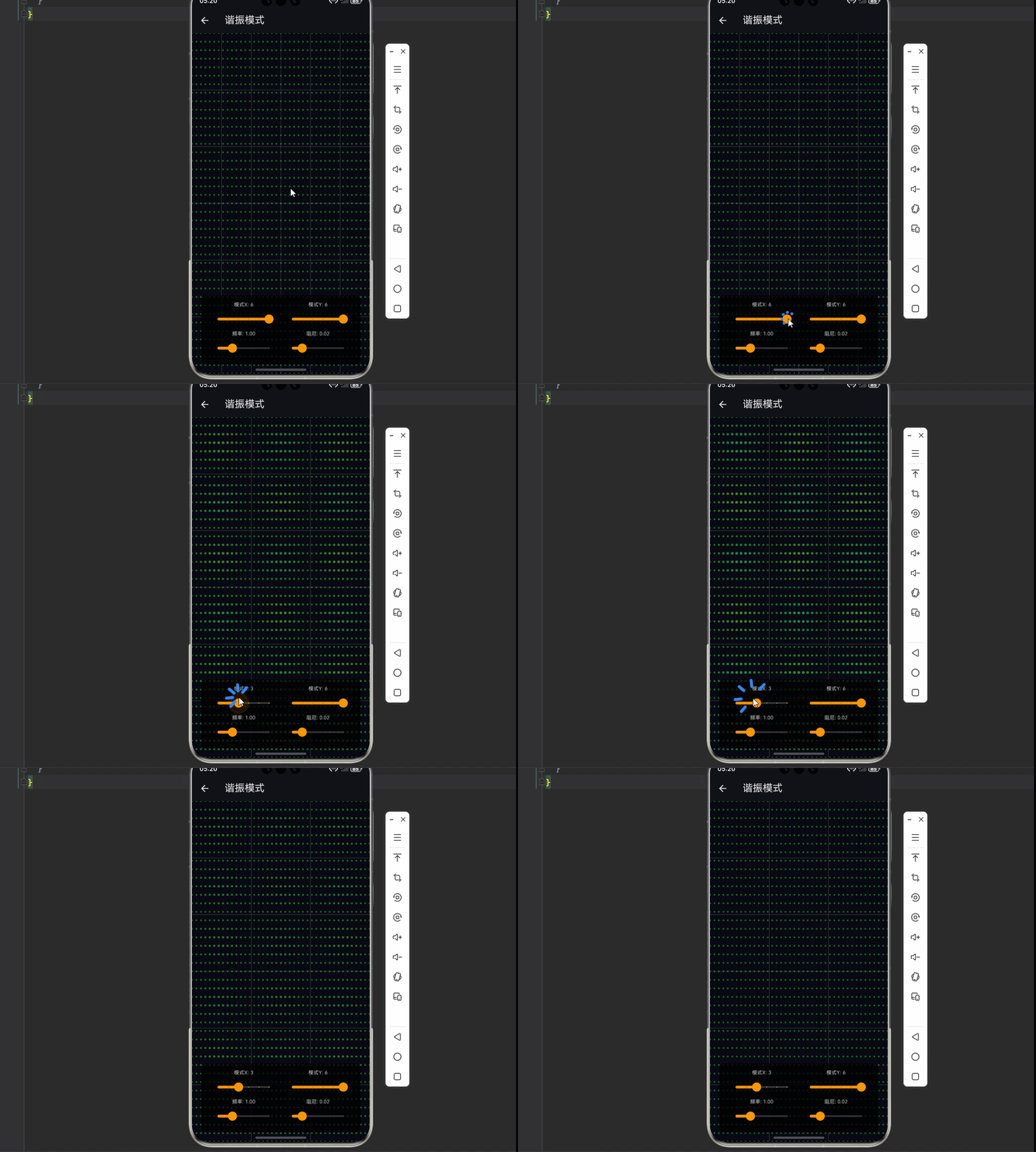
const ResonanceModeDemo({super.key});
State<ResonanceModeDemo> createState() => _ResonanceModeDemoState();
}
class _ResonanceModeDemoState extends State<ResonanceModeDemo> with SingleTickerProviderStateMixin {
late AnimationController _controller;
int _modeX = 2, _modeY = 3;
double _time = 0;
double _damping = 0.02;
double _frequency = 1;
void initState() {
super.initState();
_controller = AnimationController(vsync: this, duration: const Duration(milliseconds: 16))..repeat();
_controller.addListener(() {
_time += 0.016 * _frequency;
setState(() {});
});
}
void dispose() {
_controller.dispose();
super.dispose();
}
Widget build(BuildContext context) {
return Scaffold(
appBar: AppBar(title: const Text('谐振模式')),
body: Stack(children: [
CustomPaint(painter: ResonanceModePainter(_modeX, _modeY, _time, _damping), size: Size.infinite),
Positioned(bottom: 20, left: 20, right: 20, child: _buildControls()),
]),
);
}
Widget _buildControls() {
return Container(
padding: const EdgeInsets.all(12),
decoration: BoxDecoration(color: Colors.black.withOpacity(0.7), borderRadius: BorderRadius.circular(12)),
child: Column(children: [
Row(children: [
Expanded(child: _buildIntSlider('模式X', _modeX, 1, 6, (v) => setState(() => _modeX = v))),
Expanded(child: _buildIntSlider('模式Y', _modeY, 1, 6, (v) => setState(() => _modeY = v))),
]),
Row(children: [
Expanded(child: _buildSlider('频率', _frequency, 0.2, 3, (v) => setState(() => _frequency = v))),
Expanded(child: _buildSlider('阻尼', _damping, 0, 0.1, (v) => setState(() => _damping = v))),
]),
]),
);
}
Widget _buildIntSlider(String label, int value, int min, int max, Function(int) onChanged) {
return Column(children: [
Text('$label: $value', style: const TextStyle(color: Colors.white70, fontSize: 11)),
Slider(value: value.toDouble(), min: min.toDouble(), max: max.toDouble(), divisions: max - min,
onChanged: (v) => onChanged(v.toInt()), activeColor: Colors.orange),
]);
}
Widget _buildSlider(String label, double value, double min, double max, Function(double) onChanged) {
return Column(children: [
Text('$label: ${value.toStringAsFixed(2)}', style: const TextStyle(color: Colors.white70, fontSize: 11)),
Slider(value: value, min: min, max: max, onChanged: onChanged, activeColor: Colors.orange),
]);
}
}
class ResonanceModePainter extends CustomPainter {
final int modeX;
final int modeY;
final double time;
final double damping;
ResonanceModePainter(this.modeX, this.modeY, this.time, this.damping);
void paint(Canvas canvas, Size size) {
canvas.drawRect(Rect.fromLTWH(0, 0, size.width, size.height), Paint()..color = const Color(0xFF0a0a15));
final gridX = 40, gridY = 40;
final cellW = size.width / gridX;
final cellH = size.height / gridY;
for (int i = 0; i <= gridX; i++) {
for (int j = 0; j <= gridY; j++) {
final x = i / gridX;
final y = j / gridY;
final z = sin(modeX * pi * x) * sin(modeY * pi * y) * sin(2 * pi * time) * exp(-damping * time);
final px = i * cellW;
final py = j * cellH;
final hue = (120 + z * 60).clamp(0.0, 360.0);
final radius = 2 + z.abs() * 3;
canvas.drawCircle(Offset(px, py), radius, Paint()..color = HSVColor.fromAHSV(0.8, hue, 0.8, 0.5 + z.abs() * 0.5).toColor());
}
}
final nodePaint = Paint()..color = Colors.white.withOpacity(0.2)..strokeWidth = 1;
for (int n = 1; n < modeX; n++) {
final x = n * size.width / modeX;
canvas.drawLine(Offset(x, 0), Offset(x, size.height), nodePaint);
}
for (int n = 1; n < modeY; n++) {
final y = n * size.height / modeY;
canvas.drawLine(Offset(0, y), Offset(size.width, y), nodePaint);
}
}
bool shouldRepaint(covariant ResonanceModePainter old) => true;
}
/// 音程可视化演示
class IntervalVisualizer extends StatefulWidget {
const IntervalVisualizer({super.key});
State<IntervalVisualizer> createState() => _IntervalVisualizerState();
}
class _IntervalVisualizerState extends State<IntervalVisualizer> with SingleTickerProviderStateMixin {
late AnimationController _controller;
int _intervalIndex = 2;
double _time = 0;
double _phase = 0;
final List<Map<String, dynamic>> _intervals = [
{'name': '纯一度', 'ratio': [1, 1], 'description': '完全协和'},
{'name': '纯八度', 'ratio': [1, 2], 'description': '完全协和'},
{'name': '纯五度', 'ratio': [2, 3], 'description': '完全协和'},
{'name': '纯四度', 'ratio': [3, 4], 'description': '完全协和'},
{'name': '大三度', 'ratio': [4, 5], 'description': '不完全协和'},
{'name': '小三度', 'ratio': [5, 6], 'description': '不完全协和'},
{'name': '大六度', 'ratio': [3, 5], 'description': '不完全协和'},
{'name': '小二度', 'ratio': [15, 16], 'description': '不协和'},
];
void initState() {
super.initState();
_controller = AnimationController(vsync: this, duration: const Duration(milliseconds: 16))..repeat();
_controller.addListener(() {
_time += 0.016;
_phase += 0.01;
setState(() {});
});
}
void dispose() {
_controller.dispose();
super.dispose();
}
Widget build(BuildContext context) {
final interval = _intervals[_intervalIndex];
final ratio = interval['ratio'] as List;
return Scaffold(
appBar: AppBar(title: const Text('音程可视化')),
body: Stack(children: [
CustomPaint(painter: IntervalPainter(ratio[0], ratio[1], _time, _phase), size: Size.infinite),
Positioned(top: 20, left: 20, child: _buildInfo(interval)),
Positioned(bottom: 20, left: 20, right: 20, child: _buildControls()),
]),
);
}
Widget _buildInfo(Map<String, dynamic> interval) {
return Container(
padding: const EdgeInsets.all(12),
decoration: BoxDecoration(color: Colors.black.withOpacity(0.7), borderRadius: BorderRadius.circular(8)),
child: Column(crossAxisAlignment: CrossAxisAlignment.start, children: [
Text(interval['name'], style: const TextStyle(color: Colors.white, fontSize: 18)),
Text('频率比 ${(interval['ratio'] as List).join(":")}', style: const TextStyle(color: Colors.white70, fontSize: 14)),
Text(interval['description'], style: const TextStyle(color: Colors.pink, fontSize: 12)),
]),
);
}
Widget _buildControls() {
return Container(
padding: const EdgeInsets.all(12),
decoration: BoxDecoration(color: Colors.black.withOpacity(0.7), borderRadius: BorderRadius.circular(12)),
child: Column(children: [
Row(children: [
for (int i = 0; i < _intervals.length; i++)
Expanded(child: GestureDetector(
onTap: () => setState(() => _intervalIndex = i),
child: Container(
margin: const EdgeInsets.symmetric(horizontal: 2),
padding: const EdgeInsets.symmetric(vertical: 8),
decoration: BoxDecoration(color: _intervalIndex == i ? Colors.pink : Colors.grey[800], borderRadius: BorderRadius.circular(4)),
child: Text(_intervals[i]['name'], style: const TextStyle(color: Colors.white, fontSize: 10), textAlign: TextAlign.center),
),
)),
]),
]),
);
}
}
class IntervalPainter extends CustomPainter {
final int freqA;
final int freqB;
final double time;
final double phase;
IntervalPainter(this.freqA, this.freqB, this.time, this.phase);
void paint(Canvas canvas, Size size) {
final center = Offset(size.width / 2, size.height / 2);
final scale = min(size.width, size.height) * 0.35;
canvas.drawRect(Rect.fromLTWH(0, 0, size.width, size.height), Paint()..color = const Color(0xFF0a0a15));
final trail = <Offset>[];
for (double t = 0; t <= 2 * pi * 20; t += 0.01) {
final x = sin(freqA * t + phase);
final y = sin(freqB * t);
trail.add(Offset(x, y));
}
for (int i = 1; i < trail.length; i++) {
final p1 = center + Offset(trail[i - 1].dx * scale, trail[i - 1].dy * scale);
final p2 = center + Offset(trail[i].dx * scale, trail[i].dy * scale);
final hue = (i / trail.length * 180 + time * 20) % 360;
canvas.drawLine(p1, p2, Paint()..color = HSVColor.fromAHSV(0.7, hue, 0.8, 1).toColor()..strokeWidth = 1.5..strokeCap = StrokeCap.round);
}
}
bool shouldRepaint(covariant IntervalPainter old) => true;
}
/// 多频叠加演示
class MultiFrequencyDemo extends StatefulWidget {
const MultiFrequencyDemo({super.key});
State<MultiFrequencyDemo> createState() => _MultiFrequencyDemoState();
}
class _MultiFrequencyDemoState extends State<MultiFrequencyDemo> with SingleTickerProviderStateMixin {
late AnimationController _controller;
double _time = 0;
final List<double> _frequencies = [1, 2, 3, 5];
final List<double> _amplitudes = [1, 0.7, 0.5, 0.3];
final List<double> _phases = [0, 0.5, 1, 1.5];
void initState() {
super.initState();
_controller = AnimationController(vsync: this, duration: const Duration(milliseconds: 16))..repeat();
_controller.addListener(() {
_time += 0.016;
setState(() {});
});
}
void dispose() {
_controller.dispose();
super.dispose();
}
Widget build(BuildContext context) {
return Scaffold(
appBar: AppBar(title: const Text('多频叠加')),
body: CustomPaint(painter: MultiFrequencyPainter(_frequencies, _amplitudes, _phases, _time), size: Size.infinite),
);
}
}
class MultiFrequencyPainter extends CustomPainter {
final List<double> frequencies;
final List<double> amplitudes;
final List<double> phases;
final double time;
MultiFrequencyPainter(this.frequencies, this.amplitudes, this.phases, this.time);
void paint(Canvas canvas, Size size) {
final center = Offset(size.width / 2, size.height / 2);
final scale = min(size.width, size.height) * 0.35;
canvas.drawRect(Rect.fromLTWH(0, 0, size.width, size.height), Paint()..color = const Color(0xFF0a0a15));
final trail = <Offset>[];
for (double t = 0; t <= 4 * pi; t += 0.005) {
double x = 0, y = 0;
for (int i = 0; i < frequencies.length; i++) {
x += amplitudes[i] * sin(2 * pi * frequencies[i] * t + phases[i]);
y += amplitudes[i] * sin(2 * pi * frequencies[(i + 1) % frequencies.length] * t + phases[i]);
}
trail.add(Offset(x / frequencies.length, y / frequencies.length));
}
for (int i = 1; i < trail.length; i++) {
final p1 = center + Offset(trail[i - 1].dx * scale, trail[i - 1].dy * scale);
final p2 = center + Offset(trail[i].dx * scale, trail[i].dy * scale);
final hue = (i / trail.length * 240 + time * 25) % 360;
canvas.drawLine(p1, p2, Paint()..color = HSVColor.fromAHSV(0.8, hue, 0.85, 1).toColor()..strokeWidth = 2..strokeCap = StrokeCap.round);
}
}
bool shouldRepaint(covariant MultiFrequencyPainter old) => true;
}
/// 相位动画演示
class PhaseAnimationDemo extends StatefulWidget {
const PhaseAnimationDemo({super.key});
State<PhaseAnimationDemo> createState() => _PhaseAnimationDemoState();
}
class _PhaseAnimationDemoState extends State<PhaseAnimationDemo> with SingleTickerProviderStateMixin {
late AnimationController _controller;
int _freqA = 3, _freqB = 4;
double _time = 0;
double _phaseSpeed = 1;
bool _animate = true;
void initState() {
super.initState();
_controller = AnimationController(vsync: this, duration: const Duration(milliseconds: 16))..repeat();
_controller.addListener(() {
_time += 0.016;
setState(() {});
});
}
void dispose() {
_controller.dispose();
super.dispose();
}
Widget build(BuildContext context) {
return Scaffold(
appBar: AppBar(title: const Text('相位动画')),
body: Stack(children: [
CustomPaint(painter: PhaseAnimationPainter(_freqA, _freqB, _time, _phaseSpeed, _animate), size: Size.infinite),
Positioned(bottom: 20, left: 20, right: 20, child: _buildControls()),
]),
);
}
Widget _buildControls() {
return Container(
padding: const EdgeInsets.all(12),
decoration: BoxDecoration(color: Colors.black.withOpacity(0.7), borderRadius: BorderRadius.circular(12)),
child: Column(children: [
Row(children: [
Expanded(child: _buildIntSlider('频率A', _freqA, 1, 8, (v) => setState(() => _freqA = v))),
Expanded(child: _buildIntSlider('频率B', _freqB, 1, 8, (v) => setState(() => _freqB = v))),
]),
Row(children: [
Expanded(child: _buildSlider('相位速度', _phaseSpeed, 0.1, 5, (v) => setState(() => _phaseSpeed = v))),
Expanded(child: GestureDetector(
onTap: () => setState(() => _animate = !_animate),
child: Container(
padding: const EdgeInsets.symmetric(vertical: 12),
decoration: BoxDecoration(color: _animate ? Colors.amber : Colors.grey[700], borderRadius: BorderRadius.circular(8)),
child: Text(_animate ? '动画中' : '暂停', style: const TextStyle(color: Colors.white), textAlign: TextAlign.center),
),
)),
]),
]),
);
}
Widget _buildIntSlider(String label, int value, int min, int max, Function(int) onChanged) {
return Column(children: [
Text('$label: $value', style: const TextStyle(color: Colors.white70, fontSize: 11)),
Slider(value: value.toDouble(), min: min.toDouble(), max: max.toDouble(), divisions: max - min,
onChanged: (v) => onChanged(v.toInt()), activeColor: Colors.amber),
]);
}
Widget _buildSlider(String label, double value, double min, double max, Function(double) onChanged) {
return Column(children: [
Text('$label: ${value.toStringAsFixed(1)}', style: const TextStyle(color: Colors.white70, fontSize: 11)),
Slider(value: value, min: min, max: max, onChanged: onChanged, activeColor: Colors.amber),
]);
}
}
class PhaseAnimationPainter extends CustomPainter {
final int freqA;
final int freqB;
final double time;
final double phaseSpeed;
final bool animate;
PhaseAnimationPainter(this.freqA, this.freqB, this.time, this.phaseSpeed, this.animate);
void paint(Canvas canvas, Size size) {
final center = Offset(size.width / 2, size.height / 2);
final scale = min(size.width, size.height) * 0.35;
canvas.drawRect(Rect.fromLTWH(0, 0, size.width, size.height), Paint()..color = const Color(0xFF0a0a15));
final phase = animate ? time * phaseSpeed : 0;
final trail = <Offset>[];
for (double t = 0; t <= 2 * pi * 10; t += 0.01) {
final x = sin(freqA * t);
final y = sin(freqB * t + phase);
trail.add(Offset(x, y));
}
for (int i = 1; i < trail.length; i++) {
final p1 = center + Offset(trail[i - 1].dx * scale, trail[i - 1].dy * scale);
final p2 = center + Offset(trail[i].dx * scale, trail[i].dy * scale);
final hue = (i / trail.length * 120 + time * 30) % 360;
canvas.drawLine(p1, p2, Paint()..color = HSVColor.fromAHSV(0.8, hue, 0.9, 1).toColor()..strokeWidth = 2..strokeCap = StrokeCap.round);
}
}
bool shouldRepaint(covariant PhaseAnimationPainter old) => true;
}
/// 频率扫描演示
class FrequencySweepDemo extends StatefulWidget {
const FrequencySweepDemo({super.key});
State<FrequencySweepDemo> createState() => _FrequencySweepDemoState();
}
class _FrequencySweepDemoState extends State<FrequencySweepDemo> with SingleTickerProviderStateMixin {
late AnimationController _controller;
double _time = 0;
double _sweepSpeed = 0.1;
double _baseFreqA = 2;
double _baseFreqB = 3;
bool _sweeping = true;
void initState() {
super.initState();
_controller = AnimationController(vsync: this, duration: const Duration(milliseconds: 16))..repeat();
_controller.addListener(() {
_time += 0.016;
setState(() {});
});
}
void dispose() {
_controller.dispose();
super.dispose();
}
Widget build(BuildContext context) {
return Scaffold(
appBar: AppBar(title: const Text('频率扫描')),
body: Stack(children: [
CustomPaint(painter: FrequencySweepPainter(_baseFreqA, _baseFreqB, _time, _sweepSpeed, _sweeping), size: Size.infinite),
Positioned(bottom: 20, left: 20, right: 20, child: _buildControls()),
]),
);
}
Widget _buildControls() {
return Container(
padding: const EdgeInsets.all(12),
decoration: BoxDecoration(color: Colors.black.withOpacity(0.7), borderRadius: BorderRadius.circular(12)),
child: Column(children: [
Row(children: [
Expanded(child: _buildSlider('基频A', _baseFreqA, 1, 5, (v) => setState(() => _baseFreqA = v))),
Expanded(child: _buildSlider('基频B', _baseFreqB, 1, 5, (v) => setState(() => _baseFreqB = v))),
]),
Row(children: [
Expanded(child: _buildSlider('扫描速度', _sweepSpeed, 0.01, 0.5, (v) => setState(() => _sweepSpeed = v))),
Expanded(child: GestureDetector(
onTap: () => setState(() => _sweeping = !_sweeping),
child: Container(
padding: const EdgeInsets.symmetric(vertical: 12),
decoration: BoxDecoration(color: _sweeping ? Colors.deepPurple : Colors.grey[700], borderRadius: BorderRadius.circular(8)),
child: Text(_sweeping ? '扫描中' : '暂停', style: const TextStyle(color: Colors.white), textAlign: TextAlign.center),
),
)),
]),
]),
);
}
Widget _buildSlider(String label, double value, double min, double max, Function(double) onChanged) {
return Column(children: [
Text('$label: ${value.toStringAsFixed(2)}', style: const TextStyle(color: Colors.white70, fontSize: 11)),
Slider(value: value, min: min, max: max, onChanged: onChanged, activeColor: Colors.deepPurple),
]);
}
}
class FrequencySweepPainter extends CustomPainter {
final double baseFreqA;
final double baseFreqB;
final double time;
final double sweepSpeed;
final bool sweeping;
FrequencySweepPainter(this.baseFreqA, this.baseFreqB, this.time, this.sweepSpeed, this.sweeping);
void paint(Canvas canvas, Size size) {
final center = Offset(size.width / 2, size.height / 2);
final scale = min(size.width, size.height) * 0.35;
canvas.drawRect(Rect.fromLTWH(0, 0, size.width, size.height), Paint()..color = const Color(0xFF050510));
final sweep = sweeping ? sin(time * sweepSpeed * 2 * pi) * 0.5 + 0.5 : 0;
final freqA = baseFreqA + sweep * 3;
final freqB = baseFreqB + (1 - sweep) * 3;
final trail = <Offset>[];
for (double t = 0; t <= 4 * pi; t += 0.005) {
final x = sin(freqA * t);
final y = sin(freqB * t);
trail.add(Offset(x, y));
}
for (int i = 1; i < trail.length; i++) {
final p1 = center + Offset(trail[i - 1].dx * scale, trail[i - 1].dy * scale);
final p2 = center + Offset(trail[i].dx * scale, trail[i].dy * scale);
final hue = (sweep * 180 + i / trail.length * 60 + time * 20) % 360;
canvas.drawLine(p1, p2, Paint()..color = HSVColor.fromAHSV(0.75, hue, 0.85, 1).toColor()..strokeWidth = 1.5..strokeCap = StrokeCap.round);
}
}
bool shouldRepaint(covariant FrequencySweepPainter old) => true;
}
📝 五、总结
本篇文章深入探讨了李萨如图形在音乐可视化中的应用,从振动叠加原理到谐振模式,构建了完整的音乐驱动几何艺术系统。
✅ 核心知识点回顾
| 知识点 | 说明 |
|---|---|
| 📐李萨如图形 | 两个垂直简谐振动的叠加 |
| 🔄频率比 | 决定图形形状和闭合性 |
| 🌊相位差 | 决定图形姿态和动画效果 |
| 🎵音程对应 | 简单整数比对应协和音程 |
| 📊拍频现象 | 频率接近时的干涉效果 |
| 🌊驻波模式 | 一维和二维振动模式 |
| 🎨音频驱动 | 音乐参数映射图形变化 |
⭐ 最佳实践要点
- ✅ 使用最小公倍数计算闭合周期
- ✅ 相位差变化创造动态效果
- ✅ 音频能量映射到图形参数
- ✅ 三维投影增强视觉深度
- ✅ 谐振模式可视化驻波原理

作为“人工智能6S店”的官方数字引擎,为AI开发者与企业提供一个覆盖软硬件全栈、一站式门户。
更多推荐


 3
3 0
0- 0


 已为社区贡献12条内容

所有评论(0)