
Flutter for OpenHarmony 实战:freezed 代码生成与数据模型终极方案
摘要: 本文介绍了如何在Flutter for OpenHarmony中使用freezed插件简化数据模型管理。通过代码生成,freezed自动处理不可变类、copyWith方法和深度比较,并支持联合类型(Union Types),使业务逻辑更清晰。文章详细展示了集成步骤、模型定义及模式匹配的高效用法,并结合鸿蒙平台的不可变性要求,优化状态管理。实战示例演示了如何利用freezed优雅处理商品列表
Flutter for OpenHarmony 实战:freezed 代码生成与数据模型终极方案
前言
随着业务逻辑的增长,数据模型的管理变得异常棘手。手写不可变类、重写 == 和 hashCode、以及实现 copyWith 方法简直是开发者的噩梦。
freezed 插件通过强大的代码生成,不仅一次性解决了上述所有痛点,还带来了“联合类型(Union Types)”这种大幅简化业务逻辑的杀手锏。在 HarmonyOS NEXT 追求高质量、零冗余的开发体系下,freezed 是提升项目健壮性的必选利器。
一、 为什么 Freezed 是 Model 层的“银弹”?
1.1 彻底消灭样板代码
只需几行定义,自动拥有 copyWith、toString 以及深度对象比较能力。
1.2 Union 类型处理复杂状态
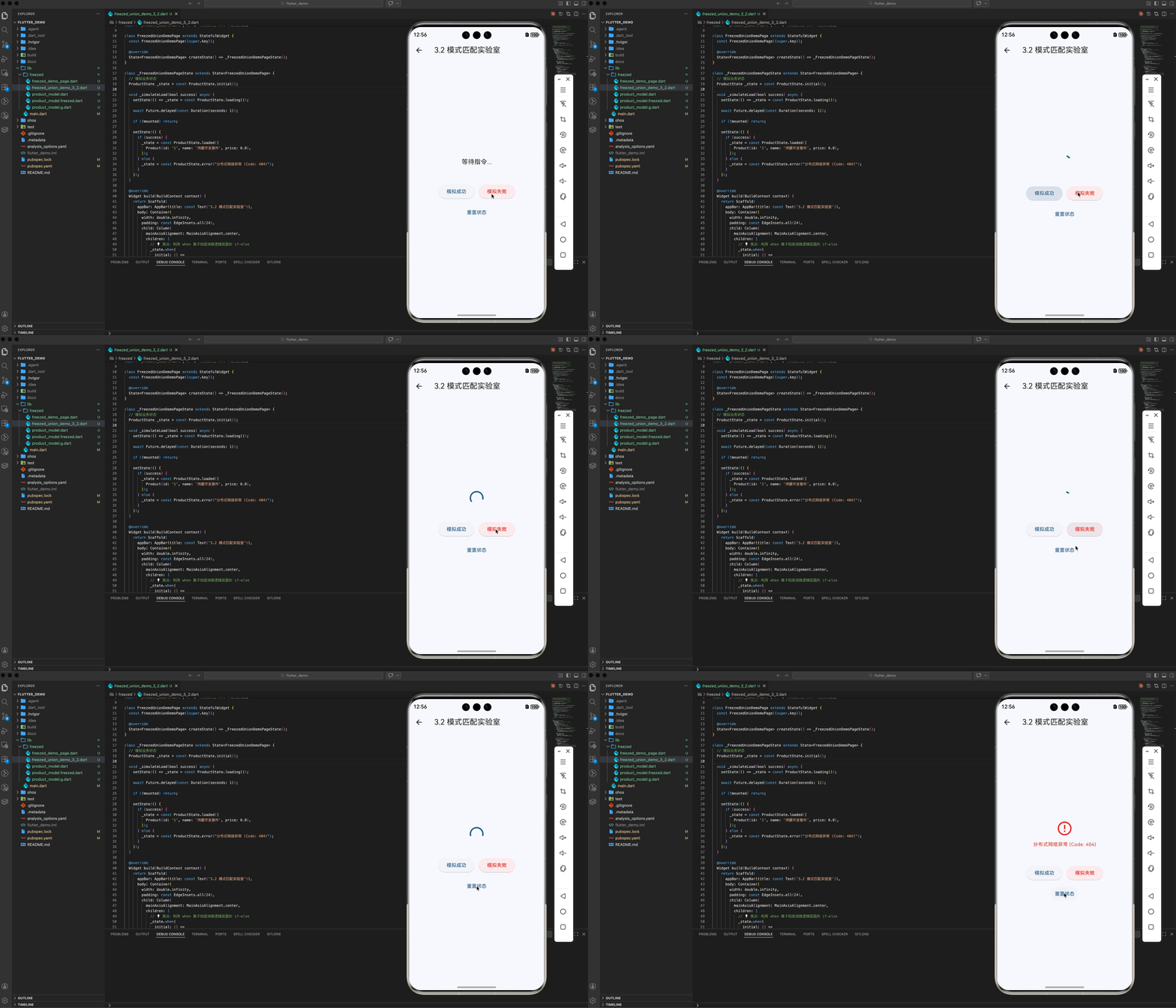
在鸿蒙端处理网络请求结果时(成功、失败、加载中),利用 Freezed 的联合类型配合模式匹配(Pattern Matching),逻辑清晰得像在写数学公式。
二、 集成指南
2.1 添加依赖
dependencies:
  freezed_annotation: ^2.4.4
  json_annotation: ^4.9.0

dev_dependencies:
  build_runner: ^2.4.11
  freezed: ^3.2.5
  json_serializable: ^6.12.0
三、 实战:构建鸿蒙应用的业务解析模型
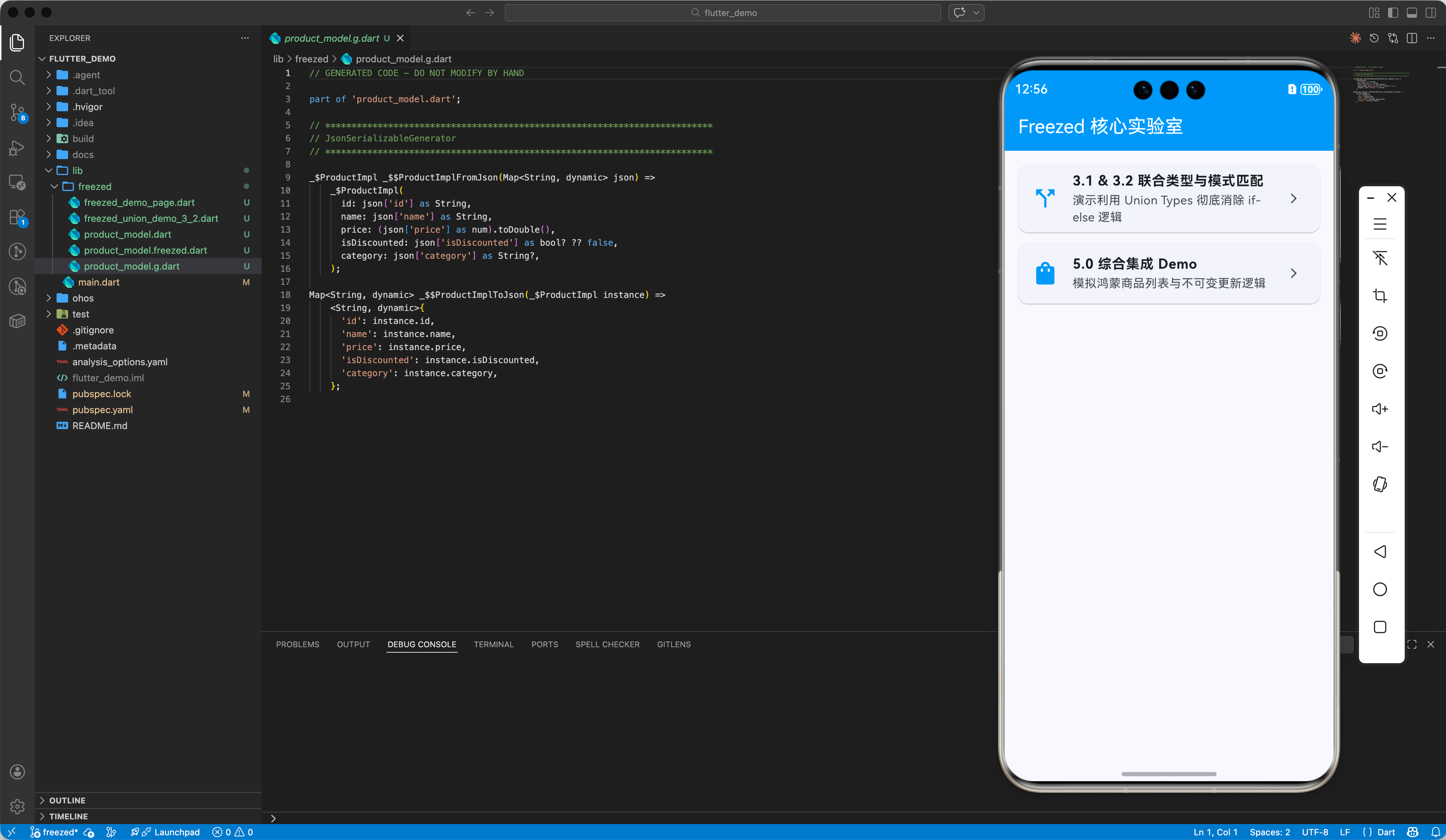
3.1 定义联合类型模型
利用 freezed 强大的语法糖,快速声明具有高度表达力的数据结构。
import 'package:freezed_annotation/freezed_annotation.dart';
part 'product_model.freezed.dart';
part 'product_model.g.dart';
class ProductState with _$ProductState {
// 💡 亮点:定义 UI 可能处于的不同状态
const factory ProductState.initial() = _Initial;
const factory ProductState.loading() = _Loading;
const factory ProductState.loaded(List<Product> products) = _Loaded;
const factory ProductState.error(String message) = _Error;
}
3.2 模式匹配的高雅用法
在 UI 逻辑中,告别 if-else:
state.when(
  data: (items) => ListView(children: items.map(Text.new).toList()),
  loading: () => const CircularProgressIndicator(),
  error: (msg) => Text('出错了: $msg'),
);
四、 鸿蒙平台的工程实践
4.1 适配鸿蒙的不可变性要求
在鸿蒙端处理复杂表单数据流转时,不可变模型(Immutability)能极大减少并发状态下的数据写冲突。结合 copyWith,你可以安全地在异步操作中传递数据快照,无需担心旧状态被非法篡改。
4.2 编译速度与产物大小
在大规模应用 freezed 的鸿蒙工程中,虽然生成代码体积略微增加,但其带来的运行期逻辑分支优化(由编译器优化 when 分支)反而有助于提升执行效率。记得在发布鸿蒙版本前运行代码瘦身工具。
五、 综合实战:构建带状态感知的鸿蒙商品卡片
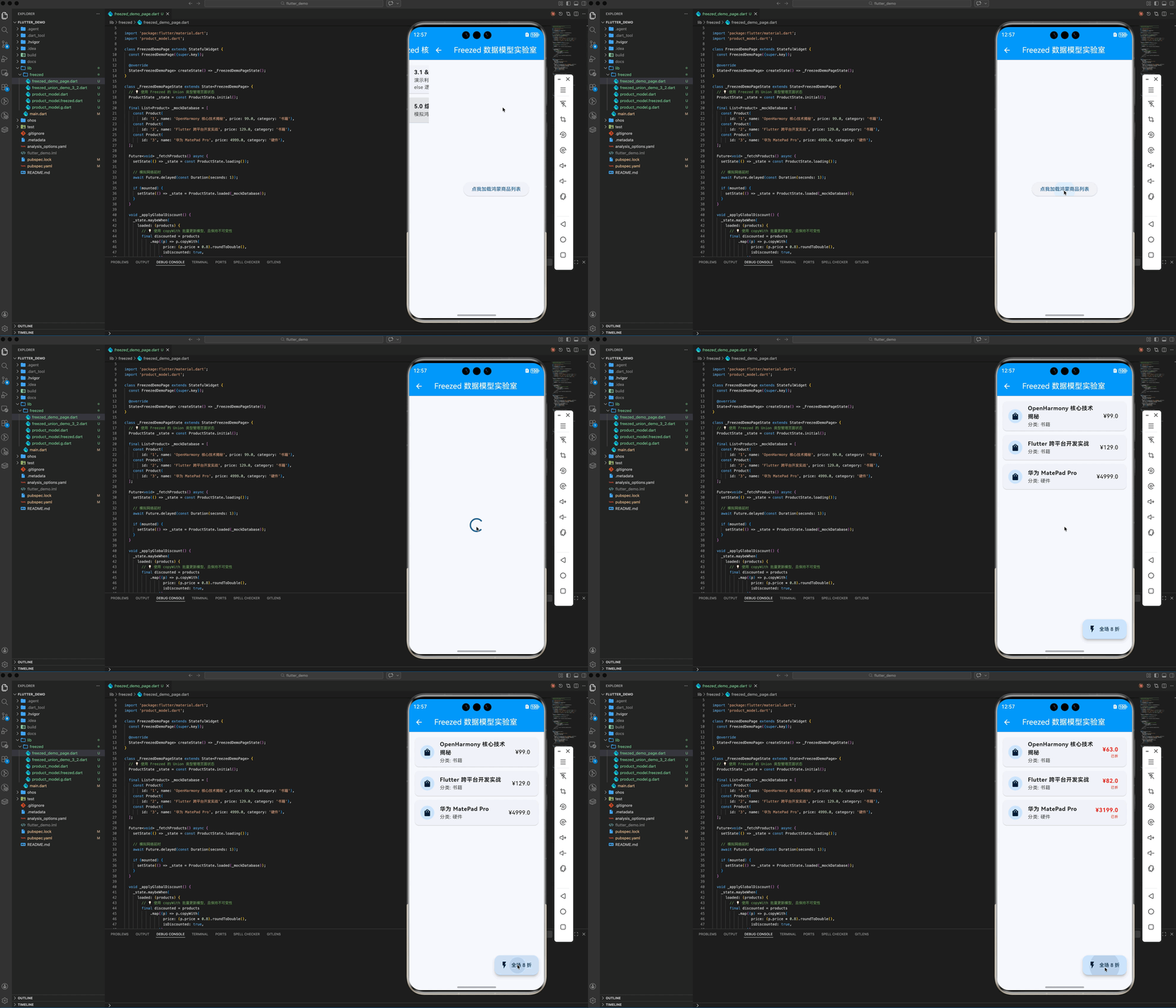
本示例展示了如何配合 build_runner 真实生成的代码,在 UI 层利用 when 算子完美分发“加载中、成功、失败”三种业务态,并演示了 copyWith 批量折扣更新的高雅姿态。
import 'package:flutter/material.dart';
import 'product_model.dart';
class FreezedDemoPage extends StatefulWidget {
const FreezedDemoPage({super.key});
State<FreezedDemoPage> createState() => _FreezedDemoPageState();
}
class _FreezedDemoPageState extends State<FreezedDemoPage> {
// 💡 使用 Freezed 的 Union 类型管理页面状态
ProductState _state = const ProductState.initial();
final List<Product> _mockDatabase = [
const Product(
id: '1', name: 'OpenHarmony 核心技术揭秘', price: 99.0, category: '书籍'),
const Product(
id: '2', name: 'Flutter 跨平台开发实战', price: 129.0, category: '书籍'),
const Product(
id: '3', name: '华为 MatePad Pro', price: 4999.0, category: '硬件'),
];
Future<void> _fetchProducts() async {
setState(() => _state = const ProductState.loading());
// 模拟网络延时
await Future.delayed(const Duration(seconds: 1));
if (mounted) {
setState(() => _state = ProductState.loaded(_mockDatabase));
}
}
void _applyGlobalDiscount() {
_state.maybeWhen(
loaded: (products) {
// 💡 使用 copyWith 批量更新模型,且保持不可变性
final discounted = products
.map((p) => p.copyWith(
price: (p.price * 0.8).roundToDouble(),
isDiscounted: true,
))
.toList();
setState(() => _state = ProductState.loaded(discounted));
},
orElse: () {},
);
}
Widget build(BuildContext context) {
return Scaffold(
appBar: AppBar(
title: const Text('Freezed 数据模型实验室'),
backgroundColor: Colors.blue,
foregroundColor: Colors.white,
),
body: _state.when(
initial: () => _buildCenterAction('点我加载鸿蒙商品列表', _fetchProducts),
loading: () => const Center(child: CircularProgressIndicator()),
error: (msg) => _buildCenterAction('出错啦: $msg', _fetchProducts),
loaded: (products) => _buildProductList(products),
),
floatingActionButton: _state.maybeWhen(
loaded: (_) => FloatingActionButton.extended(
onPressed: _applyGlobalDiscount,
label: const Text('全场 8 折'),
icon: const Icon(Icons.flash_on),
),
orElse: () => null,
),
);
}
Widget _buildProductList(List<Product> products) {
return ListView.builder(
padding: const EdgeInsets.all(16),
itemCount: products.length,
itemBuilder: (context, index) {
final product = products[index];
return Card(
margin: const EdgeInsets.only(bottom: 12),
child: ListTile(
leading: const CircleAvatar(child: Icon(Icons.shopping_bag)),
title: Text(product.name,
style: const TextStyle(fontWeight: FontWeight.bold)),
subtitle: Text('分类: ${product.category ?? "未分类"}'),
trailing: Column(
mainAxisAlignment: MainAxisAlignment.center,
crossAxisAlignment: CrossAxisAlignment.end,
children: [
Text('¥${product.price}',
style: TextStyle(
color: product.isDiscounted ? Colors.red : Colors.black,
fontSize: 16,
fontWeight: product.isDiscounted
? FontWeight.bold
: FontWeight.normal,
)),
if (product.isDiscounted)
const Text('已折',
style: TextStyle(color: Colors.red, fontSize: 10)),
],
),
),
);
},
);
}
Widget _buildCenterAction(String label, VoidCallback action) {
return Center(
child: ElevatedButton(onPressed: action, child: Text(label)),
);
}
}
六、 总结
freezed 不仅仅是减少了几行 copyWith。它将函数式编程中的“代数数据类型”引入了鸿蒙 Flutter 开发,让复杂的业务逻辑分支变得有迹可循。在 HarmonyOS NEXT 这样高品质的平台开发中,拥有这种“逻辑确定性”,是区分初级开发者与架构师的关键。
欢迎加入开源鸿蒙跨平台社区:开源鸿蒙跨平台开发者社区

作为“人工智能6S店”的官方数字引擎,为AI开发者与企业提供一个覆盖软硬件全栈、一站式门户。
更多推荐

 4
4 0
0- 0


 已为社区贡献23条内容

所有评论(0)