
Flutter for OpenHarmony 实战:fluentui_system_icons 微软风格图标库适配指南
本文介绍了如何在鸿蒙Flutter应用中集成微软FluentUI System Icons图标库。该图标库具有统一的设计美学,提供Regular和Filled两种风格,包含4000+种图标,能够完美适配鸿蒙的卡片式布局。文章解析了字体图标的矢量缩放、内存优化等优势,并给出具体集成步骤:在pubspec.yaml中添加依赖即可使用。通过代码示例演示了图标的基础调用、颜色尺寸调整以及与鸿蒙品牌色的搭配
Flutter for OpenHarmony 实战:fluentui_system_icons 微软风格图标库适配指南
前言
在应用开发中,图标(Icon)是 UI 传达信息的灵魂。虽然 Flutter 默认集成了 Material Icons,但在追求更加精致、具有现代感甚至商务质感的 HarmonyOS NEXT 应用设计中,微软出品的 FluentUI System Icons 凭借其统一的线条美学和极高的一致性,成为了许多高端应用的首选。
本文将演示如何在鸿蒙 Flutter 应用中集成这一高质量图标库,提升应用的国际化设计水准。
一、 为什么在鸿蒙开发中首选 FluentUI System Icons?
1.1 跨越平台的“普世美学”
Fluent UI 是微软新一代设计系统,不仅在 Windows 和 Office 场景中广泛使用,其图标造型圆润、笔触细腻且具有极强的识别度。在 HarmonyOS NEXT 这一强调“轻量”与“秩序”的设计体系下,Fluent 图标的极简线条能与鸿蒙的卡片式布局产生绝佳的“设计共振”。
1.2 物理级支持的 Regular 与 Filled 风格
该库对每一个图标都提供了 Regular(线性)和 Filled(面性)两个版本。这在鸿蒙应用的 Tab 切换、深色模式映射以及“选中态”反馈中提供了物理级别的视觉一致性支撑。
1.3 极度丰富的语义覆盖
涵盖了从基础导航、多媒体控制到复杂的商业办公(如 Outlook 风格的日历、协同图标)等 4000+ 种组合。对于缺少专业 UI 支持的独立开发者或敏捷开发团队来说,这是一个开箱即用的“设计资产库”。
二、 技术内幕:解析图标在鸿蒙端的渲染路径
2.1 字体图标 (Icon Font) 的本质
fluentui_system_icons 并不是以位图图片(PNG/SVG)的形式存在,而是封装在一个 TrueType Font (TTF) 字体文件中。每一个图标都对应字体中的一个 Unicode 码位。
2.2 渲染优势分析
- 矢量缩放:无论在鸿蒙手机还是 4K 智慧屏上,图标都能保持无限的边缘锐度,绝对不会出现模糊。
- 内存极简:加载几千个图标仅需读取一个几百 KB 的字体文件,比起加载数千张 PNG 图片,内存占用降低了 90% 以上。
- 颜色灵活性:开发者可以通过 Dart 的
color属性实时改变图标颜色,轻松适配鸿蒙的系统强调色或品牌色。
三、 集成指南
2.1 添加依赖
在 pubspec.yaml 中增加以下配置:
dependencies:
  fluentui_system_icons: ^1.1.273
四、 实战:构建鸿蒙风格的精致 UI 系统
4.1 核心图标资产的高级调用
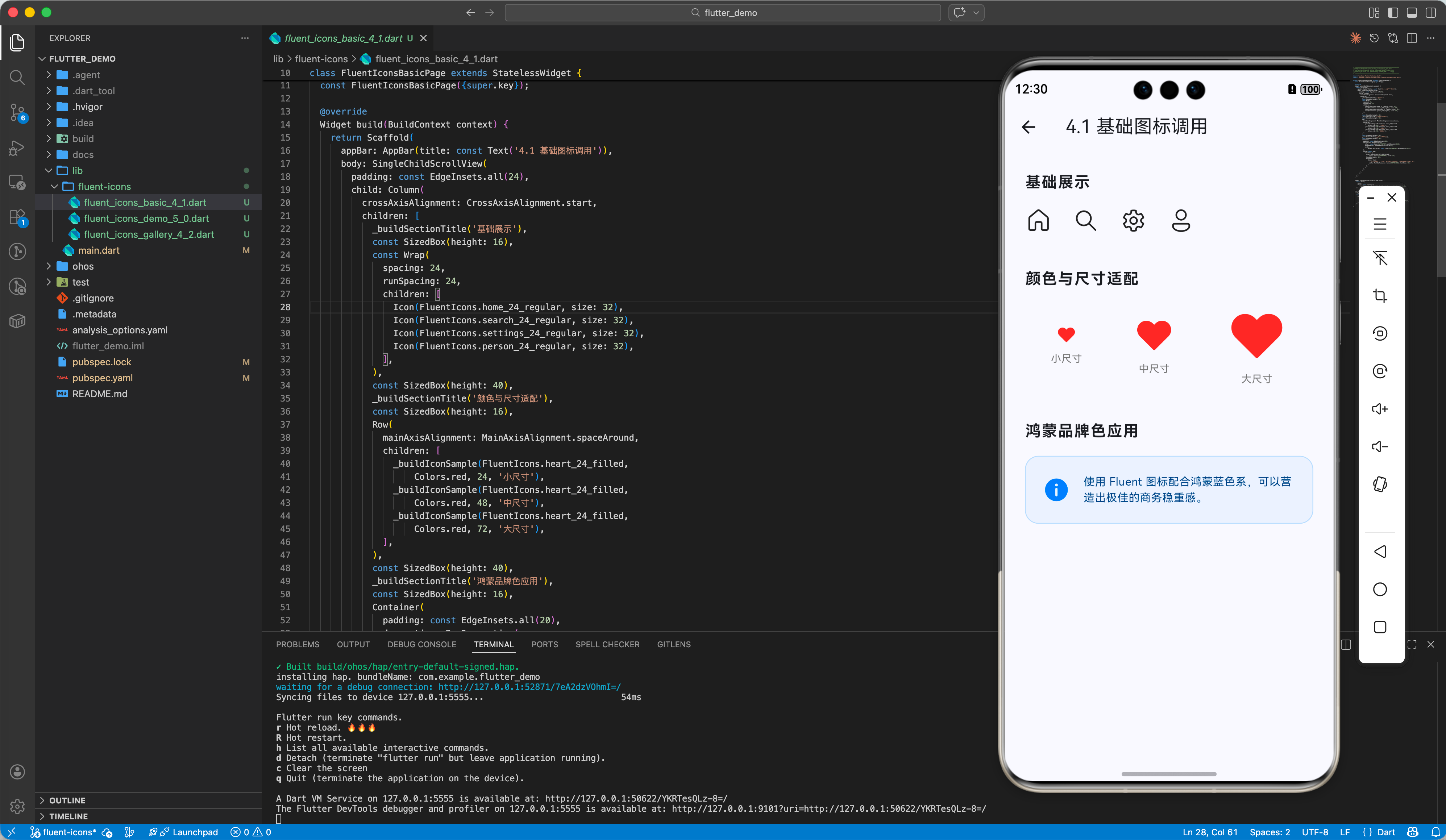
演示如何调用基础图标并进行高级定制。
import 'package:flutter/material.dart';
import 'package:fluentui_system_icons/fluentui_system_icons.dart';
class FluentIconsBasicPage extends StatelessWidget {
const FluentIconsBasicPage({super.key});
Widget build(BuildContext context) {
return Scaffold(
appBar: AppBar(title: const Text('4.1 基础图标调用')),
body: SingleChildScrollView(
padding: const EdgeInsets.all(24),
child: Column(
crossAxisAlignment: CrossAxisAlignment.start,
children: [
_buildSectionTitle('基础展示'),
const SizedBox(height: 16),
const Wrap(
spacing: 24,
runSpacing: 24,
children: [
Icon(FluentIcons.home_24_regular, size: 32),
Icon(FluentIcons.search_24_regular, size: 32),
Icon(FluentIcons.settings_24_regular, size: 32),
Icon(FluentIcons.person_24_regular, size: 32),
],
),
const SizedBox(height: 40),
_buildSectionTitle('颜色与尺寸适配'),
const SizedBox(height: 16),
Row(
mainAxisAlignment: MainAxisAlignment.spaceAround,
children: [
_buildIconSample(FluentIcons.heart_24_filled,
Colors.red, 24, '小尺寸'),
_buildIconSample(FluentIcons.heart_24_filled,
Colors.red, 48, '中尺寸'),
_buildIconSample(FluentIcons.heart_24_filled,
Colors.red, 72, '大尺寸'),
],
),
const SizedBox(height: 40),
_buildSectionTitle('鸿蒙品牌色应用'),
const SizedBox(height: 16),
Container(
padding: const EdgeInsets.all(20),
decoration: BoxDecoration(
color: const Color(0xFF007DFF).withOpacity(0.05),
borderRadius: BorderRadius.circular(16),
border:
Border.all(color: const Color(0xFF007DFF).withOpacity(0.2)),
),
child: const Row(
children: [
Icon(FluentIcons.info_24_filled,
color: Color(0xFF007DFF), size: 32),
SizedBox(width: 16),
Expanded(
child: Text(
'使用 Fluent 图标配合鸿蒙蓝色系,可以营造出极佳的商务稳重感。',
style: TextStyle(color: Color(0xFF004080), fontSize: 13),
),
),
],
),
),
],
),
),
);
}
Widget _buildSectionTitle(String title) {
return Text(
title,
style: const TextStyle(
fontSize: 18, fontWeight: FontWeight.bold, letterSpacing: 1.2),
);
}
Widget _buildIconSample(
IconData icon, Color color, double size, String label) {
return Column(
children: [
Icon(icon, color: color, size: size),
const SizedBox(height: 8),
Text(label, style: TextStyle(fontSize: 12, color: Colors.grey[600])),
],
);
}
}
4.2 图标风格实验室 (Regular vs Filled)
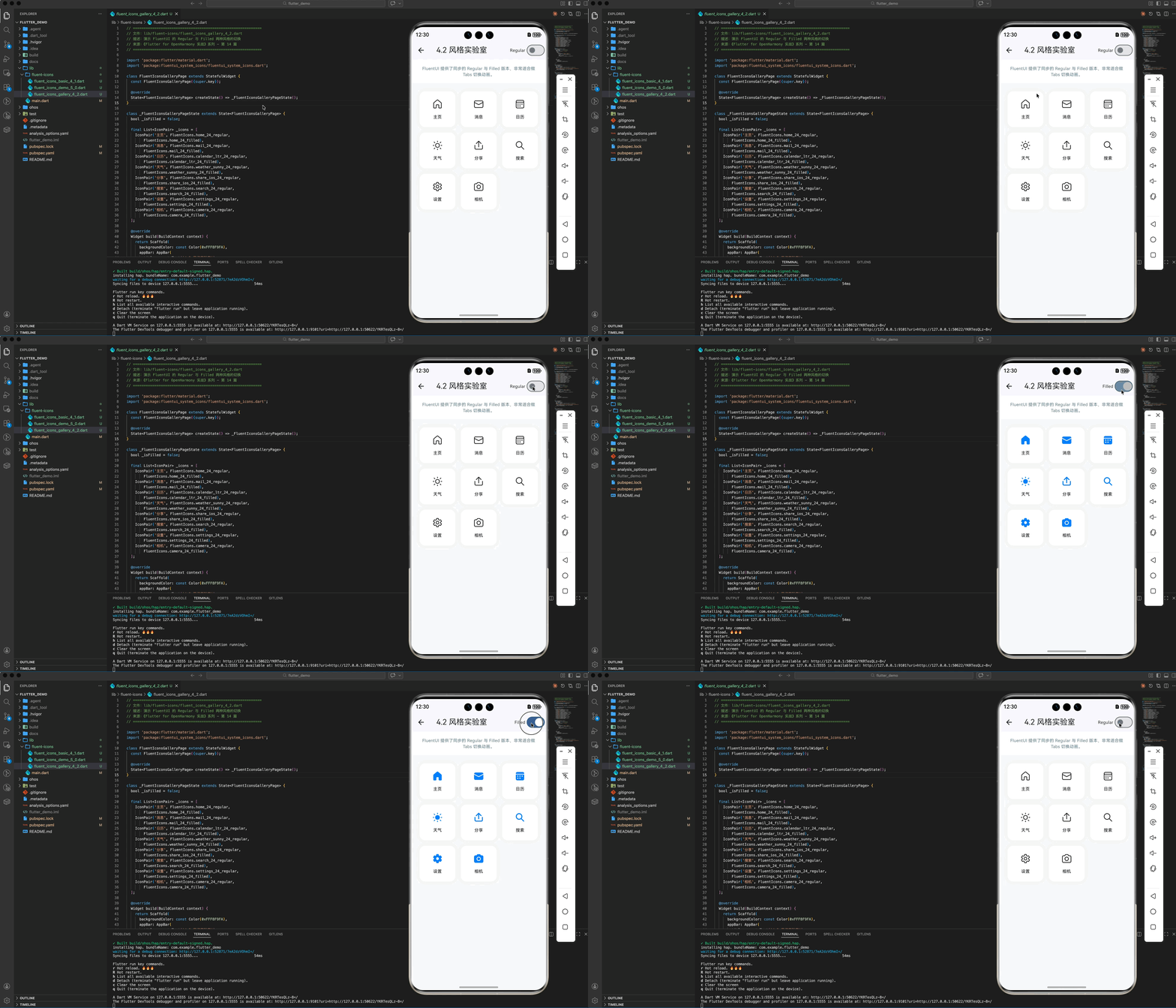
在鸿蒙端处理图标风格切换,以获得最佳的选中态反馈(如 Tab 选中切换)。
import 'package:flutter/material.dart';
import 'package:fluentui_system_icons/fluentui_system_icons.dart';
class FluentIconsGalleryPage extends StatefulWidget {
const FluentIconsGalleryPage({super.key});
State<FluentIconsGalleryPage> createState() => _FluentIconsGalleryPageState();
}
class _FluentIconsGalleryPageState extends State<FluentIconsGalleryPage> {
bool _isFilled = false;
final List<IconPair> _icons = [
IconPair('主页', FluentIcons.home_24_regular,
FluentIcons.home_24_filled),
IconPair('消息', FluentIcons.mail_24_regular,
FluentIcons.mail_24_filled),
IconPair('日历', FluentIcons.calendar_ltr_24_regular,
FluentIcons.calendar_ltr_24_filled),
IconPair('天气', FluentIcons.weather_sunny_24_regular,
FluentIcons.weather_sunny_24_filled),
IconPair('分享', FluentIcons.share_ios_24_regular,
FluentIcons.share_ios_24_filled),
IconPair('搜索', FluentIcons.search_24_regular,
FluentIcons.search_24_filled),
IconPair('设置', FluentIcons.settings_24_regular,
FluentIcons.settings_24_filled),
IconPair('相机', FluentIcons.camera_24_regular,
FluentIcons.camera_24_filled),
];
Widget build(BuildContext context) {
return Scaffold(
backgroundColor: const Color(0xFFF8F9FA),
appBar: AppBar(
title: const Text('4.2 风格实验室'),
actions: [
Row(
children: [
Text(_isFilled ? 'Filled' : 'Regular',
style: const TextStyle(fontSize: 12)),
Switch(
value: _isFilled,
onChanged: (v) => setState(() => _isFilled = v),
),
],
),
],
),
body: Column(
children: [
_buildInfoBar(),
Expanded(child: _buildGalleryGrid()),
],
),
);
}
Widget _buildInfoBar() {
return Container(
width: double.infinity,
color: Colors.white,
padding: const EdgeInsets.symmetric(horizontal: 24, vertical: 16),
child: const Text(
'FluentUI 提供了同步的 Regular 与 Filled 版本,非常适合做 Tabs 切换动画。',
style: TextStyle(fontSize: 12, color: Colors.blueGrey),
textAlign: TextAlign.center,
),
);
}
Widget _buildGalleryGrid() {
return GridView.builder(
padding: const EdgeInsets.all(24),
gridDelegate: const SliverGridDelegateWithFixedCrossAxisCount(
crossAxisCount: 3,
mainAxisSpacing: 16,
crossAxisSpacing: 16,
),
itemCount: _icons.length,
itemBuilder: (context, index) {
final pair = _icons[index];
return Container(
decoration: BoxDecoration(
color: Colors.white,
borderRadius: BorderRadius.circular(16),
boxShadow: [
BoxShadow(color: Colors.black.withOpacity(0.03), blurRadius: 10)
],
),
child: Column(
mainAxisAlignment: MainAxisAlignment.center,
children: [
Icon(
_isFilled ? pair.filled : pair.regular,
size: 32,
color: _isFilled ? const Color(0xFF007DFF) : Colors.black87,
),
const SizedBox(height: 12),
Text(pair.name,
style: const TextStyle(
fontSize: 12, fontWeight: FontWeight.w500)),
],
),
);
},
);
}
}
class IconPair {
final String name;
final IconData regular;
final IconData filled;
IconPair(this.name, this.regular, this.filled);
}
4.3 针对鸿蒙深色模式的自动适配
结合鸿蒙系统的 Brightness 状态,动态映射图标风格:
Icon(
  Theme.of(context).brightness == Brightness.dark
    ? FluentIcons.weather_moon_24_filled
    : FluentIcons.weather_sunny_24_regular,
  size: 32,
)
四、 鸿蒙平台的视觉适配建议
4.1 像素对齐
由于 Fluent 图标是为微软生态设计的,在鸿蒙真机的高 PPI 屏幕下,建议将 Icon 的 size 设置为偶数(如 20, 24, 32),以获得最佳的边缘锐度。
4.2 符号化与无障碍
鸿蒙系统非常看重无障碍属性。在使用 Icon 时,务必填写 semanticLabel,确保鸿蒙系统的屏幕阅读器能够正确读出图标代表的含义:
Icon(
  FluentIcons.search_24_regular,
  semanticLabel: '搜索',
)
五、 综合实战:构建鸿蒙风格的精致 UI 系统
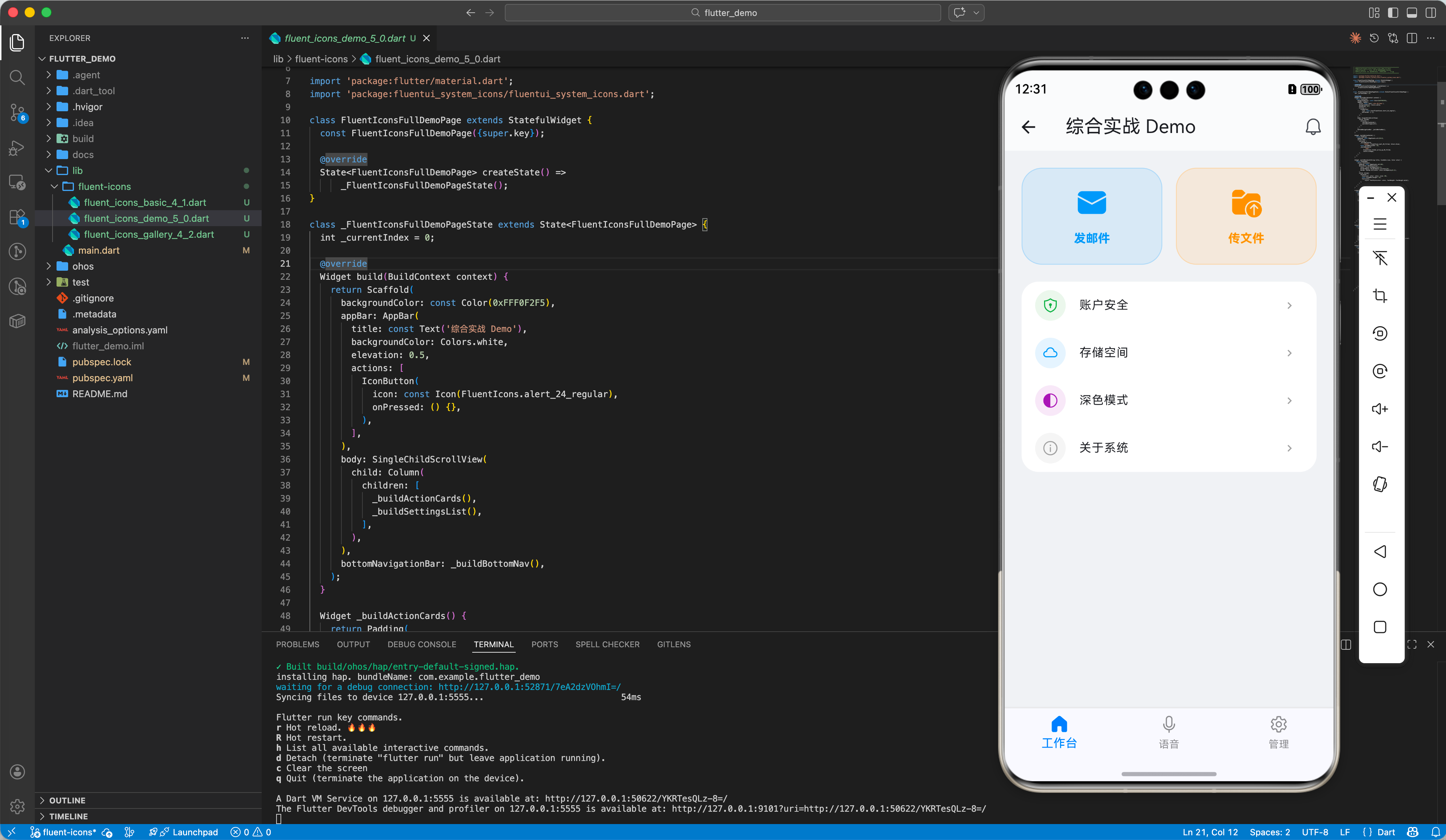
本 Demo 演示了从基础图标、Hero 卡片到设置列表及底部导航栏的完整工程化链路。
import 'package:flutter/material.dart';
import 'package:fluentui_system_icons/fluentui_system_icons.dart';
class FluentIconsFullDemoPage extends StatefulWidget {
const FluentIconsFullDemoPage({super.key});
State<FluentIconsFullDemoPage> createState() =>
_FluentIconsFullDemoPageState();
}
class _FluentIconsFullDemoPageState extends State<FluentIconsFullDemoPage> {
int _currentIndex = 0;
Widget build(BuildContext context) {
return Scaffold(
backgroundColor: const Color(0xFFF0F2F5),
appBar: AppBar(
title: const Text('综合实战 Demo'),
backgroundColor: Colors.white,
elevation: 0.5,
actions: [
IconButton(
icon: const Icon(FluentIcons.alert_24_regular),
onPressed: () {},
),
],
),
body: SingleChildScrollView(
child: Column(
children: [
_buildActionCards(),
_buildSettingsList(),
],
),
),
bottomNavigationBar: _buildBottomNav(),
);
}
Widget _buildActionCards() {
return Padding(
padding: const EdgeInsets.all(20.0),
child: Row(
children: [
_buildHeroCard(
'发邮件', FluentIcons.mail_48_filled, Colors.blue),
const SizedBox(width: 16),
_buildHeroCard(
'传文件',
FluentIcons.folder_arrow_up_48_filled,
Colors.orange),
],
),
);
}
Widget _buildHeroCard(String title, IconData icon, Color color) {
return Expanded(
child: Container(
padding: const EdgeInsets.all(20),
decoration: BoxDecoration(
color: color.withOpacity(0.1),
borderRadius: BorderRadius.circular(24),
border: Border.all(color: color.withOpacity(0.2)),
),
child: Column(
children: [
Icon(icon, color: color, size: 40),
const SizedBox(height: 12),
Text(title,
style: TextStyle(color: color, fontWeight: FontWeight.bold)),
],
),
),
);
}
Widget _buildSettingsList() {
return Container(
margin: const EdgeInsets.symmetric(horizontal: 20),
decoration: BoxDecoration(
color: Colors.white,
borderRadius: BorderRadius.circular(20),
),
child: Column(
children: [
_buildSettingItem(
'账户安全',
FluentIcons.shield_keyhole_24_regular,
Colors.green),
_buildSettingItem('存储空间',
FluentIcons.cloud_24_regular, Colors.blue),
_buildSettingItem('深色模式',
FluentIcons.dark_theme_24_regular, Colors.purple),
_buildSettingItem(
'关于系统', FluentIcons.info_24_regular, Colors.grey),
],
),
);
}
Widget _buildSettingItem(String title, IconData icon, Color color) {
return ListTile(
leading: Container(
padding: const EdgeInsets.all(8),
decoration: BoxDecoration(
color: color.withOpacity(0.1), shape: BoxShape.circle),
child: Icon(icon, color: color, size: 20),
),
title: Text(title, style: const TextStyle(fontSize: 14)),
trailing: const Icon(Icons.chevron_right, size: 16, color: Colors.grey),
onTap: () {},
);
}
Widget _buildBottomNav() {
return Container(
decoration: const BoxDecoration(
border: Border(top: BorderSide(color: Color(0xFFEEEEEE))),
),
child: BottomNavigationBar(
currentIndex: _currentIndex,
onTap: (i) => setState(() => _currentIndex = i),
type: BottomNavigationBarType.fixed,
selectedItemColor: const Color(0xFF007DFF),
unselectedItemColor: Colors.black45,
items: const [
BottomNavigationBarItem(
icon: Icon(FluentIcons.home_24_regular),
activeIcon: Icon(FluentIcons.home_24_filled),
label: '工作台',
),
BottomNavigationBarItem(
icon: Icon(FluentIcons.mic_24_regular),
activeIcon: Icon(FluentIcons.mic_24_filled),
label: '语音',
),
BottomNavigationBarItem(
icon: Icon(FluentIcons.settings_24_regular),
activeIcon: Icon(FluentIcons.settings_24_filled),
label: '管理',
),
],
),
);
}
}
七、 总结
fluentui_system_icons 为鸿蒙 Flutter 开发者提供了一个无需设计参与就能大幅提升应用质感的“捷径”。在 HarmonyOS NEXT 这个强调美的系统中,每一个图标的细节都是品质的体现。利用好微软的设计资产,能让你的鸿蒙应用在众多国产软件中脱颖而出。
🔗 相关阅读推荐:
🌐 欢迎加入开源鸿蒙跨平台社区:开源鸿蒙跨平台开发者社区

作为“人工智能6S店”的官方数字引擎,为AI开发者与企业提供一个覆盖软硬件全栈、一站式门户。
更多推荐
 20
20 0
0- 0


 已为社区贡献23条内容

所有评论(0)