
Flutter for OpenHarmony:path_provider 插件指南
本文介绍了Flutter的path_provider插件在OpenHarmony(鸿蒙)系统中的适配使用。主要内容包括: 集成配置:通过依赖覆盖方式使用鸿蒙专用实现包,需在pubspec.yaml中添加特定配置并执行依赖获取。 核心API解析: 临时目录(getTemporaryDirectory)对应鸿蒙的cache目录 应用文档目录(getApplicationDocumentsDirecto

Flutter for OpenHarmony:path_provider 插件指南
前言
由于每个操作系统的文件系统沙盒机制不同,硬编码文件路径(如 /data/user/0/...)会导致应用在不同平台上崩溃或无法读取数据。OpenHarmony (鸿蒙) 系统同样具有严密的沙盒设计。
path_provider 的作用就是抹平平台差异,让开发者通过统一的 Dart 接口获取当前系统下合法的存储位置。
本文你将学到:
- 鸿蒙适配版
path_provider的集成方式 - 常用 API 对应鸿蒙系统的具体路径
- 文件读写实战演示
- 鸿蒙 Next 沙盒权限与路径规则说明
一、OpenHarmony 集成配置
1.1 依赖覆盖
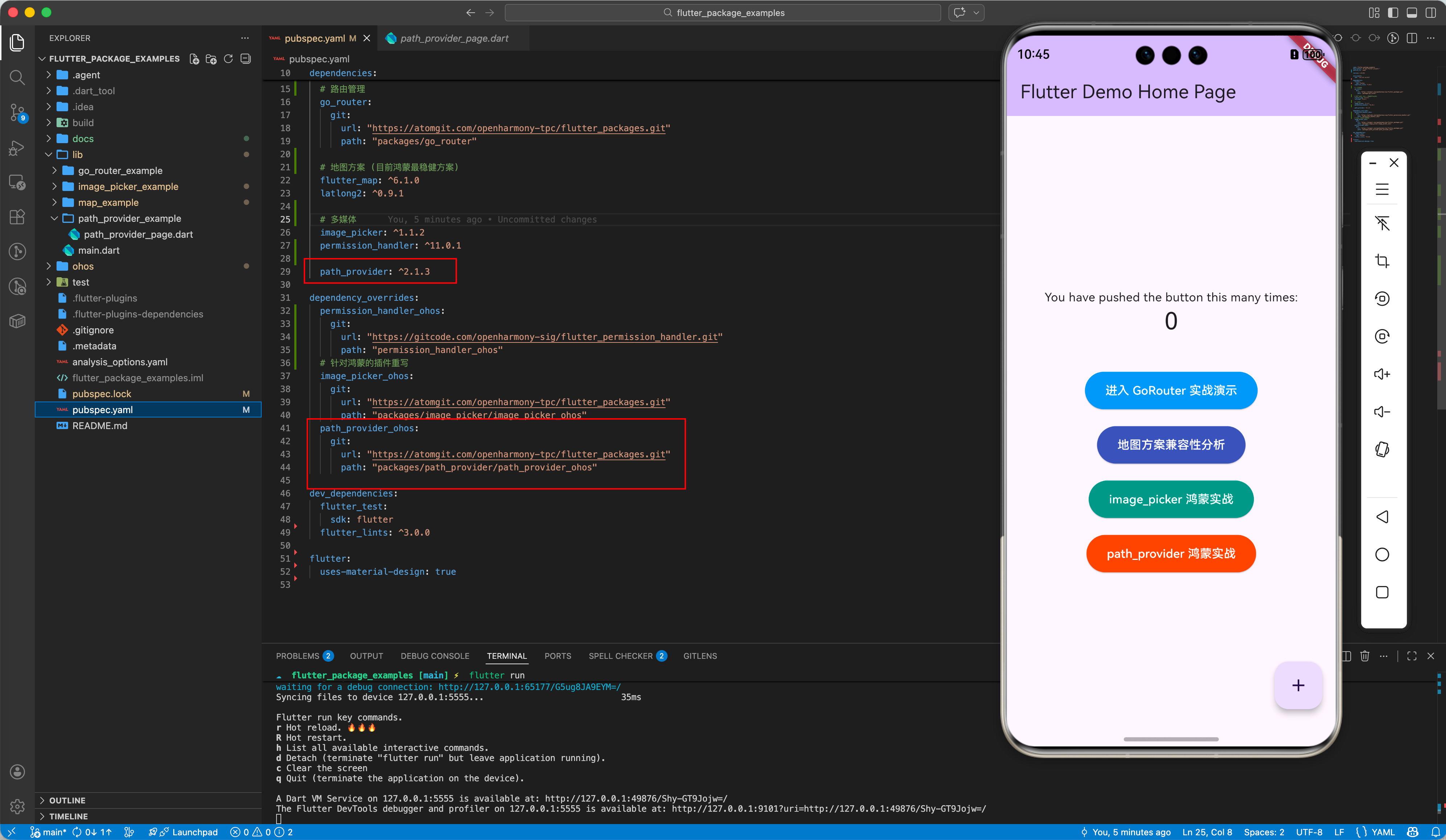
在 OpenHarmony 平台上,官方 path_provider 需要配合鸿蒙专用的实现包使用。在 pubspec.yaml 中添加以下配置:
dependencies:
  path_provider: ^2.1.3

dependency_overrides:
  # 使用 OpenHarmony TPC 维护的兼容版本
  path_provider_ohos:
    git:
      url: "https://atomgit.com/openharmony-tpc/flutter_packages.git"
      path: "packages/path_provider/path_provider_ohos"
1.2 执行依赖获取
flutter pub get
二、核心 API 详解
2.1 临时目录(Temporary Directory)
用于存放临时文件,系统可能会在设备空间不足时自动清理。
- API:
getTemporaryDirectory() - 鸿蒙路径: 对应
cache目录。 - 场景: 网络图片缓存、导出的临时 PDF。
2.2 应用程序文档目录(Application Documents Directory)
用于存放应用生成的、不能由系统清理的文件。
- API:
getApplicationDocumentsDirectory() - 鸿蒙路径: 对应应用沙盒内的
files目录。 - 场景: 用户配置、SQLite 数据库文件、持久化数据。
2.3 应用支持目录(Application Support Directory)
用于存放应用支持运行的文件,通常对用户不可见。
- API:
getApplicationSupportDirectory() - 场景: 应用状态同步文件、离线地图包。
2.4 外部存储目录(External Storage)
获取外部 SD 卡或公共存储空间的路径(注意:OpenHarmony Next 加强了隐私管理,通常推荐使用沙盒内部路径)。
三、文件读写实战
以下是一个在鸿蒙应用中保存文本数据的完整示例:
import 'dart:io';
import 'package:flutter/material.dart';
import 'package:path_provider/path_provider.dart';
class PathProviderPage extends StatefulWidget {
const PathProviderPage({super.key});
State<PathProviderPage> createState() => _PathProviderPageState();
}
class _PathProviderPageState extends State<PathProviderPage> {
String _tempPath = '未知';
String _docPath = '未知';
String _fileContent = '尚未读取数据';
final TextEditingController _controller = TextEditingController();
void initState() {
super.initState();
_loadPaths();
}
Future<void> _loadPaths() async {
final tempDir = await getTemporaryDirectory();
final docDir = await getApplicationDocumentsDirectory();
setState(() {
_tempPath = tempDir.path;
_docPath = docDir.path;
});
}
Future<void> _saveData() async {
if (_controller.text.isEmpty) return;
try {
final directory = await getApplicationDocumentsDirectory();
final file = File('${directory.path}/ohos_test.txt');
await file.writeAsString(_controller.text);
if (mounted) {
ScaffoldMessenger.of(context).showSnackBar(
const SnackBar(content: Text('数据已存入鸿蒙沙盒')),
);
}
_controller.clear();
_readData();
} catch (e) {
debugPrint('写入失败: $e');
}
}
Future<void> _readData() async {
try {
final directory = await getApplicationDocumentsDirectory();
final file = File('${directory.path}/ohos_test.txt');
if (await file.exists()) {
final content = await file.readAsString();
setState(() => _fileContent = content);
} else {
setState(() => _fileContent = '文件不存在');
}
} catch (e) {
setState(() => _fileContent = '读取失败: $e');
}
}
Widget build(BuildContext context) {
return Scaffold(
appBar: AppBar(
title: const Text('path_provider 鸿蒙化实战'),
backgroundColor: Colors.deepOrange,
foregroundColor: Colors.white,
),
body: SingleChildScrollView(
padding: const EdgeInsets.all(16.0),
child: Column(
crossAxisAlignment: CrossAxisAlignment.start,
children: [
_buildSectionTitle('系统存储路径'),
_buildPathCard('临时目录 (Temporary)', _tempPath, Colors.amber),
_buildPathCard('文档目录 (Documents)', _docPath, Colors.blue),
const SizedBox(height: 24),
_buildSectionTitle('文件读写演示 (持久化)'),
TextField(
controller: _controller,
decoration: const InputDecoration(
hintText: '输入要保存的内容...',
border: OutlineInputBorder(),
),
),
const SizedBox(height: 12),
Row(
children: [
ElevatedButton(
onPressed: _saveData,
style: ElevatedButton.styleFrom(
backgroundColor: Colors.deepOrange,
foregroundColor: Colors.white),
child: const Text('写入文件'),
),
const SizedBox(width: 12),
OutlinedButton(
onPressed: _readData,
child: const Text('读取文件'),
),
],
),
const SizedBox(height: 16),
Container(
width: double.infinity,
padding: const EdgeInsets.all(16),
decoration: BoxDecoration(
color: Colors.grey[100],
borderRadius: BorderRadius.circular(8),
border: Border.all(color: Colors.grey[300]!),
),
child: Column(
crossAxisAlignment: CrossAxisAlignment.start,
children: [
const Text('读取结果:',
style: TextStyle(fontWeight: FontWeight.bold)),
const SizedBox(height: 8),
Text(_fileContent, style: const TextStyle(fontSize: 16)),
],
),
),
],
),
),
);
}
Widget _buildSectionTitle(String title) {
return Padding(
padding: const EdgeInsets.symmetric(vertical: 12.0),
child: Text(title,
style: const TextStyle(fontSize: 18, fontWeight: FontWeight.bold)),
);
}
Widget _buildPathCard(String label, String path, Color color) {
return Card(
elevation: 0,
color: color.withOpacity(0.05),
margin: const EdgeInsets.only(bottom: 8),
shape: RoundedRectangleBorder(
borderRadius: BorderRadius.circular(12),
side: BorderSide(color: color.withOpacity(0.2)),
),
child: ListTile(
title: Text(label,
style: TextStyle(
color: color, fontWeight: FontWeight.bold, fontSize: 14)),
subtitle: Text(path,
style: const TextStyle(fontFamily: 'monospace', fontSize: 12)),
trailing: IconButton(
icon: const Icon(Icons.copy, size: 18),
onPressed: () {
// 复制逻辑省略
},
),
),
);
}
}
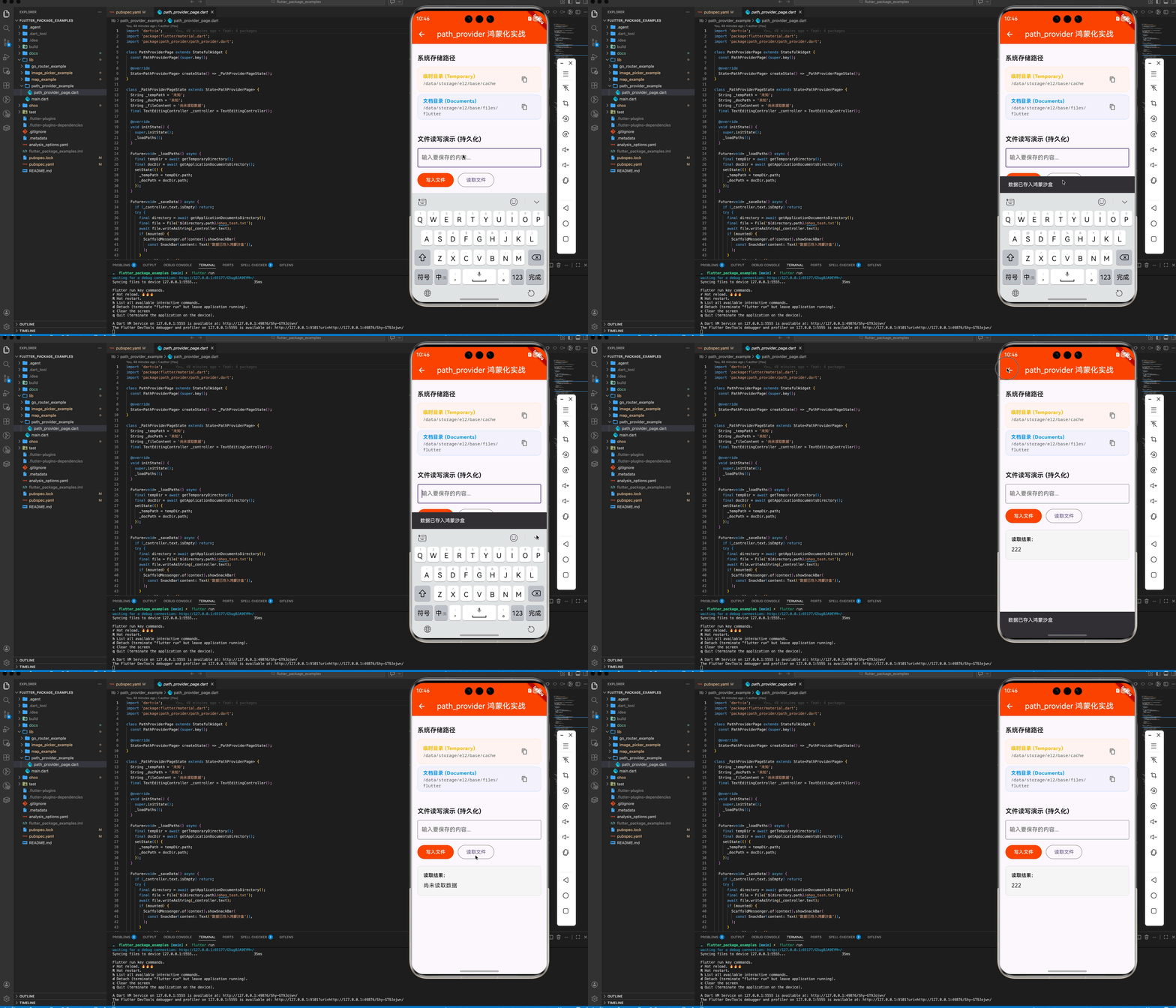
四、鸿蒙平台适配细节
4.1 路径前缀(Context Context)
鸿蒙系统的沙盒路径通常以 /data/storage/el2/base/haps/entry/... 开头。path_provider_ohos 插件底层通过 ohos.app.Context 接口动态获取这些映射路径,确保应用在不同用户或多 Ability 环境下逻辑正确。
4.2 文件权限(Permissions)
在鸿蒙沙盒目录(如 getApplicationDocumentsDirectory 返回的路径)内读写文件不需要申请额外权限。但如果涉及到访问用户的公共相册(MediaLibrary),则需要额外申请。
📌 建议:优先将业务数据存储在应用私有沙盒内,以避免繁琐的权限申请。
五、总结
path_provider 是 Flutter for OpenHarmony 开发必备的底层工具。通过它,我们可以安全、合规地管理应用数据,充分利用鸿蒙系统的文件隔离机制。
📦 完整代码已上传至 AtomGit:flutter_package_examples
🌐 欢迎加入开源鸿蒙跨平台社区:开源鸿蒙跨平台开发者社区

作为“人工智能6S店”的官方数字引擎,为AI开发者与企业提供一个覆盖软硬件全栈、一站式门户。
更多推荐

 6
6 0
0- 0


 已为社区贡献17条内容

所有评论(0)